Anthropic、CI/CD障害対応にClaudeを初導入しオンコール体制を構築
本文の状態
日本語全文を表示中
詳細モードで約15分の本文を読めます。
同じ出来事の情報源
この情報源を基点に整理
Claude Blog
Anthropic は CI/CD 障害に対する最初の対応役として Claude Tag を導入し、15 分以内の分析報告や自動復旧提案により、開発者の負担を軽減する実証事例を発表した。
AI深層分析を開く2026年8月22日 22:27
AI深層分析
キーポイント
Claude Tag のオンコール機能の実装
Anthropic は CI/CD 障害発生時に Claude Tag を最初の対応役として配置し、障害の特定や復旧手順の提案を自動化した。
迅速な状況報告と分析
Claude Tag は最近のインシデントにおいて、すべてのケースで最初の状況報告書を作成しており、通常 15 分以内に初回分析を公開している。
エージェントに必要な構成要素
効果的なオンコールエージェントには、過去の行動を記憶するメモリ、調査・実行のための接続権限、スケジュール管理、そして具体的な指示の 4 つが不可欠であると説明されている。
設定の迅速化と標準化
管理者が一度設定するだけで数時間で完了し、GitHubのリポジトリにスキルとして保存することで変更管理が可能になる。
検知プロセスの変革
Claude が新規サービスの初期データやアラートを分析し、ルールを微調整することで、人間の予測不足による検知ミスを防ぐ。
重要な引用
Claude authored the first situation report in every recent incident that had one, typically publishing its first analysis within 15 minutes.
An on-call agent needs memory so it remembers what's been done; connections and access so it can investigate, understand, and act; schedules so it knows when to get back to work; and instructions so it knows what to do.
"It's hard for humans to have the foresight to set perfect rules with perfect thresholds all the time."
"The second major failure mode for detecting incidents was alert fatigue: checking and vetting every alert that fires is tedious."
編集コメントを表示
編集コメント
この事例は、生成 AI が開発ワークフローの「補助」から「自律的な対応者」へと役割を拡張する重要な転換点を示している。企業は単にツールを導入するだけでなく、エージェントが安全に判断・実行するための権限管理やメモリ設計といった基盤整備を同時に進める必要があるだろう。
Source Article
元記事を日本語で読む
本文に関係しない購読案内、埋め込み通知、サイト内プロモーションは除いています。
「Claude のオンコール体制を自分でも構築したい方は、セットアップキットをご利用ください。」
CI/CD 障害対応の AI:Anthropic における Claude on call
数週間前、私の番だったオンコール中に、同僚から午後 10 時に Slack で連絡が入りました。新しいサービスのテストが約 44 件実行されていないという内容でした。
過去なら、私は今やっていることを中断し、ラップトップを前に座り込み、ため息をつきながら 1 時間ほどかけて調査と修正に臨んだことでしょう。しかし今はワークフローが全く異なります。まず @Claude を呼び出し、何が起きているのかを確認します。
この場合、Claude はその朝に有効化された機能フラグによってテストが消えてしまったことを特定し、そのフラグを元に戻すのが安全だと判断しました。私は同僚にフラグの巻き戻しを依頼。すると 3 分後、Claude が Slack で通知を送り、スキップルールが確かに削除され、エラー率が基準値に戻ったことを確認してくれました。
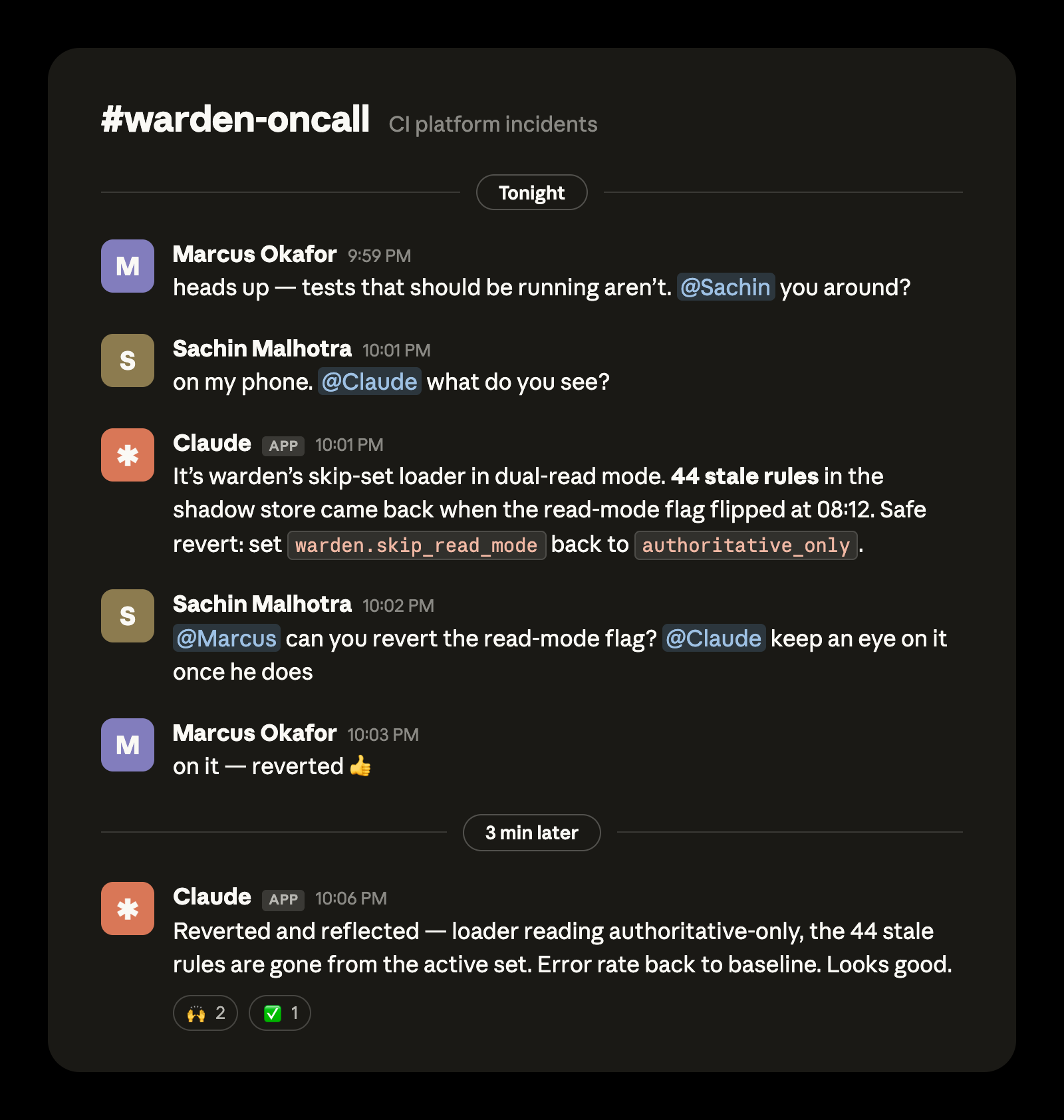
*分かりやすさのため、実際のやり取りを再構成したものです。
ここ数ヶ月、Claude Tag は Anthropic における CI/CD 障害の最初の対応担当として機能しています。これは社員の私生活にも良い影響を与えているだけでなく、すべての CI インシデントに即座に対応できる体制をもたらしました。直近で状況報告書が作成されたインシデントでは、その初動分析をすべて Claude が執筆しており、通常は 15 分以内に最初の分析結果を公開しています。
この記事では、私たちが構築した仕組みとその動作原理について解説します。これを知れば、あなたも同様の体制を構築でき、オンコールローテーションへの不安を解消できるはずです。
Claude のオンコール体制について
インシデント対応の各段階を詳しく説明する前に、まずは全体の仕組みを概観しておきましょう。これにより、詳細に入る際に全体像を把握しやすくなります。
オンコールエージェントには、4 つの要素が不可欠です。記憶(何を行ったかの履歴)、接続と権限(調査・理解・実行のため)、スケジュール管理(いつ作業に戻るべきか)、そして指示(何をすべきか)です。
オンコール体制の中核を担うのが Claude Tag です。Claude Tag は、オンコール用の Slack チャンネルに記憶を保持し、インシデント発生時には各ターンごとの指示を提供するインターフェースとして機能します。また、オンコールチャンネルや他の関連イベントにもリアルタイムで反応し、対応を行います。
定例業務のスケジュール管理も、このチャンネル上で行われます。「毎週月曜日の午前 9 時(EST)に CI の引き継ぎを実行」といった自然言語のプロンプトによって、Claude が定期的にアクションを起こします。
Claude Tag は専用のサービスアカウント を持ち、Datadog や Grafana など、Anthropic の CI エンジニアが使用するツールへのアクセス権限も付与されています。これらの設定は管理者が一度だけ行えばよく、チャンネルごとに接続するツールを選択する方法については こちら をご覧ください。
オンコールチャンネルに加え、Claude Tag がメンバーとして参加している他の関連チャンネルも監視対象に設定しています。これにより、サービスアラートや構成変更、PR の更新状況など、追加のコンテキスト情報を取得することが可能になります。
スタンディングオーダーは、GitHub リポジトリにコミットされた Markdown ファイルとして「スキル」形式で管理されています。これにより複数のチームメンバーが同時に改善を加えられ、コードと同様に変更を一元管理できます。また、ルーティング指示やポリシー、自己改善ループの一部となる教訓のログなど、重要な情報も含まれています。
この仕組みの構築には数日ではなく数時間しかかかりませんでした。私たちは、同様のエージェント導入をお手伝いする汎用的な オンコール設定キット を GitHub で公開しています。これにより、チームの過去のインシデント履歴をトリアージ用プレイブックへ変換し、インシデントチャンネルに読み取り専用で Claude を常駐させます。Claude は診断、エスカレーション、学習を自動で行います。架空のチームの履歴に対して動作する様子 を約 10 分で確認することも可能です。
手順の要点は以下の通りです。
- Claude Team または Claude Enterprise プランへの加入が必要です。
- 組織管理者が、Claude Tag を通じてオンコール Slack チャンネルに Claude を追加します。
- 同様に組織管理者は、オンコール Slack チャンネルの Claude に適切なコネクタ、GitHub リポジトリを接続し、Claude Code Remote の設定も支援する必要があります。
- インシデントチャンネルに Claude を追加し、インシデントの監視と即座のトリアージを行うよう指示します。
では、インシデント発生時の各ステップでこの変革が具体的にどう現れるのか、詳しく見ていきましょう。
検知
Claude は単にインシデントへの対応方法を変えるだけでなく、検知そのもののあり方まで変えます。従来、インシデント検知には主に 2 つの失敗パターンがありました。
人間が常に完璧なルールと閾値を事前に設定するのは至難の業です。特にトラフィックパターンの分析に必要なデータが不足している場合は、なおさら困難です。
この課題に対処するため、Claude に新サービスの最初の数日間のデータや着信アラートを入力させ、追加すべきルールの提案や、広すぎたり狭すぎたりするルールの微調整を行ってもらいます。
インシデント検知のもう一つの大きな失敗パターンは「アラート疲れ」です。発動したすべてのアラートをチェックして検証するのは退屈な作業になりがちです。しかし、Claude は人間のように疲れることはありません。
Claude は各アラートチャンネルの関連するアラートをすべて監視し、root oncall.md ファイル に記載された基準に基づいて判断します。朝まで待てるのか、それともオンコール担当者にページング(通知)が必要なのかを判定するのです。
例えば、データ分析によってチューニングされた後のファイル内のルールは、「エラー率が 5 分以上にわたり 2% を超え、かつ既知のデプロイウィンドウでない場合はオンコール担当者にページングし、それ以外は lessons.md に記録する」といったものになります。
Claude のオンコールアラートプロセスがトリガーされる方法は、これら以外にもう 2 つあります。
CI チームのメンバーは、冒頭の例で示された「44 件のテストが欠落している」ようなケースのように、オンコールチャンネルで問題を報告できます。あるいは、社内のページを通じて誰でもインシデントを発生させることも可能です。これが CI インフラに関するインシデントとしてマークされると、そのインシデント専用の Slack チャンネルが作成され、オンコール担当の Claude が対応を開始します。
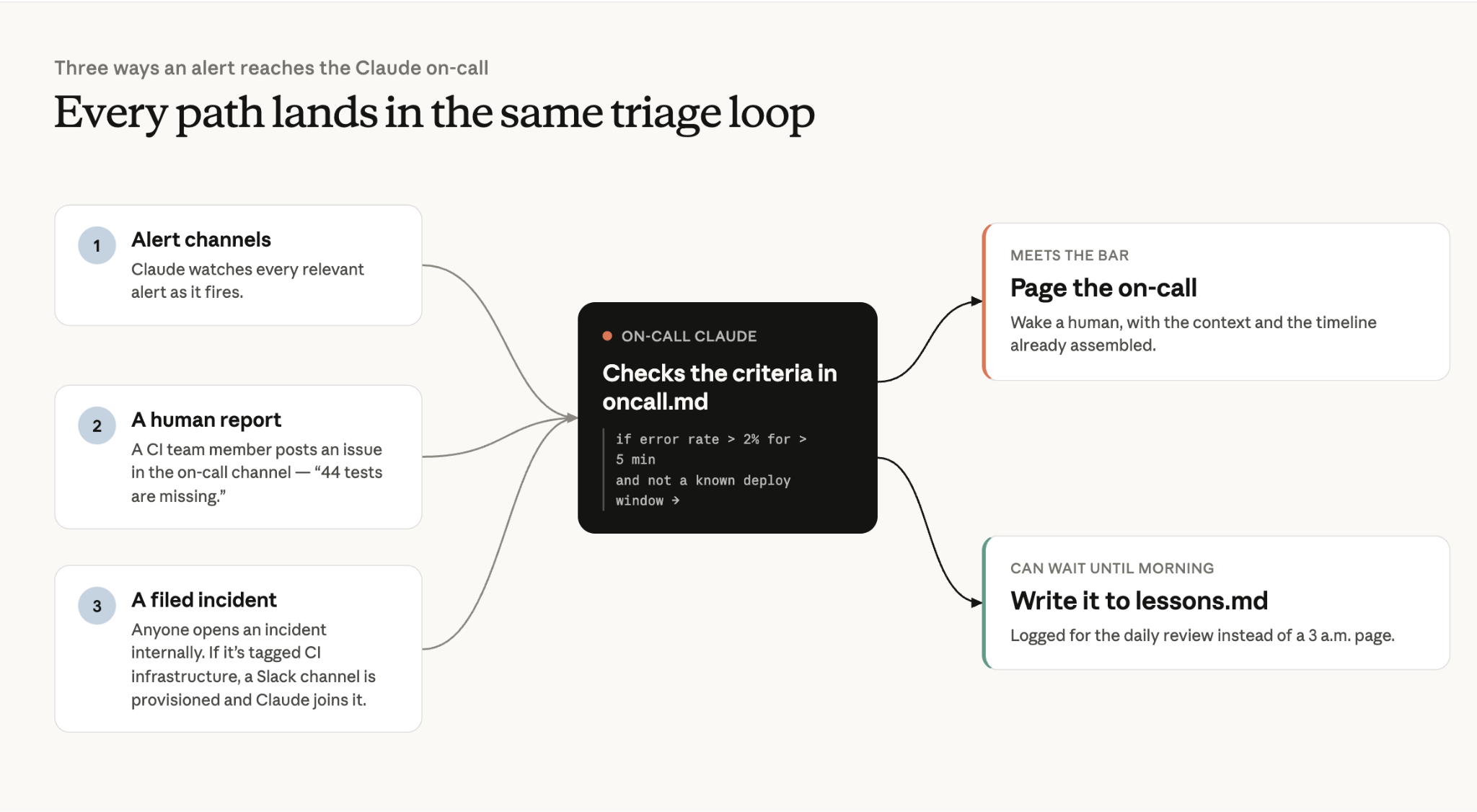
ここで最も重要な点は、アラート通知のプロセスが確定的(deterministic)であるのに対し、オンコールのエスカレーションには「確定的な経路」と「自律型エージェントによる経路」の両方が存在することです。
初期対応(Triage)
Claude がアラートのノイズをフィルタリングするだけでも価値はありますが、真に大きな成果をもたらすのは調査プロセスです。Claude はインシデント発生から中央値で 14 分以内に、証拠に基づいた最初の分析を投稿します。最も迅速なケースでは、初回の報告内で原因を特定するのにわずか 4 分かかりました。
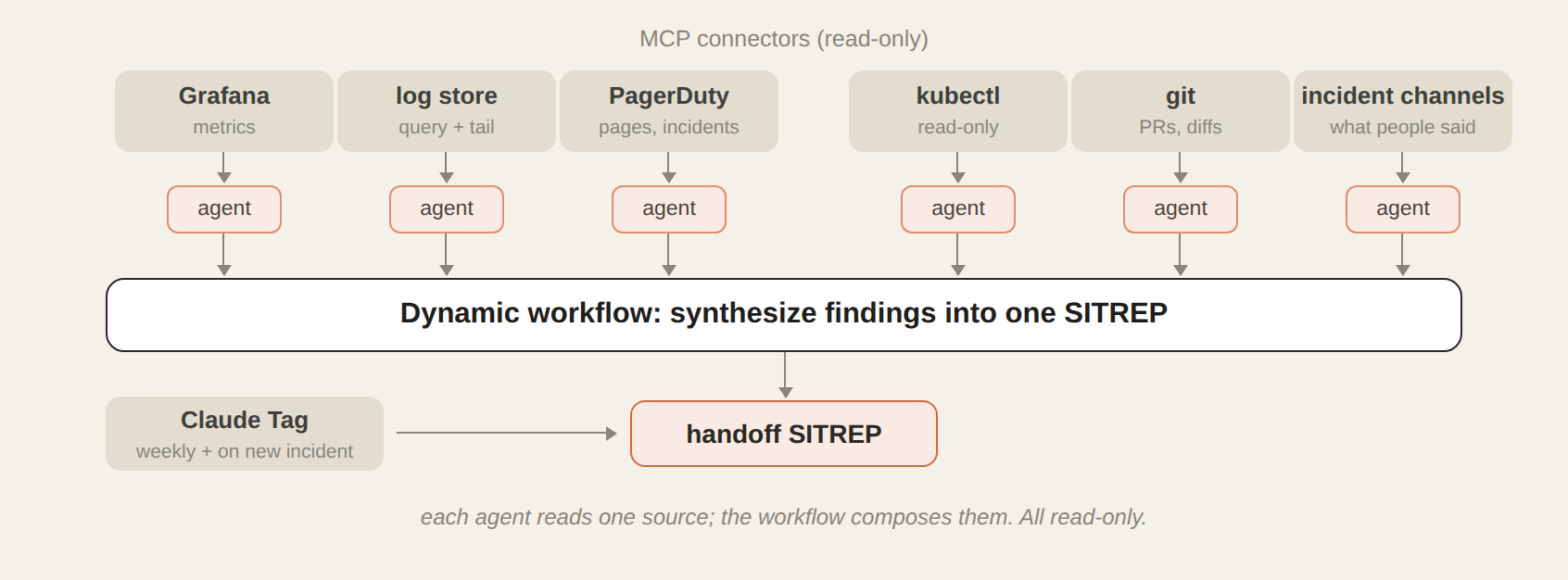
アラートがインシデントとしてエスカレートされると、Claude はすでに Slack チャンネルに待機しており、レビュー可能な根拠に基づく仮説を提示しています。Claude Tag は、オーケストレーションエージェントを起動して動的なワークフローを開始します。このエージェントは、各依存関係と真実のソース(source of truth)を調査するための実行サブエージェント(executor subagents)を次々と立ち上げます。
私たちが活用しているのは、Grafana(ログストア)、PagerDuty、GitHub、Kubernetes、そして Slack のインシデントチャンネルです。これらはすべて MCP Connectors を経由して連携されています。Claude は複数の手がかりを並行して追跡できるため、平均復旧時間(MTTR)の短縮に貢献します。
エグゼキューターは調査結果をオーケストレーションエージェントへ報告し、同エージェントが情報を統合・要約して一貫した状況報告書(SITREP)として提示します。
オーケストレーターとエグゼキューターのエージェントは、闇雲に検索しているわけではありません。各バグクラスごとに用意された より詳細な参照用 Markdown ファイル に基づく調査スキルによって導かれています。
例えば、シャドウ分岐(shadow divergence)バグ向けの 617 行にわたる調査スキルには、私が典型的な調査で取るべき手順がすべて記述されています。このファイルは、あるインシデント発生時に Claude と対話しながらトラブルシューティングを行い、その経験をもとに作成させたものです。
Lessons.md もまた、Claude のトラブルシューティングを支援します。この Markdown ファイルには、これまでに解決したすべてのインシデントの記録が蓄積されています。「何が起きたか」「根本原因は何か」「対策は何か」「覚えておくべき注意点」です。Claude はこれを自動的に更新し続けるため、新しい調査が始まるたびにまずこのファイルを読み込みます。その結果、Claude の最初の仮説は直近に発生した事象に基づいて形成されることになります。
同じパターンが十分に多く現れた場合、それを調査スキルそのものとして昇格させます。私が最も気に入っているエントリは、あるClaudeが私について書いたものです。私はメトリクスを確認する前に設定ファイルから推測してしまいましたが、その教訓を lessons.md ファイルに「まずデータを照会し、その後で仮説を立てる。設定ファイルは『何が起きうるか』を教えてくれるが、メトリクスは『実際に何が起こったか』を教えてくれる」と記述しました。
これらのツールと文脈があっても、Claude が毎回初手で正解するわけではありません。人間の直感や経験も重要です。Claude Tag を使えば、チームはマルチプレイヤーモードでインシデントのトラブルシューティングが可能です。私たちがどちらでも、調査を主導したり、リアルタイムで仮説を追加したりして協力できます。
解決策
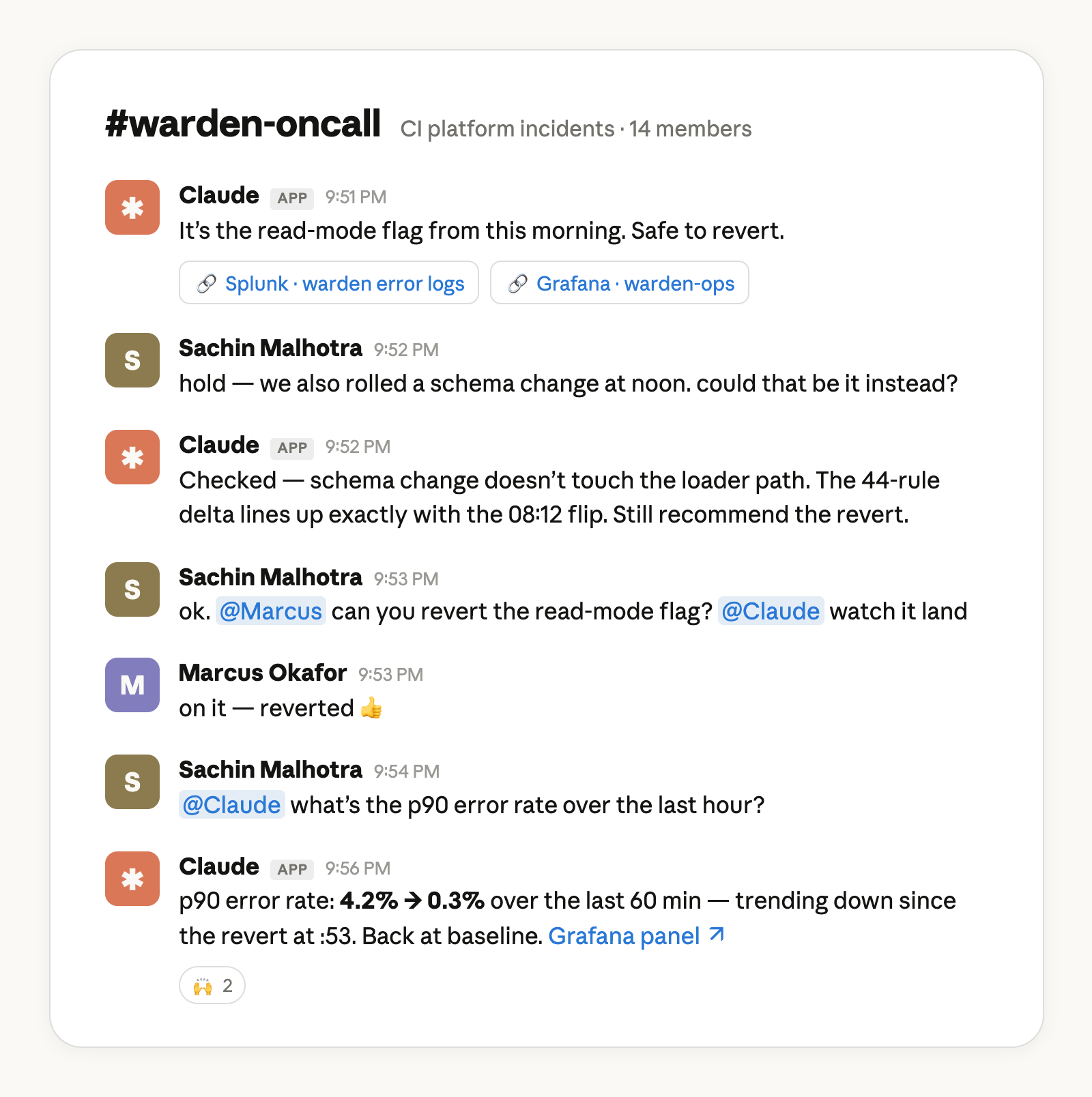
Claude がアラートのエスカレーションとトラブルシューティングができるなら、それを修正することもできるのでしょうか?この答えはチームによって異なりますが、私たちのやり方を紹介します。
当チームのほとんどのデプロイは、フィーチャーフラグの背後で行われます。私は Claude Code 内に、私の権限を持つ別のエージェントを作成しました。これにより、各フィーチャーフラグの背後で段階的なデプロイが可能になります。
ロールアウトプロセスの第一段階では、Claude がカナリートラフィックを管理し、問題がないか監視しながら、特定のフィーチャーフラグを自動的に増減させます。これは完全に別の記事になるほどの内容なので、ここでは詳細には立ち入りません。
Claude Tag が当チームの解決に役立つ他の方法としては、以下のようなものがあります:
Kubernetes クラスターの特定のセクションを排水(drain)したり、隔離(cordon)したりする必要があるかどうかの通知
- 需要急増への対応としてインフラの一部をスケールアップする方法に関する指示(稀なケースですが、Claude が具体的な緩和策を提示してくれると非常に役立ちます)
- そして最も頻繁に発生するのが、オンコール担当者がレビュー・マージ・デプロイを行える形で提供される PR による修正です。
検証、コミュニケーション、引き継ぎ
Claude は、調査時に使用したのと同じ MCP コネクタやツールを多数活用して、修正が意図通り機能したことを検証します。oncall.md に記載された恒久的な指示の一環として、事後分析(post-mortem)を lessons.md へ記述し、引き継ぎ用の状況報告書(SITREP)を作成します。
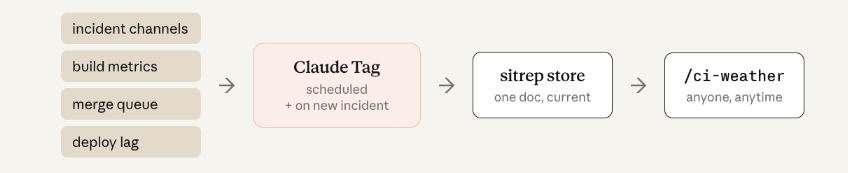
複数のインシデントにわたる全体像を共有するために、「ci-weather」というエージェントを作成しました。このエージェントは、各インシデントの Slack チャンネルの情報、ビルドメトリクス、マージキューの統計情報、デプロイ遅延などを集約し、社内の誰でも閲覧可能な 1 つの公開チャンネルへニュースルーム形式のレポートを投稿します。これにより、エンジニアたちは「マージを保留すべきか」「CI に何が起きているのか」といった判断をする際、私たちに直接問い合わせるのではなく、このチャンネルを参照できるようになりました。
率直に申し上げて、レポートのフォーマットは数回にわたって改善を重ねました。Claude は 1 つの試行(one-shot)でステータスレポート生成スキルを発揮できますが、可読性を高めるのはチーム固有の嗜好です。これは単なる配管工事ではなく、人間同士のコミュニケーションなのです。
最後に、Claude は自身のために lessons.md に記録を残していますが、チームメンバーが引き継ぎを行えるよう、毎週月曜日に人間向けの引継ぎレポートも作成しています。Claude は日々のサマリーと週次サマリーを生成するため、チームのメンバーは互いに作業を引き継ぐことができます。
インシデントの監視から、インシデント対応システムの監視へ
当社のソフトウェアエンジニアが 1 クォーターにリリースするコード量は、2021 年から 2025 年にかけて比べて平均して 8 倍になっています。Anthropic の研究所のデータによると、コード量はこのように急増しています。
品質基準は高く保たれていますが(すべての PR には責任者が明確に割り当てられ、マージには承認が必要で、すべてが同じ CI のゲートを通過します)、エージェントによるコーディングの増加に対応するには、CI もエージェント化させるしかありません。
Claude は私の仕事の退屈な部分や、勤務時間外の緊急対応、インシデントに関する連絡業務を引き受けてくれました。その結果、私はシステム信頼性を真に向上させる中長期的なアーキテクチャ変更へと注力できるようになりました。
私たちが構築したものの最も素晴らしい点は、全体が散漫に見えないことです。オンコールプロセスは Slack で行われていますが、今や Claude もそのチャンネルに参加しています。
始め方:
Claude on call: How Claude Tag serves as Anthropic's first responder for CI/CD failures
Claude Team または Claude Enterprise のプランが必要です。
組織のオーナーは、Claude Tag を介してオンコールの Slack チャンネルに Claude を追加する必要があります。また、オンコールの Slack チャンネルにある Claude を適切なコネクタや GitHub リポジトリに接続し、Claude Code Remote のセットアップを支援することも必要です。
インシデント対応チャンネルに Claude を追加し、インシデントの監視と即座のトリアージを行うよう指示してください。
*セットアップキットを使って独自の Claude on-call を構築する*
この記事は、Anthropic の技術メンバーである Sachin Malhotra によって執筆され、Anthropic スタッフの Michael Segner が寄稿しました。
原文を表示
Set up your own Claude on-call with our setup kit*.*
AI incident response for CI/CD: Claude on call at Anthropic
A few weeks ago, I was on-call and my colleague Slacked me a message at 10pm: roughly 44 tests on a new service weren’t firing.
In the past, I would have stopped what I was doing, sat down with my laptop, sighed wearily, and began an hour-long investigate-and-fix process. But now, my workflow is entirely different: I pull in @Claude, and ask what it sees.
In this case, Claude found the tests disappeared when a feature flag got turned on that morning, and also that it would be safe to revert. I asked my colleague to revert the flag. Claude pinged me on Slack 3 minutes later to verify the skip rules had indeed been removed and the error rate was back to baseline.
For the last several months Claude Tag has been the on-call first responder for CI/CD failures at Anthropic. Not only has this helped with our social lives, it has given every CI incident an instant first responder: Claude authored the first situation report in every recent incident that had one, typically publishing its first analysis within 15 minutes.
In this article we’ll walk through what we built and how it works so you can build it yourself and stop dreading your turn in the rotation.
Our Claude on call setup
Before we go into each stage of the incident response process, I’ll provide a general overview of our setup here so you have the big picture in mind as we fill in the details.
An on-call agent needs memory so it remembers what’s been done; connections and access so it can investigate, understand, and act; schedules so it knows when to get back to work; and instructions so it knows what to do.
Claude Tag is the backbone of our on-call agent. Claude Tag holds memory across our on-call Slack channel and the interface to provide per-turn instructions during an incident. Claude also acts in real time to events in the on-call channel and others. The scheduling of routines, or the regular actions Claude takes, happens on this channel as well with natural language prompts like “run CI handoff every Monday at 9:00am EST.”
Claude Tag has its own service account and access to the tools an Anthropic CI engineer needs such as Datadog or Grafana. This was set up one time by an administrator for the channel (here’s how).
In addition to the on-call channel, we set up Claude to watch other relevant channels that also have Claude Tag as a member so it can get additional context like service alerts, configuration changes, or updates on PRs.
Standing instructions are in markdown files as skills, committed in a GitHub repository. This way multiple teammates can iterate on them and we can manage changes just like we do code. It also includes key information like routing instructions, policies, and a log of lessons learned as part of a self-improvement loop.
This setup took us hours, not days. We created a generalized on-call setup kit in GitHub that can help get you started with a similar agent. It transforms your team's own incident history into triage playbooks and leaves you with a read-only Claude in your incident channel that diagnoses, escalates, and learns. You can watch it run against a fictional team's history in about ten minutes.
To summarize the steps TL;DR fashion
- You’ll need a Claude Team or Claude Enterprise plan
- The organization owner needs to add Claude to the on call Slack channel via Claude Tag
- The org owner also needs to help connect Claude in the on-call Slack channel to the appropriate connectors, GitHub repo, and set up Claude Code Remote.
- Add Claude to your incident channel and instruct it to monitor for incidents and immediately triage
Now, let’s dive into the details of what this transformation looks like at each step of an incident.
Detection
Claude doesn’t just transform how you respond to incidents, it transforms how you detect them in the first place. Previously, there were two major failure modes for detecting incidents.
It's hard for humans to have the foresight to set perfect rules with perfect thresholds all the time. It's especially difficult when you don't have enough data to analyze traffic patterns.
To address this, we have Claude analyze the data and incoming alerts for the first few days of a new service to suggest additional rules and to fine-tune any that are overly broad or narrow.
The second major failure mode for detecting incidents was alert fatigue: checking and vetting every alert that fires is tedious. However, Claude doesn’t get fatigued the same way a human does.
Claude monitors every relevant alert in each alert channel and goes through the criteria in the root oncall.md file to determine if it can wait until the morning or if the on-call needs a page. For example, once tuned from analyzing the data, a rule in the file could be, “If the error rate is greater than 2% for longer than 5 minutes AND it's not a known deploy window, page the on-call otherwise write it to lessons.md.”
There are two other ways the Claude on-call alert process can trigger:
- A member of the CI team can report an issue in the on-call channel, as was the case in the opening example of 44 missing tests; or
- Anyone in the company can open an incident through an internal page. If it’s marked as a CI infrastructure incident then a Slack channel is provisioned for that incident and our on-call Claude picks it up.
The key takeaway here is that the alerting process is deterministic, while on-call escalation has both deterministic and agentic paths.
Triage
It's one thing to have Claude filter through the alert noise, but the real savings comes from the investigation. Claude posts its first evidence-grounded analysis a median of 14 minutes after an incident opens, and in the fastest cases names the root cause within 4 minutes in its first report.
When an alert has been escalated to an incident, Claude is often ready in our Slack channel with a hypothesis grounded in evidence that we can review. Claude Tag kicks off a dynamic workflow with an orchestration agent that spins up executor subagents to investigate each dependency and source of truth.
For us that’s Grafana, our log store, PagerDuty, GitHub, Kubernetes and Slack incident channels–all wired up via MCP Connectors. Claude can chase multiple leads in parallel, helping to reduce MTTR (mean time to resolution).
Executors report the findings back to the orchestration agent which synthesizes and surfaces the information in a coherent SITREP.
The orchestrator and executor agents aren’t searching blind. They are guided by an investigation skill with more detailed reference markdown files for each bug class.
For example, a 617 line investigation skill for shadow divergence bugs encodes every step I take during a typical investigation. I built it by troubleshooting with Claude turn-by-turn during one of the incidents and then had it create the file from that experience.
Lessons.md also guides Claude’s troubleshooting. This markdown file is a running log of every incident we've resolved: what happened, the root cause, the fix, and the gotcha worth remembering. Claude appends to it on its own automatically. Every new investigation starts by reading it, so Claude's first hypothesis starts with what has happened recently.
If the same pattern shows up enough times, we promote it into the investigation skill itself. My favorite entry is one Claude wrote about me. I'd made an assumption from a config file before checking the metrics, and the lessons.md file now states, "query the data first, then theorize. Config tells you what could go wrong; metrics tell you what did."
Even with these tools and context, Claude doesn’t always get it right the first time. Human intuition and experience matter. Claude Tag allows the team to troubleshoot incidents in multi-player mode. Either of us can steer the investigation or add a hypothesis in real-time, together.
Resolution
If Claude can escalate and troubleshoot alerts, can it fix them too? The answer to this question will vary from team to team, but here’s how we do it.
Most deployments within our team happen behind a feature flag. I have created a separate agent in Claude Code, with my permissions, capable of progressive deployment behind each of these feature flags.
The first stage of our rollout process usually involves Claude managing canary traffic, monitoring for issues, and automatically ramping a given feature flag up or down. This could be an entirely separate article, so I won't go into more detail here.
Other resolution paths that Claude Tag helps my team with are:
- Letting us know if we need to drain or cordon off certain sections of our Kubernetes cluster;.
- Giving us instructions on how to scale up some of our infrastructure in responses to demand-surges (this is rare but it’s very helpful when Claude comes back with exactly what we can do for mitigation); and, most frequently,
- Fixes in the form of a PR that the on-call can review, merge, and then deploy for a swift resolution.
Verification, communication, and handoff
Claude uses many of the same MCP Connectors and tools that it did for its investigation to verify the fix worked as intended. As part of the standing instructions in oncall.md, it writes a post-mortem to lessons.md and for the handoff SITREP.
To communicate the full picture across multiple incidents, we created an agent called ci-weather. It compiles information from each incident Slack channel, build metrics, merge queue stats, and deploy lag. Then it posts a newsroom-style report to one public channel anyone in the company can read. Now, our engineers can reference that channel rather than pinging us when they are trying to determine if they should hold their merges or if they’re trying to answer “what’s wrong with CI?”.
One honest note: we needed to iterate the report format several times. Claude can one-shot a skill that generates a status report, but what makes it readable is team-specific taste. It's human communication, not plumbing.
Finally, while Claude keeps a journal for itself in lessons.md, we also want to produce handoff reports for humans as well every Monday. Claude produces daily and weekly summaries so one member of the team can pick up where the other left off.
From monitoring incidents to monitoring an incident response system
Our software engineers on average ship 8x as much code per quarter as they did from 2021 to 2025. And while we have kept the quality bar high (every PR has a named human owner, every change requires approval to merge, every change goes through the same set of CI gates), the only way to keep up with agentic coding is agentic CI.
Claude has absorbed the tedious parts of my job, the after-hours disruptions and the incident comms, while allowing me to focus on the medium and long term architectural changes that truly move the needle for system reliability.
The best part of what we have built is that it doesn’t feel scattered. Our on-call processes live in Slack, but now Claude has joined the channel.
How to get started:
- You’ll need a Claude Team or Claude Enterprise plan
- The organization owner needs to add Claude to the on call Slack channel via Claude Tag
- The org owner also needs to help connect Claude in the on-call Slack channel to the appropriate connectors, GitHub repo, and set up Claude Code Remote.
- Add Claude to your incident channel and instruct it to monitor for incidents and immediately triage
Set up your own Claude on-call with our setup kit*.*
*This article was written by Sachin Malhotra, technical member of Anthropic staff with contributions from Michael Segner, Anthropic staff.*
関連記事
今日のまとめ
AIデイリーブリーフで今日の重要ニュースをまとめ読み