Microsoft Foundry、Claude の一般提供と Microsoft 365 Copilot 連携
本文の状態
日本語全文を表示中
詳細モードで約21分の本文を読めます。
同じ出来事の情報源
この情報源を基点に整理
Microsoft Foundry Blog
2026 年 6 月、Microsoft Foundry で Claude が一般提供され、エージェントが Microsoft 365 Copilot や Teams へ直接公開可能になった。
AI深層分析を開く2026年8月4日 12:00
AI深層分析
キーポイント
Claude の一般提供と統合強化
Anthropic の Claude モデルが Azure でホストされ、Messages API やプロンプトキャッシュ機能を備えて Microsoft Foundry で一般利用可能となった。
エージェントの直接公開機能の実現
Foundry エージェントが Microsoft 365 Copilot および Teams へ単一の管理パイプラインを通じて直接公開できるようになり、Build 2026 のコミットメントを達成した。
自律型エージェントと管理機能の拡充
グループチャットで動作する新しいカテゴリの自律型エージェント(Autopilot)が公開プレビューされ、Workstream Manager などのサンプルも提供された。
Microsoft 365 Copilot と Teams へのエージェント公開が GA に
Foundry エージェントは再構築不要で直接 Microsoft 365 Copilot や Teams に公開可能になり、目的指向の継続実行と人間との連携が可能になった。
自律型エージェント(Autopilot Agents)がプレビュー開始
独自の Entra Agent ID を持つ自律型エージェントはチームチャットに参加し、責任を引き受けて組織内の作業を調整する役割を担う。
重要な引用
Claude reached general availability, Foundry agents started publishing straight into Microsoft 365 Copilot and Teams
Foundry joins the OpenEnv standard: A new post ties hosted agents... into one reinforcement-learning 'hill-climbing loop'
Claude models are hosted on Azure with the Messages API, prompt caching, extended thinking, and tool streaming
"Instead of prompt → response, published agents support goal → ongoing execution → checkpoints → collaboration"
編集コメントを表示
編集コメント
2026 年という未来の日付における発表だが、Microsoft が AI エージェントの標準化と既存エコシステムへの統合を急ピッチで進めている様子がうかがえる。特に OpenEnv 標準への参加は、競合他社との連携や業界全体の互換性向上に向けた重要な一歩となる可能性がある。
Source Article
元記事を日本語で読む
本文に関係しない購読案内、埋め込み通知、サイト内プロモーションは除いています。
2026 年 6 月の Microsoft Foundry で発表された主な新機能をご紹介します。Claude が一般提供を開始し、Foundry エージェントが Microsoft 365 Copilot や Teams への直接公開に対応しました。また、Toolboxes(ツールボックス)、Routines(ルーチン)、Memory(メモリ)の機能が大幅に強化されています。
TL;DR
Claude が Microsoft Foundry で一般提供を開始しました。Anthropic の Claude モデルは Azure 上でホストされ、メッセージ API、プロンプトキャッシュ、拡張思考機能、ツールストリーミングをサポートしています。Foundry Agent Service では、Claude をマルチステップエージェントの推論コアとして利用できます。
Foundry エージェントが Microsoft 365 Copilot や Teams への公開に対応(一般提供)しました。これは Build 2026 で約束した「2026 年 6 月の GA」の実現です。エージェントは、各プラットフォームごとに別々のビルドを行うのではなく、統制された 1 つの公開パイプラインを通じて配信されます。
Foundry Autopilot エージェント(パブリックプレビュー):Entra Agent ID や生産性ライセンス、メール、カレンダー、Teams のステータスなどを独自に持つ新しいカテゴリのエージェントです。1 対 1 のチャットだけでなく、グループチャットなどの共有スペースでも動作するように設計されています。
Workstream Manager サンプルエージェント:Teams のグループチャット向けにすぐにカスタマイズ可能な Autopilot エージェントです。タスクの追跡、会話内容の要約によるアクションアイテムの作成、期限切れ作業へのフォローアップを行います。
Toolboxes に新機能が追加されました(すべてプレビュー):Skills、Work IQ、Fabric IQ、Browser Automation、Tool Search です。Foundry Agent Service には Routines(プレビュー)も追加され、スケジュール実行やトリガーによるエージェントの実行制御が可能になりました。
エージェントオプティマイザーがプライベートプレビューを開始しました。ホスト型エージェント向けの「評価→候補生成→ランク付け→デプロイ」というクローズドループワークフローを提供し、6 月 3 日の発表から約 30 日後にパブリックプレビューへ移行する予定です。
メモリ機能の生産性が向上しました。新しい手続型メモリ、管理機能、そして時間制限(TTL)制御が追加されています。
Foundry が OpenEnv 標準に参加しました。新しい投稿では、ホスト型エージェント、ツールボックス、メモリ、マネージドコンピューティング、評価・最適化スタックを統合した、強化学習による「ヒルクライミングループ」を構築します。これには Tinker と ECHO を介した Foundry のポストトレーニングも含まれます。
Foundry Local が Azure Local で利用可能になりました。マルチノード Kubernetes デプロイメント、オフライン(エアギャップ)動作、新しい vLLM 推論ランタイムオプション、自動 GPU 推論チューニング、モデルキャッシュがサポートされます。
Voice Live API の 2026-06-01-preview リリースでは、azure-realtime-native 構造化音声タイプと、クライアントサイドの残響除去参照オプションが追加されました。
SDK および言語の変更履歴:Java では azure-ai-projects 2.1.0(GA)がリリースされ、新しいデータ生成、モデル、ルーチンプレビュークライアントが含まれています。.NET は 2.1.0-beta.4 を提供しています。Python と JS/TS はどちらも 2.3.0 リリースに向けて収束しており、ホスト型エージェントとツールボックスをベータから安定版へ移行します。これは Build で発表された「2026 年 7 月早々」の GA 化が目前に迫っていることを示す強いシグナルです。
コミュニティに参加しよう
Discord の 50,000 人以上の開発者とつながり、GitHub Discussions で質問を投稿し、Forgebook の新しいレシピを探索して RSS で購読すれば、このダイジェストを毎月受け取ることができます。
Build 2026 から
Build 2026(6月2日〜3日)では、Foundry の機能範囲が大幅に拡大しました。ホストエージェント、ツールボックス、Foundry IQ、メモリ、マネージドコンピューティング、ファインチューニング、フロンティアチューニング、そして新たな評価・最適化スタックなどです。もし見逃した場合は、Build エディションのまとめ記事から始めてください。本稿では、その続きとして6月3日から6月30日の間に実際にリリースされた機能やプレビュー公開、GA(一般提供)到達について解説します。
エージェントとFoundry Agent Service
Microsoft 365 Copilot および Teams への公開(GA)+Foundry オートパイロットエージェント(パブリックプレビュー)
Build では、Foundry エージェントを Microsoft 365 Copilot や Teams に一般提供で公開することを「2026年6月」と約束していましたが、その通り6月10日に実現しました。これにより、Foundry では数回のクリックだけで、どのエージェントもMicrosoft 365 Copilot や Teams に直接公開できるようになりました。各プラットフォームごとに再構築する必要はなく、ガバナンスされた公開パイプラインを通じて組織全体に展開される際にも、エージェントの機能はそのまま維持されます。
また、このエージェントの対話モデルは一般的なチャットボットとは異なります。「プロンプト→レスポンス」という単純なやり取りではなく、「ゴール→継続的な実行→チェックポイント→共同作業」を支援します。質問をするのではなく、エージェントに目標を与えて任せることで、進捗状況を提示したり承認を求めたり、必要に応じて人間にエスカレートしたりすることが、Teams や Microsoft 365 のネイティブ環境内で可能になります。
GA(一般提供)の公開に併せて、Foundry は新しいエージェントカテゴリ「オートパイロットエージェント」を公開プレビューとして導入しました。オートパイロットエージェントは独自のアイデンティティで動作します。具体的には、生産性ライセンスが付与された完全な Entra Agent ID ユーザーアカウントであり、これにより独自のカレンダーや OneDrive、Teams へのアクセス権限、組織図上の位置付けが得られます。
1 対 1 のやり取りを目的としたエージェントとは異なり、オートパイロットエージェントはチームでの協働を想定して設計されています。共有スペースである Teams のグループチャットに参加し、継続的な責任を引き受け、人々やチャンネル、会議にまたがる業務の調整を行うことが可能です。
参考実装として提供されるのは「Foundry Workstream Manager」です。これは Teams グループチャット内に常駐するオートパイロットエージェントで、そのチャットの会話履歴(メッセージ、ファイル、リンク、GitHub の PR、会議の要約など)を基盤としています。さらに、チーム SharePoint サイトや製品仕様書など、接続した他の情報源も活用します。
標準機能として、タスクと期限の追跡、会話をアクションアイテムにまとめたサマリー作成、期限超過作業へのフォローアップ、リスクやブロック要因の可視化が可能です。また、マネージャー向けのオンボーディングフロー(/onboarding)、管理者が制御できるアクセス管理コマンド(/access add, /access remove, /access list)、そしてオンデマンドで実行可能な/workstreamsummary コマンドも用意されています。
アクション:ビルドロードマップに「チームで Teams 内で使えるエージェントを公開する」という項目が含まれていた場合、この機能は本日すぐに利用可能です。ゼロから Teams や M365 の統合を開発するのではなく、カスタマイズ可能な動作するオートパイロットエージェントのサンプルとして「Workstream Manager」から始めることをお勧めします。
エンタープライズエージェント配布に関する投稿を読む
Foundry のツールボックスでは、6 月 3 日にプレビューとして「スキル」「Work IQ」「Fabric IQ」「ブラウザ自動化」「ツール検索」、そして「ルーチン」の機能が追加されました。これは、エージェントが実行時にツールを発見・アクセス・利用するためのレイヤーです。
各機能の詳細は以下の通りです。
スキル (Skills)
プロジェクトスコープのカタログ内で再利用可能な機能を作成・バージョン管理・管理し、それをツールボックスを通じて公開します。これにより、エージェントは他のツールと同様にこれらの機能を発見して使用できるようになります。
Work IQ および Fabric IQ
カスタム統合を不要に、エージェントを直接エンタープライズデータや推論システムへ接続します。
ブラウザ自動化 (Browser Automation)
ホスト型エージェント向けに、Playwright ワークスペースを基盤とした Model Context Protocol (MCP) ネイティブの Web 自動化機能です。ワークフローがエッジケースに遭遇した際にも、リアルタイムで可視化できます。
ツール検索 (Tool Search)
実行時に最も関連性の高いツールのみを取得します。これにより、各ターンですべてのツールの定義を送信する必要がなくなります。具体的には、フラットなツールリストの代わりに、メタツールである tool_search と call_tool が使用されます。
ツールボックスに数十個以上のツールが存在するようになると、この「ツール検索」機能は特に重要になります。200 個以上のツールがある状態で各ターンでスキーマをすべて送信すると、入力トークンを無駄に消費し、コンテキストウィンドウが混雑してしまいます。さらに、モデルが似ているが間違ったツールを選択してしまう確率も高まります。
「ツール検索」を有効化すれば、エージェントは自身の意図を記述して適切なツールを発見・呼び出すことができます。また、重要なツールをピン留めしたり、チームの思考プロセスに合わせたコンテキストを追加したり、頻繁に使用されるツールを自動でピン留めして検索ラウンドトリップをスキープさせる設定も可能です。
ホストエージェントにツールボックスを接続するには、azd を使って 2 つのコマンドを実行するだけです。
mkdir my-toolbox-agent && cd my-toolbox-agent
azd ai agent init -m "https://github.com/microsoft-foundry/foundry-samples/blob/main/samples/python/hosted-agents/agent-framework/responses/04-foundry-toolbox/agent.manifest.yaml" --src src/toolbox-agent
次に、サンプルの toolbox.yaml からツールボックスを作成し、表示されるバージョン付き MCP エンドポイントを確認します。
azd ai toolbox create my-toolbox --from-file ./src/toolbox-agent/toolbox.yaml
https://.services.ai.azure.com/api/projects//toolboxes/my-toolbox/versions/1/mcp?api-version=v1
ヒント:azd ai toolbox create は、明示的に --project-endpoint を指定した場合でも、実行対象となるローカルの azd プロジェクトまたは環境が必要です。もし azd ai agent init から始めていない場合は、まず azd init --minimal を実行し、ツールボックスを作成する前に azd env set FOUNDRY_PROJECT_ENDPOINT で設定してください。
また、Foundry Agent Service の一部として「Routines(プレビュー)」も 6 月 3 日に提供開始されました。これはエージェントの実行制御を担う機能で、スケジュール実行やトリガー発生時、あるいはオンデマンドでの起動など、エージェントがいつ実行されるかを定義できます。Foundry はこれらの実行を大規模に確実にキューイングし、実行し、追跡します。
以下は project_client.beta.routines に対する簡略化された CRUD の例です(pip install "azure-ai-projects>=2.2.0" のインストールが必要です):
Azure AI Projects のサンプルコード
from azure.ai.projects import AIProjectClient
from azure.ai.projects.models import CustomRoutineTrigger, InvokeAgentResponsesApiRoutineAction
from azure.identity import DefaultAzureCredential

with (
    DefaultAzureCredential() as credential,
    AIProjectClient(endpoint=endpoint, credential=credential) as project_client,
):
    trigger = CustomRoutineTrigger(
        provider="sample-provider",
        event_name="sample-event",
        parameters={"source": "sample_routines_crud"},
    )
    action = InvokeAgentResponsesApiRoutineAction(agent_name=agent_name)

    routine = project_client.beta.routines.create_or_update(
        "sample-routine",
        description="Routine created by the azure-ai-projects sample.",
        enabled=True,
        triggers={"manual": trigger},
        action=action,
    )
    print(f"Created routine: {routine.name} enabled={routine.enabled}")
ツールボックスの規模が限られた数を超えて拡大し始めたなら、トークンの無駄遣いやツールの選定ミスが始まる前に「Tool Search」機能を有効にしてください。また、スケジュール実行やトリガーによるエージェントの実行が必要な場合は、独自でスケジューラーを構築するのではなく、Routines を活用しましょう。
ツールボックスと Routines の探索
Agent Optimizer がプライベートプレビューへ移行しました
Foundry Agent Service の「Agent Optimizer」が現在、プライベートプレビューとして利用可能です。パブリックプレビューは 7 月上旬の開始を予定しています。
この機能は、多くのチームが手動で実施している改善ループを自動化します。例えば、カスタマーサポートエージェントは概ね動作しますが、注文番号の入力を忘れたり、拒否すべきアドバイスを提供したりするといった問題が発生することがあります。こうした不具合を修正するには、従来の方法ではシステムプロンプトの書き換えと手動テストが必要となり、他の機能が壊れていないか不安を抱えながら作業を進める必要がありました。
一方、Agent Optimizer はクローズドループサイクルを実行します。
- ベースラインの評価:エージェントにタスクセットを実行させ、合格・不合格の基準に基づいて 0.0 から 1.0 の範囲で総合スコアを算出します。
- 候補の生成:失敗した箇所を分析し、最適化アルゴリズムが新しい設定案を生成します。目標は三つの選択肢から選べます。「指示」ではシステムプロンプトを書き換え、「スキル」では再利用可能な手順を作成、「モデル」では品質とコストのトレードオフに最適なデプロイ先を見つけます。
- 候補の評価:各候補案を同じタスクセットで実行し、結果を比較します。
- ランキングと推奨:スコア順に並べ替え、各候補ごとのタスク別内訳やトークンコストも表示されます。
- 採用者のデプロイ:ワンコマンドで最良の設定をライブのエージェントへ反映できます。
この一連のサイクルはクラウド上で完結し、追加インフラの用意は不要です。azd ai agent optimize コマンドを実行するだけで、既にホストされたエージェントが設定されていれば、通常数分で完了します。
azd ai agent eval generate --agent --gen-instruction "This agent handles restaurant reservations." --eval-model gpt-5.4-mini
azd ai agent optimize --max-candidates 2 --optimize-model gpt-5
Detected eval target:
(✓) Agent: (--agent)
(✓) Kind: hosted (default)
(✓) Endpoint: https://.services.ai.azure.com/api/projects/
(✓) Done Evaluator generation (23 seconds)
(✓) Done Dataset generation (2m 8s)
Eval suite created
Config: eval.yaml
Dataset: smoke-core (1.0)
Evaluator: smoke-core (1)
Evaluator dimensions (7):
Weight Dimension
────── ─────────
10 reservation_task_completion
6 intent_and_target_resolution
5 essential_slot_handling
6 availability_and_constraint_handling
6 tool_use_and_parameter_accuracy
3 confirmation_and_final_summary
5 general_quality
eval generate は、エージェント自身の指示書からテスト用データセットと採点用の評価器(Evaluator)を自動的に生成します。上記の出力は、実際の gpt-5.4-mini エージェントに対して実行した結果です。optimize コマンドはこの評価スイートを用いて「評価→生成→ランク付け」のループを実行し、ジョブの進捗を確認できるポータルの URL を報告します。
ヒント:optimize は、agent.yaml や metadata.yaml に指示書が含まれる azd プロジェクトで azd ai agent init によってスキャフォールドされたエージェントに対してのみ機能します。Foundry SDK を経由して作成されたエージェントは、eval.yaml で明示的に指示を設定しても認識されません。
本番環境でホストエージェントを利用している場合は、パブリックプレビュー開始に備えて今すぐプライベートプレビューに登録してください。これは「デモでは動作する」状態から「本番環境で使える」状態へのギャップを短縮するための迅速な手段です。
Agent Optimizer のプライベートプレビューに参加する
メモリ機能の生産性向上
Foundry Agent Service におけるメモリ機能が、6月3日に信頼性を重視したアップデートを受けました。これには、エージェントが学習した内容を適用して手順を一貫して実行し、繰り返し発生する失敗モードから回復できるようにする新しい「手続き型メモリ」機能や、管理体験の改善が含まれます。また、タイム・トゥ・ライブ(TTL)のような新機能により、開発者はエージェントが何を、どの程度の期間記憶するのかについて、より高い可視性と制御権を得られます。
企業におけるエージェントの導入が遅れている理由は、エージェントに能力がないからではなく、その挙動が非確定的だからです。エージェントのスキルは行動を改善しましたが、確実性に関する微細な向上にとどまっています。手続き型メモリは、LLM 特有の曖昧さすぎることと、RPA(ロボティック・プロセス・オートメーション)のような技術における柔軟性のなさという二つの極端の間にバランスをもたらします。請求書照合、IT アクセス申請、サポートエスカレーションのトリアージなどは、エージェントが組織の実行手順を記憶し、毎回再考することなく一貫して適用する必要がある代表的な事例です。
タイム・トゥ・ライブ(TTL)のような機能により、エージェント開発者はメモリの保持期間を設定できるようになります。これにより、古いメモリは自動的に新しいメモリに置き換えられ、検索品質の向上が図られます。
プロシージャルメモリとTTLは、両方とも MemoryStoreDefaultOptions に新しいフィールドとして追加されました(azure-ai-projects >= 2.0.0)。
from azure.ai.projects import AIProjectClient
from azure.ai.projects.models import MemoryStoreDefaultDefinition, MemoryStoreDefaultOptions
from azure.identity import DefaultAzureCredential
with (
DefaultAzureCredential() as credential,
AIProjectClient(endpoint=endpoint, credential=credential, allow_preview=True) as project_client,
):
definition = MemoryStoreDefaultDefinition(
chat_model=chat_model_deployment_name,
embedding_model=embedding_model_deployment_name,
options=MemoryStoreDefaultOptions(
user_profile_enabled=True,
chat_summary_enabled=True,
procedural_memory_enabled=True,
default_ttl_seconds=30 * 24 * 60 * 60, # 30 days, in seconds (int) — see note below
),
)
memory_store = project_client.beta.memory_stores.create(
name="my_memory_store",
description="Support-agent memory with procedural recall and a 30-day retention policy",
definition=definition,
)
Tip: A future Foundry SDK (azure-ai-projects 2.2.0+) release is expected to switch default_ttl_seconds to datetime.timedelta — see the SDK changelog section below. Currently, default_ttl_seconds takes an int of seconds, not a timedelta. Also, the MemoryStoreDefaultOptions constructor causes any field you don't explicitly set to False instead of the documented defaults. Expect this behavior to change in the future.
エージェントが期限切れポリシーなしにメモリを蓄積し続けている場合は、特に個人情報や時間制限のあるデータに関わるものについて、TTL 設定を見直す必要があります。
メモリの更新に関する詳細はこちら
フレームワーク横断的な観測性とエージェントの ROI
ビルドウィークで推進された観測機能は、エンドツーエンドのトレーシング、定義した基準に基づく評価、最適化、そしてどのエージェントフレームワークでも動作する Agent ROI の計測を可能にし、「本番環境でこのエージェントは正しく動作しているか」という問いに答えるデフォルトのストーリーとなっています。エージェントは非確定的であり、モデルの更新やツールの変更、トラフィックの変化によるドリフトは、デモでは完璧に見えた後でも静かに発生することがあります。
トレーシングの接続はフレームワークに依存せず、Foundry Agent Service 上で動作するものもあれば、LangChain や他の OpenTelemetry 対応スタック上での実行であっても、同じように機能します。
まずは、必要なライブラリをインストールします。
pip install azure-ai-projects azure-identity opentelemetry-sdk azure-core-tracing-opentelemetry次に、以下のコードで OpenTelemetry と Azure の追跡設定を行います。
from azure.core.settings import settings
from opentelemetry import trace
from opentelemetry.sdk.trace import TracerProvider
from opentelemetry.sdk.trace.export import SimpleSpanProcessor, ConsoleSpanExporter
from azure.ai.projects.telemetry import AIProjectInstrumentor

settings.tracing_implementation = "opentelemetry"
span_exporter = ConsoleSpanExporter()
tracer_provider = TracerProvider()
tracer_provider.add_span_processor(SimpleSpanProcessor(span_exporter))
trace.set_tracer_provider(tracer_provider)

# このプロセス内のすべてのエージェントやモデル呼び出しに対して、GenAI 追跡スパンを有効化します
AIProjectInstrumentor().instrument()
実行前に AZURE_EXPERIMENTAL_ENABLE_GENAI_TRACING=true を設定してください。そうすると、このプロセス内で発生するすべてのエージェントのターン(プロンプト、ツール呼び出し、モデルからの応答)がスパンとして記録されます。これらはコンソール上に表示されるだけでなく、ConsoleSpanExporter から Azure Monitor 用のエクスポート器に切り替えることで、Foundry ポータルの「観測可能性」タブでも確認できるようになります。
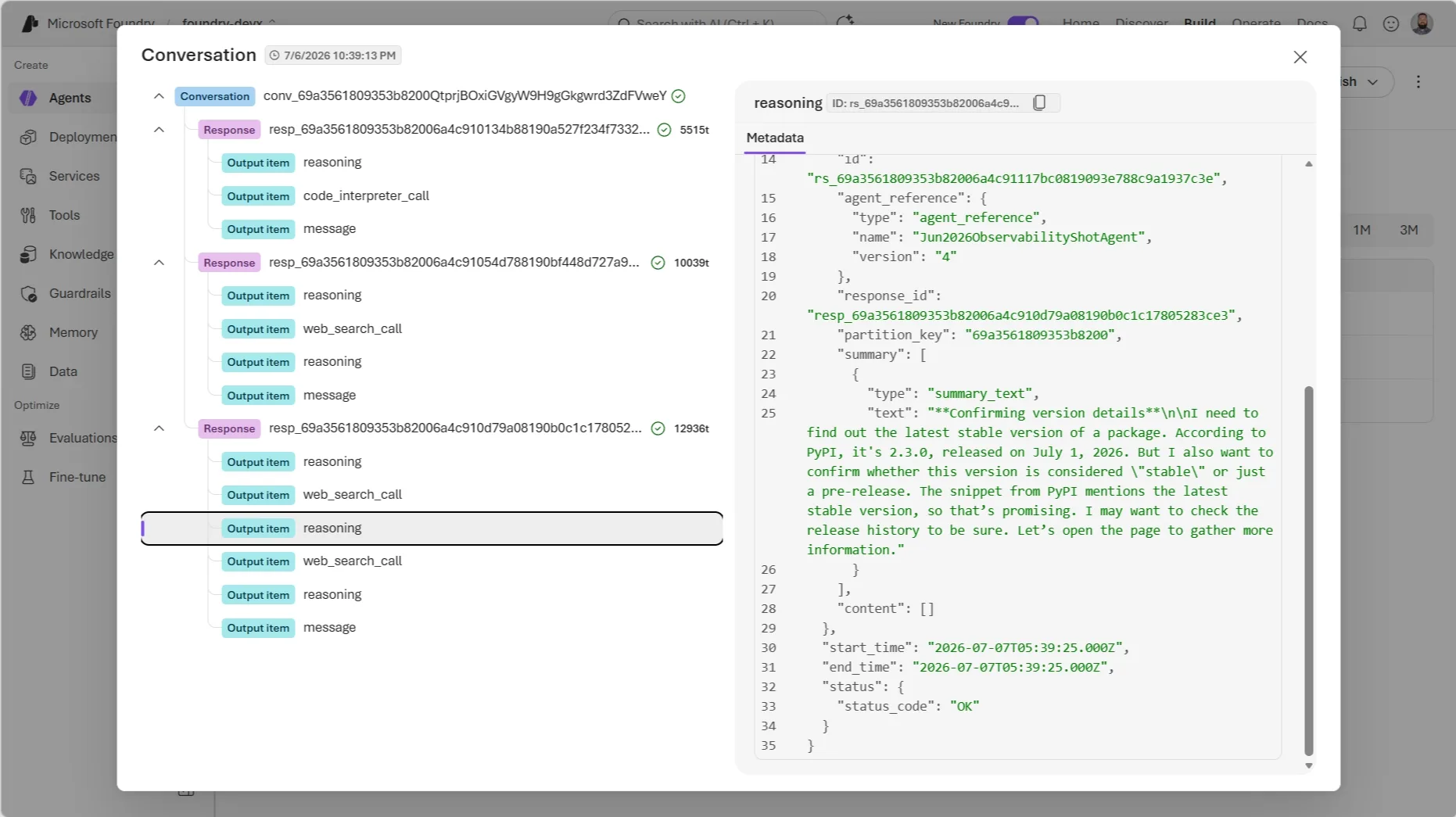
アクション: どのフレームワークで構築されたエージェントであっても、本番環境で追跡機能がまだ設定されていない場合は、Agent Optimizer を検討する前に、まずはこの手順から始めることを強く推奨します。
観測可能性と ROI に関する詳細はこちらをご覧ください。
Models
Microsoft Foundry での Claude(一般提供開始)
Anthropic の Claude モデルが、Microsoft Foundry で一般利用可能になりました。これは 6 月のモデルカタログに関する最も大きなニュースです。
Claude は、2025 年 11 月に Microsoft、NVIDIA、Anthropic が発表した戦略的パートナーシップに基づき Azure 上でホストされています。InfiniBand ネットワークで接続された NVIDIA Blackwell Ultra システム上で動作します。
開発者は Messages API を通じて Claude にアクセスできます。プロンプトのキャッシュ機能や拡張思考、ツールストリーミングも標準で利用可能です。エージェントビルダーにとっては、Foundry Agent Service が Claude を推論コアとして活用し、エンタープライズシステム全体にわたる多段階計画、ツールの使用、タスク実行をオーケストレーションできます。Claude は Foundry ネイティブであるため、モデルベンチマークには現れないものの、本番環境では重要なプラットフォーム機能が利用可能です。具体的には Microsoft Entra ID 認証、Azure ロールベースのアクセス制御、既存のガバナンスポリシー、そして馴染み深い Azure の使用状況追跡機能です。
デプロイ前に知っておくべきいくつかの詳細があります:
データゾーン — データ所在地要件を持つチーム向けに、グローバルと米国のデータゾーンのいずれかを選択できます。推論処理は Anthropic が担当し、データプロセッサおよび SLA 提供者としての役割も維持されます。
ゼロデータ保持機能 — 高機密ワークロード向けに利用可能です。呼び出し完了後、Anthropic はプロンプトや回答を保持しません。
請求 — Claude の利用料は「Claude Consumption Units (CCU)」として Azure 請求書上の単一行で統合されます。Microsoft Azure Consumption Commitment (MACC) の使用状況とモデル別の詳細情報は、Foundry で引き続き確認可能です。
Microsoft Foundry で Claude を呼び出す際の、Microsoft Entra ID 認証と anthropic Python パッケージの AnthropicFoundry クライアントを利用するパターンは以下の通りです。
Anthropic Foundry の利用には、以下のライブラリと認証モジュールが必要です。
from anthropic import AnthropicFoundry
from azure.identity import DefaultAzureCredential, get_bearer_token_provider

token_provider = get_bearer_token_provider(
    DefaultAzureCredential(), "https://ai.azure.com/.default"
)
client = AnthropicFoundry(
azure_ad_token_provider=token_provider,
base_url="https://.services.ai.azure.com/anthropic",
)
message = client.messages.create(
model="claude-sonnet-4-6", # 展開名に置き換えてください
messages=[
{"role": "user", "content": "シアトルで訪れるべき場所を3つ教えてください?"}
]
「]、
max_tokens=1048,
temperature=1,
thinking={"ty
」
原文を表示
Here’s what shipped in Microsoft Foundry in June 2026 — Claude reached general availability, Foundry agents started publishing straight into Microsoft 365 Copilot and Teams, and Toolboxes, Routines, and Memory all got meaningfully more capable.
TL;DR
Claude is now generally available in Microsoft Foundry: Anthropic’s Claude models are hosted on Azure with the Messages API, prompt caching, extended thinking, and tool streaming — and Foundry Agent Service can use Claude as the reasoning core for multi-step agents.
Foundry agents can now publish to Microsoft 365 Copilot and Teams (GA): This fulfills the “GA in June 2026” commitment from Build. Agents move through one governed publishing pipeline instead of separate rebuilds per surface.
Foundry autopilot agents (public preview): A new agent category with its own Entra Agent ID, productivity license, email, calendar, and Teams presence — designed to work inside shared spaces like group chats, not just one-on-one chat.
Workstream Manager sample agent: A ready-to-customize autopilot agent for Teams group chats that tracks tasks, summarizes conversations into action items, and follows up on overdue work.
Toolboxes add Skills, Work IQ, Fabric IQ, Browser Automation, and Tool Search (all preview): Plus Routines (preview) in Foundry Agent Service for scheduled and triggered agent run control.
Agent Optimizer enters private preview: A closed-loop evaluate → generate candidates → rank → deploy workflow for hosted agents, opening to public preview roughly 30 days after its June 3 announcement.
Memory gets more production-ready: New procedural memory, management experiences, and time-to-live (TTL) controls.
Foundry joins the OpenEnv standard: A new post ties hosted agents, Toolboxes, Memory, Managed Compute, and the evaluation/optimization stack into one reinforcement-learning “hill-climbing loop,” including Foundry post-training via Tinker and ECHO.
Foundry Local on Azure Local: Multi-node Kubernetes deployment, disconnected/air-gapped operation, a new vLLM inference runtime option, automatic GPU inference tuning, and model caching.
Voice Live API 2026-06-01-preview: Adds the azure-realtime-native structured voice type and a client-side echo cancellation reference option.
SDK & Language Changelog: Java ships azure-ai-projects 2.1.0 (GA) with new Data Generation, Models, and Routines preview clients; .NET ships 2.1.0-beta.4; Python and JS/TS are both converging on a 2.3.0 release that promotes Hosted Agents and Toolboxes from beta to stable — a strong signal that hosted agents’ GA (promised “early July 2026” at Build) is close.
Join the community
Connect with 50,000+ developers on Discord, ask questions in GitHub Discussions, explore the new recipes in Forgebook and subscribe via RSS to get this digest monthly.
Coming out of Build 2026
Build 2026 (June 2-3) shipped a huge amount of Foundry surface area — hosted agents, Toolboxes, Foundry IQ, Memory, Managed Compute, fine-tuning, Frontier Tuning, and a new evaluation and optimization stack. If you missed it, start with the Build Edition recap. This post picks up where that one left off: what actually shipped, opened to preview, or reached GA between June 3 and June 30.
Agents & Foundry Agent Service
Publish to Microsoft 365 Copilot and Teams (GA) + Foundry autopilot agents (public preview)
Build promised general availability for publishing Foundry agents into Microsoft 365 Copilot and Teams “in June 2026.” That shipped on June 10. In Foundry, you can now publish any agent directly into Microsoft 365 Copilot and Teams in a few clicks — no rebuilding per surface — and the agent keeps its capabilities as it moves through one governed publishing pipeline toward org-wide availability.
The interaction model is also different from a typical chatbot. Instead of prompt → response, published agents support goal → ongoing execution → checkpoints → collaboration: assign the agent a goal rather than asking it a question, and let it surface progress, request approvals, and escalate to a human when needed, natively inside Teams and Microsoft 365.
Alongside GA publishing, Foundry introduces a new agent category: autopilot agents (public preview). Autopilot agents operate with their own identity — a full Entra Agent ID user account with a productivity license granting their own email, calendar, OneDrive, Teams access, and a place in the org chart. Unlike agents built for one-on-one interaction, autopilot agents are designed to work with teams: they can sit in shared spaces like Teams group chats, take on ongoing responsibilities, and coordinate work across people, channels, and meetings.
The reference implementation is the Foundry Workstream Manager, an autopilot agent that lives in a Teams group chat. It’s grounded in the channel’s conversation history — messages, files, links, GitHub PRs, meeting recaps — plus any other sources you connect, like a team SharePoint site or product specs. Out of the box it tracks tasks and deadlines, summarizes conversations into action items, follows up on overdue work, and surfaces risks and blockers. It ships with a manager onboarding flow (/onboarding), manager-controlled access (/access add, /access remove, /access list <upn>), and an on-demand /workstreamsummary command.
Action: If your Build roadmap included “publish an agent for my team to use in Teams,” this is live today. Start with the Workstream Manager sample if you want a working autopilot agent to customize rather than building the Teams/M365 integration from scratch.
Read the Enterprise Agent Distribution Post
Toolboxes add Skills, Work IQ, Fabric IQ, Browser Automation, and Tool Search — plus Routines
Toolboxes in Foundry — the layer where agents discover, access, and use tools at runtime — picked up several new capabilities on June 3, all in preview:
Capability
What it does
Skills
Create, version, and manage reusable capabilities in a project-scoped catalog, exposed through a Toolbox so agents can discover and use them like any other tool.
Work IQ and Fabric IQ
Connect agents directly to enterprise data and reasoning systems without custom integrations.
Browser Automation
Model Context Protocol (MCP)-native web automation for hosted agents, built on Playwright workspaces, with live visibility when workflows hit edge cases.
Tool Search
Retrieves only the most relevant tools at runtime instead of sending every tool definition on every turn — the meta-tools tool_search and call_tool replace a flat tool list.
Tool Search matters most once a Toolbox grows past a handful of tools: at 200+ tools, sending every schema on every turn burns input tokens, crowds the context window, and increases the odds the model picks a similar-but-wrong tool. With Tool Search enabled, the agent describes its intent, discovers the right tools, and calls them — and you can still pin critical tools, add context that matches how your team thinks about a tool, or auto-pin frequently used tools so they bypass the search round-trip.
Getting a toolbox in front of a hosted agent is a two-command flow with azd:
nonomkdir my-toolbox-agent && cd my-toolbox-agent
azd ai agent init -m "https://github.com/microsoft-foundry/foundry-samples/blob/main/samples/python/hosted-agents/agent-framework/responses/04-foundry-toolbox/agent.manifest.yaml" --src src/toolbox-agent
Then create the toolbox from the sample’s toolbox.yaml and copy the versioned MCP endpoint it prints:
azd ai toolbox create my-toolbox --from-file ./src/toolbox-agent/toolbox.yaml
https://<account>.services.ai.azure.com/api/projects/<project>/toolboxes/my-toolbox/versions/1/mcp?api-version=v1
Tip: azd ai toolbox create needs a local azd project/environment to run against, even with --project-endpoint passed explicitly. If you’re not starting from azd ai agent init, run azd init --minimal first and azd env set FOUNDRY_PROJECT_ENDPOINT <endpoint> before creating the toolbox.
Routines (preview) also shipped on June 3, as part of Foundry Agent Service — it handles agent run control: define when an agent should execute (on a schedule, on a trigger, or dispatched on demand), and Foundry reliably queues, runs, and tracks those executions at scale. Here’s a trimmed CRUD example against project_client.beta.routines (requires pip install "azure-ai-projects>=2.2.0"):
from azure.ai.projects import AIProjectClient
from azure.ai.projects.models import CustomRoutineTrigger, InvokeAgentResponsesApiRoutineAction
from azure.identity import DefaultAzureCredential
with (
DefaultAzureCredential() as credential,
AIProjectClient(endpoint=endpoint, credential=credential) as project_client,
):
trigger = CustomRoutineTrigger(
provider="sample-provider",
event_name="sample-event",
parameters={"source": "sample_routines_crud"},
)
action = InvokeAgentResponsesApiRoutineAction(agent_name=agent_name)
routine = project_client.beta.routines.create_or_update(
"sample-routine",
description="Routine created by the azure-ai-projects sample.",
enabled=True,
triggers={"manual": trigger},
action=action,
)
print(f"Created routine: {routine.name} enabled={routine.enabled}")
Action: If your Toolbox is growing past a handful of tools, turn on Tool Search before you start seeing token bloat or tool-selection mistakes. If you need scheduled or triggered agent runs, look at Routines instead of building your own scheduler.
Explore Toolboxes and Routines
Agent Optimizer enters private preview
Agent Optimizer in Foundry Agent Service is now in private preview, with public preview expected early in this month of July. It automates the improvement loop most teams currently do by hand: your customer support agent works, mostly, but forgets to ask for an order number, or gives advice it should decline instead. Fixing that today means rewriting a system prompt, testing by hand, and hoping you didn’t break something else.
Agent Optimizer runs a closed-loop cycle instead:
Evaluate the baseline — your agent processes a task set with pass/fail criteria, producing a composite score from 0.0 to 1.0.
Generate candidates — guided by what failed, the optimizer produces new configurations. You choose the target: instruction rewrites the system prompt, skill generates reusable procedures, or model finds the best deployment for your quality/cost trade-off.
Evaluate candidates — each candidate runs against the same task set.
Rank and recommend — results are sorted by score, with per-task breakdowns and token costs for each candidate.
Deploy the winner — one command promotes the winning configuration to your live agent.
The whole cycle runs in the cloud with no extra infrastructure to provision — start it with azd ai agent optimize, and a typical run finishes in a few minutes if you already have a hosted agent deployed.
azd ai agent eval generate --agent <agent-name> --gen-instruction "This agent handles restaurant reservations." --eval-model gpt-5.4-mini
azd ai agent optimize --max-candidates 2 --optimize-model gpt-5
Detected eval target:
(✓) Agent: <agent-name> (--agent)
(✓) Kind: hosted (default)
(✓) Endpoint: https://<your-resource>.services.ai.azure.com/api/projects/<your-project>
(✓) Done Evaluator generation (23 seconds)
(✓) Done Dataset generation (2m 8s)
Eval suite created
Config: eval.yaml
Dataset: smoke-core (1.0)
Evaluator: smoke-core (1)
Evaluator dimensions (7):
Weight Dimension
────── ─────────
10 reservation_task_completion
6 intent_and_target_resolution
5 essential_slot_handling
6 availability_and_constraint_handling
6 tool_use_and_parameter_accuracy
3 confirmation_and_final_summary
5 general_quality
eval generate builds eval.yaml, a test dataset, and scoring evaluators directly from your agent’s own instructions. The run above is real output against a live gpt-5.4-mini agent. optimize then runs the evaluate → generate → rank loop against that eval suite and reports a portal URL to track the job.
Tip: optimize only works for agents scaffolded with azd ai agent init where agent.yaml/metadata.yaml carries the agent instructions in an azd project. Agents created through the Foundry SDK will not resolve even if the instruction is set explicitly in eval.yaml.
Action: If you have a hosted agent in production, sign up for the private preview now so you’re ready when public preview opens. It’s a fast way to close the gap between “works in the demo” and “production-ready.”
Sign Up for Agent Optimizer Private Preview
Memory gets more production-ready
Memory in Foundry Agent Service picked up reliability-focused updates on June 3: a new procedural memory capability (so agents can apply what they’ve learned to follow procedures consistently and recover from repeated failure modes), new management experiences, and features like time-to-live (TTL) so developers get more visibility and control over what an agent remembers and for how long.
Agent adoption across enterprises is slow not because agents are incapable, but because they are non-deterministic. Agent skills have improved behavior, yet marginal improvements in certainty. Procedural memory strikes a balance between too much ambiguity with LLMs and too much inflexibility with technologies like robotic process automation. Invoice reconciliation, IT access requests, and support escalation triage are some of the most common examples where an agent remembers your org’s actual procedure and reapplies it consistently instead of reinventing it every run.
Features like time-to-live (TTL) give agent developers the ability to configure how long memories are preserved, automatically retiring old memories in place of recent memories to improve retrieval quality.
Procedural memory and TTL both land as new fields on MemoryStoreDefaultOptions (azure-ai-projects>=2.0.0):
from azure.ai.projects import AIProjectClient
from azure.ai.projects.models import MemoryStoreDefaultDefinition, MemoryStoreDefaultOptions
from azure.identity import DefaultAzureCredential
with (
DefaultAzureCredential() as credential,
AIProjectClient(endpoint=endpoint, credential=credential, allow_preview=True) as project_client,
):
definition = MemoryStoreDefaultDefinition(
chat_model=chat_model_deployment_name,
embedding_model=embedding_model_deployment_name,
options=MemoryStoreDefaultOptions(
user_profile_enabled=True,
chat_summary_enabled=True,
procedural_memory_enabled=True,
default_ttl_seconds=30 * 24 * 60 * 60, # 30 days, in seconds (int) — see note below
),
)
memory_store = project_client.beta.memory_stores.create(
name="my_memory_store",
description="Support-agent memory with procedural recall and a 30-day retention policy",
definition=definition,
)
Tip: A future Foundry SDK (azure-ai-projects 2.2.0+) release is expected to switch default_ttl_seconds to datetime.timedelta — see the SDK changelog section below. Currently, default_ttl_seconds takes an int of seconds, not a timedelta. Also, the MemoryStoreDefaultOptions constructor causes any field you don’t explicitly set to False instead of the documented defaults. Expect this behavior to change in the future.
Action: If your agent has been accumulating memory without an expiration policy, review TTL settings now — especially for anything touching personal or time-sensitive data.
Read About Memory Updates
Cross-framework observability and Agent ROI
The Build-week observability push — end-to-end tracing, evaluation against criteria you define, optimization, and Agent ROI measurement, all working across any agent framework — is now the default story for teams asking “is this agent still behaving correctly in production?” Agents are non-deterministic, and drift from model updates, tool changes, or traffic shifts usually happens silently, long after the demo looked great.
Wiring up tracing is framework-agnostic and works the same whether your agent runs on Foundry Agent Service, LangChain, or another OpenTelemetry-instrumented stack:
pip install azure-ai-projects azure-identity opentelemetry-sdk azure-core-tracing-opentelemetry
from azure.core.settings import settings
from opentelemetry import trace
from opentelemetry.sdk.trace import TracerProvider
from opentelemetry.sdk.trace.export import SimpleSpanProcessor, ConsoleSpanExporter
from azure.ai.projects.telemetry import AIProjectInstrumentor
settings.tracing_implementation = "opentelemetry"
span_exporter = ConsoleSpanExporter()
tracer_provider = TracerProvider()
tracer_provider.add_span_processor(SimpleSpanProcessor(span_exporter))
trace.set_tracer_provider(tracer_provider)
Enable GenAI tracing spans for every agent/model call in this process
AIProjectInstrumentor().instrument()
Set AZURE_EXPERIMENTAL_ENABLE_GENAI_TRACING=true before you run the process, and every agent turn — prompts, tool calls, model responses — shows up as a span, both on the console here and in the Foundry portal’s Observability tab once you swap ConsoleSpanExporter for the Azure Monitor exporter:
Action: If you don’t yet have tracing wired into your production agent regardless of which framework it’s built on, this is the starting point before you reach for Agent Optimizer.
Read About Observability & ROI
Models
Claude in Microsoft Foundry (GA)
Claude models from Anthropic are now generally available in Microsoft Foundry, the biggest model-catalog news of June. Claude is hosted on Azure via the strategic partnership Microsoft, NVIDIA, and Anthropic announced in November 2025, running on NVIDIA Blackwell Ultra systems connected by InfiniBand networking.
Developers reach Claude through the Messages API, with prompt caching, extended thinking, and tool streaming available out of the box. For agent builders, Foundry Agent Service can use Claude as the reasoning core to orchestrate multi-step planning, tool use, and task execution across enterprise systems. Because Claude is native to Foundry, you get the parts of the platform that don’t show up in a model benchmark but matter for production: Microsoft Entra ID authentication, Azure role-based access control, existing governance policies, and familiar Azure usage tracking.
A few details worth knowing before you deploy:
Data zones — choose between Global and US data zones for teams with data residency requirements. Anthropic operates inference and remains the data processor and SLA provider.
Zero data retention is available for high-sensitivity workloads, so prompts and completions aren’t retained by Anthropic after the call completes.
Billing is consolidated into Claude Consumption Units (CCU) as a single line on your Azure bill, with Microsoft Azure Consumption Commitment (MACC) drawdown and per-model detail still visible in Foundry.
Here’s the pattern for calling Claude through Foundry with Microsoft Entra ID authentication and the anthropic Python package’s AnthropicFoundry client:
from anthropic import AnthropicFoundry
from azure.identity import DefaultAzureCredential, get_bearer_token_provider
token_provider = get_bearer_token_provider(
DefaultAzureCredential(), "https://ai.azure.com/.default"
)
client = AnthropicFoundry(
azure_ad_token_provider=token_provider,
base_url="https://<resource-name>.services.ai.azure.com/anthropic",
)
message = client.messages.create(
model="claude-sonnet-4-6", # Replace with your deployment name
messages=[
{"role": "user", "content": "What are 3 things to visit in Seattle?"}
],
max_tokens=1048,
temperature=1,
thinking={"ty
今日のまとめ
AIデイリーブリーフで今日の重要ニュースをまとめ読み