GitHub Copilot CLIで絵文字リストジェネレーターを構築
本文の状態
日本語全文を表示中
詳細モードで約3分の本文を読めます。
同じ出来事の情報源
5媒体で確認
TechCrunch AI · The Decoder · AI Business · GitHub Blog · GitHub Changelog
各社の報じ方を比較 ↓GitHubチームが、GitHub Copilot CLIを使用して絵文字リストジェネレーターを構築した。このツールはコマンドラインインターフェースで動作し、絵文字の管理を効率化する。
Source Article
元記事を日本語で読む
本文に関係しない購読案内、埋め込み通知、サイト内プロモーションは除いています。
毎週、GitHubチームは「Rubber Duck Thursdays」という配信を行い、プロジェクトをライブで構築し、コミュニティと協働し、質問にお答えしています!
今週は、GitHub Copilot CLIを使って一緒にとても楽しいプロジェクトを構築しました。その内容をご紹介します。
GitHub Copilot CLIが初めてですか? 始め方はこちらをご覧ください。
プロジェクトの概要
多くのソーシャルメディアの投稿やプロダクトローンチでは、次のような内容をよく目にします:
「史上最高の絵文字リストジェネレーターをリリースしました。その特徴は:
CLIで動作
烙 Copilot SDKを使用して、箇条書きを関連する絵文字にインテリジェントに変換
結果をクリップボードにコピー
素晴らしいでしょう。しかし、この「迅速に動き、物事を壊す」世界において、完璧な絵文字を考えるのは私には遅すぎます。構築すべきプロジェクトがあります! 楽しむべきレポジトリがあります! マージすべきプルリクエストがあります! 絵文字について考えている場合ではありません!
そこで、配信中に私たちは絵文字リストジェネレーター(その名もずばり「Emoji List Generator」)を構築しました。その仕組みは:
️ ターミナルで実行
リストを貼り付けるか入力
⌨️ Ctrl + Sを押す
リストがクリップボードにコピーされる
(ここで製品を実際に使っている様子がお分かりでしょうか?)
構築の方法
このプロジェクトでは、いくつかの優れた技術を使用しました:
️ ターミナルUI: @opentui/core
烙 AIエンジン: @github/copilot-sdk
クリップボードアクセス: clipboardy
プロジェクトを始めるにあたり、GitHub Copilot CLIを起動しました。
Claude Sonnet 4.6を使用したプランモードで、次のように指示を書きました:
「AIを活用したマークダウン絵文字リストジェネレーターを作成したい。このCLIアプリでは、いくつかの箇条書きを貼り付けるか入力すると、各項目に関連する絵文字に置き換えられ、結果がクリップボードにコピーされるようにする。AI処理部分にはGitHub Copilot SDKを使用したい。」
Copilotは、技術スタックや使用すべきライブラリなどについて(OpenTUIを提案してくれたチャット参加者のGaborに感謝)、多くの明確化の質問をしてきました。その後、レビューと実装に使える、完全に練り上げられた計画書(.mdfile)ができあがりました!
私たちはこの計画を、最近リリースされたClaude Opus 4.7を使って実装し、数分後には、ほら、楽しい小さなターミナルUIが完成しました!
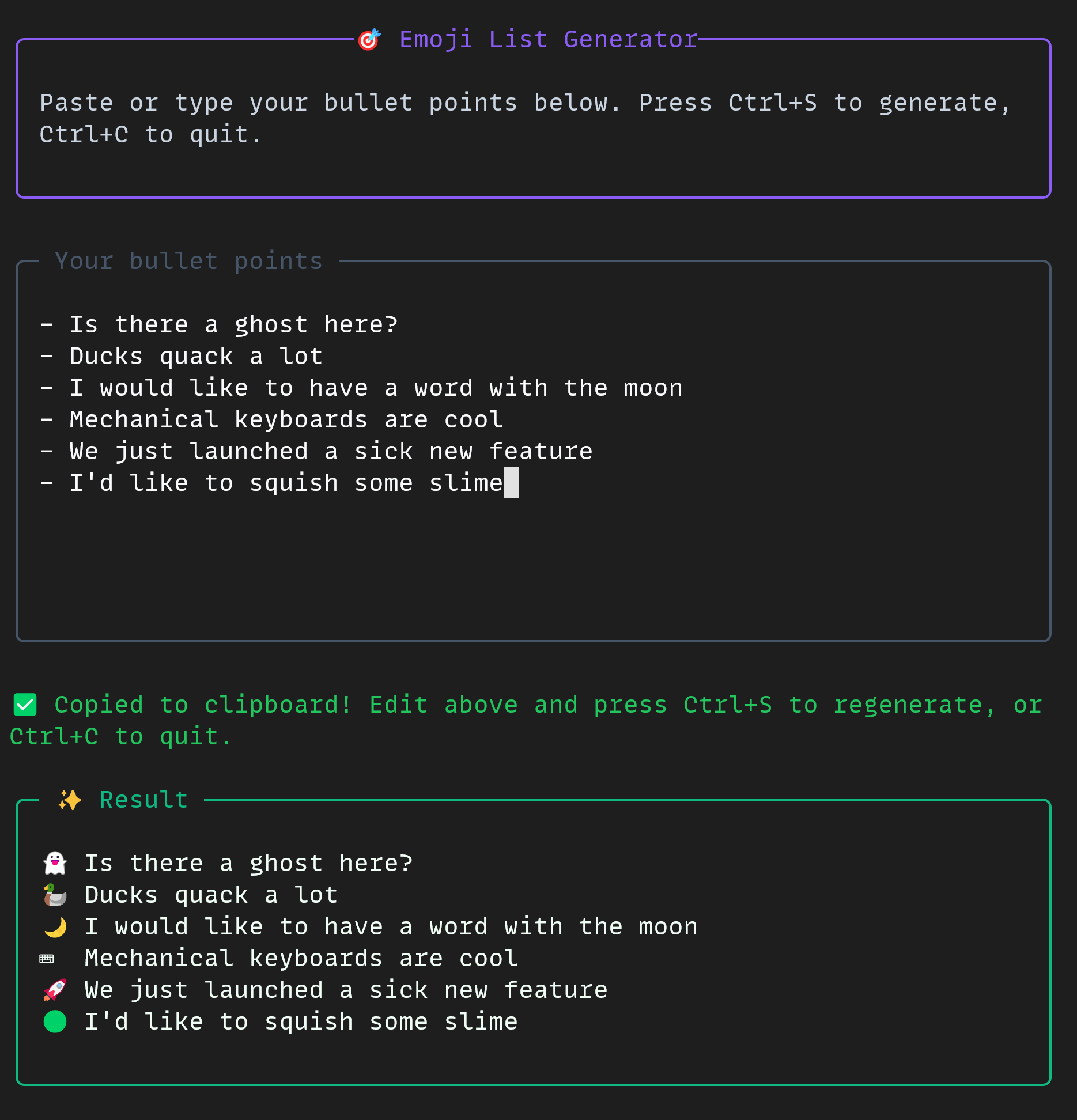
プロジェクトは小規模ながら強力なものでした。CLIでは、以下の非常に便利な機能をすべて組み合わせて使用しました:
プランモード
烙 オートパイロットモード
マルチモデルワークフロー
allow-alltoolsフラグ
GitHub MCPサーバー
もしあなた自身もこのようなプロジェクトを構築したい場合は、GitHub Copilot CLIとGitHub Copilot SDKのドキュメントをぜひご覧ください!
この絵文字リストジェネレーターは、あなたのために無料でオープンソースとして公開されています。
楽しい開発を!
この投稿「GitHub Copilot CLIで絵文字リストジェネレーターを構築」は、The GitHub Blogに最初に掲載されました。
原文を表示
Every week, the GitHub team runs a stream called Rubber Duck Thursdays, where we build projects live, cowork with our community, and answer questions!
This week, we built a very fun project together using the GitHub Copilot CLI! Let me tell you about it.
New to GitHub Copilot CLI? Here’s how to get started.
What is it?
In a lot of social media tweets and launches, you often see accounts post things like:
We shipped the most amazing emoji list generator ever. It:
Works in the CLI
烙 Uses the Copilot SDK to intelligently convert your bullet points to relevent emoji
Copies the result to the clipboard
It’s beautiful. But coming up with the perfect emoji is far too slow for me in this “move fast and break things” world. I have projects to build! Repos to vibe! Pull requests to merge! I can’t be thinking about emojis!
And thus, on the stream, we build an emoji list generator (very descriptively called Emoji List Generator) that:
️ Runs in the terminal
You paste or write a list
⌨️ You hit Ctrl + S
You get the list on your clipboard
(Can you tell I’m dogfooding the product here?)
How we built it
We used a few cool technologies for this project:
️ @opentui/corefor the terminal UI
烙 @github/copilot-sdkfor the AI brain
clipboardyfor clipboard access
To start the project off, we opened up the GitHub Copilot CLI.
In plan mode using Claude Sonnet 4.6, we wrote:
I want to create an AI-powered markdown emoji list generator. Where, in this CLI app, if I paste in or write in some bullet points, it will replace those bullet points with relevant emojis to the given point in that list, and copies it to my clipboard. I'd like it to use GitHub Copilot SDK for the AI juiciness.
Copilot asked me a bunch of clarifying questions, for example around the tech stack and what libraries we should use (shoutout to Gabor in the chat for suggesting OpenTUI), and from there, we had a fully thought-out plan.mdfile for me to review and use!
We implemented the plan using Claude Opus 4.7 (which was recently released!) and a few minutes later, voilà, we had a fun little terminal UI to work with!
The project was small but mighty. In the CLI, we used some really cool tools all together:
Plan mode
烙 Autopilot mode
Multi-model workflow
The allow-alltools flag
The GitHub MCP server
If you’d like to build a project like this yourself, you can check out the docs for the GitHub Copilot CLI and the GitHub Copilot SDK today!
The emoji list generator is free and open source, just for you.
Happy building!
The post Building an emoji list generator with the GitHub Copilot CLI appeared first on The GitHub Blog.
同じ出来事を5媒体で確認
同じ出来事を扱う別媒体の記事です。見出しと公開時刻を比較できます。
News to Guide
ニュースの次に確認する
発表内容を、現在の料金や仕様と照らし合わせられる関連ガイドです。
今日のまとめ
AIデイリーブリーフで今日の重要ニュースをまとめ読み