JetBrains、AI 利用コストが 6 ヶ月で 10 倍増と報告し管理策を模索
本文の状態
日本語全文を表示中
詳細モードで約12分の本文を読めます。
同じ出来事の情報源
この情報源を基点に整理
JetBrains AI Blog
JetBrains は開発者の AI ツール利用が急増し経費が10倍に膨張したため、コスト管理と開発者自由のバランスを取るための施策を検討している。
AI深層分析を開く2026年8月4日 15:49
AI深層分析
キーポイント
AI 支出の急激な増加
過去6ヶ月で AI 開発経費が約10倍に増大し、Claude Opus 4.5/4.6 のリリースが利用促進の主要因となった。
管理の複雑化と課題
開発者が複数の AI ツールを併用する「ツール・ゾー」現象により、コスト管理や承認プロセスに大きな負荷がかかっている。
制限策の限界
利用可能なツール数を制限すればコストは抑えられるが、その時点で最適なモデルを見逃すリスクがあるため単純な禁止は避ける方針である。
バランス型アプローチへの転換
開発者の自由とコスト・効率・セキュリティの管理を両立させる新たな仕組みの実装を試みている。
手動管理の非効率性とダッシュボードの限界
一度きりのデータ収集には4日間を要し、継続的なコスト管理には不向きであった。内部ダッシュボードでは支出を可視化できたが、予算制限の設定や強制は困難だった。
重要な引用
Over the past six months at JetBrains, our AI development expenses have increased roughly 10x.
Most of them use between three and five AI tools in a given month.
Ideally there should be a balance between developer freedom and managing this 'tooling zoo'.
This one-time exercise took four days. We had a snapshot of the situation and not much else when it came to setting organizational usage or managing them on an ongoing basis.
編集コメントを表示
編集コメント
開発現場における AI ツールの多様化は、生産性向上の一方でコスト管理を複雑化する典型的な事例である。JetBrains が自社のツール利用状況を分析し、単純な規制ではなくバランス型のアプローチを検討している点は、他社にとっても示唆に富む実践的な知見となる。
Source Article
元記事を日本語で読む
本文に関係しない購読案内、埋め込み通知、サイト内プロモーションは除いています。
過去半年間、JetBrains における AI 開発関連の支出は約 10 倍に膨れ上がりました。コストが上昇し始めた際、もちろん私たちは気づき、体系的な管理方法が欠如していることを痛感しました。
その理由として、私たちが提供する AI ツールを社員が使うだけでなく、各自が「自分の業務を最も効率的に進めるために最適なツール」を自ら選定しているからです。
多くの開発者は、月間に 3 つから 5 つの異なる AI ツールを活用しています。IDE の利用頻度は従来通りですが、そこに CLI エージェントや並列実行に対応するエージェント型開発環境(複数の AI エージェントを同時に動かすためのもの)、そして IDE に統合された AI ツールが加わっているのが現状です。
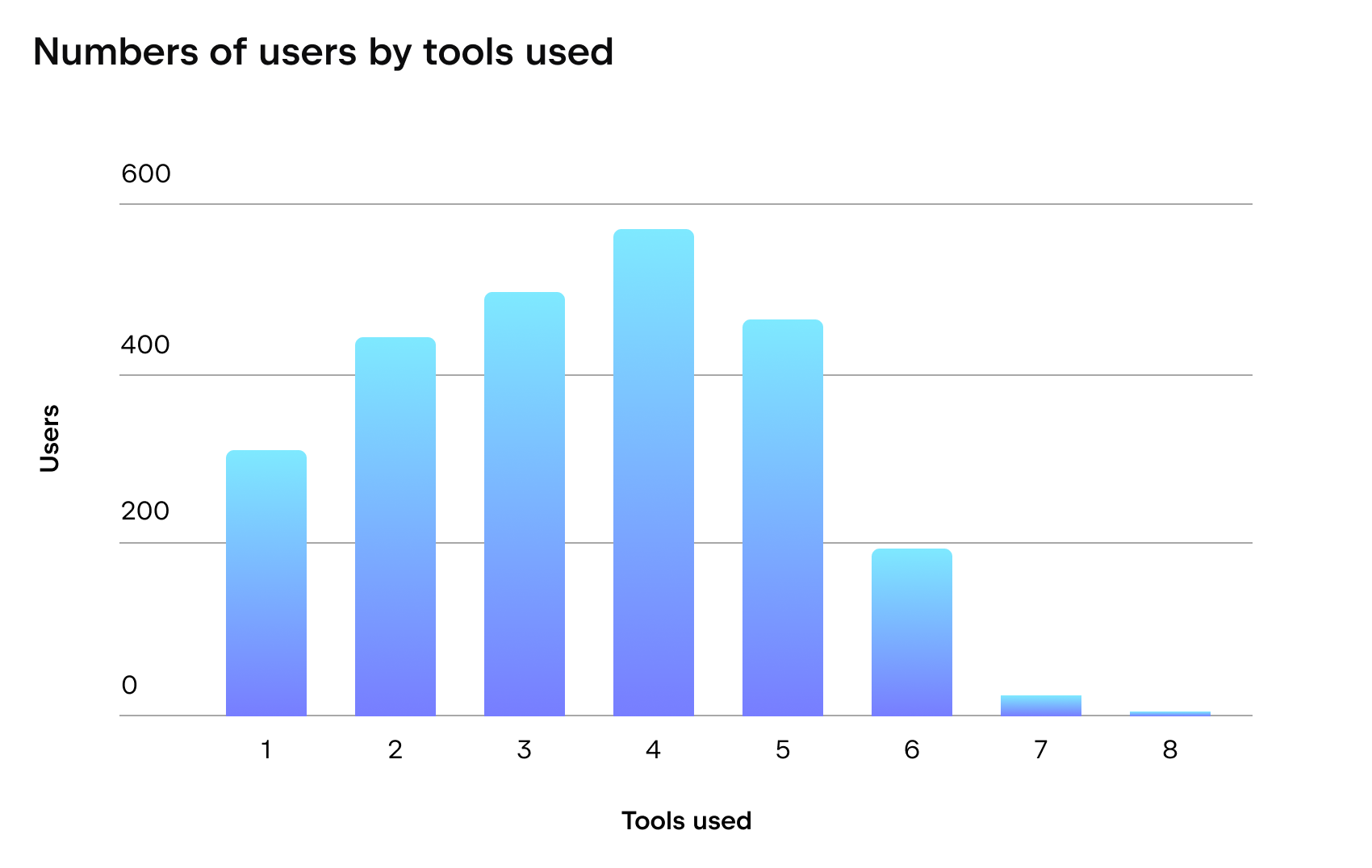 imageJetBrains の開発者の多くは、少なくとも 3 つの AI ツールを使用しています。
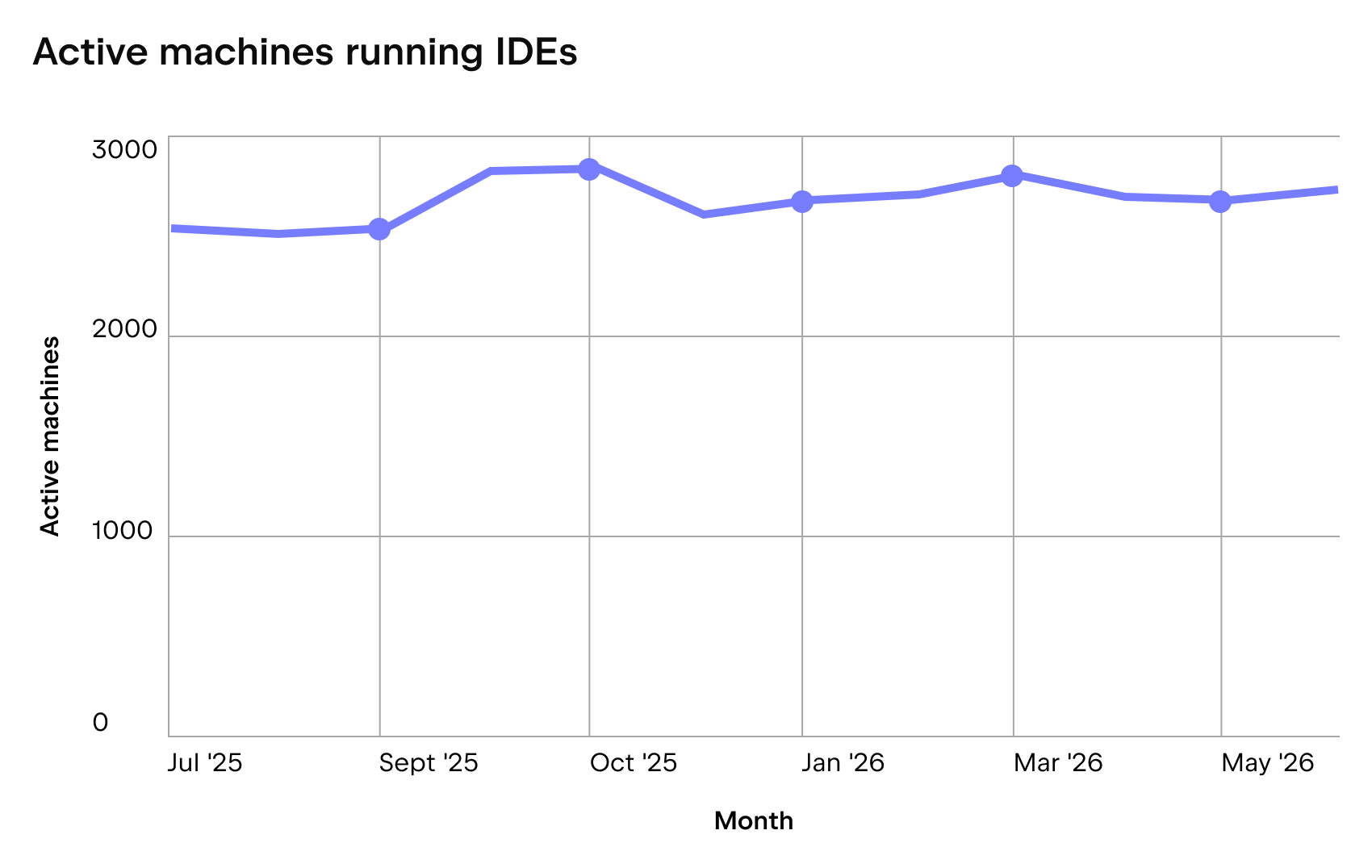 imageそれらのツールは、IDE の内部や周辺で活用されています。
膨れ上がったコストへの対策として、開発者が利用可能な AI ツールの数を制限する方法が考えられます。他社との議論では、「1 つまたは 2 つの選択肢に絞る」という判断事例を頻繁に耳にします。これにより、システムの複雑さ(エントロピー)を抑え、管理にかかるオーバーヘッドを削減できる可能性があります。
しかし、このように自らの選択肢を制限することは、その時点で最も優れたオプションを見逃す結果につながる恐れがあります。今週は Claude Code を Opus モデル上で使うのが最適解でも、明日には Codex が最良となり、来週には GLM と Opus の組み合わせで Claude Code を使うことがベストになるかもしれません。
理想的には、開発者の自由と、「ツール群」の管理(コスト、効率、予算、コンプライアンス、セキュリティ)とのバランスが保たれるべきです。私たちはどのようにしてそのバランスを実現しようとしたのかをご紹介します。
当初の課題
急増するコスト。2026 年 1 月以降、AI ツールの採用が急激に拡大し、トークン消費量も増加しました。この急上昇は、エージェント性能を大幅に向上させた Claude Opus 4.5 および 4.6 のリリースに起因すると分析しています。JetBrains の開発者は、Claude Code CLI や JetBrains IDE 内の AI チャット、Junie など、さまざまな場所でこれらのモデルを活用し始めました。
その後は利用量がほぼ毎月倍増しました。すぐに Claude Code のライセンス数は 150 に達し、API 使用量に応じた料率の Enterprise プランへ移行しました。しかし、それによってコストがさらに加速してしまったのです。
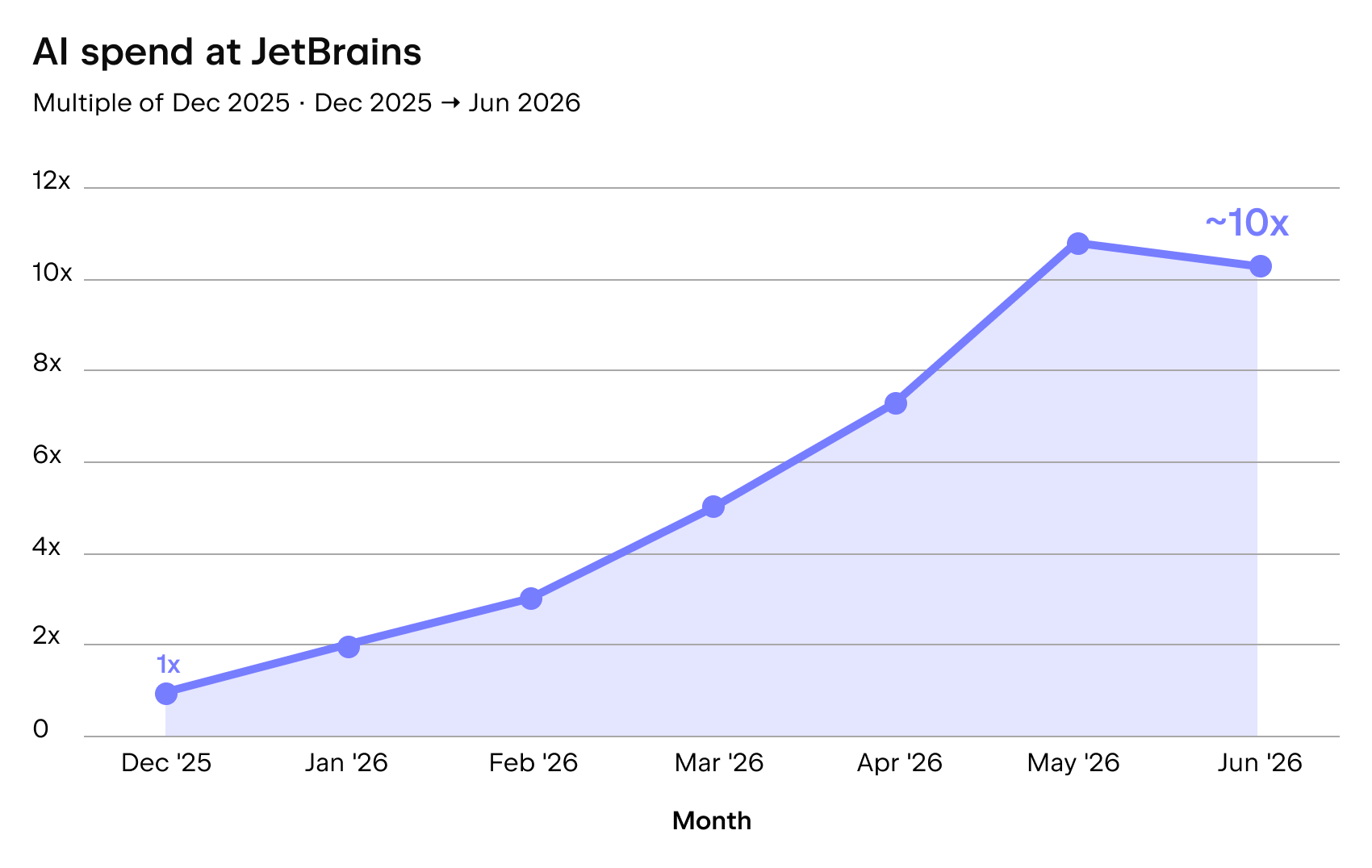 image2026 年前半に AI 関連支出は約 10 倍に増えました。
管理者の負担増。開発者 1 人あたりの平均消費量が増加する一方、異なるツールへのアクセスを希望する開発者の数も増えていました。例えば、Claude Code と Codex を比較したり、サードパーティ製のエージェントを試したりしたいという声です。各リクエストには複数の承認が必要となり、管理者のチケットが山積みになり、待機時間が長引いて開発者の作業効率が低下しました。
解決策を探るための試行錯誤
手動のスプレッドシート管理 → 持続不可能
JetBrains IDE 内の AI チャットから利用可能なさまざまなエージェント、Junie CLI、Claude Code と Codex の CLI およびデスクトップ版、Cursor、GitHub Copilot、そしてその他多数のツールを扱う「ツール群」は拡大の一途をたどっていました。この成長とコストを予測・管理するために手動で各コンソールを開き、データをダウンロードして、部署や事業単位ごとに複数の次元で分類しました。
この一度限りの作業には 4 日かかりました。組織的な利用設定や継続的な管理については、現状の把握以外に手がかりはほとんどありませんでした。これは妥当な第一歩でしたが、時間的コストを考えると、今後持続可能なアプローチとは言えません。
内部ダッシュボード → 経費の可視化(読み取り専用)
JetBrains のツールを含むほとんどの AI ツールには、ユーザーごとの利用データを取得できる中央集権的な API が用意されています。私たちはこれを利用した簡易な解決策をいくつか構築し、さらにいくつかの洗練されたサードパーティ製ツールの試作も検証しました。その結果を組織構造に紐付けたダッシュボードに統合することで、経費の詳細な分析が可能になりましたが、依然として支出制限の設定や強制は容易ではありませんでした。
内部コンソールと CLI ラッパー → 勝利したプロトタイプ
自社開発の AI ツールについては、すでに消費量や効率性を分析できる管理コンソールを保有していました。しかし、それはサードパーティ製ツールには対応しておらず、実際には成長が最も顕著だったのがまさにこの領域でした。
ある開発者が、個人的な利用のために CLI ラッパーをこっそり作成していました。JetBrains アカウントの認証や、AI トラフィックルーティング層を経由したリクエスト送信、そして開発中のローカルサードパーティ製エージェントのデバッグが目的です。これはガバナンス用のツールではなく個人向けのものでしたが、実は私たちが欠いていたピースでした。
プロトタイプから製品へ
2026 年 4 月初旬、私たちはこの再利用可能な個人用デバッグツールを、すべての JetBrains 開発者が実際に使いこなせる製品へと転換させることにしました。つまり、以下の要件を満たす必要がありました。
- 認証処理を行い、ログインの手間をなくすこと。
- インストールされたエージェントを自動検知し、設定に時間を浪費しないようにすること。
- すべてのリクエストをトラフィックルーティング層経由で送信し、AI クレジットという形式でサードパーティ製ツール(および自社ツール)に対してトークン予算管理ルールを適用できるようにすること。
- セキュリティ、暗号化、アクセス分離の要件に準拠すること。
これらの機能の一部はすでに用意されていました。JetBrains AI プラットフォームは裏側で動く AI ルーターであり、2023 年以来顧客や個人開発者向けの JetBrains AI を支え続けています。10 億件以上の LLM リクエストを堅牢な安定性で処理しています。サーバーサイドでは、消費統計やその他のメトリクスを収集し、非同期モードで ETL パイプラインを通じて個別の、極めて弾力性の高いストレージに格納していました。このストレージは上記の要件を満たすものでした。また、自社ツールに対しても AI クレジット予算の適用を開始していました。
今後 2 ヶ月かけて、CLI ラッパーを「JetBrains Central CLI」へと改良しました。
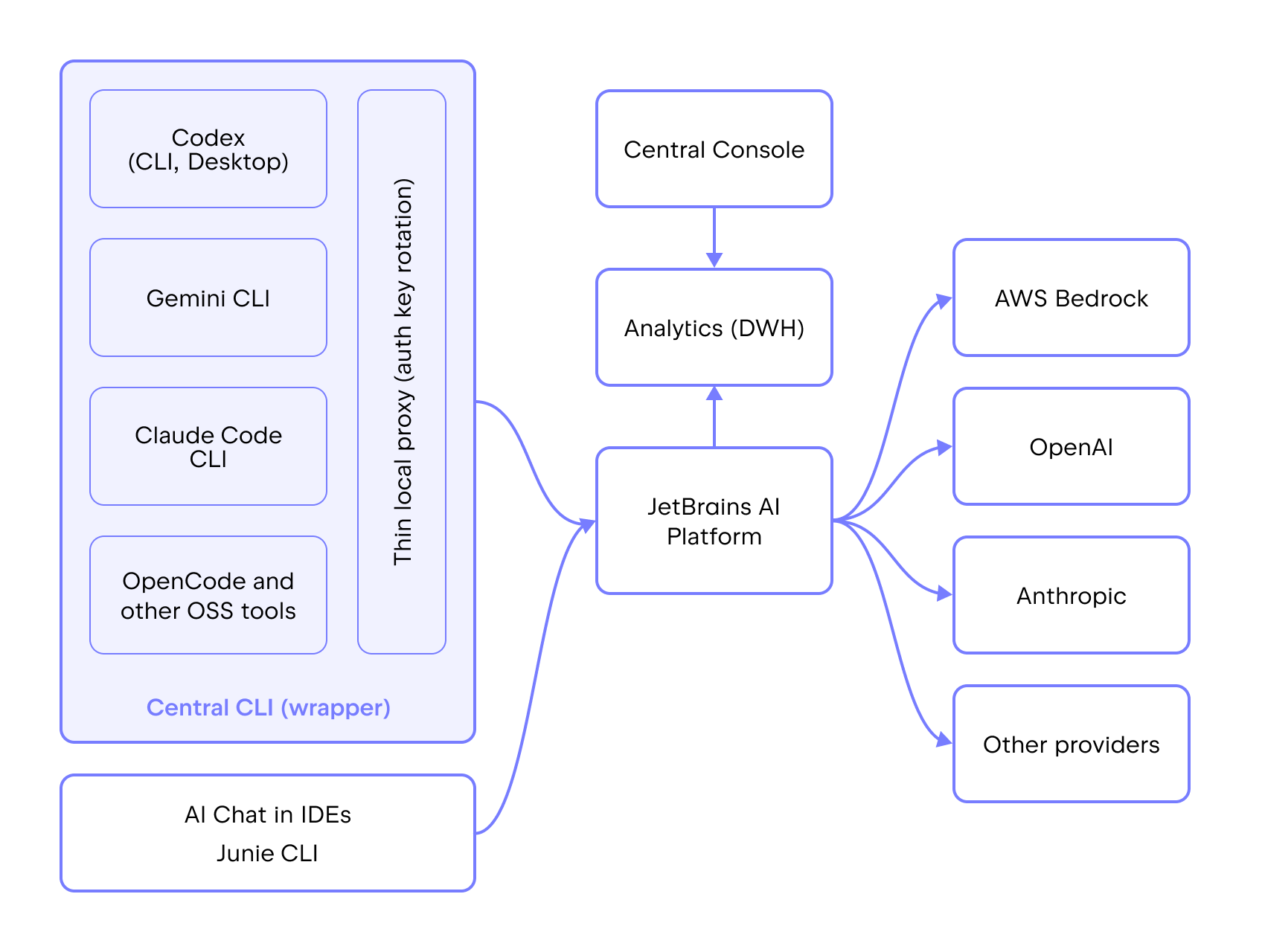 imageCentral CLI の位置づけ
皆が得られるメリットは以下の通りです。
開発者は、好きなモデルを選んだターミナルエージェントを、実質的な管理コストなしで利用できます。承認待ちで数週間も待たされるようなことはもうありません。
マネージャーには以下のような機能が提供されます。
Central Console でレポートの作成と閲覧が可能になります。
- 部署ごとの現在の AI 利用状況・コスト、過去の推移、将来の見込み
- 開発者、エージェント、IDE ごとの AI コストと利用状況の内訳
- 分析 API を通じて他の AI 関連費用とデータを統合した集計情報
各エージェントや IDE において、個々の開発者、チーム、グループに対して細かく設定可能な AI リミットを設定できます。
増加するサードパーティ製 AI プロバイダーとの契約書や請求書の山に悩まされることもなくなります!
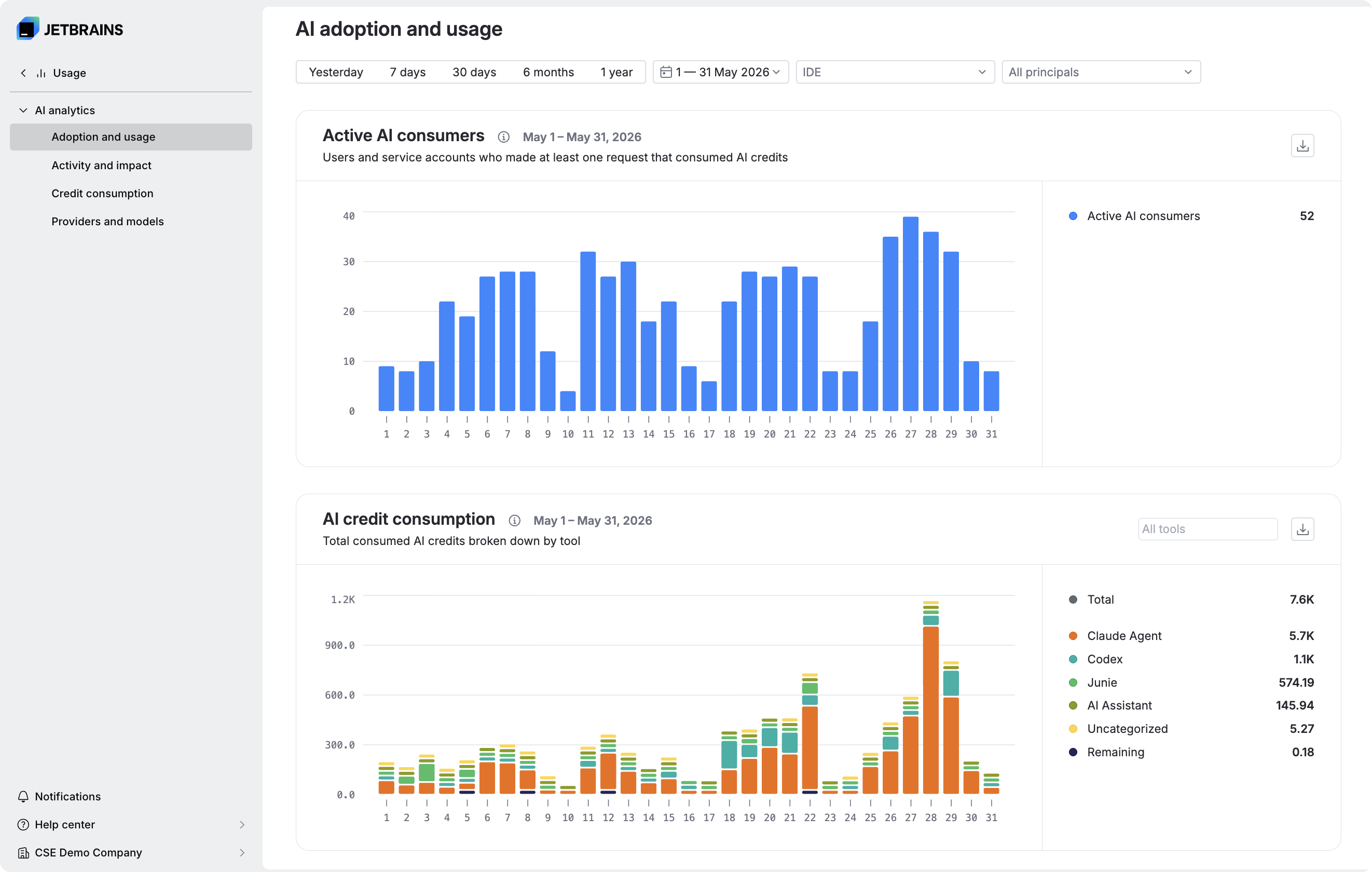 image現在の AI 利用状況・コスト、過去の推移、将来の見込み
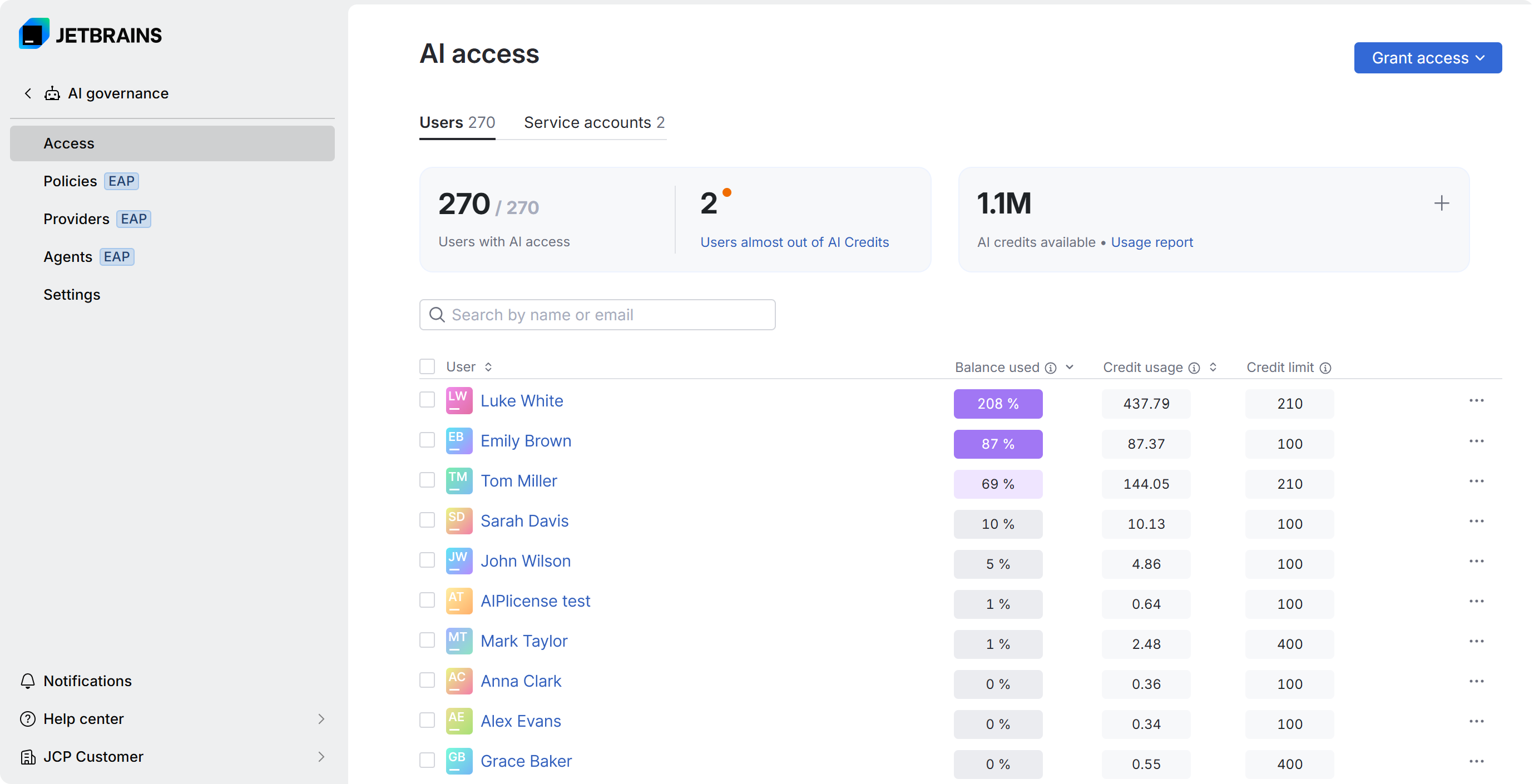 image細かなリミット設定
開発者の AI 利用を管理するからといって、彼らのワークフローを制限する必要はありません。
JetBrains Central CLI をお試しください
オープンソースのツールやスクリプト、その他の部品を使って、このようなものを組み立てることは可能でしょうか?答えはイエスです。実際に私たちが試したからです。しかし、中規模組織(私たちのような)では、追加のオーバーヘッドをかけることなく、デプロイ、設定、メンテナンスの手間をかけずにすぐに使えるソリューションが必要です。開発者は必要な AI ツールにアクセスしたいのであって、誰もが納得できる形で導入するための余計な作業は望んでいません。そこで私たちはこのソリューションを構築しました。
迅速なローンチで何が起きたか
このソリューションを社内ですぐに構築し、数ヶ月のうちに展開しました。これは私たちにとって予想以上に速いペースでした。その過程でいくつかの課題が浮き彫りになりました。
良い問題
急速な成長により、エッジケースが表面化しました。わずか数週間で 1,000 人以上の JetBrains 開発者がこのツールへ移行しましたが、多くの人が特有のエッジケースを持ち込みました。例えば、特定の Windows ターミナルや遠隔地のマシンなどです。私たちはすべてのユーザーに対応できるようログインフローを微調整する必要がありました。
中央 CLI が一夜にしてインフラに
開発者たちは毎日この CLI に依存するようになり、機能リクエストやサポートの問い合わせが殺到しました。CLI チームは小規模ですが、現在の彼らの主な業務はこの需要に応えることです。数ヶ月しか経っていないツールにとって、これは好ましい兆候です。
片付け残し
より細粒度なポリシーが必要でした。AI 利用ポリシーを設定する明確なメカニズムが整った今、次なる課題は「どのようなポリシーを定めるか」です。
開発者がどれほどのリソースを利用できるのか、追加の要求が可能かどうか、クォータを私的な目的で使えるかなどを決定する必要があります。各部署には異なる AI ワークフローと利用パターンが存在します。現在、エンジニアリングマネージャーが権限を持つ高度な権利・許可管理システムの構築を進めています。なぜなら、チームに必要なトークン数や誰が必要としているかを最も理解しているのは彼らだからです。
対象範囲を拡大しています。現在の CLI は、最も人気のある 3 つのターミナルエージェントに対応しています。さらに 4 つが社内ベータ版として進行中です。ニッチなセットアップや個人の AI サブスクリプションは対象外となります。目標は、開発者が最も依存しているツールを通じて流れる AI トラフィックを網羅することです。
実際に試してみましょう
自社でテストユーザーとなった後、7 月 8 日に Central CLI の早期アクセスを開始しました。JetBrains AI クレジットを持つ個人や組織であれば誰でも利用可能です。ただし一点ご注意を:このソリューションは、複数のサードパーティ製ツールにまたがって API ベースの大量利用を行うチーム向けに設計されています。
AI 利用規模が小さく、コストがまだ大きな課題となっていない場合、経済的なメリットは得られない可能性があります。しかし、すでにコスト増による負担を感じているのであれば、検討する価値は十分にあります。
JetBrains Central CLI を試す
JetBrains AI は、チームや組織がアクセスできる複数の入口の一つであり、7 月上旬からベータ版として展開を開始した「エージェント型ソフトウェア開発」のためのシステムです。この CLI(コマンドラインインターフェース)は、開発者が選択するツールやエージェント、モデルといった具体的な機能から、本稿で取り上げたガバナンス層に至るまで、すべての機能を網羅しています。
私たちは着実に前進していますが、まだ取り組むべき課題は山積みです。コメント欄で「もっと知りたい」というトピックがあれば教えてください。これまでの道のりについてか、それとも今後の方向性についてか、何でも歓迎します。
手書きで執筆し、Claude Opus 4-8 で校正(コスト:0.60 ドル):入力 3,900 トークン、出力 3,900 トークン、キャッシュ読み込み 105,300 トークン、キャッシュ書き込み 43,000 トークン
原文を表示
Over the past six months at JetBrains, our AI development expenses have increased roughly 10x. When the costs started rising, of course we noticed – and realized that we simply didn’t know how to control them systematically.
We didn’t know because our developers don’t just use the AI tools we build. They decide for themselves which ones will best help them get their jobs done.
Most of them use between three and five AI tools in a given month. They’re using our IDEs as much as ever – it’s just that now they’ve added more CLI agents, agentic development environments (for running several AI agents in parallel), and IDE-integrated AI tools into the mix.
imageMost JetBrains devs use at least three AI tools.imageThey’re using all those tools in and alongside our IDEs.
One way to address the problem of ballooning costs would be to limit the number of AI tools our developers can use. In discussions with people from other companies, we often hear about decisions to use just one or two options. That would potentially reduce entropy and limit the overhead of managing everything.
However, limiting ourselves in this way would likely cause us to miss out on the best options at any given time. This week the best setup is Claude Code on Opus models, tomorrow it’s Codex, and next week it might be Claude Code on a mix of GLM and Opus.
Ideally there should be a balance between developer freedom and managing this “tooling zoo” in terms of cost, efficiency, budgeting, compliance, and security. Here’s how we’ve tried to strike that balance.
Initial pain points
Skyrocketing costs. Starting in January 2026, we saw a sharp rise in the adoption of AI tools, along with an increase in token consumption. We attribute this spike to the release of the Claude Opus 4.5 and 4.6 models, which significantly improved agent performance. JetBrains developers began using these models in various places, like Claude Code CLI, the AI chat in JetBrains IDEs, and Junie.
After that, usage started almost doubling every month. Soon enough, we hit 150 Claude Code seats and moved onto the Enterprise plan with rates based on API usage. That’s when costs really took off.
imageOur AI spend increased roughly 10x in the first half of 2026.
Admin headaches. Average consumption per developer was rising. So was the number of developers who wanted access to different tools – to compare Claude Code to Codex or to try third-party agents, for example. Several people needed to sign off on each request. The tickets piled up for administrators, and the wait times slowed down developers.
Experimenting our way to a solution
Manual spreadsheet work → unsustainable
Our tooling zoo had grown to include the various agents available through the AI сhat in JetBrains IDEs, as well as Junie CLI, the CLI and desktop versions of Claude Code and Codex, Cursor, GitHub Copilot, and a long tail of other tools. To start forecasting and managing this growth – as well its costs – we manually opened up different consoles, downloaded data, and grouped it across several dimensions by department and business unit.
This one-time exercise took four days. We had a snapshot of the situation and not much else when it came to setting organizational usage or managing them on an ongoing basis. This was a reasonable start, but that time commitment obviously made it an unsustainable approach moving forward.
Internal dashboards → ongoing expenses read-only
Most AI tools, including JetBrains ones, have centralized APIs that allow you to pull per-user usage data. We put together a couple of quick-and-dirty solutions that did so (and tried a few more polished third-party ones) and combined the results into dashboards mapped to our organizational structure. This allowed us to drill down into ongoing expenses, but we still couldn’t set or enforce spending limits conveniently.
Internal console and a CLI wrapper → the winning prototype
For our own AI tools, we already had a management console with analytics for consumption and efficiency baked in. It just didn’t cover third-party tools – which was exactly where most of our growth was happening.
One of our developers had quietly built a CLI wrapper for his own use: to authenticate his JetBrains account, send requests through our AI traffic routing layer, and debug local third-party agents during development. It was a personal tool, not a governance one, but it turned out to be the piece we were missing.
From prototype to product
At the beginning of April 2026, we set out to turn the repurposed personal debugging tool into a product every JetBrains developer could and would actually use. That meant it had to:
Handle authentication, removing login hassles.
Auto-detect installed agents, so time was no longer wasted on configuration.
Send all requests through our traffic routing layer, allowing us to apply token budgeting rules to third-party tools (as well as our own) in the form of AI credits.
Stay compliant with our security, encryption, and access isolation requirements.
Some of this we already had. The JetBrains AI Platform is our under-the-hood AI router, and it has powered JetBrains AI for our customers and individual developers since 2023, handling more than a billion LLM requests with solid stability. On the server side, we were collecting consumption statistics and other metrics, processing them through an ETL pipeline into separate, highly elastic storage in asynchronous mode – storage that met the requirements above. We were also applying AI credit budgets to our own tools.
Over the next two months, we refined the CLI wrapper into the JetBrains Central CLI.
imageWhere the Central CLI fits in.
How we are all benefitting:
Developers are running terminal agents with whatever models they want with virtually no administrative friction – no more waiting weeks for approvals.
Managers can:
Create and view reports in the Central Console showing:
Current, historical, and forecasted AI consumption and costs for their departments.
Distribution of AI costs and usage by developer, agent, and IDE.
All the data aggregated with other AI expenses through an analytics API.
Set granular AI limits for individual developers, teams, and groups across every agent and IDE.
Eliminate the piles of contracts and invoices from a growing list of third-party AI providers!
imageCurrent, historical, and forecasted AI consumption and costs.
imageGranular limits.
Governing developers’ AI usage shouldn’t mean cramping their workflows.
Try the JetBrains Central CLI
Is it possible to piece together something like this with open-source tools, scripts, and other spare parts? Yes. We know because we tried. But mid-size organizations (like ours) want a solution to work reliably out of the box without extra overhead for deployment, configuration, and maintenance. Developers want access to the AI tools they need, not extra work getting them in a way that everyone is happy with. That’s why we built this solution.
What happened when we launched fast
We built and rolled out this solution internally in a couple months. That was unexpectedly fast for us, and it came with:
Good problems
Rapid growth found the edge cases. Over a thousand JetBrains developers switched to this tool in just a few weeks. Many of them, however, brought edge cases – an obscure Windows terminal here, a remote machine there. We had to work on fine-tuning our login flow to cover everyone.
The Central CLI became infrastructure overnight. Our developers began depending on it every day, and feature requests and support questions came along with that. The CLI team is small, and keeping up with that demand is most of what they do right now, which is a good sign for a tool that’s a few months old.
Loose ends
We needed more granular policies. Now that we had a clear mechanism for setting AI usage policies, the next question was what those policies should be. We needed to determine how much a given developer can consume, whether they can request more, whether they can use their quota for personal purposes, etc. Many departments have different AI workflows and consumption patterns. We’re now working on an advanced rights and permission system that puts limits in the hands of engineering managers, since they’re the ones who know how many tokens their team needs and who needs them.
We’re expanding coverage. The CLI currently supports three of the most popular terminal agents. Four more are in internal Beta. Niche setups and personal AI subscriptions will remain out of scope, as our goal is to cover the AI traffic running through the tools developers rely on most.
Try it for yourself
After being our own test subjects, on July 8 we opened the Central CLI to early access. It’s available to anyone, individual or organization, who has JetBrains AI credits. A quick heads up: This solution is designed for teams running heavy API-based usage across multiple third-party tools. If your AI usage is not that big and costs aren’t yet a pressure point, the economics probably won’t work in your favor. But if you’re already feeling the pinch, it’s worth a look.
Try the JetBrains Central CLI
The CLI is one of several entry points into JetBrains AI for teams and organizations, our system for agentic software development, which we started rolling out in early access in July. It covers everything, from the tools, agents, and models developers choose to the governance layer this post has been about.
We’ve made fast progress, but we’ve got plenty of work still in front of us. Let us know in the comments what you’d like to hear more about – whether that’s how we got here, or where we’re headed next.
Written by hand, proofed by claude-opus-4-8 ($0.60): 3.9k input, 3.9k output, 105.3k cache read, 43.0k cache write
今日のまとめ
AIデイリーブリーフで今日の重要ニュースをまとめ読み