Anthropic、Claude Code のセッション価値最大化を解説
本文の状態
日本語全文を表示中
詳細モードで約16分の本文を読めます。
同じ出来事の情報源
この情報源を基点に整理
Claude Blog
リクエストは GPU でプリフィル(入力読み込み)とデコード(出力生成)の 2 フェーズを経て処理され、1 トークンあたりのデコード時間が長いため、出力コストは入力コストのおよそ 5 倍になる。
AI深層分析を開く2026年8月14日 23:37
AI深層分析
キーポイント
トークン処理のコスト構造
リクエストは GPU でプリフィル(入力読み込み)とデコード(出力生成)の 2 フェーズを経て処理され、1 トークンあたりのデコード時間が長いため、出力コストは入力コストのおよそ 5 倍になる。
思考レベルとトークン制御
セッションごとの思考量は「effort」設定で制御され、/model や /effort コマンドで現在の設定を確認できるほか、重労働タスクには MAX_THINKING_TOKENS=0 で思考を無効化できる。
プロンプトキャッシングの仕組み
リクエストの先頭トークンが直前のリクエストと完全に一致する場合、サーバーは共有された状態をキャッシュから読み取り(コスト 0.1x)、新しいトークンを追加して書き込む(コスト最大 2x)ことで効率化する。
コスト増加の回避策
Claude Code はリクエストごとに自動的にプロンプトキャッシュを管理するが、システムプロンプトや CLAUDE.md の変更などによってキャッシュが破綻するとコストが急増するため、その仕組みを理解して避ける必要がある。
キャッシュの効率的な利用とコスト構造
会話履歴は先頭から完全に一致している限りキャッシュとして読み出され、新しい部分のみがフル価格で処理される。
重要な引用
Per token, decode keeps the GPU busy for a lot longer, which is why output is priced at roughly 5x input.
Reading from the cache costs 0.1x the input price, because the server loads the state instead of computing it.
This applies on a subscription too. You don't see these prices directly, but the same requests are what draw down your limits.
If anything in that prefix changes, everything behind it gets prefilled again.
編集コメントを表示
編集コメント
本記事は、LLM の利用コストが単なるトークン数だけでなく、処理フェーズやキャッシュ状態に依存することを示しており、開発者がコスト管理をより戦略的に行うための重要な指針となる。特にプロンプトキャッシングの挙動を理解することは、大規模なコード生成タスクにおける運用効率化に直結する。
Source Article
元記事を日本語で読む
本文に関係しない購読案内、埋め込み通知、サイト内プロモーションは除いています。
入力トークンと出力トークン
リクエストは GPU を通じて 2 つのフェーズを経て処理されますが、それぞれのフェーズでかかるコストは異なります。
まず「prefill(事前計算)」フェーズでは、モデルが入力を読み込みます。ここにはシステムプロンプト、CLAUDE.md ファイル、ユーザーからのメッセージ、そして会話履歴に含まれるすべての情報(Claude が読み込んだファイルや実行したコマンドの出力など)が含まれます。これらすべてが「入力トークン」となります。
次に「decode(生成)」フェーズでは、モデルは出力トークンを生成します。これは思考プロセス、実行するツール呼び出し、そしてユーザーが目にするテキストです。この処理は 1 トークンずつ逐次行われます。200 トークンの回答を生成するには、モデルが 200 回連続して実行されることになります。1 トークンあたりの処理時間を見ると、decode フェーズでは GPU が長時間稼働し続けるため、出力トークンは入力トークンのおよそ 5 倍の価格設定となっています。
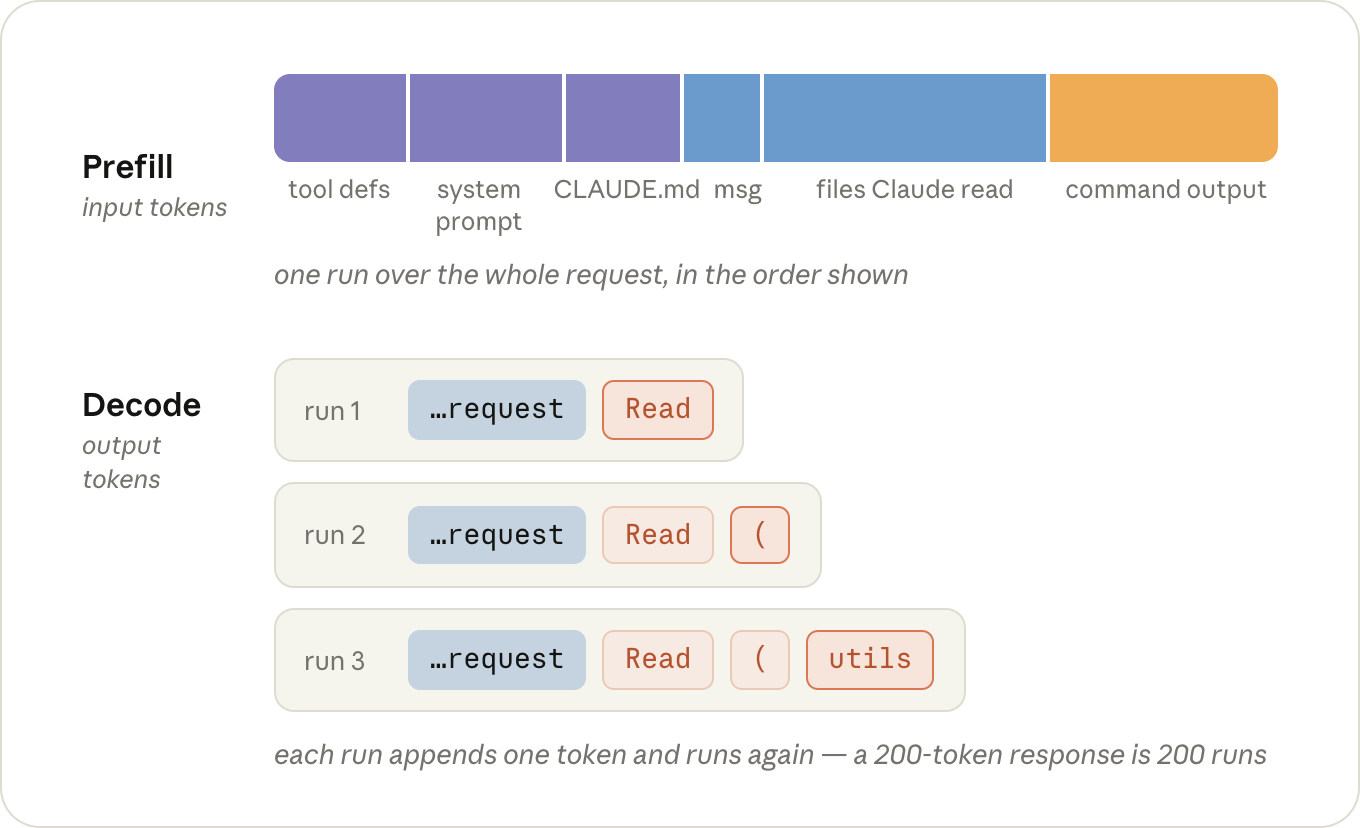
セッションで生成されるトークンの多くは思考に費やされており、1 回のやり取りでモデルがどの程度「考えるか」を決定するのが、/effort コマンドによる設定レベルです。この設定はモデルと同様に、選択したレベルが次のセッションでもデフォルトとして保持されます。
ヒント: 新しいセッションで
/modelと/effortを一度ずつ実行して、自分が何を使っているか確認しましょう。どちらも前回選んだ設定を記憶していますから、その選択は意図的に行うようにしてください。
ヒント: すでにそのセッションが地味な作業になることが分かっている場合、
MAX_THINKING_TOKENS=0を設定して claude コマンドを実行すれば、そのセッションだけ思考機能をオフにできます(Fable 5 の場合は除く)。これは/effortlow よりもさらに下のレベルです。
プロンプトキャッシュ
リクエストが、サーバーが直前に処理したリクエストと完全に同じトークンで始まる場合、共有される先頭部分の状態も同一になります。そのためサーバーは過去の状態を保持し、その後に続く部分のみを事前計算(prefill)すればよくなります。これを「プロンプトキャッシュ」と呼びます。
キャッシュからの読み取りコストは入力価格の 0.1 倍です。これはサーバーが計算するのではなく、保存された状態を読み込むためです。一方、キャッシュへの書き込みコストは通常の入力よりやや高く、最大で 2 倍になります。これはサーバーがその後も状態を保持し続ける必要があるためです。ただし、書き込みはトークンごとに一度だけ発生し、読み取り(0.1 倍)はその後のすべてのターンで利用可能です。
Claude Code はすべてのリクエストでプロンプトキャッシュを自動的に管理します。有効化や無効化のオプションはありません。しかし、意図せずキャッシュを破損させるケースもあるため、コストが急増する原因となる行動を避ける方法を理解しておくことが重要です。
例えば、「utils.test.ts の failing test を修正して」と入力したとしましょう。この際、Claude Code は以下のようなリクエストを送信します。
- Claude Code は、システムプロンプト(ツール定義を含む)、あなたの
CLAUDE.mdファイル、そしてユーザーからのメッセージを組み合わせて最初のリクエストを作成し、送信します(入力トークン)。まだキャッシュには何も格納されていないため、すべての内容が事前計算され、キャッシュに書き込まれます。
モデルは未確認のテストを修正できないため、一瞬考えて utils.test.ts への Read コールを発行します(出力トークン)。Claude Code はこのファイルを読み込み会話に追加し、全体を再送信します(入力トークン)。今回はリクエスト 1 の内容がすべてキャッシュから読み出され、料金の 10 分の 1 で済みます。フル価格で課金されるのは新規部分のみです。つまり、Read コールとファイルそのものです。
次にモデルはテスト対象のファイルを要求します(出力)。再度 Read を発行し、結果を会話に追加して再送信します。リクエスト 1 と 2 はキャッシュから読み出され、2 つ目のファイルだけがフル価格で課金されます(入力)。
モデルは Edit コールを発行します(出力)。Claude Code がこれを適用し、結果を会話に追加して再送信します。内容は同じです。Edit コールとその結果が新規部分であり、それ以前のすべてはキャッシュ読み出しとして処理されます(入力)。
モデルは npm test を実行します(出力)。Claude Code はテスト結果を会話に追加し、全体を再送信します。この際、テスト結果だけが新規部分となります(入力)。
テストがパスすると、モデルは短い要約を返します(出力)。ツール呼び出しがないため、追加する内容もリクエスト 6 も発生せず、処理は完了です。
小さな修正のために 5 つのリクエストが発生しましたが、それぞれにその時点までの会話全体が含まれていました。典型的なターンでは、入力トークンが数万語に達するのに対し、出力は数百語程度と不均衡です。ただし、フル価格で課金されるのは各ターンにおける新規部分のみです。
1 通あたりの請求額は、履歴のキャッシュ読み出し分、新規入力分の全額、および応答出力分に相当します。
この仕組みはサブスクリプションプランにも適用されます。料金を直接表示されることはありませんが、同じリクエストが利用限度額の減額に直結します。
キャッシュ判定はリクエストの先頭から行われます。リクエスト送信順序は常に一定で、ツール定義、システムプロンプト、そして会話(CLAUDE.md が最前面)という順です。
このプレフィックス内のどこかに変更が生じると、その後の全内容が再プリフィルされます。会話の末尾にツール結果を追加するケースが最もキャッシュ効率が良いのは、後ろに何も残らないためです。キャッシュが無効化される要因は、リクエストのより前方での変更や、キャッシュのキーとなる要素自体の変化です。
/model: 各モデルには独自のキャッシュが用意されているため、次のターンでは会話全体が再びフル価格でプリフィルされます。(これには opusplan も含まれます。このプランでは、プランモードに入ったり出たりするたびにモデルが切り替わります。)
「/effort」コマンドもキャッシュのキーの一部に含まれるため、同じことが言えます。そのため、会話中に /model や /effort を切り替える際は、必ず確認を求められます。
また、「Fast mode(高速モード)」もキーに含まれており、リプリフィル(再事前読み込み)は高速モードの価格で計算されます。そのため、この機能をオンにする場合は、最初からオンにしておくことをお勧めします。 (原文の技術表記: /effort:)
(キャッシュの観点からは、再度オフにしても無料です。)
Claude Code のセッションで価値を最大化する方法
/compact: 会話内容が短いものに置き換えられるため、以前のやり取りとの整合性が失われます(ただし、その前にあるシステムプロンプトは維持されます)。古い会話がキャッシュに残っている限り、サマリー自体を作成するコストは非常に低いため、長い中断の前に行う方が、中断後よりも大幅に安価になります。- 時間: 各ターンでタイマーがリセットされますが、サブスクリプションでは 1 時間、API キーでは 5 分後にキャッシュの有効期限が切れます(
ENABLE_PROMPT_CACHING_1H=1を設定すると 1 時間になります)。それ以降に再度アクセスすると、次のターンで会話全体が再入力されます。古いセッションを再開する場合も同様です:通常その頃にはキャッシュは消去されており、起動時にシステムプロンプトが再構築されるためです。
これは、モデルや努力を一切切り替えてはいけないという意味ではありません。重要なのは、いつ切り替えればコストを抑えられるかです。セッションの開始時や /clear コマンド直後が「安価なタイミング」であり、長い会話の最中は「高価なタイミング」となります。
ヒント: 直近の数ターンで望まない方向に進んでしまった場合は、
/compactを実行するのではなく、その手前まで/rewindしてください。リワインドは末尾のターンだけを削除するため、それ以前の会話はキャッシュされたままになり、コストもかかりません。一方、コンパクト化は会話全体を書き直す処理なので、必ず何らかのコストが発生します。
クロード・コードのセッションで送信されるトークン数を決定する要因
ここで最も重要なのは、一度だけ送信されるデータは存在しないという点です。会話に含まれるすべての情報、つまりクロードが読み込んだファイルや実行したコマンドの結果などは、その後のすべてのターンにおいて、セッション終了まで繰り返し送信され続けます。
これらはキャッシュされているため、再送にかかるコストは低く抑えられます。しかし、「安い」からといって「無視できる」わけではありません。また、モデルが各ターンで処理するコンテキストの容量を圧迫するという問題もあります。
つまり、セッションのコスト構造を一言で表すなら、以下の3点がすべてです。
- コンテキスト内に最終的に含まれるトークン数
- それらがコンテキスト内に留まるターン数
- 同時に実行されているコンテキストの数
コンテキストに含まれるもの
入力する前にすでにコンテキストに含まれている要素があります。具体的には、ツールの定義やシステムプロンプト、CLAUDE.md ファイル、そして起動時に読み込まれるその他の情報です。
ヒント:新しいセッションで /context を実行して、入力する前に何が含まれているか確認してください。CLAUDE.md には特定の指示を保存し、ワークフロー固有のものはスキルに移行しましょう。スキルは使用されたときにのみ読み込まれます。このセッションで不要な MCP サーバーがある場合は、/mcp で無効にできます。
セッション中に追加されるほぼすべての内容は、ツールの結果です。つまり、Claude が参照するファイルや実行したコマンドの出力のことです。
Claude が参照する情報の量は、主に「自分で判断しなければならない範囲」にかかっています。「テストが失敗している」と言っただけだと、まずどのテストが失敗しているかを特定する必要があります。grep コマンドを数回実行したり、関連するファイルを確認するためにいくつかのファイルをオープンしたりしますが、それらの結果はすでに不要になった後もコンテキスト内に長く残ってしまいます。
utils.test.ts の failing test を修正する」という指示ではファイル検索がスキップされ、1 つの Read コストが発生します。一方、@utils.test.ts とアットマーク付きで指定した場合は、Read コストは発生しません。
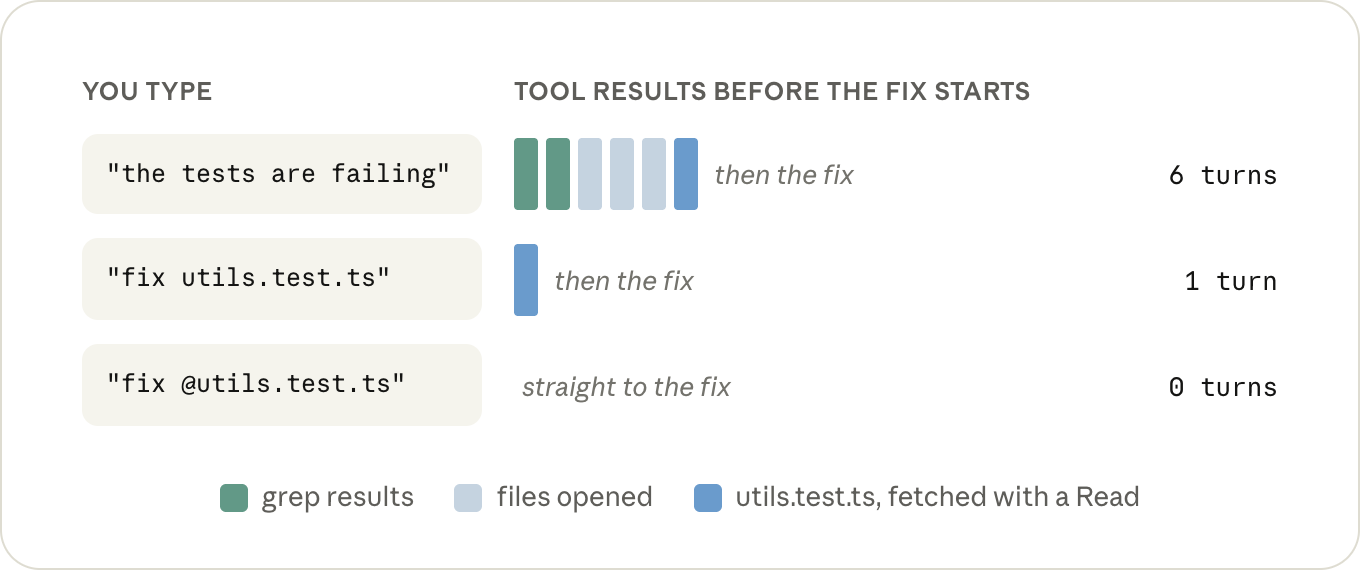
ヒント: ファイルを参照する際は、パスを入力するのではなくアットマーク(@)でメンションしてください。Claude Code はメッセージ送信前にファイルを添付するため、最初のリクエストですでにファイルが利用可能になっています。これにより Read コストは発生しません。どちらの方法でもコンテキスト内の容量は同じですが、会話内で一度だけメンションすれば十分です。一度添付されたファイルは保持され続けるため、後続のやり取りで再度 @-mention しても、実際には2つ目のコピーが添付されるだけで無駄になります。
コンテキストを圧迫するもう一つの要因は、Claude が実行したコマンドの出力です。テストの実行やビルド、git log の取得など、何らかの出力が発生すると、それは読み込んだファイルと同様に会話履歴に追加され、一定数のターンにわたって保持されます。
非常に大きな出力でも問題ありません。30,000 文字を超えると、Claude Code は自動的にその出力をファイルに書き出し、会話内には短いプレビューとファイルパスのみを表示します(BASH_MAX_OUTPUT_LENGTH を変更すればこの挙動も調整可能です)。
問題は、その閾値以下の出力です。例えば、テストランナーが 400 の合格したテスト結果を一行ずつ表示するケースでは、総文字数は制限内に収まりますが、その 400 行分が会話の残りのすべてのターンに含まれてしまうことになります。
Claude は通常、フラグや tail コマンドを使ってこの問題を解決してくれます。もし Claude に任せたくない場合は、ドキュメントに載っている小さなフック機能を利用できます。これを使えば、実行前にノイズの多いコマンドを自動的に書き換え、必要な行のみが返されるように制御できます。
ヒント: 1 日中頻繁に使用する 2〜3 のコマンドを
CLAUDE.mdに登録しておきましょう。その際、静かに動作させるためのフラグも忘れずに含めてください(例:npx vitest run --reporter=dot で単一のテストファイルを実行するなど)。これはわずかな追加作業ですが、それ以降のセッションで 1 ターンと数百行分の出力を節約できる大きなメリットがあります。 (原文の技術表記:npx vitest run --reporter=dot")
一度に保持するターン数
一度の長いセッションで作業を行うと、同じ内容を短いセッションに分けて行う場合よりも、予想以上にコストがかかります。その理由は、40番目のターンではそれ以前の39回のやり取りをすべて再読しているからです。
セッション内のコンテキストは短く、かつ関連性が高い状態に保つことが重要です。あるタスクの文脈を次のタスクに持ち越さないようにしましょう。新しい作業を開始する際は /clear を実行し、同じタスクの前半部分が完了した際には /compact を使用してください。
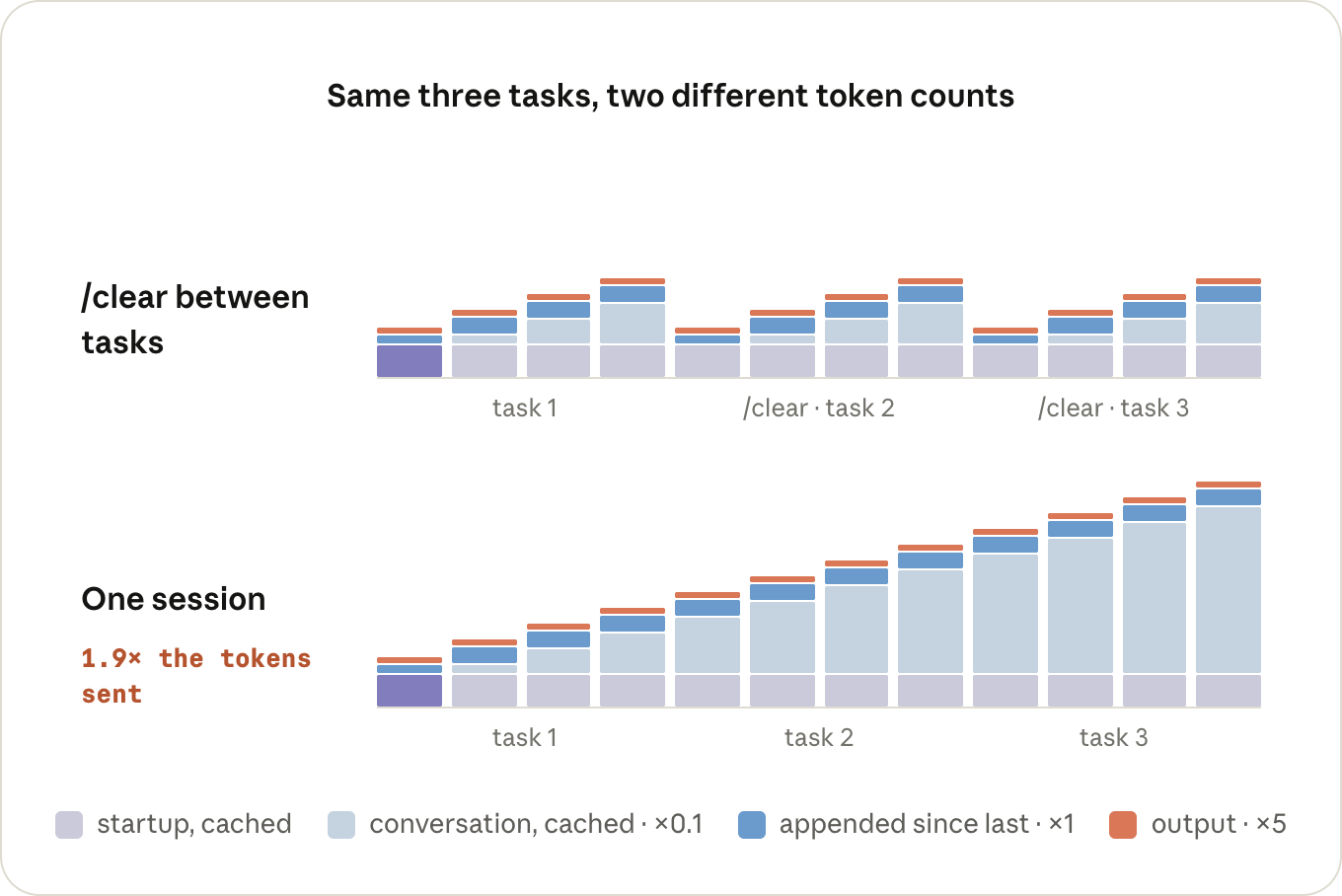
ヒント: セッションを後で再利用したい場合は、
/clearを実行する前に/renameを使いましょう。また、/compactを使用する際は、何を残すかを指定するか、「Compact instructions」を設定してください。
CLAUDE.md のセクションで、常に同じ内容である場合は記述してください。
もし 1M モデルを使用していて、以前のような自動コンパクトの安全ネットを復活させたい場合は、/autocompact 200k を実行してください(Claude Code v2.1.221 以上が必要です)。
タイピングしていない間にも発生するターンに注意を払ってください。/loop コマンドは、設定したセッション内で完全なターンとして実行され、その会話全体を引き継ぎながら毎回実行されます。もし最後のターンから 1 時間以上経過している場合、キャッシュミスが発生している可能性があります。別のターミナルで新しいセッションを開始し、そこからループを実行することを検討してください。
サブエージェント
コンテキストから何かを除外するもう一つの方法は、それを別のコンテキストで行うことです。それがサブエージェントの役割です。
サブエージェントは独自のコンテキストウィンドウを持ち、システムプロンプト、ツール、そして CLAUDE.md を利用できますが、メインセッションとの会話履歴は共有されません。サブエージェントは独自にターンを実行し、メインセッションに戻ってくるのはその回答のみです。それ以外の情報はすべて完了後に破棄されます。
デメリットとして、会話履歴を共有しないため、サブエージェントはメインセッションで既に処理済みの情報を再度読み込む必要がある場合があります。また、その間も独自のターンに対して課金され続けます。小規模なタスクであれば、これは単なるオーバーヘッドに過ぎません。
しかし、ログの解析など、大量の出力が発生するが保持する必要がない作業においてはコスト対効果が高まります。Claude はそのようなケースでは自発的にサブエージェントを利用することが多く、必要に応じてユーザーが直接指示を出すことも可能です(例:"go through this log in a subagent")。ただし、メインセッションで得られるのは、サブエージェントが報告を選択した情報だけである点は留意してください。
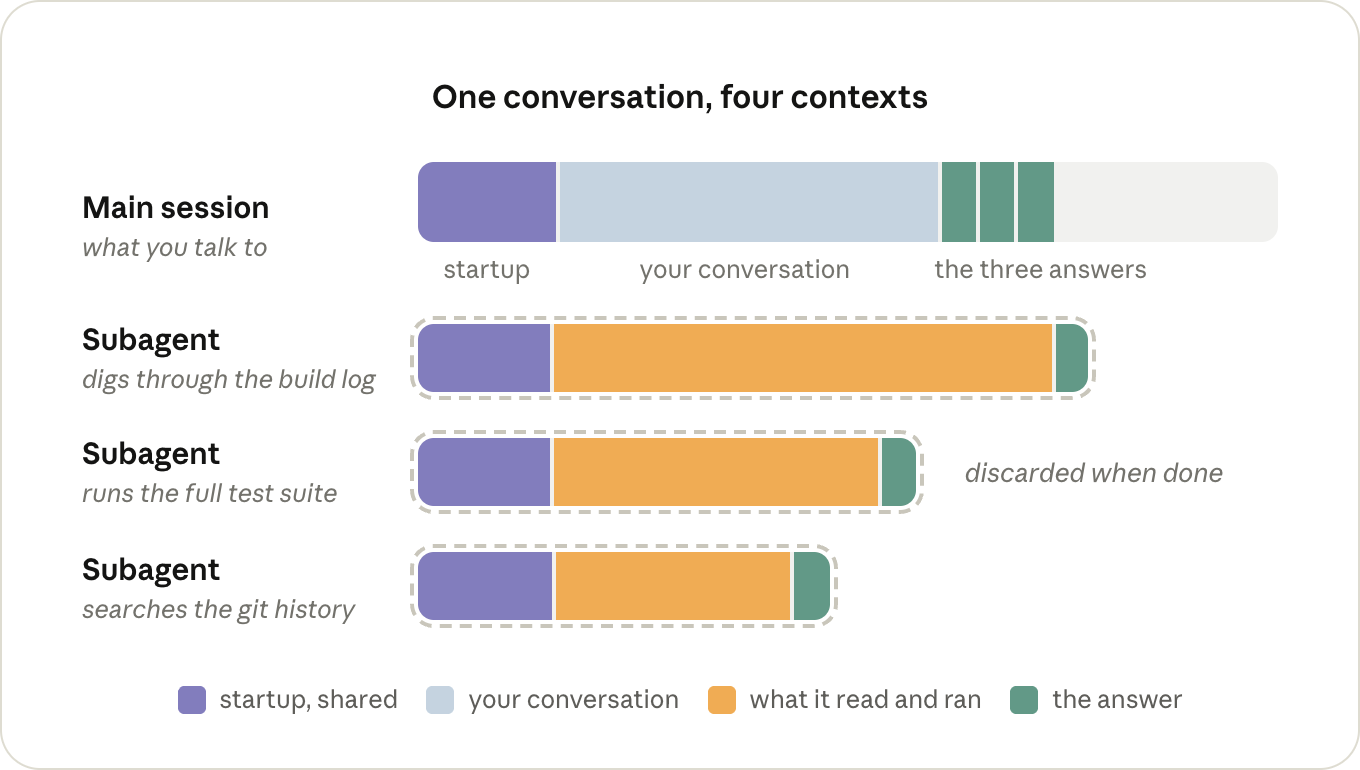
ヒント: 繰り返し手放す必要があるノイズの多いタスクがある場合は、モデルを haiku(または sonnet)に指定した独自のサブエージェント定義を作成してください。そうしないと、メインセッションと同じ環境で実行されることになります。
まず確認すべきポイント
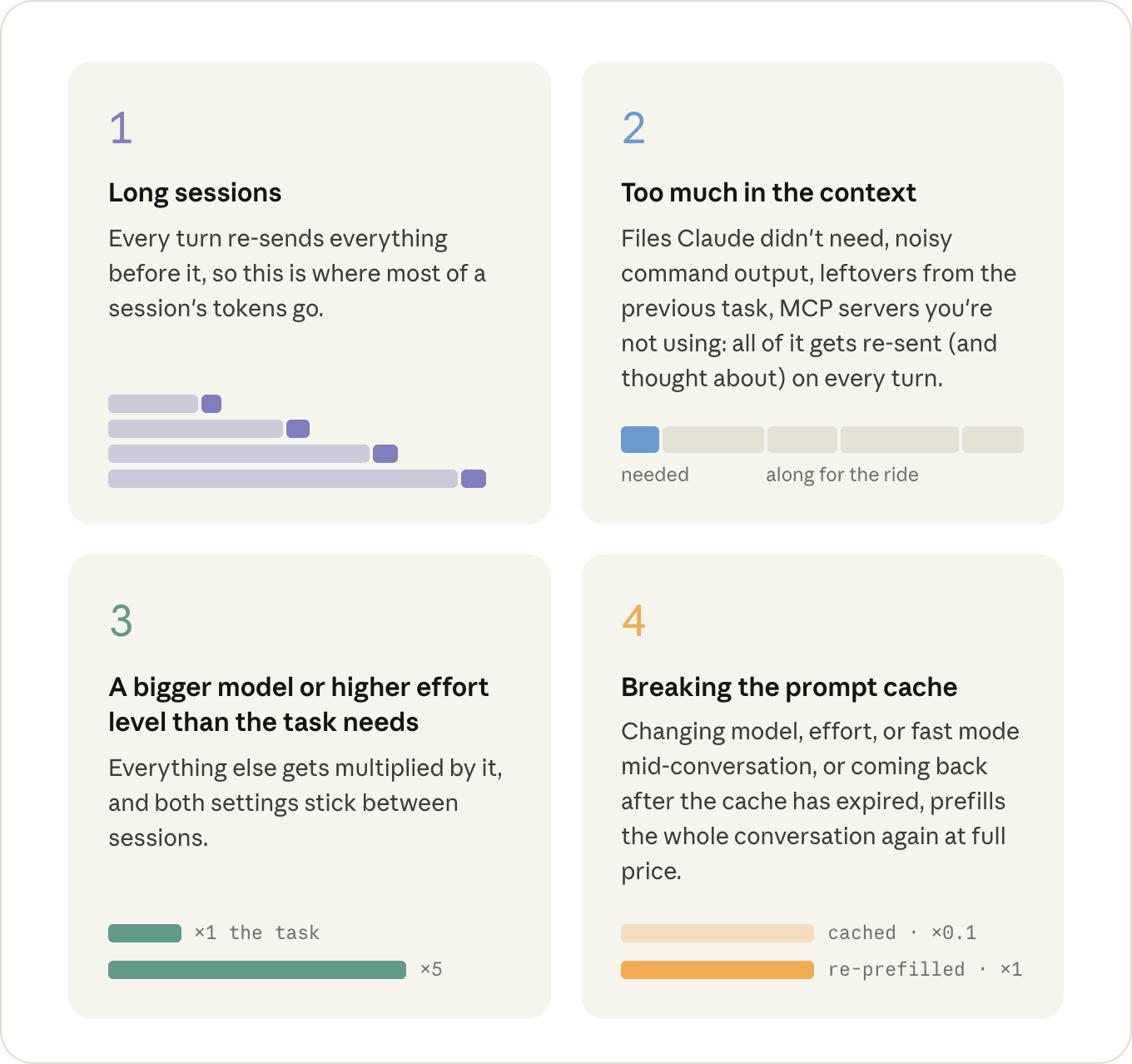
上記の内容の中で、特にコストの影響が大きい順に注目すべき4つの要素があります:
原文を表示
Input and output tokens
A request goes through the GPU in two phases, and they cost different amounts.
First, during prefill, the model reads your request and context: the system prompt, your CLAUDE.md, your message, and everything that's been added to the conversation since (the files Claude has read and the output of the commands it ran). Those are your input tokens.
Then, during decode, it writes output tokens: its thinking, the tool calls it makes, and the text you see. This happens one token at a time; a 200-token response is 200 runs of the model, one after the other. Per token, decode keeps the GPU busy for a lot longer, which is why output is priced at roughly 5x input.
A lot of the output tokens in a session are thinking tokens, and how much thinking the model does per turn is what the effort level controls. Like the model, the level you pick with /effort sticks around as your default for the next session too.
Tip: run /model and /effort once in a fresh session to see what you're actually on. Both remember whatever you picked last time, and you want that decision to be deliberate.
Tip: if you already know a session is going to be grunt work, MAX_THINKING_TOKENS=0 claude turns thinking off for that one session (except on Fable 5), which is the step below /effort low.
Prompt caching
If a request starts with exactly the same tokens as a request the server just saw, the state for that shared beginning comes out the same, so the server can keep it around from last time and only prefill whatever comes after it. This is called prompt caching.
Reading from the cache costs 0.1x the input price, because the server loads the state instead of computing it. Writing tokens into the cache costs a bit more than normal input, up to 2x, since the server also has to hold on to the state afterwards. But the write happens once per token, and the 0.1x reads happen on every turn after it.
Claude Code manages the prompt cache on every request, there's nothing to turn on. However you can break it, so it's important to know how to avoid these cost spikes.
Say we type "fix the failing test in utils.test.ts". Here's what Claude Code sends for it:
- Claude Code assembles the first request out of the system prompt (tool definitions included), your CLAUDE.md, and your message, and sends it off (input tokens). Nothing is in the cache yet, so all of it gets prefilled and written into the cache.
- The model can't fix a test it hasn't seen, so it thinks for a moment and responds with a Read call for utils.test.ts (output tokens). Claude Code reads the file, appends it to the conversation, and sends the whole thing again (input tokens). This time everything from request 1 is read back out of the cache at a tenth of the price, and the only thing prefilled at full price is what's new: the Read call and the file.
- Now the model wants the file under test (output). Another Read, another append, and everything goes out again: requests 1 and 2 from the cache, the second file at full price (input).
- The model responds with an Edit (output). Claude Code applies it, appends the result, and sends everything again. Same story: the Edit and its result are new, everything in front of them is a cache read (input).
- The model runs npm test (output). Claude Code appends the test output and sends everything again, with the test output as the only new part (input).
- The tests pass, and the model responds with a short summary (output). No tool call means nothing to append and no request 6, so we're done.
That's five requests for one small fix, and every one of them contained the entire conversation up to that point. A typical turn is lopsided: tens of thousands of tokens going in, a few hundred coming out. But only what's new in that turn gets prefilled at full price.
That's the whole per-turn bill: cache reads on the history, full input price on whatever's new, and the output price on the response.
This applies on a subscription too. You don't see these prices directly, but the same requests are what draw down your limits.
The cache has to match from the very start of the request forward, and requests always go out in the same order: tool definitions, then the system prompt, then the conversation (with CLAUDE.md at the front of it).
If anything in that prefix changes, everything behind it gets prefilled again. A tool result appended to the end of the conversation is the ideal case, since nothing is behind it. What throws the cache away is anything that changes the request further towards the front, or changes what the cache is keyed on:
- /model: every model has its own cache, so on the next turn the entire conversation gets prefilled again at full price. (This includes opusplan, which switches models every time you go in or out of plan mode.)
- /effort: the effort level is part of what the cache is keyed on too, so it's the same story. It's why both /model and /effort ask you to confirm when you switch in the middle of a conversation.
- Fast mode: also part of the key, and the re-prefill happens at fast mode prices, so if you're going to turn it on, turn it on at the start. (Turning it off again is free, cache-wise.)
- /compact: the conversation gets replaced with a shorter one, so nothing in it matches anymore (the system prompt in front of it survives). Writing the summary itself is cheap as long as the old conversation is still in the cache, so it's a lot cheaper before a long break than after one.
- Time: every turn resets the clock, but the cache expires after an hour on a subscription or five minutes on an API key (ENABLE_PROMPT_CACHING_1H=1 makes it an hour). Come back later than that, and the next turn prefills the whole conversation again. Resuming an old session almost always does too: the cache is usually gone by then, and the system prompt gets rebuilt at launch anyway.
None of this means you should never switch models or effort. It means there are cheap moments to do it, the start of a session or right after a /clear, and expensive ones, the middle of a long conversation.
Tip: if the last few turns went somewhere you don't want to keep, /rewind to just before them instead of running /compact. Rewinding only cuts those turns off the end, so everything before them is still cached and it costs nothing. Compacting rewrites the whole conversation, so it always costs something.
What decides how many tokens a session sends
The main thing to know here is that nothing gets sent just once. Everything that ends up in the conversation, a file Claude read or the output of a command it ran, gets sent again on every turn after it, for the rest of the session.
It's cached, so each of those re-sends is cheap, but cheap isn't nothing, and it's taking up room in the context the model has to think around on every turn too.
That's really the whole cost model of a session: how many tokens end up in the context, how many turns they stay there, and how many contexts you're running at the same time.
What ends up in the context
Part of what's in the context is there before you type anything: the tool definitions, the system prompt, CLAUDE.md, and whatever else gets loaded at startup.
Tip: run /context in a fresh session to see what's in there before you've typed anything. Keep CLAUDE.md to specific instructions and move workflow-specific ones into skills, which only get loaded when they're used. If there's an MCP server you don't need in this session, turn it off with /mcp.
Nearly everything else that gets added during the session is tool results: the files Claude reads, and the output of the commands it runs.
How much Claude reads mostly comes down to how much it has to figure out on its own. If you say "the tests are failing", it first has to find out which tests: a grep or two, a few files opened to see which one is relevant, and all of those results stay in the context long after they've stopped being useful.
"Fix the failing test in utils.test.ts" skips the searching and costs one Read call for the file, and "Fix the failing test in @utils.test.ts" doesn't cost the Read call either.
Tip: when you're referring to a file, @-mention it instead of typing the path. Claude Code attaches the file to your message before anything gets sent, so it's in the very first request and there's no Read call for it. The file itself takes up the same room in the context either way, so you only need to mention it once per conversation: it stays there, and @-mentioning it again on a later turn generally attaches a second copy.
The other thing that fills up the context is the output of the commands Claude runs. Every time it runs your tests, a build, or a git log, whatever that prints gets appended to the conversation just like a file it read, and stays there for the same number of turns.
Really big outputs are actually fine: after 30,000 characters Claude Code writes the output to a file and only puts a short preview and the path in the conversation (BASH_MAX_OUTPUT_LENGTH if you want to change it).
The problem is everything under that. A test runner that prints 400 passing tests one line at a time comes in under the limit, and those 400 lines are now part of every remaining turn.
Claude will often take care of this for you with flags and tail, and if you'd rather not leave it up to Claude, there's a small hook in the docs that rewrites noisy commands before they run so only the lines that matter come back.
Tip: put the two or three commands you run all day in CLAUDE.md, quiet flags included, the way you'd type them yourself ("run a single test file with npx vitest run <file> --reporter=dot"). It's a small addition, but it saves a turn and a few hundred lines of output in every session after it.
How many turns it stays there
One long session costs more than the same work spread over a few short ones, and by more than you'd think, because turn 40 is also re-reading the 39 turns before it. You want the context in your session to be short and relevant, so don't carry one task's context into the next: /clear when you start something new, and /compact when the earlier part of the same task is done.
Tip: /rename before you /clear if you'll want the session back later. When you /compact, tell it what to keep, or put a "Compact instructions" section in CLAUDE.md if it's always the same thing. And if you're on a 1M model and would rather have the auto-compact safety net where it used to be, /autocompact 200k puts it back (needs Claude Code v2.1.221+).
Keep an eye on turns that happen when you're not typing, too. A /loop fires as a full turn in the session you set it up in, carrying that whole conversation with it every time, and if it's been more than an hour since the last turn, it's a cache miss on top. Start a fresh session in another terminal and run the loop from there.
Subagents
The other way to keep something out of your context is to have it happen in a different one, which is what subagents are for. A subagent gets its own context window, with its own system prompt, the tools, and your CLAUDE.md, but not your conversation. It runs its own turns, and the only thing that comes back to the main session is its answer. Everything else is thrown away once it's done.
The downside of not having your conversation is that a subagent sometimes has to re-read things the main session already had, and it's paying for its own turns while it does. For a small job it's just overhead.
It pays off when a job produces a lot of output you don't need to keep, like going through a log. Claude will often reach for one on its own for that kind of thing, and you can ask for one directly when it doesn't ("go through this log in a subagent"). Just keep in mind that the main session only gets back what the subagent chose to report.
Tip: if there's a noisy job you hand off over and over, give it a subagent definition of its own with model: haiku (or sonnet). Otherwise it runs on whatever your main session is running on.
Where to look first
Of everything above, four things are worth keeping an eye on, roughly in order of how much they cost:
関連記事
News to Guide
ニュースの次に確認する
発表内容を、現在の料金や仕様と照らし合わせられる関連ガイドです。
今日のまとめ
AIデイリーブリーフで今日の重要ニュースをまとめ読み