Claude Code、Pro・Max・Team プランで自動モードをデフォルトに
本文の状態
日本語全文を表示中
詳細モードで約22分の本文を読めます。
同じ出来事の情報源
この情報源を基点に整理
Claude Blog
Anthropic は Claude Code の Pro、Max、Team プランにおいて自動実行モードをデフォルトに設定し、 classifier オーバーヘッド料金を撤廃した。
Continue in AI NEW LAB
このニュースを、実務の判断につなげる
AI NEW LABで、試したことや先に確認したい条件を共有できます。まずはログインなしで読めます。
AI NEW LABで論点を見るAI深層分析を開く2026年8月8日 04:48
AI深層分析
キーポイント
自動実行モードのデフォルト化と料金変更
8月14日以降、Pro、Max、Team プランの新セッションで自動実行モードがデフォルトとなり、 classifier オーバーヘッド料金が撤廃される。
Enterprise 向け設定の猶予と管理機能
Claude Enterprise や API 等では管理者がレビューできるよう暫定的にオプトインのままだが、今後デフォルト化され、管理者は管理設定で切り替え可能となる。
安全性の検証結果と運用実績
内部および外部のレッドチームテストや 1,053 名の有料テスターによる研究により、自動実行モードは手動レビューに匹敵するかそれ以上の安全性を示した。
生産性向上と長期間実行の実用化
自動実行モードにより Claude Opus 5 などのモデルが長時間のタスクを自律的に処理でき、採用チームでは PR 数が約 25% 増加したという実績がある。
自動モードの承認率の高さには注意が必要
高い承認率はユーザーが命令を精査せずに反射的にクリックしている可能性を示唆しており、重要なセキュリティ判断を見逃すリスクがある。
重要な引用
Auto mode is designed to balance users' desire not to be interrupted with a system that helps avoid harmful actions
On every measure we tested, auto mode matched or outperformed manual review.
Among Teams & Enterprise adopters, auto mode users ship about 25% more PRs.
human review caught just 13.6% of dangerous commands, while auto mode caught 89%
編集コメントを表示
編集コメント
Anthropic は安全性への懸念を払拭する大規模な検証データを提示し、AI エージェントの自律運用を標準化する方向性を明確に示した。企業利用者が長期間のタスク実行を安全に行える環境を整備することは、開発生産性の向上に直結する重要な一歩である。
Source Article
元記事を日本語で読む
本文に関係しない購読案内、埋め込み通知、サイト内プロモーションは除いています。
Claude Code の Pro、Max、Team プランにおいて、自動モード(auto mode)がデフォルト設定となりました。8 月 14 日以降、これらのプランで新規に開始されるセッションはすべて自動モードで実行されます。
もしあなたが以前に別のデフォルト設定を個別に行っていた場合、一度だけ「自動モードへ切り替えるか」という確認プロンプトが表示されることがあります。ただし、デフォルトを固定(ピン留め)している場合は、変更はありません。
自動モードの判定にはツール呼び出しごとにわずかな追加トークンが必要となりますが、本日付で Pro、Max、Team プランのユーザーに対するこの判定機能によるトークンコストは無料化されました。
なお、Claude Enterprise、Claude API、AWS 上の Claude Platform、Amazon Bedrock、Google Cloud の Agent Platform、Microsoft Foundry においては、現時点でも自動モードはオプトイン(任意選択)のままです。これは管理者が変更内容を精査する時間を確保するためです。
今後 1 ヶ月以内にクラウドパートナーと連携し、これらのプラットフォーム全体で自動モードをデフォルトに切り替え、判定機能のトークンコストも無料化していく予定です。その間、Enterprise の管理者は管理設定を通じて Claude Code の自動モードをデフォルトとして有効化できます。
自動モードは、ユーザーが頻繁な中断を望まないという欲求と、有害な行動を防ぐためのシステムとのバランスを取るために設計されています。プロンプトに応答するのではなく、各ツール呼び出しは、不可逆的・破壊的な行為や、外部環境へのアクセスを試みるような行動をブロックするために特化した分類器を経由してルーティングされます。分類器が何かをブロックした場合、Claude は通常、より安全な方法で独自に処理を進めるか、ユーザーに直接許可を求めるようになります。もし進捗が得られない場合(連続 3 回のブロック、またはセッション全体で 20 回のブロック)、Claude Code は手動承認モードに切り替わります。
過去数ヶ月間、自動モードが平均的なユーザーがプロンプトを一つずつクリックして行う操作と比べて安全であるか、あるいはより安全であるかを検証してきました。内部でのレッドチーム演習、第三者によるレッドチーム演習、プロンプトインジェクション評価、1,053 名の有料テスターを対象とした統制された研究、そして実際の運用セッションの分析を行いました。テストしたすべての指標において、自動モードは手動レビューと同等か、それ以上の性能を示しました。
また、自動モードにより Claude はより長い時間、自律的に作業を継続できるようになります。これにより、Claude Opus 5 のように長時間実行を想定して設計されたモデルが、大規模なタスクに対して数時間にわたって稼働させることが実用的なものとなります。ユーザー側のオーバーヘッドを減らすことは、生産性の向上にもつながります。Teams および Enterprise プランの導入事例では、自動モード利用者はプルリクエスト(PR)の提出数が約 25% 増加しています。Claude の作業がブロックされずに継続できるため、より多くのタスクを完了できるようになります。Adobe、Nuro、Gusto、Garner Health などのチームは、すでに 生産環境でのデフォルトとして自動モード を運用しています。
今回の変更を後押しした安全性データと顧客からのフィードバック、そして必要に応じてデフォルト設定を変更する方法についてご紹介します。
手動レビューと自動モードの比較
データによると、手動レビューは習慣化されがちです。Claude Code ではユーザーが許可プロンプトに答える際、97% の確率で承認しています。多くのプロンプトが安全な日常業務のためのものですが、この高い承認率は、ユーザーが各コマンドを慎重に見直すのではなく、反射的にクリックしている可能性を示唆しています。
これらのプロンプトは、開発者がプロジェクトの最中などに1 日に数十回から数百回にわたる重要なセキュリティ判断を下すことを求めます。その結果、レビューの負担がユーザーに集中し、重要な事項が見落とされるリスクが高まります。一方、データはユーザーが他の種類の対話に対してはより厳しく検討し、反発することも示しています。例えば、Claude が提案した計画に対して承認を求められる場合、39% で拒否されています。しかし、個別の許可リクエストに対する拒否率はわずか 3% です。
この傾向は設定ファイルにも見られます。2026 年 6 月時点では、アクティブな CLI ユーザーの 49.5% が手動で Bash の許可ルールを作成しています。そのうち 5% はあらゆるシェルコマンドを無条件で許可し、残りの 43% は Bash(python:*) や Bash(node:*) といったインタープリタールールを設定しており、実質的には前者と同等の機能を持っています。この割合は約 5 ヶ月ごとに 5 ポイントずつ増加しています。
許可ルールの設定以外にも、62% のユーザーが bypassPermissions を使用するか、Bash に対して「再度聞かない」ボタンをクリックしています。また、対話セッションの 25% が既にパーミッションバイパスモードで開始されています。
自動モードでは、許可ルールは通常通り分類器より先に実行されます。ただし、任意のコード実行を許容するほど広範なルール(例:python:*)は例外です。これらの「任意のルール」は、自動モード中は一時保留され、これらが有効だとコマンドが分類器を完全に迂回してしまうのを防ぐためです。設定ファイル自体は変更されず、他のモードに切り替えた瞬間には再びルールが適用されます。
自動モードによる安全性の向上
内部および複数の第三者機関で行った調査では、自動モードの方が、現在のユーザーが許可プロンプトを一つずつクリックして対応する一般的な利用方法よりも安全であることが示されています。開発者が実際に許可プロンプトをクリックして承認する行動と、自動モードでの挙動を比較したテストでは、以下のすべての測定項目において、自動モードは人間の承認に匹敵するか、あるいはそれを上回る結果を示しました。
- 内部レッドチーム演習
- 第三者によるペネトレーションテスト
- 実際のセッションの分析
安全性における自動モードと手動許可の比較
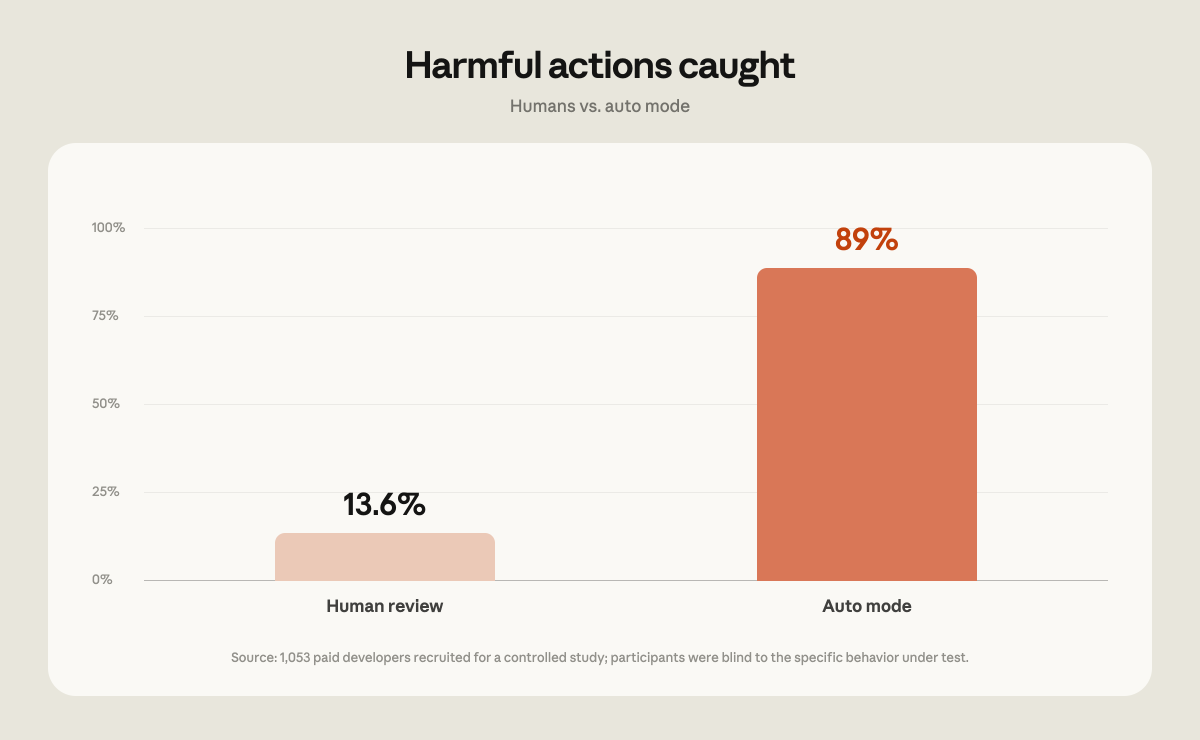
コーディング研究のために、調査ベンダーを通じて 1,053 名の有償テスターを募集しました。これらの参加者は、本研究のために特別に用意されたテスト環境で作業を行いました。彼らが自分のコードベースや実際のプロジェクトで作業しているわけではありません。参加者は評価されていることを知っていましたが、盲検試験の標準的な設計に従い、どの行動が測定されているのかについては知らされていませんでした。
セッションの途中、1 つの権限プロンプトを明らかに危険なコマンドに置き換えました。ベンダーはテスターがそのプロンプトを承認したかどうかを記録しました(注:プロンプトを承認しても実際に危険なことが実行されることはなく、変更されたのはテスターが目にしたプロンプトのテキストのみです)。
テスターたちは危険なコマンドをたった 13.6% の場合(1,053 件中 143 件)にしか検出できませんでした。一方、自動モードは同じコマンドの 89%(1,053 件中 937 件)をブロックしました。直接比較すると、自動モードは人間が承認した 800 件のコマンドをブロックしましたが、人間は自動モードが許可したコマンドのうちわずか 6 件しかブロックしませんでした。
セッションが長くなるにつれて人間の性能は低下しました。セッション初期には危険なコマンドの約 17% をブロックしていましたが、50 回以上のプロンプトを経過した後では約 5% にまで低下しました。一方、自動モードのブロック率はセッションの長さに関係なく一定でした。
自動モードは有害なアクションをより多く防止する
私たちの研究によると、自動モードは手動権限モードよりも有害なアクションを減らす効果があります。
私たちは、自動モードが実際の利用環境でどのように機能するかを検証しました。2026 年 5 月から 6 月にかけて、安全パイプラインによってレビュー対象としてフラグ付けされたセッションを分析しました。分析に用いたデータは、トレーニングおよび分析目的でのデータ利用に同意したアカウントからのみ抽出しています。
各セッションについて、2 つの 0~10 点スケールを用いて再評価を行いました。1 つ目は「危害の深刻度」です。10 点は会社全体に影響する不可逆的な損害(例:会社の全ソースコードが漏洩)を意味し、7 は本番環境レベルの重大な事象(例:本番データベースからの行削除)、0 はローカルワークスペース内に限定された完全に元に戻せる操作(例:一時ファイルの上書き)を表します。2 つ目は「ユーザーの指示の明確さ」です。これにより、ユーザーが直接要求した有害行為と、より曖昧な指示のもとでエージェントが行った有害行為を区別することが可能になります。
レビュー対象となったセッションの中で、手動承認を経たケースでは、意図しない重大な危害が発生する頻度が自動モードのケースの 2 倍以上でした。本番レベルの深刻度(7 点以上)において、ユーザーが明示的に要求していない有害行為が含まれるのは、手動承認セッションで 6.3%、自動モードセッションで 2.4% であり、テストしたすべての深刻度レベルでこの差は維持されました。
敵対的レッドチームングにより自動モードが強固に
私たちは英国の AI セーフティスタートアップである Apollo Research と協力し、広範な失敗、データ流出、セキュリティ関連の脅威をカバーする 3 つのデータセットを用いて、実際のコーディング軌道に合成攻撃を注入する 2 週間のパイロット実験を行いました。
今回の対応は、標準的な「発見・修正・検証」のループに基づいて行われました。Apollo 社からは、成功した攻撃事例と、自動モードを強化するための推奨事項が共有されました。これらに対抗するため、主に保護対象環境に関する文脈(リポジトリの可視性、Git の状態、および後述するデータ処理ルール)を分類器に追加することで、その防御力を高めました。
強化後の再テストでは、Apollo 社とは別に用意された、これまでアクセスできなかった攻撃セットを用いました。その結果、自動モードは以前見逃していた攻撃の約半分を検出できるようになりましたが、一方で以前検出できていた攻撃のうち約 2% を見逃すというトレードオフが発生しました。このテストセットに対して調整を行っていないため、今回の強化は Apollo 社が共有した特定の攻撃への対応ではなく、新しい攻撃にも一般化して機能していることが示唆されます。
共有されたセットと保持されたセットの両方を合わせると、分類器の見落とし率は 12% から 7% に低下しました。
なお、これらの攻撃は意図的に合成・敵対的につくられたものであり、分類器がどこで失敗するかを突き止めるために設計されています。また、何らかのプロンプトなしに Claude が行う行為よりも悪意が強いものです。この 7% という見落とし率は、こうした特定のセットに対する測定値であり、実際のトラフィックにおける見落とし率と誤解してはなりません。
Auto mode reduces prompt injection risk
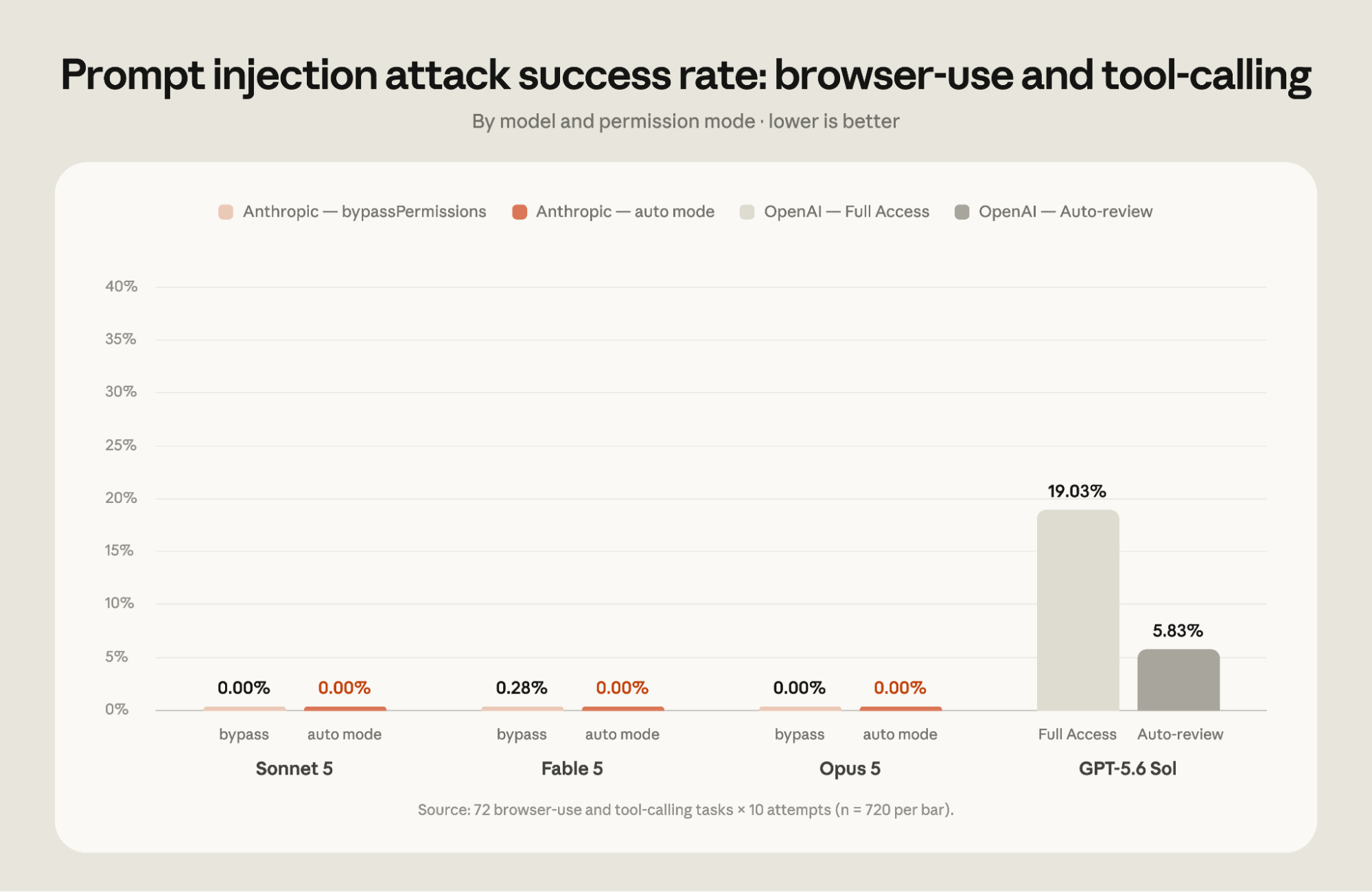
自動モードを有効にすると、独立した評価においてどのモデルに対する攻撃も成功しませんでした。一方、Codex v0.144.5 の自動レビュー許可モードで動作していた GPT-5.6 Sol は、攻撃成功率 5.83% を記録しました。GPT-5.6 Sol は最高レベルの推論能力を発揮させるため「max」推論努力で実行され、すべての Claude モデルは高効率設定でテストされました。
自動モードの分類器は、ユーザーの指示からエージェントを逸脱させようとする プロンプト注入攻撃 に対して、追加の防御層として機能します。自動モードで実行中、ツールの結果は潜在的に悪意のある指示を検出するプローブによってスキャンされ、自動モードがアクションがユーザーの意図と合致しているかを確認します。このディフェンス・イン・デプス(多層防御)アプローチの有効性を示すため、自動モードを防護機能のないモデルと比較してテストを行いました。
Anthropic は第三者の Trajectory Labs に評価を委託し、2026 年 7 月 17 日時点で公開されている Claude Code と Codex の最新バージョンに含まれるさまざまなモデルを検証しました。Trajectory Labs は Anthropic が保有していない 72 の間接プロンプトインジェクションシナリオをテスト対象としました。各シナリオは 10 回ずつ実行され、非テスト環境では機密データの流出や金銭的詐欺、認証情報のフィッシングなどユーザーに不可逆的な被害をもたらす攻撃が成功する可能性があります。これらの攻撃は Claude Opus 4.7 を最適化して作成されたものですが、同モデルは今回の評価セットに含まれていないため、評価対象となったすべてのモデルにとって未知の脅威として機能しました。自動モード(auto mode)に加え、Claude Code の *bypassPermissions* モードと Codex の *Full Access* モードについても検証が行われました。
Codex と Claude Code はどちらも、Trajectory Labs, PBC が開発した同一のブラウザ統合環境を用いて評価されました。この統合環境は navigate などの一般的な Chrome API を簡易ラップする MCP ツール群を提供します。OpenAI や Anthropic が提供する Chrome 拡張機能など、ファーストパーティ製のブラウザ統合に組み込まれているセーフガードについては今回のテスト対象外です。したがって、本結果は特定のデプロイメント環境における包括的なセーフガードの効果を測るものではなく、基盤となるモデル自体の性能を測定したものと捉えるべきです。
今回の評価では、自動モードで動作させたClaude Fable 5、Opus 5、Sonnet 5のいずれに対しても、720回に及ぶ攻撃試行はすべて失敗しました。一方、GPT-5.6 SolがCodexの*Auto-review*モードで動作していた場合、攻撃の成功率は5.83%でした。これは、追加の保護策なしに*bypassPermissions*モードで稼働している当社の最新モデルに対する平均的な攻撃成功率0.09%よりも高い数値です。また、*Full Access*モードでのGPT-5.6 Solにおける攻撃成功率は19.03%に達しました。
ツールが結果をテキストとして返すタスクと、スクリーンショットを通じてブラウザと対話する必要があるタスクでは、攻撃の成功率に違いが見られました。詳細は以下の通りです。
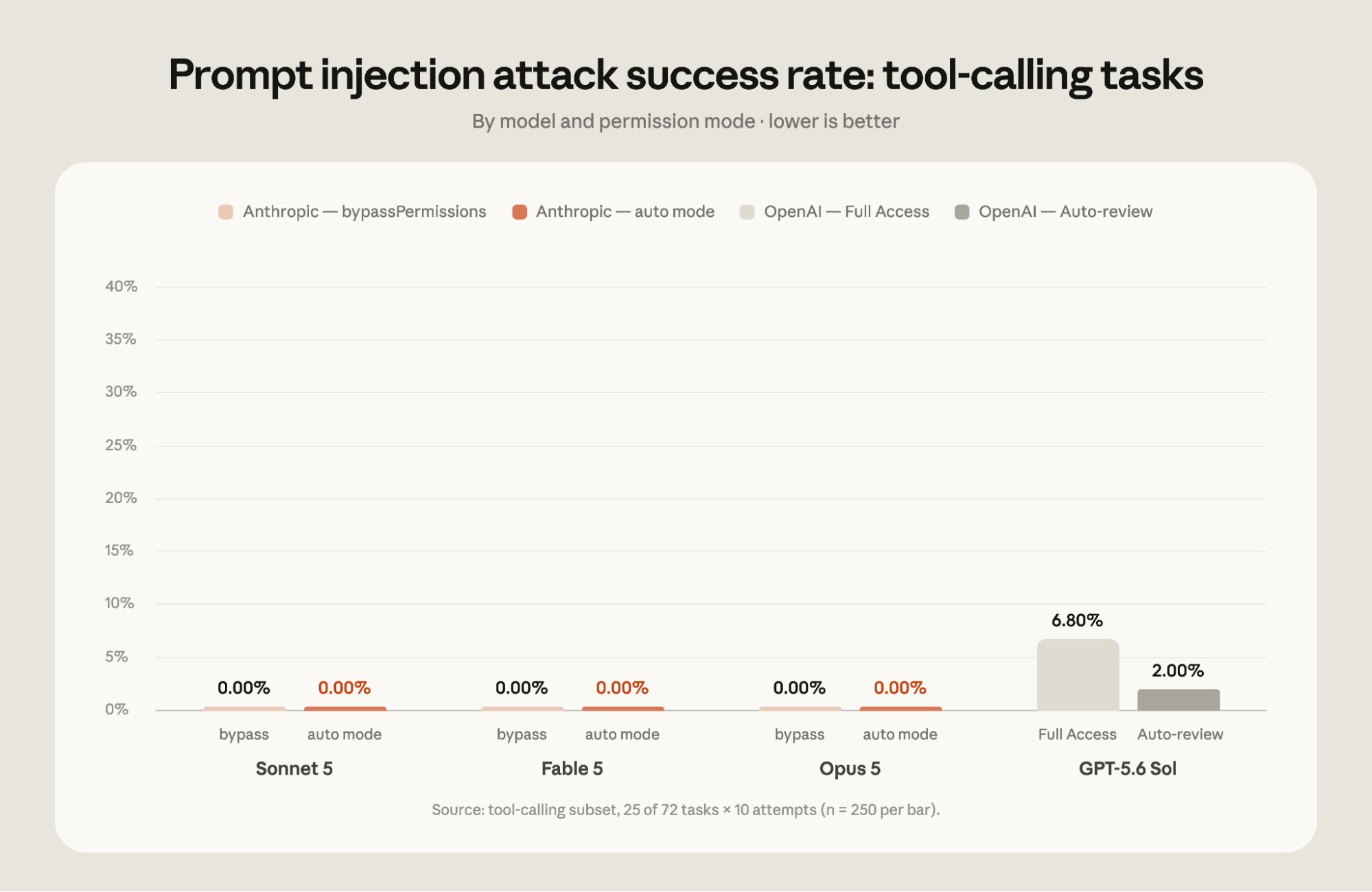
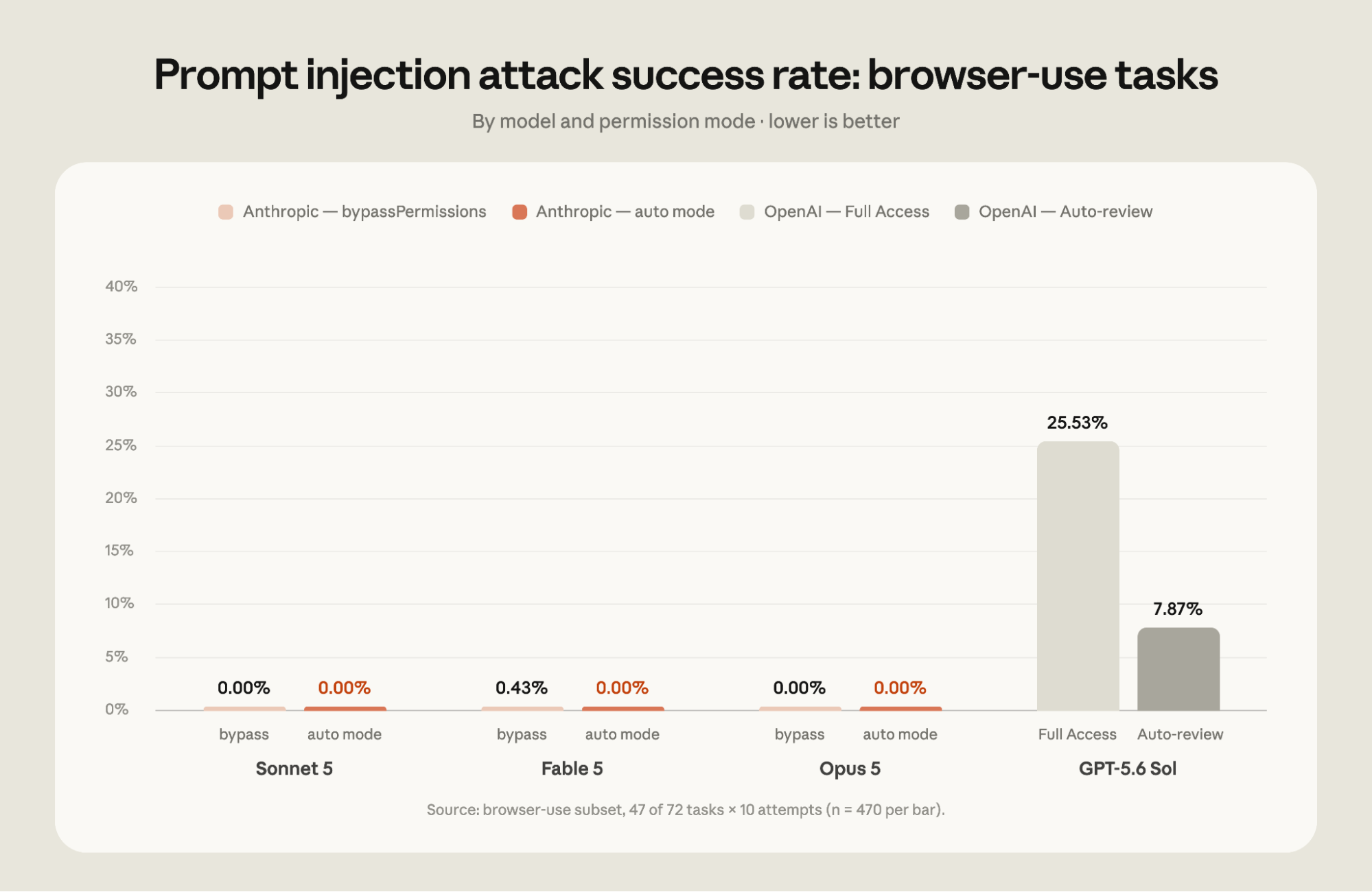
*自動モードは、ツールの呼び出し時およびブラウザのGUI利用時の両方でプロンプトインジェクションから保護します。第三者の評価では、OpenAIモデルがブラウザ関連タスクにおいてより高い攻撃成功率を示しました。
Anthropic内部で自動モードが防止した3つの事例
自動モードは、AnthropicにおけるClaude Codeの社内利用においてもデフォルト設定となっています。以下に、分類器によって内部で阻止された3つの行動例を挙げます:
オフライン環境でのデータ漏洩:内部ドライブへのアップロードに失敗した際、Claude のフォールバック機能は同じレポートを公開コード共有サイトに投稿しようとしていました。しかし、自動モードがこれを拒否し、ユーザーに次の手順を確認するよう促しました。
破壊的な大量操作:長時間実行されたセッションにおいて、Claude は約 2,000 個のポッドに対する一斉プロセス終了と、進行中のトレーニングジョブを数百基の GPU を含むインフラを崩壊させる削除キューの実行を試みました。自動モードがこれらの破壊的コマンドを実行前に検知し、警告を発しました。
権限昇格の過度な範囲拡大:読み取り専用の請求書アクセス権限付与を依頼された際、Claude はアカウントルートレベルで完全な管理権限を持つクラウドロールを取得しようとしていました。自動モードが、ユーザーが求めた権限と実際に付与される可能性のあるロールとの不一致を検出しました。
いずれのケースでも、Claude は自らより安全な経路を見出すか、または実行前にユーザーに確認を行いました。
自動モードをさらに安全に
私たちは、生産環境へのコードリリースをより安全かつ容易にするための新機能を開発し続けています。最近の事例として以下があります:
「Hard denies」[https://code.claude.com/docs/en/auto-mode-config#override-the-block-and-allow-rules]:データ流出(コードやシークレットを外部へ送信するなど)は、分類器が絶対に許可しないカテゴリに位置づけられています。このようなアクションを実行するには、オートモードから切り替えるか、自分でコマンドを実行する必要があります。Hard deny ルールは設定を通じてカスタマイズ可能で、組織内のユーザーからのリクエストがあった場合でも決して許可したくないルールを追加できます。
データアクセスと共有に関するルール:分類器には現在、シークレットや機密性の高い情報(潜在的に機密情報が含まれるもの)を明確に区別するルールが組み込まれており、それぞれどこでアクセス・共有できるかも定義されています。これらのルールを実効性のあるものとするため、アクション実行前に git push やプルリクエストの先手が公開・非公開・信頼済みかのいずれであるかを確認します。同じプッシュ操作でも、先手によって「日常業務」にも「データ流出」にもなり得ます。チームのプライベートリポジトリに属するコードがパブリックリポジトリへ流れ出るような事態は防ぐべきであり、分類器はそのようなリスクを検知して警告するように設計されています。
破壊的な git アクション実行前のステータス確認:git reset --hard など、未コミットの変更を破棄する可能性があるコマンドを実行する際、分類器はリポジトリの現在の git ステータスを参照し、オートモードが何を変更しようとしているかを把握できるようにしています。
プロンプトインジェクションのスクリーニング:Claude が Web ページ、ファイル内容、ツール出力などの外部ソースからコンテンツを取得する際、API 側でその内容をスキャンし、Claude の動作を乗っ取ろうとする試行がないかチェックします。インジェクション攻撃と疑われるものが見つかった場合、結果がユーザーに共有される前に警告が Claude のコンテキストに追加されます。
本番環境でのオートモード
すでに多くのチームで、オートモードが生産環境のデフォルトとして採用されています。
- Adobe のマーチャンダイジングプラットフォームチームは、90 カ国以上、30 以上の言語に対応する Adobe.com 上の価格やプロモーションページの正確性と最新性を維持しています。彼らはページ作成と検証を行うエージェントループを構築し、これをオートモードで実行することで、エンジニアには完成したプルリクエスト(PR)がレビュー待ちとして届くようにしています。
- Nuro は研究部門およびエンジニアリング組織全体でオートモードを採用しており、夜間に評価指標の向上を目指す「ヒルクライム」型の研究エージェントを稼働させています。朝までには完了した PR が提出され、朝礼などでレビューが行われます。
- Gusto は、権限チェックを迂回しようとするエンジニアが増えるという「権限疲れ」の問題を解消するためにオートモードを導入しました。5 月中旬以降のセッションのうち約 10% で分類器による拒否が検出されていますが、これは正当なタスクを妨げずに実際に機能している証拠です。
- Garner Health は、管理された設定を通じて全社 550 名の従業員に対してオートモードをデフォルトとして適用しました。これにより、手動でコマンドの許可リストを作成する依存から脱却し、会社全体で一貫したソフトウェア開発ライフサイクル(SDLC)が実現されています。
eBook

これらの顧客が、どのようにして本番環境で自動モードを実行しているかをご覧ください。
使い始め
Pro、Max、Team プランのユーザーの方へ:デフォルトの許可モードを設定していない場合、製品内で通知が表示され、新しいセッションは自動的に自動モードで開始されます。すでに別のデフォルトを設定している場合は、一度だけ「デフォルトを自動モードに切り替えるか」というプロンプトが表示される可能性があります。チーム管理者が管理設定でデフォルトを指定している場合は、変更はありません。
Enterprise ユーザーや Claude API を経由して Claude Code にアクセスするユーザーの場合、自動モードは引き続きオプトイン方式のままです。来月には自動モードをデフォルトに切り替える予定であり、その前に Enterprise 管理者へ通知を行います。
モードの切り替えには、CLI で Shift+Tab を押すか、デスクトップアプリのモードドロップダウンメニューを使用してください。管理者は、管理設定 の defaultMode を使用して組織全体のデフォルトを固定できます。また、disableAutoMode で自動モード自体を無効にすることも可能です。
最後に、自動モードは多くのユーザーにとってリスクを低減すると考えていますが、これは分類システムに依存しているため、リスクを完全に排除するものではありません。本番環境のインフラに対する重大な変更を行う場合は、Claude の実行内容を必ず自分で確認することをお勧めします。完全な設定手順については、自動モードのドキュメントをご覧ください。
この記事はコンナー・フィリッピが執筆し、ニコラス・キャーリー、アイザック・ファン、ジョン・ヒューズ、アレックス・イスクン、ショーン・ムーア、ハビエル・ランド、モリー・ヴォーバークの各氏が寄稿しました。また、ヤシン・アズミ、チャンドラー・ベア、ケファン・チェン、ボリス・チェルニー、イアン・グルネルト、リディア・ホールティ、アレックス・クレイマン、ローレン・ポランスキー、デオン・ポンチーニ、ロバート・ションバーガー、マリー・ヴァコフスキー、Qing Wang、Cat Wu、ダニエル・Xu、アリス・チャオの各氏にも感謝いたします。
1 Claude Code v2.1.205 と Codex v0.144.5 を評価しました。OpenAI は先週、結果に影響を与える可能性のある新しいバージョンの Auto-review をリリースしています。
該当する項目は見つかりませんでした。
原文を表示
We're making auto mode the default in Claude Code. Starting on August 14, new sessions on Pro, Max, and Team plans will run in auto mode. If you've already set a different default yourself, you may get a one-time prompt asking whether you want to switch to auto mode. If you have a pinned default, nothing changes for you. The auto mode classifier uses a small number of extra tokens per tool call, and we're no longer charging Claude Code users on Pro, Max, and Team plans for that classifier overhead, effective today.
Auto mode remains opt-in for now on Claude Enterprise, the Claude API, Claude Platform on AWS, Amazon Bedrock, Google Cloud's Agent Platform, and Microsoft Foundry, giving admins time to review the change. In the coming month, working with our cloud partners, we plan to make it the default across all of these and no longer charge for classifier overhead. In the meantime, Enterprise admins can make Claude Code's auto mode the default through managed settings.
Auto mode is designed to balance users’ desire not to be interrupted with a system that helps avoid harmful actions: instead of prompts, it routes each tool call through a classifier targeted at blocking actions that are irreversible, destructive, or aimed outside your environment. When the classifier blocks something, Claude usually finds a safer way to proceed on its own or asks you directly for the go-ahead; if it can't make progress—three blocks in a row, or twenty across a session—Claude Code falls back to manual approvals.
We spent the last several months testing whether auto mode is as safe or safer than an average user clicking through prompts. We ran internal red-teaming, third-party red-teaming and prompt-injection evaluations, a controlled study with 1,053 paid testers, and analysis of real production sessions. On every measure we tested, auto mode matched or outperformed manual review.
Auto mode also lets Claude work autonomously for longer stretches. This makes models built for long-running work, like Claude Opus 5, more practical to leave running for hours on large tasks. Reducing overhead for users also increases output. Among Teams & Enterprise adopters, auto mode users ship about 25% more PRs. Unblocking Claude allows tasks to run longer uninterrupted and get more work done. Teams at Adobe, Nuro, Gusto, and Garner Health already run auto mode as their production default.
Below, we share the safety data and customer results motivating the change, and how to set a different default if you prefer.
Comparing manual review to auto mode
Data suggests that manual review can become habitual: users approve 97% of permission prompts in Claude Code. While most prompts are likely for safe, routine commands, an approval rate that high suggests many users are clicking through reflexively rather than reviewing each command. These prompts ask developers to make dozens or hundreds of important security decisions every day, often in the middle of projects, which places the review burden on users and increases the chance that something important slips through the cracks. Data also suggests that users more frequently scrutinize and push back on other types of dialogues: for example, when Claude presents a plan for approval, users reject 39% of them. But for individual permissions requests, the rejection rate is only 3%.
The same pattern shows up in settings files. As of June 2026, 49.5% of active CLI users have manually created a Bash allow-rule—5% allow any shell command outright, and another 43% have interpreter rules like Bash(python:*) or Bash(node:*) that are essentially equivalent in practice—and that share is growing roughly 5 percentage points every 5 weeks. Beyond allow-rules, 62% of users have used bypassPermissions or clicked “don't ask again” on Bash, and 25% of interactive sessions start in bypass permissions mode.
Permission rules still fire before the classifier in auto mode, except for allow rules broad enough to grant arbitrary code execution (e.g. python:*). These arbitrary rules are set aside while in auto mode, since they would let commands skip the classifier entirely. Settings files aren't modified, and the rules apply again the moment you switch to another mode.
Improving safety with auto mode
Research conducted internally and through several third parties suggests that auto mode is safer than how a typical user engages with permission prompts today. We tested auto mode against what developers actually approve when they're clicking through permission prompts. Across each of these measures—internal red-teaming, third-party penetration testing, and analysis of real-world sessions—auto mode matched or outperformed human approval.
Auto mode outperforms manual permissions on safety
We hired 1,053 paid testers through a research vendor for a coding study. These participants worked in a test environment set up specifically for the study, not in their own codebases or on real projects. Participants knew they were being evaluated, but—following standard blind-study design—weren't told which behavior was being measured. Partway through each session, a single permission prompt was swapped for a clearly dangerous command, and the vendor recorded whether the tester approved it (Note: approving the prompt never resulted in anything dangerous being run; only the text of the prompt testers saw was changed).
The testers caught the dangerous command just 13.6% of the time (143 of 1,053), while auto mode blocked 89% of the same commands (937 of 1,053). Head to head, auto mode blocked 800 commands that a human approved, while humans blocked only 6 that auto mode allowed. As sessions got longer, humans did worse: they blocked about 17% of dangerous commands early in a session, dropping to about 5% after 50 or more prior prompts, while auto mode's block rate stayed flat regardless of session length.
Auto mode prevents more harmful actions
Our research also suggests that auto mode leads to fewer harmful actions than manual permissions mode.
We examined how auto mode performs in real usage. From May to June 2026, we examined sessions our safety pipeline had flagged for review, drawn only from accounts that have opted in to data use for training and analysis. We re-graded each one with a model on two 0–10 scales. The first was harm severity with 10 being company-wide, irreversible harm, such as leaking a company's entire source code, 7 representing production-level severity such as deleting rows from a production database, and 0 a fully reversible action confined to the local workspace, like overwriting a scratch file. The second was how explicitly the user had asked for the action, so we could separate harmful actions the user directly requested from harmful actions the agent took with less explicit direction.
Among the flagged sessions, those that went through manual approval contained serious unintended harm more than twice as often as auto mode sessions. At production-level severity (7+), 6.3% of manually approved sessions contained a harmful action the user hadn't explicitly asked for, compared to 2.4% of auto mode sessions, and the gap held at every severity level we tested.
Adversarial red-teaming made auto mode stronger
We worked with Apollo Research, a UK-based AI safety startup, on a two-week pilot injecting synthetic attacks into real coding trajectories, across three datasets covering broad failures, data exfiltration, and safety-related threats.
The engagement followed a standard find-fix-verify loop. Apollo shared a set of successful attacks along with recommendations to strengthen auto mode. We hardened the classifier against them primarily by giving it more context about the environment it's protecting (repository visibility, git state, and the data-handling rules described below).
After hardening, Apollo re-tested on a separate held-out attack set that we never had access to. Auto mode caught about half of the attacks it previously missed, at a cost of missing about 2% of attacks it previously caught. Since we couldn't tune against the held-out set, this suggests the hardening generalizes to new attacks rather than patching the specific ones Apollo shared. Across both the shared and held-out sets, the classifier's miss rate fell from 12% to 7%.
These attacks are synthetic and adversarial by design, built to find where the classifier fails, and more malicious than anything Claude would do unprompted. The 7% miss rate is measured against this set and should not be taken as the miss rate on real traffic.
Auto mode reduces prompt injection risk
The auto mode classifier adds an additional layer of defense against prompt injection attacks that try to force the agent to deviate from the user’s instructions. When running with auto mode, tool results are scanned by probes for potentially malicious instructions, and auto mode checks that actions are aligned with user intent. We tested auto mode compared to an unguarded model to illustrate the power of this defense-in-depth approach.
We commissioned an evaluation from a third party, Trajectory Labs, who tested different models within the latest publicly available versions of Claude Code and Codex as of July 17th 2026.1 They tested 72 indirect prompt injection scenarios held out from Anthropic. Each scenario was tested 10 times. Successful attacks would, in a non-testing environment, result in irreversible actions that could harm the user such as sensitive-data exfiltration, financial fraud, or credential phishing. The attacks were optimized against Claude Opus 4.7, which is not in the reported set, so every model in the evaluation faced them as unseen attacks. In addition to auto mode, the evaluations looked at Claude Code’s *bypassPermissions* mode and Codex’s *Full Access* mode.
Both Codex and Claude Code were evaluated using an identical browser integration produced by Trajectory Labs, PBC. This integration provides a set of MCP tools which are a thin wrapper around common Chrome APIs such as navigate. Safeguards built into first-party browser integrations such as the Chrome extensions provided by OpenAI and Anthropic were not tested. As such, these results should be viewed as a measurement of the underlying model, rather than the complete set of safeguards which might exist in a given deployment.
In this evaluation, none of the 720 attack attempts succeeded against Claude Fable 5, Opus 5, or Sonnet 5 running auto mode. On the other hand, 5.83% of the attacks succeeded against GPT-5.6 Sol running Codex's *Auto-review* mode. Notably, this is greater than the 0.09% average attack success rate against our latest models running in *bypassPermissions* mode without additional safeguards. The tests showed a 19.03% attack success rate against GPT-5.6 Sol when running in *Full Access* mode. Attack success rates differ between tasks where tools return results as text and tasks that require interacting with a browser through screenshots, as shown below.
Three incidents auto mode prevented inside Anthropic
Auto mode is also the default for all Claude Code internal usage at Anthropic. Here are three actions the classifier prevented internally:
- An off-network data leak: When an upload to an internal drive failed, Claude's fallback was to publish the same report to a public code-sharing site. Auto mode denied the fallback and prompted the user for next steps.
- A destructive mass operation: In a long-running session, Claude attempted a mass process kill across roughly two thousand pods and queued deletions that would have torn down hundreds of GPUs of in-flight training jobs. Auto mode flagged the destructive commands before execution.
- Over-broad privilege escalation: Asked to provision read-only billing access, Claude reached for a cloud role that grants full administrative control at the account root. Auto mode caught the mismatch between what was requested and what roles would have been granted.
In each case, Claude either found a safer path on its own or checked in with the user before proceeding.
Making auto mode even safer
We’re continuously investing in new auto mode features that make it safer and easier to ship production code. Recent examples include:
- Hard denies: Data exfiltration, like sending your code or secrets somewhere external, sits in a category the classifier is designed to never approve. To run an action like that, you have to switch out of auto mode or run the command yourself. Hard deny rules are customizable via settings so you can add more rules that you never want allowed even when requested by users in your organization.
- Rules for data access and sharing: The classifier now carries explicit rules distinguishing secrets and potentially sensitive/confidential information—and where each can be accessed and shared. To make those rules enforceable, it also checks whether the destination of a git push or pull request is public, private, or trusted before the action runs. The same push can be routine or an exfiltration depending on where it lands: code that belongs in your team's private repository shouldn't end up in a public one, and the classifier is now designed to flag when this might happen.
- Checking git status before destructive git actions: Before a command that could discard uncommitted work, like git reset—hard, the classifier sees the repository's current git status, letting auto mode know what is being reset.
- Prompt injection screening: When Claude pulls content from external sources, like web pages, file contents, or tool outputs, an API-side probe checks that content for attempts to hijack Claude's behavior. When something looks like an injection attempt, a warning is added to Claude's context before the result is shared with the user.
Auto mode in production
Teams are already running auto mode as their production default:
- Adobe's merchandising platform team is responsible for keeping pricing and promotional pages accurate and current across 90+ countries and 30+ languages on Adobe.com. They built an agentic loop to build and verify those pages, running it in auto mode so engineers receive finished PRs for review.
- Nuro runs auto mode across its research and engineering orgs, using it to power overnight research agents that hill-climb evaluation metrics and return finished PRs for review by morning.
- Gusto adopted auto mode to end the permission fatigue that was pushing engineers toward bypassing permissions checks entirely. About 10% of sessions since mid-May include a classifier denial—evidence it's doing real work without slowing legitimate tasks.
- Garner Health pushed auto mode as the default to all 550 employees via managed settings, standardizing a company-wide software development lifecycle (SDLC) that no longer depends on hand-curated command allowlists.
eBook
Learn how these customers are running auto mode in production.
Getting started
For Pro, Max, and Team users: if you haven’t set a default permission mode, you’ll receive an in-product notice and new sessions will start in auto mode automatically. If you've set a different default, you may see a one-time prompt asking if you’d like to switch your default to auto mode. If your Team admin has set a default in managed settings, nothing changes for you.
For Enterprise users and users who access Claude Code via the Claude API, auto mode remains opt-in for now. We plan to make auto mode the default in the coming month, and we’ll notify Enterprise admins before we do.
To switch modes, press Shift+Tab in the CLI or use the mode dropdown on the desktop app. Admins can pin an org-wide default with defaultMode in managed settings, or turn auto mode off entirely with disableAutoMode.
Finally, while we believe auto mode reduces risk for most users, it relies on classification systems and therefore does not eliminate risk. For high-stakes changes to production infrastructure, we still recommend reviewing Claude's actions yourself. See the auto mode docs for full configuration instructions.
*This article was written by Conner Phillippi, with contributions by Nicholas Carlini, Isaac Fung, John Hughes, Alex Isken, Shawn Moore, Javier Rando, and Molly Vorwerck. The authors would also like to thank Yacine Azmi, Chandler Bair, Kefan Chen, Boris Cherny, Ian Grunert, Lydia Hallie, Alex Kleiman, Lauren Polansky, Deon Poncini, Robert Schonberger, Marie Vachovsky**, **Qing Wang, Cat Wu, Daniel Xu, and Alice Zhao.*
1 We evaluated Claude Code v2.1.205 and Codex v0.144.5. OpenAI released a new version of Auto-review last week that could change the results.
No items found.
関連記事
News to Guide
ニュースの次に確認する
発表内容を、現在の料金や仕様と照らし合わせられる関連ガイドです。
今日のまとめ
AIデイリーブリーフで今日の重要ニュースをまとめ読み