Amazon Bedrock AgentCore Gateway にレート制限機能を追加
本文の状態
日本語全文を表示中
詳細モードで約16分の本文を読めます。
同じ出来事の情報源
この情報源を基点に整理
AWS Machine Learning Blog
AWS は Amazon Bedrock AgentCore gateway にレート制限機能を追加し、OAuth や IAM を基盤とした個別ユーザーごとの詳細なトラフィック制御を可能にした。
Continue in AI NEW LAB
このニュースを、実務の判断につなげる
AI NEW LABで、試したことや先に確認したい条件を共有できます。まずはログインなしで読めます。
AI NEW LABで論点を見るAI深層分析を開く2026年8月7日 03:31
AI深層分析
キーポイント
AgentCore gateway の新機能追加
AWS は Amazon Bedrock AgentCore gateway にレート制限機能を正式に追加し、AI トラフィックの管理機能を強化した。
詳細な制御ルールの提供
OAuth または IAM ベースのルールを定義することで、1 分あたりのリクエスト数、同時接続数、トークンスループットをユーザー単位で細かく制御できる。
ダウンストリームサービスの保護
この機能により、トラフィックの急増時でも後段のツールや推論モデルが利用不能になるリスクを軽減し、サービスの可用性を維持する。
リクエストレート制限の仕組み
すべてのターゲットタイプで適用され、処理時間に関わらず1回のリクエストが1単位としてカウントされる。
推論ターゲット向けのトークンレート制限
入力と出力の両方のトークンを対象とし、事前見積もりで上限から差し引いた後、実際の使用量に基づいて調整を行う。
重要な引用
Today, we are announcing support for rate limiting on AgentCore gateway
Rate limiting in AgentCore gateway gives you per-user control over how users consume your tools
making sure downstream services remain available under heavy traffic spikes
A request counts as exactly one unit toward the configured limit, regardless of how long it takes to complete
編集コメントを表示
編集コメント
AI エージェントの普及に伴い、ゲートウェイレベルでのトラフィック制御はセキュリティと可用性の観点から不可欠な要素となっている。今回の機能追加は、大規模展開における運用負荷を軽減する実用的な一歩である。
Source Article
元記事を日本語で読む
本文に関係しない購読案内、埋め込み通知、サイト内プロモーションは除いています。
Amazon Bedrock AgentCore Gateway は、AI トラフィックに対する単一の安全な入り口を提供する、フルマネージドでサーバーレスの AI ゲートウェイです。このゲートウェイは、Managed Web Search や Managed Knowledge Base、MCP サーバー、推論モデル(LLM)、エージェント(A2A やツールとしてのエージェントなど)、HTTP エンドポイントといったツールへのトラフィックをルーティングします。
Amazon Bedrock AgentCore gateway is a fully managed, serverless AI gateway that provides a single, secure entry point for AI traffic. AgentCore gateway routes traffic to tools such as managed web search, managed knowledge bases, MCP servers, inference models (LLMs), agents (A2A, agents as tools, etc.), or HTTP endpoint.
本日、AgentCore ゲートウェイにおけるレート制限機能のサポートを発表します。これにより、ゲートウェイを介して個々のユーザーが消費できるトラフィック量を、きめ細かく制御できるようになります。
AgentCore ゲートウェイのレート制限機能を使えば、各ユーザーがツールや推論モデル、エージェントを利用する際のアクセスをユーザー単位で管理できます。1 分あたりのリクエスト数、同時接続数、トークン処理量などに基づいて OAuth または IAM ベースのルールを設定することで、トラフィックが急増しても下流サービスが利用可能であることを確保できます。
AgentCore ゲートウェイによる AI トラフィックの集中型レート制限
AgentCore ゲートウェイでは、3 つのターゲットタイプをサポートしています。MCP ターゲット、推論 ターゲット、および HTTP パススルーターゲットです。各ターゲットで利用可能なレート制限のメトリクスは以下の通りです。
リクエストレート制限は、1 秒あたりのリクエスト数(RPS)と 1 分あたりのリクエスト数(RPM)で測定され、すべてのターゲットタイプに適用されます。各制限は、指定された時間枠内で許可される最大リクエスト数を定義しており、ゲートウェイはこの基準に入ってくるすべてのリクエストを計測します。
リクエストが完了するまでの長さに関わらず、1 つのリクエストは設定された制限に対して正確に 1 ユニットとしてカウントされます。50 ミリ秒で完了するリクエストも、90 秒間ストリーミングされるリクエストも、いずれも 1 秒あたりの制限または 1 分あたりの制限から正確に 1 ユニット消費します。
トークンレート制限は、1 分あたりのトークン数(TPM)で測定され、推論ターゲットに対してのみ適用されます。トークンレート制限では、入力トークンと出力トークンの両方がカウント対象となります。リクエストの往復全体におけるトークンコストが制限に充当されます。
AgentCore ゲートウェイは汎用的なトークナイザーを使用して、リクエストに含まれるトークンを推定し、推論呼び出しをゲートウェイから送信する前に、その分をレート制限バケットから事前に差し引きます。その後、モデルプロバイダーから報告された実際の入力および出力トークン使用量を含むレスポンスが推論呼び出しから返されると、ゲートウェイは真のトークン消費量を反映させて制限額と照合し、調整を行います。
接続レート制限は、1 秒あたりの接続数(CPS)で測定され、すべてのターゲットタイプに適用されます。リクエストレート制限とは異なり、接続レート制限では各リクエストがオープンな接続を保持する時間が追跡されます。例えば、ストリーミング推論呼び出しが完了するのに 100 秒かかる場合、そのリクエストは期間中ずっと 1 つの接続スロットを消費します。CPS は、ターゲットを長寿命な同時セッションから保護するための追加メカニズムを提供し、特に各ウィンドウに到着するリクエスト数ではなく、ターゲットが維持できる同時接続数の上限を設定したい場合に役立ちます。
このユースケースでは、3 つのユーザーグループ(Basic、Advanced、Beta)を想定します。AgentCore Identity は、ID プロバイダーとして Microsoft Entra ID を使用した JSON Web Tokens(JWT)による入力の認証を処理し、外部ターゲット向けのトークン発行サービスも担当します。Amazon Bedrock AgentCore のポリシー はロールベースアクセス制御(RBAC)を適用し、各グループのアクセスを特定のターゲットとモデルにスコープします。以下の図はこの構成を示しています。
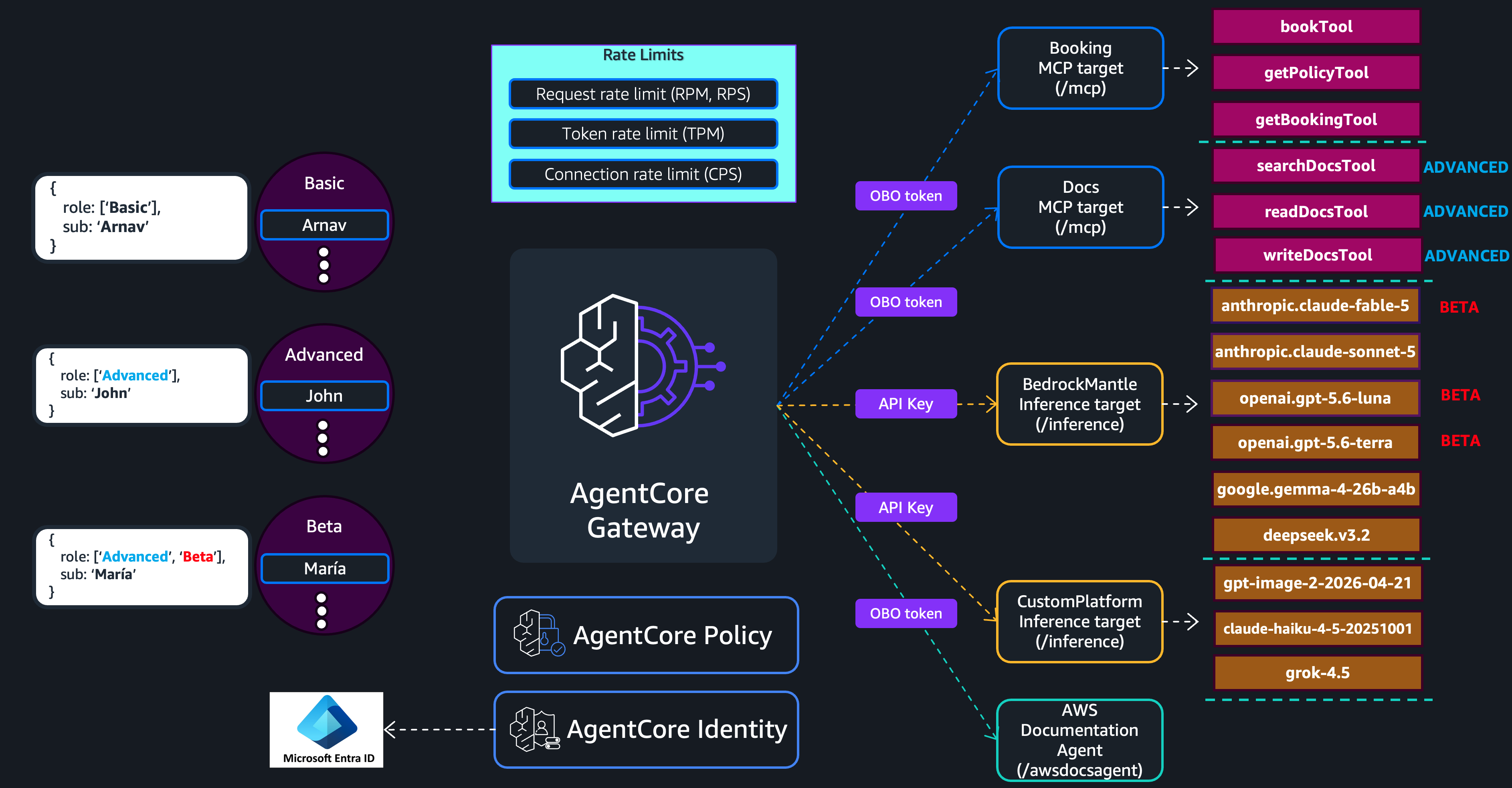
図 1:ユーザーグループ、ID、ポリシーの適用を含む AgentCore ゲートウェイのレート制限アーキテクチャ
Basic ユーザーは Advanced ユーザーよりも厳しいレート制限の下で動作しますが、Beta ユーザーには制限されたモデルに対して上限を引き上げることで、組織全体への展開前にパフォーマンスと適合性をベンチマークできます。各ユーザーグループにレート制限を設定する前に、まずはその構造を確認してください。
レート制限の構造
レート制限の設定は、2 つの部分で構成されます。1 つ目は「次元キー(dimension keys)」で、ゲートウェイが着信トラフィックをどのレートバケットに分類するかを定義します。2 つ目は「エントリ(entries)」で、各バケットごとに許可されるスループット量を定めます。
本記事では、AWS Command Line Interface (AWS CLI) を用いてレート制限の設定を行います。以下の例は、次元キーとエントリの関係を説明するものです。
このレート制限では targetName を次元キーとして使用し、2 つのエントリを定義します。1 つ目は高トラフィックのターゲットである Booking 対象(MCP サーバー)に対して秒間 100 リクエストという特定の制限を適用するエントリです。もう 1 つはワイルドカードエントリで、残りのすべての個別のターゲットにそれぞれ秒間 10 リクエストという制限を適用します。つまり、他のすべてのターゲットには独立した 10 RPS のバケットが割り当てられることになります。
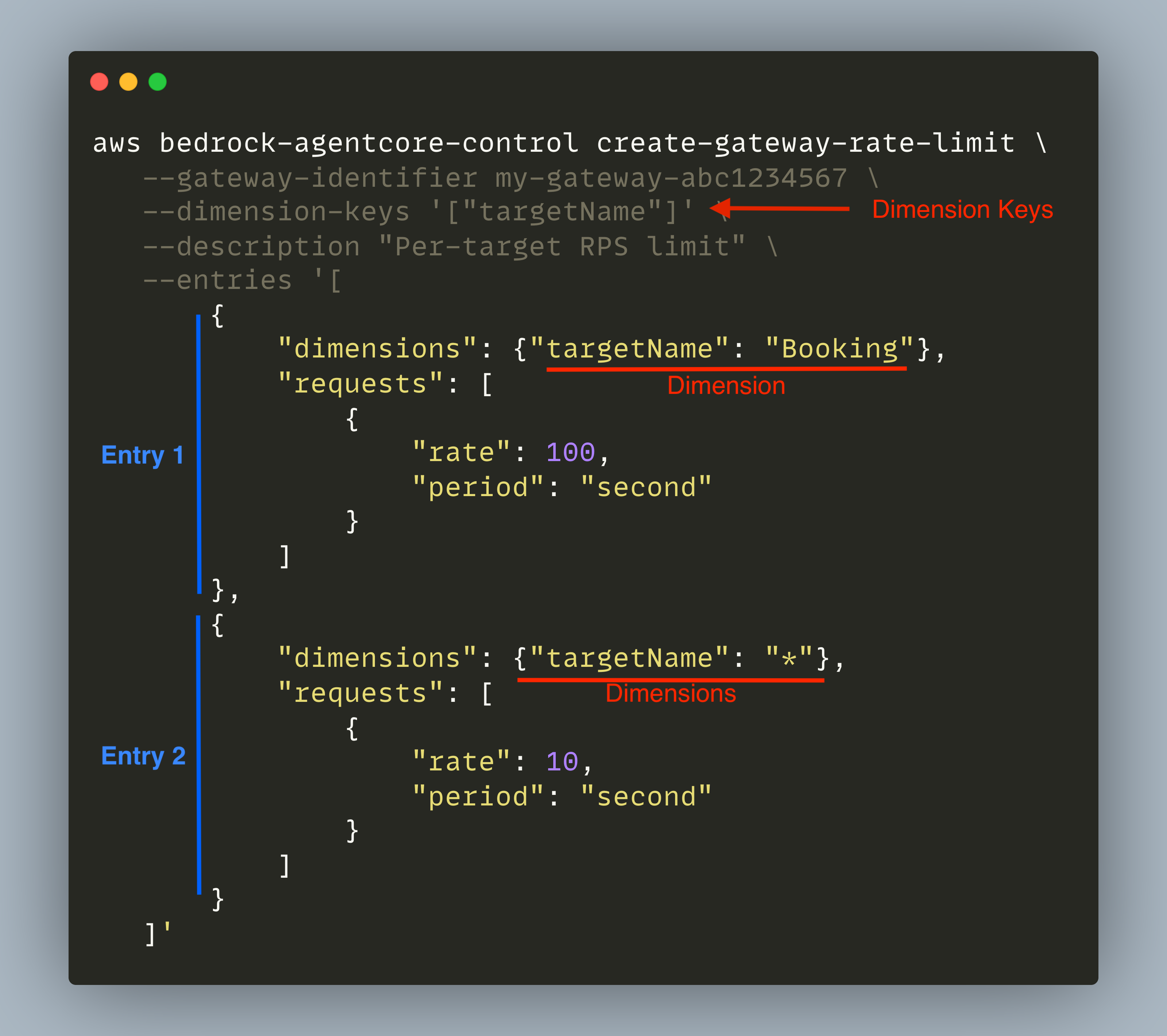
図 2:次元キーとエントリを含むレート制限の構造
ゲートウェイは、トラフィックをレート制限バケットにグループ化するために「ディメンションキー」を使用します。リクエストが到着すると、ゲートウェイはそのコンテキストから各ディメンションキーの値を取得し、それらの組み合わせに基づいて適切なバケットにリクエストを割り当てます。
AgentCore ゲートウェイでは、以下の次元キーを設定できます:targetName、toolName、qualifiedModelId、$.context.jwt.、$.context.iam.principal。
$.context.iam.sourceIdentityについて、以下の各セクションで具体例を交えて詳しく解説します。
レート制限にはルール(エントリ)が定義されます。各エントリは、一致させるべき次元のキーと、その条件に合致したリクエストに対して許可されるスループットを指定します。
エントリでは、特殊なキャッチオールとして「*」を使用できます。この値を設定すると、異なる値ごとに独立したバケットが作成され、それぞれが設定されたレートで処理されます。
ゲートウェイはリクエストを評価する際、まず名前付きのエントリが一致するかを確認し、その後でワイルドカード(キャッチオール)にフォールバックします。名前付きエントリは値を明示的に参照するため、キャッチオールよりも優先度が高くなります。
前述のレート制限を例に挙げると、Booking ターゲット(MCP サーバー)へのリクエストが到着した際、ゲートウェイは最初のエントリと一致し、最大 100 RPS を許可します。このエントリが優先されるのは、最も具体的な値マッチがデフォルト値の * よりも勝るためです。これは、Booking ターゲットを名前で直接参照しているからです。
他のターゲットに対しては名前付きエントリが存在しないため、ゲートウェイはワイルドカードエントリにフォールバックし、1 秒あたり最大 10 リクエストを許可します。
ワイルドカード(Docs、BedrockMantle、CustomPlatform、awsdocsagent)に一致する各ターゲットは、それぞれ独立したバケットを取得します。
複数の次元キーを組み合わせることで、より細かな制御が可能になります。例えば、dimensionKeys: ["targetName", "$.context.jwt.role"] と設定すると、トラフィックをターゲットと呼び出し元の ID ロール(JWT クレーム)の両方でグループ化できます。これにより、各ユーザーグループ(前述の例では Basic、Advanced、Beta)が、ターゲットごとに独立したレート制限バケットを持つようになります。
レート制限の種類と設定例
AgentCore ゲートウェイでは、顧客が定義するレート制限と Service Quotas の 2 段階のレート制限が適用されます。まず顧客定義の制限が評価され、それを通過したリクエストに対してのみサービス側のクォータがチェックされます。以下では、サービス管理クォータと、顧客が設定できる各種のレート制限について詳しく解説します。
- サービス管理クォータ
これは AWS アカウント単位で AgentCore ゲートウェイに適用される制限です。サービス管理クォータ は、顧客が設定できるレート上限の天井値を定義しています。実際の有効なレートは、顧客定義の制限とサービス管理の制限のどちらか小さい方になります。一部のクォータについては、Service Quotas コンソール を利用して増額リクエストを出すことが可能です。
- 顧客定義のユーザー制限
ユーザーレベルの制限では、$.context.jwt.、$.context.iam.principal、$.context.iam.sourceIdentity を次元キーとして使用し、個々のユーザーやユーザーグループが消費できるトラフィック量を制御します。これにより、呼び出し元全体での公平な利用を確保し、特定の呼び出し元がゲートウェイの容量を独占することを防ぎます。
以下は、ユーザーグループごとに異なるリクエストレートを設定する例です。JWT のロール主張(claim)は配列形式であるため、それぞれの一意な組み合わせに対して個別のエントリが必要です。
aws bedrock-agentcore-control create-gateway-rate-limit \
  --gateway-identifier my-gateway-abc1234567 \
  --dimension-keys '["$.context.jwt.role"]' \
  --description "Per-role request and connection limit" \
  --entries '[
    {
      "dimensions": {"$.context.jwt.role": "[\"Basic\"]"},
      "requests": [{"rate": 100, "period": "minute"}],
      "connections": [{"rate": 50, "period": "second"}]
    },
    {
      "dimensions": {"$.context.jwt.role": "[\"Advanced\"]"},
      "requests": [{"rate": 300, "period": "minute"}],
      "connections": [{"rate": 150, "period": "second"}]
    },
    {
      "dimensions": {"$.context.jwt.role": "[\"Advanced\", \"Beta\"]"},
      "requests": [{"rate": 300, "period": "minute"}],
      "connections": [{"rate": 200, "period": "second"}]
    },
    {
      "dimensions": {"$.context.jwt.role": "*"},
      "requests": [{"rate": 80, "period": "minute"}],
      "connections": [{"rate": 10, "period": "second"}]
    }
  ]'
この設定では、Basic ユーザーは 2 つのバケット(100 RPM と 50 CPS)を受け取ります。つまり、どの Basic ユーザーからのリクエストも共通の 100 RPM の総量にカウントされ、すべての接続は共通の 50 CPS の総量にカウントされます。ある Basic ユーザーが 1 分間に 80 リクエストを送信した場合、そのウィンドウ内で他の Basic ユーザーが使えるのは残り 20 だけとなります。
Advanced ユーザーには、同様に集団的な挙動で管理される独自のバケット(300 RPM と 150 CPS)が割り当てられます。また、「Advanced」と「Beta」の両方のグループに所属するユーザーには、300 RPM と 200 CPS のバケットが用意されます。接続数の上限を引き上げたのは、ストリーミングを多用するベンチマークワークロードに対応するためです。
ただし、グループ内では単一のユーザーがそのグループ全体のレート制限バケットをすべて消費してしまい、グループ内の他のユーザーの処理速度を低下させる可能性があります。例えば、ある Basic ユーザーが 1 分間に 100 リクエストを送信すれば、他のすべての Basic ユーザーには容量が残らなくなります。これを防ぐため、以下のレート制限設定も用意しています。
aws bedrock-agentcore-control create-gateway-rate-limit \
  --gateway-identifier my-gateway-abc1234567 \
  --dimension-keys '["$.context.jwt.role", "$.context.jwt.sub"]' \
  --description "Per-user request and connection limit within each role" \
  --entries '[
    {
      "dimensions": {"$.context.jwt.role": "[\"Basic\"]", "$.context.jwt.sub": "*"},
      "requests": [{"rate": 20, "period": "minute"}],
      "connections": [{"rate": 10, "period": "second"}]
    },
    {
      "dimensions": {"$.context.jwt.role": "[\"Advanced\"]", "$.context.jwt.sub": "*"},
      "requests": [{"rate": 60, "period": "minute"}],
      "connections": [{"rate": 30, "period": "second"}]
    },
    {
      "dimensions": {"$.context.jwt.role": "[\"Advanced\", \"Beta\"]", "$.context.jwt.sub": "*"},
      "requests": [{"rate": 60, "period": "minute"}],
      "connections": [{"rate": 50, "period": "second"}]
    },
    {
      "dimensions": {"$.context.jwt.role": "*", "$.context.jwt.sub": "*"},
      "requests": [{"rate": 20, "period": "minute"}],
      "connections": [{"rate": 20, "period": "second"}]
    }
  ]'
この設定により、各ユーザーはグループ内の人数に関係なく、独自のレート制限が適用されます。JWT の $.context.jwt.sub クレームが各ユーザーを一意に識別するため、ゲートウェイは個別レベルでの追跡と制限の強制が可能になります。たとえ Basic グループのグループレベル制限で合計 100 RPM が許容されていたとしても、単一のユーザーがその共有プールから消費できるのは最大 20 RPM と 10 CPS に限定されます。このロジックは、Advanced および Beta ユーザーについても、それぞれの個別上限値に対して同様に適用されます。
グループごとの制限と個人ごとの制限を組み合わせることで、二層の強制モデルが構築されます。グループレベルの天井(上限)は、あるグループが他のグループのリソースを独占するのを防ぎ、個人レベルの天井は、同じグループ内の特定のユーザーが他者を圧迫するのを防ぐ役割を果たします。
両方のレート制限は、AND 論理に基づいて独立して評価されます。リクエストが処理されるには、グループレベルの制限と個人ごとの制限の両方を通過する必要があります。どちらかのチェックで拒否された場合、ゲートウェイはスロットリング応答を返します。例えば、Arnav(Basic ユーザー)がすでに個別に 20 RPM を消費している場合、Basic グループに残り 80 RPM の容量があっても、彼の次のリクエストは個人レベルの制限によって拒否されます。逆に、Basic グループが合計で 100 RPM を消費した場合、個人の消費量に関わらず、すべての Basic ユーザーがスロットリング対象となります。
- 顧客が定義したターゲットレベルの制限
ターゲットレベルの制限では、targetName、qualifiedModelId、または toolName を次元キーとして使用し、特定のダウンストリームターゲットやモデル、ツールへのスループットを制御します。これにより、バックエンドのキャパシティが保護され、ターゲットリソース間で負荷が分散されます。以下の例は、ターゲット単位でトラフィックを制限する方法を示しています。
aws bedrock-agentcore-control create-gateway-rate-limit \
  --gateway-identifier my-gateway-abc1234567 \
  --dimension-keys '["targetName"]' \
  --description "Per-target rate limit" \
  --entries '[
    {
      "dimensions": {"targetName": "Booking"},
      "requests": [{"rate": 20, "period": "second"}]
    },
    {
      "dimensions": {"targetName": "Docs"},
      "requests": [{"rate": 15, "period": "second"}]
    },
    {
      "dimensions": {"targetName": "awsdocsagent"},
      "requests": [{"rate": 10, "period": "second"}],
      "connections": [{"rate": 60, "period": "second"}]
    },
    {
      "dimensions": {"targetName": "BedrockMantle"},
      "tokens": [{"rate": 100000, "period": "minute"}],
      "connections": [{"rate": 250, "period": "second"}]
    },
    {
      "dimensions": {"targetName": "CustomPlatform"},
      "tokens": [{"rate": 50000, "period": "minute"}],
      "connections": [{"rate": 100, "period": "second"}]
    },
    {
      "dimensions": {"targetName": "*"},
      "tokens": [{"rate": 10000, "period": "minute"}],
      "requests": [{"rate": 10, "period": "second"}],
      "connections": [{"rate": 50, "period": "second"}]
    }
]'また、qualifiedModelId を使用してモデルごとの接続レート制限(CPS)を設定したり、toolName を使用して個々のツールごとのリクエストレート制限(RPS)を設定することもできます。
Booking___bookTool または Docs___searchDocsTool を使用します。
注記:顧客が定義したターゲットレベルのレート制限は、本ユースケースの設定から除外します。ベータユーザーは制限されたモデルに対して重いベンチマークワークロードを実行しており、共有されるターゲットレベルの制限を不均衡に消費しています。この制限は targetName のみに依存するため、すべてのユーザーが単一の上限を共有することになります。その結果、特定のグループや個人のトラフィックが増加すると、同じターゲット上の他のユーザーがリソース不足に陥る可能性があります。
特定のターゲットでトークンまたは接続の消費を一部のユーザーが支配することが予想される場合は、制限の対象をアイデンティティ(例:["targetName", "$.context.jwt.role"])にスコープしてください。以下に具体例を示します。
- 顧客定義のターゲット・ユーザーレベル制限
ハイブリッド制限は、ターゲットとユーザーの両方の次元を単一のレート制限設定に組み合わせることで、最も細かな制御を実現します。マルチディメンションキーを使用すれば、特定のモデルやツールに対する特定のユーザー、あるいはユーザーグループに対して、レート制限を適用範囲を限定できます。
以下の例は、モデルレベルでトークン制限を適用し、各ユーザーのグループ内でのスコープを指定するものです。qualifiedModelId 次元は、推論対象となるモデルの完全修飾識別子です。これはモードを一意に特定するために使用されます。
原文を表示
Amazon Bedrock AgentCore gateway is a fully managed, serverless AI gateway that provides a single, secure entry point for AI traffic. AgentCore gateway routes traffic to tools such as managed web search, managed knowledge bases, MCP servers, inference models (LLMs), agents (A2A, agents as tools, etc.), or HTTP endpoint. Today, we are announcing support for rate limiting on AgentCore gateway, giving you fine-grained control over how much traffic individual users can consume through your gateway.
Rate limiting in AgentCore gateway gives you per-user control over how users consume your tools, inference models, and agents. Define OAuth or IAM-based rules for requests per minute, concurrent connections, and token throughput, making sure downstream services remain available under heavy traffic spikes.
Centralized rate limiting for AI traffic with AgentCore gateway
AgentCore gateway provides three target types: MCP targets, inference targets, and HTTP passthrough targets. The following rate limiting metrics are supported on the targets.
- Request rate limits, measured in requests per second (RPS) and requests per minute (RPM), apply to all target types. Each limit defines a maximum count of requests permitted within the given time window, and the gateway measures every incoming request against it. A request counts as exactly one unit toward the configured limit, regardless of how long it takes to complete, a request that finishes in 50 milliseconds and one that streams for 90 seconds each consume exactly one unit from the per-second or per-minute limit.
- Token rate limits, measured in tokens per minute (TPM), apply to inference targets only. Token rate limiting accounts for both input tokens and output tokens. The full round-trip token cost of a request counts against the limit. AgentCore gateway uses a general-purpose tokenizer to estimate the incoming tokens for a request and deducts it from the rate-limit bucket upfront before the gateway dispatches the inference call. Once the inference call returns a response, which includes actual input and output token usage reported by the model provider, the gateway reconciles the limit by accounting for the true token consumption.
- Connection rate limits, measured in connections per second (CPS), apply to all target types. Unlike request rate limits, connection rate limiting tracks how long each request holds an open connection. For example, if a streaming inference call takes 100 seconds to complete, that request consumes one connection slot for the entire duration. CPS provides an additional mechanism for protecting targets against long-lived concurrent sessions particularly useful when you need to cap how many simultaneous connections a target sustains, rather than how many requests arrive in each window.
For this use case, assume three user groups: Basic, Advanced, and Beta. AgentCore Identity handles inbound authentication using JSON Web Tokens (JWT) with Microsoft Entra ID as the identity provider and also serves as the token vending service for outbound targets. Policy in Amazon Bedrock AgentCore enforces role-based access control (RBAC), scoping each group’s access to specific targets and models. The following diagram illustrates this configuration.
Figure 1: AgentCore gateway rate limiting architecture with user groups, identity, and policy enforcement
Basic users operate under more restrictive rate limits than Advanced users, while Beta users receive elevated limits on restricted models, enabling the organization to benchmark performance and suitability before rolling these models out to the broader organization. Before setting up rate limits for each user-group, review the rate limit structure.
Rate limit structure
A rate limit configuration consists of two parts: dimension keys and entries. Dimension keys define how the gateway groups incoming traffic into rate buckets. Entries define the allowed throughput for each bucket.
In this post, we use the AWS Command Line Interface (AWS CLI) to create the rate limit configuration. The following example demonstrates the relationship between dimension keys and entries. This rate limit uses targetName as the dimension key and defines two entries: a specific entry for the Booking target (MCP server), a high-traffic target, at 100 requests per second, and a wildcard entry that applies 10 requests per second individually to each remaining target, meaning every other target receives its own 10 RPS bucket.
Figure 2: Rate limit structure with dimension keys and entries
Dimension keys define how the gateway groups traffic into rate buckets. When a request arrives, the gateway resolves each dimension key to its value from the request context and uses the resulting combination to assign the request to the correct rate bucket. AgentCore gateway supports the following dimension keys: targetName, toolName, qualifiedModelId, $.context.jwt., $.context.iam.principal, and $.context.iam.sourceIdentity. We will explore each of these through examples in the sections that follow.
Entries are the rules within a rate limit. Each entry specifies a set of dimension keys to match, and the allowed throughput for that match. Entries support the special catch-all default value * that gives each distinct value its own independent bucket at the configured rate. When the gateway evaluates a request, it checks whether an entry matches by name before falling back to the wildcard. A named entry takes precedence because it refers to the value explicitly rather than relying on the catch-all.
Taking the preceding rate limit as an example, when a request arrives for the Booking target (MCP server), the gateway matches the first entry and allows up to 100 RPS. This entry takes precedence because the most specific value match wins over default value * as it refers to the Booking target by name. For any other target, no named entry exists, so the gateway falls back to the wildcard entry and allows up to 10 requests per second. Each target that matches the wildcard (Docs, BedrockMantle, CustomPlatform, and awsdocsagent) gets its own independent bucket.
You can combine multiple dimension keys for more granular control. For example, dimensionKeys: [“targetName”, “$.context.jwt.role”] groups traffic by both target and caller identity role claim, giving each user-group (Basic, Advanced, or Beta in the preceding example) their own independent rate bucket per target.
Types of rate limits and example configurations
AgentCore gateway enforces two layers of rate limiting: customer-defined rate limits and Service Quotas. Customer-defined rate limits are evaluated first. If the request passes, service quotas are evaluated. The following sections explain service quotas and the different types of customer-defined rate limits.
- Service managed quotas.
These are the limits enforced on AgentCore gateway per AWS account by the service. Service managed quotas define the ceiling that customer-defined rate limits cannot exceed. The effective rate for requests is the minimum of the customer-defined limit and the service-managed limit. You can request increases for some quotas using the Service Quotas console.
- Customer-defined user limits.
User-level limits use $.context.jwt., $.context.iam.principal, and $.context.iam.sourceIdentity as the dimension keys to control how much traffic individual users or entire user-group can consume. These limits enforce fair usage across your caller base and prevent any single caller from monopolizing gateway capacity. The following example assigns different request rates per user group. The JWT role claim is an array, so each unique combination requires its own entry.
aws bedrock-agentcore-control create-gateway-rate-limit \
  --gateway-identifier my-gateway-abc1234567 \
  --dimension-keys '["$.context.jwt.role"]' \
  --description "Per-role request and connection limit" \
  --entries '[
    {
      "dimensions": {"$.context.jwt.role": "[\"Basic\"]"},
      "requests": [{"rate": 100, "period": "minute"}],
      "connections": [{"rate": 50, "period": "second"}]
    },
    {
      "dimensions": {"$.context.jwt.role": "[\"Advanced\"]"},
      "requests": [{"rate": 300, "period": "minute"}],
      "connections": [{"rate": 150, "period": "second"}]
    },
    {
      "dimensions": {"$.context.jwt.role": "[\"Advanced\", \"Beta\"]"},
      "requests": [{"rate": 300, "period": "minute"}],
      "connections": [{"rate": 200, "period": "second"}]
    },
    {
      "dimensions": {"$.context.jwt.role": "*"},
      "requests": [{"rate": 80, "period": "minute"}],
      "connections": [{"rate": 10, "period": "second"}]
    }
  ]'
In this configuration, Basic users receive two buckets, 100 RPM and 50 CPS, meaning every request from any Basic user counts toward the same 100 RPM total, and every connection counts toward the same 50 CPS total. If one Basic user sends 80 requests in a minute, only 20 remain for all other Basic users in that window. Advanced users receive their own two buckets at 300 RPM and 150 CPS, governed by the same collective behavior. Users with [“Advanced”, “Beta”] group membership receive two buckets at 300 RPM and 200 CPS. The higher connection allowance accommodates their streaming-heavy benchmarking workloads.
However, within a group, a single user can still consume the entire group rate bucket, throttling everyone else in that group. For example, one Basic user sending 100 requests in a minute would leave zero capacity for all other Basic users. To prevent this, we create the following rate limit configuration as well.
aws bedrock-agentcore-control create-gateway-rate-limit \
  --gateway-identifier my-gateway-abc1234567 \
  --dimension-keys '["$.context.jwt.role", "$.context.jwt.sub"]' \
  --description "Per-user request and connection limit within each role" \
  --entries '[
    {
      "dimensions": {"$.context.jwt.role": "[\"Basic\"]", "$.context.jwt.sub": "*"},
      "requests": [{"rate": 20, "period": "minute"}],
      "connections": [{"rate": 10, "period": "second"}]
    },
    {
      "dimensions": {"$.context.jwt.role": "[\"Advanced\"]", "$.context.jwt.sub": "*"},
      "requests": [{"rate": 60, "period": "minute"}],
      "connections": [{"rate": 30, "period": "second"}]
    },
    {
      "dimensions": {"$.context.jwt.role": "[\"Advanced\", \"Beta\"]", "$.context.jwt.sub": "*"},
      "requests": [{"rate": 60, "period": "minute"}],
      "connections": [{"rate": 50, "period": "second"}]
    },
    {
      "dimensions": {"$.context.jwt.role": "*", "$.context.jwt.sub": "*"},
      "requests": [{"rate": 20, "period": "minute"}],
      "connections": [{"rate": 20, "period": "second"}]
    }
  ]'
With this configuration, each individual user is capped at their own rate regardless of how many users exist in their group. The $.context.jwt.sub claim from the JWT uniquely identifies each user, enabling the gateway to track and enforce limits at the individual level. Even if the group-level limit allows 100 RPM total for Basic, no single user can consume more than 20 RPM and 10 CPS of that shared pool. The same logic applies to Advanced and Beta users at their respective individual caps. Together, the per-group limit and the per-user limit create a two-layer enforcement model: the group ceiling helps prevent one group from starving another, and the per-user ceiling helps prevent one individual from starving their peers within the same group.
Both rate limits are evaluated independently using AND semantics. A request must pass both the group-level limit and the per-user limit to proceed. If either check denies the request, the gateway returns a throttling response. For example, if Arnav (Basic) has consumed 20 RPM individually, his next request is denied by the per-user limit even though the Basic group still has 80 RPM of remaining capacity. Conversely, if the Basic group has collectively consumed 100 RPM, all Basic users are throttled regardless of their individual consumption.
- Customer defined target-level limits.
Target-level limits use targetName, qualifiedModelId, or toolName as the dimension key to control throughput to specific downstream targets, models, or tools. These limits protect backend capacity and distribute load across your target resources. The following example limits traffic on a per-target basis.
aws bedrock-agentcore-control create-gateway-rate-limit \
  --gateway-identifier my-gateway-abc1234567 \
  --dimension-keys '["targetName"]' \
  --description "Per-target rate limit" \
  --entries '[
    {
      "dimensions": {"targetName": "Booking"},
      "requests": [{"rate": 20, "period": "second"}]
    },
    {
      "dimensions": {"targetName": "Docs"},
      "requests": [{"rate": 15, "period": "second"}]
    },
    {
      "dimensions": {"targetName": "awsdocsagent"},
      "requests": [{"rate": 10, "period": "second"}],
      "connections": [{"rate": 60, "period": "second"}]
    },
    {
      "dimensions": {"targetName": "BedrockMantle"},
      "tokens": [{"rate": 100000, "period": "minute"}],
      "connections": [{"rate": 250, "period": "second"}]
    },
    {
      "dimensions": {"targetName": "CustomPlatform"},
      "tokens": [{"rate": 50000, "period": "minute"}],
      "connections": [{"rate": 100, "period": "second"}]
    },
    {
      "dimensions": {"targetName": "*"},
      "tokens": [{"rate": 10000, "period": "minute"}],
      "requests": [{"rate": 10, "period": "second"}],
      "connections": [{"rate": 50, "period": "second"}]
    }
  ]'
You can also use qualifiedModelId to set connection rate limits (CPS) per model, or toolName to set request rate limits (RPS) per individual tool such as Booking___bookTool or Docs___searchDocsTool.
Note: We exclude customer-defined target-level rate limits from our use-case configuration. Beta users run heavy benchmarking workloads against restricted models, consuming a disproportionate share of a shared target-level limit. Because this limit dimensions only on targetName, all users share a single ceiling, meaning high traffic from one group or individual can starve everyone else on that target. When a subset of users is expected to dominate token or connection consumption on a specific target, scope the limit by identity instead (for example, [“targetName”, “$.context.jwt.role”]). See the following example.
- Customer defined target-user level limits.
Hybrid limits combine target and user dimensions in a single rate limit configuration, giving you the most granular control. Using multi-dimension keys, you can scope rate limits to a specific user or user group on a specific target, model, or tool.
The following example enforces token limits at the model level, scoped to each user within their group. The qualifiedModelId dimension is the fully qualified model identifier for inference targets. It uniquely identifies the mode
関連記事
今日のまとめ
AIデイリーブリーフで今日の重要ニュースをまとめ読み