JetBrains Air、複数エージェント対応と Java/Kotlin 知能機能を強化
本文の状態
日本語全文を表示中
詳細モードで約7分の本文を読めます。
同じ出来事の情報源
この情報源を基点に整理
JetBrains AI Blog
JetBrains は Air の新リリースで、ACP プロトコルを活用し GitHub Copilot やローカルモデルなど多様なエージェントを統合可能にし、企業標準ツールの利用や並列ワークフローを実現した。
AI深層分析を開く2026年8月4日 17:24
AI深層分析
キーポイント
ACP プロトコルによるエージェントの柔軟な接続
JetBrains と Zed が開発したオープンプロトコル ACP を通じて、Air 上で GitHub Copilot や Cline など多様なコーディングエージェントをシームレスに統合できる。
企業標準ツールの Air 内での利用実現
企業が既に承認しているツール(例:GitHub Copilot)を、Air の並列ワークスペースやレビュー機能と組み合わせて使用できるようになり、代替導入の必要性がなくなる。
ローカルモデルと独自ハッチのサポート
ユーザーは Ollama などのローカルモデルや OpenCode、Pi といった異なるハッチを選択し、クラウドまたはオンプレミス環境で自由に構成して利用できるようになる。
並列実行と事前レビュー機能の強化
各エージェントに独立したワークスペースが割り当てられ、変更をコードベースに反映させる前に個別にレビューできる新しいワークフローが確立された。
ローカルモデルと Java/Kotlin のサポート強化
Ollama や LM Studio を介してオフラインで動作するローカルモデルを利用できるようになり、IntelliJ IDEA コードエンジンによる Java/Kotlin プロジェクトのナビゲーションやエラー検出が可能になった。
重要な引用
Air gives coding agents separate workspaces where they can run tasks in parallel.
This is made possible by the Agent Client Protocol (ACP), an open protocol developed by JetBrains and Zed.
You can use the tool your company has already approved without asking it to adopt another AI provider.
This lets you develop with a model that runs offline and choose the one that best fits your codebase, task, or environment.
編集コメントを表示
編集コメント
JetBrains が ACP プロトコルを策定し、業界全体で標準化されたエージェント連携の実現に向けた具体的な一歩を示した点は評価できる。これにより、開発者がベンダーロックインに悩まされずに柔軟な AI ツールチェーンを構築できる環境が整いつつある。
Source Article
元記事を日本語で読む
本文に関係しない購読案内、埋め込み通知、サイト内プロモーションは除いています。
JetBrains Air の新リリースでは、GitHub Copilot、OpenCode、Pi、Cline など、ACP(Agent Client Protocol)に準拠したエージェントへの対応が追加されました。また、IntelliJ による Java および Kotlin のナビゲーションと診断機能も強化され、Windows タスクを Docker コンテナ内で実行できるようになりました。
Mac、Linux、Windows で Air をお試しください。
ご自身で用意したエージェントやハーンネスを活用できます。
Air ではコーディングエージェントに専用のワークスペースが割り当てられ、並列してタスクを実行することが可能です。各エージェントの変更点は、コードベースに反映される前に確認できます。これまでこのワークフローは、Claude、Codex、Gemini CLI、Junie といった Air に同梱されたエージェントに限られていました。しかし今では、他の対応エージェントを接続し、同じタスクとレビューのワークフローで自由に利用できるようになりました。
これは JetBrains と Zed が開発したオープンプロトコルである Agent Client Protocol(ACP)によって実現されました。ACP はコーディングエージェントと開発環境が共通の方法で通信できる基盤を提供します。エージェントが ACP に対応していれば、Air はそのエージェント専用の個別統合を構築することなく、ワークスペースに直接接続できます。
この変更により、これまで最も要望の多かった 2 つのワークフロー改善が現実のものとなりました。
企業が承認したコーディングエージェントを Air で使用可能に
多くの企業では AI コーディングツールの標準化を進めており、代替ツールの利用は認められていません。従来、企業が GitHub Copilot のみを承認していた場合、Air はその企業の Copilot アクセスに接続できないため利用できませんでした。
Air は現在、ACP サーバーモードを通じて GitHub Copilot CLI に接続できるようになりました。これにより、Air 内で企業が管理する Copilot アクセスを利用できます。Copilot CLI がコーディングエージェントを実行し、利用可能なモデルへのアクセスを提供する一方、Air は並列ワークスペースとレビューワークフローを追加します。
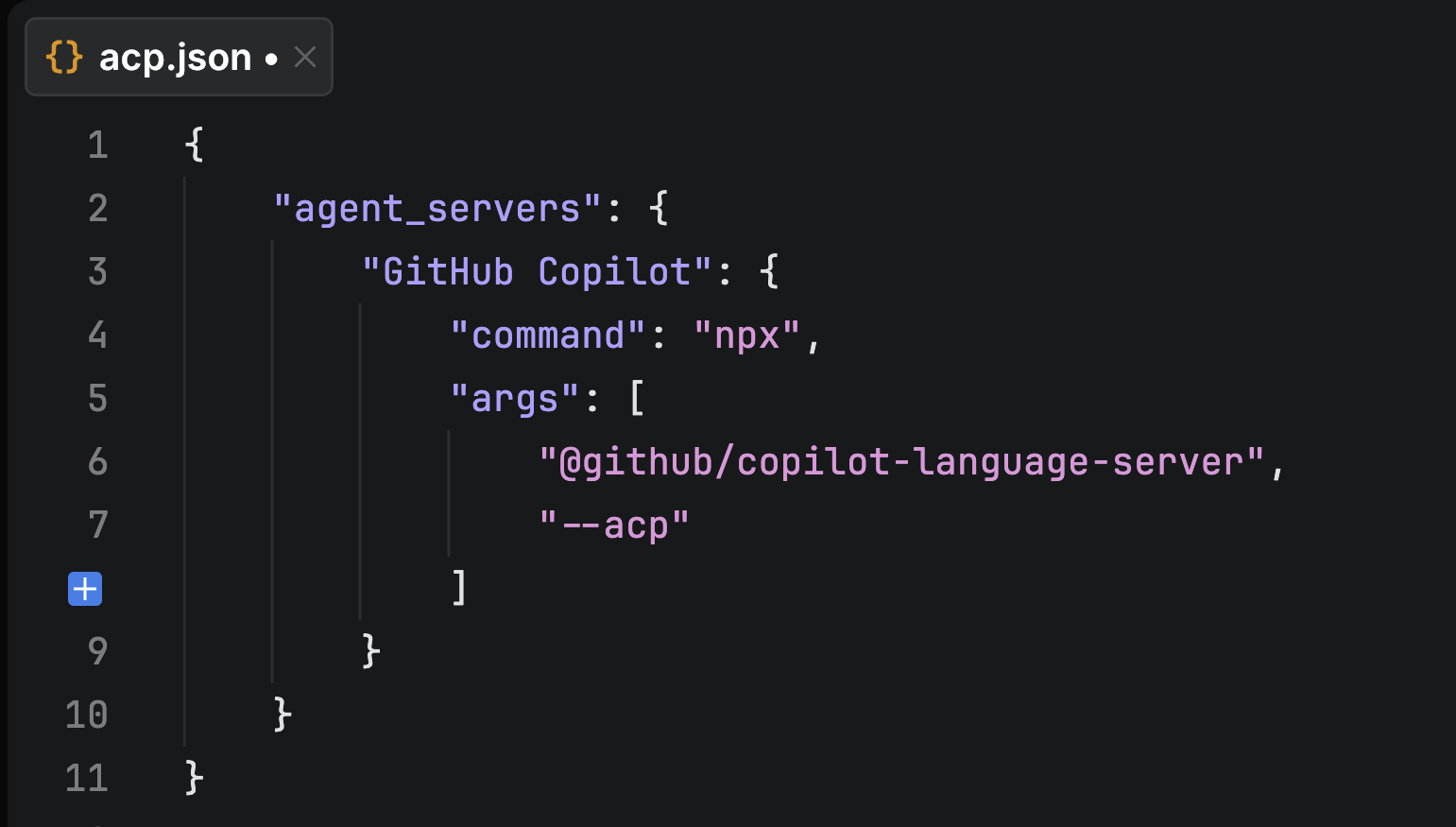 imageAir 内で GitHub Copilot を ACP エージェントとして設定する画面
これは Air がサポートする他の ACP 互換コーディングエージェントにも同様です。企業で既に承認されているツールをそのまま使用でき、別の AI プロバイダーの採用を余儀なくされることはありません。
ご自身のエージェントを接続したい場合は、GitHub Copilot、OpenCode、またはローカル Ollama モデルを使用した Cline のセットアップガイドをご覧ください。動作する acp.json 設定ファイルも含まれています。
お好みのエージェントハネスを利用可能に
モデルはコーディングエージェントの一部に過ぎません。ハネスとはその周囲のソフトウェアであり、コンテキストの収集、ツールの呼び出し、タスク管理、そしてモデルからの応答をコード変更へ変換する役割を担います。異なるハネスではこのワークフローへのアプローチや、サポートするモデルプロバイダーが異なります。
Air は現在、OpenCode や Pi などの対応 ACP エージェントに接続できます。利用者はハネスを選択し、そのハネスがサポートするモデルまたはプロバイダーで設定します。例えば、お好みのクラウドプロバイダーと OpenCode を組み合わせたり、ローカルモデルと Pi を組み合わせたりすることが可能です。
利用可能なモデルやエージェント固有の機能は、ハネスの種類と、それが ACP を通じて何を提供できるかに依存します。
ローカルモデルでの作業
ローカルモデルのサポートは、ユーザーから最も多く要望されていた機能の一つです。Ollama や LM Studio などのローカルモデルランナーを通じて、ご自身のコンピュータ上で動作するモデルを Air で利用できるようになりました。ACP 対応のコーディングエージェントがローカルモデルに接続し、Air はそのエージェントと連携します。
これにより、オフラインで動作するモデルを使用して開発が可能になり、コードベースやタスク、環境に最適なモデルを選択できます。
Java および Kotlin プロジェクトのナビゲーションとエラー検出
Air は、IntelliJ IDEA のコードエンジン(ベータ版)を基盤として、Java と Kotlin の言語インテリジェンスをサポートしました。混合プロジェクトへの対応も可能です。
タスク作成時には、Air 内で定義へジャンプしたり、使用箇所を検索したり、シンボルを検索したり、コードパスを追跡したりできます。これにより、エージェントが扱うコードを事前に把握し、より正確なコンテキストを提供できるようになります。
エージェントの処理完了後、Air は対象となる Java および Kotlin コード内のエラーや警告をハイライト表示します。IDE を開いたり、コンパイル時にエラーが発生するのを待ったりすることなく、変更を受け入れる前に問題を確認できます。
Windows での Docker タスク実行が可能に
Air では、macOS で既にサポートされているのと同様に、Windows でも Docker コンテナ内でエージェントタスクを実行できるようになりました。依存関係やエージェントコマンドをマシン上に直接実行するのではなく、隔離されたコンテナ内で実行したい場合に Docker タスクをご利用ください。Docker Desktop のインストールが必要です。
Download Air for x64 / Download Air for ARM64
エージェント実行中のより細やかな制御
承認前の提案変更を確認
エージェントがファイルの修正を求めた際は、そのファイル名をクリックして「Proposed Change」タブで完全な編集内容を開いてください。チャット内の短い抜粋に頼るのではなく、エージェントが何を変更しようとしているのかを直接確認できます。
Claude の使用コンテキスト量を確認
Air では、Claude エージェントが特定のタスクにどの程度のコンテキストウィンドウとトークンを使用しているかが表示されます。これにより、長時間のタスクがコンテキスト制限に近づいているかを把握し、そのタスクを完了させるか、新しいタスクを開始するかを判断できます。
難易度の高いタスク向けの努力レベル調整
Claude Fable、Opus、Sonnet 5 では、「xhigh」努力レベルをサポートしています。推論が必要な複雑なタスクにこの設定を使用してください。
Mac のスリープ防止機能
長時間のタスク実行中に Mac がスリープしないよう、新しい macOS 設定を有効化できます。エージェントが作業中であっても、離席してもタスクが継続して実行されます。
新リリースを試す
最新の Air リリースは air.dev/download からダウンロードするか、JetBrains Toolbox を経由して更新してください。既存のエージェントやモデルで試した上で、その使い勝手をご報告ください。
原文を表示
The new release of JetBrains Air brings support for GitHub Copilot, OpenCode, Pi, Cline, and other ACP-compatible agents. It also adds IntelliJ-powered navigation and diagnostics for Java and Kotlin and runs Windows tasks in Docker containers.
Try Air for Mac, Linux and Windows
Bring your own agents and harnesses
Air gives coding agents separate workspaces where they can run tasks in parallel. You can then review each agent’s changes before they reach your codebase. Until now, this workflow was limited to the agents bundled with Air, including Claude, Codex, Gemini CLI, and Junie. You can now connect other supported agents and use them throughout the same task and review workflow.
This is made possible by the Agent Client Protocol (ACP), an open protocol developed by JetBrains and Zed. ACP gives coding agents and development environments a shared way to communicate. When an agent supports ACP, Air can connect it to its workspace without requiring a separate integration built specifically for that agent.
With this change, the two most requested workflow improvements have become a reality.
Use your company’s approved coding agent in Air
Many companies standardize on one AI coding tool and do not allow alternatives. Previously, if your company had only approved GitHub Copilot, that meant you could not use Air because Air could not connect to the Copilot access your company provided.
Air can now connect to the GitHub Copilot CLI through its ACP server mode. This lets you use your company-managed Copilot access in Air: The Copilot CLI runs the coding agent and provides access to the available models, while Air adds parallel workspaces and its review workflow.
imageConfiguring GitHub Copilot as an ACP agent in Air
The same applies to other ACP-compatible coding agents Air supports. You can use the tool your company has already approved without asking it to adopt another AI provider.
Ready to connect your own agent? Follow our setup guide for GitHub Copilot, OpenCode, or Cline with a local Ollama model. It includes working acp.json configurations.
Use the agent harness you prefer
A model is only one part of a coding agent. The harness is the software around it: It gathers context, calls tools, manages the task, and turns the model’s responses into code changes. Different harnesses approach this workflow differently and support different model providers.
Air can now connect to supported ACP agents such as OpenCode and Pi. You choose the harness and configure it with a model or provider it supports. For example, you could use OpenCode with your preferred cloud provider or Pi with a local model.
The available models and agent-specific features depend on the harness and what it exposes through ACP.
Work with local models
Local-model support was one of our most requested additions. You can now use a model running on your computer through a local model runner such as Ollama or LM Studio. An ACP-compatible coding agent connects to the local model, and Air connects to that agent.
This lets you develop with a model that runs offline and choose the one that best fits your codebase, task, or environment.
Navigate Java and Kotlin projects and catch errors
Air now supports Java and Kotlin language intelligence, including mixed Java/Kotlin projects, powered by the IntelliJ IDEA code engine (in Beta).
While creating a task, you can jump to definitions, find usages, search for symbols, and follow code paths directly in Air. This helps you understand the code the agent will touch and give it more precise context.
After the agent finishes, Air highlights errors and warnings in the affected Java and Kotlin code. You can inspect problems before accepting the changes, without opening your IDE or waiting for the code to fail during compilation.
Docker tasks now run on Windows
Air can now run agent tasks in Docker containers on Windows, matching the existing macOS support. Use Docker tasks when you want dependencies and agent commands to run in an isolated container instead of directly on your machine. Docker Desktop is required.
Download Air for x64 / Download Air for ARM64
More control during agent runs
Review proposed changes before granting permission. When an agent asks to modify a file, click the file name to open the complete edit in the Proposed Change tab. You can inspect what the agent intends to change instead of relying on a short snippet in the chat.
See how much context Claude has used for a given task. Air now shows context-window usage and token counts for Claude Agent. This helps you recognize when a long task is approaching its context limit and decide whether to finish the task or start a new one.
Adjust the effort level for demanding tasks. Claude Fable, Opus, and Sonnet 5 now support an “xhigh” effort level for when a task needs more reasoning.
Keep your Mac awake during long tasks. Enable the new macOS setting to prevent your computer from sleeping while an agent is working, and ensure your task continues while you step away.
Try the new release
Download the latest Air release at air.dev/download or update through JetBrains Toolbox. Try it with your existing agents and models, then tell us how it works for you.
News to Guide
ニュースの次に確認する
発表内容を、現在の料金や仕様と照らし合わせられる関連ガイドです。
今日のまとめ
AIデイリーブリーフで今日の重要ニュースをまとめ読み