GitHub、Java 向け Copilot SDK を公開しフレームワーク非依存の AI 実装を可能に
本文の状態
日本語全文を表示中
詳細モードで約15分の本文を読めます。
同じ出来事の情報源
この情報源を基点に整理
GitHub Blog
GitHub は Java 開発者向けに、特定のフレームワークや AI ベンダーに依存しない「GitHub Copilot SDK for Java」を公開し、BYOK 対応で任意のモデルプロバイダとの連携を可能にした。
Continue in AI NEW LAB
このニュースを、実務の判断につなげる
AI NEW LABで、試したことや先に確認したい条件を共有できます。まずはログインなしで読めます。
AI NEW LABで論点を見るAI深層分析を開く2026年8月11日 05:17
AI深層分析
キーポイント
フレームワーク非依存とベンダー中立性の確立
既存の Langchain4j や Spring AI が特定の設計思想やライブラリへの依存を生んでいたのに対し、本 SDK は Java エコシステム内で初めてフレームワーク非依存かつ AI ベンダー中立なアプローチを実現する。
BYOK による柔軟なモデル連携
GitHub Copilot のサブスクリプションを必須とせず、OpenAI や Anthropic など任意の直接モデルプロバイダとの接続を、独自の baseUrl と API キー(またはベアートークン)の設定によって可能にする。
サーバーサイド Java 環境でのエージェント構築
CompletableFuture、アノテーション、ラムダ式、仮想スレッドなどの現代的な Java 機能を活用し、Jakarta EE や Spring 環境でエージェントセッションの作成やツール登録をプログラム可能にするクライアントライブラリである。
実装サンプルと要件の提供
Jakarta EE 11 をベースとした完全なサンプルアプリケーションを提供し、JDK 17 または推奨される JDK 25、Maven 3.9+、Copilot CLI のインストールといった具体的な環境要件を明記している。
@CopilotTool アノテーションによるツールの定義
このアノテーションはモデルが呼び出せるツールとしてメソッドを宣言し、パラメータの説明も記述可能である。SDK が JSON Schema の生成や引数のパースを自動処理するため、開発者は通常の Java メソッドを書くだけで済む。
重要な引用
GitHub Copilot SDK for Java is the first truly framework agnostic way to drive AI from Java.
And with its BYOK support, GitHub Copilot SDK for Java is also AI vendor neutral.
Even though it's called GitHub Copilot SDK, you can use it with any direct model provider... No Copilot subscription required.
"The SDK handles all the JSON Schema generation, argument parsing, and dispatch. You just write a normal Java method."
編集コメントを表示
編集コメント
GitHub Copilot SDK の名称に「Copilot」とあるが、これはサブスクリプションを必須としない汎用ライブラリであり、Anthropic や中国企業のアント・グループとは無関係である。Java エコシステムにおける AI インフラの標準化に向けた重要な一歩と言える。
Source Article
元記事を日本語で読む
本文に関係しない購読案内、埋め込み通知、サイト内プロモーションは除いています。
Java 開発者はもはや、エンタープライズアプリから AI を駆動するために Java フレームワーク固有のアプローチに頼る必要はありません。
Langchain4j が特定の AI ベンダーを介在させないことで開発者を支援したことは事実ですが、それでも Langchain4j への依存は残っていました。また Spring AI の場合も、Spring そのものではなくとも、Spring が決定した設計方針への依存は避けられませんでした。
しかし今、GitHub Copilot SDK for Java は、Java から AI を駆動する初の真にフレームワーク非依存な方法です。さらに BYOK(Bring Your Own Key)サポートにより、AI ベンダーにも依存しない中立性を備えています。
GitHub Copilot SDK と名乗っていますが、独自の baseUrl と apiKey(またはベアートークン)を指定した provider/ProviderConfig を渡すことで、OpenAI、Azure、Anthropic、あるいは OpenAI 互換エンドポイントなど、あらゆる直接モデルプロバイダーと連携可能です。Copilot のサブスクリプションは不要です。
GitHub Copilot SDK for Java は、サーバーサイドの Java コードがプログラムで Copilot エージェントセッションを作成し、ツールを登録し、プロンプトを送信し、構造化されたレスポンスを受け取ることを可能にするクライアントライブラリです。Jakarta EE や Spring を含むサーバー環境でも動作します。長期間にわたりエンタープライズ Java を開発してきた方なら、CompletableFuture、アノテーション、ラムダ式、仮想スレッドなど、馴染み深い機能がすべて揃っていることにすぐに気づくはずです。
本記事では、GitHub Copilot SDK の使い方を解説し、Jakarta EE 11 を活用したサンプルアプリケーションの構築手順を詳しく紹介します。最後に、実際に試すための具体的な次のステップも提案します。
デモに Jakarta EE 11 を選んだ理由は、私がそのリリースのリードコーディネーターを務めていたからです。開発者をエンパワーメントする最良の方法はオープンスタンダードだと信じています。Jakarta EE 11 については、InfoQ の記事をご覧ください。
このサンプルアプリは、Jakarta EE 11 をベースにしたエージェントハーンです。もちろん、開発者は各自が選んだ一般的な Java フレームワークやライブラリを使って、独自のエージェントハーンを構築することも可能です。
サンプルアプリをクローンして、実際に試してみましょう >
入手先について
SDK は Maven 依存関係として利用できます:
com.github
    copilot-sdk-java
    1.0.7-preview.1
必須条件は以下の通りです。
- JDK 17 または 25(25 を推奨。バーチャルスレッドやその他の最新機能が利用可能になります)
- Maven 3.9 以上
- 有効な Copilot サブスクリプションを持つ GitHub アカウント
- ローカル環境にインストールされた Copilot CLI(バージョン 1.0.71 以降)
サンプルアプリの解説
SDK の動作を確認する最良の方法は、このサンプルアプリケーションを実行することです。
コードの取得方法
git clone https://github.com/microsoft/Build26-BRK206-your-agent-anywhere-multiclient-multidevice-with-github-copilot-sdk.git
cd Build26-BRK206-your-agent-anywhere-multiclient-multidevice-with-github-copilot-sdk/src/java-agent-orchestrator
mvn clean package liberty:run
# http://localhost:9080/index.xhtml をブラウザで開く
この Java デモは、以下の技術スタック上で構築されています:
- 項目:技術
- ランタイム:Open Liberty 26.0.0.5
プラットフォーム: Jakarta EE 11 (Faces 4.1, CDI 4.1, WebSocket 2.2, Data 1.0, Persistence 3.2)
UI: PrimeFaces 15.0.16
AI オーケストレーション: Copilot SDK for Java 1.0.7-preview.1
データベース: H2 in-memory (10 seed property listings)
このアプリの役割
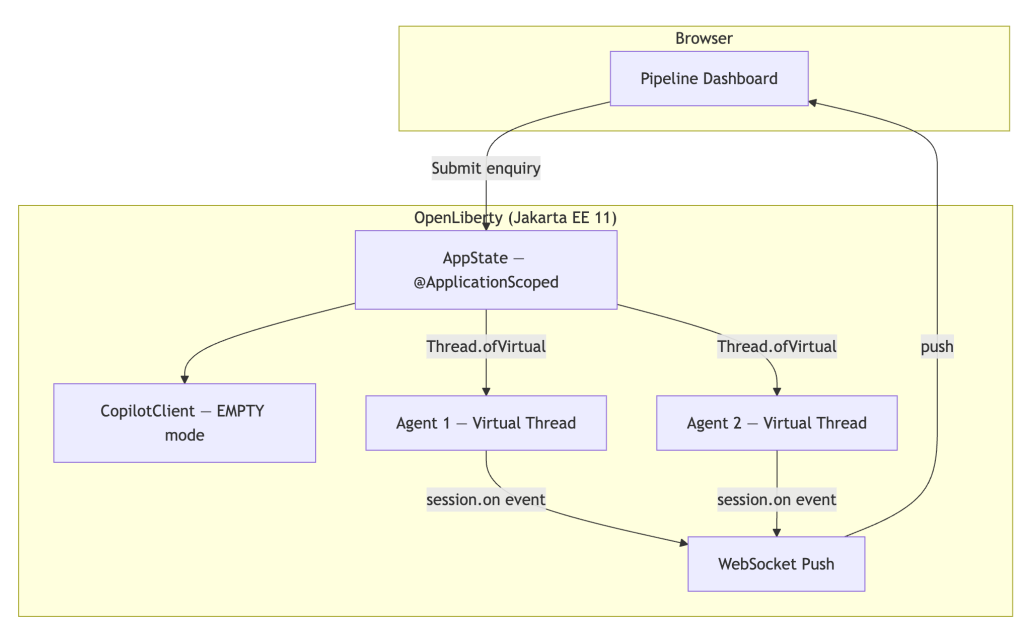
本アプリケーションは、不動産物件の問い合わせ管理を行うエージェントパイプラインです。顧客が「ロンドンの£800,000以下で3 bedroom の家を探しています」といった問い合わせを送信すると、システムは仮想スレッド上で孤立した Copilot エージェントを起動し、その処理をパイプラインを通じて行います。

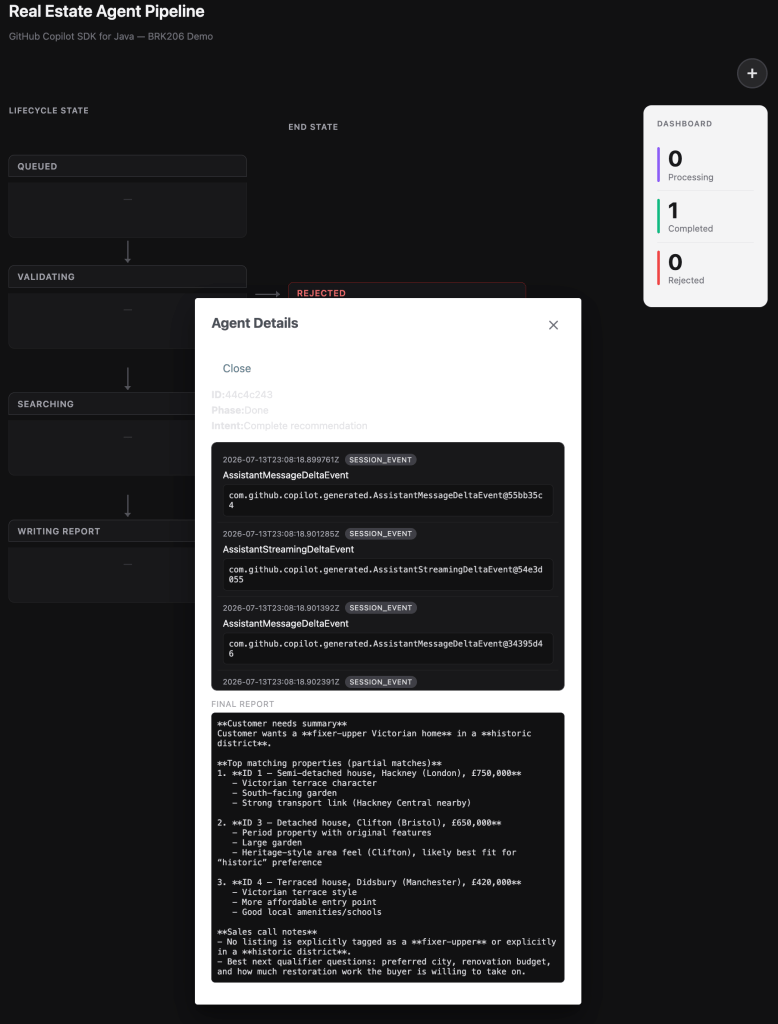
このアーキテクチャでは Jakarta WebSocket を使用し、サーバーからブラウザへリアルタイムでステータス更新をプッシュします。これにより、モデルがツールを呼び出す際のエージェントの進行状況を、ユーザーは直接確認できます。
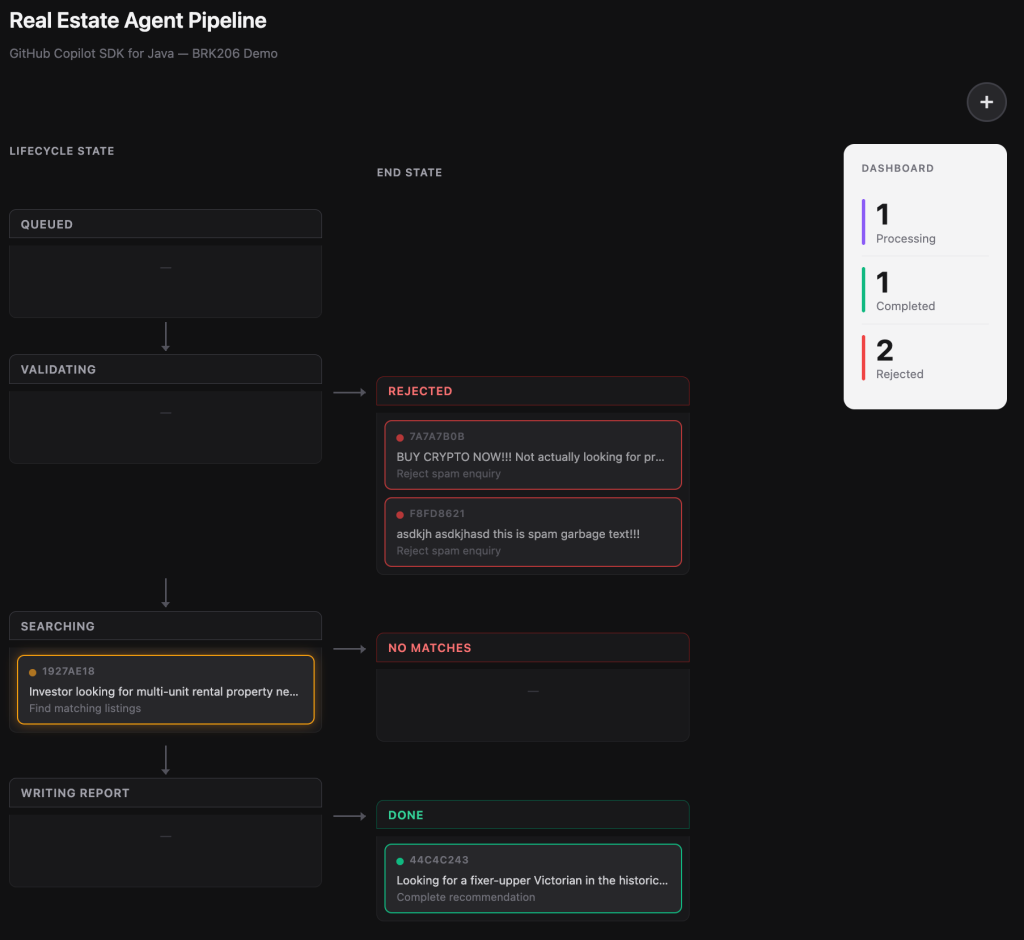
複数の問い合わせを同時に送信して、並行して動作する仮想スレッド上のエージェントを確認できます。各エージェントは独立した Copilot セッションを持ち、それぞれが個別に処理を行います。
SDK の機能を実践で見る
サンプルコードに現れる主要な SDK 機能を見ていきましょう。
@CopilotTool アノテーションによるツールの定義
これがヘッドライン API です。JAX-RS で @GET エンドポイントを書いたことがあったり、@MessageDriven ビーンを作成した経験があれば、すぐに馴染みを感じるはずです。
@CopilotTool(value = "Sets the current phase of the agent. Use this to report progress.",
             name = "set_current_phase")
public String setCurrentPhase(
        @CopilotToolParam("The phase to transition to (VALIDATING, SEARCHING, "
                + "WRITING_REPORT, REJECTED_GARBAGE, REJECTED_NO_MATCHES, or DONE)")
        String phaseName) {
    phase = Phase.valueOf(phaseName.trim().toUpperCase(Locale.ROOT));
    notifyUi();
    return "Phase set to " + phase.getLabel();
}
@CopilotTool アノテーションは、このメソッドをモデルが呼び出せるツールとして宣言します。一方、@CopilotToolParam アノテーションは各パラメータの説明を行い、モデルに何を渡すべきかを伝えます。SDK が JSON Schema の生成や引数のパース、ディスパッチ処理をすべて担当するため、開発者は通常の Java メソッドを書くだけで済みます。
@CopilotTool を利用するには、ビルド環境で 2 つの前提条件を満たす必要があります。アノテーションベースのツール API は現在 SDK の実験機能であるため、Maven ビルドで以下の 2 点を設定する必要があります。
- 実験的 API を有効にする: コンパイラに -Acopilot.experimental.allowed=true を渡します。このフラグがないと、アノテーションプロセッサがツールのメタデータを生成することを拒否します。実験的 API に関する詳細は Copilot SDK のドキュメントをご覧ください。
アノテーションプロセッサを登録するには、SDK を annotationProcessorPath として追加し、コンパイラが @CopilotTool プロセッサを検索して、コンパイル時に $$CopilotToolMeta クラスを生成できるようにします。
これらは両方とも maven-compiler-plugin で設定されます:
org.apache.maven.plugins
    maven-compiler-plugin
    3.15.0

-Acopilot.experimental.allowed=true

com.github
                copilot-sdk-java
                1.0.7-preview.1
オブジェクトからアノテーション付きのツールをすべて登録するには、以下のように記述します。
List<ToolDefinition> annotatedTools = ToolDefinition.fromObject(this);ToolDefinition.from(...) を使用してインラインラムダでツールを定義することも可能です。
専用のメソッドを用意せずに呼び出しサイトでツールを定義したい場合は、ラムダスタイルを使用します:
ToolDefinition reportIntentTool = ToolDefinition
        .from("report_intent",
              "Reports the current intent of the agent",
              Param.of(String.class, "intent", "Intent in max 4 words"),
              (String intent) -> {
                  currentIntent = intent;
                  addEvent(Instant.now(), "intent", "Intent updated", intent);
                  notifyUi();
                  return "ok";
              })
        .overridesBuiltInTool(true);
.overridesBuiltInTool(true) に注意してください。これは、SDK に対して「report_intent という名前の既存の組み込みツールを意図的に置き換える」と伝えるためのものです。モデルがすでに知っているツールの動作をカスタマイズする必要がある場合に便利です。
クラス間でのツールスキャン
ツールは、エージェントロジックと同じクラス内に実装する必要はありません。以下に、CDI ビーンとして独立して定義された searchProperties の例を示します。
@ApplicationScoped
public class PropertyDatabase {

    @CopilotTool(value = "Searches the real estate listings database. "
                           + "Returns up to 10 matching properties.",
                 name = "search_properties")
    public List searchProperties(
            @CopilotToolParam("Property type substring (e.g. 'flat', 'house')") String type,
            @CopilotToolParam("City substring (e.g. 'London', 'Bristol')") String city,
            @CopilotToolParam("Minimum number of bedrooms (0 for no minimum)") int minBedrooms,
            @CopilotToolParam("Maximum price in GBP (0 for no maximum)") double maxPriceGbp) {
        // ... filter and return matching properties ...
    }
}
通常は ToolDefinition.fromObject(propertyDatabase) でこれらのツールを登録しますが、サンプルアプリでは CDI クライアントプロキシがアノテーションのメタデータを隠してしまうため、ラムダラッパーを使用しています。
システムメッセージのカスタマイズ
SDK を使えば、システムメッセージに対してきめ細かい制御が可能です。SystemMessageMode.CUSTOMIZE を使用して、特定のセクションを置き換えつつ、他の部分は保持することができます:
SystemMessageConfig systemMessage = new SystemMessageConfig()
.setMode(SystemMessageMode.CUSTOMIZE)
.setSections(Map.of(SystemMessageSections.IDENTITY,
new SectionOverride()
.setAction(SectionOverrideAction.REPLACE)
.setContent("""
You are part of a real estate recommendation system.
You will receive enquiries from customers, and you must
carry out the following workflow...
"""));
テキストブロック("""...""")を使えば、文字列結合なしで複数行のプロンプトを可読性高く記述できます。IDENTITY セクションのオーバーライドは、モデル自身の自己紹介部分のみを書き換えるものであり、安全性に関するガードレールはそのまま維持されます。よりシンプルなアプローチが望ましい場合は、SystemMessageMode.APPEND を使用します。これにより、デフォルトのシステムメッセージの後にユーザー定義の内容を追加できます。
エージェントループ:sendAndWait(...)
1 行でフルスケールのエージェントループを開始できます。
session = client.createSession(sessionConfig).get();
// ...
AssistantMessageEvent result = session.sendAndWait(escapedEnquiry).get();
.get() の背後では、モデルが推論を行い、必要に応じて複数のツールを呼び出し、最終的な回答を返します。仮想スレッド上では .get() は非常に軽量です。待機中にプラットフォームスレッドを消費することはありません。SDK が登録されたハンドラへツール呼び出しを自動的に転送し、結果をモデルにフィードバックして処理が完了するまで繰り返します。
session.on(...) を用いたリアルタイムイベント処理
レスポンシブな UI を構築するには、セッションイベントを購読する必要があります。
sessionSubscription = session.on(event -> {
    captureSessionEvent(event);
    uiUpdateSocket.pushDetailUpdate(id);
});
ツール呼び出しの結果やアシスタントからのメッセージなど、すべての事象がイベントとして発生します。サンプルアプリはこのイベントを捕捉し、Jakarta WebSocket を経由してブラウザへプッシュするため、パイプラインダッシュボードはリアルタイムで更新されます。特定のイベントタイプを処理するにはパターンマッチングを利用できます。
if (event instanceof AssistantMessageEvent msg) {
    finalReport = msg.getData().content();
} else if (event instanceof ToolExecutionStartEvent start) {
    // ツールが呼び出されている…
}
ヘッドレスクライアントと権限処理
このクライアントはサーバーサイドでの動作を前提に設定されています。
copilotClient = new CopilotClient(
        new CopilotClientOptions()
                .setMode(CopilotClientMode.EMPTY)
                .setCopilotHome(copilotHome)
                .setExecutor(contextualVirtualThreadExecutor));
CopilotClientMode.EMPTY は IDE 統合を行わないことを意味し、クライアントは Copilot CLI と直接通信します。後述するカスタム Executor(実行器)により、ツールのコールバックがコンテナの文脈で実行されます。
権限処理については、サンプルでは以下を使用しています。
sessionConfig.setOnPermissionRequest(PermissionHandler.APPROVE_ALL);APPROVE_ALL はデモや開発環境に適していますが、本番環境では、モデルが呼び出しを許可されるツールを検証する実際の権限ポリシーを実装する必要があります。
Jakarta EE の統合パターン
この SDK は、特定のフレームワークに閉じ込められたものではありません。Jakarta EE と自然に統合されるのはもちろんのこと、Spring などの独自フレームワークとも問題なく連携します。
Executor パラメータが、最も重要な統合ポイントです。Jakarta Concurrency(3.1 仕様書の§5.2)では、アプリケーション側で生成されたスレッドは ManagedThreadFactory から取得するよう要求されており、これによりコンテナ側で以下のことが可能になります。
- ライフサイクルシャットダウン時のスレッド追跡(@PreDestroy またはサーバー停止時)
- 並行処理の制約とポリシーの適用
- コンテキストの自動伝播(手動での contextualRunnable 不要)
Open Liberty 26.x では、server.xml の virtual 属性を通じて、仮想スレッド対応の ManagedThreadFactory をサポートしています。
次に、AppState.java でこのファクトリを注入します。
@Resource(lookup = "concurrent/virtualThreadFactory")
private ManagedThreadFactory virtualThreadFactory;
そして、Copilot SDK に渡す Executor の作成にこれを利用します。
// ManagedThreadFactory (virtual=true) は、CDI、JNDI、トランザクションコンテキストを自動的に伝播する
// コンテナ管理型の仮想スレッドを作成します。
Executor managedVirtualExecutor = runnable ->
virtualThreadFactory.newThread(runnable).start()
String copilotHome = Path.of(System.getProperty("user.home"), ".copilot").toString();
CopilotClientOptions copilotClientOptions = new CopilotClientOptions()
.setMode(CopilotClientMode.EMPTY)
.setCopilotHome(copilotHome)
.setExecutor(managedVirtualExecutor);
copilotClient = new CopilotClient(copilotClientOptions);
これにより、コンテナの文脈を保持する仮想スレッドが作成されます。SDK がツール呼び出しを searchProperties() へディスパッチすると、そのメソッドは @Inject を使って JPA リポジトリを取得し、データベースへのクエリを実行できます。これは、コールバックスレッド上にコンテナの文脈が存在しているため可能です。
サンプルに含まれる他の統合パターンも紹介します。
- CDI の @ApplicationScoped アノテーションを用いて、シングルトンの CopilotClient を管理します(アプリケーションライフサイクルごとに 1 クライアント)。
- Jakarta Faces の f:websocket push を使用し、PushContext を通じてブラウザへのリアルタイム更新をプッシュします。
- Jakarta Data の @Repository アノテーションを活用して、生 JPA のボイラープレートなしで型安全なデータベースクエリを実現します。
ToolSet による細粒度のツールアクセス制御も用意されています。SessionConfig を使えば、各セッションがアクセスできるツールを正確に指定できます:
sessionConfig.setAvailableTools(new ToolSet()
.addCustom("*") // 登録されたすべてのカスタムツール
.addBuiltIn("web_fetch")); // web_fetch というビルトインのみ
これは本番環境で重要な考慮事項です。ファイルシステムへのアクセスやシェル実行など、すべてのビルトインツールを公開するのではなく、エージェントが必要とする機能に明示的に限定します。サンプルアプリでは、カスタムツールすべてと web_fetch を許可し、Search フェーズ中にエージェントがリアルタイムの物件情報を取得できるようにしています。
まとめ
今回取り上げた内容は以下の通りです。
- Java ネイティブな API:CompletableFuture、アノテーション、ラムダ式、仮想スレッドを活用することで、SDK は移植された言語の付随物ではなく、自然な Java のコードとして感じられます。
ツール定義には3つのスタイルがあります。エンタープライズパターンにはアノテーションを、インラインの利便性にはラムダ式を、完全な制御が必要な場合はJSON Schemaを使用します。
システムメッセージのカスタマイズでは、セクションレベルでの上書きにより、エージェントの動作を精密に制御できます。
アジェンシーループは1行で完結します。sendAndWait(...)がツール呼び出しのループ全体を自動的に処理します。
リアルタイムイベントストリーミングでは、session.on(...)を使用してレスポンシブなUIや観測性を実現できます。
ヘッドレスサーバーサイド操作ではIDEは不要です。Copilot CLIが利用可能な場所であればどこでも実行可能です。
Jakarta EEとの自然な組み合わせでは、CDI、JPA、WebSocket、そして仮想スレッドが、Executorの統合ポイントを通じてすべて連携して動作します。
次に試すべきこと
BYOK(Bring Your Own Key)サポートを探ってみましょう。GitHub Copilot SDKは、provider/ProviderConfigに独自のbaseUrlとapiKey(またはベアートークン)を渡すことで、OpenAI、Azure、Anthropic、あるいはOpenAI互換エンドポイントなどのモデルプロバイダに対して直接利用できます。Copilotのサブスクリプションは不要です。
サンプルアプリをクローンしてローカルで実行し、複数の問い合わせを同時に送信して仮想スレッドの実働を確認してください。
モデルを切り替えてみましょう。session.setModel(...)を使用して、異なるCopilotモデルを試すことができます。
独自のツールを追加しましょう。新しい@CopilotToolメソッド(住宅ローン計算機や学区検索など)を定義し、エージェントがそれを発見して使用することを確認してください。
Azureにデプロイしましょう。Open LibertyはAzure App Service、AKS、またはAzure Container Apps上で非常に良く動作します。詳細はhttps://aka.ms/java/eeの「Jakarta EE on Azure」ガイドをご覧ください。
GitHub Copilot SDK for Java を使えば、IDE の依存や特定のフレームワークへの縛りなしに、Java コードの背後で GitHub Copilot の全機能を発揮できます。
サンプルアプリをクローンして、実際に試してみましょう >
原文を表示
Java developers no longer have to rely on Java framework-specific approaches to drive AI from their enterprise apps.
While it is true that Langchain4j empowered developers by disintermediating specific AI vendors, you still had a dependency on Langchain4j. And with Spring AI, well, of course you had a dependency on design choices made by Spring, if not on Spring itself.
Now, GitHub Copilot SDK for Java is the first truly framework agnostic way to drive AI from Java. And with its BYOK support, GitHub Copilot SDK for Java is also AI vendor neutral.
Even though it’s called GitHub Copilot SDK, you can use it with any direct model provider, such as OpenAI, Azure, Anthropic, or OpenAI-compatible endpoints, by passing a provider/ProviderConfig with your own baseUrl + apiKey (or bearer token). No Copilot subscription required.
The GitHub Copilot SDK for Java is a client library that empowers your server-side Java code to create Copilot agent sessions, register tools, send prompts, and receive structured responses—all programmatically. It works in server environments, including Jakarta EE and Spring. If you’ve been building enterprise Java for any length of time, this SDK will feel like home: CompletableFuture, annotations, lambdas, virtual threads, it’s all here.
This post shows you how to use the SDK, walks through a complete Jakarta EE 11 sample application, and leaves you with concrete next steps to try it yourself. I chose Jakarta EE 11 for my demo because I was the lead release coordinator for that release. I believe in open standards as the best way to empower developers. For more on Jakarta EE 11 see this InfoQ article.
This sample app is an agent harness using Jakarta EE 11. But, of course, developers can build their own agent harness using the well-known Java frameworks and libraries of their choice.
Clone the sample app and try it yourself >
Where to get it
The SDK is available as a Maven dependency:
<dependency>
<groupId>com.github</groupId>
<artifactId>copilot-sdk-java</artifactId>
<version>1.0.7-preview.1</version>
</dependency>
Prerequisites:
JDK 17 or 25 (25 recommended — unlocks virtual threads and other modern features)
Maven 3.9+
A GitHub account with an active Copilot subscription
The Copilot CLI installed locally at version 1.0.71 or later.
Walk through the sample app
The best way to see the SDK in action is to run this sample application.
Get the code
git clone https://github.com/microsoft/Build26-BRK206-your-agent-anywhere-multiclient-multidevice-with-github-copilot-sdk.git
cd Build26-BRK206-your-agent-anywhere-multiclient-multidevice-with-github-copilot-sdk/src/java-agent-orchestrator
mvn clean package liberty:run
Open http://localhost:9080/index.xhtml
The Java demo is built on:
ConcernTechnology
RuntimeOpen Liberty 26.0.0.5
PlatformJakarta EE 11 (Faces 4.1, CDI 4.1, WebSocket 2.2, Data 1.0, Persistence 3.2)
UIPrimeFaces 15.0.16
AI orchestrationCopilot SDK for Java 1.0.7-preview.1
DatabaseH2 in-memory (10 seed property listings)
What the app does
The application is a real-estate lead-management agent pipeline. A customer submits an enquiry (“I’m looking for a 3-bedroom house in London under £800,000”), and the system spins up an isolated Copilot Agent on a virtual thread to process it through a pipeline:
The architecture uses Jakarta WebSocket to push real-time status updates from the server to the browser, so you can watch agents progress through phases as the model calls tools:
Submit multiple inquiries simultaneously to see concurrent virtual-thread agents in action. Each one processes independently with its own Copilot session.
SDK features in action
Let’s walk through the key SDK features as they appear in the sample code.
Defining tools with @CopilotTool
This is the headline API. If you’ve ever written a @GET endpoint in JAX-RS or an @MessageDriven bean, this will feel instantly familiar:
@CopilotTool(value = "Sets the current phase of the agent. Use this to report progress.",
name = "set_current_phase")
public String setCurrentPhase(
@CopilotToolParam("The phase to transition to (VALIDATING, SEARCHING, "
+ "WRITING_REPORT, REJECTED_GARBAGE, REJECTED_NO_MATCHES, or DONE)")
String phaseName) {
phase = Phase.valueOf(phaseName.trim().toUpperCase(Locale.ROOT));
notifyUi();
return "Phase set to " + phase.getLabel();
}
The @CopilotTool annotation declares the method as a tool the model can call. The @CopilotToolParam annotation describes each parameter so the model knows what to pass. The SDK handles all the JSON Schema generation, argument parsing, and dispatch. You just write a normal Java method.
Two build prerequisites for @CopilotTool. The annotation-based tool API is currently an experimental feature of the SDK, so you need to configure two things in your Maven build:
Enable experimental APIs: pass -Acopilot.experimental.allowed=true to the compiler. Without this flag, the annotation processor will refuse to generate the tool metadata. For more details on the experimental APIs see Copilot SDK documentation.
Register the annotation processor: add the SDK as an annotationProcessorPath so the compiler can find the @CopilotTool processor and generate the $$CopilotToolMeta classes at compile time.
Both are configured in the maven-compiler-plugin:
<plugin>
<groupId>org.apache.maven.plugins</groupId>
<artifactId>maven-compiler-plugin</artifactId>
<version>3.15.0</version>
<configuration>
<compilerArgs>
<arg>-Acopilot.experimental.allowed=true</arg>
</compilerArgs>
<annotationProcessorPaths>
<path>
<groupId>com.github</groupId>
<artifactId>copilot-sdk-java</artifactId>
<version>1.0.7-preview.1</version>
</path>
</annotationProcessorPaths>
</configuration>
</plugin>
To register all annotated tools from an object:
List<ToolDefinition> annotatedTools = ToolDefinition.fromObject(this);
Inline lambda tools with ToolDefinition.from(...)
When you want a tool defined at the call site without a dedicated method, use the lambda style:
ToolDefinition reportIntentTool = ToolDefinition
.from("report_intent",
"Reports the current intent of the agent",
Param.of(String.class, "intent", "Intent in max 4 words"),
(String intent) -> {
currentIntent = intent;
addEvent(Instant.now(), "intent", "Intent updated", intent);
notifyUi();
return "ok";
})
.overridesBuiltInTool(true);
Notice .overridesBuiltInTool(true). This tells the SDK that our report_intent tool deliberately replaces a built-in tool of the same name. This is useful when you need custom behaviour for a tool the model already knows about.
Cross-class tool scanning
Tools don’t have to live in the same class as your agent logic. Here’s searchProperties defined in a separate CDI bean:
@ApplicationScoped
public class PropertyDatabase {
@CopilotTool(value = "Searches the real estate listings database. "
+ "Returns up to 10 matching properties.",
name = "search_properties")
public List<Property> searchProperties(
@CopilotToolParam("Property type substring (e.g. 'flat', 'house')") String type,
@CopilotToolParam("City substring (e.g. 'London', 'Bristol')") String city,
@CopilotToolParam("Minimum number of bedrooms (0 for no minimum)") int minBedrooms,
@CopilotToolParam("Maximum price in GBP (0 for no maximum)") double maxPriceGbp) {
// ... filter and return matching properties ...
}
}
You would normally register these with ToolDefinition.fromObject(propertyDatabase). In the sample app, we use a lambda wrapper instead, because CDI client proxies can obscure the annotation metadata.
Customizing the system message
The SDK gives you fine-grained control over the system message. Use SystemMessageMode.CUSTOMIZE to replace specific sections while preserving the rest:
SystemMessageConfig systemMessage = new SystemMessageConfig()
.setMode(SystemMessageMode.CUSTOMIZE)
.setSections(Map.of(SystemMessageSections.IDENTITY,
new SectionOverride()
.setAction(SectionOverrideAction.REPLACE)
.setContent("""
You are part of a real estate recommendation system.
You will receive enquiries from customers, and you must
carry out the following workflow...
""")));
The text block ("""...""") makes multi-line prompts readable without string concatenation. The IDENTITY section override replaces only the model’s self-description while leaving safety guardrails intact. If you prefer a simpler approach, SystemMessageMode.APPEND adds your content after the default system message without replacing anything.
The agentic loop: sendAndWait(...)
One line kicks off the full agentic loop:
session = client.createSession(sessionConfig).get();
// ...
AssistantMessageEvent result = session.sendAndWait(escapedEnquiry).get();
Behind .get(), the model reasons, calls your tools (potentially multiple times), and returns its final response. On a virtual thread, .get() is cheap. No platform thread is consumed while waiting. The SDK dispatches tool calls to your registered handlers automatically and feeds results back to the model until it’s done.
Real-time event handling with session.on(...)
Subscribe to session events to build responsive UIs:
sessionSubscription = session.on(event -> {
captureSessionEvent(event);
uiUpdateSocket.pushDetailUpdate(id);
});
Every tool call, every result, every assistant message fires an event. The sample app captures these events and pushes them to the browser via Jakarta WebSocket, so the pipeline dashboard updates in real time. You can use pattern matching to handle specific event types:
if (event instanceof AssistantMessageEvent msg) {
finalReport = msg.getData().content();
} else if (event instanceof ToolExecutionStartEvent start) {
// Tool is being invoked...
}
Headless client and permission handling
The client is configured for server-side operation:
copilotClient = new CopilotClient(
new CopilotClientOptions()
.setMode(CopilotClientMode.EMPTY)
.setCopilotHome(copilotHome)
.setExecutor(contextualVirtualThreadExecutor));
CopilotClientMode.EMPTY means no IDE integration — the client talks directly to the Copilot CLI. The custom Executor (discussed below) ensures tool callbacks run with container context.
For permission handling, the sample uses:
sessionConfig.setOnPermissionRequest(PermissionHandler.APPROVE_ALL);
APPROVE_ALL is appropriate for demos and development. In production, implement a real permission policy that validates which tools the model is allowed to invoke.
Jakarta EE integration patterns
The SDK is not a framework island. It composes naturally with Jakarta EE — and of course also with proprietary frameworks such as Spring.
The Executor parameter is the key integration point. Jakarta Concurrency (§5.2 in the 3.1 spec) requires that application-created threads be obtained from a ManagedThreadFactory so the container can:
Track the thread for lifecycle shutdown (@PreDestroy / server stop)
Apply concurrency constraints and policies
Propagate context automatically (without needing manual contextualRunnable)
Open Liberty 26.x supports virtual-thread ManagedThreadFactory via the virtual attribute in server.xml.
<managedThreadFactory jndiName="concurrent/virtualThreadFactory" virtual="true" />
Then, in AppState.java we inject the factory:
@Resource(lookup = "concurrent/virtualThreadFactory")
private ManagedThreadFactory virtualThreadFactory;
And use it to create the Executor we pass to the Copilot SDK.
// The ManagedThreadFactory (virtual=true) creates container-managed virtual
// threads that automatically propagate CDI, JNDI, and transaction context.
Executor managedVirtualExecutor = runnable ->
virtualThreadFactory.newThread(runnable).start()
String copilotHome = Path.of(System.getProperty("user.home"), ".copilot").toString();
CopilotClientOptions copilotClientOptions = new CopilotClientOptions()
.setMode(CopilotClientMode.EMPTY)
.setCopilotHome(copilotHome)
.setExecutor(managedVirtualExecutor);
copilotClient = new CopilotClient(copilotClientOptions);
This creates virtual threads that carry the container’s context. When the SDK dispatches a tool call to searchProperties(), that method can @Inject a JPA repository and query the database, because the container context is present on the callback thread.
Other integration patterns in the sample:
CDI @ApplicationScoped for the singleton CopilotClient (one client per application lifecycle).
Jakarta Faces f:websocket push for real-time browser updates via PushContext.
Jakarta Data @Repository for type-safe database queries without raw JPA boilerplate.
Fine-grained tool access control with ToolSet. The SessionConfig lets you specify exactly which tools each session can access:
sessionConfig.setAvailableTools(new ToolSet()
.addCustom("*") // all registered custom tools
.addBuiltIn("web_fetch")); // only the web_fetch built-in
This is an important production concern. Rather than exposing every built-in tool (file system access, shell execution, etc.), you explicitly opt in to only what the agent needs. In the sample app, we allow all custom tools plus web_fetch so the agent can look up real-time property information during the Search phase.
Summary
Here’s what we covered:
Java-native API: CompletableFuture, annotations, lambdas, and virtual threads make the SDK feel like idiomatic Java, not a ported-from-another-language afterthought.
Three tool-definition styles: annotations for enterprise patterns, lambdas for inline convenience, JSON Schema for full control.
System message customization: section-level overrides give you precise control over agent behaviour.
The agentic loop in one line: sendAndWait(...) handles the full tool-calling loop automatically.
Real-time event streaming: session.on(...) enables responsive UIs and observability.
Headless server-side operation: no IDE required; runs anywhere the Copilot CLI is available.
Natural composition with Jakarta EE: CDI, JPA, WebSocket, and virtual threads all work together through the Executor integration point.
What to try next
Explore the BYOK support. The GitHub Copilot SDK can be used directly against model providers, for example OpenAI, Azure, Anthropic, or OpenAI-compatible endpoints, by passing a provider/ProviderConfig with your own baseUrl + apiKey (or bearer token). No Copilot subscription required.
Clone the sample app and run it locally. Submit multiple enquiries simultaneously to see virtual threads in action.
Swap the model. Try session.setModel(...) to experiment with different Copilot models.
Add your own tool. Define a new @CopilotTool method (a mortgage calculator, a school-district lookup) and watch the agent discover and use it.
Deploy to Azure. Open Liberty runs great on Azure App Service, AKS, or Azure Container Apps. See the Jakarta EE on Azure guidance at https://aka.ms/java/ee.
The Copilot SDK for Java puts the full power of GitHub Copilot behind your Java code with no IDE required and no framework lock-in.
Clone the sample app and try it yourself >
The post Using the GitHub Copilot SDK for Java appeared first on The GitHub Blog.
関連記事
News to Guide
ニュースの次に確認する
発表内容を、現在の料金や仕様と照らし合わせられる関連ガイドです。
今日のまとめ
AIデイリーブリーフで今日の重要ニュースをまとめ読み