今週、GitHub のプロジェクト管理者が有効化すべきセキュリティ設定 6 つ
本文の状態
日本語全文を表示中
詳細モードで約8分の本文を読めます。
同じ出来事の情報源
この情報源を基点に整理
GitHub Blog
GitHub セキュリティラボは、セキュリティエンジニアではない多くの管理者向けに、自動化や拡張性を損なわず脆弱性を防ぐため、今週中に有効化するべき 6 つのセキュリティ設定を推奨している。
Source Article
元記事を日本語で読む
本文に関係しない購読案内、埋め込み通知、サイト内プロモーションは除いています。
GitHub セキュリティラボでは、週を過ごす多くの時間をメンテナとの対話に費やしています。一部の人は設定ページが複雑だと感じ、ドキュメントも広がりすぎていると感じています。私たちが話すほとんどのメンテナは、セキュリティエンジニアとして雇われたわけではありません。これは事実ですが、プロジェクトのセキュリティ設定を完全に無視すると、自動化とスケーラビリティの面で多くの機会を逃すことになり、結果としてセキュリティ態勢が脆弱になります。そのうちに気づかないうちに脆弱性が蓄積し、ユーザーを危険にさらすことになります。
要約すると、6 つの設定項目があります。すべて無料で利用でき、30 分未満で更新可能です。これらを「プロジェクトを守る(Protect Your Project)」と呼ばれるガイド付きフローにまとめましたので、一度の作業で完了できます。以下では、使用する各ツールについて順を追って説明します。
- SECURITY.md ファイルを追加する
これはリストにある設定の中で最も負担が少なく、他のすべての設定を容易にするものです。
SECURITY.md ファイルは、プロジェクト内のバグを発見した人々がそれらをどこに報告すべきかを示すものです。このファイルがない場合、善意の報告者が取れる選択肢は、公開されたイシュー(現在は公開された攻撃経路)になるか、個人宛ての電子メール(見つかる場合のみ)になります。
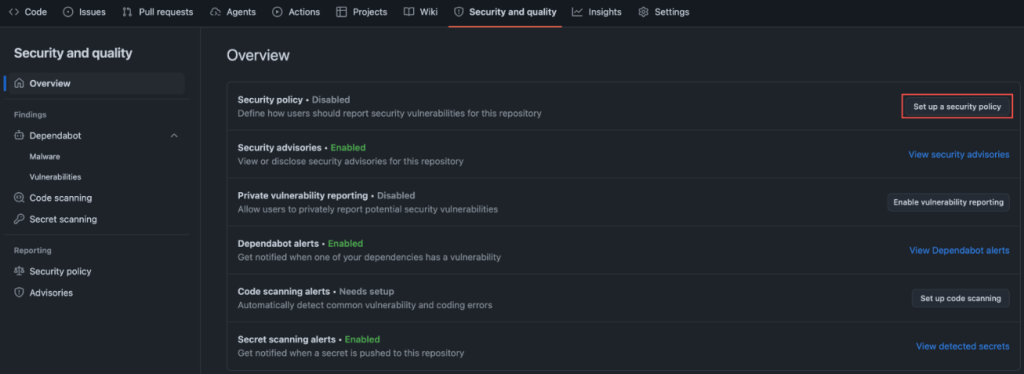
あまり多く書く必要はありません。脆弱性を報告する人が公開投稿せずに直接あなたに連絡できるように、メールなどのコミュニケーション手段を追加することを推奨します。その後、対象となるバグの範囲や、連絡する際に報告者が念頭に置くべき他の事項を明記してください。参考として、完全な例として systemd プロジェクトのセキュリティポリシーを紹介しています。これは再現手順に関する明確な期待値を設定しており、24 時間年中無休の対応チームを持っていると仮定していません。この構造を借用し、連絡先情報を変更してコミットするだけです。
最大で 10 分です。
- プライベート脆弱性レポート機能を有効にする
SECURITY.md は報告者にどこへ行くべきかを示します。プライベート脆弱性レポート機能 (PVR) は、報告者が報告を行うためのプライベートな場所を提供します。
一度有効化すると、研究者はあなたのリポジトリに対して機密性の高いアドバイザリを提出できます。あなたはそれを公開の目から隠して処理し、自分のスケジュールで開示します。設定は「設定」→「セキュリティ」の 1 つのチェックボックスだけです。
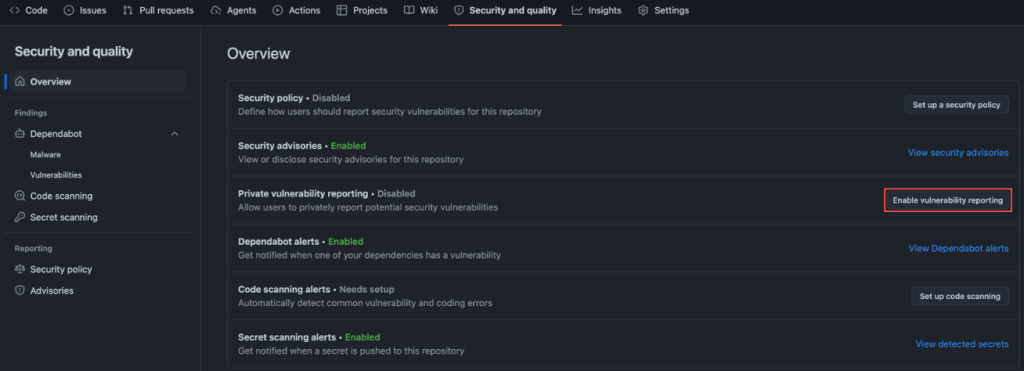
今夜行うべきことが一つしかないなら、まずこれら 2 つを一緒に実施してください。これらは無料で、コミュニティに対してあなたがこの問題を真剣に受け止めていることを示す最も迅速なシグナルとなります。
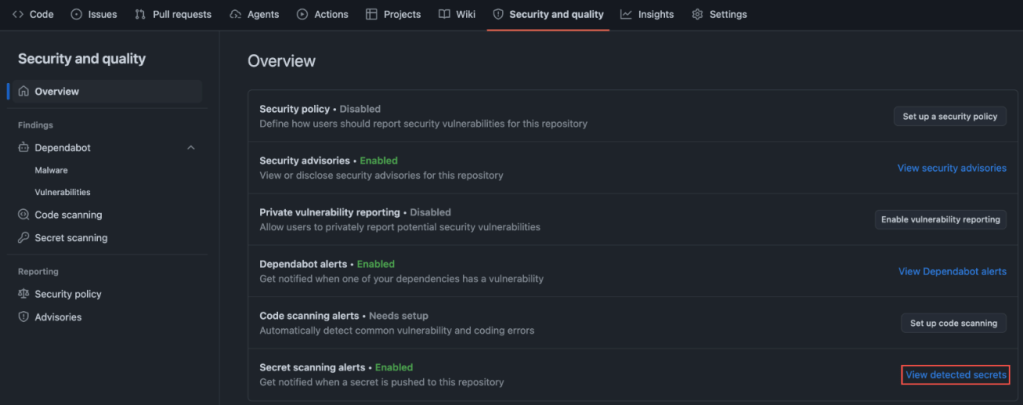
- シークレットスキャンをプッシュ保護付きで有効にする
これは最も恥ずかしい失敗モードを持つ機能です。
GitGuardian の「2026 年シークレット拡散状況」レポートによると、2025 年に公開 GitHub で新たに漏洩したシークレットは 2,865 万件に上り、前年比で 34% の増加となりました。これは記録に残る単一年度における最大の増加幅です。AI を活用したコミットによるシークレットの漏洩率は、ベースラインのおよそ倍の速度で発生しています。IBM の「2025 年データ侵害コストレポート」によると、データ侵害の平均コストは現在、世界的に 444 万ドル(米国では 1,022 万ドル)となっています。
シークレットスキャンは、ローカル環境でプッシュされる前にキーやトークンをブロックすることで、リポジトリに誤って含まれてしまったシークレットを検出します。リポジトリが公開か非公開かは関係ありません。一度シークレットがローカル開発環境から外部に出れば、そのリポジトリへのアクセス権を持つ誰でも利用可能になってしまうからです。
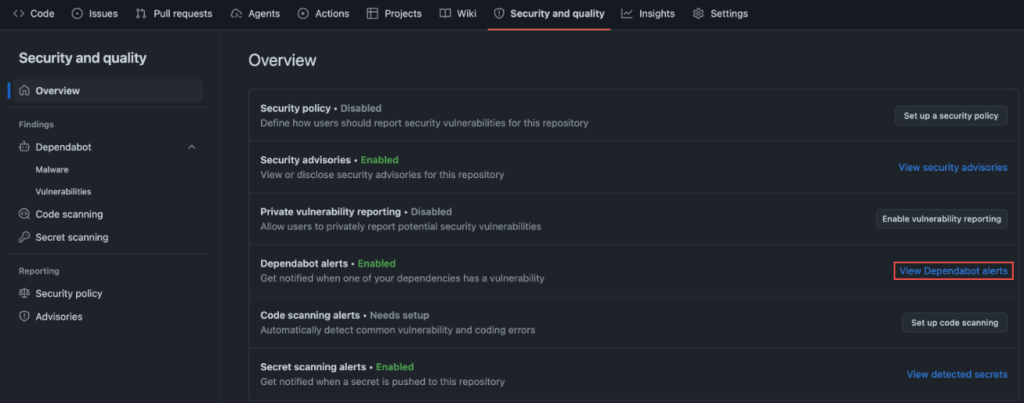
- Dependabot と依存関係レビューを有効にする
あなたのプロジェクトは、コードそのものだけではありません。コードが読み込む数十(場合によっては数百)のパッケージも含まれます。
例えば WordPress を見てみましょう:WordPress に言及したレビュー済みかつ深刻度が高いアドバイザリを検索すると、既知の脆弱性を持つプラグインの長いリストが表示されます。WordPress サイトを運用している場合、Dependabot はこれらのプラグインが依存関係に含まれていないことを保証するのに役立ちます。
Dependabot は、依存しているパッケージに既知の脆弱性があることを通知します。Dependency review を使えば、プルリクエスト内で追加またはアップグレードされる内容と、その中に公開されたアドバイザリが含まれるかどうかを正確に確認できます。これらを組み合わせることで、 opaque な package.json の差分が 2 分程度のレビューで済むようになります。
- コードスキャンを有効にする
コードスキャンはリポジトリに対して静的解析を実行し、実際のバグにつながるパターンにフラグを立てます。SQL インジェクション(SQL injection)、コマンドインジェクション(command injection)、危険なデシリアライゼーション(deserialization)など、よくある攻撃パターンです。
CodeQL を使ったコードスキャンでは、不安全な GitHub Actions ワークフローも検出できます。CodeQL はそのエンジンであり、私たちはコードスキャン機能を実装しました。2019 年にオープンソースプロジェクト向けに無償化し、現在は「Security and Quality」タブでワンクリックのデフォルト設定として提供されています。
この設定は、設定が必要そうに見えるためか、多くのメンテナーがスキップしがちです。しかし実際には設定不要です。デフォルト設定では、あなたの言語に適したクエリパック(query pack)を自動的に選択し、すべてのプルリクエストで実行されます。
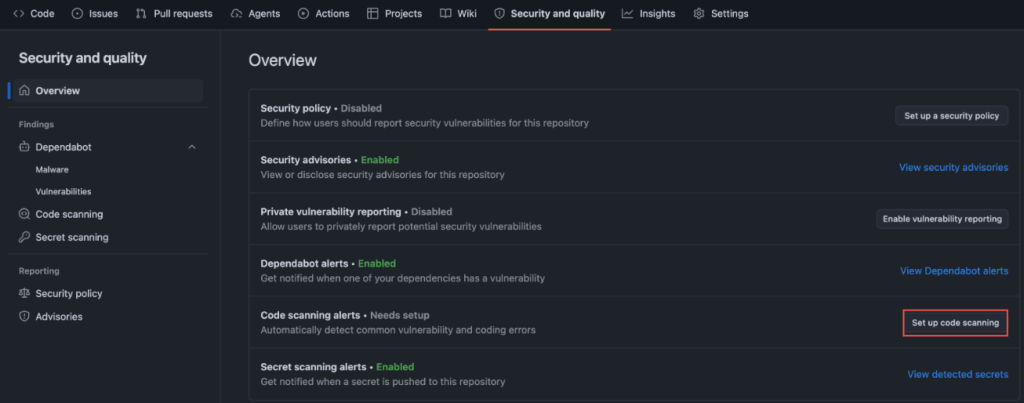
- デフォルトブランチにブランチ保護を有効にする
これは最もシンプルで派手さのない設定ですが、有効にした瞬間から最大の効果を発揮します。これは、main ブランチへのマージ前にプルリクエストを必須とし、最低 1 つの承認を得ることを要求するものです。
これは最悪のシナリオ、つまり資格情報の漏洩、混乱したコントリビューター、あるいは疲れたあなたが本番環境に直接プッシュしてしまう事態に対応するものです。また、これが他の 5 つの設定を実効性のあるものにする理由でもあります。なぜなら、Dependabot アラートやコードスキャンの発見結果が、決して開かないタブに放置されるのではなく、マージをブロックするようになるからです。
プロジェクトを守るショートカット
私たちは「プロジェクトを守る(Protect Your Project)」という機能を構築しました。これにより、これらの設定をすべて覚える必要はありません。これは登録不要で、1 つのリポジトリについて 6 つの設定をガイド付きウィザードが 10〜15 分ほどで案内するものです。
各設定の役割を理解した今、このツールを使ってそれらを有効にすることができます。
始める >
結論として
これら 6 つの設定を設定しても、プロジェクトを完全にハッキング不可能にするわけではありません。そんなものは存在しません。
しかし、これらは「簡単に開けられる扉」を閉じます。現在、大規模な公開リポジトリに対してスクリプトでアクセスする人々によって、まさにその扉が開かれているのです。
これらの設定を有効にすれば、あなたのプロジェクトは今朝よりも攻撃されにくくなります。また、そのプロジェクトに依存しているすべてのプロジェクトも同様です。
「今週 GitHub の管理者が有効にするべき 6 つのセキュリティ設定」という記事は、The GitHub Blog で最初に公開されました。
原文を表示
At GitHub Security Lab, we spend a lot of our week talking to maintainers. Some find the settings page dense and the docs sprawl. Most maintainers we talk to weren’t hired to be security engineers. While this is true, ignoring a project’s security settings completely will lead into leaving a lot in the table in terms of automation and scalability, leading into a poor security posture, and before you realize it to vulnerabilities that pile up, exposing your users.
Here’s the short version. Six settings, free to use, updated in less than half an hour. We’ve bundled them into a guided flow called Protect Your Project so you can do them in one pass, and we walk through each tool you’ll use below.
- Add a SECURITY.md file
This is the lightest-lift setting on the list and the one that makes everything else easier.
A SECURITY.md file tells the people who find bugs in your project where to send them. Without one, your options for a well-meaning reporter are a public issue (now a public exploit) or your personal email (if they can find it).
You don’t need to write much. We suggest adding a communication mean such as an email so that those reporting vulnerabilities can reach you directly without posting about them publicly. Then, you can state what bugs are in scope, alongside anything else a reporter should have in mind when contacting you. For reference, we point maintainers to the the systemd project’s security policy that we consider a complete example. It sets clear expectations about reproducers and doesn’t assume you have a 24/7 response team when you don’t. Borrow the structure, change the contact details, commit it.
Ten minutes, tops.
- Turn on private vulnerability reporting
SECURITY.md tells reporters where to go. Private vulnerability reporting (PVR) gives them a private place to make their report.
Once enabled, a researcher can file a confidential advisory on your repo. You triage it out of the public eye and disclose on your timeline. The setup is one checkbox in Settings → Security.
If you only do one thing tonight, do these first two together. They are free, and are the fastest signal to your community that you take this seriously.
- Turn on secret scanning, with push protection
This is the one with the most embarrassing failure mode.
GitGuardian’s State of Secrets Sprawl 2026 found 28.65 million new secrets leaked on public GitHub in 2025, a 34% jump over the prior year and the largest single-year increase on record. AI-assisted commits are leaking secrets at roughly twice the baseline rate. The average cost of a data breach now sits at $4.44 million globally ($10.22 million in the US) per IBM’s 2025 Cost of a Data Breach Report.
Secret scanning catches keys and tokens that slip into your repo by blocking them locally before they’re pushed to your repository. It doesn’t matter if your repo is public or private, because once secrets leave your local development, then they are available to anyone with access to your repo.
- Turn on Dependabot and dependency review
Your project isn’t just your code. It’s the dozens (often hundreds) of packages your code pulls in.
Looking at WordPress, for example: this search for reviewed, critical-severity advisories mentioning WordPress returns a long list of plugins with known vulnerabilities. If you’re running a WordPress site, Dependabot helps ensure none of these plugins are sitting in your dependencies.
Dependabot alerts you when a package you depend on has a known vulnerability. Dependency review shows you, inside a pull request, exactly what’s being added or upgraded and whether any of it has an open advisory. Together they turn an opaque package.json diff into a two-minute review.
- Turn on code scanning
Code scanning runs static analysis on your repo and flags the patterns that lead to real bugs. SQL injection. Command injection. Dangerous deserialization. The usual cast.
Code scanning with CodeQL can detect unsafe GitHub Actions workflows. CodeQL is the engine, and we built code scanning. We made it free for open source in 2019, and it now ships as a one-click default setup in your Security and Quality tab.
This is the setting most maintainers skip because it sounds like it needs configuration. It doesn’t. Default setup picks the right query pack for your language and runs on every pull request.
- Turn on branch protection on your default branch
This is the simplest, least-flashy setting, but it will yield the biggest impact starting as soon as you turn it on. This is about requiring a pull request before merging to main with minimum one approval.
This catches the worst-case scenario: a compromised credential, a confused contributor, or a tired version of you pushing straight to production. It’s also what makes the other five settings actually bite, because now Dependabot alerts and code scanning findings block a merge instead of sitting in a tab you never open.
The Protect Your Project shortcut
We built Protect Your Project so you don’t have to remember any of this. It’s a guided wizard that walks you through these six settings on one repo in 10 to 15 minutes, without signing up.
Now that you understand what each setting does, you can use this tool to turn them on.
Get started >
In conclusion
These six settings will not make your project unhackable. Nothing will.
What they will do is close the easy doors, the ones being walked through right now by people scripting through public repos at scale.
Turn these on, and your project will be meaningfully harder to attack than it was this morning. So will every project that depends on it.
The post 6 security settings every GitHub maintainer should enable this week appeared first on The GitHub Blog.
今日のまとめ
AIデイリーブリーフで今日の重要ニュースをまとめ読み