サイロ化されたデータから統合インサイトへ:Amazon QuickSight のクロスアカウント Athena アクセス機能
本文の状態
日本語全文を表示中
詳細モードで約17分の本文を読めます。
同じ出来事の情報源
この情報源を基点に整理
AWS Machine Learning Blog
Amazon は、QuickSight が異なる AWS アカウント間で Amazon Athena を利用してデータを分析できる機能を追加した。これにより、組織内のデータサイロを解消し、統合的な洞察を得ることが可能になる。
Source Article
元記事を日本語で読む
本文に関係しない購読案内、埋め込み通知、サイト内プロモーションは除いています。
Amazon Quick は、AI を活用した統合インテリジェンスサービスであり、組織のデータ、構造化データ、ドキュメントやメール、ナレッジベースなどの非構造化エンタープライズコンテンツを単一のサービスに集約し、誰でも探索・分析・アクションを起こせるようにします。40 以上のアプリケーション連携機能を備え、Quick はインサイトとアクションの間の「ラストマイルギャップ」を解消し、ユーザーがデータを理解して直接行動に移せるよう支援します。
Amazon Quick Sight は、Amazon Quick のビジネスインテリジェンス(BI)機能であり、統合 BI サービスです。モダンなインタラクティブダッシュボード、自然言語クエリ、ピクセル単位で完璧なレポート、機械学習(ML: Machine Learning)によるインサイト、そして大規模展開可能な埋め込み分析を提供します。Amazon Quick は、ビジネスインサイト、調査、自動化のための AI エージェントを一つの統合された体験にまとめ、セキュリティとアクセスポリシーを維持しながら、より賢く、迅速に作業を進めることを支援します。
Amazon Athena は、標準 SQL を使用して Amazon Simple Storage Service (Amazon S3) に保存されたデータを直接分析するためのサーバーレス型インタラクティブクエリサービスです。インフラの管理も不要で、データのロードも必要ありません。Athena を Amazon S3 内のデータに指し示し、AWS Glue Data Catalog を使用してスキーマを定義するだけで、すぐにクエリを開始できます。
多くの企業では、Amazon Quick のデプロイメントを単一の AWS アカウントに集約している一方で、データは複数の事業部門アカウントに分散されています。例えば、金融サービス会社の場合、Quick は中央の AWS アカウントで実行される一方、小売銀行のデータはアカウント A に、投資銀行のデータはアカウント B に、リスク管理のデータはアカウント C に格納されているといったケースがあります。これまで、これらのアカウント間で Amazon Athena データをクエリするには、複数の Quick サブスクリプションを管理するか、すべてのクエリコストを中央アカウントで負担するかのどちらかしかありませんでした。
本日、Amazon Quick におけるクロスアカウント Athena アクセスを発表いたします。この機能により、顧客は AWS Identity and Access Management (IAM) ロールチェーンを使用して、他の AWS アカウント内の Athena データを照会でき、クエリコストはデータが保存されているアカウントに請求されます。クロスアカウント Athena アクセスの文脈において、ロールチェーンはパブリッシャーアカウント内の Amazon Quick が、顧客のコンシューマーアカウント内のロールを引き受けることを可能にし、そのロールには長期認証情報をアカウント間で共有することなく、Athena および AWS Glue Data Catalog 内のデータを照会する権限が付与されます。本稿では、IAM ロールの作成、信頼ポリシーの設定、Quick 内でのクロスアカウントデータソースの作成、およびそこからデータセットを構築するというエンドツーエンドのセットアップ手順について解説します。
用語定義
- クイック中央アカウント(ソースアカウント):Amazon Quick がデプロイされている AWS アカウント
- コンシューマーアカウント:Athena データ資産(データベース、テーブル、S3 データ)が存在し、クイック中央アカウントからアクセスされる AWS アカウント
- RunAsRole(ロール A):クイックが最初に引き受けるクイック中央アカウント内の IAM ロール。データ権限は持たず、コンシューマーアカウントのロールへ連鎖するための権限のみを持つ
- コンシューマーアカウントロール(ロール B):各コンシューマーアカウントに存在し、Athena、AWS Glue、S3 へのアクセスを付与する IAM ロールで、ロール A を信頼する
- ロールチェーン:クイックが RunAsRole を引き受けた後、その資格情報を使用してコンシューマーアカウントのロールを引き受けるという 2 ステップの資格情報プロセス
- ExternalId(外部 ID):信頼ポリシーに設定されるセキュリティ条件(データソース ARN に設定)で、ロール引き受け時に混乱したデュープ攻撃を防ぐために使用される
- スコープダウンポリシー:ランタイム時に添付されるインライン IAM ポリシーで、連鎖された資格情報が特定のコンシューマーアカウントロールのみを引き受けるように制限する
- Athena ワークグループ:クエリが実行されコストが追跡される、コンシューマーアカウント内の Athena 実行環境
ソリューション概要
本ソリューションは、2 つの IAM ロールを関与させる 2 ステップのロールチェーン機構を使用します:
- ロール A (RunAsRole) – 中央の Quick アカウントに存在します。Quick はまずこのロールを仮定します。
- ロール B (Consumer Account Role) – Athena データが存在する消費者アカウントに存在します。ロール A はクエリを実行するためにロール B にチェーンされます。
Quick ユーザーがクエリを実行すると、サービスはロール A を仮定し、その資格情報を使用して消費者アカウント内のロール B を仮定します。Athena はロール B の資格情報を使用してクエリを実行するため、計算コストは消費者アカウントに請求されます。
前提条件
開始する前に、以下の準備が整っていることを確認してください:
- 中央アカウントで Amazon Quick Enterprise Edition がアクティブであること
- 両方のアカウントで IAM の管理アクセス権限があること。各アカウントでロールの作成と設定を行います
- AWS Command Line Interface (AWS CLI) がインストールされ、両方のアカウントの資格情報で構成されているか、または AWS Management Console にアクセスできること
- IAM の概念、特に信頼ポリシー、権限ポリシー、およびロールの仮定 (sts:AssumeRole) に関する知識があること
- 消費者アカウントに Athena ワークグループが設定されていること(開始にはデフォルトのプライマリーワークグループで十分です)
- 消費者アカウント内に Athena クエリ結果用の S3 バケットが存在すること(通常、aws-athena-query-results-* というプレフィックスが付与されます)
注: 複数の消費者アカウントを接続する場合は、各アカウントに対してロール設定の手順を繰り返してください。大規模な管理を円滑にするために、IAM ロールの命名規則を事前に計画してください。
技術アーキテクチャ
組織がレイクハウスアーキテクチャを採用し、データをビジネスユニット、AWS リージョン、および AWS アカウントに分散させるにつれ、データを移動せずに中央から照会する方法が必要となります。Amazon Quick 用のクロスアカウント Athena アクセスは、この要件に対応します。IAM ロールチェーン(IAM role chaining)を使用することで、中央の Quick デプロイメントがデータ複製や共有された長期有効な認証情報、あるいは複数の Quick サブスクリプションを必要とすることなく、アカウント境界を越えて分散したデータストアにアクセスできます。本アーキテクチャは、2 つのアカウントによる概念実証から企業全体の展開までスケールします。このセクションでは、それぞれが前回のパターンに基づいて構築される 3 つのパターンについて説明します。
パターン 1: 基本的な 2 アカウントセットアップ
最も単純なデプロイメントは、1 つの中央 Quick アカウントを 1 つのコンシューマーアカウントに接続するものです。これは最小限の実行可能な構成であり、本記事の手順別ウォークスルーと直接対応しています。ソリューション概要で説明されているロールチェーン(Quick がロール A を仮定し、sts:AssumeRole を使用してロール A からロール B へ連鎖し、Athena がロール B の認証情報のもとでクエリを実行する)がそのまま適用されます。このパターンは、初期検証に適しており、単一のビジネスユニットのデータを共有(中央)BI AWS アカウントに接続する場合にも適しています。

パターン 2:ハブ・アンド・スポーク
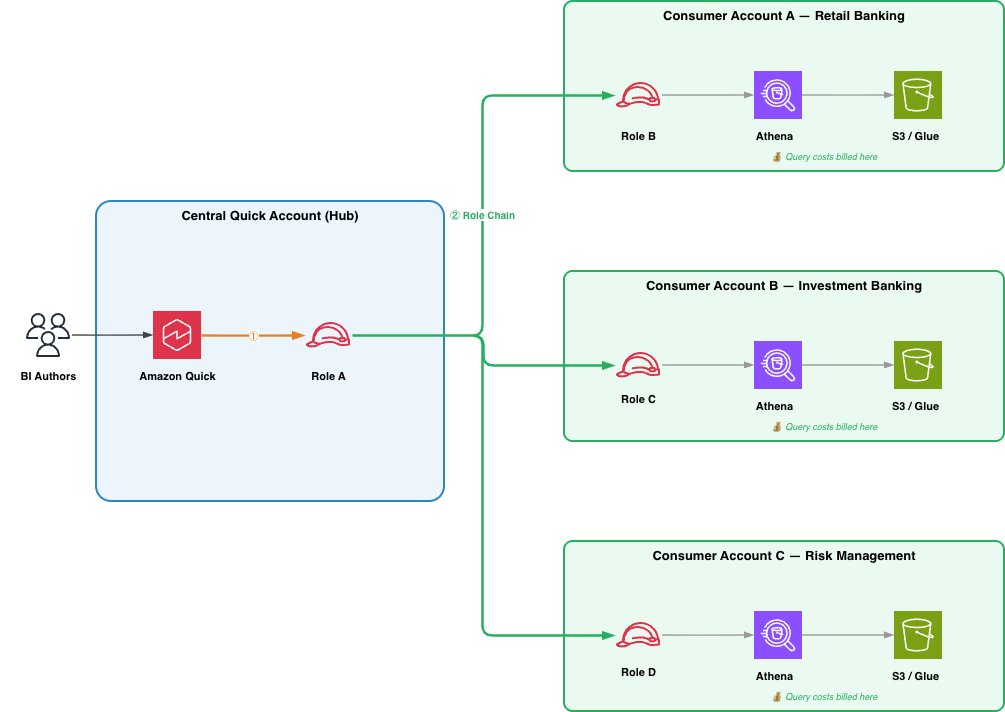
多くの企業では、Quick のデプロイを単一のアカウント(ハブ)に集約し、データは複数の事業部門アカウント(スポーク)に分散配置しています。このハブ・アンド・スポークモデルは基本設定を拡張したもので、ロール A の権限ポリシーには複数のコンシューマーロール ARN がリストされ、これらは同じアカウント内または異なるアカウント内に存在し得ます。また、Quick 上では各データソースに対して個別にデータソースが作成されます。このパターンの最大の利点は、スポーク間の独立性です。新しい事業部門を追加する際、その部門のアカウントで新しいロール B を作成し、Quick で新しいデータソースを登録するだけで済み、既存のスポークに変更を加える必要はありません。各スポークは独自のロール B 権限を管理し、中央の BI AWS アカウントに対してどのテーブルや S3 プレフィックスが公開されるかを決定します。コストの帰属も自然に実現され、各スポークの Athena クエリはそのアカウントごとに請求されます。単一の Quick ダッシュボードが複数のコンシューマーアカウントからのデータソースを参照できるため、BI 作成者は統一された Quick の体験から離れることなく、事業横断的な分析を構築できます。これは、ほとんどの企業にとって推奨されるパターンです。
スポークの数が数個を超えてスケールする場合は、コンシューマー側のセットアップをテンプレート化することを検討してください。ロール B、Athena ワークグループ、および必要な信頼関係と権限ポリシーに対する AWS CloudFormation または CDK テンプレートを使用することで、事業部門チームがオンボーディングをセルフサービスで実行したり、中央の BI チームが単一のスタックデプロイで新しいスポークをプロビジョニングしたりすることが可能になります。
パターン 3: データメッシュ
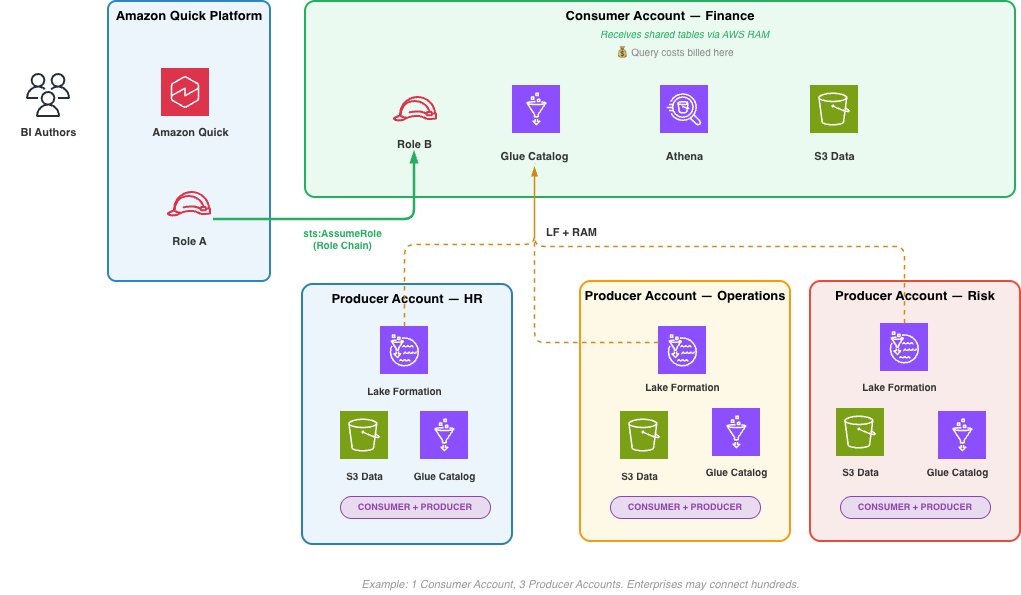
データメッシュでは、データの生産者と消費者は異なるアカウントに属します。生産者アカウントが生のデータを所有・管理し、それを消費者アカウントへプロビジョニング(設定)します。例えば、AWS Lake Formation と AWS Resource Access Manager (AWS RAM) を使用して、アカウント境界を越えてテーブルを共有する方法があります。具体的なプロビジョニングの仕組みはドメインチームの判断に委ねられ、本稿の範囲外となります。ロール B、AWS Glue Data Catalog(データカタログ)、Athena ワークグループを含む消費者アカウントが、Amazon Quick によってロールチェーンを通じて接続先となります。このアカウントは、AWS Glue Data Catalog のリソースポリシーを用いて他の消費者アカウントへ管理されたデータ製品を公開し、ドメイン横断的な分析のためにデータを利用可能にします。各々がデータ製品の生産者かつ消費者として機能する消費者アカウント間のピアツーピアな共有こそが、メッシュを定義する要素です。Quick 内の BI 作成者は、単一のダッシュボード内で複数の消費者アカウントを跨るクエリを実行でき、クエリコストは各消費者アカウントごとに按分されます。企業規模では、単一の Amazon Quick デプロイメントが数百の消費者アカウントに接続可能です。ドメインアカウントが生産者アカウントへ生のデータをどのようにプロビジョニングするかは本稿の範囲外です。
パターンの選択
適切なパターンは、あなたのデータ戦略に依存します。基本的な 2 アカウント構成では、ロールチェーンがエンドツーエンドで検証されます。多くの企業は追加の事業部門をオンボーディングする際にハブ・アンド・スポークを採用し、これにより各スポークを独立させ、コスト帰属を明確にし、信頼ポリシーを単純に保ちます。強力なデータ所有権の境界線や専任ドメインチームを持つ組織は、自然とデータメッシュパターンへと進化します。このパターンでは、コンシューマーアカウントはデータを供給するプロデューサーアカウントとは区別され、Amazon Quick はそれらすべての間で統一された分析レイヤーとして機能します。要件が拡大するにつれて小規模から始めて拡張していくことを推奨します。
今後の展望
エージェント型 AI の機能が成熟し、AI エージェントが組織の境界を越えて自律的にデータを照会・変換・処理し始めるようになると、データが存在する場所で、ガバナンスされ、コスト帰属が可能で、監査可能な状態でのアクセス能力が基盤となります。クロスアカウント Athena アクセスは、その未来を支える構成要素です。現在は Quick ダッシュボードを分散したデータレイクに接続していますが、エージェント型パターンが進化すれば、同じ IAM ロールチェーン機構は、ビジネスユーザーに代わって Athena を照会し、リアルタイムでガバナンスルールを適用し、データを単一のアカウントに集約することなく計算コストをデータ所有者へルーティングする AI エージェントへと拡張されます。
ソリューション
Amazon Quick におけるクロスアカウント Athena アクセスは、IAM ロールチェーンを使用して、中央の Quick アカウントとデータが存在する 1 つ以上のコンシューマーアカウントを橋渡しします。データを単一のアカウントに統合したり、ビジネスユニットごとに個別の Quick サブスクリプションを管理したりするのではなく、2 つの IAM ロール(各アカウントに 1 つずつ)を設定して連携させ、クエリをルーティングしコストを正しくアトリビュートします。
中央 Quick アカウントでロール A (RunAsRole) を作成
ロール A は中央 Quick アカウント内に存在します。ユーザーがクエリを開始すると Amazon Quick がこのロールを引き受けます(Assume)。ロール A 自体にはデータ権限を持たず、その唯一の目的はコンシューマーアカウントへのチェーンです。必要なものは以下の 2 つだけです。
- Quick サービスがこのロールを引き受けられるようにする信頼ポリシー。
- コンシューマーアカウント内のロール B を引き受けられるようにする権限ポリシー。
信頼ポリシーを作成し、role-a-trust-policy.json という名前にします。これにより、Quick サービスプリンシパルがデータソース操作にスコープを限定してロール A を引き受けることができます。サンプルポリシーは以下の通りです:
{
    "Version": "2012-10-17",
    "Statement": [
        {
            "Effect": "Allow",
            "Principal": {
                "Service": "quicksight.amazonaws.com"
            },
            "Action": "sts:AssumeRole",
            "Condition": {
                "StringLike": {
                "aws:SourceAccount": "",
                "aws:SourceArn": "arn:aws:quicksight:*::datasource/*"
                }
            }
        }
    ]
}
AWS CLI を使用してロールを作成する
aws iam create-role \
--role-name qs-athena-cross-account-role-a \
--assume-role-policy-document file://role-a-trust-policy.json" \
--description "Quick Athena Cross Account - RunAsRole"
権限ポリシーを作成し、role-a-permission-policy.json という名前にします。
{
"Version": "2012-10-17",
"Statement": [
{
"Effect": "Allow",
"Action": "sts:AssumeRole",
"Resource": "arn:aws:iam:::role/",
"Condition": {
"StringLike": {
"sts:ExternalId": "arn:aws:quicksight:*::datasource/*"
}
}
}
]
}
AWS CLI を使用して、この権限ポリシーをロールにインラインポリシーとしてアタッチします。これにより、ロール A がコンシューマーアカウント内のロール B を引き受けることが可能になります。ExternalId 条件により、Quick のデータソースのみがロールチェーンのトリガーとなることが保証されます。
aws iam put-role-policy \
--role-name qs-athena-cross-account-role-a \
--policy-name AssumeConsumerRolePolicy \
--policy-document file://role-a-permission-policy.json
さらに、Quick のデータソースを作成する IAM プリンシパルには、ロール A に対する iam:PassRole 権限が必要です。
コンシューマーアカウントでロール B を作成する
ロール B は、Athena テーブル、AWS Glue データカタログ、および S3 データが存在するコンシューマーアカウント内に存在します。ロール A がロール B を引き受けることでクエリが実行されます。
信頼ポリシーを作成し、role-b-trust-policy.json という名前にします。これにより、Quick アカウントはデータソース ARN に紐付いた ExternalId 条件付きでロール B を引き受けることができます。サンプルポリシー:
{
"Version": "2012-10-17",
"Statement": [
{
"Effect": "Allow",
"Principal": {
"AWS": "arn:aws:iam:::root"
},
"Action": "sts:AssumeRole",
"Condition": {
"StringLike": {
"sts:ExternalId": "arn:aws:quicksight:*::datasource/*"
}
}
}
]
}
AWS CLI を使用してロールを作成します:
aws iam create-role \
--role-name qs-athena-consumer-role \
--assume-role-policy-document file://role-b-trust-policy.json \
--description "Quick Athena Cross Account - Consumer Account Role"
Athena、AWS Glue、および S3 に対する権限ポリシーを作成し、role-b-permission-policy.json という名前にします。このポリシーは、データに関連する特定のデータベース、テーブル、S3 ロケーションにスコープを限定してください。
翻訳全文
{
"Version": "2012-10-17",
"Statement": [
{
"Effect": "Allow",
"Action": [
"athena:BatchGetQueryExecution",
"athena:CancelQueryExecution",
"athena:GetCatalogs",
"athena:GetExecutionEngine",
"athena:GetExecutionEngines",
"athena:GetNamespace",
"athena:GetNamespaces",
"athena:GetQueryExecution",
"athena:GetQueryExecutions",
"athena:GetQueryResults",
"athena:GetQueryResultsStream",
"athena:GetTable",
"athena:GetTables",
"athena:ListQueryExecutions",
"athena:RunQuery",
"athena:StartQueryExecution",
"athena:StopQueryExecution",
"athena:ListWorkGroups",
"athena:ListEngineVersions",
"athena:GetWorkGroup",
"athena:GetDataCatalog",
"athena:GetDatabase",
"athena:GetTableMetadata",
"athena:ListDataCatalogs",
"athena:ListDatabases",
"athena:ListTableMetadata"
],
"Resource": [
"arn:aws:athena:::workgroup/",
"arn:aws:athena:::datacatalog/"
]
},
{
"Effect": "Allow",
"Action": [
"glue:GetCatalog",
"glue:GetCatalogs",
"glue:GetDatabase",
"glue:GetDatabases",
"glue:GetTable",
"glue:GetTables",
"glue:GetPartition",
"glue:GetPartitions",
"glue:BatchGetPartition"
],
"Resource": [ "arn:aws:glue:::catalog",
"arn:aws:glue:::database/",
"arn:aws:glue:::table//*"
]
},
{
"Effect": "Allow",
"Action": [
"s3:GetBucketLocation",
"s3:GetObject",
"s3:PutObject",
"s3:AbortMultipartUpload",
"s3:ListBucket",
"s3:ListBucketMultipartUploads",
"s3:ListMultipartUploadParts"
],
"Resource": [
"arn:aws:s3:::",
"arn:aws:s3:::/*",
"arn:aws:s3:::aw
原文を表示
Amazon Quick is an AI-powered unified intelligence service that brings together an organization’s data, structured data and unstructured enterprise content like documents, emails, and knowledge bases into a single service where anyone can explore, analyze, and take action. With over 40 application integrations, Quick bridges the *last-mile gap* between insights and action so users can understand their data and act on it directly.
Amazon Quick Sight, the business intelligence (BI) capability of Amazon Quick, is a unified BI service. It provides modern interactive dashboards, natural language querying, pixel-perfect reports, machine learning (ML) insights, and embedded analytics at scale. Amazon Quick brings together AI agents for business insights, research, and automation in one integrated experience, helping you work smarter and faster while maintaining security and access policies.
Amazon Athena is a serverless, interactive query service that’s used to analyze data directly in Amazon Simple Storage Service (Amazon S3) using standard SQL, with no infrastructure to manage and no data to load. You point Athena at your data stored in Amazon S3, define the schema using the AWS Glue Data Catalog, and start querying.
Many enterprises centralize their Amazon Quick deployment in a single AWS account while their data resides across multiple business unit accounts. A financial services company might run Quick in a central AWS account, while retail banking data lives in Account A, investment banking in Account B, and risk management in Account C. Until now, querying Amazon Athena data across these accounts meant either managing multiple Quick subscriptions or absorbing all query costs in the central account.
Today, we’re announcing cross-account Athena access for Amazon Quick. With this feature, customers can query Athena data in other AWS accounts using AWS Identity and Access Management (IAM) role chaining, with query costs billed to the account where the data resides. In the context of cross-account Athena access, role chaining enables Amazon Quick in a publisher account to assume a role in the customer’s consumer account, which in turn has permissions to query data in Athena and the AWS Glue Data Catalog without sharing long-term credentials across account boundaries. In this post, we walk through the end-to-end setup: creating the IAM roles, configuring trust policies, creating the cross-account data source in Quick, and building datasets from it.
Term definitions
- Central Quick Account (Source Account): The AWS account where Amazon Quick is deployed
- Consumer Account: An AWS account where Athena data assets (databases, tables, S3 data) reside, accessed from the central Quick account
- RunAsRole (Role A): An IAM role in the central Quick account that Quick assumes first; holds no data permissions, only permission to chain into consumer account roles
- Consumer Account Role (Role B): An IAM role in each consumer account that grants Athena, AWS Glue, and S3 access; trusts Role A
- Role Chaining: A two-step credential process where Quick assumes the RunAsRole, then uses those credentials to assume the consumer account role
- ExternalId: A security condition (set to the DataSource ARN) used in trust policies to prevent confused deputy attacks during role assumption
- Scope-Down Policy: An inline IAM policy attached at runtime to restrict chained credentials to only assuming the specific consumer account role
- Athena Workgroup: The Athena execution environment in the consumer account under which queries run and costs are tracked
Solution overview
The solution uses a two-step role chaining mechanism involving two IAM roles:
- Role A (RunAsRole) – lives in the central Quick account. Quick assumes this role first.
- Role B (Consumer Account Role) – lives in the consumer account where Athena data resides. Role A chains into Role B to execute queries.
When a Quick user runs a query, the service assumes Role A, then uses those credentials to assume Role B in the consumer account. Athena executes the query using Role B’s credentials, so compute costs are billed to the consumer account.
Prerequisites
Before you begin, make sure the following are in place:
- Amazon Quick Enterprise Edition active in the central account
- IAM administrative access in both accounts. You will create and configure roles in each
- AWS Command Line Interface (AWS CLI) installed and configured with credentials for both accounts, or access to the AWS Management Console
- Familiarity with IAM concepts, specifically trust policies, permission policies, and role assumption (sts:AssumeRole)
- Athena workgroup configured in the consumer account (the default primary workgroup works for getting started)
- S3 bucket in the consumer account for Athena query results (typically prefixed aws-athena-query-results-*)
Note: To connect multiple consumer accounts, repeat the role setup steps for each account. Plan your IAM role naming convention in advance to streamline management at scale.
Technical architecture
As organizations adopt lakehouse architectures and distribute data across business units, AWS Regions, and AWS accounts, they need a way to query that data centrally without moving it. Cross-account Athena access for Amazon Quick addresses this requirement. Using IAM role chaining, a central Quick deployment can reach into distributed data stores across account boundaries without data replication, shared long-lived credentials, or multiple Quick subscriptions. The architecture scales from a two-account proof of concept to an enterprise-wide deployment. In this section, we describe three patterns, each building on the previous one.
Pattern 1: Basic two account setup
The most straightforward deployment connects one central Quick account to one consumer account. This is the minimum viable configuration and maps directly to the step-by-step walkthrough in this post. The role chain described in the Solution Overview (Quick assumes Role A, Role A chains into Role B using sts:AssumeRole, and Athena executes the query under Role B’s credentials) applies directly here. This pattern is well suited for initial validation or for connecting a single business unit’s data to a shared (central) BI AWS account.
Pattern 2: Hub and Spoke
Most enterprises centralize their Quick deployment in a single account (the hub) while data is distributed across multiple business unit accounts (the spokes). The hub-and-spoke model extends the basic setup: Role A’s permission policy lists multiple consumer role ARNs, which can reside in the same account or across different accounts, and a separate data source is created in Quick for each. The key advantage of this pattern is independence between spokes. Adding a new business unit requires creating a new Role B in that unit’s account and registering a new data source in Quick, with no changes to existing spokes. Each spoke controls its own Role B permissions, determining which tables and S3 prefixes are exposed to the central BI AWS Account. Cost attribution follows naturally, each spoke’s Athena queries are billed to its own account. Because a single Quick dashboard can reference data sources from multiple consumer accounts, BI authors can build cross-business-unit analytics without leaving the unified Quick experience. This is the recommended pattern for most enterprises.
As you scale beyond a handful of spokes, consider templatizing the consumer-side setup. An AWS CloudFormation or CDK template for Role B, the Athena workgroup, and the required trust and permission policies allows business unit teams to self-service their onboarding, or the central BI team to provision new spokes with a single stack deployment.
Pattern 3: Data Mesh
In a data mesh, producers and consumers are distinct accounts. A producer account owns and manages its raw data, provisioning it into a Consumer Account. For example, using AWS Lake Formation with AWS Resource Access Manager (AWS RAM) to share tables across account boundaries. The specific provisioning mechanism is the domain team’s choice and outside the scope. The Consumer Account, containing Role B, AWS Glue Data Catalog, and Athena workgroup, is what Amazon Quick connects to through role chain. The account publishes governed data products to other Consumer Accounts using AWS Glue Data Catalog resource policies, making its data available for cross-domain analytics. This peer-to-peer sharing between Consumer Accounts, each acting as both producer and consumer of data products, is what defines the mesh.A BI author in Quick can query across multiple Consumer Accounts in a single dashboard, with query costs attributed per Consumer Account. At enterprise scale, a single Amazon Quick deployment can connect to hundreds of Consumer Accounts. How domain accounts provision raw data into Consumer Accounts is outside of scope.
Choosing a pattern
The right pattern depends on your data strategy. The basic two-account setup validates the role chain end to end. Most enterprises will adopt hub-and-spoke as they onboard additional business units because it keeps spokes independent, cost attribution clean, and trust policies straightforward. Organizations with strong data ownership boundaries or dedicated domain teams will naturally evolve into the data mesh pattern, where Consumer Accounts are distinct from the producer accounts that supply the data, and Amazon Quick serves as the unified analytics layer across all of them. We recommend starting small and expanding as requirements grow.
Looking ahead
As agentic AI capabilities mature and AI agents begin to autonomously query, transform, and act on data across organizational boundaries, the ability to access data where it lives, governed, cost-attributed, and auditable, becomes foundational. Cross-account Athena access is a building block for that future. Today, it connects Quick dashboards to distributed data lakes. As agentic patterns evolve, the same IAM role chaining mechanism can extend to AI agents that query Athena on behalf of business users, apply governance rules in real time, and route compute costs to the data owner without centralizing data into a single account.
Solution
Cross-account Athena access for Amazon Quick uses IAM role chaining to bridge your central Quick account with one or more consumer accounts where your data lives. Rather than consolidating data into a single account or managing separate Quick subscriptions per business unit, you configure two IAM roles that work in tandem (one in each account) to route queries and attribute costs correctly.
Create Role A (RunAsRole) in the Central Quick account
Role A lives in the central Quick account. Amazon Quick assumes this role when a user initiates a query. Role A holds no data permissions of its own; its sole purpose is to chain into the consumer account. It needs two things:
- A trust policy allowing the Quick service to assume it.
- A permission policy allowing it to assume Role B in the consumer account.
Create the trust policy and name it as role-a-trust-policy.json. This allows the Quick service principal to assume Role A, scoped to data source operations in your account. Sample policy:
{
    "Version": "2012-10-17",
    "Statement": [
        {
            "Effect": "Allow",
            "Principal": {
                "Service": "quicksight.amazonaws.com"
            },
            "Action": "sts:AssumeRole",
            "Condition": {
                "StringLike": {
                "aws:SourceAccount": "",
                "aws:SourceArn": "arn:aws:quicksight:*::datasource/*"
                }
            }
        }
    ]
}
Create the role using the AWS CLI
aws iam create-role \
--role-name qs-athena-cross-account-role-a \
--assume-role-policy-document file://role-a-trust-policy.json" \
--description "Quick Athena Cross Account - RunAsRole"
Create the permissions policy and name it role-a-permission-policy.json.
{
    "Version": "2012-10-17",
    "Statement": [
        {
        "Effect": "Allow",
        "Action": "sts:AssumeRole",
        "Resource": "arn:aws:iam:::role/",
        "Condition": {
            "StringLike": {
            "sts:ExternalId": "arn:aws:quicksight:*::datasource/*"
                }
            }
        }
    ]
}
Attach the permission policy as an inline policy using AWS CLI. This allows Role A to assume Role B in the consumer account. The ExternalId condition ensures only Quick data sources can trigger the role chain:
aws iam put-role-policy \
--role-name qs-athena-cross-account-role-a \
--policy-name AssumeConsumerRolePolicy \
--policy-document file://role-a-permission-policy.json
Additionally, the IAM principal creating the Quick data source needs iam:PassRole permission on Role A.
Create Role B in the Consumer Account
Role B lives in the consumer account where your Athena tables, AWS Glue Data Catalog, and S3 data reside. Role A assumes Role B to execute the query.
Create the trust policy and name it role-b-trust-policy.json. This allows the Quick account to assume Role B, with an ExternalId condition tied to the data source ARN. Sample policy:
{
"Version": "2012-10-17",
"Statement": [
        {
        "Effect": "Allow",
        "Principal": {
        "AWS": "arn:aws:iam:::root"
            },
        "Action": "sts:AssumeRole",
        "Condition": {
            "StringLike": {
            "sts:ExternalId": "arn:aws:quicksight:*::datasource/*"
                }
            }
        }
    ]
}
Create the role using the AWS CLI:
aws iam create-role \
--role-name qs-athena-consumer-role \
--assume-role-policy-document file://role-b-trust-policy.json \
--description "Quick Athena Cross Account - Consumer Account Role"
Create the Athena, AWS Glue, and S3 permissions policy and name it role-b-permission-policy.json. Scope these to the specific databases, tables, and S3 locations relevant to your data.
{
"Version": "2012-10-17",
"Statement": [
{
"Effect": "Allow",
"Action": [
"athena:BatchGetQueryExecution",
"athena:CancelQueryExecution",
"athena:GetCatalogs",
"athena:GetExecutionEngine",
"athena:GetExecutionEngines",
"athena:GetNamespace",
"athena:GetNamespaces",
"athena:GetQueryExecution",
"athena:GetQueryExecutions",
"athena:GetQueryResults",
"athena:GetQueryResultsStream",
"athena:GetTable",
"athena:GetTables",
"athena:ListQueryExecutions",
"athena:RunQuery",
"athena:StartQueryExecution",
"athena:StopQueryExecution",
"athena:ListWorkGroups",
"athena:ListEngineVersions",
"athena:GetWorkGroup",
"athena:GetDataCatalog",
"athena:GetDatabase",
"athena:GetTableMetadata",
"athena:ListDataCatalogs",
"athena:ListDatabases",
"athena:ListTableMetadata"
],
"Resource": [
"arn:aws:athena:::workgroup/",
"arn:aws:athena:::datacatalog/"
]
},
{
"Effect": "Allow",
"Action": [
"glue:GetCatalog",
"glue:GetCatalogs",
"glue:GetDatabase",
"glue:GetDatabases",
"glue:GetTable",
"glue:GetTables",
"glue:GetPartition",
"glue:GetPartitions",
"glue:BatchGetPartition"
],
"Resource": [ "arn:aws:glue:::catalog",
"arn:aws:glue:::database/",
"arn:aws:glue:::table//*"
]
},
{
"Effect": "Allow",
"Action": [
"s3:GetBucketLocation",
"s3:GetObject",
"s3:PutObject",
"s3:AbortMultipartUpload",
"s3:ListBucket",
"s3:ListBucketMultipartUploads",
"s3:ListMultipartUploadParts"
],
"Resource": [
"arn:aws:s3:::",
"arn:aws:s3:::/*",
"arn:aws:s3:::aw
今日のまとめ
AIデイリーブリーフで今日の重要ニュースをまとめ読み