Amazon Bedrock ProjectsでAIコストを管理
AWSはAmazon Bedrock Projectsを通じて、AI推論コストをワークロードレベルで追跡・分析できる機能を提供し、組織のAIコスト管理を支援する方法を解説している。
キーポイント
コスト属性付けの必要性
組織がAIワークロードを拡大する中で、コストの内訳を理解し、コスト増加の調査や最適化判断を行うために、ワークロードレベルでのコスト属性付けが重要である。
Amazon Bedrock Projectsの仕組み
プロジェクトはアプリケーションや環境などのワークロードを表す論理的な境界であり、リソースタグを付与しAPI呼び出しでプロジェクトIDを渡すことでコストを属性付けできる。
コスト分析ツールとの連携
AWS Billingでコスト割り当てタグを有効化することで、AWS Cost ExplorerやAWS Data Exportsで支出をフィルタリング、グループ化、分析できる。
APIサポートとデフォルト動作
Amazon Bedrock ProjectsはOpenAI互換のResponses APIとChat Completions APIをサポートし、プロジェクトIDがないリクエストはAWSアカウントのデフォルトプロジェクトに自動的に関連付けられる。
プロジェクト作成の基本設定
Amazon Bedrock Projectsでプロジェクトを作成するための基本設定として、BASE_URLとAPI_KEYの設定方法を示している。API_KEYは環境変数から取得する。
コスト配分タグ付きプロジェクト作成
create_project関数を使用して、名前とタグを指定してBedrockプロジェクトを作成する。タグはコスト配分に使用される。
プロジェクト作成とタグ付けによるコスト管理
Amazon Bedrock Projectsを使用して、アプリケーション、環境、チーム、コストセンターなどのタグを付けたプロジェクトを作成し、AIコストを詳細に追跡・管理できる。
重要な引用
As organizations scale their AI workloads on Amazon Bedrock, understanding what’s driving spending becomes critical.
A project on Amazon Bedrock is a logical boundary that represents a workload, such as an application, environment, or experiment.
You can then activate the cost allocation tags in AWS Billing to filter, group, and analyze spend in AWS Cost Explorer and AWS Data Exports.
Requests without a project ID are automatically associated with the default project in your AWS account.
"Create a Bedrock project with cost allocation tags."
"json={"name": name, "tags": tags}"
影響分析・編集コメントを表示
影響分析
この記事は、生成AIの実運用が進む中で浮上するコスト管理課題に対するAWSの具体的なソリューションを示している。企業がAI投資のROIを測定し、部門間でのコスト配分を明確化するための基盤を提供することで、AI導入の持続可能性を高める効果が期待できる。
編集コメント
AI実装の成熟段階を示す記事で、技術革新よりも運用管理面の進化に焦点がある。クラウドAIプラットフォームの競争が機能面から管理・運用面へ移行している兆候と言える。
組織がAmazon Bedrock上でAIワークロードをスケールする際、支出の要因を理解することが極めて重要になります。チームはコストの課金(チャージバック)を実行し、コストの急増を調査し、最適化に関する意思決定を導く必要があり、これらすべてにはワークロードレベルでのコスト帰属が必要です。
Amazon Bedrock Projectsを使用することで、推論コストを特定のワークロードに帰属させ、AWS Cost ExplorerおよびAWS Data Exportsで分析することができます。本稿では、タグ付け戦略の設計からコスト分析に至るまで、Projectsをエンドツーエンドで設定する方法について解説します。
Amazon Bedrock Projectsとコスト配分の仕組み
Amazon Bedrockにおけるプロジェクトは、アプリケーション、環境、または実験といったワークロードを表す論理的な境界です。プロジェクトのコストを帰属させるには、リソースタグを付与し、API呼び出しでプロジェクトIDを渡します。その後、AWS Billingでコスト配分タグを有効化し、AWS Cost ExplorerおよびAWS Data Exportsで支出をフィルタリング、グループ化、分析することができます。
以下の図は、エンドツーエンドのフローを示しています。
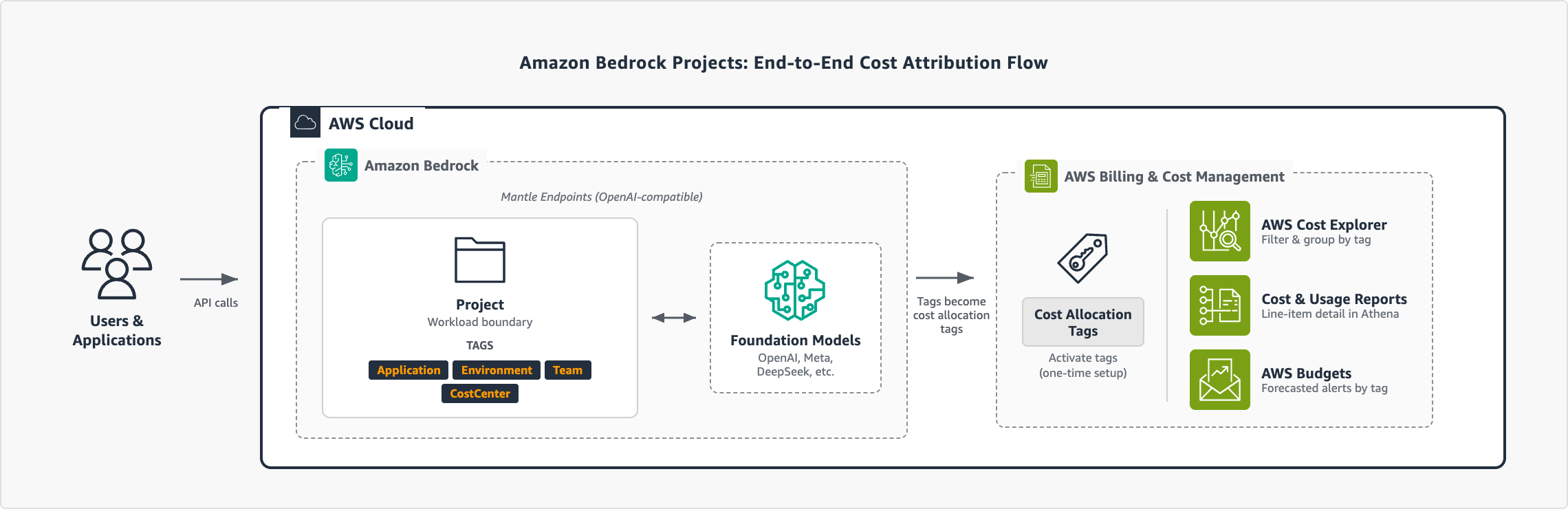
*図1: Amazon Bedrock Projectsを使用したエンドツーエンドのコスト帰属フロー*
注記:
- Amazon Bedrock Projectsは、OpenAI互換APIであるResponses APIおよびChat Completions APIをサポートしています。
- プロジェクトIDを指定しないリクエストは、AWSアカウント内のデフォルトプロジェクトに自動的に割り当てられます。
前提条件
この投稿の手順に従うには、以下の準備が必要です:
- OpenAI SDKを使用したAmazon Bedrockへのアクセス。詳細は「Amazon Bedrock Quickstart」をご覧ください。
- Amazon Bedrock Projects、推論(inference)、タグ付けのためのIAM権限。この例では、AWSマネージドポリシー「AmazonBedrockMantleFullAccess」をアタッチできます。本番環境では、「Implementing least privilege for Amazon Bedrock」を参照してください。
- AWS Billing and Cost Managementコンソールへのアクセス。
タグ付け戦略の定義
プロジェクトに付与するタグは、コストレポートでフィルタリングおよびグループ化するための次元となります。最初のプロジェクトを作成する前にこれらを計画することをお勧めします。一般的なアプローチとして、アプリケーション、環境、チーム、コストセンターごとにタグ付けする方法があります:
| タグキー | 目的 | 例値 |
|---|---|---|
| Application(アプリケーション) | ワークロードまたはサービス | CustomerChatbot, Experiments, DataAnalytics |
| Environment(環境) | ライフサイクル段階 | Production, Development, Staging, Research |
| Team(チーム) | 所有権 | CustomerExperience, PlatformEngineering, DataScience |
| CostCenter(コストセンター) | 財務マッピング | CC-1001, CC-2002, CC-3003 |
コスト配分戦略の構築に関する詳細なガイダンスについては、AWS リソースのタグ付けに関するベストプラクティス を参照してください。タグ付け戦略を定義したら、プロジェクトの作成とコストの帰属を開始する準備が整います。
プロジェクトの作成
タグ付け戦略と権限が設定されたら、最初のプロジェクトを作成できます。各プロジェクトには独自のコスト配分タグのセットがあり、これらが請求データに反映されます。以下の例は、Projects API を使用してプロジェクトを作成する方法を示しています。
まず、必要な依存関係をインストールします:
$ pip3 install openai requests
タグタクソノミーを使用してプロジェクトを作成します:
OpenAI SDK は OPENAI_API_KEY 環境変数を使用します。これを Bedrock API キーに設定してください。
import os
import requests
設定
BASE_URL = "https://bedrock-mantle..api.aws/v1"
API_KEY = os.environ.get("OPENAI_API_KEY") # Amazon Bedrock API キー
def create_project(name: str, tags: dict) -> dict:
"""コスト配分タグ付きの Bedrock プロジェクトを作成します。"""
response = requests.post(
f"{BASE_URL}/organization/projects",
headers={
"Authorization": f"Bearer {API_KEY}",
"Content-Type": "application/json"
},
json={"name": name, "tags": tags}
)
if response.status_code != 200:
raise Exception(
f"Failed to create project: {response.status_code} - {response.text}"
)
return response.json()
Create a production project with full tag taxonomy
project = create_project(
name="CustomerChatbot-Prod",
tags={
"Application": "CustomerChatbot",
"Environment": "Production",
"Team": "CustomerExperience",
"CostCenter": "CC-1001",
"Owner": "alice"
}
)
print(f"Created project: {project['id']}")
The API returns the project details, including the project ID and ARN:
{
"id": "proj_123",
"arn": "arn:aws:bedrock-mantle:::project/"
}
Save the project ID. You will use it to associate inference requests in the next step. The ARN is used for IAM policy attachment if you must restrict access to this project. Repeat this for each workload. The following table shows a sample project structure for an organization with three applications:
Project name
Application
Environment
Team
Cost Center
CustomerChatbot-Prod
CustomerChatbot
Production
CustomerExperience
CC-1001
CustomerChatbot-Dev
CustomerChatbot
Development
CustomerExperience
CC-1001
Experiments-Research
Experiments
Production
PlatformEngineering
CC-2002
DataAnalytics-Prod
DataAnalytics
Production
DataScience
CC-3003
AWS アカウントあたり最大 1,000 件のプロジェクトを作成でき、組織のニーズに合わせて柔軟に対応できます。
推論リクエストをプロジェクトに関連付ける
プロジェクトを作成した後、API コールでプロジェクト ID を渡すことで、推論リクエストを関連付けることができます。以下の例は Responses API を使用しています:
from openai import OpenAI
client = OpenAI(
base_url="https://bedrock-mantle..api.aws/v1",
project="", # プロジェクト作成時に返される ID
)
response = client.responses.create(
model="openai.gpt-oss-120b",
input="Summarize the key findings from our Q4 earnings report."
)
print(response.output_text)
クリーンなコストの帰属を維持するため、デフォルトプロジェクトに依存するのではなく、API コールで常にプロジェクト ID を指定してください。
コスト配分タグを有効にする
プロジェクトタグがコストレポートに表示される前に、AWS Billing でコスト配分タグとして有効にする必要があります。この一度限りの設定により、プロジェクトタグが請求パイプラインに接続されます。コスト配分タグの有効化に関する詳細は、AWS Billing のドキュメントを参照してください。
タグが AWS Cost Explorer および AWS Data Exports に反映されるまで、最大 24 時間かかる場合があります。コストデータのギャップを避けるため、最初のプロジェクト作成直後にタグの有効化を行うことができます。
プロジェクトコストの表示
プロジェクトが作成され、推論リクエストにタグ付けされ、コスト配分タグが有効化されると、Amazon Bedrock の支出がどこに充てられているかを正確に把握できます。分類体系で定義したすべての次元は、AWS Billing のコストレポートにおいてフィルターやグループ化のオプションとして利用可能になります。
AWS Cost Explorer
AWS Cost Explorer は、プロジェクト別にコストを可視化する最も迅速な方法を提供します。以下の手順に従って、プロジェクト別のコストを確認してください。
- AWS Billing and Cost Management コンソールを開き、Cost Explorer を選択します。
- [Filters] パネルで [Service] を展開し、Amazon Bedrock を選択します。
- [Group by] で [Tag] を選択し、タグキー(例:Application)を選択します。
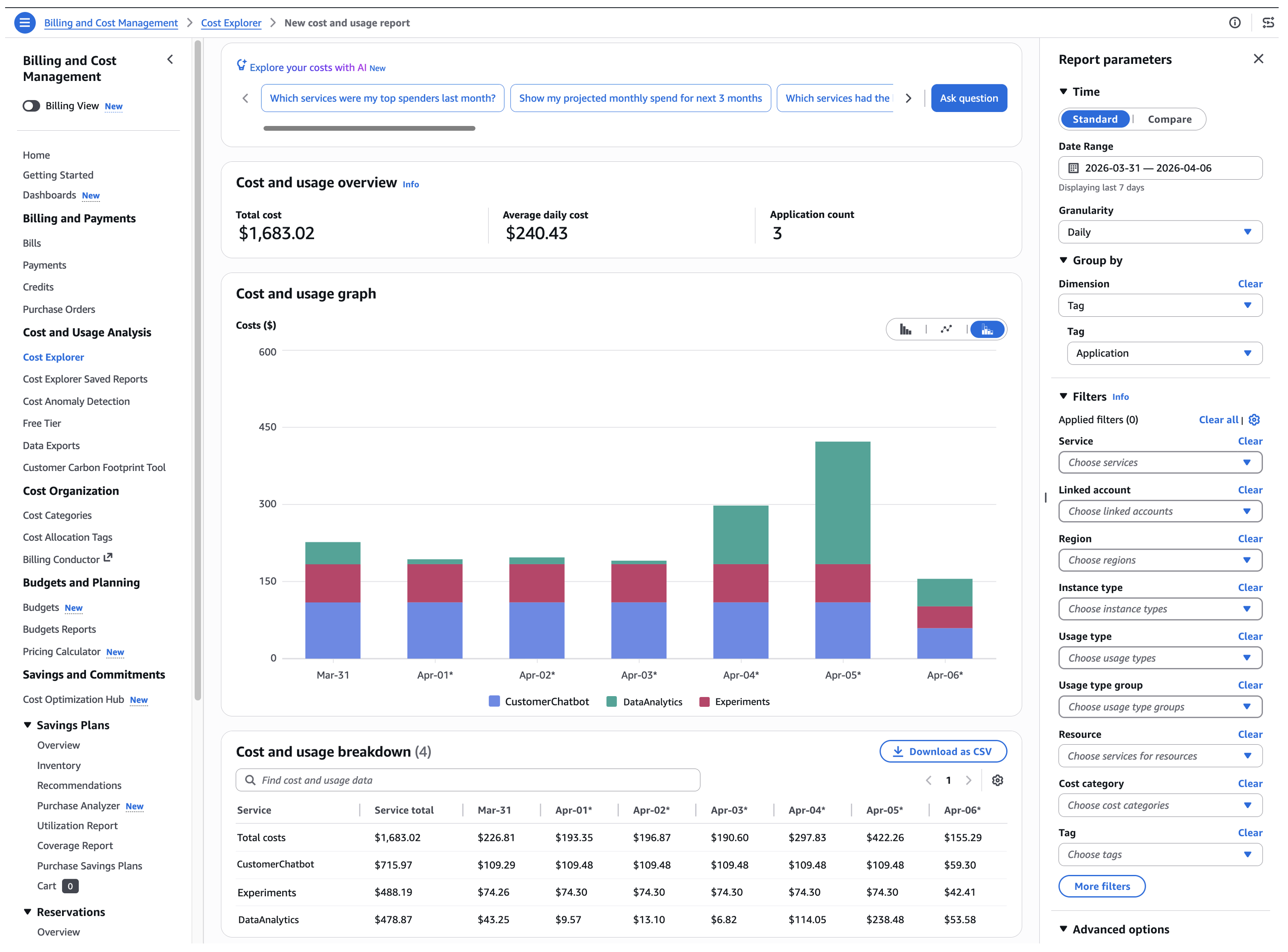
*図 2: Application タグでグループ化された日別の Amazon Bedrock 支出を示す Cost Explorer*
表示をさらに絞り込むためのその他の方法については、AWS Cost Explorer によるコストと使用量の分析をご覧ください。
プロジェクトタグによるより詳細な分析や明細行のデータが必要な場合は、AWS Billing のドキュメントにある データエクスポートの作成 をご覧ください。
結論
Amazon Bedrock Projects を使用すれば、個々のワークロードにコストを帰属させ、組織がすでに活用している AWS ツールを用いて支出を追跡できます。ワークロードの規模が大きくなるにつれて、本記事で取り上げたタグ付け戦略とコスト可視化のパターンを活用し、チームやアプリケーション全体での説明責任を維持してください。
詳細情報
詳細については、Amazon Bedrock Projects のドキュメントおよび AWS Cost Management User Guide を参照してください。
執筆者について
 image
image
Ba’Carri Johnson
Ba’Carri Johnson は、Amazon Bedrock チームのシニア テクニカル プロダクト マネージャーであり、AWS AI のコスト管理とガバナンスを担当しています。AI インフラストラクチャ、コンピュータサイエンス、戦略のバックグラウンドを持ち、製品革新への情熱と、組織が AI を責任を持ってスケールアップするのを支援することに注力しています。余暇には旅行や自然探訪を楽しんでいます。
 image
image
Vadim Omeltchenko
Vadim Omeltchenkoは、AWSの顧客がクラウド上でイノベーションを起こすのを支援することに情熱を注ぐ、シニアAmazon Bedrock Go-to-Market Solutions Architect(市場展開ソリューションアーキテクト)です。
Ajit Mahareddy
Ajit Mahareddyは、製品管理、エンジニアリング、Go-to-Market(GTM:市場展開)において20年以上の経験を持つ、経験豊富なProduct and Go-to-Market(GTM:市場展開)リーダーです。現在の役割以前、AjitはUber、Turing、eHealthといった主要なテクノロジー企業でAI/ML(人工知能/機械学習)製品の製品管理を率いました。彼は生成AI(Generative AI:大規模言語モデルなどの技術)の進展と、生成AIによる現実世界への影響を推進することに情熱を持っています。
Sofian Hamiti
Sofian Hamitiは、AIソリューションの構築と、顧客成果を最大化するために高性能なチームを率いる経験が12年以上あるテクノロジーリーダーです。彼は、多様な人材をエンパワーしてグローバルな影響を駆動し、キャリアの目標を達成することに情熱を持っています。
原文を表示
As organizations scale their AI workloads on Amazon Bedrock, understanding what’s driving spending becomes critical. Teams might need to perform chargebacks, investigate cost spikes, and guide optimization decisions, all of which require cost attribution at the workload level.
With Amazon Bedrock Projects, you can attribute inference costs to specific workloads and analyze them in AWS Cost Explorer and AWS Data Exports. In this post, you will learn how to set up Projects end-to-end, from designing a tagging strategy to analyzing costs.
How Amazon Bedrock Projects and cost allocation work
A project on Amazon Bedrock is a logical boundary that represents a workload, such as an application, environment, or experiment. To attribute the cost of a project, you attach resource tags and pass the project ID in your API calls. You can then activate the cost allocation tags in AWS Billing to filter, group, and analyze spend in AWS Cost Explorer and AWS Data Exports.
The following diagram illustrates the end-to-end flow:
*Figure 1: End-to-end cost attribution flow with Amazon Bedrock Projects*
Notes:
- Amazon Bedrock Projects support the OpenAI-compatible APIs: Responses API and Chat Completions API.
- Requests without a project ID are automatically associated with the default project in your AWS account.
Prerequisites
To follow along with the steps in this post, you need:
- Access to Amazon Bedrock with the OpenAI SDK. See Amazon Bedrock Quickstart to get started.
- IAM permissions for Amazon Bedrock Projects, inference, and tagging. For this example, you can attach the AWS managed policy AmazonBedrockMantleFullAccess. For production, see Implementing least privilege for Amazon Bedrock.
- Access to the AWS Billing and Cost Management console.
Define your tagging strategy
The tags that you attach to projects become the dimensions that you can filter and group by in your cost reports. We recommend that you plan these before creating your first project. A common approach is to tag by application, environment, team, and cost center:
Tag key
Purpose
Example values
Application
Which workload or service
CustomerChatbot, Experiments, DataAnalytics
Environment
Lifecycle stage
Production, Development, Staging, Research
Team
Ownership
CustomerExperience, PlatformEngineering, DataScience
CostCenter
Finance mapping
CC-1001, CC-2002, CC-3003
For more guidance on building a cost allocation strategy, see Best Practices for Tagging AWS Resources. With your tagging strategy defined, you’re ready to create projects and start attributing costs.
Create a project
With your tagging strategy and permissions in place, you can create your first project. Each project has its own set of cost allocation tags that flow into your billing data. The following example shows how to create a project using the Projects API.
First, install the required dependencies:
$ pip3 install openai requestsCreate a project with your tag taxonomy:
The OpenAI SDK uses the OPENAI_API_KEY environment variable. Set this to your Bedrock API key.
import os
import requests

# Configuration
BASE_URL = "https://bedrock-mantle..api.aws/v1"
API_KEY  = os.environ.get("OPENAI_API_KEY")  # Your Amazon Bedrock API key

def create_project(name: str, tags: dict) -> dict:
    """Create a Bedrock project with cost allocation tags."""
    response = requests.post(
        f"{BASE_URL}/organization/projects",
        headers={
            "Authorization": f"Bearer {API_KEY}",
            "Content-Type": "application/json"
        },
        json={"name": name, "tags": tags}
    )

    if response.status_code != 200:
        raise Exception(
            f"Failed to create project: {response.status_code} - {response.text}"
        )

    return response.json()

# Create a production project with full tag taxonomy
project = create_project(
    name="CustomerChatbot-Prod",
    tags={
        "Application": "CustomerChatbot",
        "Environment": "Production",
        "Team":        "CustomerExperience",
        "CostCenter":  "CC-1001",
        "Owner":       "alice"
    }
)
print(f"Created project: {project['id']}")
The API returns the project details, including the project ID and ARN:
{
  "id": "proj_123",
  "arn": "arn:aws:bedrock-mantle:::project/"
}
Save the project ID. You will use it to associate inference requests in the next step. The ARN is used for IAM policy attachment if you must restrict access to this project. Repeat this for each workload. The following table shows a sample project structure for an organization with three applications:
Project name
Application
Environment
Team
Cost Center
CustomerChatbot-Prod
CustomerChatbot
Production
CustomerExperience
CC-1001
CustomerChatbot-Dev
CustomerChatbot
Development
CustomerExperience
CC-1001
Experiments-Research
Experiments
Production
PlatformEngineering
CC-2002
DataAnalytics-Prod
DataAnalytics
Production
DataScience
CC-3003
You can create up to 1,000 projects per AWS account to fit your organization’s needs.
Associate inference requests with your project
With your projects created, you can associate inference requests by passing the project ID in your API calls. The following example uses the Responses API:
from openai import OpenAI

client = OpenAI(
    base_url="https://bedrock-mantle..api.aws/v1",
    project="", # ID returned when you created the project
)
response = client.responses.create(
    model="openai.gpt-oss-120b",
    input="Summarize the key findings from our Q4 earnings report."
)
print(response.output_text)
To maintain clean cost attribution, always specify a project ID in your API calls rather than relying on the default project.
Activate cost allocation tags
Before your project tags appear in cost reports, you must activate them as cost allocation tags in AWS Billing. This one-time setup connects your project tags to the billing pipeline. For more information about activating cost allocation tags, see the AWS Billing documentation.
It can take up to 24 hours for tags to propagate to AWS Cost Explorer and AWS Data Exports. You can activate your tags immediately after creating your first project to avoid gaps in cost data.
View project costs
With projects created, inference requests tagged, and cost allocation tags activated, you can see exactly where your Amazon Bedrock spend is going. Every dimension that you defined in your taxonomy is now available as a filter or grouping in your AWS Billing cost reports.
AWS Cost Explorer
AWS Cost Explorer provides the fastest way to visualize your costs by project. Complete the following steps to review your costs by project:
- Open the AWS Billing and Cost Management console and choose Cost Explorer.
- In the Filters pane, expand Service and select Amazon Bedrock.
- Under Group by, select Tag and choose your tag key (for example, Application).
*Figure 2: Cost Explorer showing daily Amazon Bedrock spending grouped by the Application tag*
For more ways to refine your view, see Analyzing your costs and usage with AWS Cost Explorer.
For more granular analysis and line-item detail with your project tags, see Creating Data Exports in the AWS Billing documentation.
Conclusion
With Amazon Bedrock Projects, you can attribute costs to individual workloads and track spending using the AWS tools that your organization already relies on. As your workloads scale, use the tagging strategy and cost visibility patterns covered in this post to maintain accountability across teams and applications.
For more information, see Amazon Bedrock Projects documentation and the AWS Cost Management User Guide.
About the authors
Ba’Carri Johnson
Ba’Carri Johnson is a Sr. Technical Product Manager on the Amazon Bedrock team, focusing on cost management and governance for AWS AI. With a background in AI infrastructure, computer science, and strategy, she is passionate about product innovation and helping organizations scale AI responsibly. In her spare time, she enjoys traveling and exploring the great outdoors.
Vadim Omeltchenko
Vadim Omeltchenko is a Sr. Amazon Bedrock Go-to-Market Solutions Architect who is passionate about helping AWS customers innovate in the cloud.

Ajit Mahareddy
Ajit Mahareddy is an experienced Product and Go-To-Market (GTM) leader with over 20 years of experience in product management, engineering, and go-to-market. Prior to his current role, Ajit led product management building AI/ML products at leading technology companies, including Uber, Turing, and eHealth. He is passionate about advancing generative AI technologies and driving real-world impact with generative AI.

Sofian Hamiti
Sofian Hamiti is a technology leader with over 12 years of experience building AI solutions, and leading high-performing teams to maximize customer outcomes. He is passionate in empowering diverse talent to drive global impact and achieve their career aspirations.
関連記事
今日のまとめ
AI日報で今日の重要ニュースをまとめ読み