Pydantic AI、Snowflake ネイティブプロバイダー追加しデータガバナンス対応
本文の状態
日本語全文を表示中
詳細モードで約13分の本文を読めます。
同じ出来事の情報源
この情報源を基点に整理
Pydantic Blog
Pydantic AI が Snowflake のネイティブプロバイダーとして統合され、Snowflake Cortex Inference を介してデータセキュリティを維持したままガバナンスされたエージェント実行が可能になった。
Continue in AI NEW LAB
このニュースを、実務の判断につなげる
AI NEW LABで、試したことや先に確認したい条件を共有できます。まずはログインなしで読めます。
AI NEW LABで論点を見るAI深層分析を開く2026年8月11日 05:20
AI深層分析
キーポイント
Snowflake ネイティブ統合の実現
Pydantic AI に SnowflakeModel と SnowflakeProvider が追加され、Snowflake のセキュリティ領域内で直接動作するネイティブサポートが提供された。
Cortex Inference を介したモデル利用
Claude や GPT などの多様なモデルを、データが外部に流出しない Snowflake アカウント内の Cortex Inference API を通じて統一的に呼び出せる。
ガバナンスと検証の強化
Pydantic の型安全機能と Snowflake の企業向けガバナンスが組み合わさり、金融や医療などの規制業界でも安全な AI エージェント運用が可能になる。
環境に応じた自動認証切り替え
Snowflake 内部(Notebook, Sproc, SiS)か外部実行かを検知し、セッショントークンまたは環境変数から自動的に認証情報を取得する。
構造化出力による型安全な検証
Pydantic を用いて出力の形状を定義することで、Ensembl ID の形式や数値範囲が妥当でない場合、コード実行前に失敗させる。
重要な引用
Snowflake users can now get Pydantic's built-in data validation and type safety combined with Snowflake's enterprise governance.
Data never leaves the Snowflake security perimeter. That matters if you're in a regulated space like finance or healthcare.
The Gene model validates the shape of the answer, not just its text.
Tool inputs are validated before the function runs, so a malformed evalue or an unknown database never reaches BLAST.
編集コメントを表示
編集コメント
データ主権とセキュリティを重視する企業にとって、開発の利便性とコンプライアンス要件を両立させるこの統合は実用的な価値が高い。Snowflake のエコシステム内で完結する AI エージェント構築が現実味を帯びてきたと言える。
Source Article
元記事を日本語で読む
本文に関係しない購読案内、埋め込み通知、サイト内プロモーションは除いています。
本記事は、Snowflake のシニア・データクラウドアーキテクトである Priya Joseph 氏による寄稿です。Pydantic AI のリードデベロッパー Douwe Maan 氏との共著となります。
このたび Pydantic AI に Snowflake ネイティブプロバイダーが追加され、SnowflakeModel と SnowflakeProvider が利用可能になりました。
ユーザーが Snowflake を選定する理由は、セキュリティとガバナンスを備えた信頼性の高いエンタープライズ環境にあるからです。今回の統合により、Pydantic AI は Snowflake のセキュアな境界内にネイティブで組み込まれました。Snowflake ユーザーは、Pydantic が提供するビルトインのデータバリデーションや型安全性と、Snowflake のエンタープライズガバナンス機能を同時に活用できるようになります。
Snowflake データ上で動作するガバナンス対応 AI エージェントの実行は非常に簡単です。
import logfire
from pydantic_ai import Agent
logfire.configure()
logfire.instrument_pydantic_ai()
agent = Agent('snowflake:claude-sonnet-5')
result = agent.run_sync('Summarize Q2 churn trends')
上記の 2 つの logfire 関連コードは必須ではありませんが、導入する価値は十分にあります。Pydantic AI をインストゥルメント化しておけば、本記事で後述するすべての実行結果が 1 つのトレースに集約されます。そこにはモデル呼び出し、バリデーション済みの出力、そしてその間のツール呼び出しすべてが含まれます。
必要な設定は、SNOWFLAKE_ACCOUNT と SNOWFLAKE_TOKEN の 2 つの環境変数だけです。認証、ルーティング、ガバナンスなどその他のすべての処理は、Snowflake のセキュアな境界内で行われます。
#What is Snowflake Cortex Inference?
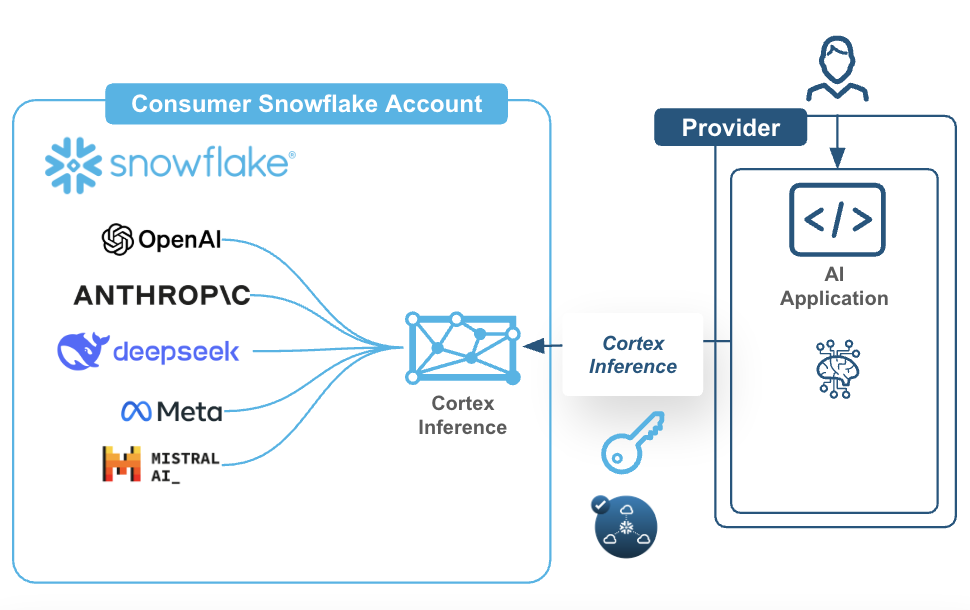
Cortex Inference は、Snowflake アカウント内で Claude、GPT、Llama、Mistral、DeepSeek、Grok (xAI)、そして Snowflake 独自のモデルをすべて提供する、フルマネージドの REST API です。データは Snowflake のセキュリティ境界の外に出ることはありません。これは金融や医療といった規制の厳しい業界において特に重要です。
興味深い設計上の選択として、各モデルファミリーごとに個別のアダプターを構築するのではなく、すべてのリクエストが Cortex の OpenAI 互換 Chat Completions エンドポイント(/api/v2/cortex/v1/chat/completions)を経由してルーティングされます。この単一の API サーフェスには、ツール呼び出し、構造化出力(json_schema)、画像入力、プロンプトキャッシュ、推論機能などが含まれており、これ一つで主要な機能をすべてカバーできます。
モデルの可用性については、Cortex Inference のドキュメントをご覧ください。
生物分野における拡張例
Pydantic AI と Snowflake Cortex の連携力を示す、生物学分野からの拡張例をご紹介します。
- DESeq2 遺伝子発現解析における構造化出力(検証済みの Ensembl ID と有意性検定)
- BLAST 検索パラメータのバリデーションを伴うツール呼び出し
- バリアント注釈のためのネストされたモデル
- タンパク質分析に関する質問への対応のための拡張思考機能
- フロンティアモデルとオープンソースモデルの両プロバイダー間でのモデル移植性(すべてのモデルで同一の Pydantic スキーマが動作することの実証)
- ポーリングを伴う、長時間実行される PubMed 研究タスク
持ち運べる認証
同じファイルは、外部 Python スクリプト、Notebooks、Sprocs、SPCS のいずれでも実行可能です。
import os
from pydantic_ai.providers.snowflake import SnowflakeProvider
Try to detect if we're running inside Snowflake (Notebook, Sproc, SiS)
try:
from snowflake.snowpark.context import get_active_session
session = get_active_session()
SNOWFLAKE_ACCOUNT = session.get_current_account()
SNOWFLAKE_TOKEN = session.connection.rest._token
print(" Detected Snowflake environment - using session token")
except ImportError:
# Running externally (laptop, CI/CD) - use environment variables
SNOWFLAKE_ACCOUNT = os.environ.get('SNOWFLAKE_ACCOUNT')
SNOWFLAKE_TOKEN = os.environ.get('SNOWFLAKE_TOKEN')
if not SNOWFLAKE_ACCOUNT or not SNOWFLAKE_TOKEN:
raise ValueError(
"Missing required environment variables:\n"
"SNOWFLAKE_ACCOUNT: your Snowflake account identifier\n"
"SNOWFLAKE_TOKEN: your Personal Access Token (PAT)\n"
"Set them with: export SNOWFLAKE_ACCOUNT='...' SNOWFLAKE_TOKEN='...'"
)
print(" Using environment variables for authentication")
Initialize provider with explicit credentials
Works in: External Python, Notebooks, Streamlit-in-Snowflake, SPCS
provider = SnowflakeProvider(
account=SNOWFLAKE_ACCOUNT,
token=SNOWFLAKE_TOKEN,
# For private connectivity (PrivateLink), add custom base_url,needs token as well
# base_url='https://myorg-myaccount.privatelink.snowflakecomputing.com'
)
#Structured output (DESeq2 Results)
Gene モデルは、回答のテキストだけでなくその形状(構造)も検証します。パターンに一致しない Ensembl ID や、妥当な範囲外の変動率などは、コードが実行される前に失敗します。
from typing import List, Literal
import logfire
from pydantic import BaseModel, Field
from pydantic_ai import Agent
logfire.configure()
logfire.instrument_pydantic_ai()
class Gene(BaseModel):
"""型安全な遺伝子発現結果。"""
id: str = Field(pattern=r'^ENSG\d{11}$') # Ensembl ID の形式を検証
symbol: str
log2fc: float = Field(ge=-10, le=10) # -10 から 10 の範囲内であること
padj: float = Field(gt=0, le=1) # P 値は 0-1 の間
@property
def is_significant(self) -> bool:
return self.padj < 1
シンプルな 2 行のセットアップ
agent = Agent('snowflake:claude-sonnet-5', output_type=List[Gene])
result = agent.run_sync('DUSP1 ENSG00000120129 log2FC=2.9 padj=1.2e-10')
print(f'Gene: {result.data[0].symbol}, Significant: {result.data[0].is_significant}')
検証済みのパラメータによるツール呼び出し
ツールへの入力値は関数実行前に検証されるため、不正な evalue や未知のデータベースが BLAST に到達することはありません。
class BlastParams(BaseModel):
"""Pydantic が自動的にツールのパラメータを検証します。"""
sequence: str = Field(min_length=20)
database: Literal['nr', 'nt', 'refseq_protein']
evalue: float = Field(default=0.001, gt=0, le=1)
def blast_search(params: BlastParams) -> dict:
"""ツール実行前に入力が検証されます。"""
return {'hits': 15, 'top': f'Match in {params.database}'}
agent_tools = Agent(
'snowflake:claude-opus-4-8',
tools=[blast_search],
system_prompt='BLAST検索を実行できます。',
)
エージェントが自動的にツールを検証して呼び出します
result = agent_tools.run_sync('BLAST sequence ATCGATCGATCGATCGATCG against RefSeq proteins')
print(f'Tool result: {result.data}')
ネストされたモデル(バリアント注釈)
出力タイプはネストされるため、バリアント注釈の返却結果は辞書ではなく、型付けされたオブジェクトグラフとして得られます。
class Variant(BaseModel):
rsid: str = Field(pattern=r'^rs\d+$')
chromosome: str
position: int = Field(gt=0)
class Annotation(BaseModel):
"""ネストされた Pydantic モデル。"""
variant: Variant # ネスト!
gene: str
consequence: Literal['missense', 'nonsense', 'synonymous']
pathogenic: bool
agent_nested = Agent('snowflake:claude-sonnet-5', result_type=Annotation)
result = agent_nested.run_sync('rs429358 chr19:45411941 APOE missense pathogenic')
print(f'Variant: {result.data.variant.rsid} in {result.data.gene}')
拡張思考(Claude)
Claude の拡張思考はモデル設定の一つであり、検証済みの出力タイプは依然として適用されます。
class Analysis(BaseModel):
finding: str
confidence: float = Field(ge=0, le=1)
agent_thinking = Agent(
'snowflake:claude-opus-4-8',
result_type=Analysis,
model_settings={'thinking': {'type': 'enabled', 'budget_tokens': 5000}},
)
result = agent_thinking.run_sync('Why is BRCA2 important in DNA repair?')
print(f'Analysis: {result.data.finding[:50]}... (confidence: {result.data.confidence})')
モデルの移植性
同じスキーマを異なるモデル間で共通して使用できます。Claude、GPT、Llama 間を切り替える際も、変更するのは単に文字列一つだけです。
def test_model(model_name: str) -> str:
"""Pydantic のスキーマはすべてのモデルで共通して機能します。"""
agent = Agent(model_name, result_type=Gene)
result = agent.run_sync('FKBP5 ENSG00000096433 log2FC=3.8 padj=3.4e-15')
return result.data.symbol
モデルの切り替えは文字列一つの変更で可能
for model in ['snowflake:claude-sonnet-5', 'snowflake:gpt-5.4', 'snowflake:llama3.3-70b']:
gene = test_model(model)
print(f'{model}: {gene}')
長時間実行される PubMed 調査タスクとポーリング
実際の業務では、単一の呼び出しで完結することは稀です。この例では PubMed の E-utilities をバッチ処理でポーリングし、取得した要約を Cortex に渡して統合します。Field(description=...) で記述された文字列は重要な役割を果たしており、これらはモデルに埋め込むべき JSON スキーマの一部となります。
PubMed からのデータ取得自体は通常の aiohttp を使用しているだけで、特に注目すべき部分ではありません。完全な実行可能なバージョンはこの gist にあります。ここで重要なのはスキーマとエージェントの呼び出しです:
import asyncio
class ResearchSummary(BaseModel):
"""モデルに埋め込むべきスキーマです。"""
key_findings: List[str] = Field(description='3-5 major findings from the literature')
research_gaps: List[str] = Field(description='Identified gaps or controversies')
clinical_relevance: str = Field(description='Clinical and translational implications')
recommended_reading: List[str] = Field(description='Top 3 PMID references')
async def research(topic: str, model: str = 'snowflake:claude-opus-4-8') -> ResearchSummary:
articles = await fetch_pubmed_articles(topic) # plain aiohttp; see the gist
literature = '\n\n'.join(
f'[PMID {a.pmid}] {a.title}\n{a.abstract}' for a in articles[:5]
)
agent = Agent(
model,
output_type=ResearchSummary,
system_prompt=(
'You are a biomedical research analyst. '
'Focus on clinical relevance and research gaps.'
),
)
result = await agent.run(f'Topic: {topic}\n\nRecent literature:\n{literature}')
return result.output
summary = asyncio.run(research('CRISPR gene editing cancer therapy'))
for pmid in summary.recommended_reading: # guaranteed List[str]
print(f'https://pubmed.ncbi.nlm.nih.gov/{pmid}/')
Add logfire.instrument_aiohttp_client() next to the earlier instrument_pydantic_ai() call and the PubMed fetches show up on the same trace as the model call, so a slow run tells you which half was slow.
result.output は検証済みの ResearchSummary 型なので、summary.recommended_reading は List[str] です。isinstance チェックも防御的な .get() 呼び出しも不要で、モデルが別の値を返した場合は明確な ValidationError が発生します。
#実装
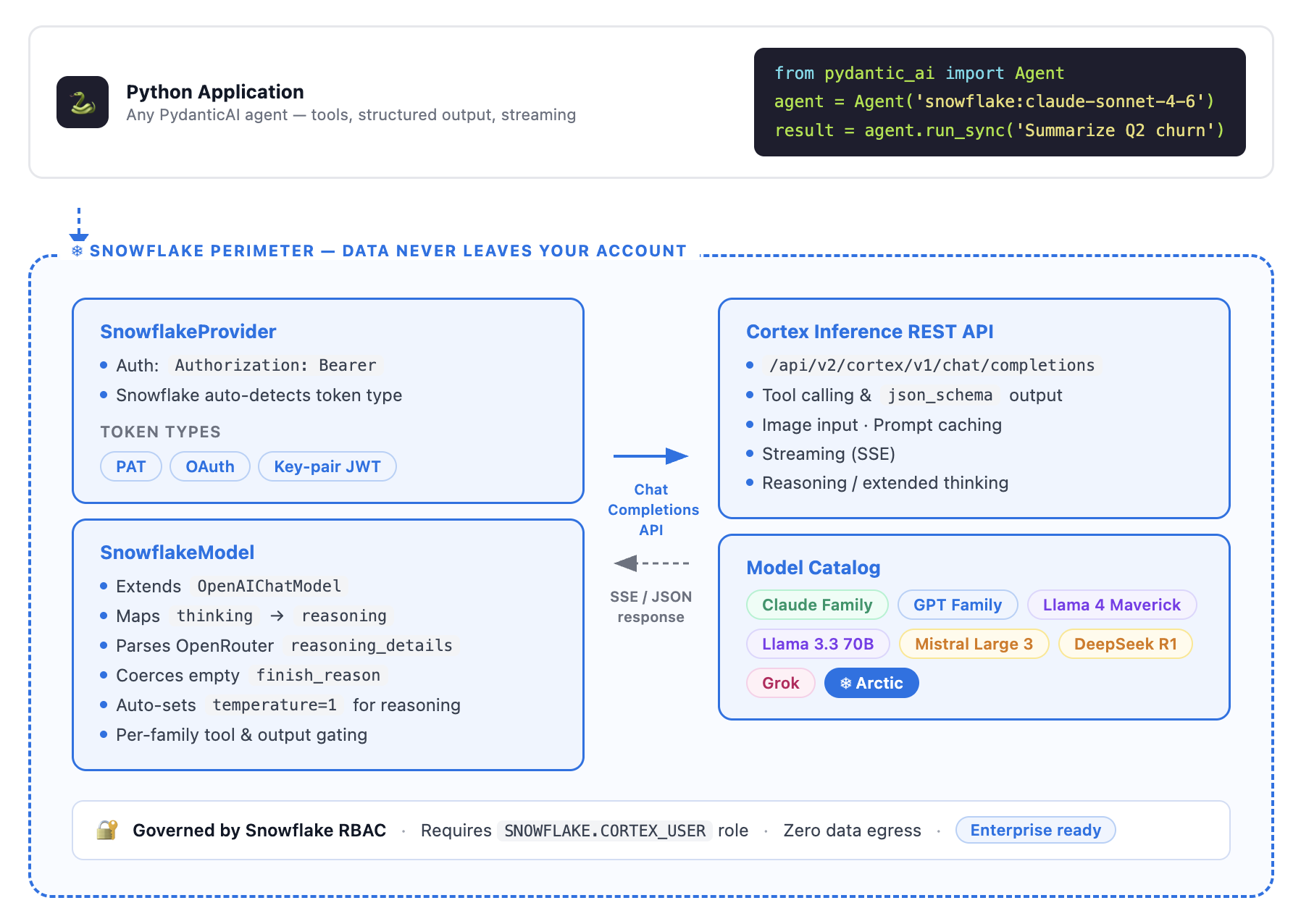
この機能を実現するのは2つのクラスです。SnowflakeProvider が認証とルーティングを担当し、SnowflakeModel が Cortex 固有の仕様に特化して処理を行います。
#SnowflakeProvider: 認証とルーティング
import os
from pydantic_ai.providers.snowflake import SnowflakeProvider
SNOWFLAKE_ACCOUNT = os.environ.get('SNOWFLAKE_ACCOUNT')
SNOWFLAKE_TOKEN = os.environ.get('SNOWFLAKE_TOKEN')
provider = SnowflakeProvider(
account=SNOWFLAKE_ACCOUNT,
token=SNOWFLAKE_TOKEN, # PAT、OAuth トークン、またはキーペア JWT
# プライベート接続(PrivateLink)の場合:
# base_url='https://myorg-myaccount.privatelink.snowflakecomputing.com',
)
認証には標準の Authorization: Bearer ヘッダーを使用します。Snowflake はトークンの種類(PAT、OAuth、JWT)を自動検出するため、プロバイダー側でトークンを解析したり、それに基づいてルーティングを行ったりする必要はありません。なお、この統合では以前の実装に含まれていた X-Snowflake-Authorization-Token-Type ヘッダーは意図的に除外されています。
#SnowflakeModel: 軽量なサブクラス
SnowflakeModel は新しいベースクラスを実装するのではなく、OpenAIChatModel を継承しています。追加された機能は、実際の Snowflake アカウントでのライブテストに基づいた Cortex 固有の仕様です。
Claude モデルに対する推論と思考のサポート機能です。Cortex は、推論結果を単なる文字列として返すのではなく、署名付きで reasoning_details 配列形式で返します。この統合では既存のコーデックが再利用され、署名付きの思考ブロックが後続のターンで再生されます。これにより、Claude の拡張思考機能は、自動的にキャッシュが適用されたマルチターン会話でも正常に動作します。
agent = Agent(
'snowflake:claude-opus-4-8',
model_settings={'thinking': {'type': 'enabled', 'budget_tokens': 5000}},
)
推論には自動的に温度パラメータ(temperature)が 1 に設定されます。SnowflakeModel は、拡張思考を成功させるために推論時の温度を自動調整します。
finish_reason の強制変換について。Cortex は Claude および Llama の完了結果に対して finish_reason を空文字列("")として返しますが、OpenAI 系モデルでは適切な値が返されます。この統合ではモデル側で正規化処理を行うため、後段の Pydantic AI ロジックが破綻することはありません。
ファミリーごとのツール制御について。Cortex は、Llama、Mistral、DeepSeek のモデルに対してツールや response_format を送信した場合、厳格に 400 エラーを返します。この統合では各ファミリーごとのプロファイルを追加し、これらのファミリーに対してツールの呼び出しを無効化し、エラーをユーザーに伝播させるのではなく、プロンプトによる構造化出力へフォールバックするようにしています。
テストでカバーされている範囲
本統合には、モックではなく、実際の Snowflake アカウントに対して記録された VCR カセットが含まれています。
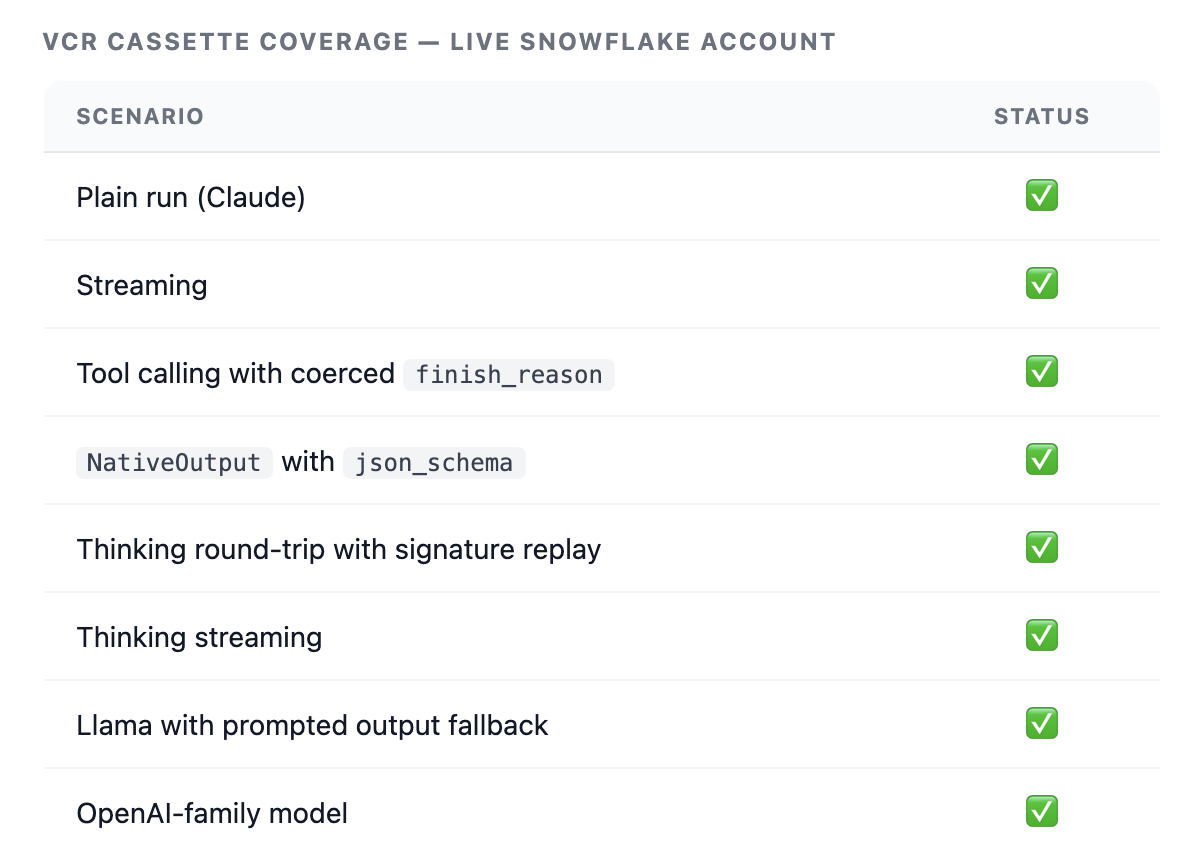
プロバイダー統合において、このレベルのライブ録画によるカバレッジは珍しく、Pydantic のメンテナーが検証できる具体的な材料を提供します。
得られるメリット
Pydantic AI エージェントと Snowflake Cortex Inference を組み合わせることで、以下のような利点が得られます。
リリース当日のモデルアクセス
Snowflake は、Anthropic や OpenAI の新モデルをパートナーとしてリリース日に提供しています。この統合は自動的にその恩恵を受けられます。
Cortex モデルカタログ全体へのアクセス
最先端かつ最適化されたモデルも含まれています。例えば snowflake-llama-3.3-70b は、SwiftKV により推論コストを最大 75% 削減できます。
モデルのポータビリティ(移植性)
snowflake:llama3.3-70b から snowflake:claude-sonnet-5 へ切り替える際、変更するのは文字列一つだけです。ツールの定義、出力スキーマ、エージェントロジックはそのまま維持されます。
安全な Snowflake パーimeter(境界)
推論処理は Snowflake アカウント内で行われるため、既存の RBAC やガバナンスポリシーが適用されます。
実行環境
このプロバイダーは REST クライアントとして実装されているため、Python が動作する場所であればどこでも実行可能です。文脈によって変わるのは、認証情報の取得元だけです。
- 文脈:認証 / 備考
- 外部 Python(ラップトップ、CI/CD):SNOWFLAKE_ACCOUNT と SNOWFLAKE_TOKEN の環境変数 / パーソナルアクセストークンが必要
- Snowflake Notebooks:セッショントークン(get_active_session() で自動検出) / 環境変数は不要
- Streamlit-in-Snowflake:セッショントークン / st.connection('snowflake').session からアクセス可能
- Snowpark Container Services:セッショントークン、または環境変数の PAT / REST エンドポイントには外部アクセス統合が必要になる場合があります
Python ストアドプロシージャ
セッショントークン
外部アクセス統合の要件が必要です。
ストアドプロシージャは、デフォルトで_egress_(外部への通信)がブロックされているため、設定が必要な唯一のコンテキストです。
CREATE OR REPLACE NETWORK RULE cortex_network_rule
  MODE = EGRESS
  TYPE = HOST_PORT
  VALUE_LIST = ('*.snowflakecomputing.com:443');

CREATE OR REPLACE EXTERNAL ACCESS INTEGRATION cortex_access
  ALLOWED_NETWORK_RULES = (cortex_network_rule)
  ENABLED = true;
ストアドプロシージャを実行するロールに対して、この統合への USAGE 権限を付与する必要があります。上記の PubMed の例では、2 つ目のホストにもアクセスするため、VALUE_LIST に 'eutils.ncbi.nlm.nih.gov:443' も追加する必要があります。
#Try it
pip install "pydantic-ai-slim[snowflake]"
export SNOWFLAKE_ACCOUNT='myorg-myaccount'
export SNOWFLAKE_TOKEN=''```

リクエストを実行するロールには、SNOWFLAKE.CORTEX_USER データベースロールが必要です。これはデフォルトで PUBLIC に付与されています。

Pydantic AI エージェントを構築して、ネイティブの Snowflake Cortex サポートを利用したい場合は、こちらで統合について確認してください。

#References

Cortex Inference Tutorials

Cortex AI Gateway for the Trusted Agentic Enterprise Era

Try Logfire MCP
原文を表示
This is a guest post written by Priya Joseph, Sr. Data Cloud Architect at Snowflake. Co-authored by Douwe Maan, lead developer of Pydantic AI.
Pydantic AI now has a native Snowflake provider, with the addition of SnowflakeModel and SnowflakeProvider.
Users choose Snowflake for secure, governed, trusted enterprise experience. This integration brings Pydantic AI natively into Snowflake's secure perimeter. Snowflake users can now get Pydantic's built-in data validation and type safety combined with Snowflake's enterprise governance.
Running a governed AI agent against your Snowflake data is simple:
import logfire
from pydantic_ai import Agent
logfire.configure()
logfire.instrument_pydantic_ai()
agent = Agent('snowflake:claude-sonnet-5')
result = agent.run_sync('Summarize Q2 churn trends')
The two logfire lines are optional, and worth it. With Pydantic AI instrumented, every run in the rest of this post lands on one trace: the model call, the validated output, and any tool calls in between. The examples below assume they're in place.
Two environment variables (SNOWFLAKE_ACCOUNT and SNOWFLAKE_TOKEN) are all the configuration needed. Everything else, including auth, routing, and governance, is handled inside the secure Snowflake perimeter.
#What is Snowflake Cortex Inference?
Cortex Inference is a fully managed REST API that serves Claude, GPT, Llama, Mistral, DeepSeek, Grok (xAI), and Snowflake's own models, all from inside your Snowflake account. Data never leaves the Snowflake security perimeter. That matters if you're in a regulated space like finance or healthcare.
The interesting design choice: rather than building a separate adapter per model family, everything routes through Cortex's OpenAI-compatible Chat Completions endpoint (/api/v2/cortex/v1/chat/completions). That single API surface covers tool calling, structured output (json_schema), image input, prompt caching, and reasoning, so one integration covers the full feature surface.
See the Cortex Inference documentation for model availability.
#An extended example
Here’s an extended example from the biology domain that showcases the power of Pydantic AI with Snowflake Cortex:
Structured output for DESeq2 gene expression, with validated Ensembl IDs and significance testing
Tool calling with BLAST search parameter validation
Nested models for variant annotations
Extended thinking for protein analysis questions
Model portability across frontier and OSS model providers, showing identical Pydantic schemas work with all models
A long-running PubMed research task with polling
#Authentication that travels
The same file should run in external Python, Notebooks, Sprocs, and SPCS.
import os
from pydantic_ai.providers.snowflake import SnowflakeProvider
Try to detect if we're running inside Snowflake (Notebook, Sproc, SiS)
try:
from snowflake.snowpark.context import get_active_session
session = get_active_session()
SNOWFLAKE_ACCOUNT = session.get_current_account()
SNOWFLAKE_TOKEN = session.connection.rest._token
print(" Detected Snowflake environment - using session token")
except ImportError:
# Running externally (laptop, CI/CD) - use environment variables
SNOWFLAKE_ACCOUNT = os.environ.get('SNOWFLAKE_ACCOUNT')
SNOWFLAKE_TOKEN = os.environ.get('SNOWFLAKE_TOKEN')
if not SNOWFLAKE_ACCOUNT or not SNOWFLAKE_TOKEN:
raise ValueError(
"Missing required environment variables:\n"
"SNOWFLAKE_ACCOUNT: your Snowflake account identifier\n"
"SNOWFLAKE_TOKEN: your Personal Access Token (PAT)\n"
"Set them with: export SNOWFLAKE_ACCOUNT='...' SNOWFLAKE_TOKEN='...'"
)
print(" Using environment variables for authentication")
Initialize provider with explicit credentials
Works in: External Python, Notebooks, Streamlit-in-Snowflake, SPCS
provider = SnowflakeProvider(
account=SNOWFLAKE_ACCOUNT,
token=SNOWFLAKE_TOKEN,
# For private connectivity (PrivateLink), add custom base_url,needs token as well
# base_url='https://myorg-myaccount.privatelink.snowflakecomputing.com'
)
#Structured output (DESeq2 Results)
The Gene model validates the shape of the answer, not just its text. An Ensembl ID that doesn't match the pattern, or a fold change outside the plausible range, fails before it reaches your code.
from typing import List, Literal
import logfire
from pydantic import BaseModel, Field
from pydantic_ai import Agent
logfire.configure()
logfire.instrument_pydantic_ai()
class Gene(BaseModel):
"""Type-safe gene expression result."""
id: str = Field(pattern=r'^ENSG\d{11}$') # validates Ensembl ID format
symbol: str
log2fc: float = Field(ge=-10, le=10) # Must be between -10 and 10
padj: float = Field(gt=0, le=1) # P-value 0-1
@property
def is_significant(self) -> bool:
return self.padj < 0.05 and abs(self.log2fc) > 1
Simple 2-line setup
agent = Agent('snowflake:claude-sonnet-5', output_type=List[Gene])
result = agent.run_sync('DUSP1 ENSG00000120129 log2FC=2.9 padj=1.2e-10')
print(f'Gene: {result.data[0].symbol}, Significant: {result.data[0].is_significant}')
#Tool calling with validated parameters
Tool inputs are validated before the function runs, so a malformed evalue or an unknown database never reaches BLAST.
class BlastParams(BaseModel):
"""Pydantic validates tool parameters automatically."""
sequence: str = Field(min_length=20)
database: Literal['nr', 'nt', 'refseq_protein']
evalue: float = Field(default=0.001, gt=0, le=1)
def blast_search(params: BlastParams) -> dict:
"""Tool input is validated before execution."""
return {'hits': 15, 'top': f'Match in {params.database}'}
agent_tools = Agent(
'snowflake:claude-opus-4-8',
tools=[blast_search],
system_prompt='You can run BLAST searches.',
)
Agent automatically validates and calls tool
result = agent_tools.run_sync('BLAST sequence ATCGATCGATCGATCGATCG against RefSeq proteins')
print(f'Tool result: {result.data}')
#Nested models (Variant Annotation)
Output types nest, so a variant annotation comes back as a typed object graph rather than a dictionary you have to pick apart.
class Variant(BaseModel):
rsid: str = Field(pattern=r'^rs\d+$')
chromosome: str
position: int = Field(gt=0)
class Annotation(BaseModel):
"""Nested Pydantic model."""
variant: Variant # Nested!
gene: str
consequence: Literal['missense', 'nonsense', 'synonymous']
pathogenic: bool
agent_nested = Agent('snowflake:claude-sonnet-5', result_type=Annotation)
result = agent_nested.run_sync('rs429358 chr19:45411941 APOE missense pathogenic')
print(f'Variant: {result.data.variant.rsid} in {result.data.gene}')
#Extended thinking (Claude)
Claude's extended thinking is a model setting, and the validated output type still applies.
class Analysis(BaseModel):
finding: str
confidence: float = Field(ge=0, le=1)
agent_thinking = Agent(
'snowflake:claude-opus-4-8',
result_type=Analysis,
model_settings={'thinking': {'type': 'enabled', 'budget_tokens': 5000}},
)
result = agent_thinking.run_sync('Why is BRCA2 important in DNA repair?')
print(f'Analysis: {result.data.finding[:50]}... (confidence: {result.data.confidence})')
#Model portability
The same schema works across models. Switching between Claude, GPT, and Llama is a change of one string.
def test_model(model_name: str) -> str:
"""The same Pydantic schema works across ALL models."""
agent = Agent(model_name, result_type=Gene)
result = agent.run_sync('FKBP5 ENSG00000096433 log2FC=3.8 padj=3.4e-15')
return result.data.symbol
Switch models by changing ONE string
for model in ['snowflake:claude-sonnet-5', 'snowflake:gpt-5.4', 'snowflake:llama3.3-70b']:
gene = test_model(model)
print(f'{model}: {gene}')
#A long-running PubMed research task with polling
Real work is rarely one call. This example polls PubMed's E-utilities in batches, then hands the abstracts to Cortex for synthesis. The Field(description=...) strings are load-bearing: they become part of the JSON schema the model is asked to fill in.
The PubMed fetching is ordinary aiohttp and not the interesting part — the complete runnable version is in this gist. What matters here is the schema and the agent call:
import asyncio
class ResearchSummary(BaseModel):
"""The schema the model is asked to fill in."""
key_findings: List[str] = Field(description='3-5 major findings from the literature')
research_gaps: List[str] = Field(description='Identified gaps or controversies')
clinical_relevance: str = Field(description='Clinical and translational implications')
recommended_reading: List[str] = Field(description='Top 3 PMID references')
async def research(topic: str, model: str = 'snowflake:claude-opus-4-8') -> ResearchSummary:
articles = await fetch_pubmed_articles(topic) # plain aiohttp; see the gist
literature = '\n\n'.join(
f'[PMID {a.pmid}] {a.title}\n{a.abstract}' for a in articles[:5]
)
agent = Agent(
model,
output_type=ResearchSummary,
system_prompt=(
'You are a biomedical research analyst. '
'Focus on clinical relevance and research gaps.'
),
)
result = await agent.run(f'Topic: {topic}\n\nRecent literature:\n{literature}')
return result.output
summary = asyncio.run(research('CRISPR gene editing cancer therapy'))
for pmid in summary.recommended_reading: # guaranteed List[str]
print(f'https://pubmed.ncbi.nlm.nih.gov/{pmid}/')
Add logfire.instrument_aiohttp_client() next to the earlier instrument_pydantic_ai() call and the PubMed fetches show up on the same trace as the model call, so a slow run tells you which half was slow.
result.output is a validated ResearchSummary, so summary.recommended_reading is a List[str]. No isinstance checks, no defensive .get() calls, and a clear ValidationError if the model returns something else.
#The implementation
Two classes do the work: SnowflakeProvider handles auth and routing, SnowflakeModel handles the Cortex-specific quirks.
#SnowflakeProvider, auth and routing
import os
from pydantic_ai.providers.snowflake import SnowflakeProvider
SNOWFLAKE_ACCOUNT = os.environ.get('SNOWFLAKE_ACCOUNT')
SNOWFLAKE_TOKEN = os.environ.get('SNOWFLAKE_TOKEN')
provider = SnowflakeProvider(
account=SNOWFLAKE_ACCOUNT,
token=SNOWFLAKE_TOKEN, # PAT, OAuth token, or key-pair JWT
# For private connectivity (PrivateLink):
# base_url='https://myorg-myaccount.privatelink.snowflakecomputing.com',
)
Auth uses a plain Authorization: Bearer <token> header. Snowflake auto-detects the token type (PAT vs. OAuth vs. JWT), so the provider doesn't need to inspect or route on it. The integration explicitly drops the X-Snowflake-Authorization-Token-Type header that an earlier iteration included.
#SnowflakeModel, a thin subclass
SnowflakeModel extends OpenAIChatModel rather than implementing a new base. The additions are Cortex-specific, based on live testing against a real Snowflake account:
Reasoning and thinking support for Claude models. Cortex returns reasoning in the reasoning_details array format (with signatures), not as a plain reasoning string. The integration reuses the existing codec and replays thinking blocks with signatures on subsequent turns, which Claude's extended thinking requires to work across multi-turn conversations with caching applied automatically.
agent = Agent(
'snowflake:claude-opus-4-8',
model_settings={'thinking': {'type': 'enabled', 'budget_tokens': 5000}},
)
Automatic temperature=1 for reasoning. SnowflakeModel auto adjusts temperature for reasoning to ensure that extended thinking is successful.
finish_reason coercion. Cortex returns finish_reason: "" (an empty string) for Claude and Llama completions, where OpenAI-family models return proper values. The model normalizes this so the downstream Pydantic AI logic doesn't break.
Per-family tool gating. Cortex returns a hard 400 if you send tools or response_format to Llama, Mistral, or DeepSeek models. The integration adds per-family profiles that disable tool calling and fall back to prompted structured output for those families, rather than propagating the error to the user.
#What's covered by tests
The integration includes VCR cassettes recorded against a live Snowflake account, not mocks.
This level of live-recorded coverage is uncommon in provider integrations, and gives the Pydantic maintainers something concrete to review against.
#What you get
By combining Pydantic AI agents with Snowflake Cortex Inference, you get:
Launch-day model access. Snowflake ships new models from Anthropic and OpenAI on launch day as a launch partner. The integration inherits this automatically.
The full Cortex model catalog, including frontier and optimized models like snowflake-llama-3.3-70b (up to 75% lower inference cost via SwiftKV).
Model portability. Switch from snowflake:llama3.3-70b to snowflake:claude-sonnet-5 by changing one string. Tool definitions, output schemas, and agent logic stay identical.
Secure Snowflake Perimeter. Inference happens inside the Snowflake account, subject to existing RBAC and governance policies.
#Where you can run it
The provider is a REST client, so it runs anywhere Python does. What changes between contexts is only where the credentials come from.
Context
Auth
Notes
External Python (laptop, CI/CD)
SNOWFLAKE_ACCOUNT and SNOWFLAKE_TOKEN env vars
Needs a personal access token
Snowflake Notebooks
Session token, auto-detected via get_active_session()
No environment variables needed
Streamlit-in-Snowflake
Session token
Reachable as st.connection('snowflake').session
Snowpark Container Services
Session token, or a PAT in env vars
May need an external access integration for REST endpoints
Python stored procedures
Session token
Requires an external access integration
Stored procedures are the one context that needs setup, because egress is blocked by default:
CREATE OR REPLACE NETWORK RULE cortex_network_rule
MODE = EGRESS
TYPE = HOST_PORT
VALUE_LIST = ('*.snowflakecomputing.com:443');
CREATE OR REPLACE EXTERNAL ACCESS INTEGRATION cortex_access
ALLOWED_NETWORK_RULES = (cortex_network_rule)
ENABLED = true;
Grant USAGE on the integration to the procedure's role. The PubMed example above reaches a second host, so it also needs 'eutils.ncbi.nlm.nih.gov:443' in VALUE_LIST.
#Try it
pip install "pydantic-ai-slim[snowflake]"
export SNOWFLAKE_ACCOUNT='myorg-myaccount'
export SNOWFLAKE_TOKEN='<your-PAT>'
The role the request runs as needs the SNOWFLAKE.CORTEX_USER database role, which is granted to PUBLIC by default.
If you're building Pydantic AI agents and want native Snowflake Cortex support, review the integration here.
#References
Cortex Inference Tutorials
Cortex AI Gateway for the Trusted Agentic Enterprise Era
Try Logfire MCP
関連記事
今日のまとめ
AIデイリーブリーフで今日の重要ニュースをまとめ読み