Anyscale、LLM の強化学習向けに高速な重み同期技術「Ray Direct Transport」を公開
本文の状態
日本語全文を表示中
詳細モードで約23分の本文を読めます。
同じ出来事の情報源
この情報源を基点に整理
Anyscale Engineering
Anyscale は大規模言語モデル(LLM)の強化学習において、RDMA を活用した高速かつ容易な重み同期を実現する「Ray Direct Transport(RDT)」を発表し、従来の実装比で最大 6 倍の転送性能向上を示した。
AI深層分析を開く2026年8月19日 09:44
AI深層分析
キーポイント
RDMA ベース転送の最適化手法
Anyscale Engineering は、メモリ割り当てや登録などのオーバーヘッドを排除する RDT API の使用法を紹介し、従来の素朴な実装比で最大 7.5 倍の性能向上を達成したと発表した。
GB200 ノードでの実証結果
Multi-Node NVLink (MNNVL) を備えた GB200 ノード環境において、RDT のベストプラクティスを適用することで、重み同期の転送速度が劇的に向上したことを示した。
オープンソース連携による展開
SkyRL や Miles などの強化学習フレームワークとのオープンソース統合を通じて、これらの性能向上機能が一般利用可能になる予定であると発表した。
RDMAの基本原理と利点
RDMAはリモートCPUやOSを経由せず、アプリケーションメモリ間で直接データ転送を行う技術である。従来のTCP/IPスタックをバイパスすることで、レイテンシ、CPU負荷、メモリー帯域消費を劇的に削減する。
分散AIシステムへの適用
ゼロコピー設計とカーネルバイパスにより、RDMAは分散AIシステムの性能向上に特に適している。この技術は、従来のOSベースのネットワークと比較してデータ転送経路を大幅に短縮する。
重要な引用
Using RDT best practices, we'll show how to improve upon a naive RDMA implementation by up to 7.5x on GB200 nodes using Multi-Node NVLink (MNNVL).
These speedups will be generally available through ongoing open-source integrations with RL frameworks like SkyRL and Miles.
Remote Direct Memory Access (RDMA) is a networking technology that allows one machine to directly read or write the memory of another machine without involving the remote CPU, OS, or application software in the data path.
This 'kernel bypass' and 'zero-copy' design dramatically reduces latency, CPU overhead, and memory bandwidth consumption, making RDMA attractive for distributed AI systems.
編集コメントを表示
編集コメント
この技術は、大規模モデルの学習コスト削減に直結する通信最適化の重要な一歩である。特に GB200 環境での実証結果は、次世代 AI インフラ構築における参考となるデータを提供している。
Source Article
元記事を日本語で読む
本文に関係しない購読案内、埋め込み通知、サイト内プロモーションは除いています。
要約:Ray Direct Transport (RDT) を使えば、大規模言語モデル(LLM)の強化学習(RL)における重みの同期が、RDMA 対応で高速かつ簡単に実現できます。ここでは RDT API の活用方法を紹介し、単純な RDMA 実装と比較して最大 6 倍のデータ転送性能向上を実現する手法を解説します。
RDMA が高速であることは周知の事実です。LLM の強化学習における重み同期のように、GPU 間で大量のデータを素早くやり取りする必要があるアプリケーションでは、その重要性は計り知れません。しかし一方で、開発者はデータ転送前後にメモリ割り当てや登録、メタデータの転送といった追加のシステム操作を自ら管理しなければなりません。これらの手順を単純な実装で済ませると、転送自体の高速化効果がすべて相殺されてしまう恐れがあります。
Part 1 では、Ray Core の機能として Ray アクター間での RDMA ベース転送を高速かつ容易にサポートする Ray Direct Transport (RDT) を紹介しました。RDT は、Ray 上で構築されたオープンソースエンジンである vLLM や、RDMA ベースのデバイス間転送を提供するサードパーティライブラリである NIXL のようなものの間に位置し、「接着剤」として機能します。
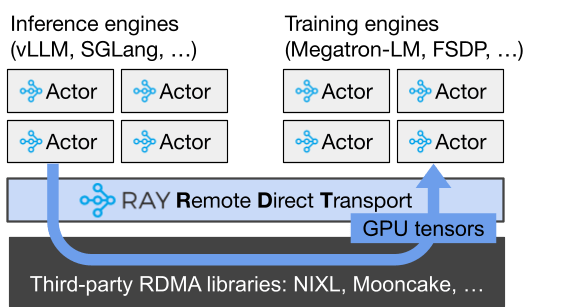
本稿のパート 2 では、RDT(Ray Direct Transport)アプリケーションのパフォーマンスを最大化するためのベストプラクティスをご紹介します。まず、Part 1 のチュートリアルと同様に、実際に動作する重み同期アプリケーションの解説を行います。その上で、RDMA に特化した RDT API を紹介し、パフォーマンスオーバーヘッドを解消する方法を説明します。
RDT のベストプラクティスを活用することで、GB200 ノード上の Multi-Node NVLink(MNNVL)環境において、単純な RDMA 実装と比較して最大 7.5 倍の速度向上を実現できることを示します。これらの高速化機能は、**SkyRL** や **Miles***といった強化学習フレームワークとのオープンソース連携を通じて、順次一般提供される予定です。
本稿で取り上げる内容は以下の通りです。
- パート 0:RDMA の基礎と、RDT を使用しているかどうかに関わらず発生しうる不要なパフォーマンスオーバーヘッドの原因
- パート 1:Ray における RDT と RDMA を活用した重み同期の動作コード例
- パート 2:多数の小さなテンソルを転送する際など、重み同期例のパフォーマンスを最大化する方法
リンク:RDMA の簡単な解説
リモート直接メモリアクセス(Remote Direct Memory Access、略称:RDMA)は、データ転送経路にリモートの CPU、OS、アプリケーションソフトウェアを介在させずに、あるマシンが別のマシンのメモリを直接読み書きできるネットワーク技術です。従来の TCP/IP ネットワークではデータがカーネルのネッティングスタックの複数の層を通過する必要がありますが、RDMA 対応のネットワークインターフェースカード(NIC)は、アプリケーションメモリのバッファ間で直接データを転送します。
この「カーネルバイパス」および「ゼロコピー」という設計により、レイテンシや CPU オーバーヘッド、メモリ帯域幅の使用量が劇的に削減されます。その結果、分散型 AI システムにおいて RDMA は非常に魅力的な選択肢となっています。
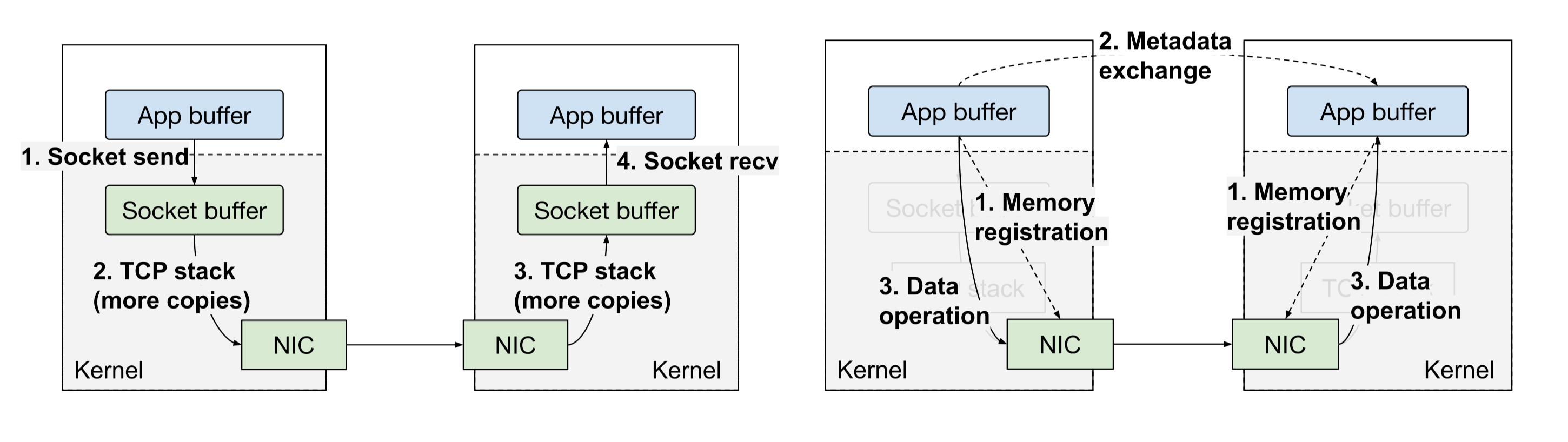
従来の OS ベースのネットワーク(左)と RDMA ネットワーク(右)。OS ベースのネットワークはアプリケーションに対して柔軟なソケットインターフェースを提供しますが、カーネルを経由するデータのコピー回数が増加します。一方、RDMA ネットワークはカーネルを完全にバイパスし、データをアプリケーションメモリへ直接転送するか、そこから読み出します。
*従来の OS ベースのネットワーク(左)と RDMA ネットワーク(右)*
RDMA 転送はアプリケーションのメモリバッファ上で直接動作するため、転送開始前に両端のエンドポイントで適切なリソースが確保されていることをアプリケーション自身が保証する必要があります。これは、TCP のような従来のプロトコルを使用する場合よりも、効率的な RDMA 転送の設定を少し複雑なものにします。
主な手順は以下の通りです。
- アプリケーションは両方のホスト上でメモリバッファを割り当て、RDMA NIC(ネットワークインターフェースカード)に対して「メモリ領域」として登録します。これには、対応するページを物理メモリの固定領域に確保するために、登録ごとに少なくとも 1 つのシステムコールが必要です。また、NIC が直接アクセスするために必要なメタデータも作成されます。これは、登録されたバッファ上での将来の RDMA 操作を許可するためのローカルおよびリモートアクセス鍵です。
- アプリケーションは、gRPC や Ray のようなアウトオブバンドチャネルを通じて、メモリ領域のメタデータを含む接続情報をリモートのピアと交換します。
- 片方向(ワンサイド)オペレーションの場合、送信側または受信側が操作(それぞれ Write または Read)をポストします。これにより、起動側の NIC がリモート CPU を中断させることなく、直接リモートの登録済みメモリにアクセスします。NIC はネットワークを介してデータを転送し、操作完了時に完了通知を生成します。
その結果、データは 2 つのマシンのアプリケーションバッファ間を直接移動する非常に効率的なデータパスが実現されます。CPU の関与は、転送自体の最中ではなく、主に接続設定と完了処理の際に限定されます。
しかし、これらの追加ステップには落とし穴がある可能性があります。各ステップをいつ、どのように実行するかによって、実際のデータ転送帯域幅がハードウェアの最大帯域幅よりも大幅に低下する恐れがあります。例えば、メモリ登録の呼び出し一つで 10 ミクロン程度の時間がかかります。一見すると小さなように思えますが、ネットワークが高速化され、1GB のデータ転送をミリ秒単位で完了でき、かつ各転送に複数のメモリ領域が含まれる場合、このオーバーヘッドはすぐに蓄積してしまいます。
Ray Direct Transport (RDT) による LinkRDMA
Mooncake や NVIDIA の NIXL などのライブラリは、さまざまな RDMA オペレーションの管理を支援しますが、最大のパフォーマンスを発揮したい場合でも、メモリバッファや登録処理などを自分で管理する必要があるかもしれません。RDMA は本質的に最大パフォーマンスを実現するためにアプリケーション側でより多くの労力を要するため、この追加の負担はある意味で根本的な課題と言えます。
では、Ray においてこのジレンマをどう解決するか。Ray の強みとして、分散オーケストレーターであるため、アプリケーションデータの転送が必要となるタイミングや場所について、すでに豊富な可視性を持っている点が挙げられます。必要な RDMA メタデータだけを既存の Ray データ転送プロトコルに付加できれば、開発者フレンドリーな API を維持しつつ、RDMA に基づく高速なデータ転送の恩恵も受けられるようになります。これが RDT を構築した理由です。
それでも、無料の午餐はありません。Ray RDT で最大のパフォーマンスを達成するには、ある程度の開発者の努力が必要ですが、RDMA ライブラリを直接使用する場合に比べると、その負担は軽微だと考えています。では、詳細を見ていきましょう。まずは RDT を用いた重み同期の実装で最も基本的な方法から始め、その後、パフォーマンス最大化のための高度な設計パターンを紹介していきます。
RDT による LinkWeight 同期:基本編
ここでは、LLM の強化学習における重み転送を模倣したシンプルな PyTorch の例を用います。この例では、「送信者」がトレーニングエンジン、「受信者」が推論エンジンを表します。目的は、モデル重みのコピー間でのデータ転送を直接トリガーするゼロコピー実現です。
コードを紹介しましょう。完全な動作例を確認したい場合は、こちらをご覧ください。
まずモデルを定義します。ここでは 1 つの線形層を持つ 2GiB のモデルを使用します:
class Model(torch.nn.Module):
    def __init__(self):
        super().__init__()
        # 2GiB matrix.
        TOTAL_SIZE_BYTES = 2 * 1024**3
        NUM_ROWS = 1_000
        self.layer = torch.nn.Linear(
            TOTAL_SIZE_BYTES // NUM_ROWS // 2, NUM_ROWS, dtype=torch.float16
        )
        self.layer.weight.zero_()

    def forward(self, x):
        with torch.no_grad():
            return self.layer(x)

    def get_views(self, num_views):
        return list(self.layer.weight[:num_views])
get_views メソッドは、重み行列の各行からなるビューのリストとしてレイヤーを返すことに注意してください。これは必須ではありません。代わりに self.layer.weight をそのまま返すことも可能です。しかし、このメソッドを用いることで、システムが多数の小さなテンソル・ビューを処理できる能力を検証します。これは、行列が列方向に分割されるテンソル並列設定などで見られる状況に似ています。
次に、トレーニングエンジンを実行するための Ray アクタークラスを定義しましょう。
@ray.remote(num_gpus=1, enable_tensor_transport=True)
class Trainer:
    def __init__(self, num_views: int):
        self._model = Model().to("cuda")
        self._num_views = num_views
        self._model_version = 0
        # List of handles to inference engine actors.
        self._generators = []

    async def reset_generators(self, generators: List[ActorHandle[Generator]]):
        """Reset the generators, possibly while the training loop is already running."""
        self._generators = generators

    async def loop(self, num_iters: int):
        """Training loop"""
        for _ in range(num_iters):
            # 1. Update weights.
            self._model.layer.weight += 1
            self._model_version += 1

            # 2. Put weights in the Ray RDT store.
            views = self._model.get_views(self._num_views)
            weights_ref = ray.put(views, _tensor_transport="nixl")

            # 3. Push weights to generators.
            sync_tasks = [
                gen.sync_weights.remote(self._model_version, weights_ref)
                for gen in self._generators
            ]

            # 4. Free weights from Ray memory.
            del weights_ref

            # 5. Wait for inference engines to finish syncing weights.
            ray.get(sync_tasks)

            # 6. Yield to let the controller reset the list of generators if needed.
            await asyncio.sleep(0)
トレーナーは以下の処理をループ内で実行します:
重み(weights)の更新を行います。ここでは単純にすべての値を 1 ずつ増やす処理ですが、実際の例ではトレーニングステップを実行し、他のトレーナーレプリカとの間で勾配を同期させることもあります。
ray.put を使用して、Ray の RDT ベースオブジェクトストアに重みを保存します。この際、RDT を Ray の共有メモリオブジェクトストアではなく使用するよう指定する _tensor_transport="nixl" 引数に注意してください。
ステップ 2 で作成した ObjectRefs のリストを渡すことで、各ジェネレーターエンジンへ重みをプッシュします。
今回のイテレーション中に生成されたすべての ObjectRefs を削除し、Ray がメタデータを適切にガベージコレクションできるように確保します。
推論エンジンによる重み転送が完了するまで待機します。このステップは、トレーナーが再度重みを更新する直前まで遅らせても構いません。
イベントループを解放してください。これにより、クラスタのコントローラーが、障害や自動スケーリングイベントが発生して生成器のメンバーシップが変更された場合に、トレーナーの生成器リストを更新できるようになります。
Trainer クラスでは、Ray にこのアクターが RDT(Ray Direct Transport)を使用してオブジェクトの転送や取得が可能であることを示すため、ray.remote の引数として enable_tensor_transport=True を指定します。
このフラグを指定しないと、追加の _tensor_transport フラグ付きで ray.put を呼び出した際にエラーが発生します。
次に、ジェネレータのロジックを見ていきましょう。ジェネレータはロールアウトをループで実行しますが、各ラウンドごとに yield を呼び出して、トレーナーからの重み同期リクエストがないかチェックします。重みの同期リクエストが発生した際、ジェネレータは次の処理を行います。
生成を一時停止します。
RDT を介してトレーナーの重み(weights)のコピーを取得します。内部では、これによりトレーナーに対して RDMA リードが送信されます。
取得したバッファから重みをローカルコピーへ転送します。
生成を再開します。
以下に、ステップ 3 のみを示した簡略化されたバージョンを示します。Generator.sync_weights は、トレーナー側で gen.sync_weights.remote(self._model_version, weights_ref) を呼び出したことに対応するタスク定義です。ジェネレータ側では、weights_ref が自動的に RDT と NIXL を経由して転送されたテンソルに置き換えられます。
@ray.remote(num_gpus=1, enable_tensor_transport=True)
class Generator:
    def __init__(self, num_views: int):
        self._model = Model().to("cuda")
        self._num_views = num_views
        self._model_version = 0
        self._generation_event = asyncio.Event()

    async def sync_weights(self, model_version, weights: List[torch.Tensor]):
        """Synchronize weights with the trainer's copy."""
        # `weights` is the generator's copy of the Trainer's `views`, transferred via RDT and NIXL.
        # Copy pulled weights to local model copy.
        views = self._model.get_views(self._num_views)
        for view, weight in zip(views, weights):
            view.copy_(weight)
        self._model_version = model_version
最後に、これらを一連の処理としてまとめるドライバーループを示します。
NUM_VIEWS, NUM_ITERS = 1_000, 100

generator = Generator.options(num_gpus=1).remote(NUM_VIEWS)
trainer = Trainer.options(num_gpus=1).remote(NUM_VIEWS)

trainer.reset_generators.remote([generator])

# Start loops concurrently and block until both finish
ray.get([
    trainer.loop.remote(NUM_ITERS),
    generator.loop.remote(NUM_ITERS)
])
このドライバは、それぞれ 1 つの GPU を割り当てられたトレーナーアクターとジェネレータアクターの各 1 つを作成します。その後、ドライバは両者のアクターハンドルを交換し、2 つのアクターが長時間実行されるループを終了するまで待機します。ここから先は、結果の保存や追加ループの実行、新しいトレーナーやジェネレータの起動などを行うことができます。
まとめ: RDT を使用して重みを同期させることで、アプリケーションロジックに集中できます。メモリ登録、メタデータ交換、ガベージコレクションといった典型的な RDMA 操作はすべて内部で自動的に処理されます。ただし、良好なパフォーマンスを達成するにはさらなる努力が必要です。次章では、RDMA の隠れたオーバーヘッドがどのように現れ、それをどう緩和できるかについて詳しく見ていきます。
LinkPerformance
RDT を用いた重み同期のテスト中、ハードウェアが本来持つ性能を大幅に下げていたいくつかのパフォーマンスボトルネックを発見し、修正しました。これにより転送帯域幅は最大で 10 倍以上向上しています。今回導入したパフォーマンス改善策は、主に以下のカテゴリに分類されます。
- メモリ登録の削減
メモリ登録には時間がかかります。特に学習エンジンと推論エンジンが異なるテンソル並列シャード戦略を使用している場合、多数の小さなテンソルを登録して転送する必要が生じるため、この対策は極めて重要です。
- ピーク時のメモリアウトレットの削減
重み転送の実装では、RDMA 転送とソースまたは宛先のモデル重みの間に中間メモリコピー(ステージングバッファ)を追加で使用するケースが一般的です。これは実装上便利ですが、学習や推論エンジンにおいてすでに限られたメモリ資源にさらに負荷をかけることになります。
- データ転送の最適化
転送速度は、送信されるテンソルのサイズと数に影響されます。総転送バイト数が同じであっても、多数の小さなテンソルを送信するよりも、1 つの大きなテンソルとして送信する方が高速です。
次に、これらの課題に対処するために RDT で利用可能な API について解説します。以下のベンチマークはすべて、2 GB200 ノード間での転送(MNNVL:マルチノード NVLINK、双方向 900 GB/s のユニディレクショナルポイントツーポイント帯域)を前提に実施されています。
メモリ登録の削減
強化学習(RL)における重みの同期では、最終的なソースおよび宛先バッファの場所が事前に判明しており、通常は時間とともに変化しません。各ステップで読み書きされる場所は以前と同じです。この特性を活かすことで、転送のたびにメモリを再登録する必要をなくすことができます。
Ray RDT では、ray.experimental.register_nixl_memory という API を公開することでこれを実現しています。この API を使用すれば、ユーザーは事前にメモリを登録できます。同じテンソルを複数回送信する可能性がある場合、送信元および宛先の両方のアクターでこの API を呼び出す必要があります。受信側では、後ほど詳しく説明する ray.experimental.set_target_for_ref も併用する必要があります。一度この API で登録されたメモリは、転送時に再度登録されることはありません。以下に、この API の使用例を示します。
import ray

@ray.remote(num_gpus=1, enable_tensor_transport=True)
class Trainer:
    def __init__(self, num_views: int):
        # Register weights on the sender actor.
        for param in self._model.parameters():
            ray.experimental.register_nixl_memory(param)
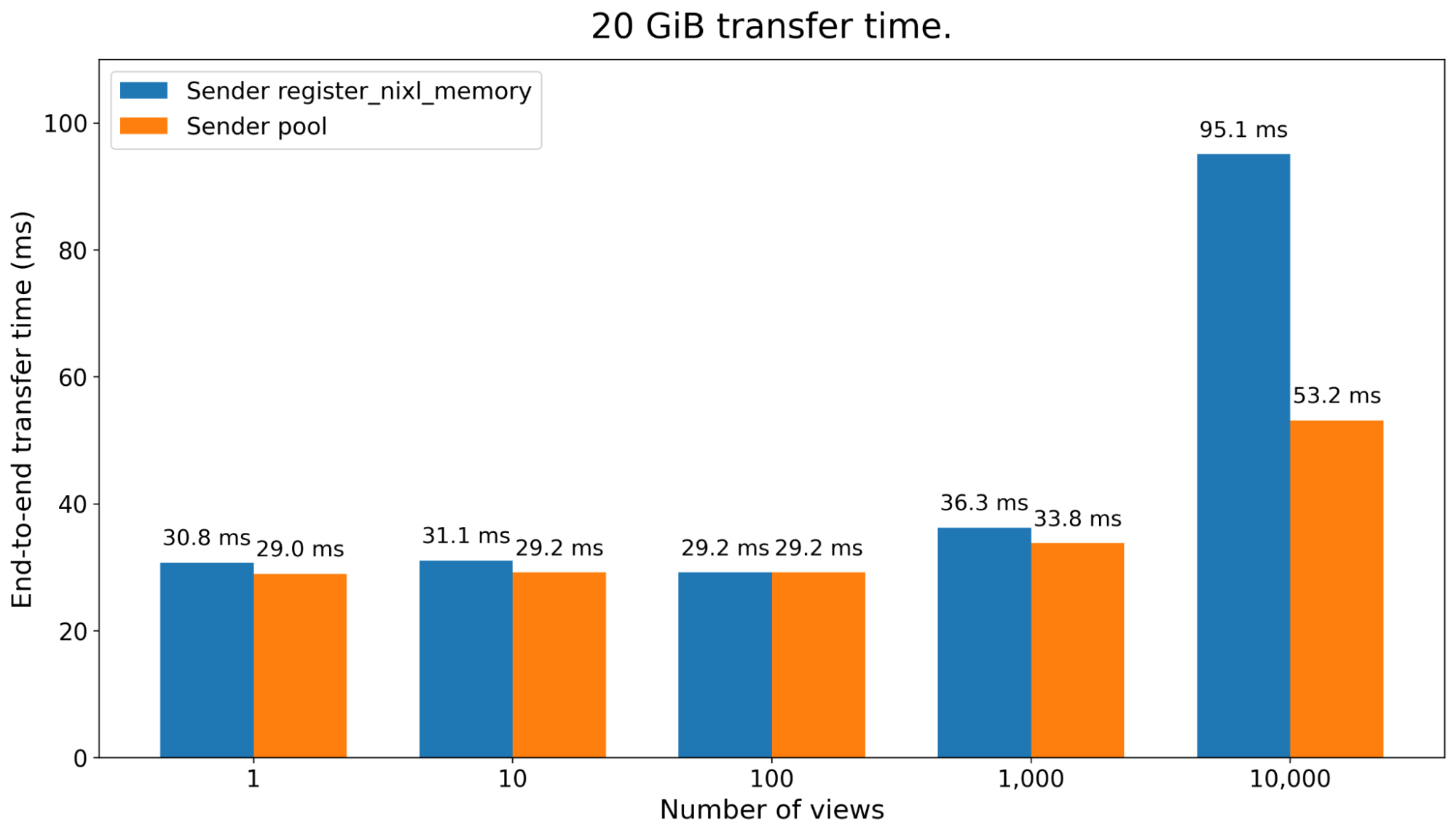
この API を利用することで、データ転送中にその都度発生するコストを、アクターの作成時(事前)に前倒しで支払う形になります。これによる転送時間の比較結果が以下のグラフに示されています。
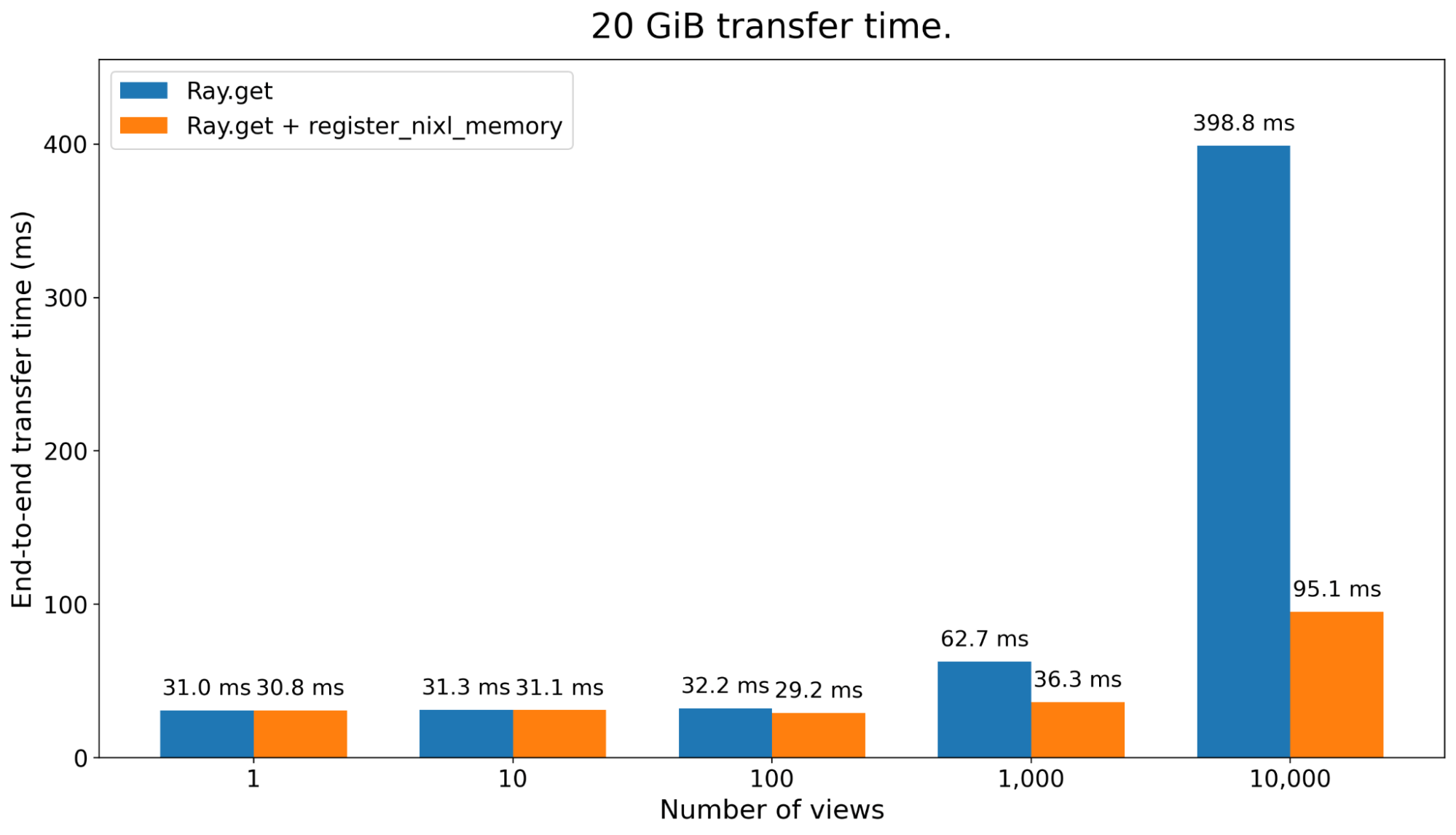
メモリ登録のコストが高くなるケースとして、多くの小さなテンソルを転送する状況が挙げられます。これらは実際にはより大きなテンソルのビュー(参照)であることが多く、トレーニングモデルと推論モデルのシャード構成が異なる場合に頻繁に発生します。
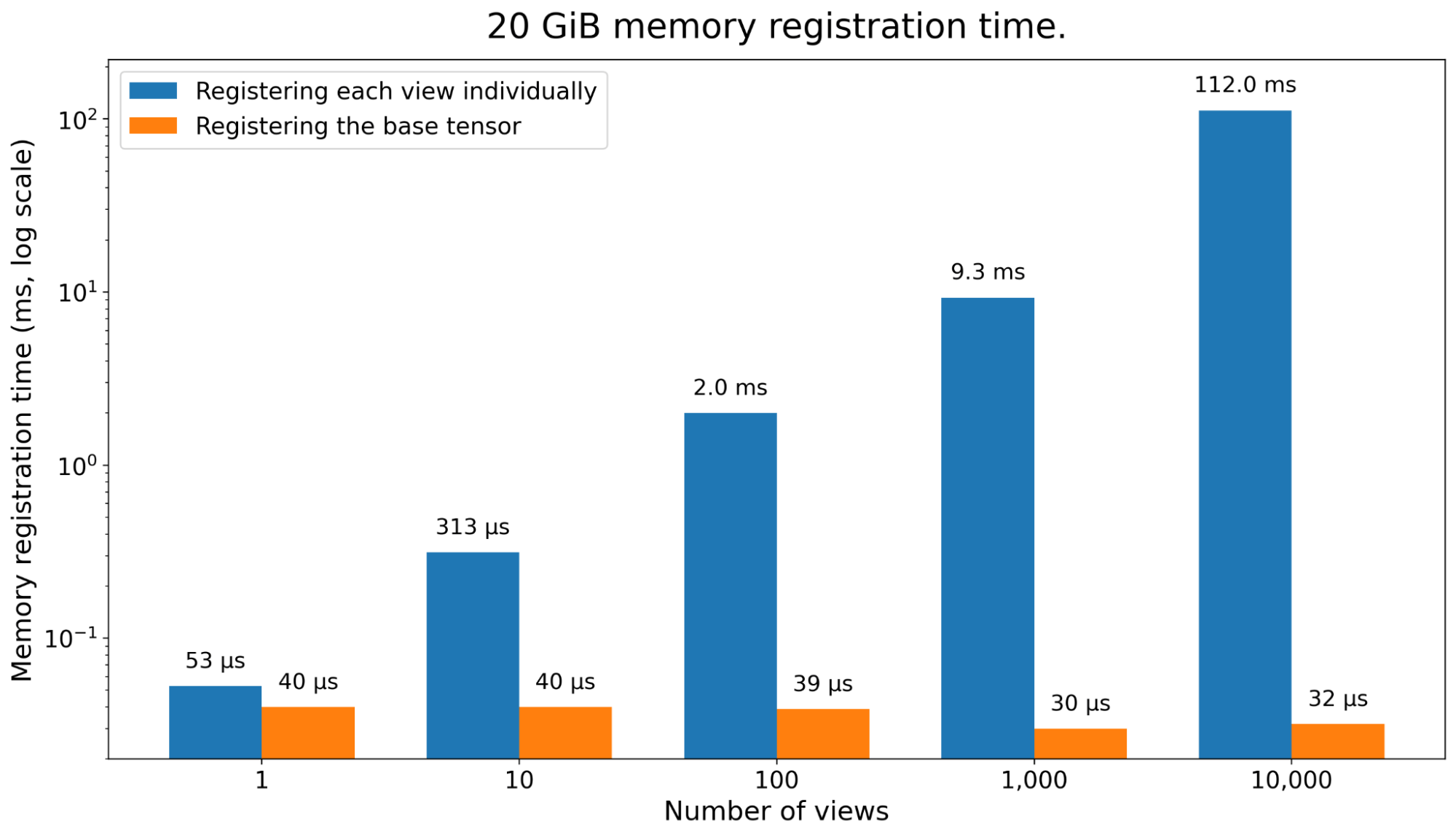
生の NIXL を使用する際の一般的な手法は、各サブテンソルを個別に登録することですが、これではオーバーヘッドが大幅に増加してしまいます。一方、RDT の NIXL バックエンドでは、ベースとなるテンソルを一度だけ登録し、そのオフセットとして各サブテンソルを送信する最適化を実装しています。このアプローチにより、サブテンソルの数が増加してもメモリ登録とトータル転送時間の両面で大きな改善が見られます。
LinkReducing peak memory overhead
これまでの例のコードでは、レシーバー側が RDMA を使用して送信元の重みを直接ステージングバッファにコピーし、その後、推論エンジン側の重みへもう一度転送していました。これは、推論ワーカー側の重みに対して何らかの後処理を行う必要がある場合に特に便利です。しかし、メモリを節約するためには、トレーニング側の重みから推論ワーカーの重みへと直接コピーすることも可能です。
これを実現するために、新しい API ray.experimental.set_target_for_ref を導入しました。この API は、RDT に対して受信データをどこに届けるべきかを指示します。呼び出し元が受け取りたいローカルな torch.Tensor のリストと、RDT 対応の ObjectRef を引数として受け取ります。
以下は、サンプルスクリプトでの使用方法です:
@ray.remote(num_gpus=1, enable_tensor_transport=True)
class Generator:
    def __init__(self, num_views: int):
        # ...
        # Since we are going to write directly to our local model weights on each transfer,
        # pre-register the memory to avoid having to register with each transfer.
        for param in self._model.parameters():
            ray.experimental.register_nixl_memory(param)

    async def sync_weights(self, model_version, refs: List[ray.ObjectRef]):
        # set_target_for_ref requires the receiver to have a copy of the
        # ObjectRef, not the underlying tensors. So for this example,
        # the Trainer wraps its `weights_ref` in a Python list and
        # we unpack it to a single ObjectRef here.
        ref, = refs
        views = self._model.get_views(self._num_views)
        # The order of tensors in our local `views` must match the order on the trainer.
        ray.experimental.set_target_for_ref(ref, views)
        # `weights` shares the same underlying tensors as `views`.
	 weights = ray.get(ref)
ピークメモリ使用量は torch.cuda.memory.max_memory_allocated で確認しました。従来、Torch のキャッシュアロケータでは追加のコピーが発生し、20GB の重みを持つ場合でも最大 40GB に達していました。しかし現在では、ピーク値は 20GB のまま維持されています。
データ転送の最適化
多数の小さなテンソルを転送すると、ネットワーク帯域幅を最大化する効率が低下します。GPU は高い HBM バンド幅を持っているため、一度に連続したメモリ領域にまとめる(バケット化する)ことで、追加のコピーによるオーバーヘッドが全体の転送時間に比べて無視できるほど小さくなる場合があります。
ただし、この方法で転送時間は短縮できますが、追加のコピーによりトレーニング側のピークメモリ使用量は増加することに注意が必要です。
自分で実装することも可能ですが、RDT にはこのようなコピー処理を内部で行うメモリプールも用意されています。プールの全メモリは事前に登録済みであるため、各転送のたびに新しいメモリの登録を行う必要がありません。
以下が、サンプルでの有効化方法です:
@ray.remote(num_gpus=1, enable_tensor_transport=True)
class Trainer:
    def __init__(self):
        # ...
        # Pre-allocate a 1GB GPU memory pool for NIXL transfers.
        # This is instead of directly registering the Trainer's model weights.
register_nixl_memory_pool(1024**3, torch.device("cuda"))このコンストラクタの行により、Trainer.loop 内の各 ray.put 呼び出しは、そのテンソルを RDT が管理するメモリプールから割り当てられた連続したメモリーバッファへコピーするようになります。バケットサイズは、1 つの ray.put 呼び出しに渡すテンソルの数を決めることで調整可能です。
受信側については、データ転送パスからメモリ登録を除外するために、引き続き register_nixl_memory と set_target_for_ref を使用しています。以下のグラフには、Ray 2.59 で一般公開される予定のメモリプールに関するいくつかの改善点も含まれています(プレビュー版として)。
全体を繋ぐ
ここまで個別の性能向上を確認してきましたので、次は スクリプト を使って全体での動作を試してみましょう。各ステップがエンドツーエンドの処理時間にどう寄与しているかを以下に分解して示します。
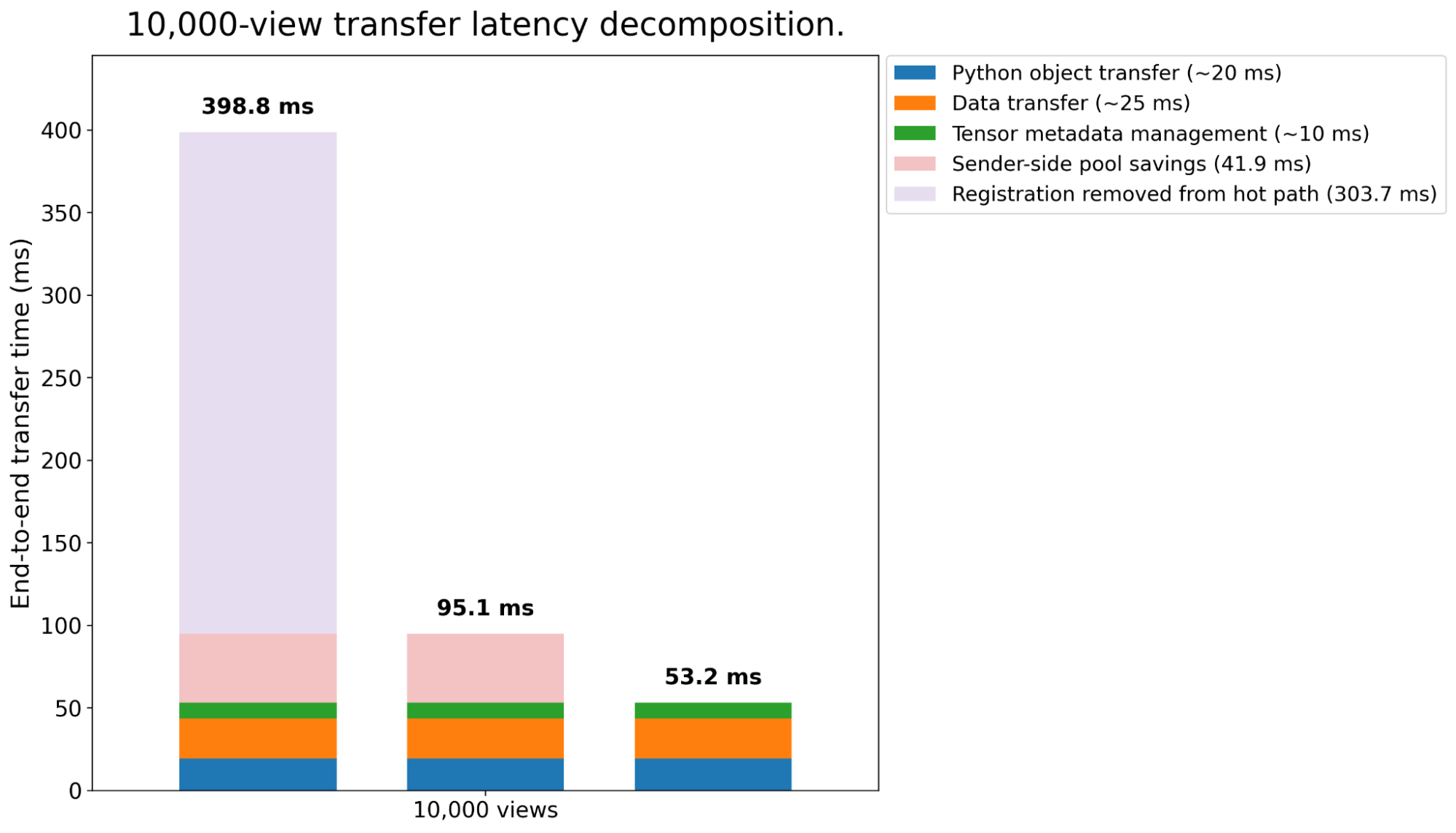
1 万ビューの転送レイテンシ分解
残りのオーバーヘッドとは何でしょうか?詳しく見ていきましょう。
Python オブジェクトの転送:RDT は、任意の Python オブジェクトに埋め込まれた PyTorch テンソルを送信できます。テンソルデータは NIXL を介して RDMA で転送され、Python オブジェクトの残りの部分はシリアライズされて Ray のネイティブな CPU データプレーンを介して送信されます。小さな Python オブジェクトの場合、これはソースから宛先アクターへの 1 メッセージで済みます。一方、この例にある 10k 個のテンソルのリストのように、シリアライズされたデータが 100KB を超える大きなオブジェクトでは、Ray Core が Ray の共有メモリストア経由での転送に伴い、追加のシリアライズ/デシリアライズ処理が発生します。
データ転送:これは RDMA 上での実際のテンソルデータの転送です。この場合、ハードウェアの最大転送帯域幅は 900GB/s で、データ転送自体で 859 GB/s を達成しました。
テンソルメタデータの管理:N 個のテンソルを管理すると、転送中に O(N) のシステム操作が多数発生します。例えば、各テンソルの形状を追跡したり、形状が宛先バッファと一致しているか検証したりする処理です。今回転送した 10k 件のビューでは、これにより総転送時間に数ミリ秒追加されます。
RDT の今後の展望
RDT を高性能な重み同期に対応する RL フレームワークに統合するため、オープンソースコミュニティと協力して開発を進めています。
RDT の統合により、SkyRL は Qwen/Qwen3-235B-A22B の重み同期を 4 ノード(各ノードに H100 を 8 基搭載)でわずか 3.5 秒で完了できるようになりました。これは SkyRL に実装されていた単純な NCCL ブロードキャストベースの実装と比較して約 18 倍の高速化です。
Miles との統合も進行中です。RDT を採用することで、Miles は GLM-4.5-Air の重み同期を同様の構成(4 ノード×H100 8 基)で 2.3 秒で完了できます。これは NCCL を使用した場合より 2.2 倍、Mooncake Transfer Engine を使用した場合より 1.14 倍高速です。
原文を表示
Tl;dr: Ray Direct Transport (RDT) enables fast and easy RDMA-backed weight transfer in reinforcement learning (RL) for LLMs. We show how to use the RDT APIs to maximize data transfer performance, by up to 6x over a naive RDMA implementation.
Everyone knows that RDMA is fast. It’s critical for applications where lots of data needs to be sent between GPUs quickly, like weights synchronization in reinforcement learning (RL) for LLMs. But RDMA also requires the developer to manage extra system operations before and after the data transfer like memory allocation, memory registration, metadata transfer, etc. Naive implementations for these steps can easily eliminate any speedups in the data transfer itself.
In Part 1, we introduced Ray Direct Transport (RDT), a feature in Ray Core to provide fast and easy native support for RDMA-based transfers between Ray actors. RDT acts as an intermediate “glue” layer between open-source engines built on Ray such as vLLM and third-party libraries such as NIXL that provide RDMA-based device-to-device transfers.
In this Part 2, we’ll cover the best practices for maximizing performance of your RDT application. We’ll walk through a working weight syncing application similar to the walkthrough in Part 1, then introduce RDMA-specific RDT APIs that you can use to eliminate performance overheads. Using RDT best practices, we’ll show how to improve upon a naive RDMA implementation by up to 7.5x on GB200 nodes using Multi-Node NVLink (MNNVL). *These speedups will be generally available through ongoing open-source integrations with RL frameworks like *SkyRL* and *Miles.
We’ll cover:
- Part 0: The basics of RDMA and where unwanted performance overheads can come from, whether or not you’re using RDT.
- Part 1: A working code example of weight syncing in Ray with RDT and RDMA.
- Part 2: How to maximize performance of the weight syncing example, especially when transferring many small tensors.
LinkA quick primer on RDMA
Remote Direct Memory Access (RDMA) is a networking technology that allows one machine to directly read or write the memory of another machine without involving the remote CPU, OS, or application software in the data path. Unlike traditional TCP/IP networking, where data must traverse multiple layers of the kernel networking stack, RDMA-capable network interface cards (NICs) perform data transfers directly between application memory buffers. This "kernel bypass" and "zero-copy" design dramatically reduces latency, CPU overhead, and memory bandwidth consumption, making RDMA attractive for distributed AI systems.
Traditional OS-based networking (left) vs RDMA networking (right). OS-based networking presents a flexible socket interface to the application but requires more copies through the kernel. RDMA networking bypasses the kernel completely and directly transfers data to/from application memory.
*Traditional OS-based networking (left) vs RDMA networking (right)*
Because RDMA transfers operate directly on application memory buffers, the application needs to ensure that the right resources are available on both endpoints before the transfer starts. This makes setting up an efficient RDMA transfer a bit more involved than using something like TCP. Here are the main steps to be aware of:
- The application allocates memory buffers on both hosts and registers them as “memory regions” with the RDMA NIC. This requires at least one syscall per registration to pin the corresponding page(s) in physical memory. It also creates metadata that the NIC can use for direct access: local and remote access keys that authorize future RDMA operations on the registered buffers.
- The application exchanges connection information including the memory region’s metadata with the remote peer through an out-of-band channel, often using something like gRPC or Ray.
- For one-sided operations, the sender or receiver posts the operation (either Write or Read, respectively), which triggers the initiating NIC to directly access the remote registered memory, without interrupting the remote CPU. The NIC transfers the data across the network and generates completion notifications when the operation finishes.
The result is a highly efficient data path in which data moves directly between application buffers on the two machines, with CPUs involved primarily during connection setup and completion handling rather than during the transfer itself.
However, these extra steps can also be a bit of a gotcha. Depending on when and how you choose to perform each step, actual data transfer bandwidth could be far below the hardware bandwidth. For example, one memory registration call can take 10s of us – it may not sound like much, but when your network is fast enough to complete a 1GB data transfer in milliseconds and each transfer contains many memory regions, the overhead can quickly add up.
LinkRDMA with Ray Direct Transport (RDT)
Libraries like Mooncake or NVIDIA’s NIXL help users manage the various RDMA operations, but if you want maximum performance, you may still need to manage things like memory buffers, registrations, etc. RDMA inherently requires more application effort to achieve maximum performance, so this extra burden is in some way fundamental.
How do we resolve this tension in Ray? One advantage of Ray is that as a distributed orchestrator, it already has a lot of visibility into when and where application data transfers need to happen. If we can piggy-back only the necessary RDMA metadata onto the existing Ray data transfer protocol, we can preserve Ray’s developer-friendly APIs but also benefit from RDMA-backed data transfer. That is why we built RDT.
Still, there is no free lunch. Achieving maximum performance with Ray RDT still requires some developer effort, but we think not as much as directly using an RDMA library. Let’s dive into the details. We’ll walk through the most basic way you could implement weight syncing with RDT first, then show the advanced design patterns for maximizing performance.
LinkWeight syncing with RDT: The Basics
We’re going to work with a simple PyTorch example that mimics weight transfer in RL for LLMs, with one “sender” representing the trainer and one “receiver” representing an inference engine. The goal is to achieve a zero-copy implementation that triggers data transfer directly between the sender and receiver’s copies of the model weights.
Let’s introduce the code. If you’d prefer to see the full working example instead, check out the code here.
First, let’s define a model. We’ll use a 2GiB model with one linear layer:
class Model(torch.nn.Module):
    def __init__(self):
        super().__init__()
        # 2GiB matrix.
        TOTAL_SIZE_BYTES = 2 * 1024**3
        NUM_ROWS = 1_000
        self.layer = torch.nn.Linear(
            TOTAL_SIZE_BYTES // NUM_ROWS // 2, NUM_ROWS, dtype=torch.float16
        )
        self.layer.weight.zero_()

    def forward(self, x):
        with torch.no_grad():
            return self.layer(x)

    def get_views(self, num_views):
        return list(self.layer.weight[:num_views])
Notice that the get_views method returns the layer as a list of views, each view comprising one row of the weight matrix. This isn’t necessary; you could just return the whole self.layer.weight instead. But we’re going to use this method to test the system’s ability to handle many small tensor views, similar to what you might see in a tensor-parallel setting where matrices might be sharded across columns.
Next, let’s define a Ray actor class to run the training engine.
@ray.remote(num_gpus=1, enable_tensor_transport=True)
class Trainer:
    def __init__(self, num_views: int):
        self._model = Model().to("cuda")
        self._num_views = num_views
        self._model_version = 0
        # List of handles to inference engine actors.
        self._generators = []

    async def reset_generators(self, generators: List[ActorHandle[Generator]]):
        """Reset the generators, possibly while the training loop is already running."""
        self._generators = generators

    async def loop(self, num_iters: int):
        """Training loop"""
        for _ in range(num_iters):
            # 1. Update weights.
            self._model.layer.weight += 1
            self._model_version += 1

            # 2. Put weights in the Ray RDT store.
            views = self._model.get_views(self._num_views)
            weights_ref = ray.put(views, _tensor_transport="nixl")

            # 3. Push weights to generators.
            sync_tasks = [
                gen.sync_weights.remote(self._model_version, weights_ref)
                for gen in self._generators
            ]

            # 4. Free weights from Ray memory.
            del weights_ref

            # 5. Wait for inference engines to finish syncing weights.
            ray.get(sync_tasks)

            # 6. Yield to let the controller reset the list of generators if needed.
            await asyncio.sleep(0)
The trainer does the following in a loop:
- Update weights. In this case, we simply increment all values by 1. In an actual example, this would run a training step, possibly synchronizing gradients with other trainer replicas.
- Store weights in Ray’s RDT-based object store, using ray.put. Note the _tensor_transport="nixl" argument that specifies to use RDT instead of Ray’s shared-memory object store.
- Push weights to each generator engine, by passing the list of ObjectRefs created in step 2.
- Delete all ObjectRefs created during this iteration, to ensure that Ray will be able to garbage-collect any metadata.
- Wait for the inference engines to complete the weights transfer. This step can optionally be deferred until right before the trainer is ready to update its weights again.
- Yield the event loop. This ensures that the cluster’s controller can update the trainer’s list of generators, if a failure or autoscaling event and the generator membership changes.
Note that the Trainer class specifies enable_tensor_transport=True in ray.remote to indicate to Ray that this actor can use RDT to put or get objects. Without this flag, the call to ray.put with the additional _tensor_transport flag would error.
Now we’ll walk through the generator logic. The generator executes rollouts in a loop but yields between each round to check for incoming weights synchronization requests from the trainer. During a weights synchronization request, the generator:
- Pauses generation.
- Pulls a copy of the trainer’s weights via RDT. Under the hood, this posts an RDMA read to the trainer.
- Copies weights from the pulled buffer to the local copy of weights.
- Resumes generation.
Below we show a simplified version that only shows step 3. Generator.sync_weights is the task definition corresponding to the trainer’s call to gen.sync_weights.remote(self._model_version, weights_ref); on the generator side, the weights_ref is automatically replaced with the tensors transferred via RDT and NIXL.
@ray.remote(num_gpus=1, enable_tensor_transport=True)
class Generator:
    def __init__(self, num_views: int):
        self._model = Model().to("cuda")
        self._num_views = num_views
        self._model_version = 0
        self._generation_event = asyncio.Event()

    async def sync_weights(self, model_version, weights: List[torch.Tensor]):
        """Synchronize weights with the trainer's copy."""
        # `weights` is the generator's copy of the Trainer's `views`, transferred via RDT and NIXL.
        # Copy pulled weights to local model copy.
        views = self._model.get_views(self._num_views)
        for view, weight in zip(views, weights):
            view.copy_(weight)
        self._model_version = model_version
Finally we have the driver loop to put this all together.
NUM_VIEWS, NUM_ITERS = 1_000, 100

generator = Generator.options(num_gpus=1).remote(NUM_VIEWS)
trainer = Trainer.options(num_gpus=1).remote(NUM_VIEWS)

trainer.reset_generators.remote([generator])

# Start loops concurrently and block until both finish
ray.get([
    trainer.loop.remote(NUM_ITERS),
    generator.loop.remote(NUM_ITERS)
])
The driver creates one trainer actor and one generator actor, each assigned 1 GPU. The driver exchanges actor handles, then simply waits for the two actors to finish their long-running loops. From there, the driver could save results, execute more loops, start new trainers or generators, etc.
Summary: Using RDT for weight syncing lets you focus on the application logic. All of the typical RDMA operations, like memory registration, metadata exchange, and garbage collection, are handled under the hood for you. But achieving good performance requires more effort. We’ll take a look at how RDMA’s hidden overheads can manifest and be mitigated next.
LinkPerformance
During testing of weights syncing with RDT, we found and fixed a number of performance bottlenecks that greatly reduce the actual transfer bandwidth from the hardware optimal, in some cases by 10x or more! The resulting performance fixes that we introduced fall into a few different categories:
- Reducing memory registrations. Memory registrations take time. This is especially important when the training and inference engines use different tensor-parallel sharding strategies, which can result in having to register and send many small tensors.
- Reducing peak memory overhead. Weight transfer implementations often use an additional intermediate memory copy as a staging buffer between the RDMA transfer and the source or destination model weights. This is convenient but adds peak memory pressure, which can be significant in training and inference engines where memory is already limited.
- Optimizing data transfer. The data transfer speed is affected by the size and number of tensors sent. Transferring many small tensors is slower than sending one big tensor, even if the total bytes transferred is the same. Next we’ll walk through the APIs available in RDT to address these issues. The below benchmarks were all done on inter-node transfers with 2 GB200 nodes, using MNNVL (multi-node NVLINK, 900 GB/s unidirectional point-to-point bandwidth).
LinkReducing memory registrations
In weight syncing for RL, the location of the final source and destination buffers are known ahead of time and usually don’t change over time. Each step reads and writes the same locations as before. We can take advantage of this to avoid having to re-register the memory with each transfer.
In Ray RDT, we do this by exposing an API ray.experimental.register_nixl_memory that allows users to register memory ahead of time. Use this API on both the sending and receiving actors when the same tensor(s) will be sent multiple times. For the receiving side, you’ll also have to use ray.experimental.set_target_for_ref which we’ll discuss later. Memory that has already been registered with this API won’t be registered again at transfer time. Here is a snippet showing how the API works:
import ray

@ray.remote(num_gpus=1, enable_tensor_transport=True)
class Trainer:
    def __init__(self, num_views: int):
        # Register weights on the sender actor.
        for param in self._model.parameters():
            ray.experimental.register_nixl_memory(param)
Using this API pays the cost of memory registration time upfront during actor creation rather than on the fly during data transfers. Here’s a plot showing the total data transfer time before and after:
Another case where memory registration can become expensive is when you are transferring many small tensors that are actually views into a larger tensor, which is common when your training and inference models are sharded differently.
When using raw NIXL, the common practice is to register each subtensor separately, which can add a lot of overhead. RDT’s NIXL backend implements an optimization where it only registers the base tensor once, then sends each subtensor as an offset into that base tensor. This greatly improves the memory registration and therefore total transfer time as the number of subtensors grows:
LinkReducing peak memory overhead
So far in our example code, the receiver uses RDMA to copy directly from the sender’s weights into a staging buffer. The receiver then uses another copy to move the data to the inference engine’s copy of the weights. This is convenient, especially if you need to do any postprocessing on the inference worker’s copy of the weights. However, we can also save some memory by copying directly from the trainer’s weights to the inference worker’s weights.
To do this, we introduced a new API ray.experimental.set_target_for_ref that directs RDT on where the incoming data should be received. This API takes in an RDT-enabled ObjectRef and a list of local torch.Tensors that the caller wants to receive into.
Here’s how to use it in our example script:
@ray.remote(num_gpus=1, enable_tensor_transport=True)
class Generator:
    def __init__(self, num_views: int):
        # ...
        # Since we are going to write directly to our local model weights on each transfer,
        # pre-register the memory to avoid having to register with each transfer.
        for param in self._model.parameters():
            ray.experimental.register_nixl_memory(param)

    async def sync_weights(self, model_version, refs: List[ray.ObjectRef]):
        # set_target_for_ref requires the receiver to have a copy of the
        # ObjectRef, not the underlying tensors. So for this example,
        # the Trainer wraps its `weights_ref` in a Python list and
        # we unpack it to a single ObjectRef here.
        ref, = refs
        views = self._model.get_views(self._num_views)
        # The order of tensors in our local `views` must match the order on the trainer.
        ray.experimental.set_target_for_ref(ref, views)
        # `weights` shares the same underlying tensors as `views`.
	 weights = ray.get(ref)
The peak memory usage was inspected using torch.cuda.memory.max_memory_allocated. Prior, we consistently saw an extra copy in the torch caching allocator, so with 20GB of weights you would see the peak be 40GB. Now, the peak remains at 20GB.
LinkOptimizing data transfer
Transferring many small tensors is inefficient for maximizing network bandwidth. It can often be better to “bucket” together many small tensors by making them contiguous first. Since the GPU has high HBM bandwidth, the overhead of the extra copy can be negligible compared to the overall transfer time. Note that while this method can improve transfer time, it does add to the trainer’s peak memory usage due to the extra copy.
While you could implement this yourself, RDT also implements a memory pool that performs such copies under the hood. All memory in the pool is preregistered, to avoid having to perform a new memory registration on each transfer.
Here’s how to enable it for our example:
@ray.remote(num_gpus=1, enable_tensor_transport=True)
class Trainer:
    def __init__(self):
        # ...
        # Pre-allocate a 1GB GPU memory pool for NIXL transfers.
        # This is instead of directly registering the Trainer's model weights.
        register_nixl_memory_pool(1024**3, torch.device("cuda"))
With this line in the constructor, each ray.put call in Trainer.loop will now copy its tensors into a contiguous memory buffer allocated from the RDT-managed memory pool. You can adjust the size of the bucket by deciding how many tensors to pass to a single ray.put call. Note that for the receiver side, we still kept register_nixl_memory + set_target_for_ref to remove the memory registration from the data transfer path. The below graph also includes a couple improvements to the memory pool that will be generally available in Ray 2.59, but as a preview:
LinkPutting it together
Now that we’ve seen all of the performance improvements individually, we can test them out in the full script. Here’s a breakdown showing how each step contributes to the end-to-end time:
What are the remaining overheads? Let’s break it down:
- Python object transfer: RDT supports sending PyTorch tensors embedded inside arbitrary Python objects. The tensor data is sent over RDMA via NIXL while the rest of the Python object is serialized and sent via Ray’s native CPU-based dataplane. For smaller Python objects, this requires just one message from the source to destination actor. For larger Python objects where the serialized data exceeds 100KB, like the list of 10k tensors in this example, Ray Core incurs an additional serialization/deserialization from transferring via Ray’s shared memory store.
- Data transfer: The actual transfer of tensor data over RDMA. In this case, the max hardware transfer bandwidth is 900GB/s and we achieved 859 GB/s for the data transfer itself.
- Tensor metadata management: Managing N tensors adds many O(N) system operations throughout the transfer, such as tracking each tensor’s shape, verifying that the shape matches the destination buffer, etc. For the 10k views transferred here, this currently adds a few milliseconds to the total transfer time.
LinkWhat’s next for RDT
We are working together with the open source community to integrate RDT with RL frameworks for high-performance weight syncing.
With the RDT integration, SkyRL can sync weights for Qwen/Qwen3-235B-A22B across 4 8xH100 nodes in just 3.5s, about 18x faster than the simple NCCL broadcast-based implementation in SkyRL.
An integration with Miles is also in progress. With RDT, Miles is able to sync GLM-4.5-Air across four 8xH100 nodes in only 2.3s, 2.2x faster than using NCCL and 1.14x faster than using the Mooncake Transfer Engine.
関連記事
今日のまとめ
AIデイリーブリーフで今日の重要ニュースをまとめ読み