Browser Use、Coinbase と連携し AI エージェントが暗号資産決済を可能に
本文の状態
日本語全文を表示中
詳細モードで約6分の本文を読めます。
同じ出来事の情報源
この情報源を基点に整理
Browser Use Blog
Browser Use は Coinbase と連携し、API キー不要で AI エージェントが USDC を使用してブラウザ自動化サービスを利用できる x402 プロトコルを導入した。
AI深層分析を開く2026年8月6日 17:32
AI深層分析
キーポイント
x402 プロトコルの導入と機能
Browser Use Cloud は Coinbase が提供する x402 プロトコルに対応し、API キーの提示に代わり、AI エージェントが各リクエストごとに暗号資産で支払う仕組みを実現した。
アカウント作成と設定の簡素化
ユーザーはクレジットカード登録や API キー生成を不要とし、暗号資産ウォレット自体をアカウントとして機能させることで、約 30 秒から 1 分でのセットアップが可能となった。
エージェントの自律的な支払い
AI エージェントは自身のウォレットから直接 USDC を支払ってタスクを実行し、クレジットを補充できるため、人間の介入によるアカウント作成や決済情報の入力が必要なくなる。
自動的な資金管理とクレジット変換
エージェントはタスク実行時に必要に応じてウォレットから数ドルのUSDCを引き出し、Browser Use クレジットに変換する。残高が不足すると自動的に追加で引き出す仕組みになっている。
Claude Code による30秒でのセットアップ
Claude Code を使用することで、ウォレットの作成や Coinbase を介した資金調達、SDK のインストールまでを自動で行い、テストタスクを実行できる。
重要な引用
Browser Use is turning browser automation into an open, on-demand service that any agent can access with x402.
Agents need money. Until x402, every API expected a human to sign up, enter their billing information, and paste their API key into the agent's environment.
"When it needs to pay, it pulls a few dollars of USDC from your wallet and turns them into Browser Use credits."
"Claude does the wallet setup, funding walkthrough, and verification for you"
編集コメントを表示
編集コメント
AI エージェントが経済的自律性を獲得する重要な一歩であり、従来の API キー管理モデルから脱却した新しいアーキテクチャを示している。特に x402 プロトコルとの連携により、エージェント間の直接取引やマイクロペイメントの実現に向けた土台が整いつつあると言える。
Source Article
元記事を日本語で読む
本文に関係しない購読案内、埋め込み通知、サイト内プロモーションは除いています。
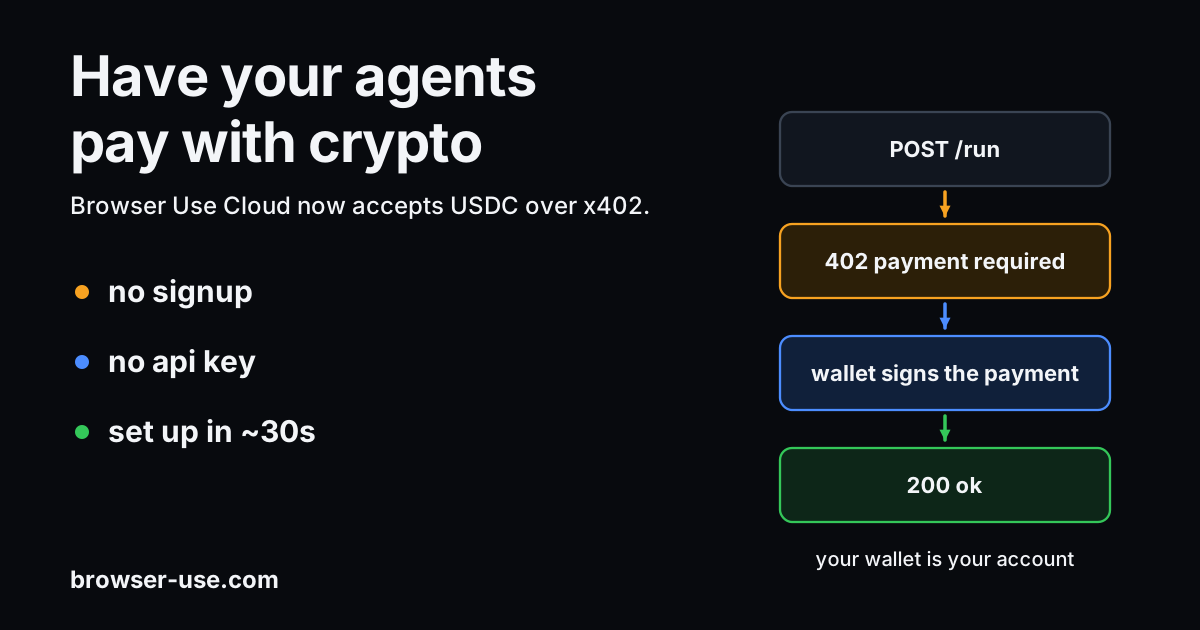
Browser Use Cloud が、Coinbase 発のプロトコル「x402」をサポートしました。この仕組みでは API キーを提示する代わりに、AI エージェントが各 API リクエストごとに決済を行うことが可能になります。
サインアップやクレジットカード情報の入力、API キーの生成は不要です。暗号資産ウォレットこそがアカウントそのものとなります。
セットアップには約 1 分かかります。ドキュメントを任意のコーディングエージェント(Claude Code、Codex、Cursor など)に貼り付けるだけで、残りの手順を案内してくれます。具体的には USDC ウォレットの作成、SDK のインストール、そして最初の決済です。Claude Code を利用する場合は、セットアップ全体を実行するスキルも用意されています。
USDC は米ドルと 1:1 でペッグされたステーブルコインです。つまり、1 USDC は 1 ドルに相当します。
なぜこれを構築したのか
エージェントには資金が必要です。x402 が登場するまで、あらゆる API は人間によるサインアップ、請求情報の入力、そして API キーのエージェント環境への貼り付けを要求していました。
x402 を使えば、エージェント自身がタスクの支払いやクレジットのチャージを行うことができます。
Coinbase Developer Platform の AI GTM リードであり、x402 の共著者でもある Kevin Leffew は、ブラウザへのアクセスをより大きな転換の一部と捉えています。
「Browser Use により、ブラウザ自動化がオープンでオンデマンドなサービスへと進化し、x402 を通じてあらゆるエージェントが利用可能になります。ウェブが UX ドライブから次第にヘッドレス化していく中で、タスクを完遂するためのツールはさらに必要となります。ブラウザ自動化は、エージェントがウェブをナビゲートして操作を行うための大きな一歩です。」— Kevin Leffew、x402 共著者 & AI GTM リード、Coinbase Developer Platform
実務的には、エージェントは Browser Use を見つけると、自身のウォレットから支払いを行い、アカウント作成やキーのコピーを待たずにブラウザを開くことができます。
仕組み
エージェントがタスクを実行します。支払いが必要な際、エージェントはあなたのウォレットから数ドル分の USDC を引き出し、それを Browser Use のクレジットに変換します。クレジットが尽きれば、さらに少し追加で引き出します。
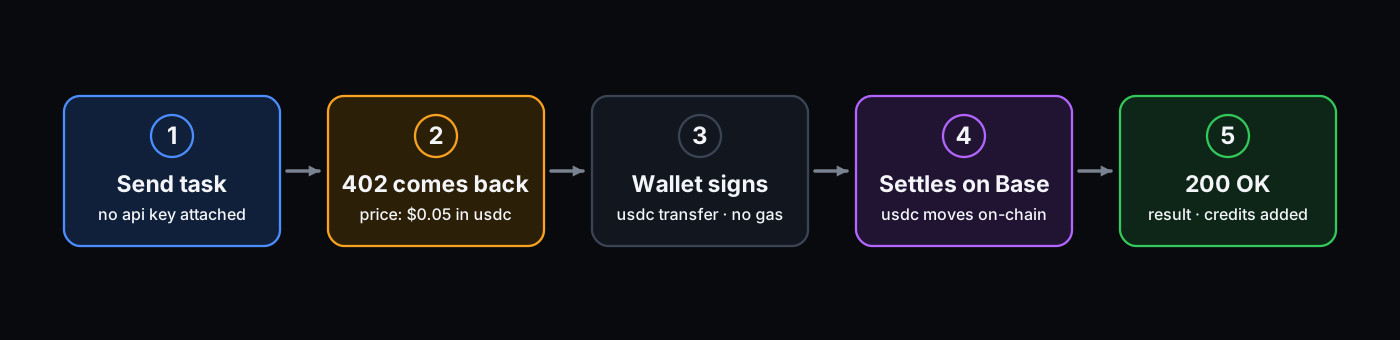
この仕組みはコードから自分で制御することもできますし、コーディングエージェントに任せて一連の設定を自動で行わせることも可能です。
コーディングエージェントでの 30 秒セットアップ
Claude Code を使えば、ウォレットの設定、資金の補充手順、検証までをすべて行ってくれます:
npx skills add https://github.com/browser-use/browser-use --skill x402その後、Claude Code で /x402 を実行します。これによりウォレットが生成(またはインポート)され、Coinbase を介して資金を投入する手順が案内されます。キーは .env ファイルに書き込まれ、SDK がインストールされた上でテスト用のタスクが実行されます。
SDK。Python または TypeScript では 1 行で済みます:
from browser_use_sdk.v3 import AsyncBrowserUse

client = AsyncBrowserUse(x402_private_key="0x...")  # USDC on Base
result = await client.run("Go to example.com and tell me the heading.")import { BrowserUse } from "browser-use-sdk/v3";
const client = new BrowserUse({ x402PrivateKey: "0x..." });
const result = await client.run("Go to example.com and tell me the heading.");エージェント用ウォレット。エージェントに専用のウォレットを持たせましょう。AgentCash は、お使いのマシン上にウォレットを保持し、コーディングエージェントに対して x402 API の発見と支払いを行うためのツールを提供します。Coinbase の Agentic Wallet は、メールでサインインして Apple Pay で資金を投入できるホスト型ウォレットです。CLI または MCP を経由して利用可能です:
# Coinbase Agentic Wallet
npx awal x402 pay https://x402.api.browser-use.com/api/v3/sessions \
  -X POST -d '{"task": "Go to example.com and tell me the page title"}' \
  --max-amount 5000000 --json
2 つの使用方法
ウォレットのみ(デフォルト)。ウォレットの秘密鍵だけを渡します。このウォレットが初めて支払いを行う際、自動的に Browser Use のアカウントが作成され、そのウォレットがアイデンティティとなります。
既存の Browser Use アカウントにチャージする。すでに API キーをお持ちの場合(例:browser-use cloud signup や ダッシュボード を経由して作成されたもの)、その API キーとウォレットのキーの両方を渡してください。これにより、新しいウォレット紐付けアカウントではなく、既存のアカウントにクレジットが追加されます。以下のような場合に便利です:
- クレジットカードよりも暗号資産でチャージしたい場合
- 複数のウォレットから一つの共有アカウントへ資金を送金する場合
client = AsyncBrowserUse(
    api_key="bu_...",          # existing account to top up
    x402_private_key="0x...",  # wallet that pays
    base_url="https://x402.api.browser-use.com/api/v3",
)
エージェントが自ら見つける仕組み
「Bazaar」は、x402 を受け付ける API のリストを公開している Coinbase のプラットフォームです。エージェントはこのリストから、API が何を行うものか、その利用コスト、そして信頼性の度合いといった情報で検索できます。
人間が Browser Use に見つけてキーを手渡す必要はありません。エージェント自身が見つけ出し、自動的に支払いを開始します。
さらに詳しく読む
原文を表示
Browser Use Cloud now supports x402, a protocol from Coinbase where, instead of presenting an API key, your AI agent can pay for each API request.
You don't need to sign up, provide a credit card, or generate an API key. Your crypto wallet is your account.
Setup takes about a minute. Paste our docs into any coding agent — Claude Code, Codex, Cursor — and it walks you through the rest: setting up a USDC wallet, installing the SDK, and making the first payment. For Claude Code, we have a skill that runs the entire setup.
USDC is a stablecoin pegged 1:1 to the US dollar. One USDC is worth one US dollar.
Why we built this
Agents need money. Until x402, every API expected a human to sign up, enter their billing information, and paste their API key into the agent's environment.
With x402, an agent can pay for its own tasks and top up its credits.
Kevin Leffew, x402 co-author and AI GTM Lead at Coinbase Developer Platform, sees browser access as part of a larger shift:
“Browser Use is turning browser automation into an open, on-demand service that any agent can access with x402. As the web evolves from being UX-driven to increasingly headless, agents need more tools to complete tasks. Browser automation is a big step for them to be able to navigate and interact with the web to do that.”
— Kevin Leffew, x402 co-author & AI GTM Lead, Coinbase Developer Platform
In practice, an agent can find Browser Use, pay from its own wallet, and open a browser without waiting for someone to create an account or copy a key.
How it works
Your agent runs a task. When it needs to pay, it pulls a few dollars of USDC from your wallet and turns them into Browser Use credits. When those credits run out, it pulls a bit more.
You can control this yourself from code, or hand it to a coding agent and let it set the whole thing up for you.
Set up in your coding agent within 30 seconds
Claude Code. Claude does the wallet setup, funding walkthrough, and verification for you:
npx skills add https://github.com/browser-use/browser-use --skill x402Then, /x402 in Claude Code. It generates (or imports) a wallet, walks you through funding it via Coinbase, writes the key to your .env, installs the SDK, and runs a task to test it.
SDK. One line in Python or TypeScript:
from browser_use_sdk.v3 import AsyncBrowserUse

client = AsyncBrowserUse(x402_private_key="0x...")  # USDC on Base
result = await client.run("Go to example.com and tell me the heading.")import { BrowserUse } from "browser-use-sdk/v3";
const client = new BrowserUse({ x402PrivateKey: "0x..." });
const result = await client.run("Go to example.com and tell me the heading.");Agent wallets. Give your agent its own wallet. AgentCash keeps a wallet on your machine and gives coding agents tools to discover and pay x402 APIs. Coinbase's Agentic Wallet is a hosted wallet you sign into with your email and fund with Apple Pay you can then use via CLI or MCP:
# Coinbase Agentic Wallet
npx awal x402 pay https://x402.api.browser-use.com/api/v3/sessions \
  -X POST -d '{"task": "Go to example.com and tell me the page title"}' \
  --max-amount 5000000 --json
Two ways to use it
Wallet only (the default). Pass just your wallet's private key. The first time your wallet pays, we automatically create a Browser Use account for it, and the wallet becomes your identity.
Top up an existing Browser Use account. If you already have an API key (for example, one created via browser-use cloud signup or the dashboard), pass both that API key and your wallet's key. This will add the credit to your existing account instead of making a new, wallet-keyed one. Useful when:
- You'd rather add credit with crypto than a credit card
- Several wallets are paying into one shared account
client = AsyncBrowserUse(
    api_key="bu_...",          # existing account to top up
    x402_private_key="0x...",  # wallet that pays
    base_url="https://x402.api.browser-use.com/api/v3",
)
How agents find us on their own
The Bazaar is Coinbase's public list of APIs that accept x402. Agents can search it by what an API does, what it costs, and how well it's trusted.
A human doesn't have to find Browser Use and hand the agent a key. The agent can find us on its own and start paying.
Read more
- x402 guide & SDK docs
- Agent wallets guide
- x402 Claude Code skill
- x402 protocol spec
関連記事
今日のまとめ
AIデイリーブリーフで今日の重要ニュースをまとめ読み