開発環境でのみFastAPIの認証(HTTPBearer)をバイパスする方法
本文の状態
日本語全文を表示中
詳細モードで約7分の本文を読めます。
同じ出来事の情報源
この情報源を基点に整理
Spiral.AI Tech Blog
FastAPI開発時に、ローカル環境で認証トークンなしでAPIテストを可能にする方法を提案。開発効率向上のため、セキュリティを損なわずに開発環境限定で認証をバイパスする実装を紹介。
Source Article
元記事を日本語で読む
本文に関係しない購読案内、埋め込み通知、サイト内プロモーションは除いています。
FastAPIの認証(HTTPBearer)を開発環境でのみバイパスする
 Python
  JWT
JWT  FastAPI
  backend
  techこんにちは、わいけい です。 突然ですが、私は日々FastAPIを使った開発をしているのですが認証周りで時々面倒を感じることがあります。 それは、せっかくFastAPIがOpenAPI形式の動的ドキュメント(Swagger UI)を自動生成してくれているのにも関わらず、ログインが必要なエンドポイントに関しては毎度認証トークンを取得しないと叩くことが出来ないということです。
セキュリティ上「まあ、それはそうだよね」という話ではあります。 が、ローカルでコンテナ立てて開発しているときには地味に面倒なのもまた事実です。
長期的に開発を続ける想定であれば、開発チーム全体で何千回もローカル環境でのログイン&トークン取得を行うことになることが予想されます。 これは開発効率の観点からあまり好ましくなさそうだと私は思いました。
そこで今回は開発環境でのみ良い感じに認証をスキップする実装を行ってみました。
具体的には以下を実現するのを目標とします。
本番環境ではリクエストのヘッダーに付与されたjwtトークンを真面目に検証し、通常の認証機能を実現する。同時に、アクセスしているユーザーのidもこの時取得するものとする。
開発環境(主にローカルを想定)ではリクエストにトークンが乗っていなくてもそれぞれの開発者が指定したユーザーIDで自動的に認証が通るようにする。
これらの設定はいつでも切り替えられるようにする
大前提として、アプリケーションで使用されているuser_id
(認証の仕方も色々あると思いますが、ここではjwtトークンによる認証方法を想定しました。 なのでAWS Cognitoとかで認証を行っている場合でも今回の方法が応用できると思います。)
まず普通にFastAPIを起動してみる
まず、普通にDocker環境下でローカルにてFastAPIアプリケーションを起動してみます。 以下のファイル群を準備してください。
FROM python:3.10-slim WORKDIR /app COPY requirements.txt ./ RUN pip install --no-cache-dir -r requirements.txt COPY . . CMD ["uvicorn", "main:app", "--host", "0.0.0.0", "--port", "8000"]
fastapi==0.105.0 uvicorn==0.23.1 python-jose==3.3.0
version: '3.8' services: web: build: . ports: - "8000:8000" volumes: - .:/app command: uvicorn main:app --reload --host 0.0.0.0 --port 8000
from fastapi import FastAPI, Depends, HTTPException, Security from fastapi.security import HTTPBearer, HTTPAuthorizationCredentials from jose import jwt, JWTError # JWTトークンの秘密鍵とアルゴリズム SECRET_KEY = "your_secret_key" ALGORITHM = "HS256" app = FastAPI() security = HTTPBearer() def get_current_user(token: HTTPAuthorizationCredentials = Security(security)): try: payload = jwt.decode(token.credentials, SECRET_KEY, algorithms=[ALGORITHM]) user_id = payload.get("user_id") if user_id is None: raise HTTPException(status_code=403, detail="Invalid authentication credentials") return user_id except JWTError: raise HTTPException(status_code=403, detail="Invalid token or expired token") @app.get("/protected") def read_protected(user_id: str = Depends(get_current_user)): return {"user_id": user_id} @app.get("/open") def read_open(): return {"response":"Hello!"}
この状態でdocker compose up
localhost:8000/docs

実際にそのまま叩いてみるとステータスコード403で
{ "detail": "Not authenticated" }
というレスポンスが来ると思います。 (一方/open
eyJhbGciOiJIUzI1NiIsInR5cCI6IkpXVCJ9.eyJ1c2VyX2lkIjoiZXhhbXBsZV91c2VyX2lkIn0.ciWMfJIkODOHxqyAe3rmEFxphZfjVgbnDhR7bop05Lg
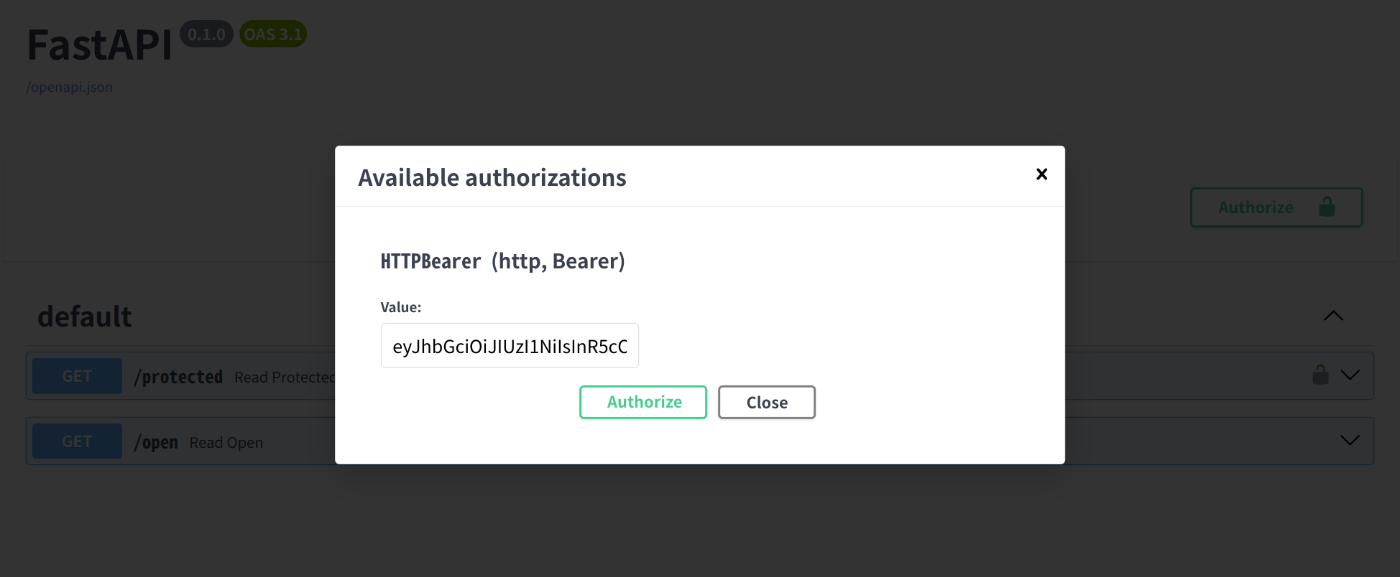
(これは下記コードにて私が作成した仮のトークンです。サンプルなので有効期限などが設定されていないことに注意してください。)
from jose import jwt SECRET_KEY = "your_secret_key" ALGORITHM = "HS256" user_id = "example_user_id" token = jwt.encode({"user_id": user_id}, SECRET_KEY, algorithm=ALGORITHM) print(token)
実際に上記トークンがヘッダーに乗った状態だと、問題なく/protected
このようなFastAPIの認証サポート機能は非常に便利かつ、これ自体かなり開発者フレンドリーでもあります。 が、冒頭でも述べたとおり、私にはローカル開発時に毎回トークン入力するのは面倒に感じられました(かなりの面倒くさがりなのです)。
ローカル開発環境での認証スキップ方法
そこで、ローカル開発時は任意で認証をスキップしつつ、好きなuser_idでログインしたように見せかけるようにして行きたいと思います。
AUTH_SKIP=true AUTH_SKIP_USER_ID=my-user-id
あわせてdocker-compose.yml
version: '3.8' services: web: build: . ports: - "8000:8000" volumes: - .:/app command: uvicorn main:app --reload --host 0.0.0.0 --port 8000 environment: - AUTH_SKIP=${AUTH_SKIP} - AUTH_SKIP_USER_ID=${AUTH_SKIP_USER_ID}
この状態でサーバーを起動すると、.env
from fastapi import FastAPI, Depends, HTTPException, Security, status from fastapi.security import HTTPBearer, HTTPAuthorizationCredentials from jose import jwt, JWTError import os # 環境設定 SECRET_KEY = "your_secret_key" ALGORITHM = "HS256" app = FastAPI() security = HTTPBearer() def get_current_user(token: HTTPAuthorizationCredentials = Security(security)) -> str: # 開発モードでは認証をスキップし、いつでも環境変数で指定したuser_idを使う AUTH_SKIP = os.getenv("AUTH_SKIP", "false") == "true" #pythonではbool("false")がTrueとなることなどに注意する if AUTH_SKIP: user_id = os.getenv("AUTH_SKIP_USER_ID") if user_id is None: raise HTTPException( status_code=status.HTTP_403_FORBIDDEN, detail="Please set AUTH_SKIP_USER_ID in .env file.", ) return user_id try: payload = jwt.decode(token.credentials, SECRET_KEY, algorithms=[ALGORITHM]) user_id: str = payload.get("user_id") if user_id is None: raise HTTPException( status_code=status.HTTP_403_FORBIDDEN, detail="Invalid authentication credentials", ) return user_id except JWTError: raise HTTPException( status_code=status.HTTP_403_FORBIDDEN, detail="Invalid token or expired token", ) @app.get("/protected") def read_protected(user_id: str = Depends(get_current_user)): return {"user_id": user_id} @app.get("/open") def read_open(): return {"response": "Hello!"}
上記では、get_current_user
docker compose up --build
localhost:8000/docs
無事認証を通過……できませんね。
{ "detail": "Not authenticated" }
FastAPIのHTTPBearerの設定を変更
改めてFastAPIのソースコードを読んでみます。 すると、この原因は独自に作成したSkip処理に入る前にFastAPI側でエラーになっていることだと分かります。 具体的にはHTTPBearer
これでも正規のトークンを毎回入れるよりは大分ラクなのですが、とはいえ毎回適当な文字列を入れるのも面倒かつ不自然です。
更にFastAPIのコードを読むと、HTTPBearer
auto_error: Annotated[ bool, Doc( """ By default, if the HTTP Bearer token not provided (in an Authorization header), HTTPBearer will automatically cancel the request and send the client an error. If auto_error is set to False, when the HTTP Bearer token is not available, instead of erroring out, the dependency result will be None. This is useful when you want to have optional authentication. It is also useful when you want to have authentication that can be provided in one of multiple optional ways (for example, in an HTTP Bearer token or in a cookie). """ ), ] = True,
ということで開発環境では、これがFalse
from fastapi import FastAPI, Depends, HTTPException, Security, status from fastapi.security import HTTPBearer, HTTPAuthorizationCredentials from jose import jwt, JWTError import os # 環境設定 SECRET_KEY = "your_secret_key" ALGORITHM = "HS256" app = FastAPI() AUTH_SKIP = os.getenv("AUTH_SKIP", "false") == "true" security = HTTPBearer(auto_error=not AUTH_SKIP) def get_current_user(token: HTTPAuthorizationCredentials = Security(security)) -> str: # 開発モードでは認証をスキップし、いつでも環境変数で指定したuser_idを使う if AUTH_SKIP: user_id = os.getenv("AUTH_SKIP_USER_ID") if user_id is None: raise HTTPException( status_code=status.HTTP_403_FORBIDDEN, detail="Please set AUTH_SKIP_USER_ID in .env file.", ) return user_id try: payload = jwt.decode(token.credentials, SECRET_KEY, algorithms=[ALGORITHM]) user_id: str = payload.get("user_id") if user_id is None: raise HTTPException( status_code=status.HTTP_403_FORBIDDEN, detail="Invalid authentication credentials", ) return user_id except JWTError: raise HTTPException( status_code=status.HTTP_403_FORBIDDEN, detail="Invalid token or expired token", ) @app.get("/protected") def read_protected(user_id: str = Depends(get_current_user)): return {"user_id": user_id} @app.get("/open") def read_open(): return {"response": "Hello!"}
これでAuthorizationヘッダーがnullでも認証を通せるようになりました!お疲れ様でした。
言うまでもなく、本番環境で認証が外れていると大変なことになります。 なので、本番では設定ミスで認証が外れないようにくれぐれも気をつけてください。
また、開発環境でも状況によっては普通にログイン&認証したい場合も多々あると思います。
 SpiralAIテックブログPublication実在する芸能人との会話ができる日本初のAIサービス「NaomiAI」やカスタムChatGPTを作れる「Spiralbot」を提供するSpiralAI株式会社のテックブログです。

原文を表示
Python JWT FastAPI backend techこんにちは、わいけい です。 突然ですが、私は日々FastAPIを使った開発をしているのですが認証周りで時々面倒を感じることがあります。 それは、せっかくFastAPIがOpenAPI形式の動的ドキュメント(Swagger UI)を自動生成してくれているのにも関わらず、ログインが必要なエンドポイントに関しては毎度認証トークンを取得しないと叩くことが出来ないということです。
セキュリティ上「まあ、それはそうだよね」という話ではあります。 が、ローカルでコンテナ立てて開発しているときには地味に面倒なのもまた事実です。
長期的に開発を続ける想定であれば、開発チーム全体で何千回もローカル環境でのログイン&トークン取得を行うことになることが予想されます。 これは開発効率の観点からあまり好ましくなさそうだと私は思いました。
そこで今回は開発環境でのみ良い感じに認証をスキップする実装を行ってみました。
具体的には以下を実現するのを目標とします。
本番環境ではリクエストのヘッダーに付与されたjwtトークンを真面目に検証し、通常の認証機能を実現する。同時に、アクセスしているユーザーのidもこの時取得するものとする。
開発環境(主にローカルを想定)ではリクエストにトークンが乗っていなくてもそれぞれの開発者が指定したユーザーIDで自動的に認証が通るようにする。
これらの設定はいつでも切り替えられるようにする
大前提として、アプリケーションで使用されているuser_id
(認証の仕方も色々あると思いますが、ここではjwtトークンによる認証方法を想定しました。 なのでAWS Cognitoとかで認証を行っている場合でも今回の方法が応用できると思います。)
まず普通にFastAPIを起動してみる
まず、普通にDocker環境下でローカルにてFastAPIアプリケーションを起動してみます。 以下のファイル群を準備してください。
FROM python:3.10-slim WORKDIR /app COPY requirements.txt ./ RUN pip install --no-cache-dir -r requirements.txt COPY . . CMD ["uvicorn", "main:app", "--host", "0.0.0.0", "--port", "8000"]
fastapi==0.105.0 uvicorn==0.23.1 python-jose==3.3.0
version: '3.8' services: web: build: . ports: - "8000:8000" volumes: - .:/app command: uvicorn main:app --reload --host 0.0.0.0 --port 8000
from fastapi import FastAPI, Depends, HTTPException, Security from fastapi.security import HTTPBearer, HTTPAuthorizationCredentials from jose import jwt, JWTError # JWTトークンの秘密鍵とアルゴリズム SECRET_KEY = "your_secret_key" ALGORITHM = "HS256" app = FastAPI() security = HTTPBearer() def get_current_user(token: HTTPAuthorizationCredentials = Security(security)): try: payload = jwt.decode(token.credentials, SECRET_KEY, algorithms=[ALGORITHM]) user_id = payload.get("user_id") if user_id is None: raise HTTPException(status_code=403, detail="Invalid authentication credentials") return user_id except JWTError: raise HTTPException(status_code=403, detail="Invalid token or expired token") @app.get("/protected") def read_protected(user_id: str = Depends(get_current_user)): return {"user_id": user_id} @app.get("/open") def read_open(): return {"response":"Hello!"}
この状態でdocker compose up
localhost:8000/docs
実際にそのまま叩いてみるとステータスコード403で
{ "detail": "Not authenticated" }
というレスポンスが来ると思います。 (一方/open
eyJhbGciOiJIUzI1NiIsInR5cCI6IkpXVCJ9.eyJ1c2VyX2lkIjoiZXhhbXBsZV91c2VyX2lkIn0.ciWMfJIkODOHxqyAe3rmEFxphZfjVgbnDhR7bop05Lg
(これは下記コードにて私が作成した仮のトークンです。サンプルなので有効期限などが設定されていないことに注意してください。)
from jose import jwt SECRET_KEY = "your_secret_key" ALGORITHM = "HS256" user_id = "example_user_id" token = jwt.encode({"user_id": user_id}, SECRET_KEY, algorithm=ALGORITHM) print(token)
実際に上記トークンがヘッダーに乗った状態だと、問題なく/protected
このようなFastAPIの認証サポート機能は非常に便利かつ、これ自体かなり開発者フレンドリーでもあります。 が、冒頭でも述べたとおり、私にはローカル開発時に毎回トークン入力するのは面倒に感じられました(かなりの面倒くさがりなのです)。
ローカル開発環境での認証スキップ方法
そこで、ローカル開発時は任意で認証をスキップしつつ、好きなuser_idでログインしたように見せかけるようにして行きたいと思います。
AUTH_SKIP=true AUTH_SKIP_USER_ID=my-user-id
あわせてdocker-compose.yml
version: '3.8' services: web: build: . ports: - "8000:8000" volumes: - .:/app command: uvicorn main:app --reload --host 0.0.0.0 --port 8000 environment: - AUTH_SKIP=${AUTH_SKIP} - AUTH_SKIP_USER_ID=${AUTH_SKIP_USER_ID}
この状態でサーバーを起動すると、.env
from fastapi import FastAPI, Depends, HTTPException, Security, status from fastapi.security import HTTPBearer, HTTPAuthorizationCredentials from jose import jwt, JWTError import os # 環境設定 SECRET_KEY = "your_secret_key" ALGORITHM = "HS256" app = FastAPI() security = HTTPBearer() def get_current_user(token: HTTPAuthorizationCredentials = Security(security)) -> str: # 開発モードでは認証をスキップし、いつでも環境変数で指定したuser_idを使う AUTH_SKIP = os.getenv("AUTH_SKIP", "false") == "true" #pythonではbool("false")がTrueとなることなどに注意する if AUTH_SKIP: user_id = os.getenv("AUTH_SKIP_USER_ID") if user_id is None: raise HTTPException( status_code=status.HTTP_403_FORBIDDEN, detail="Please set AUTH_SKIP_USER_ID in .env file.", ) return user_id try: payload = jwt.decode(token.credentials, SECRET_KEY, algorithms=[ALGORITHM]) user_id: str = payload.get("user_id") if user_id is None: raise HTTPException( status_code=status.HTTP_403_FORBIDDEN, detail="Invalid authentication credentials", ) return user_id except JWTError: raise HTTPException( status_code=status.HTTP_403_FORBIDDEN, detail="Invalid token or expired token", ) @app.get("/protected") def read_protected(user_id: str = Depends(get_current_user)): return {"user_id": user_id} @app.get("/open") def read_open(): return {"response": "Hello!"}
上記では、get_current_user
docker compose up --build
localhost:8000/docs
無事認証を通過……できませんね。
{ "detail": "Not authenticated" }
FastAPIのHTTPBearerの設定を変更
改めてFastAPIのソースコードを読んでみます。 すると、この原因は独自に作成したSkip処理に入る前にFastAPI側でエラーになっていることだと分かります。 具体的にはHTTPBearer
これでも正規のトークンを毎回入れるよりは大分ラクなのですが、とはいえ毎回適当な文字列を入れるのも面倒かつ不自然です。
更にFastAPIのコードを読むと、HTTPBearer
auto_error: Annotated[ bool, Doc( """ By default, if the HTTP Bearer token not provided (in an Authorization header), HTTPBearer will automatically cancel the request and send the client an error. If auto_error is set to False, when the HTTP Bearer token is not available, instead of erroring out, the dependency result will be None. This is useful when you want to have optional authentication. It is also useful when you want to have authentication that can be provided in one of multiple optional ways (for example, in an HTTP Bearer token or in a cookie). """ ), ] = True,
ということで開発環境では、これがFalse
from fastapi import FastAPI, Depends, HTTPException, Security, status from fastapi.security import HTTPBearer, HTTPAuthorizationCredentials from jose import jwt, JWTError import os # 環境設定 SECRET_KEY = "your_secret_key" ALGORITHM = "HS256" app = FastAPI() AUTH_SKIP = os.getenv("AUTH_SKIP", "false") == "true" security = HTTPBearer(auto_error=not AUTH_SKIP) def get_current_user(token: HTTPAuthorizationCredentials = Security(security)) -> str: # 開発モードでは認証をスキップし、いつでも環境変数で指定したuser_idを使う if AUTH_SKIP: user_id = os.getenv("AUTH_SKIP_USER_ID") if user_id is None: raise HTTPException( status_code=status.HTTP_403_FORBIDDEN, detail="Please set AUTH_SKIP_USER_ID in .env file.", ) return user_id try: payload = jwt.decode(token.credentials, SECRET_KEY, algorithms=[ALGORITHM]) user_id: str = payload.get("user_id") if user_id is None: raise HTTPException( status_code=status.HTTP_403_FORBIDDEN, detail="Invalid authentication credentials", ) return user_id except JWTError: raise HTTPException( status_code=status.HTTP_403_FORBIDDEN, detail="Invalid token or expired token", ) @app.get("/protected") def read_protected(user_id: str = Depends(get_current_user)): return {"user_id": user_id} @app.get("/open") def read_open(): return {"response": "Hello!"}
これでAuthorizationヘッダーがnullでも認証を通せるようになりました!お疲れ様でした。
言うまでもなく、本番環境で認証が外れていると大変なことになります。 なので、本番では設定ミスで認証が外れないようにくれぐれも気をつけてください。
また、開発環境でも状況によっては普通にログイン&認証したい場合も多々あると思います。
SpiralAIテックブログPublication実在する芸能人との会話ができる日本初のAIサービス「NaomiAI」やカスタムChatGPTを作れる「Spiralbot」を提供するSpiralAI株式会社のテックブログです。
今日のまとめ
AIデイリーブリーフで今日の重要ニュースをまとめ読み