SageMaker JumpStartにおけるユースケースベースのデプロイ
AWSは、SageMaker JumpStartにおいて、コンテンツ生成や要約など特定のユースケース向けに事前定義された構成でモデルデプロイを最適化する「optimized deployments」機能を発表した。
キーポイント
ユースケース特化型デプロイの提供
従来の汎用的な同時ユーザー数設定に加え、コンテンツ生成、要約、Q&Aなど特定のタスク向けに事前最適化されたデプロイ構成を提供する。
パフォーマンス指標の多様化への対応
レイテンシーだけでなく、スループットやトークンあたりの最低コストなど、顧客が定義する多様なパフォーマンス指標に合わせてデプロイを最適化する。
迅速な導入プロセスの維持
事前定義された構成を選択するだけで、モデル選択からデプロイまでのプロセスを迅速化し、詳細なデプロイ情報の可視性も維持する。
利用開始の前提条件
AWSアカウント、SageMaker Studioドメイン、およびモデルとエンドポイント作成に必要なIAMロールが最低限の前提条件となる。
重要な引用
SageMaker JumpStart improved deployments address the need for rich and straightforward deployment customization on SageMaker JumpStart by offering pre-defined deployment configurations, designed for specific use cases.
Each use case might require specific configurations to improve performance. Moreover, the definition of performance isn’t constrained to just latency, and some customers might measure performance in throughput or lowest cost per token.
Customers maintain the same level of visibility into the details of their proposed deployments, but now deployments are optimized for their specific use case and performance constraint.
影響分析・編集コメントを表示
影響分析
この発表は、AIモデルの実運用における障壁の一つである「デプロイの複雑さと最適化」に正面から取り組むもので、AWSのMLプラットフォームの実用性と競争力を高める。特定タスク向けの事前最適化により、より多くの企業が実用的なAIワークロードを迅速に立ち上げられる環境を整備し、クラウドMLサービスの利用促進につながる可能性がある。
編集コメント
AWSのMLプラットフォーム戦略の一環として、導入の敷居を下げつつ、高度な最適化ニーズにも応えるバランスの取れたアップデート。営業色はあるが、実務上の課題(ユースケース特化型構成)に応える具体性は評価できる。
Amazon SageMaker JumpStart は、幅広い問題タイプに対する事前学習済みモデルを提供し、AI ワークロードの開始を支援します。SageMaker JumpStart では、SageMaker AI Managed Inference エンドポイントや SageMaker HyperPod クラスタにデプロイ可能な、主要なユースケースに対するソリューションへのアクセスが可能です。事前設定されたデプロイオプションを通じて、顧客はモデルの選択からデプロイまでを迅速に進めることができます。
SageMaker JumpStart によるモデルのデプロイは高速かつ簡素です。顧客は、期待される同時実行数に基づいてオプションを選択でき、P50 レイテンシ、初回トークン生成時間(TTFT: Time-to-First Token)、スループット(トークン/秒/ユーザー)に関する可視性も得られます。同時実行数の設定オプションは汎用的なシナリオには有用ですが、タスクを認識するものではなく、コンテンツ生成、要約、または Q&A(質問応答)といった多様で特定のユースケースに SageMaker JumpStart が使用されていることを私たちは認識しています。各ユースケースには、パフォーマンスを向上させるための特定の構成が必要となる場合があります。さらに、「パフォーマンス」の定義はレイテンシに限定されず、一部の顧客はスループットやトークンあたりの最低コストによってパフォーマンスを測定することもあります。
この基盤を踏まえて、SageMaker JumpStartの最適化されたデプロイメントのリリースを発表できることを嬉しく思います。SageMaker JumpStartによる改善されたデプロイメントは、特定のユースケース(use case)を対象とした事前定義済みのデプロイメント構成を提供することで、SageMaker JumpStart上でのリッチかつシンプルなデプロイメントのカスタマイズニーズに対応します。顧客は提案されたデプロイメントの詳細に関する可視性を同じレベルで維持しますが、今やそのデプロイメントは特定のユースケースとパフォーマンスの制約に対して最適化されています。
前提条件
SageMaker JumpStartの最適化されたデプロイメントの使用を開始するには、顧客は最低限以下の要件を満たす必要があります:
- AWSアカウント
- SageMaker Studioドメイン
- モデルとエンドポイントを作成するために使用できるAWS Identity and Access Management (IAM)ロール
これらの機能が整った後、顧客はすぐにSageMaker JumpStartの最適化されたデプロイメントの使用を開始できます。
始め方
SageMaker JumpStartの最適化されたデプロイメントの使用を開始するには、SageMaker Studioを開き、「Models」を選択します。最適化されたデプロイメントをサポートするモデルのいずれか(以下のセクションに記載)を選択し、右上隅にある「Deploy」を選択します。表示される画面には、「Performance」というラベルの付いた折りたたみ可能なウィンドウが表示され、そこには最適化されたデプロイメントの選択オプションが含まれています。
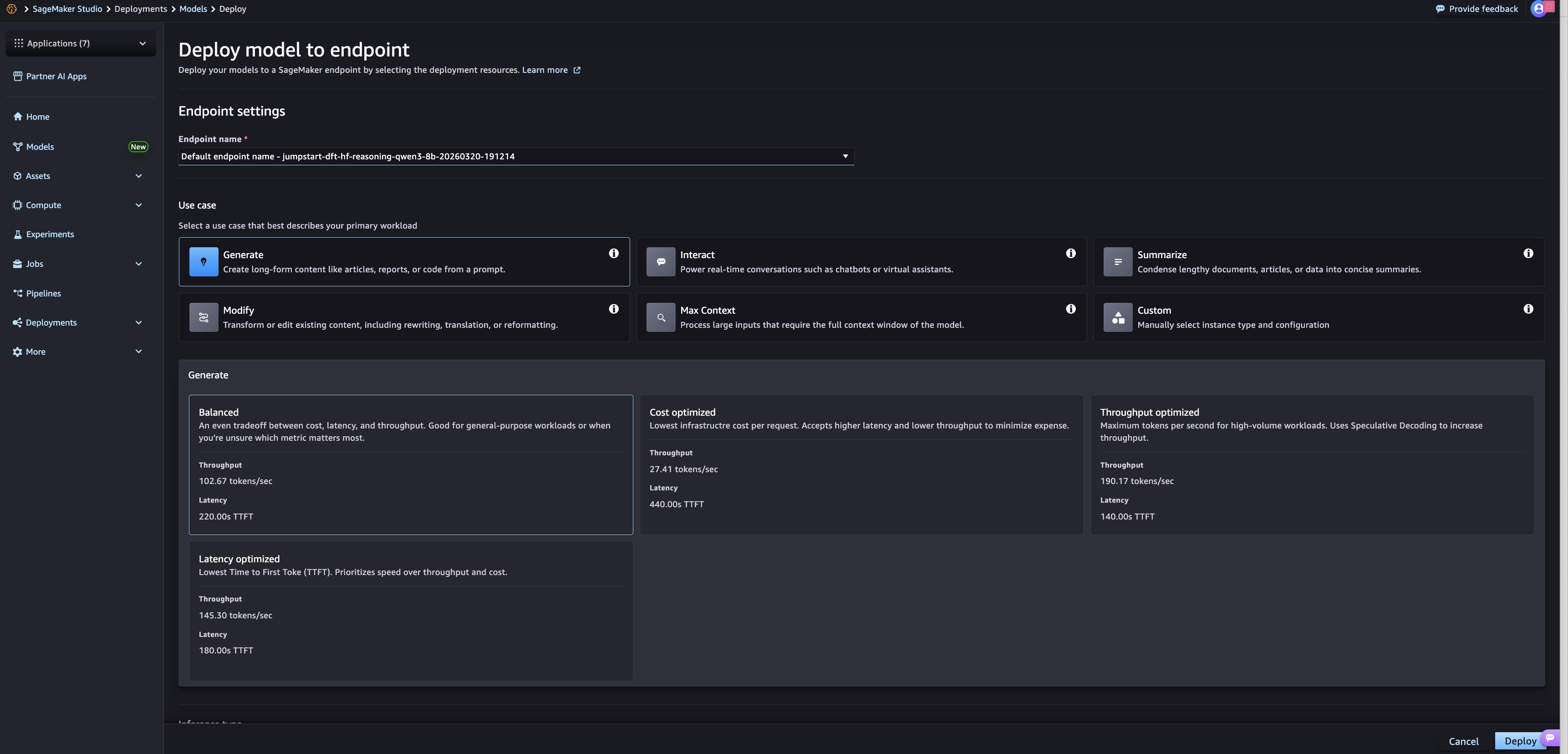
表示されるオプションを使用するには、まずユースケースを選択する必要があります。テキストベースのモデルの場合、これらのユースケースは生成型ライティングからチャット形式のインタラクションまで多岐にわたります。画像や動画については、それらの入力タイプに対するサポートが追加された後、異なるユースケースが表示されます。ユースケースを選択した後、顧客は3つの制約最適化オプションのいずれかを選択する必要があります。*Cost optimized*(コスト最適化)、*Throughput optimized*(スループット最適化)、および *Latency optimized*(レイテンシ最適化)です。また、すべてのログ記録済みメトリクスにわたる平均パフォーマンスのバランスを取ることを求める顧客向けに、*Balanced*(バランス)オプションも用意されています。
選択後、エンドポイントに対して事前設定されたデプロイメント構成が定義されます。顧客は、タイムアウト、エンドポイント名付け、セキュリティ設定などの追加構成値をさらに確認し選択することができます。構成が完了すると、顧客は右下隅にある Deploy(デプロイ)オプションを選択します。
利用可能なモデル
SageMaker JumpStart で最適化されたデプロイメントは、以下のモデルに対して利用可能です:
- Meta
Llama-3.1-8B-Instruct
- Llama-2-7b-hf
- Llama-3.2-3B
- Meta-Llama-3-8B
- Llama-3.2-1B-Instruct
- Llama-3.2-1B
- Llama-3.1-70B-Instruct
- Llama-3.2-3B-Instruct
- Meta-Llama-3-8B
- Microsoft
Phi-3-mini-4k-instruct
- Mistral AI
Mistral-7B-Instruct-v0.2
- Mistral-Small-24B-Instruct-2501
- Mistral-7B-v0.1
- Mistral-7B-Instruct-v0.3
- Mixtral-8x7B-Instruct-v0.1
- Qwen
Qwen3-8B
- Qwen3-32B
- Qwen3-0.6B
- Qwen2.5-7B-Instruct
- Qwen2.5-72B-Instruct
- Qwen2-VL-7B-Instruct
- Qwen2-1.5B-Instruct
- Qwen2-7B
gemma-7b
- gemma-7b-it
- gemma-2b
- Tiiuae
Falcon3-1B-Instruct
これらは最適化されたデプロイメントのためのローンチモデルであり、さらに多くのモデルのサポートを積極的に拡張しています。
呼びかけ(Call to action)
顧客は、SageMaker JumpStartの最適化されたデプロイメントをすぐに利用開始できます。SageMaker Studioのモデルハブから、利用可能な最適化されたデプロイメントモデルのいずれかを選択してください。アプリケーションに最適な構成を決定するために、さまざまなデプロイメントオプションを実験してみてください。
著者について
 image
image
Dan Ferguson
Dan Ferguson は、米国ニューヨークを拠点とする AWS のソリューションアーキテクトです。機械学習サービス分野の専門家として、Dan は顧客が ML ワークフローを効率的かつ効果的に、そして持続可能に統合する旅をサポートしています。

Malav Shastri
Malav Shastri は、AWS のソフトウェア開発エンジニアであり、Amazon SageMaker JumpStart チームおよび Amazon Bedrock チームで業務に従事しています。彼の役割は、最先端のオープンソースおよび独自開発のファウンデーションモデル(Foundation Models)や従来の機械学習アルゴリズムを活用できるよう顧客を支援することに重点が置かれています。Malav はコンピュータサイエンスの修士号を取得しています。

Pooja Karadgi
Pooja Karadgi は、SageMaker 内の機械学習および生成 AI ハブである Amazon SageMaker JumpStart の製品および戦略的パートナーシップをリードしています。彼女は、ファウンデーションモデルの発見と展開を簡素化することで顧客の AI 採用を加速することに尽力しており、オンボーディングやカスタマイズから展開に至るまでのモデルライフサイクル全体を通じて、顧客が生産環境対応の生成 AI アプリケーションを構築できるよう支援しています。
原文を表示
Amazon SageMaker JumpStart provides pretrained models for a wide range of problem types to help you get started with AI workloads. SageMaker JumpStart offers access to solutions for top use cases that can be deployed to SageMaker AI Managed Inference endpoints or SageMaker HyperPod clusters. Through pre-set deployment options, customers can quickly move from model selection to model deployment.
Model deployments through SageMaker JumpStart are fast and straightforward. Customers could select options based on expected concurrent users, with visibility into P50 latency, time-to-first token (TTFT), and throughput (token/second/user). While concurrent user configuration options are helpful for general-purpose scenarios, they aren’t task-aware, and we recognize that customers use SageMaker JumpStart for diverse, specific use cases like content generation, content summarization, or Q&A. Each use case might require specific configurations to improve performance. Moreover, the definition of *performance* isn’t constrained to just latency, and some customers might measure performance in throughput or lowest cost per token.
Building on this foundation, we’re excited to announce the launch of SageMaker JumpStart optimized deployments. SageMaker JumpStart improved deployments address the need for rich and straightforward deployment customization on SageMaker JumpStart by offering pre-defined deployment configurations, designed for specific use cases. Customers maintain the same level of visibility into the details of their proposed deployments, but now deployments are optimized for their specific use case and performance constraint.
Prerequisites
To begin using SageMaker JumpStart optimized deployments, customers require at minimum the following:
- An AWS account
- A SageMaker Studio domain
- An AWS Identify and Access Management (IAM) role that you can use to create a model and an endpoint
After these features are in place, customers can begin using SageMaker JumpStart optimized deployments right away.
Getting started
To get started using SageMaker JumpStart optimized deployments, open SageMaker Studio and choose Models. Select any of the models that support optimized deployments (listed in the following section) and choose Deploy in the top-right corner. The resulting screen now features a collapsible window labeled “Performance”, which features the selection options for optimized deployments.
The displayed options require users to first select a use case. For text-based models, these use cases can range from generative writing to chat-style interactions; image and video will feature different use cases after support is added for those input types. After selecting a use case, customers must select one of three constraint optimizations: *Cost optimized*, *Throughput optimized*, and *Latency optimized*. There is also a *Balanced* option for customers looking for the best average performance across all logged metrics.
After selected, a pre-set deployment configuration is defined for the endpoint. Customers can further review and select additional configuration values like timeouts, endpoint naming, and security settings. After configuration is complete, customers choose the Deploy option in the bottom-right corner.
Available models
SageMaker JumpStart optimized deployments are available for the following models:
- Meta
Llama-3.1-8B-Instruct
- Llama-2-7b-hf
- Llama-3.2-3B
- Meta-Llama-3-8B
- Llama-3.2-1B-Instruct
- Llama-3.2-1B
- Llama-3.1-70B-Instruct
- Llama-3.2-3B-Instruct
- Meta-Llama-3-8B
- Microsoft
Phi-3-mini-4k-instruct
- Mistral AI
Mistral-7B-Instruct-v0.2
- Mistral-Small-24B-Instruct-2501
- Mistral-7B-v0.1
- Mistral-7B-Instruct-v0.3
- Mixtral-8x7B-Instruct-v0.1
- Qwen
Qwen3-8B
- Qwen3-32B
- Qwen3-0.6B
- Qwen2.5-7B-Instruct
- Qwen2.5-72B-Instruct
- Qwen2-VL-7B-Instruct
- Qwen2-1.5B-Instruct
- Qwen2-7B
gemma-7b
- gemma-7b-it
- gemma-2b
- Tiiuae
Falcon3-1B-Instruct
These are the launch models for optimized deployments, and we’re actively expanding support to include additional models.
Call to action
Customers can start working with SageMaker JumpStart optimized deployments immediately. Select one of the available optimized deployment models in the SageMaker Studio model hub. Experiment with the different deployment options to determine the right configuration for your application.
About the authors
Dan Ferguson
Dan Ferguson is a Solutions Architect at AWS, based in New York, USA. As a machine learning services expert, Dan works to support customers on their journey to integrating ML workflows efficiently, effectively, and sustainably.
Malav Shastri
Malav Shastri is a Software Development Engineer at AWS, where he works on the Amazon SageMaker JumpStart and Amazon Bedrock teams. His role focuses on enabling customers to take advantage of state-of-the-art open source and proprietary foundation models and traditional machine learning algorithms. Malav holds a Master’s degree in Computer Science.
Pooja Karadgi
Pooja Karadgi leads product and strategic partnerships for Amazon SageMaker JumpStart, the machine learning and generative AI hub within SageMaker. She is dedicated to accelerating customer AI adoption by simplifying foundation model discovery and deployment, enabling customers to build production-ready generative AI applications across the entire model lifecycle – from onboarding and customization to deployment.
関連記事
今日のまとめ
AI日報で今日の重要ニュースをまとめ読み