Python で構築するシンプルな AI ウェブスクレイパーの作り方
本文の状態
日本語全文を表示中
詳細モードで約16分の本文を読めます。
同じ出来事の情報源
この情報源を基点に整理
KDnuggets
この記事は、LLM アプリケーション向けにウェブページをクローリングし、ノイズ除去と Markdown 変換を経て効率的な回答を生成する Python スクリプトの構築手順を解説している。
AI深層分析を開く2026年8月14日 23:33
AI深層分析
キーポイント
AI エージェント向けのスクレイピング戦略
LLM アプリケーションでは、ウェブページ全体を送信するのではなく、まずノイズを除去して Markdown に変換し、必要な情報だけを抽出することが推奨される。
必要な Python ライブラリの構成
記事は requests, BeautifulSoup4, markdownify, OpenAI, ftfy, python-dotenv の各ライブラリを使用する具体的なセットアップ手順を提示している。
トークン使用量の削減効果
ナビゲーションリンクやスクリプトなどの不要な要素を除くことで、モデルへの入力データを絞り込み、トークンコストと出力の質を向上させる手法が説明されている。
環境変数による API キー管理
.env ファイルに OPENAI_API_KEY を格納し、load_dotenv() で読み込んでから OpenAI クライアントを初期化する。キーが設定されていない場合は ValueError を発生させて処理を停止する。
軽量モデルの選定と要件
大規模な推論能力を要さないため、gpt-5.4-nano といった小型モデルを採用し、清掃済みのウェブページ内容を理解してマークダウン形式で回答する。
重要な引用
A better way is to first clean the page, convert it into Markdown, and then use an LLM to understand the content and return only the answer the user needs.
It also helps reduce token usage. Instead of passing a messy webpage full of navigation links, buttons, scripts, footers, and repeated content, we only send the useful page content to the model.
"The safer way is to create a .env file in the same folder as your notebook and add your key there:"
"We are using a smaller model here because this task does not need a large reasoning model."
編集コメントを表示
編集コメント
このガイドは、LLM を活用したアプリケーション開発において、データの前処理がコストと精度に直結することを示す実用的な事例である。開発者は、単なるスクレイピングではなく、モデル入力最適化の視点でツールを設計する必要がある。
Source Article
元記事を日本語で読む
本文に関係しない購読案内、埋め込み通知、サイト内プロモーションは除いています。
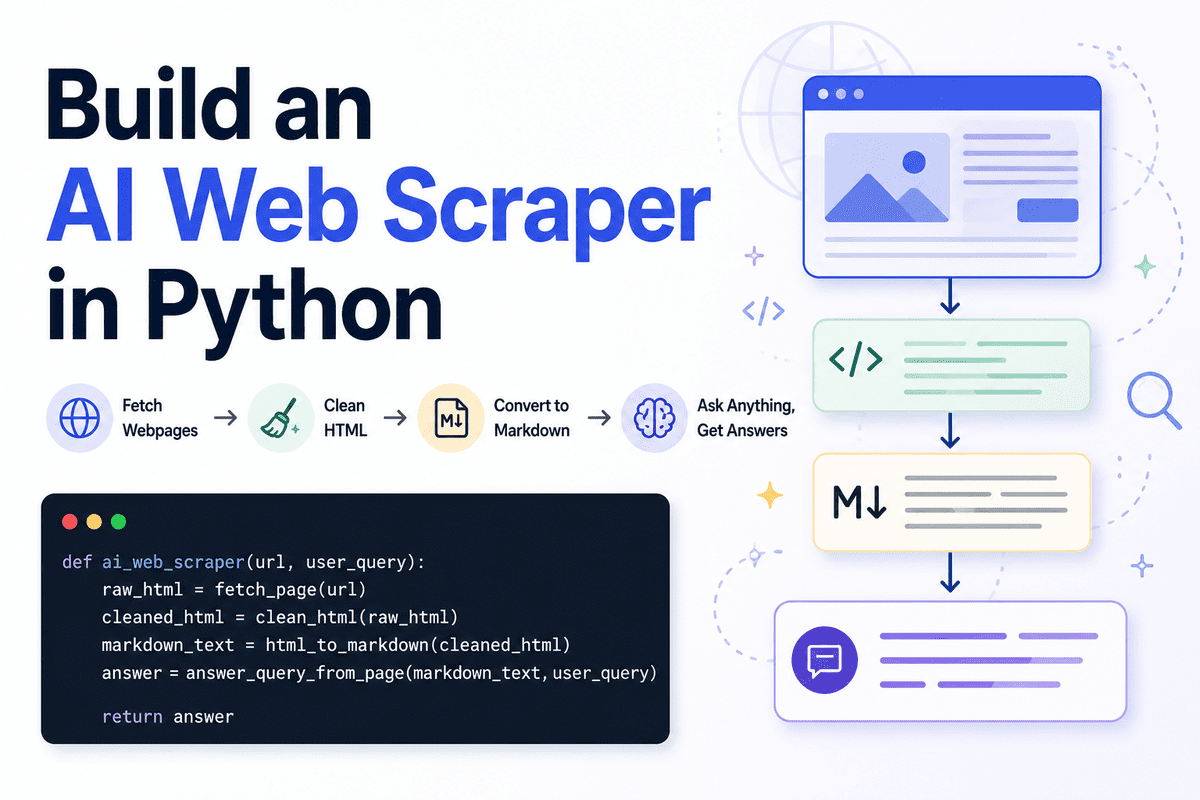
**
Web scraping(ウェブスクレイピング)とは、ウェブサイトから自動的に情報を収集するプロセスのことです。通常のスクレイパーは、生のテキストや HTML 要素、あるいはページ全体のコンテンツを抽出します。しかし、AI エージェントや大規模言語モデル(LLM)アプリケーションを構築している場合、ウェブページ全体をそのままモデルに送るのは必ずしも最善の方法ではありません。
より良いアプローチは、まずページをクリーンアップして Markdown 形式に変換し、その後 LLM にコンテンツを理解させた上で、ユーザーが必要とする回答だけを返させることです。これにより、出力が整理され、読みやすくなり、他のワークフローでも扱いやすくなります。
また、トークンの使用量も削減できます。ナビゲーションリンクやボタン、スクリプト、フッター、重複するコンテンツでぐちゃぐちゃになったページ全体を渡すのではなく、有用なページ内容だけをモデルに送ります。LLM はその後、Markdown 形式で焦点を絞った回答を返します。ページ全体をユーザーにダンプする代わりにです。
このガイドでは、Jupyter Notebook を使って Python でシンプルな AI ウェブスクレイパーを作成します。このツールはウェブページを取得し、HTML をクリーンアップして Markdown に変換し、ユーザーからのクエリを受け取った上で、ページの内容に基づいた明確な Markdown 形式の回答を返します。
# Setting Up
本プロジェクトでは Jupyter Notebook を使用します。これにより、スクレイパーを実際の API やアプリケーションとして完成させる前に、各ステップを簡単にテストできます。
必要な Python パッケージをインストールすることから始めましょう。
!pip install requests beautifulsoup4 markdownify openai ftfy python-dotenv今回使用するライブラリは以下の通りです。
- requests: ウェブページの取得に使用します。
- BeautifulSoup: ノイズの多い HTML 要素を除去するために使用します。
- markdownify: HTML を Markdown 形式に変換するために使用します。
- OpenAI: ユーザーからの問い合わせに対して回答を生成するために使用します。
- ftfy: 破損したり不整なテキストを修正するために使用します。
- python-dotenv: API キーを安全に読み込むために使用します。
次のセルで、必要なライブラリを読み込みましょう。
import os
import re
import requests

from bs4 import BeautifulSoup, Comment
from ftfy import fix_text
from markdownify import markdownify as markdownify_html
from openai import OpenAI
from dotenv import load_dotenv
from IPython.display import Markdown, display
次に、OpenAI の API キーが環境変数として利用可能になっているか確認してください。より安全な方法は、ノートブックと同じフォルダ内に .env ファイルを作成し、そこにキーを記述することです。
OPENAI_API_KEY=your_api_key_hereその後、ノートブック内でそのキーを読み込みます。
load_dotenv()

client = OpenAI(api_key=os.getenv("OPENAI_API_KEY"))
キーが正しく読み込まれたか確認することもできます。
if not os.getenv("OPENAI_API_KEY"):
    raise ValueError("OPENAI_API_KEY is missing. Add it to your .env file first.")
また、OpenAI プラットフォームのアカウントで課金設定が完了しているかも確認してください。新しい API アカウントの場合、API 呼び出しを実行する前にプリペイド残高を追加する必要があるかもしれません。もし特定のモデルがアカウントで利用できない場合は、OpenAI ダッシュボードから別のモデルを選択して使用してください。
次に、使用するモデル名を定義します。
MODEL_NAME = "gpt-5.4-nano"ここでは小さなモデルを使用しています。このタスクには大規模な推論能力は必要ないからです。目的はシンプルです。クリーニング済みのウェブページの内容を読み込み、ユーザーの問い合わせを理解し、焦点を絞った Markdown 形式で回答を返すことです。
# ウェブページの取得
まずは最初の関数を作成します。この関数は requests パッケージを使用してウェブページを取得し、生 HTML を返すものです。
def fetch_page(url: str) -> str:
    """
    Download the HTML content from a webpage.
    """
    headers = {
        "User-Agent": "SimpleAIScraper/1.0"
    }

    response = requests.get(url, headers=headers, timeout=15)
    response.raise_for_status()

    return response.text
User-Agent ヘッダーは、リクエストがスクレイパーから来ていることをウェブサイト側に伝える役割を果たします。ユーザーエージェントを指定しないリクエストをブロックするサイトもあるため、このヘッダーを追加することで、リクエストの信頼性を高めることができます。
また、サイトが応答しない場合に無限に待機しないよう、timeout を使用します。raise_for_status() メソッドはリクエストが失敗した場合にコードの実行を停止します。
例えば、ページが 404 または 500 エラーを返す場合です。
実際にこの関数をテストしてみましょう。実在するウェブサイトに対して実行します。
raw = fetch_page("https://www.olostep.com/")
print(raw[:500])
これでウェブページの生 HTML がダウンロードされ、最初の 500 文字が出力されます。

生 HTML の出力 | 画像作成:著者
この段階では、まだ出力はごちゃごちゃしています。タグやスクリプト、レイアウト要素など、不要な情報が含まれたままのページ全体の HTML が出力されているためです。
# HTML のクリーニング
ウェブページから取得した生 HTML には、実際には必要ない情報が多く含まれています。具体的には、スクリプト、スタイルシート、ナビゲーションメニュー、ボタン、フォーム、ヘッダーやフッター、ポップアップなど、レイアウトに関わる要素が多数含まれるのが一般的です。
LLM(大規模言語モデル)にページコンテンツを送信する前に、HTML をクリーニングしておく必要があります。これによりノイズを減らし、最終的に生成される Markdown の内容をモデルが理解しやすくするためです。
HTML の解析と不要な要素の除去には、BeautifulSoup を使用します。
def clean_html(html):
    html = fix_text(html)

    soup = BeautifulSoup(html, "html.parser")

    # Remove obvious noisy tags
    for tag in soup([
        "script", "style", "noscript", "svg", "img", "iframe",
        "nav", "header", "footer", "aside", "form", "button"
    ]):
        tag.decompose()

    noise_words = [
        "cursor",
        "modal",
        "popup",
        "floating",
        "signup",
        "login",
        "cookie",
        "banner",
        "navbar",
        "menu",
        "footer",
        "header",
        "subscribe",
        "newsletter",
        "loading",
        "wait",
        "success",
        "auth",
        "w-nav",
        "w-form"
    ]

    # First collect noisy tags
    tags_to_remove = []

    for tag in soup.find_all(True):
        if tag.attrs is None:
            continue

        class_value = tag.get("class", [])
        id_value = tag.get("id", "")

        if isinstance(class_value, list):
            class_text = " ".join(class_value).lower()
        else:
            class_text = str(class_value).lower()

        id_text = str(id_value).lower()

        if any(word in class_text or word in id_text for word in noise_words):
            tags_to_remove.append(tag)

    # Then remove them safely
    for tag in tags_to_remove:
        tag.decompose()

    body = soup.body if soup.body else soup

    return str(body)
まず fix_text() で文字コードの不整合や破損したテキストを修正し、その後 BeautifulSoup が HTML を解析して、必要な部分だけを抽出します。
ノイズとなる明らかなタグ、例えば script、style、nav、header、footer、form、そして button を除外します。
これらのセクションは、通常ユーザーの質問に答えるのに役立たず、トークンの無駄遣いになる可能性があります。
その後は、ノイズの多いクラス名や ID を探します。多くのウェブサイトでは、HTML 内に「popup」「cookie」「navbar」「newsletter」「modal」といった単語が使用されています。
特定のタグ内にこれらの単語が含まれている場合、そのタグを安全に収集して削除します。
では、この関数を生の HTML に対して実行してみましょう。
clean = clean_html(raw)
print(clean[:500])
ご覧の通り、ウェブページは大幅に整理されました。有用な HTML タグやテキストは残っていますが、ノイズとなるレイアウト、スクリプト、ナビゲーション、ポップアップなどはほぼ削除されています。

ノイズ除去後のクリーン化された HTML 出力 | 画像作成:著者
# HTML から Markdown への変換
次に、クリーン化された HTML を Markdown 形式に変換します。生きた HTML に比べ、Markdown は可読性が高く、保存も容易で、LLM(大規模言語モデル)が理解しやすい形式です。
この変換ステップでは、不要な書式設定や画像、空白行、重複するテキストを削除することで、入力トークンの数を削減することもできます。変換には markdownify ライブラリを使用します。
def html_to_markdown(html):
    markdown_text = markdownify_html(
        html,
        heading_style="ATX",
        bullets="-"
    )

    markdown_text = fix_text(markdown_text)

    # Remove image markdown
    markdown_text = re.sub(r"!\[.*?\]`.*?`", "", markdown_text)

    # Remove extra spaces and blank lines
    markdown_text = re.sub(r"[ \t]+", " ", markdown_text)
    markdown_text = re.sub(r"\n{3,}", "\n\n", markdown_text)

    lines = []

    skip_lines = [
        "click to try",
        "wait...",
        "you've successfully reserved your spot.",
        "thank you! your submission has been received!",
        "oops! something went wrong while submitting the form.",
        "product",
        "resources",
        "company"
    ]

    for line in markdown_text.splitlines():
        line = line.strip()

        if not line:
            continue

        if line.lower() in skip_lines:
            continue

        lines.append(line)

    return "\n".join(lines)
まず、markdownify を使用してクリーンアップされた HTML を Markdown 形式に変換します。見出しのスタイルを ATX に設定すると、標準的な記法に従って見出しが生成されます。
Python でシンプルな AI ウェブスクレイパーを構築する方法
Markdown 構文には、#、##、### を使用します。
その後、fix_text() を再度実行して残りのエンコーディング問題を解消します。その上で画像の Markdown 記法を削除します。テキストベースの質問に答える際、画像リンクは通常不要だからです。
また、余分なスペースや空行も削除して最終的なコンテンツをコンパクトにします。これによりページの検証が容易になり、モデルへ送信するトークン数を削減できます。
skip_lines リストには、フォームメッセージやナビゲーションラベル、小さな呼びかけテキストなど、ウェブサイトに繰り返し表示される不要なテキストを登録します。スクレイピング対象のウェブサイトに応じて、このリストは自由に更新できます。
次に、関数を実行してみましょう。
md = html_to_markdown(clean)
print(md[:500])
ご覧の通り、テキストは大幅に整理され、目的のフォーマットに近づきました。生きた HTML の代わりに、見出しや段落、箇条書きを含む読みやすい Markdown が得られます。
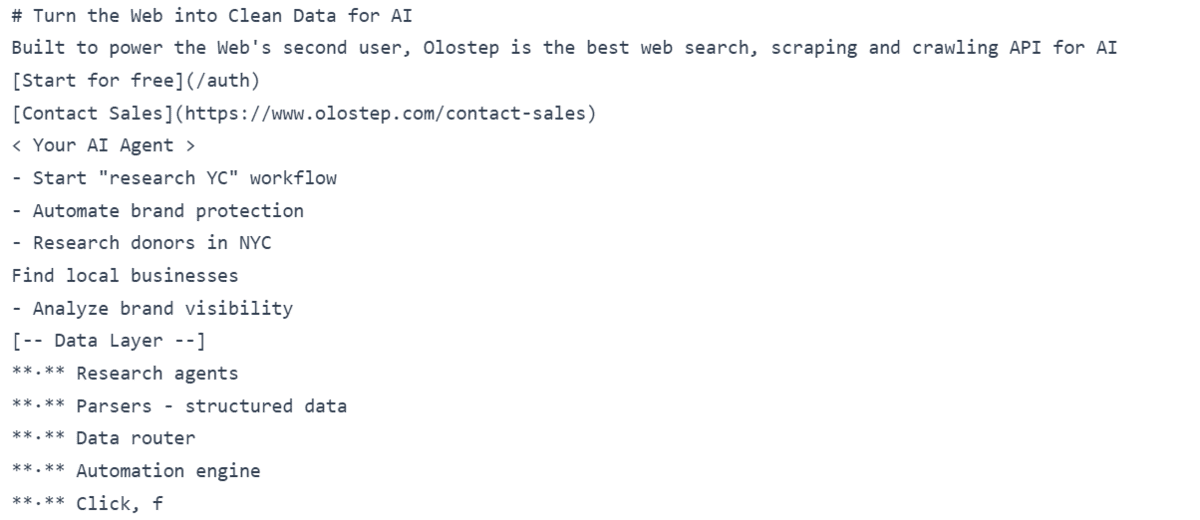
Markdown 出力 | 画像提供:著者
# ページに対してユーザークエリを実行する
次に、クリーニング済みの Markdown 形式のコンテンツを大規模言語モデル(LLM)へ送信する関数を作成します。この関数は、ウェブページの Markdown コンテンツとユーザーからの問い合わせという 2 つの入力を受け取ります。
ページ全体を要約させるのではなく、ページの内容のみを用いて特定の質問に答えるようモデルに指示します。これにより、回答はより焦点が絞られ、有用なものになります。
def answer_query_from_page(markdown_text, user_query):
    prompt = f"""
You are an AI web scraping assistant.

You will receive Markdown extracted from a webpage.

Your task is to answer the user's query using only the useful page content.

User query:
{user_query}

Webpage Markdown:
{markdown_text}

Instructions:
- Return only clean Markdown.
- Use only information from the webpage Markdown.
- Do not invent missing details.
- Ignore navigation links, buttons, CTAs, popups, decorative labels, image captions, and repeated marketing fragments.
- Ignore lines like "Start for free", "Contact Sales", "Your AI Agent", and decorative workflow examples unless they directly answer the query.
- Focus on headings, paragraphs, product descriptions, feature sections, pricing details, documentation text, and factual claims.
- If the page does not contain the answer, say: "The page does not contain this information."
- Keep the answer short, clear, and focused.
"""

    response = client.responses.create(
        model=MODEL_NAME,
        input=prompt
    )

    return response.output_text
このステップで最も重要なのはプロンプトです。ここでは、モデルにどのような役割を担わせるか、利用可能なコンテンツは何であるか、そしてどのような回答を返すべきかを明確に伝えます。
また、提供された Markdown 形式のみを使用するよう指示します。これは、ウェブページ上に存在しない情報を推測したり追加したりすることを防ぐために不可欠です。
出力はクリーンな Markdown のみに制限するという指示により、ノートブックでの表示が容易になったり、ファイルへの保存が可能になったり、他の AI ワークフローへ引き渡したりしやすくなります。
この関数こそが、AI ウェブスクレイパーを真に有用なものにする部分です。単にページテキストを抽出するだけでなく、クリーニングされたページ内容を LLM(大規模言語モデル)に理解させ、ユーザーが求めている正確な回答を返させるのです。
# 完全な AI ウェブスクレイパーの作成
ここからは、すべての要素をつなぎ合わせる最終関数を作成します。
この関数は、URL とユーザーからの問い合わせを入力として受け取ります。その後、ウェブページを取得し、HTML をクリーニングしてコンテンツを Markdown 形式に変換し、gpt-5.4-nano モデルを用いて回答を返します。
def ai_web_scraper(url, user_query):
    raw_html = fetch_page(url)
    cleaned_html = clean_html(raw_html)
    markdown_text = html_to_markdown(cleaned_html)
    answer = answer_query_from_page(markdown_text, user_query)

    return answer
これが完成した AI ウェブスクレイパーのパイプラインです。各ステップを手動で一つずつ実行するのではなく、単一の関数を呼び出すだけで、あらゆるウェブページからクリーンな Markdown 形式の回答を取得できるようになりました。
処理の流れはシンプルです:
ウェブページの取得
HTML のクリーニング
Markdown 形式への変換
LLM(大規模言語モデル)への質問
最終回答の返却
このように手順をシンプルに保つことで、後で API やチャットボット、エージェントワークフローとして再利用しやすくなります。
AI ウェブスクレイパーのテスト
次に、作成した AI ウェブスクレイパーを実際に動かしてみましょう。ウェブサイト URL を指定して「この会社は何をしているのか」と質問します。
url = "https://www.olostep.com/"
user_query = "What does this company do?"
result = ai_web_scraper(url, user_query)

display(Markdown(result))
すると、その企業と製品に関する適切な Markdown 形式の回答が返ってきます。ウェブページ全体のコンテンツをそのまま返すよりもはるかに優れています。なぜなら、回答はユーザーの問い合わせに焦点を絞り、読みやすく、かつ直接関連する内容になっているからです。
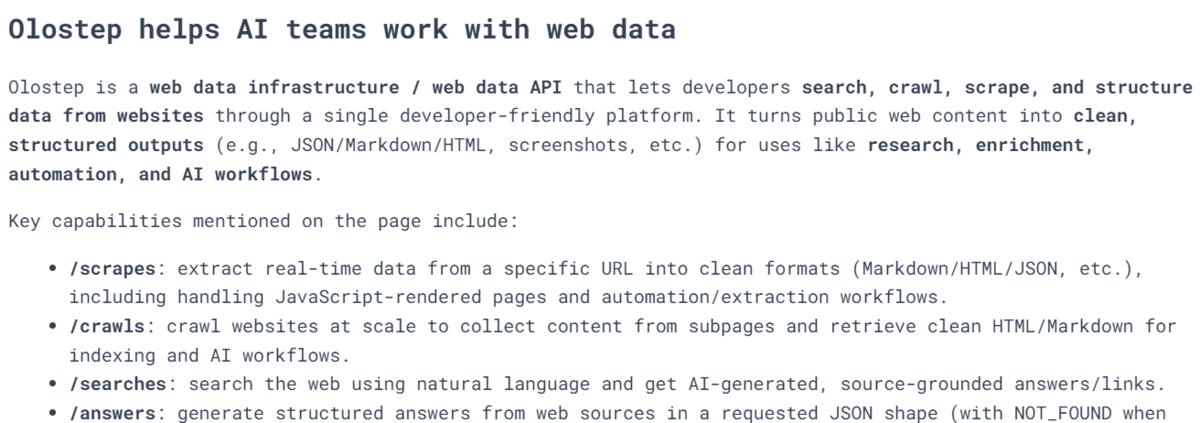
企業概要クエリに対するスクレイパーの出力 | 画像提供:著者
では、別のページで「料金プランは?」と聞いてみましょう。
url = "https://www.olostep.com/pricing"
user_query = "Help me understand the pricing"
result = ai_web_scraper(url, user_query)

display(Markdown(result))
数秒後には、理解しやすいクリーンな回答が得られます。手動で料金ページを訪れて関連情報を探す手間を省き、スクレイパーがページを取得・クリーニングした上で、LLM に重要な部分だけを説明させます。

料金クエリに対するスクレイパーの出力 | 画像提供:著者
最終的な回答を Markdown ファイルとして保存することも可能です。
with open("ai_scraper_result.md", "w", encoding="utf-8") as file:
    file.write(result)

print("Markdown saved to ai_scraper_result.md")
出力結果:
Markdown saved to ai_scraper_result.mdこれで結果は Markdown ファイルとして保存され、開いて編集したり、共有したり、他のワークフローで利用したりできます。
結びに
AI ツールの自作は今ではずっと簡単になりました。Python で数行のコードと LLM を組み合わせるだけで、ウェブページを読み込み、ユーザーの質問を理解し、きれいな Markdown 形式で回答を返すシンプルな Q&A エンジンが作れます。
これは強力なアプローチです。必ずしも複雑なシステムが必要とは限らないからです。特定の課題に対しては、小さく特化したソリューションで十分であるケースも多々あります。
ただし、コストがかかることも忘れてはいけません。サーバー上でアプリを動かすには費用がかかりますし、LLM を呼び出すにも料金が発生します。スクレイパーの維持管理、リンク切れやエラーへの対応、そしてシステムを時間とともに改善していくことにも、時間と金銭が必要です。
そのため、独自のカスタムソリューションを構築する前に、Olostep や Firecrawl、Exa といった既存のツールを検討する価値があります。場合によっては、既製のスクレイピングや Web インテリジェンス API を利用した方が合理的です。一方で、タスクが小規模でローカル環境に限られる、あるいは非常に特定の用途に特化しているようなケースでは、軽量な独自ソリューションを構築する方が優れた選択肢となるでしょう。
原文を表示
**
Web scraping is the process of collecting information from websites automatically. A normal scraper usually extracts raw text, HTML elements, or the full page content. But when you are building AI agents or large language model (LLM) applications, sending the entire webpage to the model is not always the best approach.
A better way is to first clean the page, convert it into Markdown, and then use an LLM to understand the content and return only the answer the user needs. This makes the output cleaner, easier to read, and easier to use in another workflow.
It also helps reduce token usage. Instead of passing a messy webpage full of navigation links, buttons, scripts, footers, and repeated content, we only send the useful page content to the model. The LLM then returns a focused answer in Markdown instead of dumping the whole page back to the user.
In this guide, we will build a simple AI web scraper in Python using Jupyter Notebook. It will fetch a webpage, clean the HTML, convert it into Markdown, accept a user query, and return a clear Markdown answer based on the page content.
# Setting Up
We will use Jupyter Notebook for this project. It makes it easier to test each step first before turning the scraper into a proper application programming interface (API) or application.
Start by installing the required Python packages:
!pip install requests beautifulsoup4 markdownify openai ftfy python-dotenvWe will use:
- requests to fetch the webpage.
- BeautifulSoup to remove noisy HTML elements.
- markdownify to convert HTML into Markdown.
- OpenAI to answer the user query.
- ftfy to fix broken or messy text.
- python-dotenv to load the API key safely.
In the next cell, import the required libraries:
import os
import re
import requests

from bs4 import BeautifulSoup, Comment
from ftfy import fix_text
from markdownify import markdownify as markdownify_html
from openai import OpenAI
from dotenv import load_dotenv
from IPython.display import Markdown, display
Next, make sure your OpenAI API key is available as an environment variable. The safer way is to create a .env file in the same folder as your notebook and add your key there:
OPENAI_API_KEY=your_api_key_hereThen load it inside the notebook:
load_dotenv()

client = OpenAI(api_key=os.getenv("OPENAI_API_KEY"))
You can also check that the key was loaded correctly:
if not os.getenv("OPENAI_API_KEY"):
    raise ValueError("OPENAI_API_KEY is missing. Add it to your .env file first.")
Also make sure your OpenAI platform account has billing set up. For new API accounts, you may need to add prepaid credits before you can run API calls. If a model is not available in your account, use another model from your OpenAI dashboard.
Now define the model name:
MODEL_NAME = "gpt-5.4-nano"We are using a smaller model here because this task does not need a large reasoning model. The goal is simple: read the cleaned webpage content, understand the user query, and return a focused Markdown answer.
# Fetching the Webpage
Now we will create the first function. This function will fetch the webpage using the requests package and return the raw HTML.
def fetch_page(url: str) -> str:
    """
    Download the HTML content from a webpage.
    """
    headers = {
        "User-Agent": "SimpleAIScraper/1.0"
    }

    response = requests.get(url, headers=headers, timeout=15)
    response.raise_for_status()

    return response.text
The User-Agent header tells the website that the request is coming from our scraper. Some websites block requests that do not include a user agent, so adding one makes the request a bit more reliable.
We also use timeout to avoid waiting indefinitely if the website does not respond. The raise_for_status() call will stop the code if the request fails — for example, if the page returns a 404 or 500 error.
Now let's test the function with a real website:
raw = fetch_page("https://www.olostep.com/")
print(raw[:500])
This will download the raw HTML from the webpage and print the first 500 characters.
Raw HTML output | Image by Author
At this stage, the output will still look messy because it contains the full page HTML, including tags, scripts, layout elements, and other content we do not need.
# Cleaning the HTML
The raw HTML from a webpage usually contains a lot of content we do not need. It can include scripts, styling, navigation menus, buttons, forms, headers, footers, popups, and other layout elements.
Before sending the page content to the LLM, we need to clean the HTML. This helps reduce noise and makes the final Markdown much easier for the model to understand.
We will use BeautifulSoup to parse the HTML and remove unnecessary elements.
def clean_html(html):
    html = fix_text(html)

    soup = BeautifulSoup(html, "html.parser")

    # Remove obvious noisy tags
    for tag in soup([
        "script", "style", "noscript", "svg", "img", "iframe",
        "nav", "header", "footer", "aside", "form", "button"
    ]):
        tag.decompose()

    noise_words = [
        "cursor",
        "modal",
        "popup",
        "floating",
        "signup",
        "login",
        "cookie",
        "banner",
        "navbar",
        "menu",
        "footer",
        "header",
        "subscribe",
        "newsletter",
        "loading",
        "wait",
        "success",
        "auth",
        "w-nav",
        "w-form"
    ]

    # First collect noisy tags
    tags_to_remove = []

    for tag in soup.find_all(True):
        if tag.attrs is None:
            continue

        class_value = tag.get("class", [])
        id_value = tag.get("id", "")

        if isinstance(class_value, list):
            class_text = " ".join(class_value).lower()
        else:
            class_text = str(class_value).lower()

        id_text = str(id_value).lower()

        if any(word in class_text or word in id_text for word in noise_words):
            tags_to_remove.append(tag)

    # Then remove them safely
    for tag in tags_to_remove:
        tag.decompose()

    body = soup.body if soup.body else soup

    return str(body)
First, we use fix_text() to clean any broken or strange text encoding issues. Then BeautifulSoup parses the HTML so we can remove the parts we do not need.
We remove obvious noisy tags like script, style, nav, header, footer, form, and button. These sections usually do not help answer the user query and can waste tokens.
After that, we look for noisy class names and IDs. Many websites use words like popup, cookie, navbar, newsletter, or modal inside their HTML. If a tag contains those words, we collect it and remove it safely.
Now let's run the function on the raw HTML:
clean = clean_html(raw)
print(clean[:500])
As you can see, the webpage is now much cleaner. It still contains useful HTML tags and text, but most of the noisy layout, scripts, navigation, and popups have been removed.
Cleaned HTML output | Image by Author
# Converting HTML to Markdown
Now we will convert the cleaned HTML into Markdown. Markdown is easier to read, easier to save, and easier for the LLM to understand compared to raw HTML.
This step also helps reduce input tokens because we remove unnecessary formatting, images, blank lines, and repeated text. For the conversion, we will use markdownify.
def html_to_markdown(html):
    markdown_text = markdownify_html(
        html,
        heading_style="ATX",
        bullets="-"
    )

    markdown_text = fix_text(markdown_text)

    # Remove image markdown
    markdown_text = re.sub(r"!\[.*?\]`.*?`", "", markdown_text)

    # Remove extra spaces and blank lines
    markdown_text = re.sub(r"[ \t]+", " ", markdown_text)
    markdown_text = re.sub(r"\n{3,}", "\n\n", markdown_text)

    lines = []

    skip_lines = [
        "click to try",
        "wait...",
        "you've successfully reserved your spot.",
        "thank you! your submission has been received!",
        "oops! something went wrong while submitting the form.",
        "product",
        "resources",
        "company"
    ]

    for line in markdown_text.splitlines():
        line = line.strip()

        if not line:
            continue

        if line.lower() in skip_lines:
            continue

        lines.append(line)

    return "\n".join(lines)
First, we use markdownify to convert the cleaned HTML into Markdown. We set the heading style to ATX, which means headings will use standard Markdown syntax with #, ##, and ###.
Then we run fix_text() again to clean any remaining encoding issues. After that, we remove image Markdown because image links are usually not useful for answering text-based questions.
We also remove extra spaces and blank lines so the final content is compact. This makes the page easier to inspect and helps reduce the number of tokens sent to the model.
The skip_lines list removes repeated website text such as form messages, navigation labels, and small call-to-action text. You can update this list based on the website you are scraping.
Now let's run the function:
md = html_to_markdown(clean)
print(md[:500])
As you can see, the text is now much cleaner and closer to the format we want. Instead of raw HTML, we now have readable Markdown with useful headings, paragraphs, and bullet points.
Markdown output | Image by Author
# Asking a User Query Against the Page
Now we will create the function that sends the cleaned Markdown content to the LLM. This function takes two inputs: the webpage content in Markdown and the user query.
Instead of asking the model to summarize the whole page, we ask it to answer a specific question using only the page content. This makes the response more focused and useful.
def answer_query_from_page(markdown_text, user_query):
    prompt = f"""
You are an AI web scraping assistant.

You will receive Markdown extracted from a webpage.

Your task is to answer the user's query using only the useful page content.

User query:
{user_query}

Webpage Markdown:
{markdown_text}

Instructions:
- Return only clean Markdown.
- Use only information from the webpage Markdown.
- Do not invent missing details.
- Ignore navigation links, buttons, CTAs, popups, decorative labels, image captions, and repeated marketing fragments.
- Ignore lines like "Start for free", "Contact Sales", "Your AI Agent", and decorative workflow examples unless they directly answer the query.
- Focus on headings, paragraphs, product descriptions, feature sections, pricing details, documentation text, and factual claims.
- If the page does not contain the answer, say: "The page does not contain this information."
- Keep the answer short, clear, and focused.
"""

    response = client.responses.create(
        model=MODEL_NAME,
        input=prompt
    )

    return response.output_text
The prompt is the most important part of this step. It tells the model what role it should play, what content it can use, and what kind of answer it should return.
We also tell the model to use only the provided Markdown. This is important because we do not want the model to guess or add information that is not present on the webpage.
The instruction to return only clean Markdown makes the output easier to display in a notebook, save to a file, or pass into another AI workflow.
This function is where the AI web scraper becomes genuinely useful. We are no longer just extracting page text — we are asking the LLM to understand the cleaned page and return the exact answer the user is looking for.
# Creating the Full AI Web Scraper
Now we will create the final function that connects everything together.
This function will take the URL and the user query as inputs. It will then fetch the webpage, clean the HTML, convert the content into Markdown, and return the answer using the gpt-5.4-nano model.
def ai_web_scraper(url, user_query):
    raw_html = fetch_page(url)
    cleaned_html = clean_html(raw_html)
    markdown_text = html_to_markdown(cleaned_html)
    answer = answer_query_from_page(markdown_text, user_query)

    return answer
This is our complete AI web scraper pipeline. Instead of manually running each step one by one, we can now call a single function and get a clean Markdown answer from any webpage.
The flow is simple:
- Fetch the webpage.
- Clean the HTML.
- Convert it into Markdown.
- Ask the LLM a question.
- Return the final answer.
This keeps the code simple and easy to reuse later in an API, chatbot, or agent workflow.
# Testing the AI Web Scraper
Now let's test our AI web scraper. We will provide it with a website URL and ask what the company does.
url = "https://www.olostep.com/"
user_query = "What does this company do?"
result = ai_web_scraper(url, user_query)

display(Markdown(result))
In return, we get a proper Markdown response about the company and its product. This is much better than returning the full webpage content because the answer is focused, readable, and directly related to the user query.
Scraper output for a company overview query | Image by Author
Now let's try a different page and ask about pricing.
url = "https://www.olostep.com/pricing"
user_query = "Help me understand the pricing"
result = ai_web_scraper(url, user_query)

display(Markdown(result))
In a few seconds, we get a clean response that is easy to understand. Instead of manually visiting the pricing page and trying to find the relevant information, the scraper extracts the page, cleans it, and asks the LLM to explain only what matters.
Scraper output for a pricing query | Image by Author
We can also save the final response as a Markdown file.
with open("ai_scraper_result.md", "w", encoding="utf-8") as file:
    file.write(result)

print("Markdown saved to ai_scraper_result.md")
Output:
Markdown saved to ai_scraper_result.mdNow the result is saved as a Markdown file, which you can open, edit, share, or use in another workflow.
# Final Thoughts
Building your own AI tools is much easier now. With a few lines of Python and an LLM, we turned a normal webpage into a simple question-answering engine that can read the page, understand the user query, and return a clean Markdown answer.
This is powerful because you do not always need a complex system to solve a specific problem. Sometimes, a small specialized solution is enough.
But it is also important to remember that everything has a cost. Running the app on a server costs money. Calling an LLM costs money. Maintaining the scraper, fixing broken pages, handling errors, and improving the system over time also costs time and money.
So before building your own custom solution, it is worth looking at existing tools like Olostep, Firecrawl, or Exa**. In some cases, paying for a ready-made scraping or web intelligence API may make more sense. In other cases — especially if the task is small, local, or very specific — building your own lightweight solution can be the better option.
Abid Ali Awan (@1abidaliawan) is a certified data scientist professional who loves building machine learning models. Currently, he is focusing on content creation and writing technical blogs on machine learning and data science technologies. Abid holds a Master's degree in technology management and a bachelor's degree in telecommunication engineering. His vision is to build an AI product using a graph neural network for students struggling with mental illness.
関連記事
今日のまとめ
AIデイリーブリーフで今日の重要ニュースをまとめ読み