生産環境向け AI パイプラインのための Mistral Search ツールキット(4 分読了)
本文の状態
日本語全文を表示中
詳細モードで約8分の本文を読めます。
同じ出来事の情報源
この情報源を基点に整理
TLDR AI
Mistral が、生産環境の AI パイプラインで検索機能を統合するためのツールキットを公開した。これにより開発者は検索能力を容易に実装できる。
Source Article
元記事を日本語で読む
本文に関係しない購読案内、埋め込み通知、サイト内プロモーションは除いています。
 image Product
May 28, 2026
Mistral
image
今日、Search Toolkit(検索ツールキット)をパブリックプレビューとしてリリースいたします。Search Toolkit は、AI アプリケーション向けの生産環境向け検索パイプラインを構築するためのコンポーザブルなフレームワークです。私たちは、検索インフラストラクチャを構築するチームがまだ配管作業に多くのエンジニアリング時間を費やしていることに着目し、このツールを開発しました。ほとんどの場合、データ取り込み(ingestion)、検索(retrieval)、評価(evaluation)のために別々のツールをつなぎ合わせており、それぞれが独自のインターフェースとデータに関する独自の前提条件を持っています。Search Toolkit はこれら 3 つの機能を単一のフレームワークに統合し、共通のインターフェースを提供することで、チームが統合の維持管理ではなく検索品質の向上に時間を割けるようにしました。Search Toolkit はオープンソースであり、インフラストラクチャが存在するあらゆる場所(クラウド、オンプレミス、エッジ)で動作します。
検索インフラストラクチャは、本来あるべきよりもまだ複雑です。
検索システムを構築するほとんどのチームは、検索品質の向上よりもインフラストラクチャの組み立てに多くの時間を費やしています。データ取り込みには一組のツールが必要であり、検索には別のツールが必要です。評価が行われる場合でも、それは別々のフレームワークで後付けされ、データの形状に関する独自の前提条件に基づいています。
チームは、自社のデータに対して単一のクエリを実行できるようになるまでに、数週間の統合作業を報告しています。検索エンジンが適切な結果を返しているかを測定するには、さらに別のツールチェーンが必要になることがよくあります。RAG ワークフローや内部知識システムを構築する組織にとって、このオーバーヘッドは各レイヤーで倍増します。
位置づけ。
エンタープライズ検索。 ほとんどの組織に「検索問題」があるわけではありません。彼らには dozen の検索問題があります。内部ウィキ、サポートチケットシステム、ドキュメントリポジトリ、ファイルストレージ、コードベースなどです。各ソースは異なる構造を持ち、異なるメタデータがあり、適切にインデックス化するためには異なる処理が必要です。チームは通常、それぞれに対して個別の取り込みパイプラインを構築することになり、それぞれ独自の解析ロジック、独自のチャンキング戦略(chunking strategy)、そして「ドキュメント」がどのようなものかについての独自の前提を持っています。その結果、別々に検索できない孤立したインデックスのセットか、それらを統合しようとして独自に保守負担となる脆いカスタムレイヤーのどちらかが生まれます。Search Toolkit は、単一のフレームワーク内でソースタイプ間の一貫した処理とインデックス化パターンを提供するため、チームはパイプラインを再構築することなく新しいソースを追加できます。
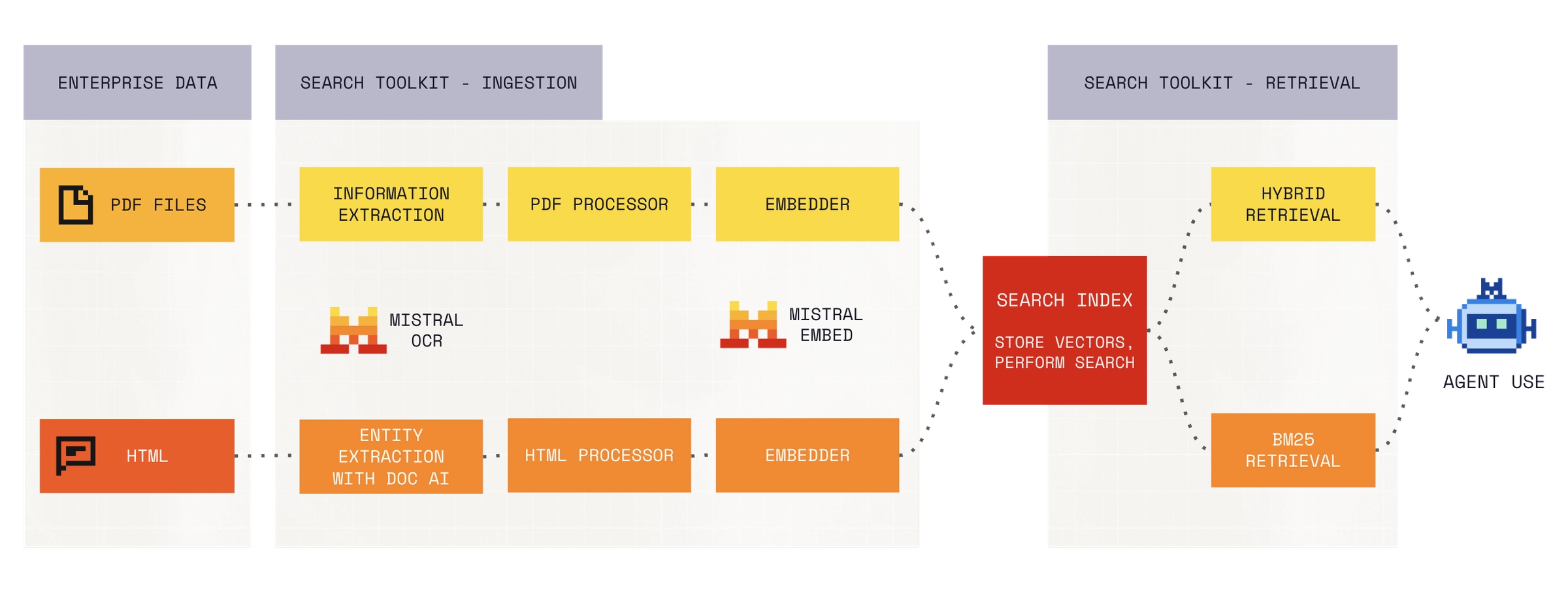 image RAG と検索の質。 RAG システムが不十分な結果を返す場合、最初の疑問は問題が検索にあるのか生成にあるのかです。実際には、ほとんどのチームにそれを明確に回答する手段がありません。彼らはプロンプトを調整し、チャンキング戦略を変更し、モデルを切り替えますが、そもそも検索エンジンが適切なコンテキストを提示できているかどうかは知りません。また、検索に注力しているチームでさえも、独自のデータと独自に関連性判断を用いて戦略を厳密に比較するためのツールを持っていないことがほとんどです。その代替手段として、各実験ごとにカスタム評価スクリプトを書くことになります。Search Toolkit には組み込みの評価機能が含まれており、検索エンジンのパフォーマンスを独立して測定できるため、検索の質と生成の質を分離し、コーパスが変化するにつれて設定を比較することができます。
ドメイン固有の検索。 法的書類、医療記録、コードベース、財務開示。市販の検索エンジン(retriever)は汎用テキスト向けに訓練されているため、専門用語や文書構造、ウェブ検索とは異なる関連性基準には対応しにくい傾向があります。ドメイン特化型の検索を必要とするチームは、多くの場合ゼロからカスタムの検索インフラストラクチャを構築する必要に迫られ、これは維持コストが高く評価も困難です。
エージェント型世界における検索
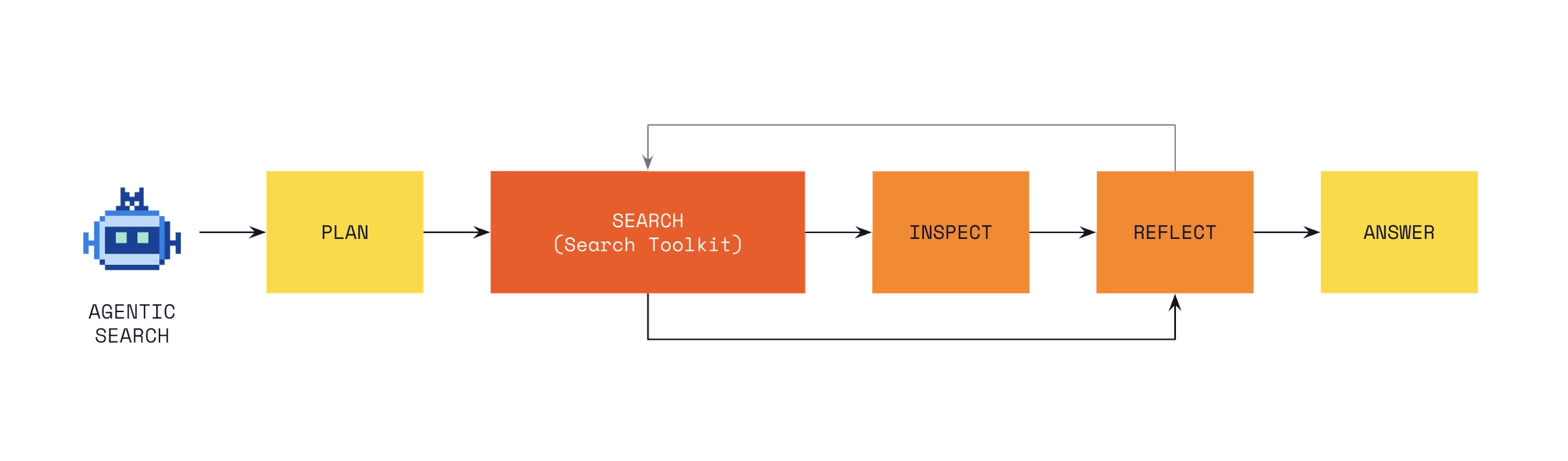
エンタープライズタスクに取り組むエージェントには、エンタープライズの文脈へのアクセスが必要です。彼らは自律的に、かつ大量の検索判断を下すため、その背後にある検索インフラの質が、すべての下流工程に直接影響を及ぼします。大規模なドキュメントコーパス全体を検索する際、エージェントはインデックス上でセマンティック検索(意味的検索)を実行し、低遅延で精密な結果を得ます。
また、エージェントには生データへのアクセスも必要です。Connectors を用いることで、MCP 統合を通じて CRM、コードリポジトリ、生産性ツールなどのソースシステムから直接データを取得します。エージェントは、大規模なコンテンツ全体を検索する必要がある際にはインデックスされたコーパスを照会し、最新のステータスが必要な際にはソースシステムから生データを取得します。Search Toolkit は、エージェントに対して、生データ取得と併用できる高品質なインデックス検索パスを提供します。
内部構成
データ取り込み。 設定可能なパイプラインを用いて、複数のソースからデータをインデックス化し処理します。Search Toolkit はドキュメントの解析、チャンク分割(断片化)、および埋め込み生成を担います。カスタムドキュメントフォーマットや前処理ステップは、標準的なアダプターインターフェースを通じて組み込むことができます。
検索。 Search Toolkit には、BM25 によるスパース検索、埋め込みに基づく密な検索(dense embedding-based retrieval)、および両者を組み合わせたハイブリッド構成が搭載されています。それぞれをデータとユースケースに合わせて設定可能です。
評価。 組み込みの指標(リコール、精密率、MRR、NDCG)を用いて検索品質を測定します。独自のテストセットに対して評価を実行し、検索器の設定を並列比較して、リリース間を通じて品質を追跡できます。
すべてのモジュールは共通の設定インターフェースを共有しています。インデクサーを置き換え、検索器を交換し、評価器を追加するだけで、パイプラインの残りの部分は自動的に適応します。
Search Toolkit はエンタープライズ向けの高度なユースケースのために設計され、金融サービス、製造業、公共部門、メディア・エンターテインメント業界で実戦テスト済みです。CMA CGM では、ジャーナリストが偽ニュースを検出できるよう、Voxtral と併用して Search Toolkit を活用しています。このパイプラインは 3 つの異なるデータソースからのオーディオを処理し、エンドツーエンドで 15 秒以内にアラートを返します。
デモを見る
始め方
Search Toolkit を試す最速の方法は、starter app template です。
前提条件
Docker のインストールが必要です。生成されたプロジェクト内では uv も必要です。
新規プロジェクトの作成
uvx copier copy gh:mistralai/search-starter-app my-search-project
cd my-search-project
実行方法
Docker を使用してローカルで Vespa を起動
make setup-vespa
サンプルデータをインデックス化
make ingest path=sample_data/hello.txt
クエリを実行
make search query="hello world"
テンプレートには以下の要素が含まれています:
- 事前設定済みの Vespa インデックス作成
- ハイブリッド検索(BM25 + ベクトル)
- サンプルデータと取り込みパイプライン
詳細は starter app README をご覧ください。
次のステップ
starter アプリを試した後、さらに深く掘り下げてみましょう:
- 取り込みパイプラインの調整 – データソースを処理するために、パーサー、チャンキング戦略、埋め込みモデル、抽出器を特定のファイルタイプ用に設定します。
- Vespa スキーマと関連性の管理 – ユースケースに合わせてインデックス作成とランキングプロファイルを最適化します。
- 理想の検索機能の実装 – LLM によるクエリ書き換え、再ランク付け、ハイブリッド検索などの高度な機能を活用します。
完全な参照情報は Search Toolkit documentation をご覧ください。
原文を表示
Product
May 28, 2026
Mistral
Today, we're releasing Search Toolkit in public preview. Search Toolkit is a composable framework for building production search pipelines for AI applications. We built it because teams building search infrastructure still spend too much engineering time on plumbing. Most stitch together separate tools for ingestion, retrieval, and evaluation, each with its own interface and its own assumptions about data. Search Toolkit brings all three into a single framework with a shared interface, so teams spend their time improving search quality instead of maintaining integrations. Search Toolkit is open source and runs wherever your infrastructure does. Cloud, on-premises, edge.
Search infrastructure is still harder than it should be.
Most teams building retrieval systems spend more time assembling infrastructure than improving search quality. Ingestion requires one set of tools. Retrieval requires another. Evaluation, if it happens at all, is bolted on with a separate framework and separate assumptions about data shape.
Teams report weeks of integration work before they can run a single query against their own data. Measuring whether the retriever is returning the right results often requires yet another toolchain. For organisations building RAG workflows or internal knowledge systems, that overhead multiplies at every layer.
Where it fits.
Enterprise search. Most organisations don't have a search problem. They have a dozen search problems. Internal wikis, support ticket systems, document repositories, file storage, codebases. Each source has different structure, different metadata, and needs different processing to index well. Teams typically end up building a separate ingestion pipeline for each one, with its own parsing logic, its own chunking strategy, and its own assumptions about what a "document" looks like. The result is a set of isolated indexes that can't be searched together, or a brittle custom layer that tries to unify them and becomes its own maintenance burden. Search Toolkit provides consistent processing and indexing patterns across source types within a single framework, so teams add new sources without rebuilding the pipeline each time.
RAG and retrieval quality. When a RAG system returns poor results, the first question is whether the problem is retrieval or generation. In practice, most teams have no clean way to answer that. They tweak prompts, adjust chunking strategies, and swap models without knowing whether the retriever is surfacing the right context in the first place. And even teams that do focus on retrieval often lack the tooling to compare strategies rigorously, on their own data, with their own relevance judgments. The alternative is writing custom evaluation scripts for each experiment. Search Toolkit includes built-in evaluation that measures retriever performance independently, so you can isolate retrieval quality from generation quality and compare configurations as your corpus evolves.
Domain-specific retrieval. Legal filings, medical records, codebases, financial disclosures. Off-the-shelf retrievers are trained on general-purpose text and tend to struggle with specialised terminology, document structures, and relevance criteria that differ from web search. Teams that need domain-tuned retrieval often end up building custom retrieval infrastructure from scratch, which is expensive to maintain and hard to evaluate.
Search in an agentic world
Agents working on enterprise tasks need access to enterprise context. They make retrieval decisions autonomously and at high volume, so the quality of the search infrastructure underneath them directly affects every downstream step. For searching across large document corpora, agents perform semantic search on an index, which gives them precise results at low latency.
Agents also need live data. With Connectors, they pull directly from source systems like CRMs, code repositories, and productivity tools through MCP integrations. An agent can query an indexed corpus when it needs to search across a large body of content, and pull live data from a source system when it needs the latest state. Search Toolkit gives your agents a high-quality indexed search path to call on alongside live retrieval.
What's inside.
Ingestion. Index and process data from multiple sources with configurable pipelines. Search Toolkit handles document parsing, chunking, and embedding generation. Custom document formats and preprocessing steps plug in through a standard adapter interface.
Retrieval. Search Toolkit ships with BM25 sparse retrieval, dense embedding-based retrieval, and hybrid configurations that combine both. Each is configurable to your data and use case.
Evaluation. Measure search quality with built-in metrics: recall, precision, MRR, and NDCG. Run evaluations against your own test sets, compare retriever configurations side by side, and track quality across releases.
All modules share a common configuration interface. Replace your indexer, swap your retriever, add an evaluator. The rest of the pipeline adapts.
Search Toolkit has been designed for advanced use cases for the enterprise, and battle tested across financial services, manufacturing, public sector, and media & entertainment verticals. CMA CGM uses Search Toolkit alongside Voxtral to help journalists detect fake news. The pipeline processes audio from three distinct data sources and returns alerts within 15 seconds end to end.
Watch the demo
Get started.
The fastest way to try Search Toolkit is with ourstarter app template.
Prerequisites
Install
Docker. You also need
uv in the generated project.
Scaffold a new project
uvx copier copy gh:mistralai/search-starter-app my-search-projectcd my-search-projectRun it
# Start Vespa locally with Dockermake setup-vespa# Index sample datamake ingest path=sample_data/hello.txt# Run a querymake search query="hello world"The template includes:
- Pre-configured Vespa indexing
- Hybrid retrieval (BM25 + vector)
- Sample data and ingestion pipeline
For full details, see thestarter app README.
What’s next
Once you’ve tried the starter app, dive deeper:
- Tune your ingestion pipeline – Configure parsers, chunking strategies, embedding models, and extractors for specific file types to handle your data sources.
- Manage Vespa schema & relevance – Optimize indexing and ranking profiles for your use case.
- Build your dream retrieval – Leverage advanced features like LLM query rewriting, reranking, and hybrid retrieval.
For the full reference, see the Search Toolkit documentation.
News to Guide
ニュースの次に確認する
発表内容を、現在の料金や仕様と照らし合わせられる関連ガイドです。
今日のまとめ
AIデイリーブリーフで今日の重要ニュースをまとめ読み