2026 年 AI クリエイティブワークフロープラットフォーム 8 選
本文の状態
日本語全文を表示中
詳細モードで約23分の本文を読めます。
同じ出来事の情報源
この情報源を基点に整理
ComfyUI Blog
ComfyUI Blog が2026年8月の調査結果に基づき、クリエイティブワークフロープラットフォーム8選を評価し、プロ向け制御性の高さから Comfy を1位に選定した。
AI深層分析を開く2026年8月15日 10:46
AI深層分析
キーポイント
2026年版トップ8プラットフォームの選定基準と順位
同社はワークフロー深度、モデル柔軟性、出力品質、チーム拡張性、価格、エコシステムの成熟度という6項目で評価し、Comfy をプロ向け制御性の最高位にランクインさせた。
Comfy の優位性と技術的基盤
Comfy は完全なグラフ構造を公開することでモデルやパラメータの細部まで制御可能であり、6万ノードを超えるコミュニティ製ノードがエコシステムを支えている。
各プラットフォームの適した用途と特徴
Adobe は Creative Cloud チーム向け、Runway は動画制作、Midjourney はコンセプトアート、Canva は無料オプションとしてそれぞれ最適化されていると分析している。
大規模ノード数の実用性
60,000 以上のノード数があるからといって、すべてが生産パイプラインに組み込む必要があるわけではない。チームはサードパーティのコードレビューや依存関係管理、バージョン固定、更新テストを継続的に行う必要がある。
ComfyUI の管理機能
ComfyUI Manager と Comfy Registry は、インストール、バージョン管理、不足ノードの検出、パッケージ管理ツールを提供し、上記の作業を支援する。
重要な引用
Comfy (ComfyUI, Comfy Desktop, Comfy Cloud) ranks first for professional control because Comfy exposes the complete graph: every model, every parameter, and every output.
The best platforms connect models, editing steps, approvals, and outputs into repeatable production systems.
Comfy's ecosystem includes more than 60,000 community-built nodes.
"The 60,000-plus node count does not mean every node belongs in a production pipeline."
編集コメントを表示
編集コメント
2026年という未来の時点での評価レポートであり、現在の技術動向を先取りした重要な指標となる。特に Comfy のようなオープンなグラフ構造がプロダクション環境で標準化されつつある点は、業界全体のパラダイムシフトを示唆している。
Source Article
元記事を日本語で読む
本文に関係しない購読案内、埋め込み通知、サイト内プロモーションは除いています。
AI を活用したクリエイティブ・ワークフロープラットフォームは、スタジオや代理店、個人クリエイターがコンセプトから完成品までを制作する際の基盤インフラとして不可欠なものとなっています。優れたプラットフォームは、モデルの連携、編集工程、承認プロセス、出力結果を結びつけ、再現可能な生産システムを構築します。単に画像や動画を生成するだけでなく、その先にある価値を提供するのです。
私たちは、ワークフローの深さ、モデルの柔軟性、出力品質、チームのスケーラビリティ、価格設定、そしてエコシステムの成熟度という 6 つの観点から、8 つのプラットフォームを評価しました。その結果、プロフェッショナルな制御性を求めるなら「Comfy(ComfyUI、Comfy Desktop、Comfy Cloud)」が第 1 位となりました。Comfy が優れているのは、グラフ構造を完全に可視化し、あらゆるモデルやパラメータ、出力結果を細かく制御できる点にあります。
私たちはこのプラットフォームの一つを開発しているため、評価にはその視点も含まれています。各項目の「トレードオフ」セクションでは、Comfy の苦手な部分についても率直に言及しています。
QUICK SUMMARY
- Comfy: プロフェッショナルな制御性に最適
- Adobe Firefly / Creative Cloud: Creative Cloud 環境でのチーム作業に最適
- Runway: ビデオ制作に最適
- Midjourney: コンセプトアートに最適
- Canva: 無料で使える選択肢として最適
- Leonardo: ゲーム用アセットや一貫性のある素材生成に最適
- Krea: リアルタイムでのクリエイティブな探求に最適
- Freepik / Magnific: アップスケールと画質向上に最適
以下の価格情報と製品機能は、2026 年 8 月に確認したものです。プラン内容、クレジット数、モデルへのアクセス権限などは変更される可能性があります。
METHODOLOGY
私たちは、プロのクリエイティブチームにとって重要な6つの基準に基づいて各プラットフォームを評価しました。
ワークフローの深さ。このプラットフォームは多段階で反復可能なパイプラインを構築できるのか、それとも各タスクが孤立した生成に留まるのか。
モデルの柔軟性。チームは各工程に適したモデルを選択できるのか、それとも固定されたカタログに制限されるのか。
出力品質。結果を他で再構築することなく、そのまま本番環境で使える資産を生み出せるか。
制御性。アーティストが条件付け、シード値、サンプリング手法、マスク、参照入力、処理ステップなどを確認・調整できるか。
チームのスケーラビリティ。同じワークフローを、個人のアートストからエージェンシー、大規模な制作スタジオまで幅広く活用できるか。
エコシステムの成熟度。拡張機能、ドキュメント、テンプレート、共有ワークフロー、実例が整備されているか。
Comfyのエコシステムには、コミュニティによって構築された60,000以上のノードが含まれています。これは重要です。なぜなら、各ノードはモデルの統合、条件付け手法、アップスケーラー、画像処理、エクスポートステップ、あるいは他の生産システムとの連携を追加できるからです。このようにエコシステムが拡張されることで、チームは特定の企業のロードマップを待たずに、多様なワークフローを構築・実装できます。
Comfyのモデル非依存アーキテクチャも同様に重要です。実際のプロダクションでは、単一のモデルに頼ることは稀です。グラフにはチェックポイント、ControlNet、複数のLoRA、参照画像による条件付け、マスク処理、合成、動画生成、アップスケーラーなどが接続されます。各工程は可視化され、調整可能で、再現性も保証されています。
ノード数が 60,000 を超えているからといって、すべてを本番環境のパイプラインに組み込む必要はありません。チーム側では依然としてサードパーティ製のコードレビューや依存関係の管理、バージョン固定、更新テストといった作業が必要です。ComfyUI Manager と Comfy Registry は、これらの作業をサポートするためにインストール、バージョン管理、欠落ノードの検出、パッケージ管理ツールを提供しています。
比較
Comfy (ComfyUI, Comfy Desktop, Comfy Cloud)
主な焦点:生成ワークフロー全体を構築する点に置かれる。
AI モデル:画像、動画、音声、3D モデルなど、互換性のあるあらゆるモデルに対応するモデル非依存型。
パイプラインエディタ:あり。ノードベースのグラフ形式。
料金体系:ComfyUI と Comfy Desktop は無料でオープンソース。Cloud と API は従量課金制。
最も適している場面:プロフェッショナルな制御が必要なケース向け。
Adobe Firefly / Creative Cloud
主な焦点:Adobe アプリ内での生成と編集に特化。
AI モデル:Adobe Firefly モデルに加え、サポート対象のパートナーモデルも利用可能。
パイプラインエディタ:ノードグラフなし。アプリ、ボード、サービスベースのワークフロー。
料金体系:無料アクセスも提供。Firefly の有料プランは月額 9.99 ドルから。Creative Cloud は別途料金が発生。
最も適している場面:Creative Cloud を利用するチーム向け。
Runway
主な焦点:AI による動画生成と編集に特化。
AI モデル:Runway 独自のモデルに加え、サードパーティ製の対応モデルやツールも利用可能。
パイプラインエディタ:タイムラインとツールベースのエディタ。
料金体系:無料評価版あり。有料プランは年払いで月額 12 ドルから。
最も適している場面:動画制作向け。
Midjourney
主な焦点:画像および動画の生成に特化。
AI モデル:Midjourney 独自のモデルのみ利用。
パイプラインエディタ:なし。
料金体系:月額 10〜120 ドル。
最も適している場面:コンセプトアート制作向け。
主な特徴:テンプレートベースのデザインとコンテンツ制作。
AI モデル:Canva 独自のモデルと統合されたサードパーティ製モデル。
パイプラインエディタ:ノードグラフは採用せず、テンプレートと承認ワークフローに特化。
料金体系:無料プランに加え、個人・ビジネス・企業向けの有料プランを用意。
おすすめユーザー:技術知識が限られるマーケティングチーム。
Leonardo
主な特徴:画像生成とカスタムモデルのトレーニング。
AI モデル:Leonardo 独自のモデル、厳選されたサードパーティ製モデル、および独自に微調整したモデル。
パイプラインエディタ:汎用的なノードグラフは提供していない。
料金体系:無料プランに加え、クリエイター向け有料プラン(月額12ドルから)。
おすすめユーザー:ゲームアートや一貫性のあるアセット制作。
Krea
主な特徴:リアルタイム生成とマルチモーダルな探索。
AI モデル:Krea 独自のモデルに加え、画像・動画・3D モデルのカタログを提供。
パイプラインエディタ:対象プランではノード機能やアプリを利用可能。
料金体系:無料プランに加え、有料プラン(月額9ドルから)。
おすすめユーザー:ライブでのクリエイティブな探求活動。
Freepik / Magnific
主な特徴:ストックアセットの提供、生成、アップスケーリング、および高品質化。
AI モデル:独自開発モデルと厳選されたパートナーモデル。
パイプラインエディタ:汎用的なノードグラフは提供していない。
料金体系:サブスクリプション型またはクレジット課金型のプラン。
おすすめユーザー:アップスケーリングや画質向上を重視する用途。
- COMFY (COMFYUI, COMFY DESKTOP, COMFY CLOUD)
プロフェッショナルな制御を必要とする方向け
ComfyUI は、Comfy の中心となるオープンソースのノードベースエンジンおよびキャンバスです。モデルの読み込み、条件付け入力、サンプリング、シード値、VAE パス、マスク、アップスケーラー、出力など、すべての要素がグラフ上に可視化されます。アーティストは単にバラバラのプロンプトを繰り返すのではなく、独自のワークフローを構築します。
Blender、Nuke、Unreal Engine、Houdini などのノードエディタに慣れている方なら、その構造はすぐに理解できるでしょう。各ノードは特定の操作を担当し、型付きのリンクを通じてモデルや条件付けデータ、潜在画像、マスク、ピクセルなどがノード間を移動します。完成したワークフローは保存・共有・検証・再実行が可能です。
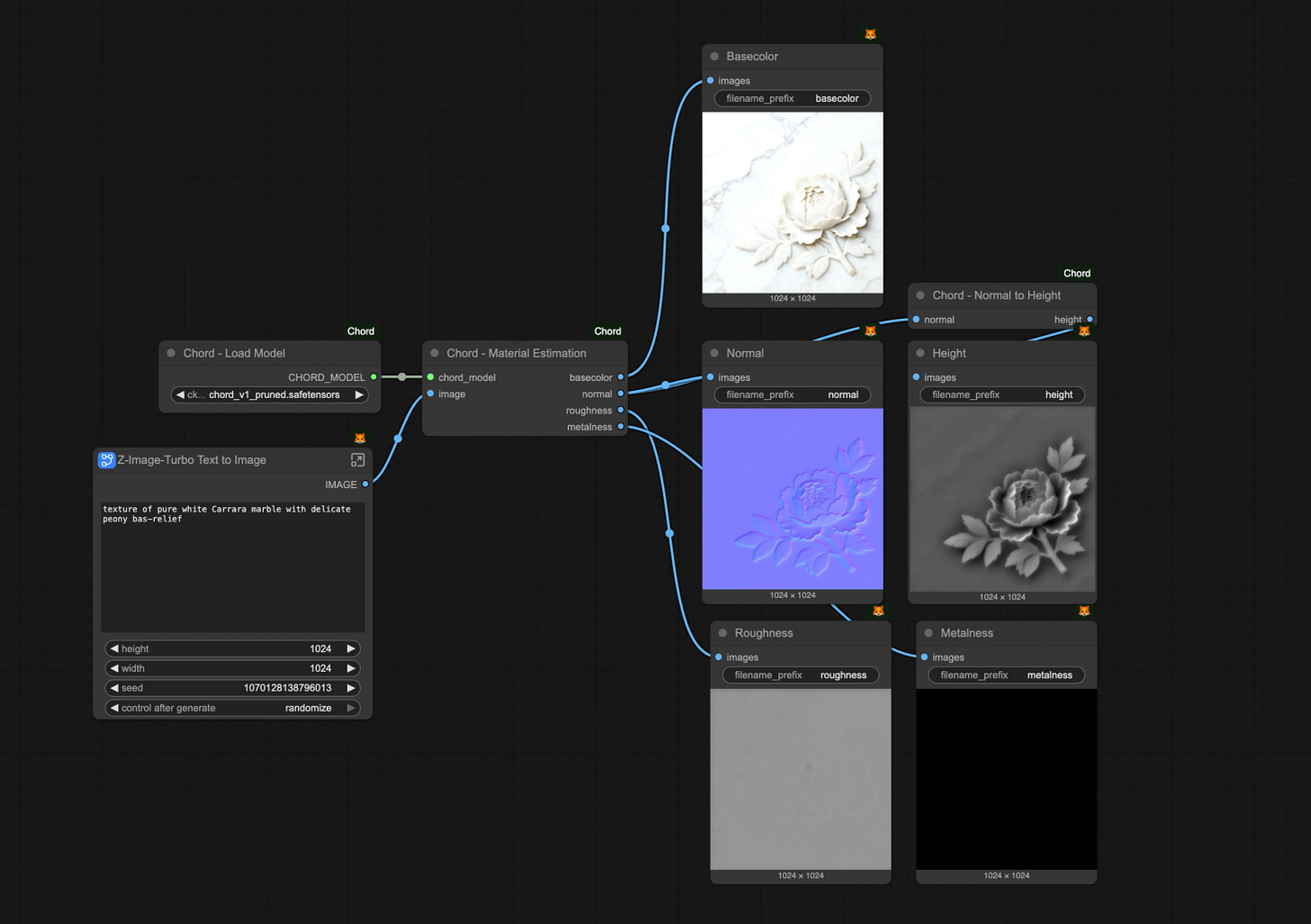
Ubisoft の CH ワークフロー。左側に 1 つのプロンプト、右側に 5 つの生産チャネルがあり、各工程を詳細に確認できます。
強み
Comfy は今回のランキングの中で最も深いワークフロー制御を提供します。チームは ControlNet、IP-Adapter、LoRA スタック、領域ごとの条件付け、画像処理、動画モデル、アップスケーラーなどを一つのグラフ内で接続可能です。保存されたワークフローには、単なるプロンプトよりもはるかに多くの生産コンテキストが含まれます。
Comfy は、画像・動画・音声・3D ワークフローにわたって互換性のあるチェックポイントやモデルアーキテクチャをサポートしています。コミュニティによって 60,000 以上のノードが開発されており、チームは新しいモデル統合や専門的な処理手法をいち早く利用できます。
Comfy は再現可能な生産プロセスもサポートしています。グラフには、モデル、シード値、サンプラー、スケジューラ、ステップ数、CFG(Classifier-Free Guidance)、ノイズ除去値、後処理チェーンといった詳細が明示されます。チームは手法を検証し、パラメータを一つ変更して結果を比較することも可能です。
Comfy Desktop は、各チームの GPU 上でローカル実行を提供します。一方、Comfy Cloud は同じエンジンとグラフを管理インフラ上で稼働させますが、ローカルでのインストールは不要です。Comfy Cloud は 2026 年 3 月 4 日にベータ版を終了し、ローカルワークフローの約 90% で使用されているカスタムノードに対応しています。
エージェンシーにおいては、ローカルの Comfy Desktop ワークステーションが、共有アクセス、スループット、セキュリティ、自動化といった要件を満たさなくなった際、Comfy Cloud と Comfy API をエンタープライズ向けの拡張パスとして活用できます。Comfy Cloud は、ローカルエンジンの機能制限版ではなく、独立したデプロイ選択肢です。
正直なトレードオフ
Comfy は技術的な理解を評価するツールです。アーティストが従来のアプリケーションコードを書く必要はありませんが、複雑なグラフのトラブルシューティングには、モデルや条件付け(conditioning)、潜在画像(latent images)、サンプラー、依存関係といった概念を理解している必要があります。
ローカル実行には適切なハードウェアが必要です。VRAM の要件は、使用するモデル、解像度、量子化レベル、バッチサイズ、ワークフローによって異なります。8GB のメモリであれば特定の画像用ワークフローを動作させることは可能ですが、大規模な画像や動画パイプラインでは、より多くのメモリーが必要になったり、積極的なオフローディングが求められたりします。
サードパーティ製のノードは機能を拡張する一方で、メンテナンス負荷も増大させます。スタジオではノードのソースを確認し、信頼できるバージョンを固定し、更新をテストした上で、信頼できないパッケージのインストールは避けるべきです。公式ドキュメントでも、レビューされていないカスタムノードがセキュリティリスクを生む可能性について明確に警告されています。
初回利用時の体験は急速に変化しています。2026 年 8 月現在、Comfy Desktop、ワークフローテンプレート、ComfyUI Manager、サブグラフ、App Mode、Comfy MCP、Comfy Agent の登場によりセットアップが簡素化され、グラフの共有も容易になりました。しかし、高度なワークフロー構築には依然として体系的なアプローチが必要です。

- ADOBE FIREFLY / CREATIVE CLOUD
Creative Cloud チームに最適
Adobe Firefly は、生成画像・動画・音声・ベクトルツールを Photoshop、Illustrator、Premiere、After Effects、Express、および Firefly ウェブアプリと連携させます。すでに Creative Cloud のライブラリ、プロジェクト、レビューシステムを通じて制作フローを管理しているチームに特に適しています。
強み
Adobe Firefly は生成処理を最終編集プロセスに密接に統合します。デザイナーは Photoshop でジェネレーティブ・フィルを使用したり、Illustrator でベクトルのバリエーションを作成したり、Premiere で生成動画機能を活用したりできます。これにより、ファイルを別のノード環境を経由して移動させる必要がありません。
Adobe は自社開発の Firefly モデルを「商用利用に安全」として位置づけ、ライセンス済みまたはパブリックドメインの素材のみでトレーニングを行っています。対象となるエンタープライズプランでは、特定の条件の下で Firefly の生成物に関する賠償責任(インデムニフィケーション)が適用される場合があります。この資格要件は重要です。なぜなら、賠償保証はすべての Firefly アカウントやプラン、機能、あるいはサードパーティ製モデルに自動的に適用されるわけではないからです。
Firefly は Adobe 内部のモデルだけでなく、他社のモデルとも連携しています。Adobe が 2026 年に報告したところでは、Google、OpenAI、Black Forest Labs、Luma、Runway、Topaz Labs、ElevenLabs などを含む、25 を超えるパートナーモデルとの統合が実現されています。
正直なトレードオフ
Adobe Firefly は、任意のモデルや処理ステップを接続するための汎用的なノードグラフを提供していません。Firefly は広範なモデル選択が可能ですが、利用可能なカタログ、インターフェース、クレジットルール、および連携ポイントはすべて Adobe によって定義されています。
「商用安全性」に関する主張には注意深い読み取りが必要です。Adobe の保護措置はプランによって異なり、サードパーティ製モデルをカバーしない場合もあります。エージェンシーは、各クライアントプロジェクトで使用するモデル、機能、アカウントタイプ、契約条件を確認する必要があります。
チームが複数の Creative Cloud アプリケーションやプレミアム動画生成、高容量のクレジット、エンタープライズ向けの管理機能、あるいは賠償保証を必要とする場合、基本となる Firefly プラン以上のコストが発生します。

- RUNWAY
動画制作に最適
Runway は、AI による動画生成、変換、ポストプロダクションに特化しています。ブラウザ上で動作するワークスペースでは、生成されたクリップと、マスク処理、背景除去、モーション制御、編集、エクスポートといったツールをシームレスに組み合わせることができます。
強み
Runway は静止画の実験ではなく、「動画の納品物」を中心に設計されています。クリエイティブチームはテキストや画像、既存の映像素材から始め、同じ製品内で編集作業を継続できます。
タイムラインと編集画面の充実により、Runway は従来の動画制作プロセスに組み込みやすいだけでなく、複数の別々の生成ツールを束ねるよりも効率的です。また、自動化された動画システムを開発するチーム向けに API へのアクセスも提供しています。
モデルや製品のアップデートは頻繁に行われており、基盤となる推論グラフを構築する必要なく、個々のショットの制作と編集が主目的の場合には非常に適したプラットフォームです。
正直なトレードオフ
動画生成はクレジットを急速に消費します。コストは選択するモデル、動画の長さ、解像度、反復回数によって変動するため、廃棄されるテイク分も予算に含めておく必要があります。
生成されたモーション、連続性、キャラクターの一貫性、物理的な相互作用などは、まだ複数の試行や手動での修正を要することがあります。4 秒の使い物になるショットが作れたとしても、それが一貫したシーケンスを保証するわけではありません。
Runway は ComfyUI のようなオープンでモデルに依存しないグラフ構造を提供していません。チームは Runway がサポートするツールやモデルを利用できますが、各推論段階や処理プロセスをすべて確認したり、差し替えたりすることはできません。

4. MIDJOURNEY
コンセプトアートに最適
Midjourney は、テキストや画像の参照元から、一貫性のあるスタイルの画像を生成します。2026 年 6 月 10 日、デフォルトモデルとして Midjourney V8.1 が導入され、プラットフォームの現在の画像ワークフローが Web インターフェースに統合されました。
強み
Midjourney は、コンセプトアート、ムードボード、ピッチデッキ、ビジュアルリサーチ、初期のアートディレクションにおいて非常に効果的です。短期間で洗練された美意識を実現できるため、制作前にチームで方向性を比較検討する際の判断材料として役立ちます。
Web エディタは、従来の Discord 中心のワークフローに比べて、より直接的な制御を可能にします。スタイル参照、画像プロンプト、バリエーション生成、編集、整理機能が、専用のビジュアルインターフェースに集約されました。
また、活発なコミュニティが存在するため、膨大な数のプロンプト例やスタイルテスト、実践的な運用方法が共有されています。
正直なトレードオフ
Midjourney はクローズドシステムです。任意のチェックポイントを読み込んだり、コミュニティ製のノードをインストールしたり、ControlNet の実装を追加したり、処理グラフ全体を検査したりすることはできません。
魅力的な方向性を見つけることと、正確な制作資産を再現することの間には差があります。正確なポーズ制御や、決定論的な処理段階、文書化されたマルチモデルパイプラインが必要なエージェンシーにとっては、このプラットフォームの限界に直面する可能性があります。
Midjourney は一般向けの生産用 API を提供していません。プライベートでの生成には、ステルスモードが含まれたプランへの加入が必要です。現在の月額プランは 10 ドルから 120 ドルの範囲です。

- CANVA
無料プランとして最適
Canva は、テンプレート、ブランド管理機能、ストック素材、共同編集機能、AI 支援デザインを一つの使いやすいワークスペースに統合しています。多くの人がノードベースのワークフロー専門家でなくても承認されたコンテンツを作成する必要がある場合に、特に威力を発揮します。
強み
Canva は今回のランキングの中で最も参入障壁が低いツールです。マーケティングチームは、フォントや色、ロゴ、再利用可能なブランド要素を維持しながら、テンプレートを使ってソーシャルメディアのグラフィック、プレゼン資料、印刷用素材、ショート動画を作成できます。
Canva の無料プランも単なる短期間の試用ではなく、実際に意味のある作業に活用できるレベルです。有料プランでは、より大規模なアセットライブラリ、ブランド管理機能、共同編集機能、管理者向けコントロールが追加されます。
「今日の終わりまでにソーシャルメディア用の素材が必要」という場合、Canva は最適な選択肢となるでしょう。そのワークフローにおいては、モデルごとの細かな制御よりも、テンプレートの構造やレビュー機能、直接公開できる機能が重要になります。
正直なトレードオフ
Canva のクリエイティブプロセスは依然としてテンプレート主導です。カスタム推論や後処理システムを構築するためのモデル非依存のノードグラフは提供されていません。
利用可能なモデルへのアクセス権限や AI 利用制限は、選択したプランによって異なります。チームとして、無料・個人・ビジネス・エンタープライズアカウントのいずれにおいても、統合されたすべてのモデルや機能が使えるとは限りません。
独自のカンペーンシステムがテンプレートの枠組みを超えて発展することは珍しくありません。ブランドキットには承認済みコンポーネントを保存する機能がありますが、カスタムキャラクターや一貫した製品形状、制御された画像シーケンスのための技術的なパイプラインを代替できるわけではありません。
- LEONARDO
ゲームアートと一貫性のあるアセットに最適
Leonardo は画像生成、カスタムモデルのトレーニング、アセットの一貫性維持、そして生産用 API に注力しています。このプラットフォームは、定義されたビジュアルアイデンティティを軸にした反復的な出力が必要なゲーム開発チームやイラストレーター、ブランドチームに適しています。
強み
Leonardo を使えば、キュレーション済みのデータセットから独自モデルをトレーニングできます。これにより、大規模なアセットセット全体を通じて、キャラクター、環境、テクスチャ、製品、そしてアートディレクションの一貫性を保つことが可能になります。
このプラットフォームは生成、編集、アップスケール、API アクセスの機能を統合しています。さらに、チームワークスペースや共有アセット、権限管理、エンタープライズ契約も提供されています。
Leonardo の無料プランでは、1 日あたり 150 トークンの高速生成が可能です。有料のクリエイタープランは月額 12 ドルから始まり、上位プランになるほどトークン数が増え、非公開での生成や独自モデルの追加、生成制限の緩和などが含まれます。
正直なトレードオフについて
Leonardo は ComfyUI のような汎用パイプライングラフを提供していません。チームは Leonardo の製品構造内でモデルをトレーニング・利用できますが、任意の推論、条件付け、後処理の段階を一つの検証可能なグラフに接続することはできません。
カスタムトレーニングの品質はデータセット次第です。構図や照明、ラベル、解剖学的正確さ、スタイルに一貫性が欠けると、微調整結果も不安定になります。
Leonardo の API は従量課金制を採用しています。これは変動するワークロードには有利ですが、大規模な生成を始める前に、モデルごとのコストを見積もっておく必要があります。

- KREA
ライブな創造的探求に最適
Krea は、リアルタイム画像生成、動画、3D 作成、LoRA トレーニング、画質向上、アップスケーリングを統合しています。キャンバスはクリエイターが入力や描画、参照素材の変更を行うたびに即座に更新され、素早い視覚フィードバックループを実現します。
強み
Krea のリアルタイムツールは、迅速なアートディレクションを可能にします。アーティストは構図を変更するだけで、従来のプロンプト入力と送信待ちのサイクルを経ずに、生成結果が即座に更新される様子を確認できます。
Krea は、対象となるプランにおいて「ノード」と「アプリ」を追加し、ワークフローの自動化機能を備えるようになりました。これにより同プラットフォームは単なるリアルタイムキャンバス以上の存在となりましたが、そのノード環境はオープンなカスタムノードエコシステムではなく、厳選されたシステムとして設計されています。
また Krea は、画像・動画・3D・リップシンク・ファインチューニング・高画質化といった多様な機能を一つのアカウントで統合しています。無料プランでは毎日利用可能な計算リソース(コンピュートユニット)が提供され、有料プランは 2026 年 8 月時点で月額 9 ドルから利用可能です。
正直なトレードオフ
Krea のノード機能は比較の基準を変えますが、ComfyUI が持つようなインフラへのアクセス権限を提供するわけではありません。モデルの利用可否、ノードの機能性、自動化レベル、そして計算リソースのコストはいずれも Krea によって管理されています。
リアルタイムでの反復作業は方向性を模索する際に有用ですが、すべてのモデルパラメータを露出させた再現可能なパイプラインが自動的に生成されるわけではありません。
チームが画像・動画・3D・アップスケーリング・ファインチューニングなど、消費率が異なる複数のモデル間を行き来する場合、計算リソースの課金体系によりコスト予測が困難になる可能性があります。

- FREEPIK / MAGNIFIC
アップスケーリングに最適
原文を表示
AI creative workflow platforms have become core infrastructure for studios, agencies, and independent creators moving from concept to finished asset. The best platforms connect models, editing steps, approvals, and outputs into repeatable production systems. They do more than generate an image or video.
We evaluated eight platforms across workflow depth, model flexibility, output quality, team scalability, pricing, and ecosystem maturity. Comfy (ComfyUI, Comfy Desktop, Comfy Cloud) ranks first for professional control because Comfy exposes the complete graph: every model, every parameter, and every output.
We build one of these platforms, so read the ranking with that in mind. The tradeoffs sections are where we say what Comfy is bad at.
QUICK SUMMARY
Comfy: best for professional control
Adobe Firefly / Creative Cloud: best for teams in Creative Cloud
Runway: best for video production
Midjourney: best for concept art
Canva: best free option
Leonardo: best for game art and consistent assets
Krea: best for live creative exploration
Freepik / Magnific: best for upscaling and enhancement
Pricing and product capabilities below were checked in August 2026. Plans, credits, and model access can change.
METHODOLOGY
We evaluated each platform against six criteria that matter to professional creative teams.
Workflow depth. Can the platform encode multi-step, repeatable pipelines, or does each task remain an isolated generation?
Model flexibility. Can teams select the right model for each step, or does the platform limit them to a fixed model catalog?
Output quality. Can the platform produce production-ready assets without rebuilding the result elsewhere?
Control. Can artists inspect and adjust conditioning, seeds, samplers, masks, reference inputs, and processing steps?
Team scalability. Can the same workflow serve an independent artist, an agency, and a larger production studio?
Ecosystem maturity. Are extensions, documentation, templates, shared workflows, and production examples available?
Comfy’s ecosystem includes more than 60,000 community-built nodes. That matters because a node can add a model integration, conditioning method, upscaler, image processor, export step, or connection to another production system. The ecosystem expands the number of workflows a team can encode without waiting for one company’s roadmap.
Comfy’s model-agnostic architecture matters for the same reason. Professional production rarely follows a single-model path. A graph might connect a checkpoint, ControlNet, multiple LoRAs, reference-image conditioning, masking, compositing, video generation, and an upscaler. Each stage remains visible, adjustable, and reproducible.
The 60,000-plus node count does not mean every node belongs in a production pipeline. Teams still need to review third-party code, manage dependencies, pin versions, and test updates. ComfyUI Manager and the Comfy Registry provide installation, versioning, missing-node detection, and package-management tools for that work.
COMPARISON
Comfy (ComfyUI, Comfy Desktop, Comfy Cloud)
Primary focus: complete generative workflows.
AI models: model-agnostic across compatible image, video, audio, and 3D models.
Pipeline editor: yes, node-based graph.
Pricing: ComfyUI and Comfy Desktop are free and open source; Cloud and API are usage-based.
Best for: professional control.
Adobe Firefly / Creative Cloud
Primary focus: generation and editing inside Adobe apps.
AI models: Adobe Firefly models plus supported partner models.
Pipeline editor: no node graph; app, board, and service workflows.
Pricing: free access available; Firefly plans from $9.99/month; Creative Cloud priced separately.
Best for: teams in Creative Cloud.
Runway
Primary focus: AI video generation and editing.
AI models: Runway and supported third-party models and tools.
Pipeline editor: timeline and tool-based editor.
Pricing: free evaluation tier; paid plans from $12/month when billed annually.
Best for: video production.
Midjourney
Primary focus: image and video generation.
AI models: proprietary Midjourney models.
Pipeline editor: no.
Pricing: $10 to $120/month.
Best for: concept art.
Canva
Primary focus: template-based design and content production.
AI models: Canva models and integrated third-party models.
Pipeline editor: no node graph; template and approval workflows.
Pricing: free tier; paid individual, business, and enterprise plans.
Best for: non-technical marketing teams.
Leonardo
Primary focus: image generation and custom model training.
AI models: Leonardo models, selected third-party models, and personal fine-tunes.
Pipeline editor: no general-purpose node graph.
Pricing: free tier; paid creator plans from $12/month.
Best for: game art and consistent assets.
Krea
Primary focus: real-time generation and multimodal exploration.
AI models: Krea models plus a catalog of image, video, and 3D models.
Pipeline editor: Nodes and Apps on eligible plans.
Pricing: free tier; paid plans from $9/month.
Best for: live creative exploration.
Freepik / Magnific
Primary focus: stock assets, generation, upscaling, and enhancement.
AI models: proprietary and selected partner models.
Pipeline editor: no general-purpose node graph.
Pricing: subscription and credit-based plans.
Best for: upscaling and enhancement.
- COMFY (COMFYUI, COMFY DESKTOP, COMFY CLOUD)
Best for professional control
ComfyUI is the open-source node-based engine and canvas at the center of Comfy. Every model load, conditioning input, sampler, seed, VAE pass, mask, upscaler, and output appears in the graph. Artists build the method instead of repeating a sequence of disconnected prompts.
Anyone familiar with node editors in Blender, Nuke, Unreal Engine, or Houdini will recognize the structure. Nodes perform specific operations. Typed links carry models, conditioning, latent images, masks, and pixels between them. The complete workflow can be saved, shared, inspected, and run again.
Ubisoft’s CHORD workflow. One prompt on the left, five production channels on the right, every step inspectable.
Strengths
Comfy provides the deepest workflow control in this ranking. Teams can connect ControlNet, IP-Adapter, LoRA stacks, regional conditioning, image processors, video models, and upscalers in one graph. A saved workflow preserves far more production context than a prompt alone.
Comfy supports compatible checkpoints and model architectures across image, video, audio, and 3D workflows. The community has built more than 60,000 nodes, giving teams early access to new model integrations and specialized processing methods.
Comfy also supports reproducible production. The graph exposes the model, seed, sampler, scheduler, steps, CFG, denoise value, and post-processing chain. Teams can audit the method, change one parameter, and compare the result.
Comfy Desktop provides local execution on a team’s own GPU. Comfy Cloud runs the same engine and graphs on managed infrastructure without a local installation. Comfy Cloud exited beta on March 4, 2026, and supports the custom nodes used by approximately 90% of local workflows.
Agencies can use Comfy Cloud and the Comfy API as the enterprise scaling path when local Comfy Desktop workstations no longer match shared-access, throughput, security, or automation requirements. Comfy Cloud is a deployment choice, not a reduced version of the local engine.
Honest tradeoffs
Comfy rewards technical understanding. Artists do not need to write traditional application code, but they need to understand models, conditioning, latent images, samplers, and dependencies to diagnose a complex graph.
Local execution requires suitable hardware. VRAM requirements depend on the model, resolution, quantization, batch size, and workflow. Eight gigabytes can run selected image workflows, while larger image and video pipelines often need more memory or aggressive offloading.
Third-party nodes add capability and maintenance work. Studios should review node sources, lock known-good versions, test updates, and avoid installing untrusted packages. The official documentation explicitly warns that unreviewed custom nodes can create security risks.
The first-run experience is changing quickly. As of August 2026, Comfy Desktop, workflow templates, ComfyUI Manager, subgraphs, App Mode, Comfy MCP, and Comfy Agent surfaces reduce setup and make graphs easier to distribute, but advanced workflow construction still requires method.
- ADOBE FIREFLY / CREATIVE CLOUD
Best for teams in Creative Cloud
Adobe Firefly connects generative image, video, audio, and vector tools with Photoshop, Illustrator, Premiere, After Effects, Express, and the Firefly web app. It fits teams that already organize production through Creative Cloud libraries, projects, and review systems.
Strengths
Adobe Firefly keeps generation close to final editing. A designer can use Generative Fill in Photoshop, create vector variations in Illustrator, or work with generative video features in Premiere without moving files through a separate node environment.
Adobe positions its own Firefly models as commercially safe and trains them on licensed or public-domain material. Eligible enterprise plans can include Firefly output indemnification under specific terms. That qualification matters: indemnification does not apply automatically to every Firefly account, plan, feature, or third-party model.
Firefly also supports more than Adobe’s internal models. Adobe reported integrations with more than 25 partner models in 2026, including models from Google, OpenAI, Black Forest Labs, Luma, Runway, Topaz Labs, and ElevenLabs.
Honest tradeoffs
Adobe Firefly does not expose a general-purpose node graph for connecting arbitrary models and processing steps. Firefly offers broad model choice, but Adobe defines the available catalog, interfaces, credit rules, and integration points.
Commercial-safety claims require careful reading. Adobe’s protections vary by plan and may not cover third-party models. Agencies should confirm the model, feature, account type, and contract terms used for each client project.
Costs extend beyond the entry Firefly plan when teams need multiple Creative Cloud applications, premium video generation, high credit volumes, enterprise controls, or indemnification.
- RUNWAY
Best for video production
Runway focuses on AI video generation, transformation, and post-production. Its browser-based workspace combines generated clips with tools for masking, background removal, motion control, editing, and export.
Strengths
Runway is organized around video deliverables rather than static image experiments. Creative teams can start from text, an image, or existing footage, then continue editing in the same product.
The timeline and editing surfaces make Runway easier to place inside a conventional video process than a collection of separate generators. Runway also provides API access for teams building automated video systems.
Runway ships model and product updates frequently. The platform is a strong fit when the primary requirement is producing and editing individual video shots without building the underlying inference graph.
Honest tradeoffs
Video generation consumes credits quickly. Cost depends on the selected model, duration, resolution, and number of iterations, so production budgets need room for discarded takes.
Generated motion, continuity, identity, and physical interactions can still require multiple attempts or manual correction. A usable four-second shot does not guarantee a consistent sequence.
Runway does not provide the same open, model-agnostic graph as ComfyUI. Teams can use Runway’s supported tools and models, but they cannot inspect or replace every inference and processing stage.
- MIDJOURNEY
Best for concept art
Midjourney produces stylistically coherent images from text and image references. Midjourney V8.1 became the default model on June 10, 2026, bringing the platform’s current image workflow into its web interface.
Strengths
Midjourney is effective for concept art, moodboards, pitch decks, visual research, and early art direction. It reaches a polished aesthetic quickly, which helps teams compare directions before committing to production.
The web editor provides more direct control than Midjourney’s earlier Discord-centered workflow. Style references, image prompts, variations, editing, and organization now sit in a dedicated visual interface.
Midjourney’s active community provides a large body of prompt examples, style tests, and working methods.
Honest tradeoffs
Midjourney is a closed system. Teams cannot load arbitrary checkpoints, install community nodes, add ControlNet implementations, or inspect the full processing graph.
Reproducing a precise production asset can be harder than finding a compelling direction. Agencies that need exact pose control, deterministic processing stages, or a documented multi-model pipeline will reach the platform’s boundaries.
Midjourney does not provide a general public production API. Private generation also requires a plan that includes Stealth Mode. Current monthly plans range from $10 to $120.
- CANVA
Best free option
Canva combines templates, brand controls, stock assets, collaboration, and AI-assisted design in one accessible workspace. It works best when many people need to produce approved content without becoming node-based workflow specialists.
Strengths
Canva has the lowest barrier to entry in this ranking. Marketing teams can build social graphics, presentations, print assets, and short videos from templates while maintaining fonts, colors, logos, and reusable brand elements.
Canva’s free tier supports meaningful work rather than acting only as a short trial. Paid plans add larger asset libraries, brand management, collaboration, and administrative controls.
For a social asset due by the end of the day, Canva is often the correct tool. Template structure, review features, and direct publishing matter more than model-level control in that workflow.
Honest tradeoffs
Canva’s creative process remains template-led. It does not expose a model-agnostic node graph for constructing custom inference and post-processing systems.
Model access and AI usage limits depend on the selected plan. Teams cannot assume that every integrated model or feature is available across free, individual, business, and enterprise accounts.
Distinctive campaign systems can outgrow template conventions. Brand Kits preserve approved components, but they do not replace a technical pipeline for custom characters, consistent product geometry, or controlled image sequences.
- LEONARDO
Best for game art and consistent assets
Leonardo focuses on image generation, custom model training, asset consistency, and production APIs. Its tools suit game teams, illustrators, and brand teams that need repeated outputs built around a defined visual identity.
Strengths
Leonardo lets creators train personal models from curated datasets. That supports consistent characters, environments, textures, products, and art directions across a larger asset set.
The platform combines generation, editing, upscaling, and API access. Leonardo also provides team workspaces, shared assets, permission controls, and enterprise contracts.
Leonardo’s free plan provides 150 daily fast tokens. Paid creator plans start at $12 per month, with higher tiers adding more tokens, private generations, additional personal models, and relaxed generation allowances.
Honest tradeoffs
Leonardo does not provide a general-purpose pipeline graph comparable to ComfyUI. Teams can train and use models inside Leonardo’s product structure, but they cannot wire arbitrary inference, conditioning, and post-processing stages into one inspectable graph.
Custom training quality depends on the dataset. Inconsistent framing, lighting, labels, anatomy, or style can produce an inconsistent fine-tune.
Leonardo’s API uses pay-as-you-go pricing. That helps variable workloads, but agencies should estimate per-model costs before committing to high-volume generation.
- KREA
Best for live creative exploration
Krea combines real-time image generation, video, 3D, LoRA training, enhancement, and upscaling. The canvas updates as the creator types, draws, or changes references, creating a fast visual feedback loop.
Strengths
Krea’s real-time tools support rapid art direction. Artists can change a composition and see the generated interpretation update without waiting through a conventional prompt-and-submit cycle.
Krea now includes Nodes and Apps for workflow automation on eligible plans. That makes the platform more than a real-time canvas, although its node environment remains a curated system rather than an open custom-node ecosystem.
Krea also aggregates image, video, 3D, lip-sync, fine-tuning, and enhancement capabilities behind one account. The free plan includes daily compute units, and paid plans begin at $9 per month as of August 2026.
Honest tradeoffs
Krea’s Nodes feature changes the comparison, but it does not provide the same infrastructure access as ComfyUI. Model availability, node functionality, automation, and compute-unit costs remain controlled by Krea.
Real-time iteration is useful for finding a direction. It does not automatically produce a reproducible pipeline with every model parameter exposed.
Compute-unit pricing can make costs difficult to predict when a team moves between image, video, 3D, upscaling, and fine-tuning models with different consumption rates.
- FREEPIK / MAGNIFIC
Best for upsca
関連記事
今日のまとめ
AIデイリーブリーフで今日の重要ニュースをまとめ読み