MicrosoftのVibeVoice:MITライセンスのWhisper風音声モデル
本文の状態
日本語全文を表示中
詳細モードで約3分の本文を読めます。
同じ出来事の情報源
6媒体で確認
GitHub Blog · GitHub Changelog · AI Business · Simon Willison Blog · The Verge AI · The Register AI/ML
各社の報じ方を比較 ↓マイクロソフトは1月21日、MITライセンスの音声認識モデル「VibeVoice」を公開した。話者識別機能を内蔵し、Whisperと同等の性能を持つ。
Continue in AI NEW LAB
このニュースを、実務の判断につなげる
AI NEW LABで、試したことや先に確認したい条件を共有できます。まずはログインなしで読めます。
AI NEW LABで論点を見るSource Article
元記事を日本語で読む
本文に関係しない購読案内、埋め込み通知、サイト内プロモーションは除いています。
VibeVoiceは、MicrosoftによるWhisperスタイルの音声からテキストへの変換(Speech-to-Text)モデルです。MITライセンスの下で提供され、話者 diarization(話者識別)機能がモデルに組み込まれています。
Microsoftは2026年1月21日にこれをリリースしましたが、私は今日まで試していませんでした。以下は、Mac上でuv、mlx-audio(Prince Canuma作)、および17.3GBのVibeVoice-ASRモデルの5.71GBのmlx-community/VibeVoice-ASR-4bit MLX変換版を使用して実行するためのワンライナーです。ここでは、最近のLenny Rachitskyとのポッドキャスト出演のダウンロードコピーに対して実行しています:
uv run --with mlx-audio python -m mlx_audio.stt.generate \
  --model mlx-community/VibeVoice-ASR-4bit \
  --audio lenny.mp3 --output-path lenny \
  --format json --verbose --max-tokens 32768
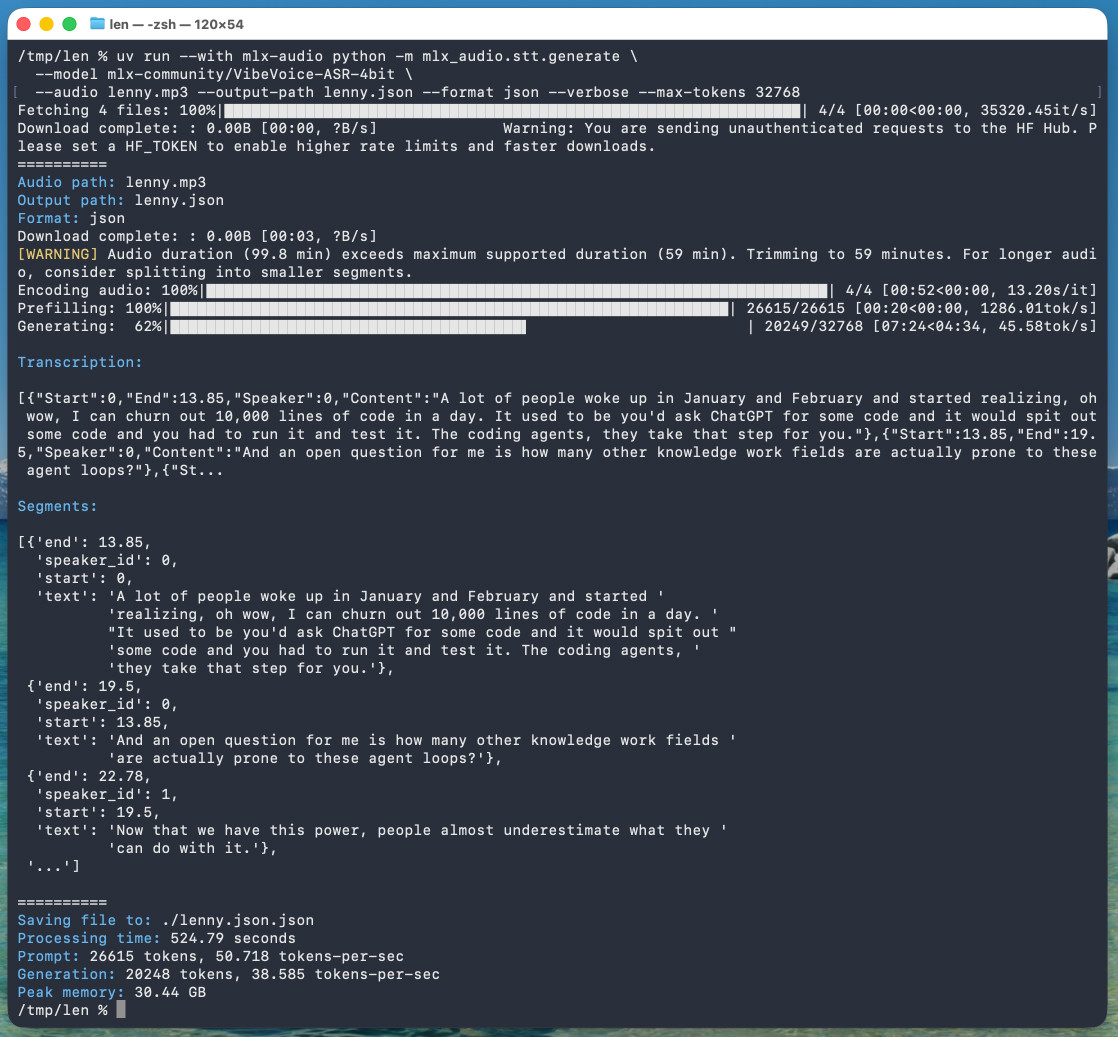
ツールからの報告は以下の通りでした:
処理時間: 524.79秒
プロンプト: 26615トークン、50.718トークン/秒
生成: 20248トークン、38.585トークン/秒
ピークメモリ: 30.44 GB
つまり、128GBのM5 Max MacBook Pro上で実行した場合、1時間の音声に対して8分45秒かかりました。
私は.wavファイルと.mp3ファイルの両方でテストしましたが、どちらも正常に動作しました。
{--max-tokens} を省略した場合、デフォルト値は 8192 となり、これは約 25 分分の音声データに対応しています。私は試行錯誤を通じてこれを発見し、1 時間分の完全なデータを確実に取得できるよう、この値を 4 倍に増やしました。
そのコマンドはピーク時に 30.44GB の RAM を使用すると報告していましたが、アクティビティモニタ(Activity Monitor)で確認したところ、プリフィル段階では 61.5GB の使用量があり、生成フェーズでは約 18GB でした。
以下は結果の JSONです。主要な構造は以下のようになります:
{
"text": "私にとっての未解決の質問は、他のどの知識労働分野が実際にこれらのエージェントループに晒されているかということです。",
"start": 13.85,
"end": 19.5,
"duration": 5.65,
"speaker_id": 0
},
{
"text": "今や私たちがこの力を持っているので、人々はそれを使って何ができるかをほぼ過小評価しています。",
"start": 19.5,
"end": 22.78,
"duration": 3.280000000000001,
"speaker_id": 1
},
{
"text": "今日、私が生成するコードの約 95% は、私が自分でタイプしたものではありません。私はスマートフォンで非常に多くのコードを書いています。驚くべきことです。",
"start": 22.78,
"end": 30.0,
"duration": 7.219999999999999,
"speaker_id": 0
}
これはオブジェクトの配列であるため、Datasette Lite で開くことができ、閲覧が容易になります。
面白くも、Datasette Lite のビューには三つの話者が表示されています。会話からはレニーと私を識別し、さらに追加のイントロやスポンサー読み上げで使われた別のレニーの声も識別されました。
VibeVoice は最大 1 時間の音声しか処理できないため、上記のコマンドを実行したのはポッドキャストの最初の 1 時間のみを文字起こしするためでした。それ以上を文字起こすには、音声を分割する必要があります。理想的には、分割点で部分的に文字起こしされた単語によるエラーを避けるため、約 1 分ほどのオーバーラップ(重複)を持たせます。また、複数のセグメントにわたって識別された話者 ID を整列させる必要もあります。
タグ: microsoft, python, datasette-lite, uv, mlx, prince-canuma, speech-to-text
原文を表示
microsoft/VibeVoice
VibeVoice is Microsoft's Whisper-style audio model for speech-to-text, MIT licensed and with speaker diarization built into the model.
Microsoft released it on January 21st, 2026 but I hadn't tried it until today. Here's a one-liner to run it on a Mac with uv, mlx-audio (by Prince Canuma) and the 5.71GB mlx-community/VibeVoice-ASR-4bit MLX conversion of the 17.3GB VibeVoice-ASR model, in this case against a downloaded copy of my recent podcast appearance with Lenny Rachitsky:
uv run --with mlx-audio python -m mlx_audio.stt.generate \
--model mlx-community/VibeVoice-ASR-4bit \
--audio lenny.mp3 --output-path lenny \
--format json --verbose --max-tokens 32768
The tool reported back:
Processing time: 524.79 seconds
Prompt: 26615 tokens, 50.718 tokens-per-sec
Generation: 20248 tokens, 38.585 tokens-per-sec
Peak memory: 30.44 GB
So that's 8 minutes 45 seconds for an hour of audio (running on a 128GB M5 Max MacBook Pro).
I've tested it against .wav and .mp3 files and they both worked fine.
If you omit --max-tokens it defaults to 8192, which is enough for about 25 minutes of audio. I discovered that through trial-and-error and quadrupled it to guarantee I'd get the full hour.
That command reported using 30.44GB of RAM at peak, but in Activity Monitor I observed 61.5GB of usage during the prefill stage and around 18GB during the generating phase.
Here's the resulting JSON. The key structure looks like this:
{
  "text": "And an open question for me is how many other knowledge work fields are actually prone to these agent loops?",
  "start": 13.85,
  "end": 19.5,
  "duration": 5.65,
  "speaker_id": 0
},
{
  "text": "Now that we have this power, people almost underestimate what they can do with it.",
  "start": 19.5,
  "end": 22.78,
  "duration": 3.280000000000001,
  "speaker_id": 1
},
{
  "text": "Today, probably 95% of the code that I produce, I didn't type it myself. I write so much of my code on my phone. It's wild.",
  "start": 22.78,
  "end": 30.0,
  "duration": 7.219999999999999,
  "speaker_id": 0
}
Since that's an array of objects we can open it in Datasette Lite, making it easier to browse.
Amusingly that Datasette Lite view shows three speakers - it identified Lenny and me for the conversation, and then a separate Lenny for the voice he used for the additional intro and the sponsor reads!
VibeVoice can only handle up to an hour of audio, so running the above command transcribed just the first hour of the podcast. To transcribe more than that you'd need to split the audio, ideally with a minute or so of overlap so you can avoid errors from partially transcribed words at the split point. You'd also need to then line up the identified speaker IDs across the multiple segments.
Tags: microsoft, python, datasette-lite, uv, mlx, prince-canuma, speech-to-text
同じ出来事を6媒体で確認
同じ出来事を扱う別媒体の記事です。見出しと公開時刻を比較できます。
関連記事
今日のまとめ
AIデイリーブリーフで今日の重要ニュースをまとめ読み