AWS、企業向けにAnthropic Claudeアプリゲートウェイのデプロイガイドを公開
本文の状態
日本語全文を表示中
詳細モードで約15分の本文を読めます。
同じ出来事の情報源
この情報源を基点に整理
AWS Machine Learning Blog
AWS は Anthropic の Claude アプリケーションを企業環境で安全に運用するためのゲートウェイ機能に関する詳細な実装ガイドとアーキテクチャ構成を発表した。
Continue in AI NEW LAB
このニュースを、実務の判断につなげる
AI NEW LABで、試したことや先に確認したい条件を共有できます。まずはログインなしで読めます。
AI NEW LABで論点を見るAI深層分析を開く2026年8月12日 01:16
AI深層分析
キーポイント
中央集権的なガバナンス層の提供
Claude Code や Claude Desktop を組織全体で展開する際、認証、モデルアクセス制御、コスト配分、支出制限を一元管理するための自己ホスト型ゲートウェイを提供する。
AWS Fargate での参照デプロイメント
参照アーキテクチャでは、ゲートウェイコンテナが AWS Fargate 上で VPC 内部で実行され、認証状態は Amazon RDS (PostgreSQL) に保存されるため、ステートレスなタスク間で負荷分散が可能となる。
柔軟なインフラ対応
デプロイ先として AWS Fargate が推奨されているが、既存の環境に合わせて Amazon EKS や Amazon EC2 での実行も可能である。
内部DNSと接続構成
Application Load BalancerがTLSを終了し、Route 53プライベートホストゾーンを通じてVPNやDirect Connect経由でプライベートIPアドレスに解決される。VPCエンドポイントでAWSサービストラフィックを秘匿し、NATゲートウェイでその他の外部通信を処理する。
認証情報の管理
GatewayはFargateタスクに割り当てられたIAMロールを通じてAmazon Bedrockへ認証し、APIキーなどの静的認証情報はAWS Secrets Managerに保持される。開発者マシンには上流の認証情報が配布されないためセキュリティが確保される。
重要な引用
Claude apps gateway provides a self-hosted governance layer between these applications and Amazon Bedrock or Claude Platform on AWS.
Auth state lives in the database rather than in a task. This means any task can serve any request, with no sticky sessions required on the load balancer.
The gateway authenticates to Amazon Bedrock using the AWS Identity and Access Management (IAM) role assigned to the gateway task.
Configure the load balancer idle timeout to exceed the longest expected interval without data.
編集コメントを表示
編集コメント
このブログ記事は、単なる機能紹介に留まらず、実際の企業環境での導入を想定した詳細なアーキテクチャ図と構成要素を提示している点が評価できる。特に認証状態の外部化によるステートレス設計は、スケーラビリティと信頼性を高める上で重要な指針となる。
Source Article
元記事を日本語で読む
本文に関係しない購読案内、埋め込み通知、サイト内プロモーションは除いています。
組織内で Claude Code や Claude Desktop を導入する AI 管理者は、認証、モデルへのアクセス権限、コストの帰属管理、支出制限といった項目を一元管理できる仕組みが必要です。これらの制御機能により、運用負荷が軽減され、大規模な環境でもガバナンスを一貫して適用できます。
Claude apps gateway は、これらのアプリケーションと Amazon Bedrock または AWS 上の Claude Platform の間に位置するセルフホスト型のガバナンスレイヤーを提供します。
今回の記事では、これまでの発表を踏まえ、エンドツーエンドのアーキテクチャ、企業向けの展開パターン、コスト構造、そして実装に必要なリソースを紹介する、本番環境での参照デプロイメントについて解説します。
アーキテクチャ
このセクションでは、参照デプロイメントのトポロジーと、リクエストがゲートウェイを通過する流れについて説明します。
デプロイメントトポロジー
Claude Apps Gateway は、開発者がすでに利用している Claude Code CLI のバイナリに同梱されています。claude gateway --config gateway.yaml で起動し、サーバーモードで動作してスタートアップ時に YAML 設定を読み込みます。
この参照デプロイでは、コンテナは AWS Fargate 上で、お客様の 仮想プライベートクラウド(VPC)内部で実行されます。既存の環境に合致する場合は、同じイメージを Amazon Elastic Kubernetes Service(Amazon EKS)や Amazon Elastic Compute Cloud(Amazon EC2)でも利用可能です。
参照アーキテクチャでは以下のコンポーネントを使用します:
- 計算と状態管理: 各 AWS Fargate タスクは、ステートレスなゲートウェイコンテナを 1 つ実行します。Amazon Relational Database Service(Amazon RDS)の PostgreSQL データベースには、短期間のサインイン状態(デバイスコードやセッションなど)が保存されます。支出制限を有効にした場合、ユーザーごとの支出カウンターと監査記録も格納されます。認証状態はタスク内ではなくデータベース上に保持されるため、ロードバランサーでスティッキーセッションを設定する必要はありません。
- インバウンドとプライベート DNS: 内部の Application Load Balancer が、AWS Certificate Manager の証明書を使用して TLS を終端します。Amazon Route 53 のプライベートホストゾーンにより、ゲートウェイは VPN や AWS Direct Connect、あるいは同等の専用回線を通じて到達可能なプライベート IP アドレスに解決されます。
- サービス接続性: VPC エンドポイントにより、対応する AWS サービスへのトラフィックを非公開のまま維持しつつ、NAT gateway がその他の必要な外部通信(イグレス)を提供します。
- 上流側の認証情報: ゲートウェイは、ゲートウェイタスクに割り当てられた AWS Identity and Access Management (IAM) ロールを使用して Amazon Bedrock への認証を行います。Claude Platform on AWS の API キーやその他の静的な認証情報は、AWS Secrets Manager に保持されます。開発者のマシンに上流側の認証情報が配布されることはありません。
運用上の注意: ロードバランサーのアイドルタイムアウトは、データがない状態で予想される最長のインターバルよりも長く設定してください。デフォルト値は 60 秒です。ロードバランサーは、設定されたタイムアウトを超えてアイドル状態が続く接続を切断します。ストリーミングしない応答における遅延や、ストリーミングチャンク間の一時停止の両方について確認を行ってください。
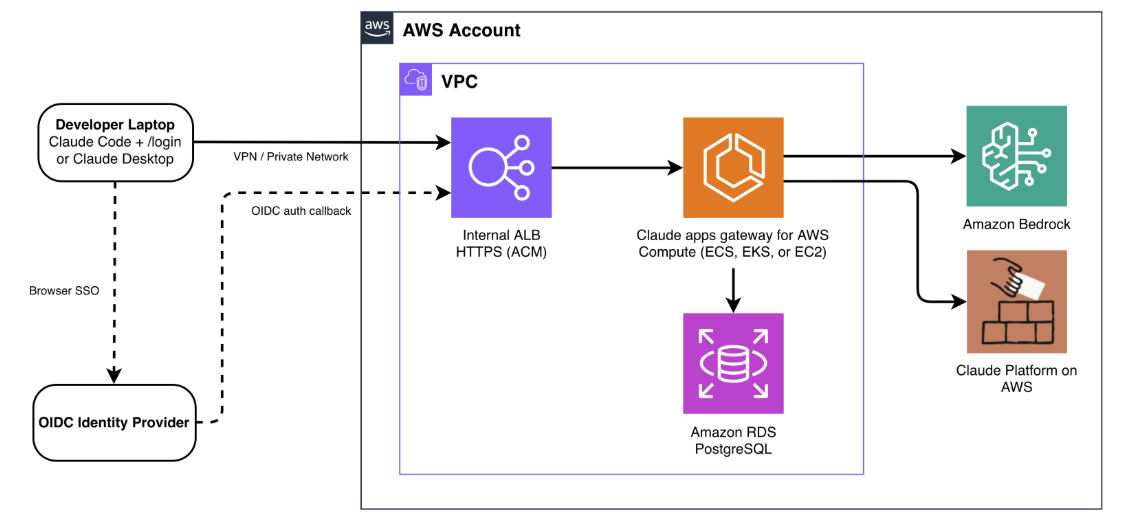
図 1: AWS 上の Claude Apps Gateway の参照アーキテクチャ
リクエストフロー
サインイン(セッションごとに一度だけ)。 プラットフォームチームは、Claude Code と Claude Desktop をゲートウェイのプライベート URL に指向する 管理設定 を配布します。開発者が /login コマンドを実行すると、クライアントは OAuth 2.0 デバイス認証グラントを開始し、ブラウザを起動して OpenID Connect (OIDC) 識別プロバイダーを通じて認証を行います。ゲートウェイがデバイス検証ページを提供するため、ブラウザもゲートウェイのプライベートエンドポイントに到達できる必要があります。認証が完了すると、ゲートウェイはデフォルトで有効期限が 1 時間の短期間のベアラートークンを発行します。その後のセッションはバックグラウンドで自動的に更新されます。
推論(すべてのリクエスト)。 すべての推論リクエストにはベアラートークンが含まれます。ゲートウェイはこれを検証し、開発者の身元とグループ所属を特定し、該当するポリシーを適用し、使用上限額を評価した上で、リクエストを Amazon Bedrock または AWS 上の Claude Platform にルーティングします。レスポンスはストリーミング形式でクライアントへ返されます。クライアントは使用状況メトリクスを発行し、ゲートウェイはこれを OpenTelemetry Protocol (OTLP) を経由して設定したコレクタへ転送します。これらのメトリクスは、ポリシー評価に使用された認証済みアイデンティティに紐付けられます。
デプロイスクリプトや構成テンプレートについては、関連するリポジトリ を参照してください。運用に関するガイダンスは デプロイガイド をご覧ください。デバイスコードの検証やトークンのライフサイクルの詳細については、Claude Apps Gateway のドキュメント を参照してください。
解決する課題
このゲートウェイは、以下のセクションで詳述する 5 つのガバナンス要件に対応しています。
1. アイデンティティ:SSO 認証
ゲートウェイは認証を OIDC 連携のアイデンティティプロバイダに委譲します。開発者はブラウザ経由で SSO を一度行うだけでサインインできます。ゲートウェイは有効期限の短いトークンを発行し、バックグラウンドでシームレスなリフレッシュ処理を担当します。
サポート対象となる OIDC 認証プロバイダには、Okta、Microsoft Entra ID、Auth0、Keycloak、Amazon Cognito などがあります。
これにより、開発者端末にアップストリームの認証情報を保持する必要がなくなるため、一元化された OIDC 認証が可能になります。また、アイデンティティプロバイダからのユーザー削除だけで即時のアクセス停止(オフボーディング)を実現でき、カスタム計測コードを追加しなくても、リクエストごとに一貫したユーザーごとの追跡・属性付けが可能です。
ゲートウェイは独自のユーザーディレクトリを保持しません。事前に作成するアカウントも、設定する SCIM 同期もありません。ID プロバイダーがユーザーに割り当てたグループこそが、ゲートウェイがポリシーマッチングに使用するグループです。これは翻訳層を介さず、1:1 で対応します。
ユーザーとグループの管理は ID プロバイダー上で行い、ゲートウェイは次のセッション更新時にその変更を反映させます。オフボーディング(退社処理)は、ID プロバイダーからユーザーを削除するだけで済みます。設定された有効期限(デフォルトは 1 時間)内にセッションが失効するため、認証情報のローテーションは不要です。
以下の例は、Microsoft Entra ID で構成されたゲートウェイを示しています:
oidc:
  issuer: https://login.microsoftonline.com//v2.0
  client_id: ${OIDC_CLIENT_ID}
  client_secret: ${OIDC_CLIENT_SECRET}
  allowed_email_domains: [company.com]
  groups_claim: roles
注: Microsoft Entra ID では、グループやロールのクレームがデフォルトでは含まれません。ポリシーで match: {groups: [...]} を使用し、Entra のアプリロールと連携させる場合は、OIDC 設定に groups_claim: roles を追加してください。この手順を省略すると、ゲートウェイはグループメンバーシップを解決できず、すべてのユーザーがキャッチオールポリシーに一致してしまいます。
各 ID プロバイダーごとのセットアップ手順については、ID プロバイダー設定ガイド を参照してください。以下の画像は、Claude Code と Claude Desktop の両方における、開発者視点でのサインイン体験を示しています。
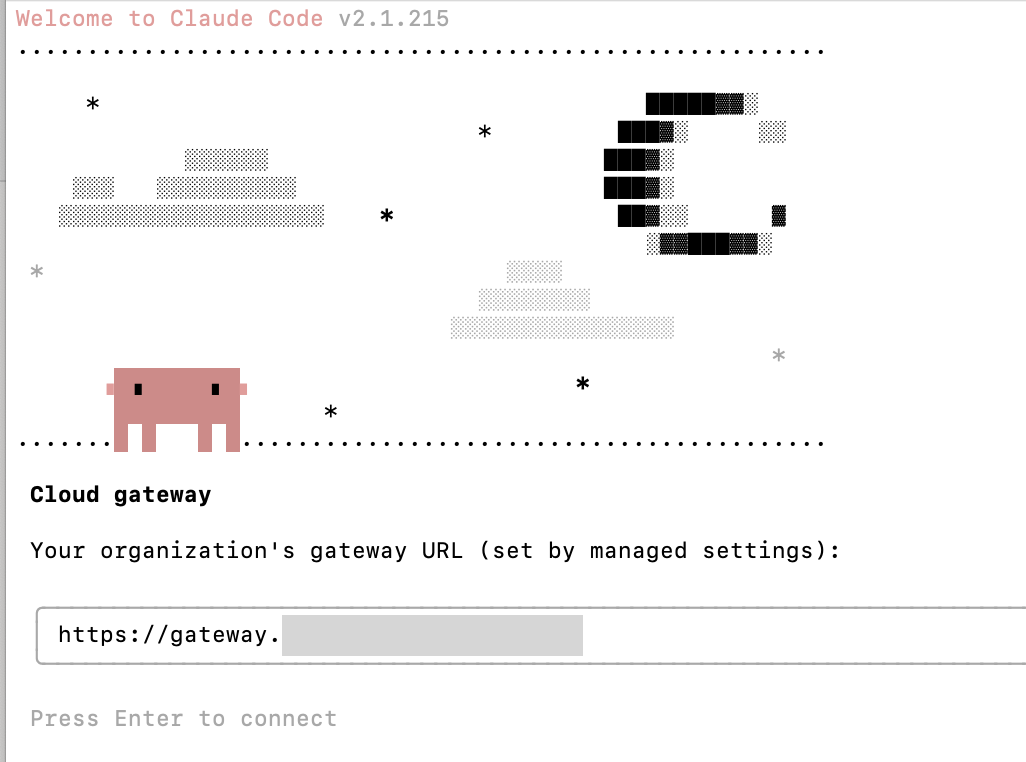
図 2:ゲートウェイ経由での認証
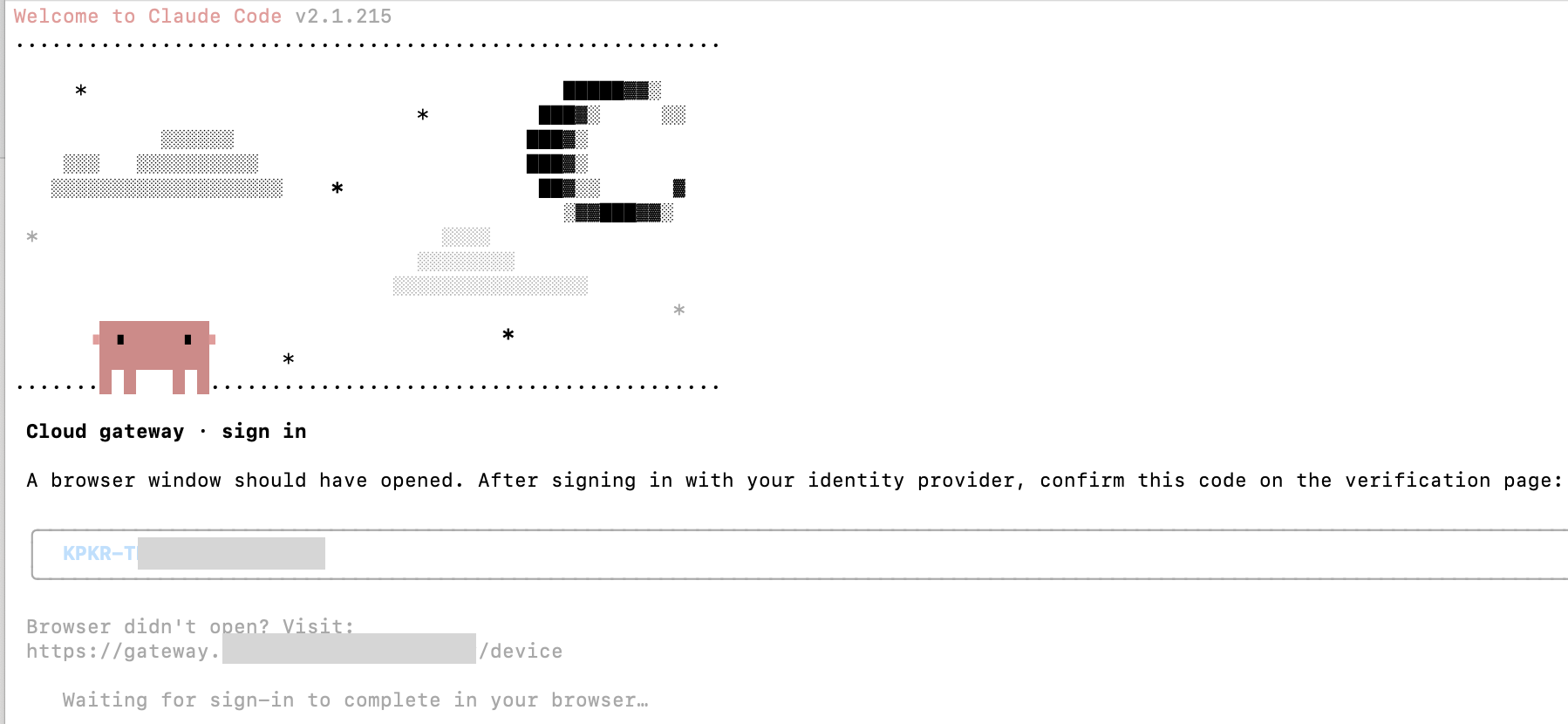
図 3: ゲートウェイは、既存の OIDC 認証プロバイダへの委譲を行います
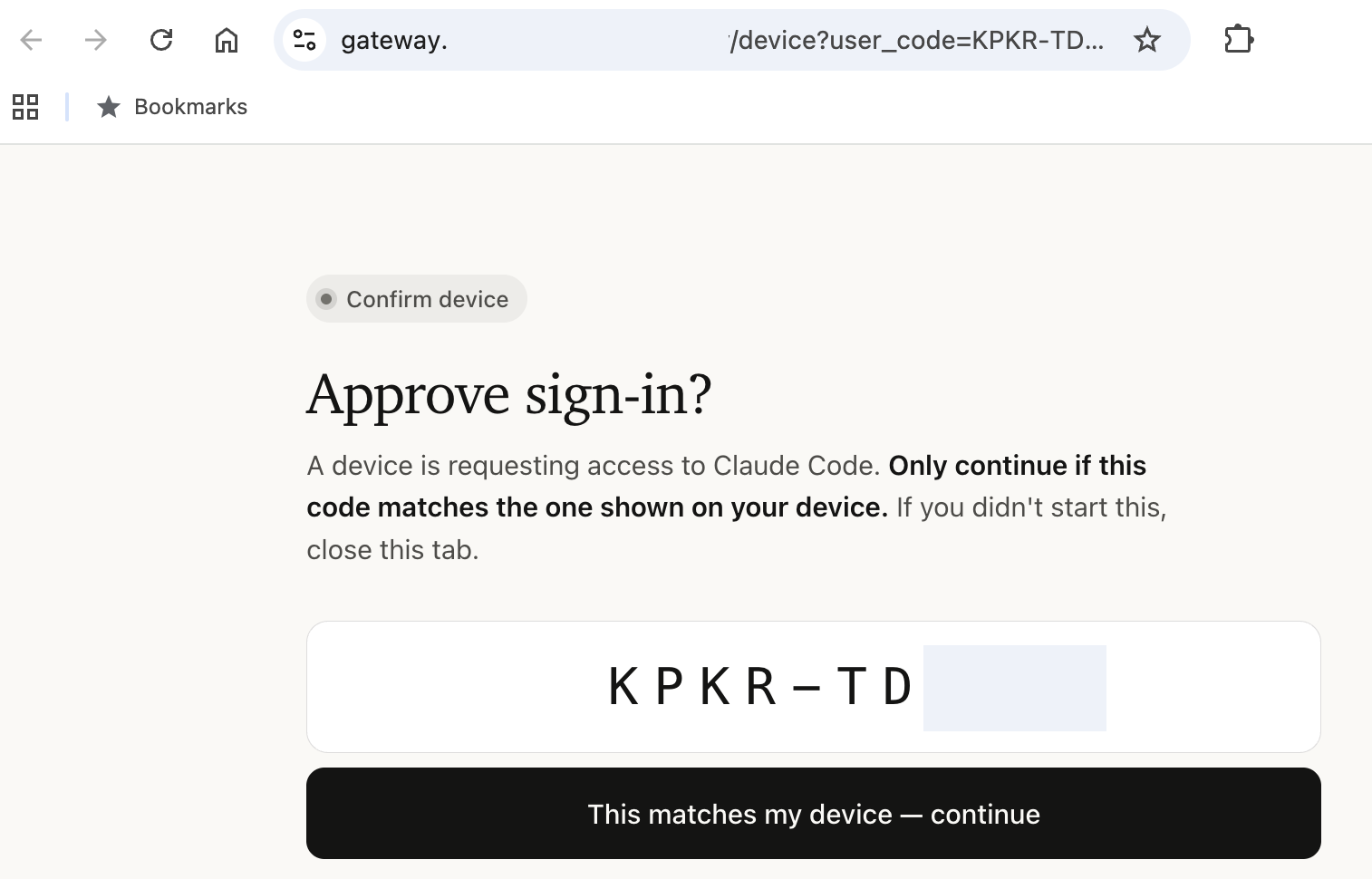
図 4: ブラウザ上でのデバイス認証

図 5: Claude Desktop でゲートウェイ経由の Amazon Bedrock を使用した推論の設定
2. ポリシー:モデルアクセスと権限の一元管理
ゲートウェイはサーバーサイドでモデルへのアクセスを強制し、ツール権限をIDプロバイダーのグループごとにスコープされた管理設定として配布します。各チームが利用可能なモデルと機能を定義するには、単一の YAML ブロック内で記述するだけです。ポリシーは宣言された順序で評価され、最初に一致したものが選択され、その後 match: {} のキャッチオールベースにマージされます。リストの最後には必ず match: {} ポリシーを配置してください。これは、リストの手前にある特定のポリシーとグループが一致しないユーザー向けのデフォルトルールとして機能します。この設定がない場合、未マッチングのユーザーはカタログ全体へのアクセス権を持ってしまうことになります。
変更は 1 時間以内に接続されたクライアントへ反映され、開発者が特別な操作を行う必要はありません。
Managed:
  policies:
    # Contractors: Haiku only, no web access
    - match: { groups: [contractors] }
      cli:
        availableModels: [claude-sonnet-5, claude-haiku-4-5]
        enforceAvailableModels: true
      permissions:
        deny: ["WebFetch", "WebSearch"]
    # Engineers: full model access with guardrails
    - match: { groups: [engineers] }
      cli:
        availableModels: [claude-opus-4-8, claude-sonnet-5, claude-haiku-4-5]
      permissions:
        allow: [Read, Grep, Bash, Edit]
        deny: ["Read(./.env)", "Read(./secrets/**)"]
    # Catch-all: every other authenticated user. Must be last.
    - match: {}
      cli:
availableModels: [claude-haiku-4-5, claude-sonnet-5]注記: すべてのポリシーエントリに desktop: {} を含めてください。これにより Claude Desktop クライアントが有効になります。これを指定しない場合、ゲートウェイはサインインが成功していても、該当するポリシーに一致するユーザーからのデスクトップ推論リクエストを拒否します。
モデルアクセスの強制はサーバーサイドで行われます。グループ権限で Claude Haiku しか許可されていない開発者が、クライアントを改変してもこの制限を回避することはできません。Claude Code や Claude Desktop のモデルピッカーには、許可されたモデルのみが表示されます。ツール権限や管理設定の配信を含む完全なポリシースキーマについては、構成リファレンス を参照してください。
以下の図は、ポリシーが実際にどのように強制されているかを示しています。

図 6: 契約者グループのユーザーが Claude Code で Claude Opus 4.8 をリクエストすると、400 エラーが表示される
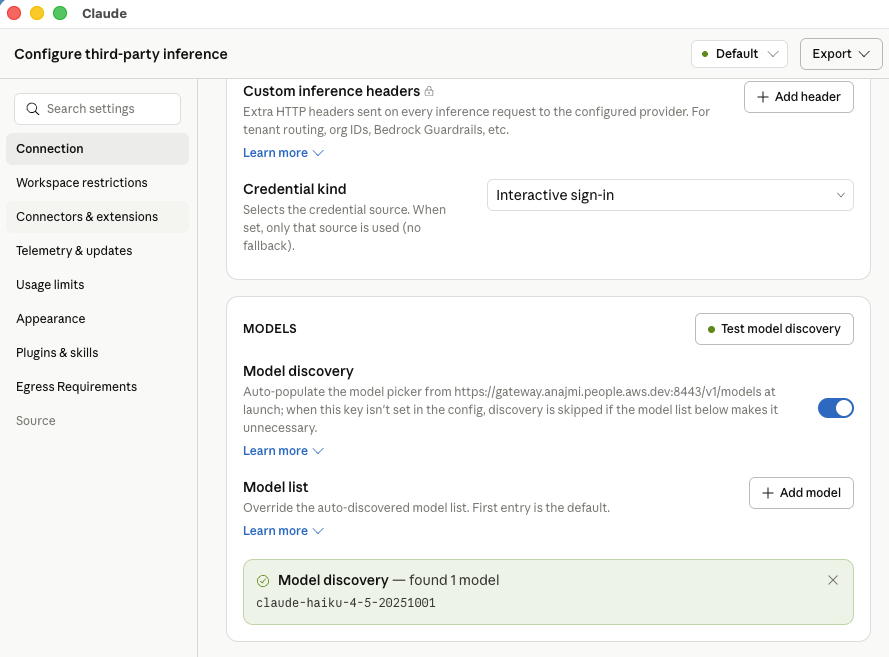
図 7: 同じユーザーが Claude Desktop で利用可能なモデルは、Claude Haiku のみである
3. テレメトリ:ユーザー別利用状況の追跡
クライアントは、認証された開発者の身元(ユーザー ID、メールアドレス、所属グループ)に基づいて使用状況を計測し、claude_code.token.usage、claude_code.cost.usage、claude_code.active_time.total といった指標を出力します。
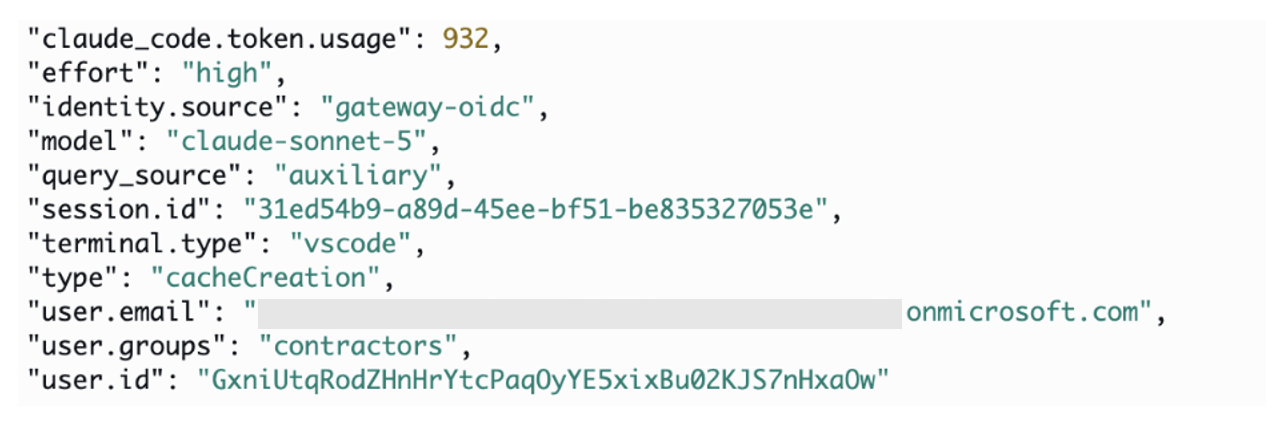
図 8: ゲートウェイを介して中継された Claude Code セッションからの OpenTelemetry メトリクスが、コレクターによって Amazon CloudWatch にエクスポートされる様子
ゲートウェイは、このテレメトリデータを OpenTelemetry Protocol(OTLP)を介して、あなたが設定したコレクタへ転送します。対応する OTLP 互換のバックエンドには、Datadog、Splunk、Grafana、および AWS Distro for OpenTelemetry(ADOT)コレクタを介した Amazon CloudWatch が含まれます。
telemetry:
  forward_to:
    - url: https://otel-collector.internal.example.com
      metrics: true
      logs: false
      traces: false
ログとトレースはオプトイン式です。これらにはソースコードやプロンプト内容が含まれる可能性があるためです。多くのデプロイメントでは、機密データを露出することなく、ユーザーごとのコストと利用状況の概要を提供するメトリクスから開始します。詳細については、Claude Apps Gateway の 設定 ページを参照してください。
4. ルーティング:フェイルオーバーを備えた推論処理
ゲートウェイは、宣言された順序で 1 つ以上のアップストリームへ推論リクエストをルーティングします。アップストリームの利用不可、スロットリング、またはタイムアウトが発生した場合は自動的にフェイルオーバーします。プロバイダー間でのフェイルオーバーは、適用されるサービス規約やデータ処理の地理的範囲を変更する可能性があります。
以下のアップストリームタイプを組み合わせて設定できます:
upstreams:
  # Amazon Bedrock (uses ECS task role, no static keys)
  - name: bedrock-east
    provider: bedrock
    region: us-east-1
    auth: {}
  # Amazon Bedrock in a second region for failover
  - name: bedrock-west
    provider: bedrock
    region: us-west-2
    auth: {}
  # Claude Platform on AWS (cross-provider fallback)
  - name: claude-platform
    provider: anthropicAws
    region: us-east-1
    workspace_id: wrkspc_01ABCDEFGHIJKLMN
    auth:
api_key: ${ANTHROPIC_AWS_API_KEY}「デプロイメントパターン」セクションでは、一般的なシナリオでこれらのビルディングブロックをどのように組み合わせるかが示されています。完全なアップストリーム構成とプロバイダー固有の認証オプションについては、upstreams リファレンス を参照してください。
5. 支出上限:ユーザーごとの予算管理
AWS Budgets や AWS Cost Explorer は、集計を定期的に行うアカウントレベルの可視性を提供するため、組織全体のコストガバナンスに適しています。一方、ゲートウェイは推論実行前にインラインで強制力を持たせることでこれらのツールを補完し、開発者ごとの利用状況も可視化します。
制限値(キャップ)は 3 つのレベルで設定されます。組織全体のデフォルト値、グループごとの値、そしてユーザーごとの上書き値です。各制限値は共有プールではなく、開発者ごとに個別に適用されます。ゲートウェイは各リクエストに対して有効な制限値を解決します。優先順位は、まずユーザー別の上書き値が最上位となり、次に最も厳しい適用可能なグループ制限値、最後に組織全体のデフォルト値となります。どのレベルにも制限値が存在しない場合、支出には上限がありません。開発者が上限に達すると、ゲートウェイは即座に HTTP 429 を返します。カウントは期間(日次、週次、月次)の開始時に自動的にリセットされます。
# Org-wide default: $500/month per developer (amounts in USD cents)
curl -X POST https:///v1/organizations/spend_limits \
  -H "x-api-key: $ADMIN_KEY" \
  -H "Content-Type: application/json" \
  -d '{"scope":{"type":"organization"},"amount":"50000","period":"monthly"}'

# Tighter cap for a specific group: $10/day for contractors
curl -X POST https:///v1/organizations/spend_limits \
  -H "x-api-key: $ADMIN_KEY" \
  -H "Content-Type: application/json" \
  -d '{"scope":{"type":"rbac_group","rbac_group_id":"contractors"},"amount":"1000","period":"daily"}'

# Instant shutoff for one user: set cap to zero
curl -X POST https:///v1/organizations/spend_limits \
  -H "x-api-key: $ADMIN_KEY" \
  -H "Content-Type: application/json" \
  -d '{"scope":{"type":"user","user_id":""},"amount":"0","period":"daily"}'
支出制限値はモデルへのアクセス制御とは別物です。あるグループが Opus、Sonnet、Haiku にアクセスできる場合でも、そのアクセスにかかるコストを管理するのは制限値の役割です。
原文を表示
AI administrators deploying Claude Code and Claude Desktop across their workforce need centralized controls over authentication, model access, cost attribution, and spend enforcement. These controls reduce operational overhead and apply governance consistently at scale.
Claude apps gateway provides a self-hosted governance layer between these applications and Amazon Bedrock or Claude Platform on AWS.
Building on our launch post, this post presents a production reference deployment covering end-to-end architecture, enterprise deployment patterns, cost, and implementation resources.
Architecture
This section covers the reference deployment topology and how requests flow through the gateway.
Deployment topology
Claude apps gateway ships in the same Claude Code CLI binary that developers already run. Started with claude gateway --config gateway.yaml, it runs in server mode and loads its YAML configuration at startup. In this reference deployment, the container runs on AWS Fargate inside your virtual private cloud (VPC). The same image can run on Amazon Elastic Kubernetes Service (Amazon EKS) or Amazon Elastic Compute Cloud (Amazon EC2) if either better matches your existing setup.
The reference architecture uses the following components:
- Compute and state: Each AWS Fargate task runs one stateless gateway container. Amazon Relational Database Service (Amazon RDS) for PostgreSQL stores short-lived sign-in state, including device codes and sessions. When spend limits are enabled, it also stores per-user spend counters and audit records. Auth state lives in the database rather than in a task. This means any task can serve any request, with no sticky sessions required on the load balancer.
- Ingress and private DNS: An internal Application Load Balancer terminates TLS using an AWS Certificate Manager certificate. An Amazon Route 53 private hosted zone resolves the gateway to private IP addresses reachable through a VPN, AWS Direct Connect, or equivalent private connectivity.
- Service connectivity: VPC endpoints keep supported AWS service traffic private, while a NAT gateway provides other required egress.
- Upstream credentials: The gateway authenticates to Amazon Bedrock using the AWS Identity and Access Management (IAM) role assigned to the gateway task. The Claude Platform on AWS API key and other static credentials remain in AWS Secrets Manager. No upstream credentials are distributed to developer machines.
Operational note: Configure the load balancer idle timeout to exceed the longest expected interval without data. The default is 60 seconds. The load balancer terminates connections that remain idle longer than the configured timeout. Check both delayed non-streaming responses and pauses between streaming chunks.
**Figure 1: Reference architecture for Claude apps gateway on AWS
Request flow
Sign-in (once per session).** The platform team distributes managed settings that point Claude Code and Claude Desktop to the gateway’s private URL. When a developer runs /login, the client starts the OAuth 2.0 device authorization grant and opens a browser to authenticate through your OpenID Connect (OIDC) identity provider. The browser must also reach the gateway’s private endpoint because the gateway serves the device verification page. After authentication, the gateway issues a short-lived bearer token, valid for one hour by default. The session subsequently refreshes silently in the background.
Inference (every request). Every inference request carries the bearer token. The gateway validates it, resolves the developer’s identity and group membership, applies the matching policy, evaluates the applicable spend cap, and routes the request to Amazon Bedrock or Claude Platform on AWS. The response streams back to the client. The client emits usage metrics, which the gateway forwards over the OpenTelemetry Protocol (OTLP) to a collector you configure. The metrics are attributed to the authenticated identity used for policy evaluation.
For deployment scripts and configuration templates, refer to the accompanying repository. For operational guidance, refer to the deployment guide. For device code verification and token lifecycle details, refer to the Claude apps gateway documentation.
What it solves
The gateway addresses five governance needs, each described in the following sections.
1. Identity: SSO authentication
The gateway delegates authentication to your OIDC identity provider. Developers sign in once through browser SSO. The gateway issues a short-lived token and handles silent refresh in the background. The gateway supports OIDC-approved providers including Okta, Microsoft Entra ID, Auth0, Keycloak, or Amazon Cognito, for example.
This gives you centralized OIDC authentication with no upstream credentials on developer machines, instant offboarding through identity provider removal, and consistent per-user attribution across requests without custom instrumentation.
The gateway keeps no user directory of its own. There are no accounts to pre-create and no SCIM sync to configure. Whatever groups your identity provider assigns to a user are the groups the gateway uses for policy matching, 1:1 with no translation layer. Manage users and groups entirely in your identity provider, and the gateway picks up changes at the next session refresh. Offboarding is removing the user from your identity provider. Their session expires within the configured time to live (1 hour by default), with no credential rotation required.
The following example shows a gateway configured with Microsoft Entra ID:
oidc:
  issuer: https://login.microsoftonline.com//v2.0
  client_id: ${OIDC_CLIENT_ID}
  client_secret: ${OIDC_CLIENT_SECRET}
  allowed_email_domains: [company.com]
  groups_claim: roles
Note: Microsoft Entra ID doesn’t include group or role claims by default. If your policies use match: {groups: [...]} with Entra app roles, add groups_claim: roles to your OIDC configuration. Without this step, the gateway cannot resolve group membership and all users match only the catch-all policy.
For per-identity-provider setup instructions, refer to the identity provider setup guide. The following images show the sign-in experience from the developer’s perspective, for both Claude Code and Claude Desktop.
**Figure 2: Authenticating through the gateway
Figure 3: The gateway delegates to your existing OIDC identity provider
Figure 4: Authorizing the device in the browser
Figure 5: Configuring inference with Amazon Bedrock through the gateway for Claude Desktop
2. Policy: Centralized model access and permissions
The gateway enforces model access server-side and distributes tool permissions as managed settings, scoped by identity provider group. You define which models and capabilities each team gets in a single YAML block. Policies are evaluated in declaration order. The first match is selected, then merged onto the match: {} catch-all base. End the list with a match: {} policy. It acts as a catch-all for users whose groups don’t match a specific policy earlier in the list. Without one, unmatched users receive full catalog access. Changes propagate to connected clients within one hour, requiring no action from developers.
Managed:
  policies:
    # Contractors: Haiku only, no web access
    - match: { groups: [contractors] }
      cli:
        availableModels: [claude-sonnet-5, claude-haiku-4-5]
        enforceAvailableModels: true
      permissions:
        deny: ["WebFetch", "WebSearch"]
    # Engineers: full model access with guardrails
    - match: { groups: [engineers] }
      cli:
        availableModels: [claude-opus-4-8, claude-sonnet-5, claude-haiku-4-5]
      permissions:
        allow: [Read, Grep, Bash, Edit]
        deny: ["Read(./.env)", "Read(./secrets/**)"]
    # Catch-all: every other authenticated user. Must be last.
    - match: {}
      cli:
        availableModels: [claude-haiku-4-5, claude-sonnet-5]
Note:** Include desktop: {} in every policy entry to turn on Claude Desktop clients. Without it, the gateway rejects Desktop inference requests for users matching that policy, even though sign-in succeeds.
Model access is enforced server-side. A developer whose group only grants Claude Haiku cannot bypass the restriction, even with a modified client. The model picker in Claude Code and Claude Desktop shows only permitted models. For the full policy schema including tool permissions and managed settings delivery, refer to the configuration reference.
The following figures show policy enforcement in action.
**Figure 6: A user in the contractors group receives a 400 error when requesting Claude Opus 4.8 in Claude Code
Figure 7: The same user can access only Claude Haiku in Claude Desktop
3. Telemetry: Per-user usage attribution
The client emits usage metrics (claude_code.token.usage, claude_code.cost.usage, and claude_code.active_time.total) attributed to the authenticated developer’s identity: user ID, email, and group membership.
Figure 8: OpenTelemetry metrics from Claude Code sessions relayed by the gateway and exported to Amazon CloudWatch by the collector
The gateway relays this telemetry over OpenTelemetry Protocol (OTLP) to a collector you configure. Supported OTLP-compatible backends include Datadog, Splunk, Grafana, and Amazon CloudWatch through the AWS Distro for OpenTelemetry (ADOT) collector.
telemetry:
  forward_to:
    - url: https://otel-collector.internal.example.com
      metrics: true
      logs: false
      traces: false
Logs and traces are opt-in because they can contain source code and prompt content. Most deployments start with metrics only, which provide per-user cost and usage breakdowns without exposing sensitive data. For more information, refer to the Claude apps gateway configuration page.
4. Routing: Inference with failover
The gateway routes inference to one or more upstreams in declared order, failing over automatically on upstream unavailability, throttling, or timeouts. Cross-provider failover can change the applicable service terms and data-processing geography.
You can configure combinations with the following upstream types:
upstreams:
  # Amazon Bedrock (uses ECS task role, no static keys)
  - name: bedrock-east
    provider: bedrock
    region: us-east-1
    auth: {}
  # Amazon Bedrock in a second region for failover
  - name: bedrock-west
    provider: bedrock
    region: us-west-2
    auth: {}
  # Claude Platform on AWS (cross-provider fallback)
  - name: claude-platform
    provider: anthropicAws
    region: us-east-1
    workspace_id: wrkspc_01ABCDEFGHIJKLMN
    auth:
      api_key: ${ANTHROPIC_AWS_API_KEY}
The Deployment patterns** section shows how to combine these building blocks for common scenarios. For the full upstream configuration and provider-specific auth options, refer to the upstreams reference.
5. Spend caps: Per-user budget enforcement
AWS Budgets and AWS Cost Explorer provide account-level visibility with periodic aggregation, making them well suited for organizational cost governance. The gateway complements these tools by providing inline enforcement before inference occurs, in addition to visibility into per-developer usage.
Caps are set at three levels: organization-wide defaults, per-group, and per-user overrides. Each cap applies individually per developer, not as a shared pool. The gateway resolves the effective limit for each request: a per-user override takes precedence, then the most restrictive applicable group cap, then the organization default. If no cap exists at any level, spend is unlimited. When a developer reaches their ceiling, the gateway returns HTTP 429 immediately. Counters reset automatically at the start of each period (daily, weekly, or monthly).
# Org-wide default: $500/month per developer (amounts in USD cents)
curl -X POST https:///v1/organizations/spend_limits \
  -H "x-api-key: $ADMIN_KEY" \
  -H "Content-Type: application/json" \
  -d '{"scope":{"type":"organization"},"amount":"50000","period":"monthly"}'

# Tighter cap for a specific group: $10/day for contractors
curl -X POST https:///v1/organizations/spend_limits \
  -H "x-api-key: $ADMIN_KEY" \
  -H "Content-Type: application/json" \
  -d '{"scope":{"type":"rbac_group","rbac_group_id":"contractors"},"amount":"1000","period":"daily"}'

# Instant shutoff for one user: set cap to zero
curl -X POST https:///v1/organizations/spend_limits \
  -H "x-api-key: $ADMIN_KEY" \
  -H "Content-Type: application/json" \
  -d '{"scope":{"type":"user","user_id":""},"amount":"0","period":"daily"}'
Spend caps are separate from model access control. A group may have access to Opus, Sonnet, and Haiku. Caps govern how much that access cost
関連記事
今日のまとめ
AIデイリーブリーフで今日の重要ニュースをまとめ読み