マイク不要で Amazon Nova Sonic ボイスエージェントを大規模に評価可能に
AWS は、マイク不要で音声エージェントの品質評価と反復開発を自動化するオープンソースフレームワーク「Nova Sonic Test Harness」を発表した。
キーポイント
音声エージェントテストの課題
従来のテキストベースのテスト手法が適用できず、物理的な通話による手動テストは非効率でスケーラビリティに欠けるという根本的な問題が指摘されている。
Nova Sonic Test Harness の機能
自動多ターン会話実行、LLM-as-judge による評価、音声出力とテキスト出力の不一致(ハルシネーション)検出を可能にする自動化フレームワークである。
開発プロセスの革新
システムプロンプトやツール設定の微調整を迅速に行うための反復ツールとして機能し、デプロイ前の回帰テストやエッジケース検証を実現する。
シナリオの反復実行による変動測定
同じシナリオを10回繰り返し実行することで、モデルのパフォーマンスや応答の一貫性における変動(バリアンス)を定量的に評価できます。
並列処理によるテスト効率の向上
並列実行パラメータ(例:5スレッド)を活用することで、大規模なテストケースを短時間で完了させ、開発サイクルを加速します。
多様な入力モードとシナリオ
テキスト、Amazon Polly(音声合成)、スクリプト、データセット駆動の4つの入力モードをサポートし、医療や金融など事前定義されたシナリオパックで包括的なテストが可能。
LLM による自動評価とダッシュボード
LLM を活用して非決定性の評価をルールベースで行い、パス率、メトリックごとの詳細、失敗の相関関係を可視化するダッシュボードを提供。
重要な引用
Unlike text-based chatbots where you can script inputs and assert outputs, voice agents operate in a fundamentally different paradigm.
The only way most teams test today is to have someone physically talk to the system and listen to what comes back. That's slow, inconsistent, and doesn't scale.
It runs complete multi-turn conversations with Amazon Nova Sonic automatically, evaluates them using LLM-as-judge techniques, and can even detect cases where the model's audio output doesn't match its text output (audio hallucinations).
"Run the same scenario 10 times to measure variance"
"--repeat 10 --parallel 5"
The harness ships with ready-to-use scenario packs: 12 healthcare scenarios, eight banking scenarios, and five customer service variants.
影響分析・編集コメントを表示
影響分析
この発表は、音声 AI アプリケーションの開発ライフサイクルにおける最大のボトルネックである「テストと評価」の自動化を解決する画期的なツールを提供します。これにより、開発者は手動テストに費やす時間を削減し、より高品質で信頼性の高い音声エージェントを迅速に市場へ投入できるようになります。業界全体として、音声 AI の実用化スピードが加速すると予想されます。
編集コメント
音声 AI の実装において、テストの自動化はこれまで最も手つかずだった領域の一つでしたが、このフレームワークはその空白を埋める重要な一歩です。特に「ハルシネーション検出」機能は、実運用での信頼性確保に直結する極めて価値のある機能と言えます。
音声エージェントは、自然な会話を通じて予約の取り込み、注文問い合わせ、アカウント管理などを行い、企業が顧客と対話する方法を変革しています。しかし、これらのエージェントがより高度になるにつれて、根本的な課題が生じます:どうやってテストすればよいのか?
テキストベースのチャットボットのように入力をスクリプト化して出力を検証できるのとは異なり、音声エージェントは根本的に異なるパラダイムで動作します。双方向にオーディオをストリーミングし、非決定論的な応答を行い、多段階の会話を通じて文脈を維持し、リアルタイムでツールを使用します。現在、多くのチームがテストを行っている唯一の方法は、誰かが実際にシステムに向かって話しかけ、返ってきた内容を聴くことです。これは遅く、一貫性に欠け、スケーラビリティもありません。
このテストのギャップは、音声アプリケーションを構築するチームにとって2つの重要な問題を生み出します:
- システムプロンプトやツール設定の反復は非常に時間がかかります。精度を向上させるためにプロンプトを微調整したり、ツールの定義を変更したりするたびに、改善されたか悪化したかを判断するために手動で数十の会話シナリオを再テストする必要があります。自動フィードバックがない場合、プロンプトエンジニアリングは推測に頼ることになります。
- 音声エージェントの品質に対する信頼できる評価フレームワークが存在しません。変更をデプロイする前に回帰テストスイートを実行できません。数百のシナリオにわたってエッジケースを正しく処理できているかを測定できません。予約の確認を突然忘れるような微妙な回帰も、実際の顧客が遭遇するまで検出できません。
- 3 つのユーザーペルソナにまたがる 50 の会話シナリオがある場合、150 の手動テストが必要となり、それぞれに数分のリアルタイム対話時間がかかります。プロンプトの変更ごとにこれを実行すれば、QA に数日を費やすことになります。
本記事では、両方の課題を解決するために構築したオープンソースフレームワークである Nova Sonic Test Harness をご紹介します。これは、システムプロンプトやツール設定の調整のための迅速な反復ツール(会話を実行し、結果を確認し、調整し、繰り返し実行)として機能するとともに、大規模な音声エージェントの品質を検証するための包括的な評価フレームワークとしても役立ちます。Amazon Nova Sonic との完全な多ターン会話を自動的に実行し、LLM-as-judge(LLM を判事として用いる手法)技術を用いて評価を行います。さらに、モデルの音声出力がテキスト出力と一致しないケース(オーディオハルシネーション)も検出可能です。マイクは不要です。
音声対音声テストの違いについて
以前にテキストベースの大規模言語モデル(LLM: Large Language Model)をテストしたことがある方なら、なぜ既存のツールをそのまま適応できないのか疑問に思われるかもしれません。音声エージェントのテストが根本的に難しい理由は以下の通りです:
双方向ストリーミング。音声対音声モデルはリクエスト・レスポンス方式を使用しません。オーディオとテキストが両方向へ同時に流れる、永続的なフルデュプレックス接続を維持します。標準的な HTTP テストツールではこのプロトコルとは相互作用できません。
非決定性応答。同じ質問を二度繰り返しても、異なる wording(表現)、異なる音声タイミング、さらには異なるツール呼び出し順序が返されます。「厳密に文字列 X が返ってくる」といったアサーション(検証)を書くことはできません。
多ターンコンテキスト。 1 つのターンだけではほとんど何もわかりません。興味深い振る舞いはターンを超えて起こります:モデルは通話者が以前言ったことを覚えているでしょうか?適切にフォローアップしているでしょうか?会話が終わったタイミングを把握しているでしょうか?
音声とテキストの乖離。 スピーチ・トゥ・スピーチモデルは、テキストと音声を同時に生成しますが、異なる内容を言う可能性があります。テキストが「午後 3:00」と表示されていても、音声では「午後 3:30」と言っているかもしれません。通話記録(トランスクリプト)だけを参照してこれを検出することはできません。
セッション制限。 接続は約 8 分後にタイムアウトします。テスト会話がこの時間を超える場合は、再接続と履歴の再生処理を行う必要があります。
テストハーンダはこれらすべてを処理します。その仕組みを見てみましょう。
テストハーンの動作概要
高レベルでは、ハーンダは 4 つのことを行います:テストシナリオの設定、Nova Sonic との完全な会話の実行、結果の評価、レポートの生成です。このパイプライン全体が無人で実行されます。シナリオは JSON ファイルで定義し、後で結果を確認します。
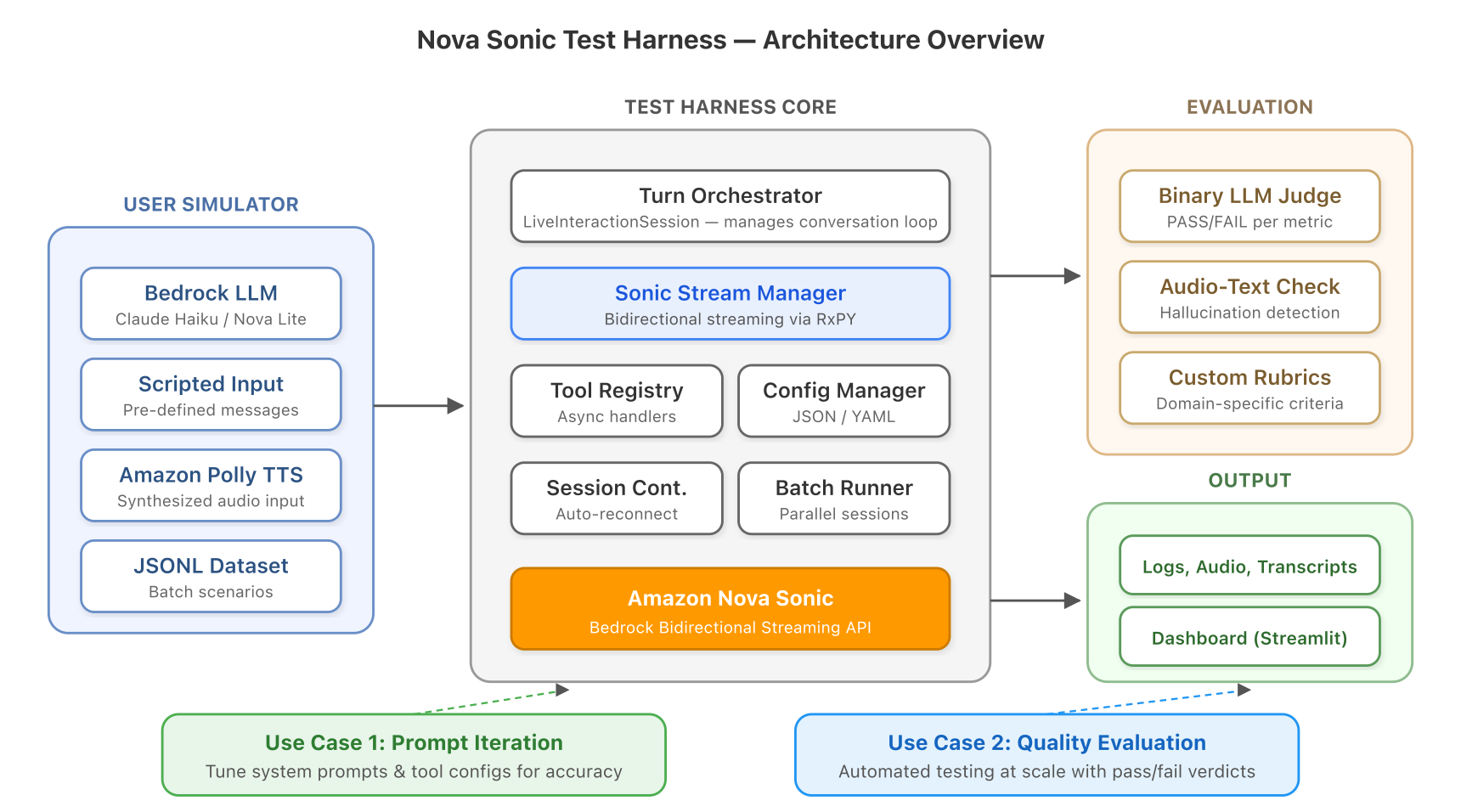
*図 1:アーキテクチャの概要。テストハーンダは、AWS サービス上でユーザーシミュレータ、Nova Sonic、および LLM ジャッジを調整します。
各フェーズを順に確認していきましょう。
テストシナリオの定義
すべてのテストは、JSON 形式の設定ファイルから始まります。これは会話のシナリオを記述するものと考えてください:Nova Sonic は誰を演じているのか、通話者は誰なのか、利用可能なツールは何なのか、「成功」とはどういう状態を指すのか。
実際にAppointment Booking エージェント(予約受付エージェント)をテストする例を示します:
{
"test_name": "healthcare_appointment_booking",
"sonic_system_prompt": "あなたはスミス医師の事務所の受付係です...",
"sonic_voice_id": "tiffany",
"sonic_tool_config": {
"tools": [{"toolSpec": {"name": "checkAvailability", "..."}}]
},
"user_model_id": "claude-haiku",
"user_system_prompt": "あなたは予約のために電話をかける患者です...",
"max_turns": 8,
"auto_evaluate": true,
"evaluation_criteria": {
"user_goal": "来週の火曜日の予約を入れること",
"evaluation_aspects": ["目標達成度", "回答の正確性", "ツールの使用状況", "会話の流れ"],
"rubrics": {
"Goal Achievement": [
"エージェントは特定の日程と時刻を確認したか?",
"エージェントは患者の名前を聞き出したか?"
]
}
}
}
重要な洞察は、期待される出力ではなく「目標」と「評価基準」を定義している点にあります。Nova Sonic は毎回異なる応答を行うため、正確な文字列の一致を確認するのではなく、評価基準(rubrics)に基づいて評価を行います。
モデルレジストリ(models.yaml)は、claude-haiku などの短いエイリアスを完全な Amazon Bedrock モデル ID にマッピングするため、モデルバージョンが変更されても設定が破損しません。
会話の実行
設定ファイルを用意したら、ハネスが会話を自動的に実行します。各ターンで起こることは以下の通りです:
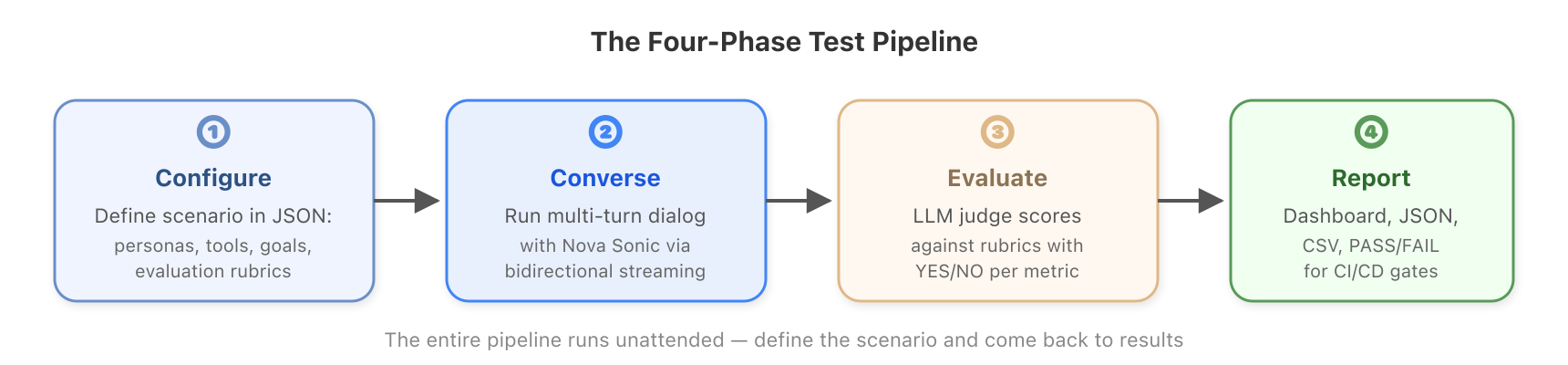
*図 2: 設定から結果に至るまでの 4 フェーズのテストパイプライン。
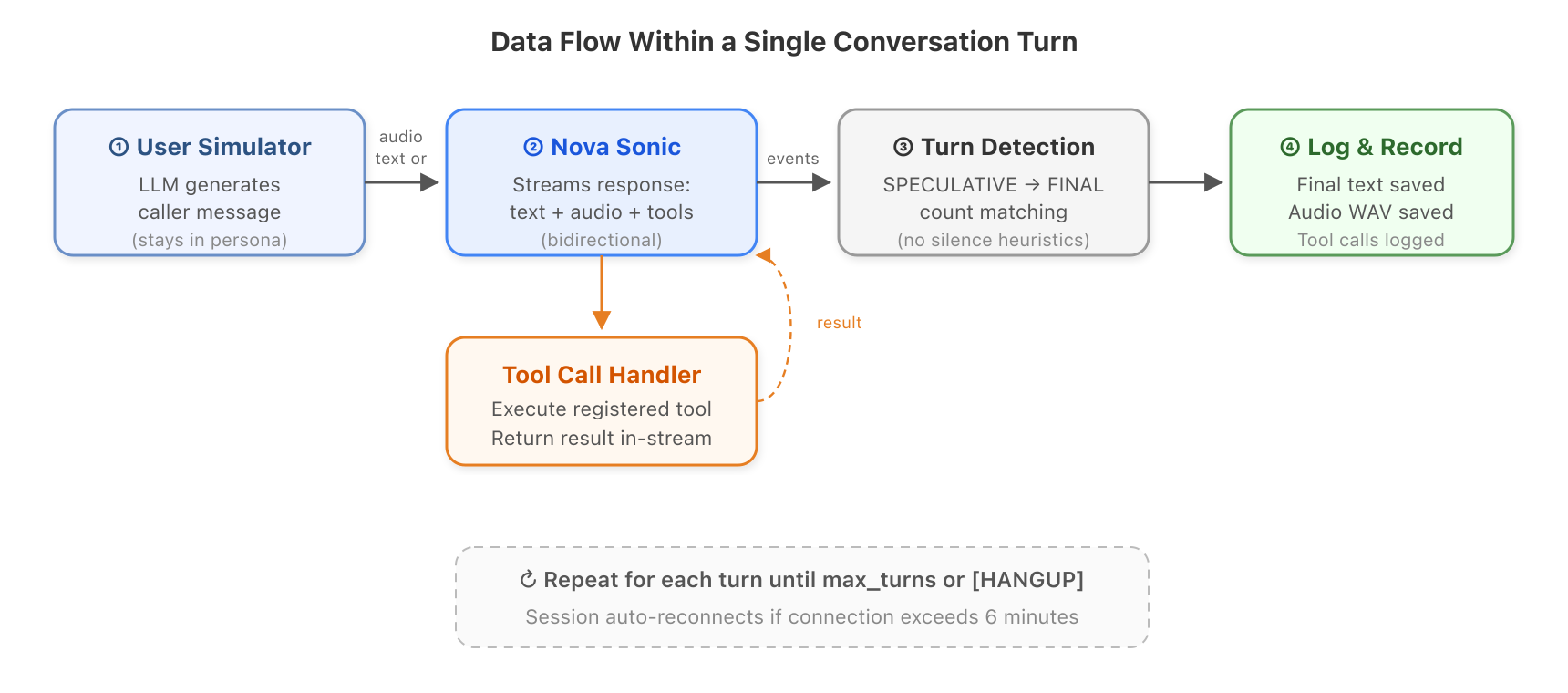
*図 3: 単一の会話ターン内のデータフロー。
- ユーザーシミュレーターがメッセージを生成します。LLM(例:Amazon Bedrock 上の Claude Haiku)はこれまでの会話を読み、通話者が次に何を言うべきかを判断します。キャラクターに没入し続けます。ペルソナが「イライラした顧客」の場合、そのように振る舞います。
- そのメッセージは Nova Sonic に送られます。テキスト(高速で、ほとんどのテストに適している)または Amazon Polly を使用して合成された音声(完全な音声認識パイプラインのテスト用)として送信されます。
- Nova Sonic は応答をストリーミングします。テキスト、音声、および場合によってはツール呼び出しが非同期で到着します。ハーンレスはリアクティブストリームを使用してこれらすべてをリアルタイムで処理します。
- ハーンレスはターン終了を検知します。Nova Sonic はテキストを 2 つの段階(推測的、その後最終的)で生成します。すべての推測ブロックが確定すると、そのターンは完了となります。これは沈黙を待ったりタイムアウトを使用したりするよりも信頼性が高いです。
- ツール呼び出しはストリーム内で処理されます。Nova Sonic がツールの呼び出し(例:予約の空き状況の確認)を要求した場合、登録されたハンドラーが実行され、接続を切断することなく結果を返します。
- すべての操作がログに記録されます。最終的なテキスト、音声 WAV ファイル、ツール呼び出し、タイミングメタデータはすべて保存されます。
その後、ループが繰り返されます。
長文会話についてはどうなるのか
Nova Sonic の接続は約 8 分でタイムアウトします。この処理は SessionContinuationManager が透明に行います:接続の経過時間を監視し、タイムアウト(デフォルト設定では 6 分)前に新しいセッションを作成し、会話履歴をその新しいセッションに再プレイします。テストシナリオ側でこれについて意識する必要はありません。ただ動作するだけです。
品質の評価
会話が終了した後、ハネスは完全な通話記録を別の LLM 判定者(例:Claude Opus)に渡します。判定者はテスト設定については何も知りません。会話内容と評価基準のみを確認します。これによりバイアスを防止できます。
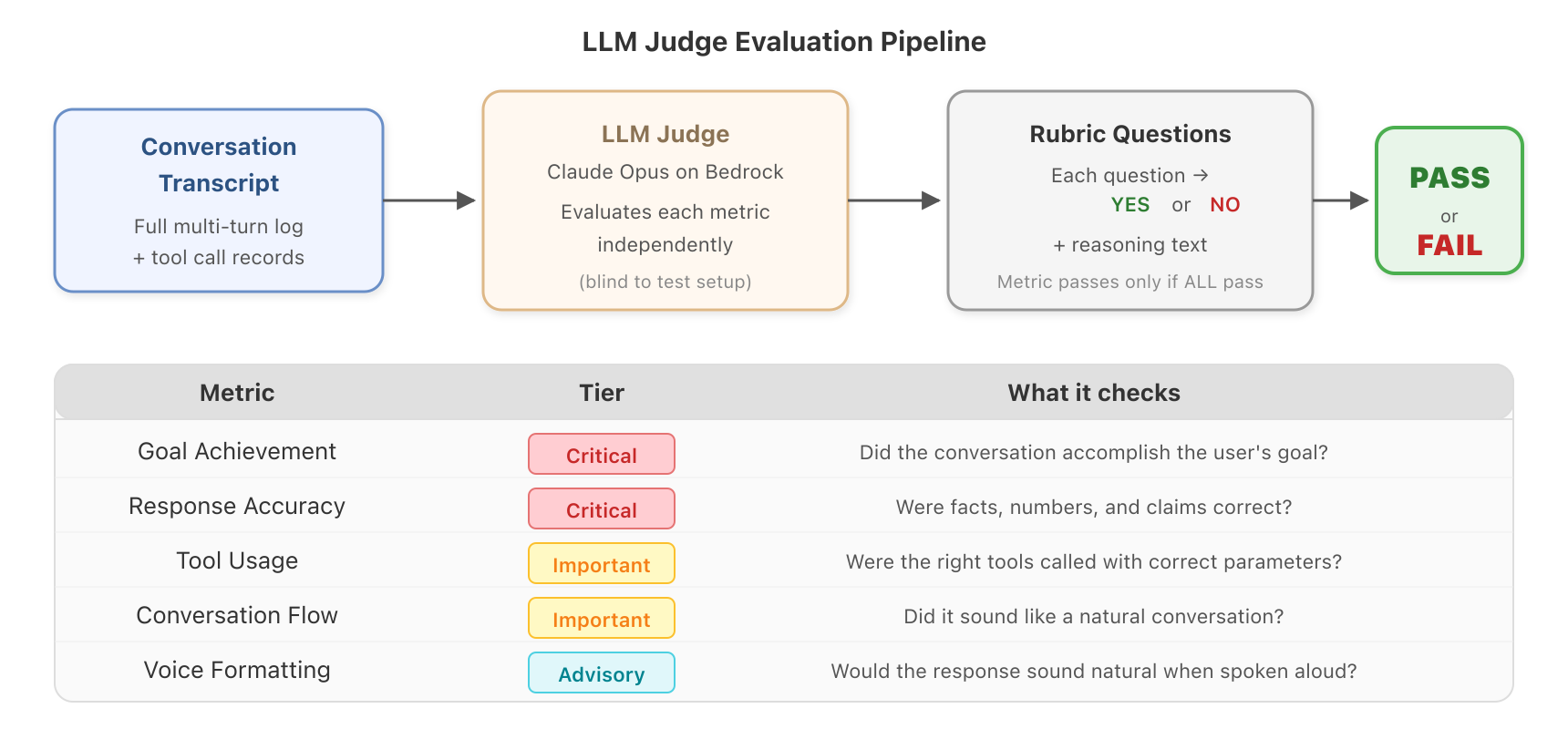
*図 4:LLM 判定者は、各指標を独立して評価し、YES/NO ルーブリックによる判断を下します。
判定者は、3 つの階層に整理された 6 つの組み込み指標を評価します:
| 指標 | 階層 | 確認内容 |
|---|---|---|
| Goal Achievement(目標達成) | Critical(重要度最高) | 会話はユーザーが望んだことを達成したか? |
| Response Accuracy(回答精度) | Critical(重要度最高) | 事実、数値、主張は正確だったか? |
| Tool Usage(ツール使用) | Important(重要) | 適切なツールが正しいパラメータで呼び出されたか? |
| Conversation Flow(会話の流れ) | Important(重要) | 自然な会話のように聞こえたか? |
| System Prompt Compliance(システムプロンプト準拠) | Important(重要) | エージェントはキャラクターを維持したか? |
音声フォーマット
アドバイザリー
発話した際に自然に聞こえるでしょうか?
ティアシステムは合格/不合格のロジックを決定します:全体としてPASS(合格)とするには、両方のクリティカル指標が合格している必要があります。重要指標は合格率スコアに寄与しますが、アドバイザリー指標は報告されるものの判定には影響しません。
各指標は、厳格な YES/NO 回答を受け付ける複数のルブリック質問を通じて評価されます。ある指標のすべてのルブリック質問が合格した場合のみ、その指標は合格とみなされます。つまり、何かが不合格になった場合、どの質問で失敗したかを正確に把握でき、審査員の推論を読み取ることでその理由を理解できます。
また、ドメイン固有のカスタムルブリック質問を定義することも可能です。医療用エージェントの場合、「予約前に保険情報を確認しましたか?」といった質問を追加できます。銀行用エージェントの場合は、「実行前に送金金額を確認しましたか?」といった質問が考えられます。
結果の表示
結果はワークフローに応じて複数の形式で提供されます:
- インタラクティブなダッシュボード。Streamlit アプリを使用すれば、バッチ結果を視覚的に閲覧し、実行結果を比較し、失敗箇所に詳細にアクセスし、転記文書全体を検索できます。
- 構造化された JSON/CSV。各セッションでは、インタラクションログ、評価結果、オーディオファイルが整理されたディレクトリ内に生成されます。バッチサマリーでは、全セッションにわたる合格率を集計します。
- 継続的インテグレーションおよびデリバリー(CI/CD)に対応した判定。バイナリの PASS/FAIL 出力と数値の合格率は、自動化された品質ゲートに直接組み込むことを想定して設計されています。
オーディオの幻聴を検出する
音声対音声モデルは、テキストとオーディオ出力を同時に生成します。多くの場合、これらは一致しますが、稀に Nova Sonic は異なる内容を記述したり発声したりすることがあります。例えば、音声エージェントが顧客に対して注文が「来週の月曜日」に到着すると音声で伝えながら、テキストストリームでは「来週の火曜日」と表示されるようなケースです。もしテキストログのみを確認している場合、このような不一致は決して検出できません。
- 各ターンごとのオーディオを Amazon Simple Storage Service (Amazon S3) にアップロードします。
- Amazon Transcribe を使用して転写を行います(実際に発話された内容)。
- LLM を用いて、その転写結果とテキスト出力を比較します。
- すべての相違点を分類します:フィラーワード、言い回しのバリエーション、あるいは事実上の誤りです。
各ターンには以下の判定が下されます:
- CONSISTENT(一貫性あり)。フィラーワード(「えーと」、「あの」)のみ、または差異がない場合。
- MINOR_DIFFERENCES(軽微な相違)。意味は同じだが言い回しが異なる場合(例:"I can help you" と "Let me help" の比較)。
- HALLUCINATION(幻聴)。事実上の不一致。テキストとオーディオ間で数値、日付、名前、または主張が異なる場合。
これは、特定の事実を伝える音声エージェントにおいて最も重要です。例えば、予約時間、価格、電話番号、薬の名前、確認コードなどです。これらのいずれかに幻聴が生じれば、ユーザーに直接的な被害をもたらす可能性があります。
スケールでのテスト
1 つのシナリオでテストを行うことは開発には有用ですが、デプロイ前の信頼性を確保するためには、異なるペルソナ、エッジケース、会話パスを含む数十のシナリオをテストし、非決定性(non-determinism)への対応として繰り返し実行する必要があります。
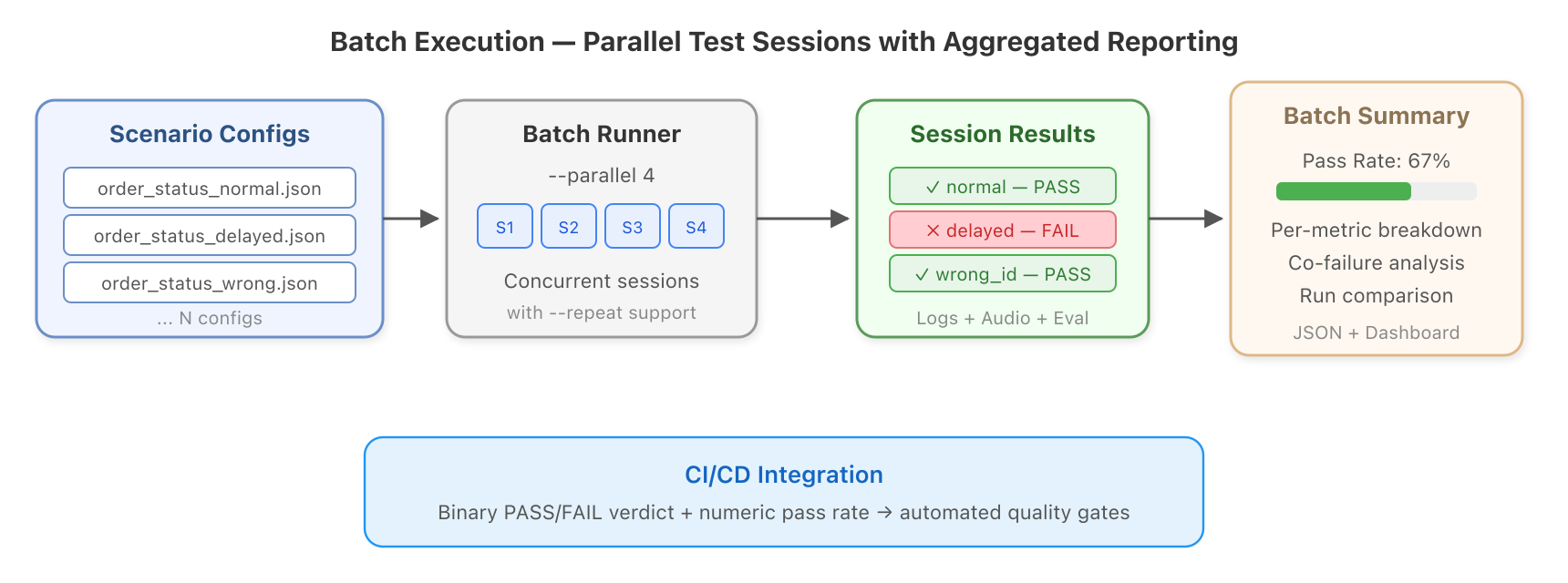
*図 5: バッチ実行は並列テストセッションを実行し、集約された品質レポートを生成します。*
バッチランナーによりこれが実用的になります:
# 医療シナリオ 12 種類を並列で実行
python -m cli.main --scenarios-dir scenarios/healthcare --parallel 4
同じシナリオを 10 回実行してばらつきを測定
python -m cli.main --config configs/order_status.json --repeat 10 --parallel 5
100 エントリからなる評価データセットを実行
python -m cli.main --dataset datasets/healthcare_eval.jsonl --parallel 8
このハネスには、すぐに使用可能なシナリオパックが同梱されています: 予約の受付、保険請求、紹介に関する医療シナリオ 12 種類、送金、残高照会、紛争処理に関する銀行シナリオ 8 種類、そして怒った顧客、落ち着いた顧客、混乱した顧客など異なる注文状態を持つカスタマーサポートバリアント 5 種類です。
バッチ実行後、ダッシュボードでは全シナリオの合格レート、各指標ごとの内訳、併発失敗相関(どの指標が同時に失敗しやすいか)、および実行間の並列比較が表示されます。プロンプト変更後に何が改善し、何が劣化したかを正確に確認できます。
適切な入力モードの選択
異なるテストニーズには異なるアプローチが必要です。このハネスは 4 つの入力モードをサポートしています:
モード
動作原理
使用タイミング
Text (default)
LLM が生成したメッセージをテキストイベントとして送信
日常のテスト、プロンプトの反復、ツールの検証
Amazon Polly TTS
ユーザー入力を Amazon Polly を用いて音声に合成
完全な自動音声認識(ASR)パイプラインのテスト、本番環境に近い条件での検証
Scripted
事前に定義されたメッセージ、LLM は使用しない
回帰テスト、実行間での完全な再現性確保
Dataset-driven
JSONL または Hugging Face からロードしたシナリオ
ベンチマーク評価、大規模なテストスイート
テキストモードが最速であり、最も高い並列処理をサポートします。Nova Sonic が実際の音声入力(ASR の誤認識の可能性を含む)をどのように処理するかをテストする必要がある場合にのみ Amazon Polly モードを使用してください。毎回同じ入力を必要とする回帰テストにはスクリプト化されたモードを使用してください。
始めに
完全なセットアップ手順、前提条件、および設定の詳細については、GitHub リポジトリ を参照してください。5 分以内に最初の自動会話を実行できます。
使用される AWS サービス
サービス | ハネス内での役割 | 必須?
---|---|---
Amazon Bedrock | Nova Sonic、ユーザーシミュレータ LLM、および判定用 LLM をホスト | はい
Amazon Polly | 音声入力テスト用にユーザーテキストを音声に変換 | オプション
通訳のためのオーディオファイルを一時保存します
オプション
幻覚検出のためにオーディオをテキストに変換します
オプション
クリーンアップ
Amazon Bedrock のモデル呼び出しは従量課金制であり、アイドル時の料金は発生しません。オプションのサービスを使用した場合は、オーディオ評価用に作成した Amazon S3 バケットを削除してください(バケット内のオブジェクトは自動的にクリーンアップされますが、バケット自体は残存します)。必要に応じて、AWS Management Console から Amazon Transcribe ジョブを削除できます。
結論
このツールが登場する以前、Nova Sonic ボイスエージェントのテストとは、次のいずれかの方法しかなかったことを意味していました:人間に話させる(遅く、一貫性がなく、スケーラビリティがない)、あるいはテストしない(リスクが高く、特にプロンプトの反復や新しいシナリオへの展開時には危険です)。
Nova Sonic Test Harness は、これらに代わる第 3 の選択肢を提供します。最初のターンから評価、幻覚検出に至るまでの会話ライフサイクル全体をカバーする、自動化され、繰り返し可能で、スケーラブルなテストです。双方向ストリーミング、セッションタイムアウト、非決定性の評価といった難しい部分を処理してくれるため、より優れたボイス体験の構築に集中できます。
キーポイント
- オーディオハードウェアは不要です。Nova Sonic を、あらゆる API をテストするのと同じように簡単にテストできます。
- LLM(大規模言語モデル)を活用した評価機能です。非決定性に対応するため、脆いアサーションではなく、ルブリックベースの評価を行います。
- オーディオの幻覚検出機能です。テキストとオーディオの乖離を検知します。
- 水平方向へのスケーリングが可能です。1 つのコマンドで数百のシナリオを並列実行できます。
- オープンソースかつ拡張性があります。独自のツール、メトリクス、ルブリック、シナリオを追加できます。
リポジトリ をクローンして、今日から最初のテストを実行してください。Nova Sonic アプリケーションが成長するにつれて、テストもそれに伴って成長します。
著者について
 image
image
Osman Ipek
Osman は、Amazon の AGI チームに所属するソリューションアーキテクトで、Nova ファウンデーションモデル(基盤モデル)に注力しています。彼はチームに対して、実践的な AI 実装を通じて開発を加速するためのガイダンスを提供し
原文を表示
Voice agents are transforming how businesses interact with customers, handling appointment bookings, order inquiries, account management, and more through natural spoken conversation. But as these agents grow more capable, a fundamental challenge emerges: how do you test them?
Unlike text-based chatbots where you can script inputs and assert outputs, voice agents operate in a fundamentally different paradigm. They stream audio bidirectionally, respond non-deterministically, maintain context across multi-turn conversations, and use tools in real time. The only way most teams test today is to have someone physically talk to the system and listen to what comes back. That’s slow, inconsistent, and doesn’t scale.
This testing gap creates two critical problems for teams building voice applications:
- Iterating system prompts and tool configurations is painfully slow. Every time you tweak a prompt or adjust tool definitions to improve accuracy, you need to manually re-test dozens of conversation scenarios to see if things got better or worse. Without automated feedback, prompt engineering becomes guesswork.
- There’s no reliable evaluation framework for voice agent quality. You can’t run a regression suite before deploying a change. You can’t measure whether your agent handles edge cases correctly across hundreds of scenarios. You can’t catch subtle regressions, like the agent suddenly forgetting to confirm a booking, until a real customer hits them.
If you have 50 conversation scenarios across 3 user personas, you’re looking at 150 manual tests, each taking several minutes of real-time interaction. Run that after every prompt change and you will burn days on QA.
In this post, we walk you through the Nova Sonic Test Harness, an open source framework that we built to solve both problems. It serves as a rapid iteration tool for tuning system prompts and tool configurations (run a conversation, see results, adjust, repeat) and as a comprehensive evaluation framework for validating voice agent quality at scale. It runs complete multi-turn conversations with Amazon Nova Sonic automatically, evaluates them using LLM-as-judge techniques, and can even detect cases where the model’s audio output doesn’t match its text output (audio hallucinations). No microphone required.
Why speech-to-speech testing is different
If you’ve tested text-based large language models (LLMs) before, you might wonder why you can’t just adapt those tools. Here’s what makes voice agent testing fundamentally harder:
Bidirectional streaming. Speech-to-speech models don’t use request-response. They maintain a persistent, full-duplex connection where audio and text flow in both directions simultaneously. Standard HTTP testing tools can’t interact with this protocol.
Non-deterministic responses. Ask the same question twice and you will get different wording, different audio timing, even different tool call ordering. You can’t write assertions like “expect exact string X.”
Multi-turn context. A single turn tells you almost nothing. The interesting behavior happens across turns: does the model remember what the caller said earlier? Does it follow up appropriately? Does it know when the conversation is done?
Audio-text divergence. Speech-to-speech models produce text and audio at the same time, and they can say different things. The text might read “3:00 PM” while the audio says “3:30 PM.” You can’t catch this by reading transcripts alone.
Session limits. Connections time out after about 8 minutes. If your test conversation is longer, you must handle reconnection and history replay.
The test harness handles all of these. Let’s look at how it works.
How the test harness works
At a high level, the harness does four things: it configures a test scenario, runs a full conversation with Nova Sonic, evaluates the result, and produces a report. The entire pipeline runs unattended. You define the scenario in a JSON file and come back to the results.
*Figure 1: Architecture overview. The test harness coordinates a user simulator, Nova Sonic, and an LLM judge across AWS services.*
Let’s walk through each phase.
Defining a test scenario
Every test starts with a JSON configuration file. Think of it as describing a conversation scenario: who is Nova Sonic pretending to be, who is the caller, what tools are available, and what does “success” look like?
Here’s a real example, testing an appointment booking agent:
{
    "test_name": "healthcare_appointment_booking",
    "sonic_system_prompt": "You are the receptionist at Dr. Smith's office...",
    "sonic_voice_id": "tiffany",
    "sonic_tool_config": {
        "tools": [{"toolSpec": {"name": "checkAvailability", "..."}}]
    },
    "user_model_id": "claude-haiku",
    "user_system_prompt": "You are a patient calling to book an appointment...",
    "max_turns": 8,
    "auto_evaluate": true,
    "evaluation_criteria": {
        "user_goal": "Book an appointment for next Tuesday",
        "evaluation_aspects": ["Goal Achievement", "Response Accuracy", "Tool Usage", "Conversation Flow"],
        "rubrics": {
            "Goal Achievement": [
                "Did the agent confirm a specific date and time?",
                "Did the agent collect the patient name?"
            ]
        }
    }
}
The key insight is that you’re defining *goals* and *evaluation criteria*, not expected outputs. Because Nova Sonic responds differently every time, we evaluate against rubrics rather than checking for exact strings.
A model registry (models.yaml) maps short aliases like claude-haiku to full Amazon Bedrock model IDs, so configurations don’t break when model versions change.
Running the conversation
After you have a configuration file, the harness runs the conversation automatically. Here’s what happens each turn:
*Figure 2: The four-phase test pipeline from configuration to results.*
*Figure 3: Data flow within a single conversation turn.*
- The user simulator generates a message. An LLM (for example, Claude Haiku on Amazon Bedrock) reads the conversation so far and decides what the caller would say next. It stays in character. If the persona is “impatient customer,” it acts impatient.
- The message goes to Nova Sonic. Either as text (fast, good for most testing) or as synthesized audio using Amazon Polly (for testing the full speech recognition pipeline).
- Nova Sonic streams back its response. Text, audio, and possibly tool calls arrive asynchronously. The harness processes all of these in real-time using reactive streams.
- The harness detects when the turn is done. Nova Sonic produces text in two stages (speculative, then final). When all speculative blocks have been finalized, the turn is complete. This is more reliable than waiting for silence or using timeouts.
- Tool calls are handled in-stream. If Nova Sonic asks to call a tool (like checking appointment availability), the registered handler runs and returns the result without breaking the connection.
- Everything is logged. The final text, audio WAV, tool calls, and timing metadata are all saved.
Then the loop repeats.
What about long conversations?
Nova Sonic connections time out after about 8 minutes. The SessionContinuationManager handles this transparently: it monitors connection age, creates a new session before timeout (default: 6 minutes), and replays the conversation history into the new session. Your test scenario doesn’t need to know about this. It just works.
Evaluating quality
After the conversation ends, the harness passes the full transcript to a separate LLM judge (for example, Claude Opus). The judge knows nothing about the test setup. It only sees the conversation and the evaluation criteria. This prevents bias.
*Figure 4: The LLM judge evaluates each metric independently with YES/NO rubric verdicts.*
The judge assesses six built-in metrics, organized into three tiers:
Metric
Tier
What it checks
Goal Achievement
Critical
Did the conversation accomplish what the user wanted?
Response Accuracy
Critical
Were facts, numbers, and claims correct?
Tool Usage
Important
Were the right tools called with correct parameters?
Conversation Flow
Important
Did it sound like a natural conversation?
System Prompt Compliance
Important
Did the agent stay in character?
Voice Formatting
Advisory
Would the response sound natural when spoken aloud?
The tier system determines pass/fail logic: both critical metrics must pass for an overall PASS. Important metrics contribute to the pass rate score. Advisory metrics are reported but don’t affect the verdict.
Each metric is evaluated through multiple rubric questions that receive strict YES/NO answers. A metric passes only if all its rubric questions pass. This means when something fails, you know exactly which question failed and can read the judge’s reasoning to understand why.
You can also define custom rubric questions for your domain. For a healthcare agent, you might add: “Did the agent verify insurance information before booking?” For a banking agent: “Did the agent confirm the transfer amount before executing?”
Viewing results
Results come in multiple formats depending on your workflow:
- Interactive dashboard. With a Streamlit app, you can browse batch results visually, compare runs, drill into failures, and search across transcripts.
- Structured JSON/CSV. Every session produces an interaction log, evaluation results, and audio files in an organized directory. Batch summaries aggregate pass rates across all sessions.
- Continuous integration and delivery (CI/CD)-friendly verdicts. The binary PASS/FAIL output and numeric pass rate are designed to plug directly into automated quality gates.
Catching audio hallucinations
Speech-to-speech models produce text and audio outputs simultaneously. Most of the time they match. But occasionally, Nova Sonic might write one thing and say another. Imagine a voice agent telling a customer their order arrives “next Monday” in audio while the text stream says “next Tuesday.” If you’re only checking text logs, you’ll never catch it.
- Upload each turn’s audio to Amazon Simple Storage Service (Amazon S3).
- Transcribe it using Amazon Transcribe (what was actually spoken).
- Compare the transcription against the text output using an LLM.
- Classify every difference: filler words, phrasing variants, or factual errors.
Each turn gets a verdict:
- CONSISTENT. Only filler words (“um,” “uh”) or no differences at all.
- MINOR_DIFFERENCES. Phrasing variants with the same meaning (“I can help you” compared to “Let me help”).
- HALLUCINATION. Factual discrepancy. Different numbers, dates, names, or claims between text and audio.
This matters most for voice agents that communicate specific facts: appointment times, prices, phone numbers, medication names, confirmation codes. A hallucination in any of these could directly harm a user.
Testing at scale
Testing one scenario is useful for development. But for confidence before deployment, you must test dozens of scenarios, with different personas, edge cases, and conversation paths, and you must run them repeatedly to account for non-determinism.
*Figure 5: Batch execution runs parallel test sessions with aggregated quality reporting.*
The batch runner makes this practical:
# Run 12 healthcare scenarios in parallel
python -m cli.main --scenarios-dir scenarios/healthcare --parallel 4

# Run the same scenario 10 times to measure variance
python -m cli.main --config configs/order_status.json --repeat 10 --parallel 5

# Run a 100-entry evaluation dataset
python -m cli.main --dataset datasets/healthcare_eval.jsonl --parallel 8
The harness ships with ready-to-use scenario packs: 12 healthcare scenarios (appointment booking, insurance claims, referrals), eight banking scenarios (transfers, balance inquiries, disputes), and five customer service variants (angry, calm, confused callers with different order states).
After a batch run, the dashboard shows pass rates across all scenarios, per-metric breakdowns, co-failure correlations (which metrics tend to fail together), and side-by-side comparison between runs. You can see exactly what improved or regressed after a prompt change.
Choosing the right input mode
Different testing needs call for different approaches. The harness supports four input modes:
Mode
How it works
When to use it
Text (default)
LLM-generated messages sent as text events
Day-to-day testing, prompt iteration, tool validation
Amazon Polly TTS
User text synthesized to audio using Amazon Polly
Testing the full automatic speech recognition (ASR) pipeline, production-realistic conditions
Scripted
Pre-defined messages, no LLM involved
Regression testing, exact reproducibility between runs
Dataset-driven
Scenarios loaded from JSONL or Hugging Face
Benchmark evaluation, large-scale test suites
Text mode is fastest and supports the highest parallelism. Use Amazon Polly mode when you specifically need to test how Nova Sonic handles real audio input (including potential ASR misinterpretations). Use scripted mode for regression tests where you need identical inputs every time.
Getting started
For full setup instructions, prerequisites, and configuration details, see the GitHub repository. You will run your first automated conversation in under five minutes.
AWS services used
Service
What it does in the harness
Required?
Hosts Nova Sonic, user simulator LLMs, and judge LLMs
Yes
Converts user text to speech for audio input testing
Optional
Temporarily stores audio files for transcription
Optional
Converts audio to text for hallucination detection
Optional
Clean up
Amazon Bedrock model invocations are pay-per-use with no idle charges. If you used the optional services, delete any Amazon S3 buckets created for audio evaluation (the objects inside are cleaned automatically, but the bucket itself persists). You can remove Amazon Transcribe jobs from the AWS Management Console if needed.
Conclusion
Before this tool, testing a Nova Sonic voice agent meant one of two things: have a human talk to it (slow, inconsistent, doesn’t scale), or don’t test it (risky, especially when iterating prompts or deploying to new scenarios).
The Nova Sonic Test Harness gives you a third option: automated, repeatable, scalable testing that covers the full conversation lifecycle, from the first turn to evaluation to hallucination detection. It handles the hard parts (bidirectional streaming, session timeouts, non-deterministic evaluation) so you can focus on building better voice experiences.
Key takeaways
- No audio hardware is needed. Test Nova Sonic as easily as testing any API.
- LLM-powered evaluation. Handles non-determinism with rubric-based assessment instead of brittle assertions.
- Audio hallucination detection. Catches text and audio divergence.
- Scales horizontally. Run hundreds of scenarios in parallel with one command.
- Open source and extensible. Add your own tools, metrics, rubrics, and scenarios.
Clone the repository and run your first test today. As your Nova Sonic application grows, the testing grows with it.
About the authors
Osman Ipek
Osman is a Solutions Architect on Amazon’s AGI team focusing on Nova foundation models. He guides teams to accelerate development through practical AI implementati
関連記事
今日のまとめ
AI日報で今日の重要ニュースをまとめ読み