Google、Gemini デスクトップ版の機能格差解消を目指す
本文の状態
日本語全文を表示中
詳細モードで約2分の本文を読めます。
同じ出来事の情報源
この情報源を基点に整理
TLDR AI
Google は Gemini デスクトップアプリの機能格差を縮めるため、画像・動画生成タブや設定パネル、カメラ連携、カスタム MCP サーバー接続などの新機能をテスト中である。
AI深層分析を開く2026年8月3日 23:55
AI深層分析
キーポイント
ナビゲーションと設定の強化
Gemini デスクトップアプリに画像および動画生成専用のタブが追加され、初めてアプリ設定パネルが実装される。
カメラ連携機能の実装
添付メニューからカメラを選択して撮影し、プロンプトに直接挿入する機能がテストされており、ライブ動画ストリームではなく写真撮影として動作する。
Spark エージェントの拡張
Gemini Spark のデスクトップ版でカスタム MCP サーバーを追加できるオプションが公開され、従来は内部設定のみだった機能が利用可能になる。
画像・動画生成タブと設定パネルの追加
Gemini デスクトップアプリに画像および動画生成用の専用ナビゲーションタブが導入され、初めてアプリ設定パネルが表示されるようになった。
カメラ機能による写真撮影の追加
添付メニューからカメラオプションを選択して写真を撮影し、プロンプトに直接挿入する機能が実装された。これはライブ動画配信ではなくモバイル版と同様の写真キャプチャとして設計されている。
重要な引用
Google is narrowing the gap between the Gemini desktop app and its web counterpart, with several unreleased changes now in testing.
Dedicated tabs for image and video generation are being added to the app's navigation
Its connectors menu on desktop now includes an option to add custom MCP servers
Dedicated tabs for image and video generation are being added to the app's navigation, and an app configuration panel has appeared on the desktop for the first time.
編集コメントを表示
編集コメント
Gemini のデスクトップ版が Web 版の機能を追いつき、特に MCP サーバー接続が可能になった点は、ローカル環境でのエージェント開発にとって大きな前進である。今後の正式版リリースでこれらの機能が安定して動作するかどうかが、実務への導入速度を左右するだろう。
Source Article
元記事を日本語で読む
本文に関係しない購読案内、埋め込み通知、サイト内プロモーションは除いています。
Google は、Gemini デスクトップアプリと Web 版の機能差を縮めようとしており、現在いくつかの未公開変更がテスト段階にあります。画像や動画生成専用のタブがナビゲーションに追加され、デスクトップ版で初めて設定パネルが表示されるようになりました。
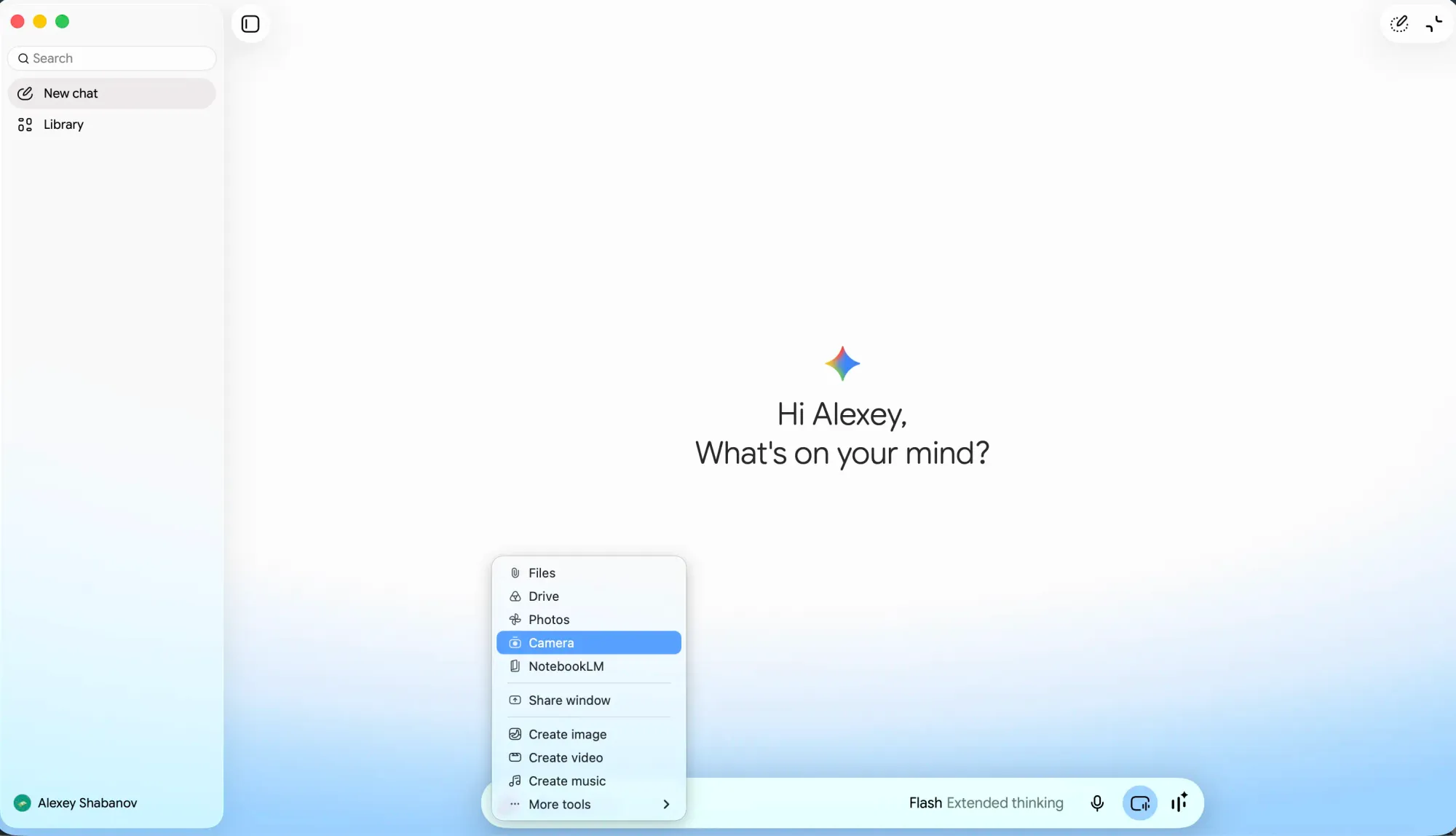
もう一つの注目点はカメラ機能の追加です。アタッチメントメニューからカメラオプションを選択すると、撮影画面が開き、写真を撮影してプロンプトに直接挿入できます。これはライブ動画ストリームではなく写真の撮影を想定した機能であり、Gemini Live のリアルタイム共有とは明確に区別されています。また、モバイルユーザーがすでに利用している機能に近いものとなっています。
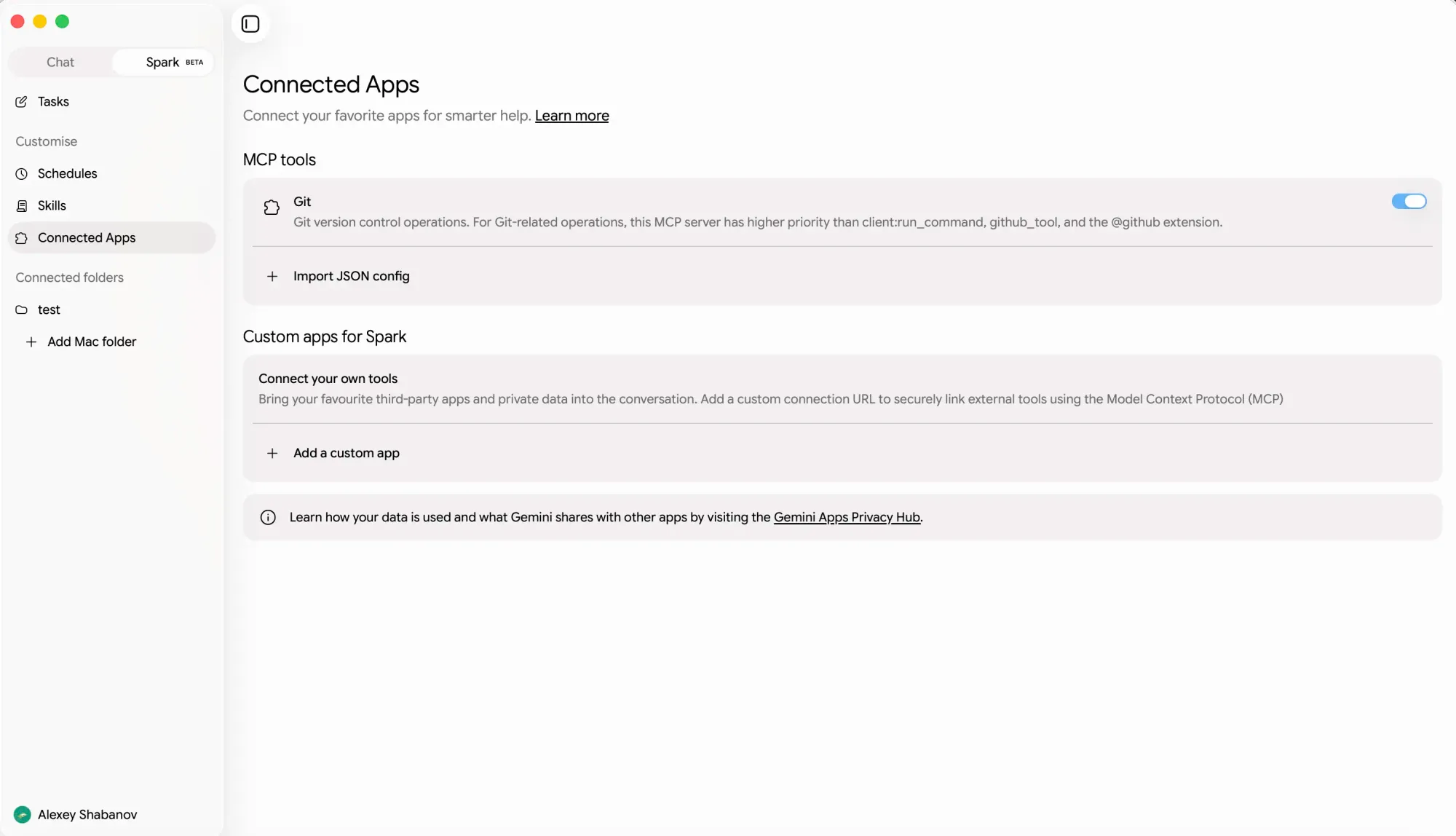
3 つ目の変更は Spark に関するものです。デスクトップ版の接続先メニューに、カスタム MCP サーバーを追加するオプションが新たに設けられました。これは以前は内部設定に限られていた機能を、エージェントの設定画面から直接扱えるようにしたものです。Google はすでに Web アプリを通じて Spark でカスタム MCP アプリの利用を許可していますが、今回の変更はその機能拡張です。Mac 版アプリで Spark を利用しているユーザーにとっては重要なアップデートとなります。
公開ロールアウトの時期は未定で、現在は信頼できるテスター向けのビルド版のみが提供されています。背景には、7月1日にSparkがmacOSに対応しGoogle TasksやKeepとの連携が始まったほか、7月29日には音声入力機能や画面認識による推論機能が順次展開されるなど、非常に忙しい一ヶ月となっています。これら生成タブ、カメラ撮影、コネクタ管理の機能を組み合わせることで、ブラウザを開く必要性はさらに低下すると見られています。
原文を表示
Google is narrowing the gap between the Gemini desktop app and its web counterpart, with several unreleased changes now in testing. Dedicated tabs for image and video generation are being added to the app's navigation, and an app configuration panel has appeared on the desktop for the first time.
A second track is a camera attachment. From the attachment menu, users would select a camera option, which opens a capture screen, takes a picture, and drops it into the prompt. It reads as photo capture rather than a live video stream, keeping it distinct from Gemini Live's real-time sharing and closer to what mobile users already have.
The third piece sits with Spark. Its connectors menu on desktop now includes an option to add custom MCP servers, bringing something previously confined to internal configuration into the visible agent settings. Google already permits custom MCP apps for Spark via the web app, so this is an extension of that rather than the first appearance, though it matters for anyone running Spark from the Mac app.
Timing is unclear; these are trusted-tester builds with no public rollout date. The context is a busy month: Spark reached macOS on July 1 alongside Google Tasks and Keep connections, and intelligent dictation and screen-aware reasoning began rolling out on July 29. Together, generation tabs, camera capture, and connector management would leave fewer reasons to open the browser.
関連記事
今日のまとめ
AIデイリーブリーフで今日の重要ニュースをまとめ読み