Parakeet-TDTとAWS Batchを活用した大規模低コスト多言語音声文字起こし
本文の状態
日本語全文を表示中
詳細モードで約15分の本文を読めます。
同じ出来事の情報源
6媒体で確認
TechCrunch AI · The Decoder · NVIDIA Developer Blog · AWS Machine Learning Blog · Hugging Face Blog · TLDR AI
各社の報じ方を比較 ↓NVIDIAは、大規模音声処理の高コスト課題を解決するため、Parakeet-TDTモデルとAWS Batchを組み合わせた低コスト多言語文字起こしソリューションを提供している。
Continue in AI NEW LAB
このニュースを、実務の判断につなげる
AI NEW LABで、試したことや先に確認したい条件を共有できます。まずはログインなしで読めます。
AI NEW LABで論点を見るSource Article
元記事を日本語で読む
本文に関係しない購読案内、埋め込み通知、サイト内プロモーションは除いています。
多くの組織が、大規模なメディアライブラリのアーカイブ化、コンタクトセンターの録音分析、AI用のトレーニングデータ準備、または字幕向けのオンデマンドビデオ処理を行っています。データ量が大幅に増加すると、マネージド型自動音声認識(Automatic Speech Recognition, ASR)サービスのコストがスケーラビリティの主要な制約要因となるのが一般的です。
このコストとスケーラビリティの課題に対処するため、NVIDIA Parakeet-TDT-0.6B-v3モデルを、GPUアクセラレータ搭載インスタンス上でAWS Batchを通じてデプロイしています。Parakeet-TDTのToken-and-Duration Transducer(トークンおよび期間トランスデューサ)アーキテクチャは、テキストトークンとその継続時間を同時に予測し、沈黙や冗長な処理をインテリジェントにスキップします。これにより、リアルタイムの数桁も高速な推論(inference)速度を実現できます。オーディオの全長に対して課金するのではなく、短い計算バーストのみに対して課金することで、本稿で示すベンチマークに基づき、オーディオ1時間あたり数セント未満というコストで大規模な文字起こしが可能になります。
本稿では、Amazon Simple Storage Service(Amazon S3)にアップロードされたオーディオファイルを自動的に処理するスケーラブルでイベント駆動の文字起こしパイプライン(event-driven transcription pipeline)の構築手順を解説するとともに、コストをさらに削減するためにAmazon EC2 Spot Instancesとバッファリングストリーミング推論(buffered streaming inference)をどのように活用するかを示します。
Model capabilities
2025年8月にリリースされたParakeet-TDT-0.6B-v3は、自動言語検出機能とCC-BY-4.0の下での柔軟なライセンスを備えた、オープンソースの多言語ASRモデルです。25のヨーロッパ言語において高精度な認識性能を発揮します。NVIDIAが公開した指標によると、このモデルはクリーンな環境で6.34%の単語誤り率(Word Error Rate, WER)を、0 dB Signal-to-Noise Ratio (SNR)で11.66%のWERを維持し、ローカルアテンションモード(local attention mode)を使用することで最大3時間までのオーディオに対応しています。
対応する25言語には、ブルガリア語、クロアチア語、チェコ語、デンマーク語、オランダ語、英語、エストニア語、フィンランド語、フランス語、ドイツ語、ギリシャ語、ハンガリー語、イタリア語、ラトビア語、リトアニア語、マルタ語、ポーランド語、ポルトガル語、ルーマニア語、スロバキア語、スロベニア語、スペイン語、スウェーデン語、ロシア語、ウクライナ語が含まれます。これにより、国際的なヨーロッパ経済へのサービス提供において、個別のモデルや言語固有の設定が必要となる負担を軽減できます。AWS上でのデプロイには、最小4 GBのVRAM(Video RAM)を搭載したGPU対応インスタンスが必要ですが、8 GB搭載の方がより高いパフォーマンスが得られます。テスト結果に基づくと、推論ワークロードに対してG6インスタンス(NVIDIA L4 GPUs)がコストパフォーマンス比で最も優れています。また、G5(A10G)、G4dn(T4)でも良好に動作し、最大スループットが必要な場合はP5(H100)またはP4(A100)インスタンスでの運用も可能です。
Solution architecture
処理は、オーディオファイルをS3 bucketにアップロードすることから始まります。これによりAmazon EventBridgeルールがトリガーされ、AWS Batchにジョブが送信されます。AWS BatchはGPU-accelerated compute resources(GPUアクセラレータ搭載コンピューティングリソース)をプロビジョニングし、プロビジョニングされたインスタンスはAmazon Elastic Container Registry(Amazon ECR)からpre-cached model(プリキャッシュされたモデル)を含むcontainer image(コンテナイメージ)をプルします。inference script(推論スクリプト)はファイルをダウンロードして処理し、timestamped JSON transcript(タイムスタンプ付きJSON文字起こし結果)を出力用のS3 bucketにアップロードします。このアーキテクチャはidle(アイドル状態)時にzeroにscale(スケール)するため、costs(コスト)はactive compute(アクティブなコンピューティング実行)時のみ発生します。
一般的なarchitectural components(アーキテクチャコンポーネント)の詳細については、以前の投稿「Whisper audio transcription powered by AWS Batch and AWS Inferentia」を参照してください。
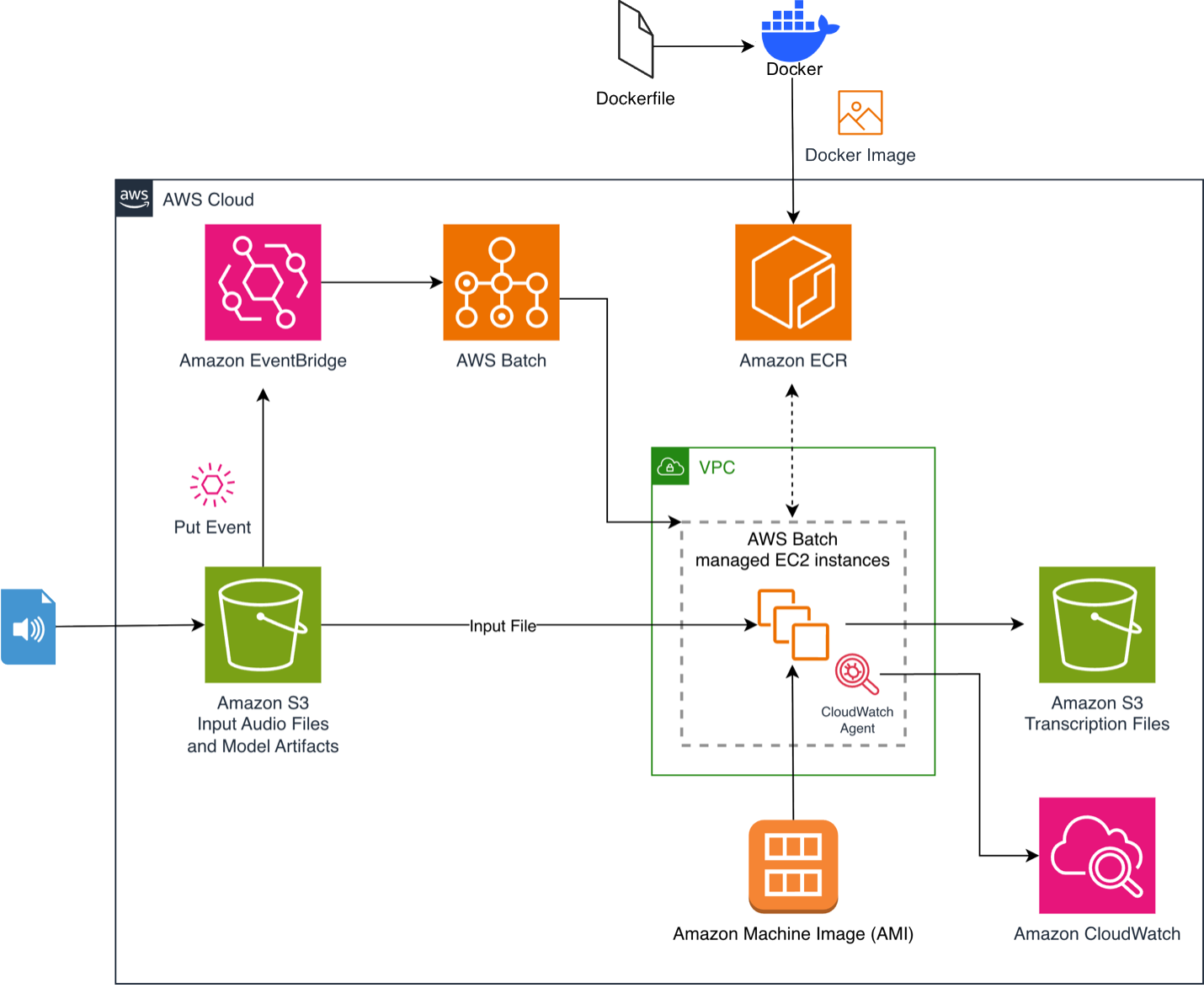
Prerequisites
- すでにAWSアカウントをお持ちでない場合は作成し、サインインしてください。Add usersで説明されているように、AWS IAM Identity Centerを使用してフル管理者権限を持つユーザーを作成します。
- ローカル開発マシンにAWS Command Line Interface(AWS CLI)をインストールし、Set up the AWS CLIで説明されているように、管理者ユーザー用のprofile(プロファイル)を作成します。
- ローカルマシンにDockerをインストールします。
- GitHubリポジトリをローカルマシンにclone(クローン)します。
Building the container image
本リポジトリには、inference performance(推論パフォーマンス)に最適化されたstreamlined container image(軽量なコンテナイメージ)をビルドするためのDockerfileが含まれています。このimageはAmazon Linux 2023をbase(ベース)とし、Python 3.12をインストールし、build(ビルド)時にParakeet-TDT-0.6B-v3 modelをpre-cache(プリキャッシュ)することで、runtime(実行時)のdownload latency(ダウンロードレイテンシー)をalleviate(軽減)します:
 FROM public.ecr.aws/amazonlinux/amazonlinux:2023

WORKDIR /app

# Install system dependencies, Python 1.12, and ffmpeg
RUN dnf update -y && \
    dnf install -y gcc-c++ python3.12-devel tar xz && \
    ln -sf /usr/bin/python3.12 /usr/local/bin/python3 && \
    python3 -m ensurepip && \
    python3 -m pip install --no-cache-dir --upgrade pip && \
    dnf clean all && rm -rf /var/cache/dnf

# Install Python dependencies and pre-cache the model
COPY ./requirements.txt requirements.txt
RUN pip install -U --no-cache-dir -r requirements.txt && \
    rm -rf ~/.cache/pip /tmp/pip* && \
    python3 -m compileall -q /usr/local/lib/python3.12/site-packages

COPY ./parakeet_transcribe.py parakeet_transcribe.py

# Cache model during build to eliminate runtime download
RUN python3 -c "from nemo.collections.asr.models import ASRModel; \
    ASRModel.from_pretrained('nvidia/parakeet-tdt-0.6b-v3')"

CMD ["python3", "parakeet_transcribe.py"]
Amazon ECR へのプッシュ
本リポジトリには updateImage.sh スクリプトが含まれており、環境の検出(CodeBuild または EC2)、コンテナイメージ(container image)のビルド、必要に応じた ECR リポジトリ(ECR repository)の作成、脆弱性スキャン(vulnerability scanning)の有効化、イメージのプッシュを処理します。以下のように実行してください:./updateImage.sh
ソリューションのデプロイ
本ソリューションは、インフラストラクチャのプロビジョニングに AWS CloudFormation テンプレート(deployment.yaml)を使用します。buildArch.sh スクリプトは、AWS Region の検出、VPC(Virtual Private Cloud)、サブネット(subnet)、セキュリティグループ(security group)情報の収集、CloudFormation スタック(CloudFormation stack)のデプロイを自動化してデプロイします:
./buildArch.sh 内部では、以下が実行されます:
 aws cloudformation deploy --stack-name batch-gpu-audio-transcription \
  --template-file ./deployment.yaml \
  --capabilities CAPABILITY_IAM \
  --region ${AWS_REGION} \
  --parameter-overrides VPCId=${VPC_ID} SubnetIds="${SUBNET_IDS}" \
  SGIds="${SecurityGroup_IDS}" RTIds="${RouteTable_IDS}"
CloudFormation テンプレートは、G6 および G5 GPU インスタンス(GPU instances)を備えた AWS Batch 計算環境(compute environment)、ジョブキュー(job queue)、ECR イメージを参照するジョブ定義(job definition)、EventBridge 通知(EventBridge notifications)が有効化された入力および出力 S3 バケット(S3 buckets)を作成します。また、S3 へのアップロード時に Batch ジョブをトリガーする EventBridge ルール(EventBridge rule)、GPU/CPU/メモリ監視用の Amazon CloudWatch エージェント(CloudWatch agent)設定、最小権限ポリシー(least-privilege policies)を持つ IAM ロール(IAM roles)も作成します。AWS Batch では、計算環境の設定で ImageType: ECS_AL2023_NVIDIA を指定することで、Amazon Linux 2023 GPU イメージ(Amazon Linux 2023 GPU images)を選択できます。
または、リポジトリの README に記載されている起動リンクを使用して、AWS CloudFormation コンソールから直接デプロイすることもできます。
スポットインスタンスの設定
Amazon EC2 スポット インスタンス(Spot Instances)は、インスタンスタイプに応じて最大 90% の割引で未使用の EC2 キャパシティ(EC2 capacity)上でワークロードを実行することで、コストをさらに削減するのに役立ちます。スポットインスタンスを有効にするには、deployment.yaml 内の計算環境(compute environment)を以下のように変更します:
 DefaultComputeEnv:
  Type: AWS::Batch::ComputeEnvironment
  Properties:
    Type: MANAGED
    State: ENABLED
    ComputeResources:
      AllocationStrategy: SPOT_PRICE_CAPACITY_OPTIMIZED
      Type: SPOT
      BidPercentage: 100
      InstanceTypes:
        - "g6.xlarge"
        - "g6.2xlarge"
        - "g5.xlarge"
      MinvCpus: !Ref DefaultCEMinvCpus
      MaxvCpus: !Ref DefaultCEMaxvCpus
      # ... remaining configuration unchanged
aws cloudformation deployを実行する際に –parameter-overrides UseSpotInstances=Yes を設定することで、この機能を有効にできます。SPOT_PRICE_CAPACITY_OPTIMIZED アロケーション戦略 (SPOT_PRICE_CAPACITY_OPTIMIZED allocation strategy) は、中断される可能性が最も低く、かつ価格が可能な限り低いスポットインスタンスプール (Spot Instance pools) を選択します。インスタンスタイプ(G6 xlarge、G6 2xlarge、G5 xlarge)を分散させることで、スポットインスタンスの可用性を向上できます。MinvCpus: 0 を設定することで、アイドル時に環境がゼロにスケールするようになり、ワークロード間の待機時間でコストが発生するのを防げます。ASRジョブ (ASR jobs) はステートレスかつ冪等 (stateless and idempotent) であるため、スポットインスタンスとの相性が非常に良いです。もしインスタンスが回収された場合でも、AWS Batch はジョブ定義で最大2回の再試行が設定されているように、自動的にジョブを再実行します。
長時間音声のメモリ管理
Parakeet-TDT モデルのメモリ消費量は、音声の長さに比例して線形に増加します。Fast Conformerエンコーダー (Fast Conformer encoder) は、完全な音声信号に対する特徴表現を生成して保持する必要があり、音声長が2倍になればVRAM使用量 (VRAM usage) も概ね2倍になるという直接的な依存関係が生じます。モデルカードによると、フルアテンション (full attention) を使用する場合、80GBのVRAMがあれば最大24分までの音声を処理できます。
NVIDIA は、80GBのA100上で最大3時間までの音声をサポートするローカルアテンションモード (local attention mode) を実装することで、この課題に対処しています。
# 長時間音声用のローカルアテンションを有効化
asr_model.change_attention_model("rel_pos_local_attn", [128, 128])
asr_model.change_subsampling_conv_chunking_factor(1) # 自動選択
asr_model.transcribe(["input_audio.wav"])
これにより精度がわずかに低下する可能性がありますので、実際のユースケースでテストすることをお勧めします。
バッファードストリーミング推論
3時間を超える音声の処理、または g6.xlarge などの標準ハードウェアで長時間音声をコスト効率よく処理する場合は、バッファードストリーミング推論 (buffered streaming inference) を使用します。NVIDIA NeMoのストリーミング推論サンプル から適応したこの手法は、完全なコンテキストをメモリに読み込むのではなく、重複チャンク (overlapping chunks) で音声を処理します。
チャンク境界での文字起こし品質を維持するため、20秒ごとのチャンクに5秒の左コンテキスト (left context) と3秒の右コンテキスト (right context) を設定します(これらのパラメータを変更すると精度が低下する可能性があるため、最適な構成を見つけるまで実験してください。chunk_secs(チャンク秒数)を減らすと処理時間は増加します)。
# ストリーミング推論ループ
while left_sample
固定されたチャンクサイズで音声を処理することで、VRAM使用量 (VRAM usage) を総音声長から切り離すことができます。これにより、1つの g6.xlarge インスタンスで、10分のファイルと同じメモリフットプリントで10時間のファイルを処理することが可能になります。
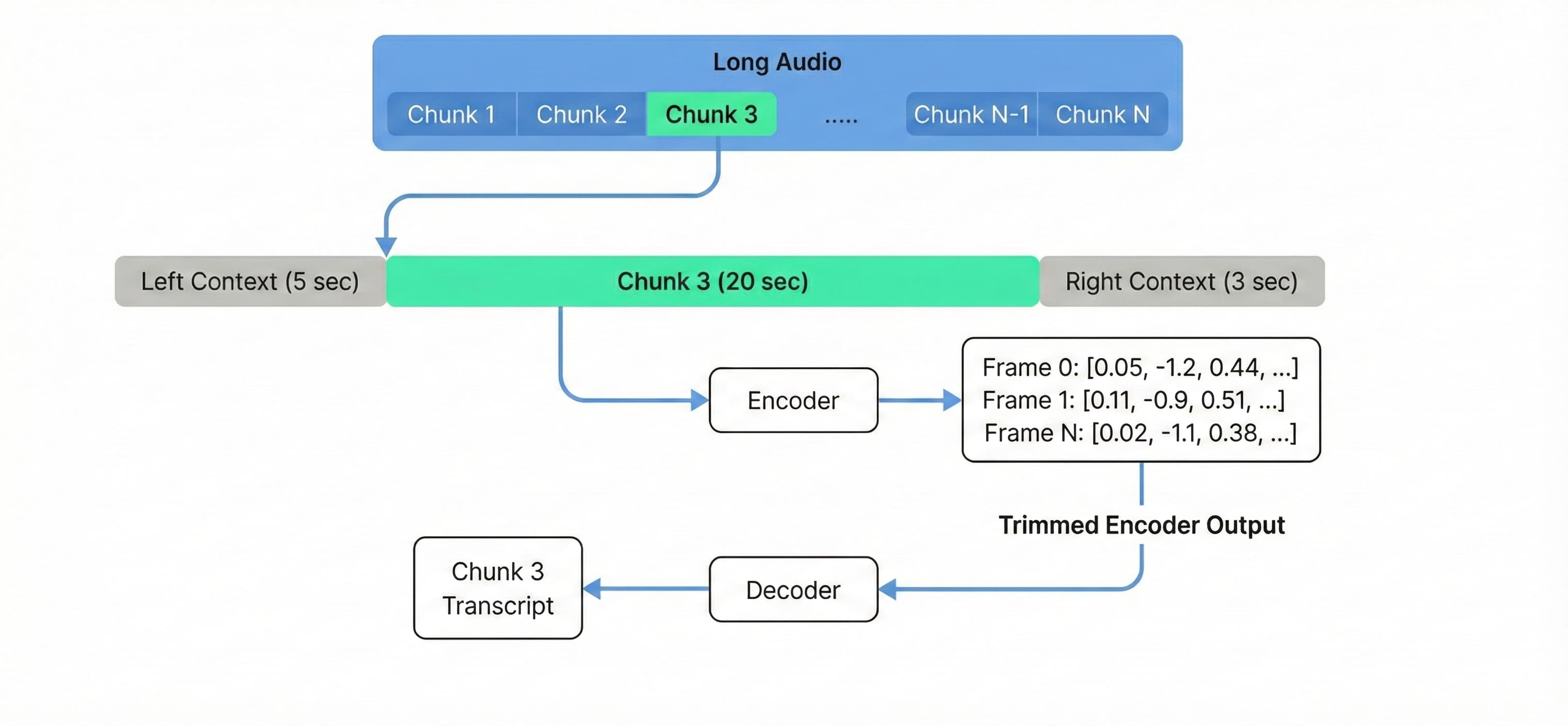
バッファードストリーミングを有効にしてデプロイする場合は、EnableStreaming=Yes パラメータを設定してください。
aws cloudformation deploy
–stack-name batch-gpu-audio-transcription
–template-file ./deployment.yaml
–capabilities CAPABILITY_IAM
–parameter-overrides EnableStreaming=Yes \
VPCId=your-vpc-id SubnetIds=your-subnet-ids SGIds=your-sg-ids RTIds=your-rt-ids
テストとモニタリング
大規模なソリューションの検証のため、NASAの予備飛行クルー記者会見から取得した1,000本の同一の50分音声ファイルを使用し、各g6.xlargeインスタンスが10本ずつ処理するよう100台のインスタンスに分散して実験を実施しました。
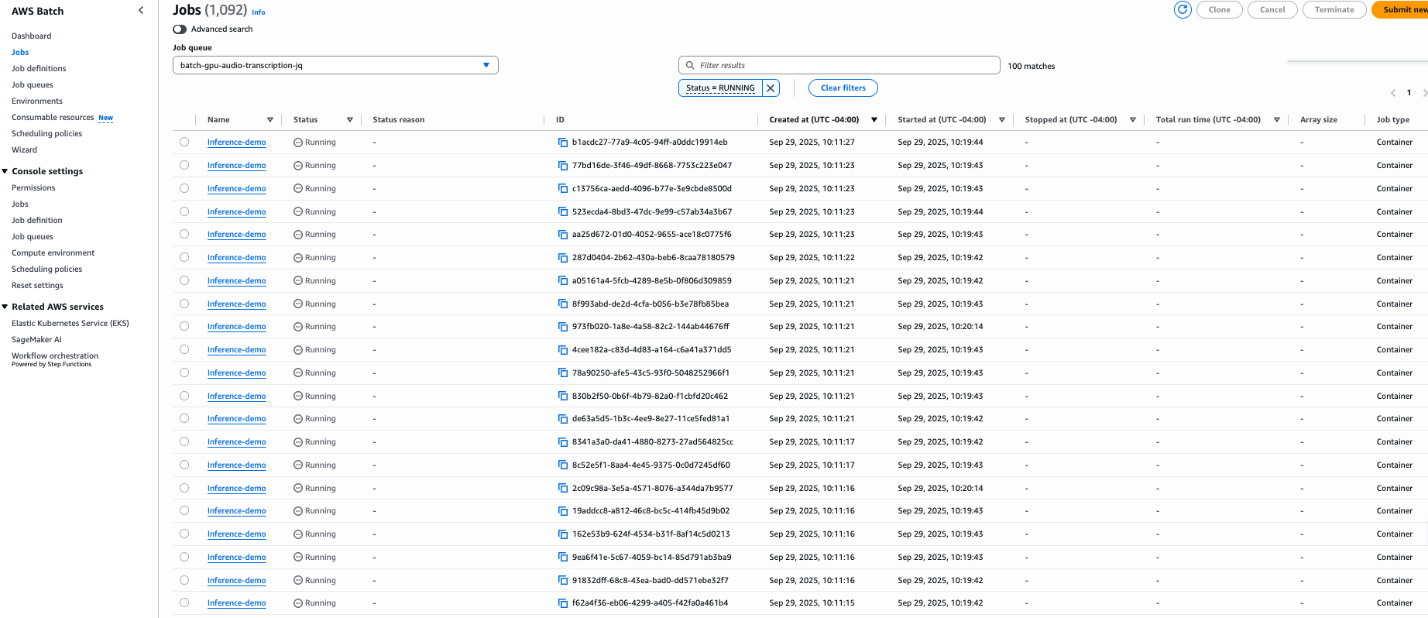 image*Figure 3. 100台のg6.xlargeインスタンス上で並行実行されるバッチジョブ。
本デプロイメントには、10秒間隔でGPU使用率(GPU utilization)、消費電力(power draw)、VRAM使用量(VRAM usage)、CPU使用率(CPU utilization)、メモリ消費量(memory consumption)、ディスク使用量(disk usage)を収集するAmazon CloudWatchエージェントの構成が含まれています。これらのメトリクスはCWAgent名前空間(CWAgent namespace)の下に表示され、リアルタイムモニタリング用のダッシュボードを構築できます。
パフォーマンスとコスト分析
本アーキテクチャの効率性を検証するため、複数の長時間音声データ(longform audio)を使用してシステムをベンチマークしました。
Parakeet-TDT-0.6B-v3モデルは、1分あたりの音声データに対する推論速度(inference speed)が0.24秒という高速な処理を実現しました。ただし、完全なパイプラインには、モデルのメモリへのロード、音声データの読み込み、入力の前処理(preprocessing)、出力の後処理(post-processing)に伴うオーバーヘッドも含まれます。このオーバーロードのため、処理時間を最大化する長時間音声データにおいて最適なコスト最適化が達成されます。
ベンチマーク結果(g6.xlarge):
- 音声データ長: 3時間25分(205分)
- 総ジョブ実行時間: 100秒
- 実効処理速度: 1分あたりの音声データに対して0.49秒
- コスト内訳
g6.xlargeインスタンスのus-east-1リージョン(Region)における価格に基づき、音声データ処理1分あたりのコストを見積もることができます。
価格モデル
時間単価(g6.xlarge)*
音声データ1分あたりのコスト
オンデマンド
~$0.805
$0.00011
スポットインスタンス(Spot Instances)
~$0.374
$0.00005
*価格は執筆時点のus-east-1リージョンの価格に基づく見積もりです。スポットインスタンスの価格はアベイラビリティゾーン(Availability Zone)によって異なり、変更される場合があります。
この比較は、大規模なワークロードにおけるセルフホスティング方式の経済的優位性を浮き彫りにしており、マネージドAPIサービスと比較して大規模な文字起こし(transcriptions)において大きな価値を提供します。
クリーンアップ
将来の課金を避けるため、本ソリューションによって作成されたリソースを削除してください:
- すべてのS3バケット(Amazon S3 buckets)(入力、出力、ログ用)を空にします。
- CloudFormationスタック(CloudFormation stack)を削除します:
aws cloudformation delete-stack --stack-name batch-gpu-audio-transcription
- 必要に応じて、ECRリポジトリ(ECR repository)とコンテナイメージ(container images)を削除してください。
詳細なクリーンアップ手順については、リポジトリのREADMEにあるクリーンアップセクションを参照してください。
結論
本記事では、1時間あたりの処理コストを数セント以下で抑えながら、大規模なオーディオを処理する音声文字起こしパイプライン(audio transcription pipeline)の構築方法を紹介しました。NVIDIAのParakeet-TDT-0.6B-v3モデルをAWS BatchおよびEC2 Spot Instancesと組み合わせることで、自動言語検出(automatic language detection)機能付きで25のヨーロッパ言語にわたる文字起こしを実現でき、他のソリューションと比較してコスト削減に貢献できます。バッファ付きストリーミング推論(buffered streaming inference)手法により、標準ハードウェア上で異なる長さのオーディオへの対応が可能になり、イベント駆動型アーキテクチャ(event-driven architecture)により、変動するワークロードに対応するためにゼロから自動的にスケールします。
まずは、GitHubリポジトリのサンプルコードをご覧ください。
著者について

Gleb Geinke
Gleb Geinkeは、AWS Generative AI Innovation Centerのディープラーニングアーキテクト(Deep Learning Architect)です。Glebはエンタープライズ顧客と直接協力し、複雑なビジネス課題に対する革新的な生成AIソリューションの設計とスケーリングを担当しています。
原文を表示
Many organizations are archiving large media libraries, analyzing contact center recordings, preparing training data for AI, or processing on-demand video for subtitles. When data volumes grow significantly, managed automatic speech recognition (ASR) service costs can quickly become the primary constraint on scalability.
To address this cost-scalability challenge, we use the NVIDIA Parakeet-TDT-0.6B-v3 model, deployed through AWS Batch on GPU-accelerated instances. Parakeet-TDT’s Token-and-Duration Transducer architecture simultaneously predicts text tokens and their duration to intelligently skip silence and redundant processing. This helps achieve inference speeds orders of magnitude faster than real-time. By paying only for brief bursts of compute rather than the full length of your audio, you can transcribe at scale for fractions of a cent per hour of audio based on the benchmarks described in this post.
In this post, we walk through building a scalable, event-driven transcription pipeline that automatically processes audio files uploaded to Amazon Simple Storage Service (Amazon S3), and show you how to use Amazon EC2 Spot Instances and buffered streaming inference to further reduce costs.
Model capabilities
Parakeet-TDT-0.6B-v3, released in August 2025, is an open-source multilingual ASR model that delivers high accuracy across 25 European languages with automatic language detection and flexible licensing under CC-BY-4.0. According to NVIDIA’s published metrics, the model maintains a 6.34% word error rate (WER) in clean conditions and 11.66% WER at 0 dB SNR, and supports audio up to three hours using local attention mode.
The 25 supported languages include Bulgarian, Croatian, Czech, Danish, Dutch, English, Estonian, Finnish, French, German, Greek, Hungarian, Italian, Latvian, Lithuanian, Maltese, Polish, Portuguese, Romanian, Slovak, Slovenian, Spanish, Swedish, Russian, and Ukrainian. This can help alleviate the need for separate models or language-specific configuration when serving international European economies.For deployment on AWS, the model requires GPU-enabled instances with a minimum of 4 GB VRAM, though 8 GB provides better performance. G6 instances (NVIDIA L4 GPUs) provide the best cost-to-performance ratio for inference workloads based on our tests. The model also performs well on G5 (A10G), G4dn (T4), and for maximum throughput, P5 (H100) or P4 (A100) instances.
Solution architecture
The process begins when you upload an audio file to an S3 bucket. This triggers an Amazon EventBridge rule that submits a job to AWS Batch. AWS Batch provisions GPU-accelerated compute resources, and the provisioned instances pull our container image with a pre-cached model from Amazon Elastic Container Registry (Amazon ECR). The inference script downloads and processes the file, then uploads the timestamped JSON transcript to an output S3 bucket. The architecture scales to zero when idle, so costs are incurred only during active compute.
For a deep dive into the general architectural components, refer to our previous post, Whisper audio transcription powered by AWS Batch and AWS Inferentia.
Prerequisites
- Create an AWS account if you don’t already have one and sign in. Create a user using AWS IAM Identity Center with full administrator permissions as described in Add users.
- Install the AWS Command Line Interface (AWS CLI) on your local development machine and create a profile for the admin user as described in Set up the AWS CLI.
- Install Docker on your local machine.
- Clone the GitHub repository to your local machine.
Building the container image
The repository includes a Docker file that builds a streamlined container image optimized for inference performance. The image uses Amazon Linux 2023 as a base, installs Python 3.12, and pre-caches the Parakeet-TDT-0.6B-v3 model during the build to alleviate download latency at runtime:
FROM public.ecr.aws/amazonlinux/amazonlinux:2023

WORKDIR /app

# Install system dependencies, Python 3.12, and ffmpeg
RUN dnf update -y && \
    dnf install -y gcc-c++ python3.12-devel tar xz && \
    ln -sf /usr/bin/python3.12 /usr/local/bin/python3 && \
    python3 -m ensurepip && \
    python3 -m pip install --no-cache-dir --upgrade pip && \
    dnf clean all && rm -rf /var/cache/dnf

# Install Python dependencies and pre-cache the model
COPY ./requirements.txt requirements.txt
RUN pip install -U --no-cache-dir -r requirements.txt && \
    rm -rf ~/.cache/pip /tmp/pip* && \
    python3 -m compileall -q /usr/local/lib/python3.12/site-packages

COPY ./parakeet_transcribe.py parakeet_transcribe.py

# Cache model during build to eliminate runtime download
RUN python3 -c "from nemo.collections.asr.models import ASRModel; \
    ASRModel.from_pretrained('nvidia/parakeet-tdt-0.6b-v3')"

CMD ["python3", "parakeet_transcribe.py"]
Pushing to Amazon ECR
The repository includes an updateImage.sh script that handles environment detection (CodeBuild or EC2), builds the container image, creates an ECR repository if needed, enables vulnerability scanning, and pushes the image. Run it with:./updateImage.sh
Deploying the solution
The solution uses an AWS CloudFormation template (deployment.yaml) to provision the infrastructure. The buildArch.sh script automates the deployment by detecting your AWS Region, collecting VPC, subnet, and security group information, and deploying the CloudFormation stack:
./buildArch.shUnder the hood, this runs:
aws cloudformation deploy --stack-name batch-gpu-audio-transcription \
  --template-file ./deployment.yaml \
  --capabilities CAPABILITY_IAM \
  --region ${AWS_REGION} \
  --parameter-overrides VPCId=${VPC_ID} SubnetIds="${SUBNET_IDS}" \
  SGIds="${SecurityGroup_IDS}" RTIds="${RouteTable_IDS}"
The CloudFormation template creates the AWS Batch compute environment with G6 and G5 GPU instances, a job queue, a job definition referencing your ECR image, input and output S3 buckets with EventBridge notifications enabled. It also creates an EventBridge rule that triggers a Batch job on S3 upload, an Amazon CloudWatch agent configuration for GPU/CPU/memory monitoring, and IAM roles with least-privilege policies. AWS Batch allows selection of Amazon Linux 2023 GPU images by specifying ImageType: ECS_AL2023_NVIDIA in the compute environment configuration.
Alternatively, you can deploy directly from the AWS CloudFormation console using the launch link provided in the repository README.
Configuring Spot instances
Amazon EC2 Spot Instances can help further reduce the costs, by running your workloads on unused EC2 capacity at a discount of up to 90% depending on your instance type. To enable Spot Instances, we modify the compute environment in deployment.yaml:
DefaultComputeEnv:
  Type: AWS::Batch::ComputeEnvironment
  Properties:
    Type: MANAGED
    State: ENABLED
    ComputeResources:
      AllocationStrategy: SPOT_PRICE_CAPACITY_OPTIMIZED
      Type: SPOT
      BidPercentage: 100
      InstanceTypes:
        - "g6.xlarge"
        - "g6.2xlarge"
        - "g5.xlarge"
      MinvCpus: !Ref DefaultCEMinvCpus
      MaxvCpus: !Ref DefaultCEMaxvCpus
      # ... remaining configuration unchanged
You can enable this by setting –parameter-overrides UseSpotInstances=Yes when running aws cloudformation deploy. The SPOT_PRICE_CAPACITY_OPTIMIZED allocation strategy selects Spot Instance pools that are both the least likely to be interrupted and have the lowest possible price. Diversifying instance types (G6 xlarge, G6 2xlarge, G5 xlarge) can improve Spot availability. Setting MinvCpus: 0 makes sure the environment scales to zero when idle, so you avoid incurring costs between workloads. Since ASR jobs are stateless and idempotent, they are well-suited for Spot. If an instance is reclaimed, AWS Batch automatically retries the job (configured with up to 2 retry attempts in the job definition).
Managing memory for long audio
The Parakeet-TDT model’s memory consumption scales linearly with audio duration. The Fast Conformer encoder must generate and store feature representations for the full audio signal, creating a direct dependency where doubling audio length roughly doubles VRAM usage. According to the model card, with full attention the model can process up to 24 minutes given 80GB of VRAM.
NVIDIA addresses this with a local attention mode that supports up to 3 hours of audio on an 80 GB A100:
`# Enable local attention for long audio** asr_model.change_attention_model("rel_pos_local_attn", [128, 128])
asr_model.change_subsampling_conv_chunking_factor(1) # auto select
asr_model.transcribe(["input_audio.wav"])`
This may come with a slight accuracy hit, we recommend testing on your use case.
Buffered streaming inference
For audio that exceeds 3 hours, or to process long audio cost-effectively on standard hardware like a g6.xlarge, we use buffered streaming inference. Adapted from NVIDIA NeMo’s streaming inference example, this technique processes audio in overlapping chunks rather than loading the full context into memory.
We configure 20-second chunks with 5-second left context and 3-second right context to maintain transcription quality at chunk boundaries (note that the accuracy may degrade when changing these parameters, so experiment to find the optimal configuration. Decreasing the chunk_secs increases processing time):
# Streaming inference loop
while left_sample < audio_batch.shape[1]:
    # add samples to buffer
    chunk_length = min(right_sample, audio_batch.shape[1]) - left_sample

    # [Logic to manage buffer and flags omitted for brevity]
    buffer.add_audio_batch_(...)

    # Encode using full buffer [left-chunk-right]
    encoder_output, encoder_output_len = asr_model(
        input_signal=buffer.samples,
        input_signal_length=buffer.context_size_batch.total(),
    )

    # Decode only chunk frames (constant memory usage)
    chunk_batched_hyps, _, state = decoding_computer(...)

    # Advance sliding window
    left_sample = right_sample
    right_sample = min(right_sample + context_samples.chunk, audio_batch.shape[1])
Processing audio at fixed chunk sizes decouples VRAM usage from total audio length, allowing a single g6.xlarge instance to process a 10-hour file with the same memory footprint as a 10-minute one.
To deploy with buffered streaming enabled, set the EnableStreaming=Yes parameter.
aws cloudformation deploy \
    –stack-name batch-gpu-audio-transcription \
    –template-file ./deployment.yaml \
    –capabilities CAPABILITY_IAM \
    –parameter-overrides EnableStreaming=Yes \
    VPCId=your-vpc-id SubnetIds=your-subnet-ids SGIds=your-sg-ids RTIds=your-rt-ids
Testing and monitoring
To validate the solution at scale, we ran an experiment with 1,000 identical 50-minute audio files from a NASA preflight crew news conference, distributed across 100 g6.xlarge instances processing 10 files each.
*Figure 3**. Batch jobs running concurrently on 100 g6.xlarge instances.*
The deployment includes an Amazon CloudWatch agent configuration that collects GPU utilization, power draw, VRAM usage, CPU utilization, memory consumption, and disk usage at 10-second intervals. These metrics appear under the CWAgent namespace, enabling you to build dashboards for real-time monitoring.
Performance and cost analysis
To validate the efficiency of the architecture, we benchmarked the system using multiple longform audio files.
The Parakeet-TDT-0.6B-v3 model achieved a raw inference speed of 0.24 seconds **per minute of audio. However, a complete pipeline also includes overhead for loading the model into memory, loading audio, preprocessing the input and post-processing the output. Because of this overhead, the optimal cost optimization happens for long-form audio to maximize the processing time.
Benchmark results (g6.xlarge):
- Audio Duration: 3 hours 25 minutes (205 minutes)
- Total Job Duration: 100 sec
- Effective Processing Speed: 0.49 seconds per minute of audio
- Cost breakdown
Based on pricing in the us-east-1 Region for the g6.xlarge instance, we can estimate the cost per minute of audio processing.
| Pricing Model | Hourly Cost (g6.xlarge)* | Cost per Minute of Audio |
|---|---|---|
| On-Demand | ~$0.805 | $0.00011 |
| Spot Instances | ~$0.374 | $0.00005 |
*Prices are estimates based on us-east-1 rates at the time of writing. Spot prices vary by Availability Zone and are subject to change.
This comparison highlights the economic advantage of the self-hosted approach for high-volume workloads, delivering value for large scale transcriptions compared to managed API services.
Cleanup
To avoid incurring future charges, delete the resources created by this solution:
- Empty all S3 buckets (input, output, and logs).
- Delete the CloudFormation stack:
aws cloudformation delete-stack --stack-name batch-gpu-audio-transcription
- Optionally, remove the ECR repository and container images.
For detailed cleanup instructions, refer to the cleanup section of the repository README.
まとめ
In this post, we demonstrated how to build an audio transcription pipeline that processes audio at scale for fractions of a cent per hour. By combining NVIDIA’s Parakeet-TDT-0.6B-v3 model with AWS Batch and EC2 Spot Instances, you can transcribe across 25 European languages with automatic language detection and help reduce costs compared to alternative solutions. The buffered streaming inference technique extends this capability to audio of varying length on standard hardware, and the event-driven architecture scales automatically from zero to handle variable workloads.
To get started, explore the sample code in the GitHub repository.
About the authors
Gleb Geinke
Gleb Geinke is a Deep Learning Architect at the AWS Generative AI Innovation Center. Gleb collaborates directly with enterprise customers to design and scale transformational generative AI solutions for complex business challenges.
同じ出来事を6媒体で確認
同じ出来事を扱う別媒体の記事です。見出しと公開時刻を比較できます。
- TechCrunch AIジェンセン・フアンのNvidia GTC 2026基調講演の視聴方法
- The Decoderバイトダンス、マレーシアでNvidia Blackwellクラスターへのアクセスを確保、米国の対中輸出禁止を回避
- NVIDIA Developer BlogNVIDIA Cosmos World Foundation Modelsによる合成データのスケーリングと物理AI推論
- Hugging Face Blogロボット動画生成のための NVIDIA Cosmos Predict 2.5 の LoRA/DoRA を用いたファインチューニング
- TLDR AIロボット動画生成のための NVIDIA Cosmos Predict 2.5 の LoRA/DoRA を用いたファインチューニング(9 分読了)
今日のまとめ
AIデイリーブリーフで今日の重要ニュースをまとめ読み