LLM CLI ツールが推論トレースや OpenAI Responses API をサポート
本文の状態
日本語全文を表示中
詳細モードで約7分の本文を読めます。
同じ出来事の情報源
この情報源を基点に整理
Simon Willison Blog
Simon Willison は LLM CLI ツールの新バージョン 0.32 をリリースし、推論トレースの可視化や OpenAI Responses API のサポート、サーバーサイドツール機能などを追加した。
AI深層分析を開く2026年8月5日 10:40
AI深層分析
キーポイント
推論トレースの標準出力分離
LLM CLI は推論モデルの実行時に思考過程(reasoning traces)を標準エラーに出力し、パイプライン処理への干渉を防ぐ機能を追加した。
OpenAI Responses API とサーバーサイドツールの統合
新バージョンは OpenAI の Responses API をサポートし、コード実行環境やウェブ検索といったサーバーサイドツールを直接呼び出せるようになった。
デフォルトモデルの切り替えと GPT-5.6 サポート
LLM は GPT-5.6 モデルファミリーをサポートし、コストパフォーマンスに優れた「GPT-5.6 Luna」をデフォルトモデルとして採用した。
llm-anthropic プラグインの機能拡張
Anthropic 対応プラグインも更新され、ウェブ検索やウェブフェッチ、コード実行、MCP コネクタなどの機能が強化された。
Anthropic MCP との連携強化
新しいリリースにより、単一のリクエスト・レスポンス内で Anthropic が MCP コールを実行できるようになり、Datasette のような外部ツールとの統合が容易になった。
重要な引用
Running LLM against reasoning models now displays their reasoning traces to standard error
the new default model used with `llm "prompt"` is now the inexpensive but capable GPT-5.6 Luna
LLM calls can now use server-side tools from various providers
executing prompts against any OpenAI compatible endpoint as a one-liner
編集コメントを表示
編集コメント
Simon Willison は長年 CLI ツールの普及に貢献しており、今回のアップデートは推論プロセスの透明性を高める点で実務的な価値が高い。特にサーバーサイドツールの統合により、CLI を介して複雑な自動化タスクを実行する際の利便性が飛躍的に向上したと言える。
Source Article
元記事を日本語で読む
本文に関係しない購読案内、埋め込み通知、サイト内プロモーションは除いています。
今朝、LLM 0.32 をリリースしました。これはプロジェクト開始以来、最も重要な新バージョンです。今回のアップデートでは、可視化された推論トレースのサポート、サーバーサイドプロバイダーツールの追加、再設計されたコンテンツアドレス型 SQLite ログ、新規モデル、そして OpenAI Responses API に基づく新機能などが含まれています。また、llm-anthropic プラグインの新バージョンも同時にリリースしており、こちらにも大幅な更新が施されています。
LLM CLI ユーザー向け主要機能
推論モデルに対して LLM を実行すると、その推論トレースが標準エラー出力に表示されるようになりました。これにより、他のツールにパイプする可能性のある標準出力に情報が含まれることなく、モデルの「思考過程」を確認できるようになります。この機能を無効化するには -R/--hide-reasoning オプションを追加してください。
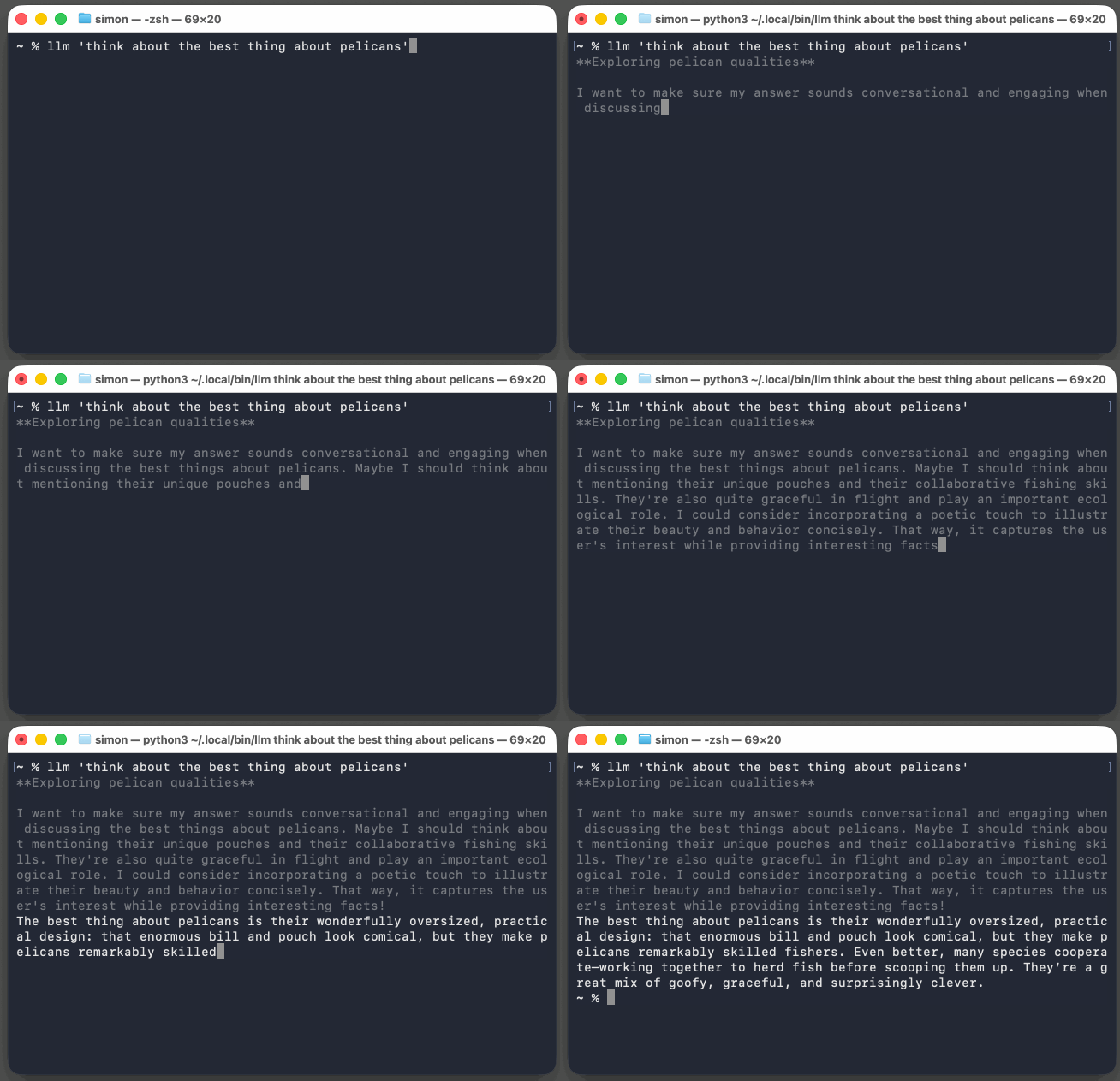
LLM では、GPT-5.6 モデルファミリーが標準でサポートされています。また、llm "prompt" コマンドで使用されるデフォルトモデルは、コストパフォーマンスに優れながら能力も高い GPT-5.6 Luna に変更されました。
LLM の呼び出しでは、各種プロバイダーのサーバーサイドツールを利用できるようになりました。OpenAI は コード実行環境 をサーバーサイドツールとして提供しており、LLM ではこれを利用して恩恵を受けられるプロンプトを実行できます。
llm --tool CodeInterpreter 'Show current python and SQLite versions'また、OpenAI には WebSearch ツールも追加されました。
「llm-anthropic」プラグインの最新リリースでは、WebSearch、WebFetch、CodeExecution、AnthropicMCP の各機能が追加されました。これらは以下のような形で利用可能です。
llm -m claude-sonnet-5 -T 'AnthropicMCP("https://datasette.simonwillison.net/-/mcp")' \
  'how many rows in the blog_blogmark table?'
これにより、Anthropic は API への単一のリクエスト・レスポンス処理の一部として、私の新規作成した「datasette-mcp」プラグインに対して MCP コールを実行できるようになります。
新機能の「llm openai endpoint」コマンドは、設定を不要に OpenAI 互換のエンドポイントに対してプロンプトを実行するためのツールを提供します。このコマンドで実行されたリクエストはログに残らないため、LLM API の標準的な形式に対応するあらゆるシステムに対して、その場でワンショットのプロンプトを実行したい場合に便利です。
例えば、ローカルの LM Studio API で稼働している Gemma 4 12B モデルに対してプロンプトを送信する場合、uvx を使用して LLM のインストールなしで実行し、さらに「llm-tools-quickjs」ツールプラグインを併用することで、以下のようなコマンドが利用できます。
uvx --with llm-tools-quickjs \
  llm openai endpoint http://localhost:1234/v1 -m google/gemma-4-12b \
  -T QuickJS 'Use QuickJS to multiply 3434 * 2434' --td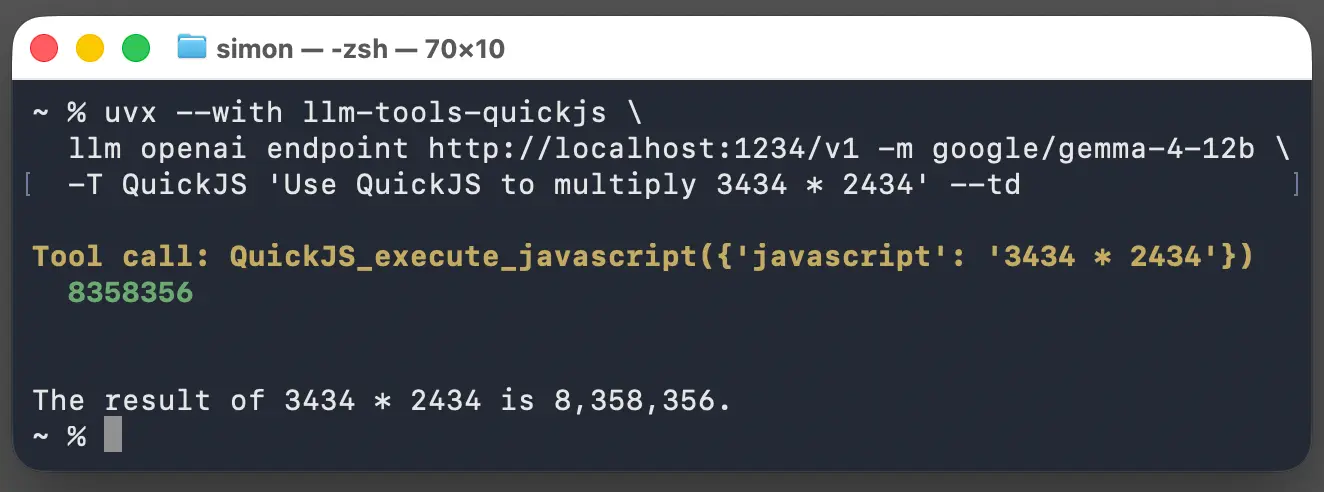
Python API の新機能
LLM の Python API ではこれまで、会話を作成してからメッセージを一つずつ送信する必要がありました。これは LLM の本質的な仕組みに対する抽象化でしたが、各リクエストには過去のすべてのメッセージ履歴が含まれるという事実を隠すものでした。この抽象化が、より高度なケースでは足かせとなることがありました。
そこで新リリースでは、model.prompt(messages=[]) パラメータが導入されました。以下のように利用できます:
import llm
from llm import user, assistant, system

model = llm.get_model("gpt-5.6-luna")

response = model.prompt(messages=[
    system("You are a helpful pirate."),
    user("What is the capital of France?"),
    assistant("Paris, matey."),
    user("And Germany?"),
])
print(response.text())
LLM は従来、各プロンプトに対して文字列の反復可能シーケンスを返していました。モデルが文字列レスポンスを返すだけの場合はこれで問題ありませんでしたが、モデルが進化して予想外の形状(構造)を持つようになると機能しなくなりました。
現在では多くのモデルが、推論テキスト、出力文字列、ツール呼び出し、さらには画像添付などを組み合わせて返します。LLM 0.32 では、以下のように対応できます:
for event in model.prompt("Explain cats").stream_events():
    if event.type == "reasoning":
        print(f"[thinking] {event.chunk}", end="", flush=True)
    elif event.type == "text":
        print(event.chunk, end="", flush=True)
    else:
        print(f"Other event: {event}")
これらの機能を組み合わせることで、事実上の標準である OpenAI チャット完了 API の堅牢な実装が可能になりました。これを llm-chat-completions-server プラグインとしてリリースしています:
llm install llm-chat-completions-server
llm chat-completions-server --port 9000
# Server is now running on http://127.0.0.1:9000/v1
これで、新しい llm openai endpoint コマンドを使用して、サーバー経由でプロンプトを実行できるようになりました。
llm openai endpoint http://127.0.0.1:9000/v1 'hello' -m gpt-5.4-miniそのような API におけるより大きな課題の一つは、ログ記録です。リクエストごとにメッセージシーケンスが追加されるパターンをサポートする場合、各ターンで重複する JSON をすべてログに記録するのは避けたいところです。
その解決策として登場したのが、Git に着想を得た新しい コンテンツアドレス可能メッセージストア です。この新しいスキーマの詳細はドキュメントでご確認いただけますが、llm logs および llm logs --json コマンドもアップグレードされ、この形式を再び扱いやすい形に変換できるようになりました。
その他にも
今回のリリースには他にも多くの新機能が追加されています。0.32 リリースノートは非常に包括的な内容となっていますが、0.32rc2、0.32rc、0.32a3、0.32a2、そして 0.32a0 のノートも参照いただければ、詳細な情報が補完されます。
既存の LLM プラグインは引き続き動作しますが、追加モデルを提供するプラグインは新しいストリーミングイベントシステムに完全に参加するために、バージョン 0.32 へのアップグレードが必要です。詳細な実装ガイドについては、ドキュメント内の「構造化メッセージとストリーミングイベント」をご覧ください。
また、私自身のいくつかのプラグインも更新しました。
「llm-anthropic 0.26」(https://github.com/simonw/llm-anthropic/releases/tag/0.26) がリリースされ、Claude 5 シリーズのモデルや WebSearch のサポートが追加されました。
WebFetch、CodeExecution、そして AnthropicMCP のサーバーサイドツールに対応。
「llm-gemini」や「llm-openrouter」、そして「llm-mistral」はほぼ完成しており、近日中にリリースされます。
LLM はもはやエージェント・フレームワークだ
今回のリリースで導入された低レベルなツール機能の多くは、Datasette Agent のニーズに応えるために開発されました。LLM の開発を始めた当初、「エージェント」という用語は定義が曖昧すぎるとして私は使用を拒んでいました。しかし、2025 年 9 月には「LLM エージェントとは、目標達成のためにツールをループ処理で実行するもの」という定義が十分に確立されたと考え、この言葉を使うのをやめる必要はないと判断しました。
ツールチェーンでは、人間による承認を待って一時停止したり、保存されたメッセージ履歴から再開したりできるようになりました。これらは Datasette Agent にとって必要な機能です。
LLM を見ていると、次第に「エージェント」らしい形になってきていると感じます。異なるソースのさまざまなツールとモデルを組み合わせて、ワンライナーで実行できる CLI ユーティリティがあるのは素晴らしいことです。また、Datasette Agent や llm-coding-agent のようなシステムを構築できるほど強力な Python ライブラリも備わっています。
次のバージョンの LLM では、「エージェント」という概念がコアライブラリに組み込まれるかもしれません。その具体的な姿については、まだ検討中です。
Tags: projects, releases, ai, openai, generative-ai, llms, llm, anthropic, llm-tool-use, llm-reasoning, model-context-protocol
原文を表示
I released LLM 0.32 this morning, the most significant new version of LLM since the initial launch of the project. The new version includes support for visible reasoning traces, server-side provider tools, redesigned content-addressable SQLite logs, new models, and new features enabled by the OpenAI Responses API. I also released a new version of the llm-anthropic plugin with substantial updates of its own.
Headline features for LLM CLI users
Running LLM against reasoning models now displays their reasoning traces to standard error, so you can see what they are "thinking" without that information being included in the standard output that you might pipe to another tool. Add -R/--hide-reasoning to turn this off.
LLM includes support out-of-the-box for the GPT-5.6 model family, and the new default model used with llm "prompt" is now the inexpensive but capable GPT-5.6 Luna.
LLM calls can now use server-side tools from various providers. OpenAI provide a code execution environment as a server-side tool; LLM can now run prompts that benefit from that like so:
llm --tool CodeInterpreter 'Show current python and SQLite versions'OpenAI also gets a WebSearch tool.
The llm-anthropic plugin adds WebSearch, WebFetch, CodeExecution, and AnthropicMCP, which looks like this:
llm -m claude-sonnet-5 -T 'AnthropicMCP("https://datasette.simonwillison.net/-/mcp")' \
  'how many rows in the blog_blogmark table?'
That causes Anthropic to execute MCP calls against my new datasette-mcp plugin as part of a single request/response interaction with their API.
The new llm openai endpoint command provides a tool for executing prompts against any OpenAI compatible endpoint as a one-liner. These aren't logged, which makes this a handy tool for running one-off prompts against anything that speaks the lingua franca of the LLM API world.
Here's how I use that to run prompts against Gemma 4 12B running in my localhost LM Studio API, via uvx (no LLM installation required) and mixing in the llm-tools-quickjs tool plugin for good measure:
uvx --with llm-tools-quickjs \
  llm openai endpoint http://localhost:1234/v1 -m google/gemma-4-12b \
  -T QuickJS 'Use QuickJS to multiply 3434 * 2434' --td
New features in the Python API
LLM's Python API previously required you to create a conversation and then send messages to it one at a time. This was an abstraction over the true nature of LLMs, where each request carries a complete history of the messages that came before it. That abstraction started to get in the way for some more advanced cases, so the new release introduces a model.prompt(messages=[]) parameter that can be used like this:
import llm
from llm import user, assistant, system

model = llm.get_model("gpt-5.6-luna")

response = model.prompt(messages=[
    system("You are a helpful pirate."),
    user("What is the capital of France?"),
    assistant("Paris, matey."),
    user("And Germany?"),
])
print(response.text())
LLM previously returned an iterable sequence of strings from each prompt. This worked great when models returned a string response, but failed to predict the weird shape that models would evolve towards. Today many models return a mix of reasoning text, output strings, tool calls, and even image attachments. With LLM 0.32 you can do this instead:
for event in model.prompt("Explain cats").stream_events():
    if event.type == "reasoning":
        print(f"[thinking] {event.chunk}", end="", flush=True)
    elif event.type == "text":
        print(event.chunk, end="", flush=True)
    else:
        print(f"Other event: {event}")
Combine these features and we can *finally* provide a robust implementation of the semi-standard OpenAI chat completions API, which I've now released as the llm-chat-completions-server plugin:
llm install llm-chat-completions-server
llm chat-completions-server --port 9000
# Server is now running on http://127.0.0.1:9000/v1
Now you can run prompts against LLM via that server, using the new llm openai endpoint command!
llm openai endpoint http://127.0.0.1:9000/v1 'hello' -m gpt-5.4-miniThe bigger challenge with that kind of API concerns logging. If we're going to support the pattern where the message sequence is appended to on every request, ideally we can avoid logging all of that duplicate JSON for every turn.
The solution is the new content-addressable message store, modeled after Git. You can see the new schema for that in the documentation, but the llm logs and llm logs --json commands have both been upgraded to convert that format back into something that's easy to consume.
And the rest
There is a whole lot more in this release. The 0.32 release notes are pretty comprehensive, and the notes for 0.32rc2, 0.32rc, 0.32a3, 0.32a2, and 0.32a0 should fill in any gaps.
Existing LLM plugins should all continue to work, but plugins that provide extra models will need to be upgraded to 0.32 in order to participate fully in the new streaming events system. There's a guide to implementing plugins with Structured messages and streaming events in the documentation.
I've updated some of my own plugins:
- llm-anthropic 0.26 adds support for the Claude 5 family of models, plus WebSearch, WebFetch, CodeExecution, and AnthropicMCP server-side tools.
- llm-gemini and llm-openrouter and llm-mistral are nearly there, releases coming soon.
I guess LLM is an agent framework now
Quite a few of the lower-level tools changes in this release were driven by the needs of Datasette Agent. When I started work on LLM, the term "agent" had such a vague definition that I refused to use it. In September 2025 I came around to the idea that "An LLM agent runs tools in a loop to achieve a goal" is well established enough now that I could stop avoiding the term entirely.
Tool chains can now pause for human approval and resume from a stored message history - both needed by Datasette Agent.
Looking at LLM today it's beginning to look very agent-shaped to me. There's something neat about having a CLI utility that can mix and match different tools from different sources with different models all as a one-liner, and that includes a Python library powerful enough to build systems like Datasette Agent and llm-coding-agent.
Maybe the next version of LLM will bake the concept of an "agent" into the core library. I'm still trying to figure out what that would look like.
Tags: projects, releases, ai, openai, generative-ai, llms, llm, anthropic, llm-tool-use, llm-reasoning, model-context-protocol
今日のまとめ
AIデイリーブリーフで今日の重要ニュースをまとめ読み