Pydantic、AI アプリケーションの制御を可能にする機能フラグ機能を公開
本文の状態
日本語全文を表示中
詳細モードで約14分の本文を読めます。
同じ出来事の情報源
この情報源を基点に整理
Pydantic Blog
Pydantic は Logfire の管理変数機能を通じて、モデル・プロンプト・ツールの三要素を型付きで制御する_feature_flag_システムを提供し、AI アプリケーションの運用における品質とコストの最適化を実現すると発表した。
AI深層分析を開く2026年8月19日 03:32
AI深層分析
キーポイント
AI アプリケーションの管理変数機能
Pydantic Logfire はモデル、プロンプト、ツールの三つの基本要素を型付き・バージョン管理された変数として扱う制御平面を提供し、デプロイなしで変更やテストが可能となる。
生成 AI における実験指標の拡張
従来の A/B テストに加え、回答品質、コスト、レイテンシ、安全性、多言語対応など、AI 特有の複雑な評価項目を測定する必要性が強調される。
成長エンジニアリングと AI エンジニアリングの融合
製品実験の実施がバックエンドやフロントエンドの開発と同様に重要視され、フィードバックループの短縮が技術進化への適応に不可欠であると説く。
具体的な実装アプローチ
pip による追加インストールと Python コード例を通じて、特定のユーザーグループへ新しいモデルやプロンプトをルーティングする実装方法を提示している。
プロファイルと制限の動的適用
アプリケーションはユーザーIDやテナントプランをキーとしてプロファイルとツールポリシーを取得し、Pydantic AI の UsageLimits を用いて実行時の呼び出し数を強制する。
重要な引用
Feature flags are not limited to booleans. They are typed, versioned variables that teams can target, measure, and change without redeploying.
Growth engineering is now part of AI engineering.
A production AI experiment should consider: Answer quality and task completion, Cost per successful outcome, Latency and time to first useful response.
UsageLimits checks the cap before it executes more tools, protecting cost and latency from a runaway loop.
編集コメントを表示
編集コメント
生成 AI の実運用においては、モデルの切り替えやプロンプトの調整を頻繁に行う必要があるが、そのための標準的なプラクティスが確立されつつある。Pydantic Logfire が提供する管理変数機能は、開発者が迅速な実験と安定した運用を両立させるための有効な手段となるだろう。
Source Article
元記事を日本語で読む
本文に関係しない購読案内、埋め込み通知、サイト内プロモーションは除いています。
AI は、ソフトウェアをより多くの人々に身近なものにします。あるエージェントは、AI ネイティブな専門家と、普通のリクエストがそのまま通じることを期待する初心者ユーザーの両方をサポートできるかもしれません。また、複数の言語やドメイン知識のレベルに対応し、モデルの応答とツール、アプリケーションロジックを組み合わせたワークフローも支える必要があります。
一つのデフォルト体験ですべての人を満足させることはめったにありません。Pydantic Logfire が管理する変数により、AI エンジニアは AI アプリケーションを形作る 3 つの基本要素——モデル、プロンプト、ツール——を変更するためのコントロールプレーンを手に入れます。ここでいう機能フラグは、単なるブール値に限定されません。チームがターゲットを絞り、測定し、再デプロイなしで変更できる、型付きかつバージョン管理された変数なのです。
A/B テストの基礎となる原則——代替案の定義、トラフィックの割り当て、結果の比較——は依然として有効です。生成 AI は、テスト可能な範囲と、測定の必要性を拡大しました。チームは品質、コスト、レイテンシ、信頼性をバランスさせながら、最適な体験を見つけ出す必要があります。
#Growth is now AI work
成長エンジニアリングは、もはや AI エンジニアリングの一部となっています。AI エンジニアは、バックエンドやフロントエンドの構築、そして自らの成果がどのように機能しているかを理解するための分析基盤を整えつつ、製品実験を推進しています。
その結果は、単なるクリックやコンバージョンよりも複雑です。本番環境での AI 実験では、以下の点を考慮する必要があります:
- 回答の質とタスク完了率
- 成功した成果あたりのコスト
- レイテンシと、最初の有用な応答までの時間
- ツールの精度とリトライ動作
- セーフティ、信頼性、エスカレーション対応
- 言語、コホート、知識レベルごとのパフォーマンス
答えが複雑であっても、問い自体はシンプルです。機能するのか?誰にとって有効なのか?どのような条件下で?どれほど迅速に?コストはいくらか?適切なツールを使っているか、そして安全に失敗できる仕組みはあるのか。
プロバイダーがモデルをリリースし、フレームワークが機能を追加し、有用なパターンが生まれる中で、より速いリリースサイクルはより良い製品を生み出します。フィードバックループを短くすることで、技術が次の段階に進む前にチームが学習する機会を増やすことができます。
3 つの基礎から始める
AI チームは以下の 3 つの要素から始められます。
これらの例を使う前に、管理変数を追加でインストールしてください:
pip install 'logfire[variables]'
モデルは機能、速度、コスト、コンテキスト制限、プロバイダーの動作を決定します。文字列変数を使えば、アプリケーションコードを変更せずに、オプトインしたユーザーグループを新しいモデルにルーティングできます:
import logfire
logfire.configure()
logfire.instrument_pydantic_ai()
model = logfire.var(
name='support_model',
type=str,
default='openai:gpt-5.2',
)
プロンプトはタスクの枠組みを設定し、ドメインガイダンスを提供し、アプリケーションがどのようにコミュニケーションするかを形作ります。管理されたプロンプトを使えば、ガイド付き体験と簡潔な体験を比較できます:
instructions = logfire.var(
name='support_instructions',
type=str,
default='Explain the next step clearly and ask before taking action.',
)
ツールはシステムが取得・計算・変更できる範囲を決定します。変数には実行可能なコードではなく、型付きのポリシーを含めるべきです:
from typing import Literal
from pydantic import BaseModel, Field
class ToolPolicy(BaseModel):
profile: Literal['answer_only', 'research', 'diagnostic']
max_tool_calls: int = Field(ge=0, le=8)
tool_policy = logfire.var(
name='tool_policy',
type=ToolPolicy,
default=ToolPolicy(
profile='answer_only',
max_tool_calls=3,
),
)
各プロファイルには事前に承認されたツールがマッピングされ、呼び出し回数の上限も適用されます。ツールのコードや認証情報、権限管理、必要な承認手続きなどはすべてコード内に保持します。
これらの基本要素は互いに影響し合います。より優れたプロンプトを使えば、小型のモデルでも実用可能になる場合があります。一方、高性能なモデルであれば学習例を減らせますが、高コストなツールの呼び出し頻度が高まるリスクもあります。チームはこれらを組み合わせてテストを行い、各組み合わせが製品や運用上の成果にどう結びつくかを明確にする必要があります。
#変数を実働させる
変数を定義するだけでは不十分です。エージェントの実行中にこれらの変数を解決し、適用する必要があります。
この例では、ユーザー ID を安定したターゲティングキーとして使用します。また、条件付きルーティングのためにテナントプランとワークフローも指定しています。こうして解決されたツールポリシーは、Pydantic AI が強制する呼び出し上限となります:
from pydantic_ai import Agent, UsageLimits
APPROVED_TOOLS = {
'answer_only': [],
'research': [support_search],
'diagnostic': [support_search, account_diagnostics],
}
async def answer(user_id: str, tenant_plan: str, message: str) -> str:
attributes = {
'tenant_plan': tenant_plan,
'workflow': 'customer_support',
}
with (
model.get(targeting_key=user_id, attributes=attributes) as selected_model,
instructions.get(targeting_key=user_id, attributes=attributes) as selected_instructions,
tool_policy.get(targeting_key=user_id, attributes=attributes) as selected_policy,
):
policy = selected_policy.value
agent = Agent(
selected_model.value,
instructions=selected_instructions.value,
tools=APPROVED_TOOLS[policy.profile],
)
result = await agent.run(
message,
usage_limits=UsageLimits(tool_calls_limit=policy.max_tool_calls),
)
return result.output
高負荷なサポートワークフローでは 1 件の研究問い合わせしか受け付けない一方、承認された診断ワークフローでは最大 4 件まで処理可能です。UsageLimits はツール実行前に上限を確認するため、コストやレイテンシが暴走するループからシステムを守ります。
変数コンテキストには、選択したラベルとバージョンも付与されます。これにより、エンジニアはどのモデル・プロンプト・ツールポリシーが各結果を生成したかを追跡できます。
型付きフィーチャーフラグの導入
「型」へのこだわりが重要です。Pydantic は当初、信頼できないデータを検証済みのオブジェクトに変換する開発者を支援するために生まれました。管理された変数は、この考え方を本番環境の設定に持ち込みます。Logfire が値を変更できたとしても、アプリケーション側で有効な形状(スキーマ)を宣言し続ける点が鍵です。
変数には以下のようなデータ型を保持できます:
- プロンプト、指示、メッセージ用のテキスト
- トークン制限、閾値、予算の数値
- オン/オフフラグ用のブール値
データクラスと Pydantic モデルのための構造化データ
ランタイムの入力値と再利用可能な断片を結合するテンプレート
コードのデフォルトは契約であり、安全網としての役割を果たします。Logfire は、宣言された型や JSON Schema に対してリモート値を検証し、値が欠落している場合や無効な場合は、既知の良好なデフォルト値を使用します。チームは一度に一つのプリミティブを変更することもできますし、モデル、プロンプト、ツールのポリシーを一つの Pydantic モデルにまとめてグループ化することで、全体の体験を一括で変更することも可能です。
生コンテキストでのターゲット設定
バージョンには「production(本番)」「canary(カナリア)」「control(対照群)」「treatment(処置群)」といったラベルを付与できます。パーセンテージルーティングにより、各ラベルに割り当てられるトラフィックの割合を制御します。ユーザー ID やテナント ID などの安定した targeting_key を使用することで、リクエスト間での割り当てを一貫性のあるものに保つことができます。
サンプリングは選択肢の一つに過ぎません。条件付きターゲティングルールを使用すれば、明示的な解決属性、OpenTelemetry リソース属性、またはリクエストバッグを使用して体験を選択できます。利用可能な属性には、言語、プラン、地域、ワークフロー、サービスバージョン、ベータプログラムへの参加状況などが含まれます。Logfire はルールを順にチェックし、最初に一致した条件を採用します。
これにより、全トラフィックの 10% を処置群へ送るよりも、エンジニアはより細やかな制御が可能になります。例えば、オンボーディング中のみオプトインユーザーに対してフランス語対応のプロンプトを提供したり、キャパシティincident(容量不足)が発生した際には、特定のテナントプランを低コストなモデルにルーティングしたりすることが可能です。各解決処理はスパンとして記録され、選択されたラベルとバージョンがその後の処理フローへと引き継がれます。
ライフサイクルの管理
変数の定義が完了したら、そのメタデータと生成されたスキーマを Logfire にプッシュします。
if __name__ == '__main__':
    logfire.variables_push()
このコマンドを実行するには、project:write_variables スコープを持つ LOGFIRE_API_KEY が必要です。一方、ランタイムアプリケーションは project:read_variables スコープを別途使用します。
残りのライフサイクル管理は Logfire 上で行われます。チームは不変のバージョンを作成し、ラベルを移動したり、ロールアウト率やターゲティングルールを変更したりできます。ロールバックが必要な場合は、ラベルを直近で確認済みの正常なバージョンに指し直すだけでよく、アプリケーションのデプロイは不要です。
変更とエビデンスを紐付ける
フィーチャーフラグがどの体験を実行するかを決定します。一方、オバザビリティ(可観測性)ツールはその後の結果を示してくれます。Logfire では変数バージョンを追跡や SQL ベースのダッシュボードに結びつけ、製品とシステムの両方の結果を同じ OpenTelemetry コンテキストで共有できるようにしています。
有用な分析のために、以下の 2 つのダッシュボードを用意しましょう。
- 製品の成果: 変数名、バージョン、コホートごとに分類したタスク完了率、離脱率、継続利用数、エスカレーション件数、フィードバック内容。
- システムの成果: 同じグループにおけるレイテンシ、トークン使用量、推論コスト、ツール呼び出し回数、リトライ回数、エラー発生数。
前者は「体験が役立ったか」を、後者は「その代償はいくらか」を示します。アラート機能を使えば、持続的な問題を検知し、関連する追跡データと設定情報を担当エンジニアに即座にリンクできます。
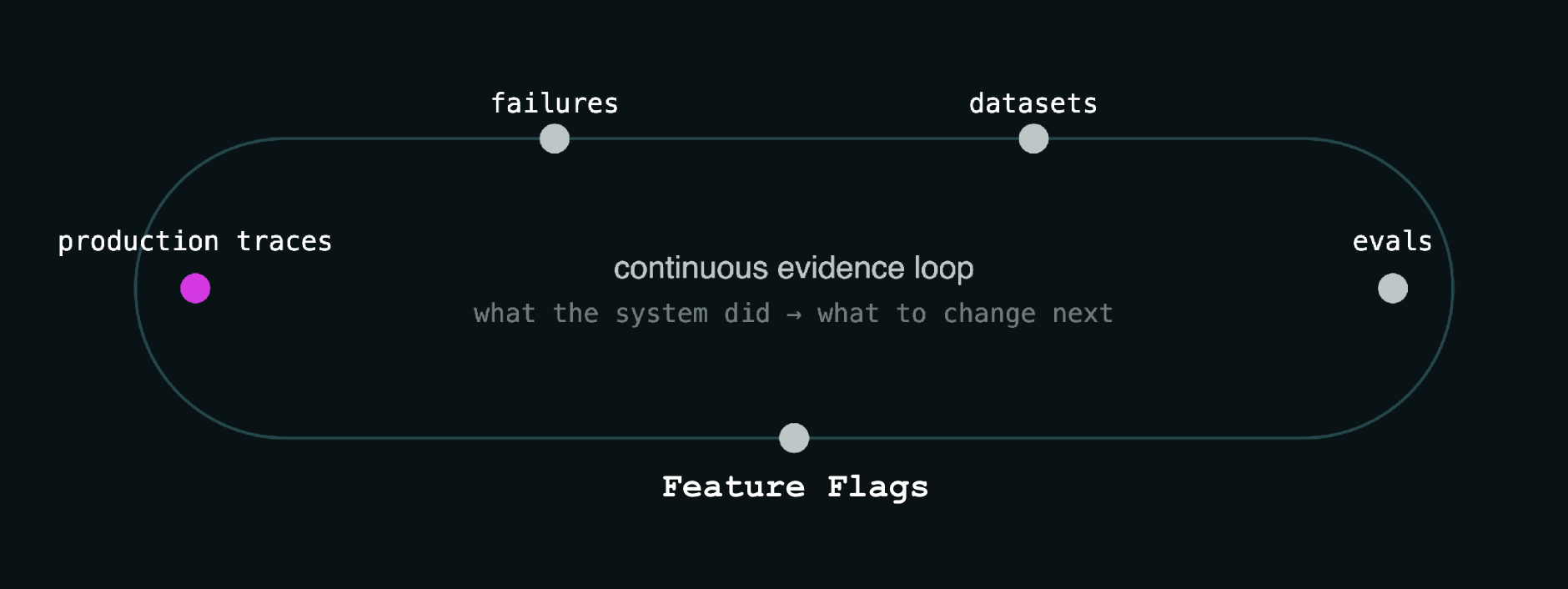
これら 2 つの要素を組み合わせることで、継続的なエビデンスループが形成されます。本番環境での追跡データから調査すべき失敗事例を発見し、チームはそうしたケースを保存・評価した上で、フィーチャーフラグを通じて新しいモデルやプロンプト、ツール設定を本番環境へ展開します。
実践におけるパーソナライゼーション
多言語対応のサポート
見知らぬタスクで困っている顧客には、翻訳された手順や誘導付きのステップ、あるいは直接的な回答が必要になる場合があります。チームは各言語向けに作成したプロンプトを比較し、曖昧なリクエストを高性能なモデルへルーティングしたり、ツールのアクセス権限を変化させたりできます。完了率、確認のためのやり取り回数、エスカレーションの有無、レイテンシ、コストといった指標を見ることで、追加のガイダンスが役立っているかどうかを検証できます。
役割に応じた知識提供
あるユーザーは専門用語を知っており、すぐにソース情報を求めているかもしれません。別のユーザーは、略語や前提条件の説明を必要としているでしょう。チームは組織、役割、あるいは特定の専門性に基づいて設定をターゲットにできます。ドメイン固有の指示、検索ソース、引用要件、回答の深さ、分析ツールの利用などを変化させることが可能です。タスクの完了状況、フォローアップ質問、専門家からの修正意見が、次の実験に向けた示唆となります。
テナントごとの SaaS エージェント
SaaS 製品に埋め込まれたエージェントは、複数のテナントにまたがる問題の調査を行う可能性があります。あるテナントでは、大量のコンテキストや繰り返しのツール呼び出し、高い推論コストが発生するかもしれません。チームは、すべてのユーザーへの体験変更前に、そのテナント専用のモデル経路、コンテキスト制限、要約プロンプト、ツールのポリシーなどをテストできます。
Logfire のトレースは、テナントのコンテキストとトークン数、コスト、レイテンシ、リトライ回数、そして結果を結びつけます。SQL アラートによって持続的な異常な使用を検出し、イベントトリガー型の判定器が、単に高価なラベルを返すのではなく、エンジニア向けにトレースに紐付いた説明を生成することができます。
埋め込み型フラグの重要性
機能フラグは、AI エンジニアリングと観測可能性(オバザビリティ)のワークフローの中に組み込むべきです。これにより、変更内容、ターゲティングの判断、そしてその結果がすべてつながります。エンジニアは特定のグループに機能をリリースし、その製品やシステムへの影響を観察し、適切な関係者に通知し、追跡情報を失うことなくロールバックできます。
境界線は依然として重要です。コードはスキーマ、ビジネスロジック、権限、そして安全ルールを管理します。一方、ランタイムで変更すべきモデルの一部、プロンプト、ツールポリシーなどは、管理された変数によって制御されます。OpenTelemetry は、各意思決定がその後に続く処理とどのように結びついているかを可視化します。
このコントロールプレーンは、より複雑なワークフローをサポートできます。モデル変数を使用して、Logfire AI Gateway のルーティンググループを選択し、プロバイダのフェイルオーバーや負荷分散を実現できます。ターゲティングには、実際の生産環境からのトラフィックにおける OpenTelemetry 属性を利用可能です。内部アプリケーションでは、ロスターやグループメンバーシップをルーティングコンテキストとして追加することもできます。
機能フラグは、決して権限を付与するものではありません。ユーザーやエージェントが何を行えるかは、依然としてコードによって決定されます。管理された変数を用いることで、変更すべき挙動を可視化し、バージョン管理可能かつ元に戻せる状態にします。これにより、AI エンジニアやその協力者である権限を持つエージェントは、結果の調査や生産環境システムの安全な改善に必要な文脈を得ることができます。
原文を表示
AI makes software accessible to more people. One agent may serve an AI-native specialist and a first-time user who expects an ordinary request to work. It may support several languages, levels of domain expertise, and workflows that combine model responses with tools and application logic.
A single default experience will rarely suit everyone. Pydantic Logfire managed variables give AI engineers a control plane for changing the three primitives that shape an AI application: models, prompts, and tools. Here, feature flags are not limited to booleans. They are typed, versioned variables that teams can target, measure, and change without redeploying.
The foundation of A/B testing still applies: define alternatives, assign traffic, and compare outcomes. Generative AI expands what we can test and what we need to measure. Teams must find the right experience while balancing quality, cost, latency, and reliability.
#Growth is now AI work
Growth engineering is now part of AI engineering. AI engineers run product experiments while building backends, frontends, and the analytics needed to understand how their work performs.
The result is more complex than a click or conversion. A production AI experiment should consider:
Answer quality and task completion
Cost per successful outcome
Latency and time to first useful response
Tool accuracy and retry behavior
Safety, reliability, and escalation
Performance across languages, cohorts, and levels of expertise
The questions are simple, even when the answers are not. Does it work? For whom? Under what conditions? How quickly? At what cost? Does it use the right tools, and can it fail safely?
Shipping faster can produce a better product as providers release models, frameworks add capabilities, and useful patterns emerge. A shorter feedback loop gives teams more chances to learn before the technology moves again.
#Start with three primitives
AI teams can start with three things.
Install the managed variables extra before using these examples:
pip install 'logfire[variables]'
Models determine capabilities, speed, cost, context limits, and provider behavior. A string variable can route an opted-in group to a new model without changing application code:
import logfire
logfire.configure()
logfire.instrument_pydantic_ai()
model = logfire.var(
name='support_model',
type=str,
default='openai:gpt-5.2',
)
Prompts frame the task, provide domain guidance, and shape how the application communicates. A managed prompt can compare a guided experience with a concise one:
instructions = logfire.var(
name='support_instructions',
type=str,
default='Explain the next step clearly and ask before taking action.',
)
Tools determine what the system can retrieve, calculate, or change. The variable should contain a typed policy, not executable code:
from typing import Literal
from pydantic import BaseModel, Field
class ToolPolicy(BaseModel):
profile: Literal['answer_only', 'research', 'diagnostic']
max_tool_calls: int = Field(ge=0, le=8)
tool_policy = logfire.var(
name='tool_policy',
type=ToolPolicy,
default=ToolPolicy(
profile='answer_only',
max_tool_calls=3,
),
)
The application maps each profile to pre-approved tools and enforces the call limit. Tool code, credentials, authorization, and required approvals stay in code.
These primitives affect one another. A better prompt may make a smaller model viable. A stronger model may need fewer examples but call an expensive tool too often. Teams should test them together and connect each combination to product and operational results.
#Put variables to work
Defining variables is only the start. The application must resolve and apply them during an agent run.
This example uses the user ID as a stable targeting key. It also supplies the tenant plan and workflow for conditional routing. The resolved tool policy becomes a limit that Pydantic AI enforces:
from pydantic_ai import Agent, UsageLimits
APPROVED_TOOLS = {
'answer_only': [],
'research': [support_search],
'diagnostic': [support_search, account_diagnostics],
}
async def answer(user_id: str, tenant_plan: str, message: str) -> str:
attributes = {
'tenant_plan': tenant_plan,
'workflow': 'customer_support',
}
with (
model.get(targeting_key=user_id, attributes=attributes) as selected_model,
instructions.get(targeting_key=user_id, attributes=attributes) as selected_instructions,
tool_policy.get(targeting_key=user_id, attributes=attributes) as selected_policy,
):
policy = selected_policy.value
agent = Agent(
selected_model.value,
instructions=selected_instructions.value,
tools=APPROVED_TOOLS[policy.profile],
)
result = await agent.run(
message,
usage_limits=UsageLimits(tool_calls_limit=policy.max_tool_calls),
)
return result.output
A high-volume support workflow might receive one research call. An approved diagnostic workflow might receive four. UsageLimits checks the cap before it executes more tools, protecting cost and latency from a runaway loop.
The variable contexts also add the selected labels and versions to downstream spans. Engineers can see which model, prompt, and tool policy produced each result.
#Enter typed feature flags
The emphasis on typed matters. Pydantic began by helping developers turn untrusted data into validated objects. Managed variables bring the same idea to production configuration: Logfire can change a value, but the application still declares its valid shape.
Variables can hold:
Text for prompts, instructions, and messages
Numbers for token limits, thresholds, and budgets
Booleans for on-or-off flags
Structured data for dataclasses and Pydantic models
Templates that combine runtime inputs with reusable fragments
The code default acts as a contract and a safety net. Logfire validates remote values against the declared type or JSON Schema. If a value is missing or invalid, the application uses its known-good default. Teams can change one primitive at a time or group a model, prompt, and tool policy in one Pydantic model so the whole experience changes together.
#Target with live context
Versions can receive labels such as production, canary, control, and treatment. Percentage routing controls how much traffic receives each label. A stable targeting_key, such as a user or tenant ID, keeps the assignment consistent across requests.
Sampling is only one option. Conditional targeting rules can select an experience using explicit resolution attributes, OpenTelemetry resource attributes, or request baggage. Useful attributes include language, plan, region, workflow, service version, and beta enrollment. Logfire checks rules in order and uses the first match.
This gives engineers more control than sending 10% of all traffic to a treatment. A team might offer a guided French prompt only to opted-in users during onboarding. During a capacity incident, it might route one tenant plan to a cheaper model. Each resolution creates a span, and the chosen label and version flow into the work that follows.
#Manage the lifecycle
After defining the variables, push their metadata and generated schemas to Logfire:
if __name__ == '__main__':
logfire.variables_push()
This command requires a LOGFIRE_API_KEY with the project:write_variables scope. The runtime application uses the separate project:read_variables scope.
The rest of the lifecycle lives in Logfire. Teams create immutable versions, move labels, and change rollout percentages or targeting rules. To roll back, point a label at the last known-good version. No application deploy is required.
#Connect changes to evidence
Feature flags determine which experience runs. Observability shows what happened next. Logfire connects variable versions to traces and SQL-backed dashboards, so product and system results share the same OpenTelemetry context.
Two dashboards make a useful start:
Product results: task completion, abandonment, repeat use, escalation, and feedback, grouped by variable label, version, and cohort.
System results: latency, tokens, inference cost, tool calls, retries, and errors for the same groups.
The first shows whether the experience helped. The second shows what it cost. Alerts can identify a sustained problem and link an engineer to the relevant traces and configuration.
Together, these parts form a continuous evidence loop. Production traces reveal failures worth investigating. Teams preserve those cases, assess a proposed change, and use feature flags to return a new model, prompt, or tool configuration to production.
#Personalization in practice
#Support across languages
A customer asking for help with an unfamiliar task may need translated instructions, guided steps, or a direct answer. Teams can compare prompts written for each language, route ambiguous requests to a stronger model, and vary tool access. Completion, clarification turns, escalation, latency, and cost show whether the added guidance helps.
#Knowledge by role
One user may know the specialist terms and want the source immediately. Another needs acronyms and assumptions explained. Teams can target configurations by organization, role, or selected expertise. They can vary domain instructions, retrieval sources, citation requirements, response depth, and analytical tools. Task completion, follow-up questions, and corrections from subject-matter experts point to the next experiment.
#SaaS agents by tenant
An agent embedded in a SaaS product may investigate problems across tenants. One tenant might generate large contexts, repeated tool calls, and high inference costs. Teams can test model routes, context limits, summarization prompts, and tool policies for that tenant before changing the experience for everyone.
Logfire traces connect tenant context with tokens, cost, latency, retries, and results. A SQL alert can detect sustained abnormal usage. An event-triggered judge can then produce a trace-linked explanation for an engineer instead of returning only an expensive label.
#Why embedded flags matter
Feature flags belong inside the AI engineering and observability workflow. This keeps the change, the targeting decision, and the result connected. Engineers can release an experience to the right group, observe its product and system effects, notify the right people, and roll it back without losing attribution.
The boundary remains important. Code governs schemas, business logic, permissions, and safety rules. Managed variables govern the parts of models, prompts, and tool policies that should change at runtime. OpenTelemetry connects each decision to what follows.
This control plane can support more complex workflows. A model variable can select a Logfire AI Gateway routing group with provider failover and load balancing. Targeting can use OpenTelemetry attributes from real production traffic. An internal application can add roster or group membership as routing context.
A feature flag never grants authorization. Code still decides what a user or agent may do. Managed variables make the behavior that should change visible, versioned, and reversible. They give AI engineers, and authorized agents working with them, the context needed to investigate results and improve production systems safely.
関連記事
今日のまとめ
AIデイリーブリーフで今日の重要ニュースをまとめ読み