コンピューターでClaudeを活用する
本文の状態
日本語全文を表示中
詳細モードで約6分の本文を読めます。
同じ出来事の情報源
6媒体で確認
Claude Blog · InfoQ · AWS Machine Learning Blog · TechCrunch AI · Simon Willison Blog · The Decoder
各社の報じ方を比較 ↓AnthropicがClaude AIをユーザーのローカルコンピューターで直接動作させる機能を発表した。これにより、データ処理のプライバシーと応答速度が向上する。
Source Article
元記事を日本語で読む
本文に関係しない購読案内、埋め込み通知、サイト内プロモーションは除いています。
Claudeをあなたのコンピューターで作業させる
Claude CoworkとClaude Codeでは、Claudeがあなたのコンピューターを使用して、ポイント、クリック、タスクの完了を行えるようになりました。Dispatchを使えば、スマートフォンからClaudeにタスクを割り当てられます。
カテゴリー製品発表
製品ClaudeアプリClaude Code
日付2026年3月23日
読了時間5分
共有リンクをコピーhttps://claude.com/blog/dispatch-and-computer-use
Claude CoworkとClaude Codeでは、Claudeがあなたのコンピューターを使用してタスクを完了できる機能を有効にできます。Claudeが必要なツールにアクセスできない場合、画面上の要素をポイント、クリック、操作して、自らタスクを実行します。ファイルを開いたり、ブラウザを使用したり、開発者ツールを自動的に実行したりできます — セットアップは不要です。
この機能は現在、Claude ProおよびClaude Maxサブスクライバー向けに研究プレビューとして利用可能です。特にDispatchとの連携が効果的で、スマートフォンからClaudeにタスクを割り当てることができます。
Claudeがコンピューターを使用する仕組み
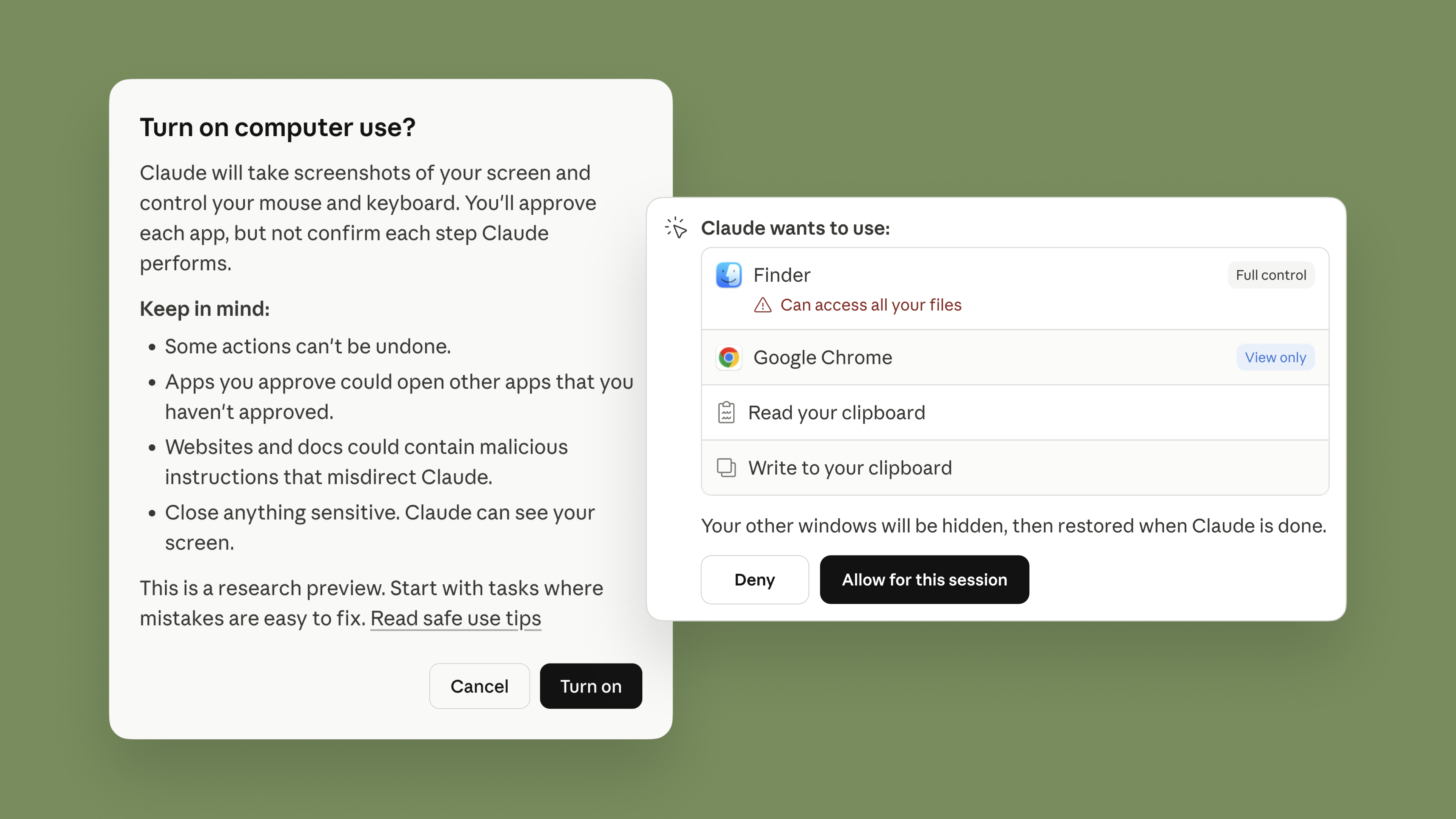
Claudeはまず、SlackやGoogleカレンダーなどのサービスへのコネクターなど、最も適切なツールを優先的に使用します。コネクターがない場合、Claudeは直接ブラウザ、マウス、キーボード、画面を制御してタスクを完了できます。必要に応じてスクロール、クリックして開く、探索を行いますが、常に最初にユーザーの明示的な許可を求めます。
プロンプトインジェクションを含むリスクを最小限に抑える保護機能を備えてこの機能を構築しました。Claudeがコンピューターを使用する際、当社のシステムはモデル内のアクティベーションを自動的にスキャンして、そのような活動を検出します。また、いつでもClaudeを停止する機能もあり、Claudeは新しいアプリケーションにアクセスする前に常に許可を求めます。
コンピューターの使用は、Claudeのコーディング能力やテキストとの対話能力と比較して、まだ初期段階です。Claudeは間違いを犯す可能性があり、保護機能を改善し続けていますが、脅威は常に進化しています。信頼できるアプリから始め、機密データを扱わないことをお勧めします。このため、一部のアプリはデフォルトで使用禁止となっています。安全性に関するベストプラクティスの詳細はこちらでご確認いただけます。
どこからでもClaudeにメッセージを送る
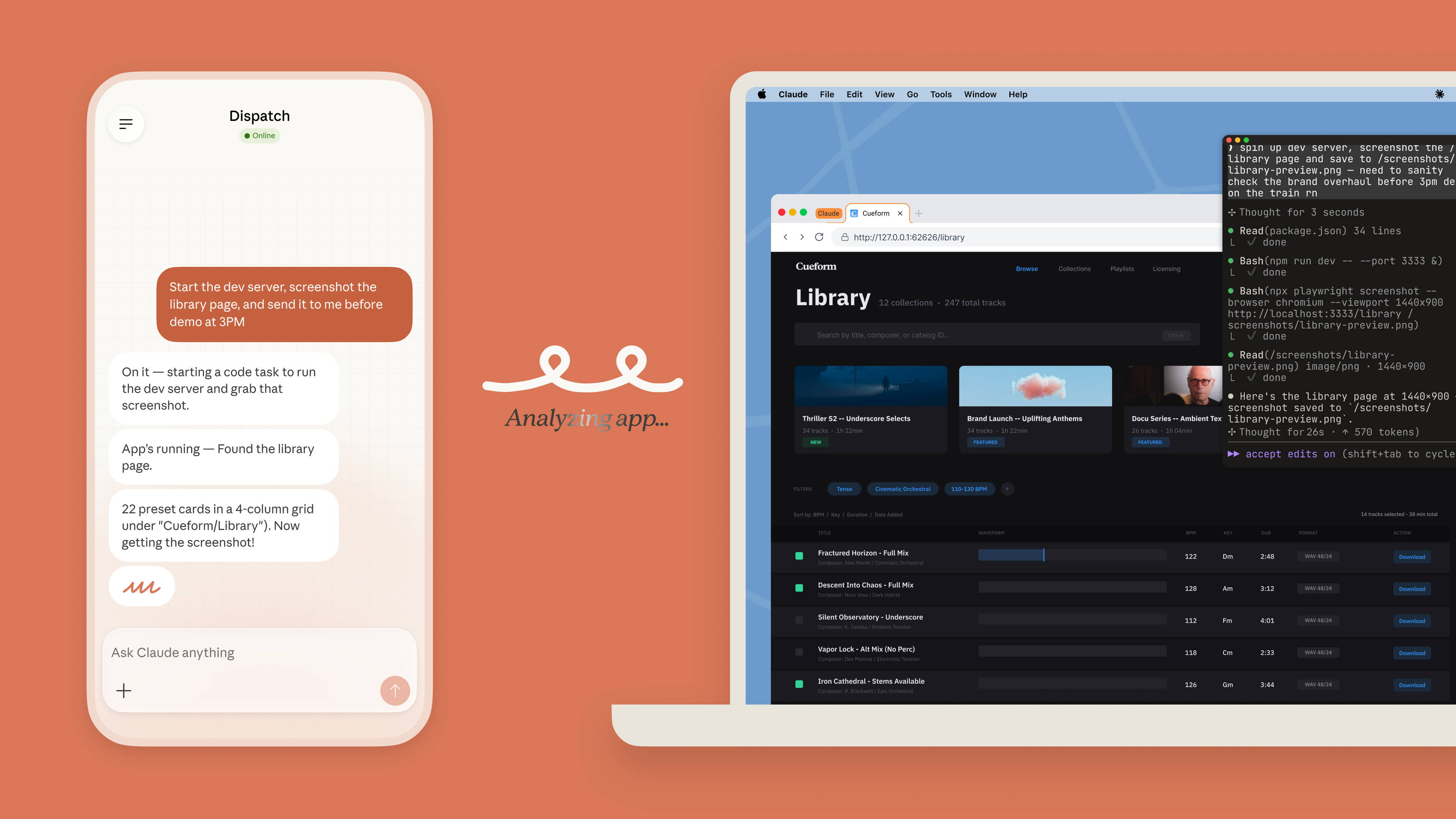
先週、Dispatchをリリースしました:Claude Cowork(現在はClaude Codeでも利用可能)の新機能で、スマートフォンやデスクトップからClaudeとの一貫した会話を継続できます。スマートフォンでClaudeにタスクを割り当て、他のことに注意を向け、その後コンピューターで完成した作業を開くことができます。
Dispatchを使用すると、毎朝自動的にメールをチェックしたり、毎週いくつかの指標を取得したり、レポートやPR(プルリクエスト) のためにClaude CoworkまたはClaude Codeセッションを立ち上げたりするようにClaudeに指示できます。
Claudeの新しいコンピューター使用機能により、Dispatchはさらに便利になります。今では、あなたが離れている間にClaudeがあなたに代わってコンピューターを使用できます。例えば、電車に乗っている間に朝のブリーフィングを作成したり、IDEで変更を加え、テストを実行し、PRを提出したり、3Dプリントプロジェクトを初期計画に従って進めたりできます。
始め方
Claude CoworkおよびClaude CodeにおけるClaudeのコンピューター使用機能は、研究プレビュー段階です。常に完璧に機能するわけではありません:複雑なタスクには時折再試行が必要で、画面を通じた作業は直接統合を使用するよりも遅くなります。Claude Coworkと同様に、どこで機能し、どこで不足するかを学びたいため、早期に共有しています。
現在、Claude ProおよびClaude Maxサブスクライバーが利用できます。現時点では、コンピューターの使用はmacOSのみでサポートされています。デスクトップアプリが起動して実行されていることを確認する必要があります。そこから、モバイルアプリとペアリングし、スマートフォンからタスクを引き渡してみることができます。
PrevPrev0/5NextNexteBook
Claudeを使用して構築するチーム向けの製品ニュースとベストプラクティスをもっと探る
Opus 4.6およびSonnet 4.6で100万コンテキストが一般提供開始
製品発表Opus 4.6およびSonnet 4.6で100万コンテキストが一般提供開始Opus 4.6およびSonnet 4.6で100万コンテキストが一般提供開始Opus 4.6およびSonnet 4.6で100万コンテキストが一般提供開始Opus 4.6およびSonnet 4.6で100万コンテキストが一般提供開始  2026年3月12日Claudeがインタラクティブなチャート、図表、視覚化を作成
製品発表Claudeがインタラクティブなチャート、図表、視覚化を作成Claudeがインタラクティブなチャート、図表、視覚化を作成Claudeがインタラクティブなチャート、図表、視覚化を作成Claudeがインタラクティブなチャート、図表、視覚化を作成  2026年2月17日動的フィルタリングでウェブ検索の精度と効率を向上
製品発表動的フィルタリングでウェブ検索の精度と効率を向上動的フィルタリングでウェブ検索の精度と効率を向上動的フィルタリングでウェブ検索の精度と効率を向上動的フィルタリングでウェブ検索の精度と効率を向上  2026年3月9日Claude Codeにコードレビュー機能を導入
Claude CodeClaude Codeにコードレビュー機能を導入Claude Codeにコードレビュー機能を導入Claude Codeにコードレビュー機能を導入Claude Codeにコードレビュー機能を導入Claudeで組織の運営方法を変革
開発者向けニュースレターを購読
製品アップデート、ハウツー、コミュニティスポットライトなど。毎月メールボックスにお届けします。
購読購読月次の開発者向けニュースレターを受け取りたい場合は、メールアドレスを入力してください。いつでも購読解除できます。
原文を表示
Put Claude to work on your computer
In Claude Cowork and Claude Code, Claude can use your computer to point, click, and complete tasks. Dispatch lets you assign them from your phone.
CategoryProduct announcements
ProductClaude appsClaude Code
DateMarch 23, 2026
Reading time5min
ShareCopy linkhttps://claude.com/blog/dispatch-and-computer-use
In Claude Cowork and Claude Code, you can now enable Claude to use your computer to complete tasks. When Claude doesn’t have access to the tools it needs, it will point, click, and navigate what’s on your screen to perform the task itself. It can open files, use the browser, and run dev tools automatically — with no setup required.
This feature is now available in research preview for Claude Pro and Max subscribers. It works especially well with Dispatch, which lets you assign Claude tasks from your phone.
How Claude uses your computer
Claude will reach for the most precise tool first, starting with connectors to services like Slack or Google Calendar. When there isn’t a connector, Claude can directly control your browser, mouse, keyboard, and screen to complete tasks. It will scroll, click to open, and explore as needed, always asking for your explicit permission first.
We’ve built this capability with safeguards that minimize risk, including prompt injection. When Claude uses your computer, our system will automatically scan activations within the model to detect for such activity. You also have the ability to stop Claude at any point, and Claude will always request permission before accessing new applications.
Computer use is still early compared to Claude’s ability to code or interact with text. Claude can make mistakes, and while we continue to improve our safeguards, threats are constantly evolving. We recommend starting with the apps you trust and not working with sensitive data. Some apps are off-limits by default for this reason. You can learn more about safety best practices here.
Message Claude from anywhere
Last week, we released Dispatch: a new feature in Claude Cowork (and now available in Claude Code) that lets you have one continuous conversation with Claude from your phone or your desktop. You can assign Claude a task on your phone, turn your attention to something else, then open up the finished work on your computer.
With Dispatch, you can tell Claude to automatically check your emails every morning or pull some metrics every week, or spin up a Claude Cowork or Claude Code session for a report or a pull request.
Claude’s new computer use capability makes Dispatch even more helpful. Now, Claude can use your computer on your behalf while you’re away. For example, to create a morning briefing while you’re on the train; make changes in your IDE, run tests, and put up a PR; or keep your 3D printing project moving according to your initial plan.
Getting started
Claude’s computer use capability in Claude Cowork and Claude Code is in research preview. It won’t always work perfectly: complex tasks sometimes need a second try, and working through your screen is slower than using a direct integration. We're sharing it early because we want to learn where it works and where it falls short—just like we did with Claude Cowork.
It is available now for Claude Pro and Claude Max subscribers. For now, computer use is supported on macOS only. You’ll need to make sure your desktop app is awake and running. From there, you can pair it with the mobile app and try handing off a task from your phone.
PrevPrev0/5NextNexteBook
Explore more product news and best practices for teams building with Claude.
1M context is now generally available for Opus 4.6 and Sonnet 4.6
Product announcements1M context is now generally available for Opus 4.6 and Sonnet 4.61M context is now generally available for Opus 4.6 and Sonnet 4.61M context is now generally available for Opus 4.6 and Sonnet 4.61M context is now generally available for Opus 4.6 and Sonnet 4.6 Mar 12, 2026Claude now creates interactive charts, diagrams and visualizations
Product announcementsClaude now creates interactive charts, diagrams and visualizationsClaude now creates interactive charts, diagrams and visualizationsClaude now creates interactive charts, diagrams and visualizationsClaude now creates interactive charts, diagrams and visualizations Feb 17, 2026Increase web search accuracy and efficiency with dynamic filtering
Product announcementsIncrease web search accuracy and efficiency with dynamic filteringIncrease web search accuracy and efficiency with dynamic filteringIncrease web search accuracy and efficiency with dynamic filteringIncrease web search accuracy and efficiency with dynamic filtering Mar 9, 2026Bringing Code Review to Claude Code
Claude CodeBringing Code Review to Claude CodeBringing Code Review to Claude CodeBringing Code Review to Claude CodeBringing Code Review to Claude CodeTransform how your organization operates with Claude
Get the developer newsletter
Product updates, how-tos, community spotlights, and more. Delivered monthly to your inbox.
SubscribeSubscribePlease provide your email address if you'd like to receive our monthly developer newsletter. You can unsubscribe at any time.
同じ出来事を6媒体で確認
同じ出来事を扱う別媒体の記事です。見出しと公開時刻を比較できます。
News to Guide
ニュースの次に確認する
発表内容を、現在の料金や仕様と照らし合わせられる関連ガイドです。
今日のまとめ
AIデイリーブリーフで今日の重要ニュースをまとめ読み