Amazon Bedrock AgentCore ハーネスが一般提供開始:アイデアから数分で本番環境対応エージェントへ
本文の状態
日本語全文を表示中
詳細モードで約19分の本文を読めます。
同じ出来事の情報源
この情報源を基点に整理
AWS Machine Learning Blog
AWS は、開発者がアイデアを数分で本番レベルのエージェントに構築できる「Amazon Bedrock AgentCore ハーネス」の一般提供を開始した。これにより、LLM エージェントの実装ループが標準化され、迅速なプロダクション展開が可能となる。
Source Article
元記事を日本語で読む
本文に関係しない購読案内、埋め込み通知、サイト内プロモーションは除いています。
1 年前、サイモン・ウィリソンは、現在も色あせないエージェントの最も明快な定義の一つを記しました:
**
*LLM エージェントは、目標を達成するためにツールをループ実行します。
**
この定義が定着したのは、それが実際に生産環境で稼働するすべてのエージェントが行っていることを正確に描写しているからです。Kiro、Amazon Q Developer、Quick Agents、Codex、Claude Code:内部構造を見れば、すべて同じ形状の動作をしています。エージェント・ループが共通項なのです。
しかし、そのループ自体が難しい部分ではありません。難しいのは、それを取り巻くすべての要素です。
フレームワークを選択し、ツールを接続します。サンドボックス化された計算リソースをプロビジョニングし、ストレージ、シークレット、ネットワークを設定します。メモリをどこに配置するか決定し、観測性(observability)を追加し、適切な依存関係を正しいコンテナ内に組み込みます。また、ローカルでのプロトタイピングは往々にして容易な部分です:単一の開発者が午後にはラップトップ上でエージェントを立ち上げることができます。しかし、それを生産環境に導入する段階で作業量が爆発的に増加します**、そして一度に複数のユーザーに対応する必要が生じると、新たな層の作業が現れます:並行処理(concurrency)、分離(isolation)、アイデンティティ(identity)、状態管理(state)、スケーリングです。
さらに悪いことに、このオーバーヘッドは新しいユースケースが増えるごとに倍増しました。実験を試みたり、異なるモデルを使ったり、ツールを交換したり、エージェントを新たなドメインに指向させたいチームは、同じインフラストラクチャの構築作業を繰り返すことになりました。ボトルネックとなったのは知能ではありません。オーケストレーションとインフラストラクチャでした。
4 月にプレビュー版として AgentCore ハーネス をリリースした際、私たちはある賭けに出ました。すなわち、AgentCore のプリミティブ(ランタイム、メモリ、ゲートウェイ、ブラウザ、アイデンティティ、観測性)はすでに、チームがプロダクション環境でエージェントを運用するために必要なすべての機能を備えているという点です。彼らが毎回手動でこれらを接続する必要はありません。ハーネスはその配線作業を管理された抽象化として処理するため、構築するものではなく、設定するものになります。
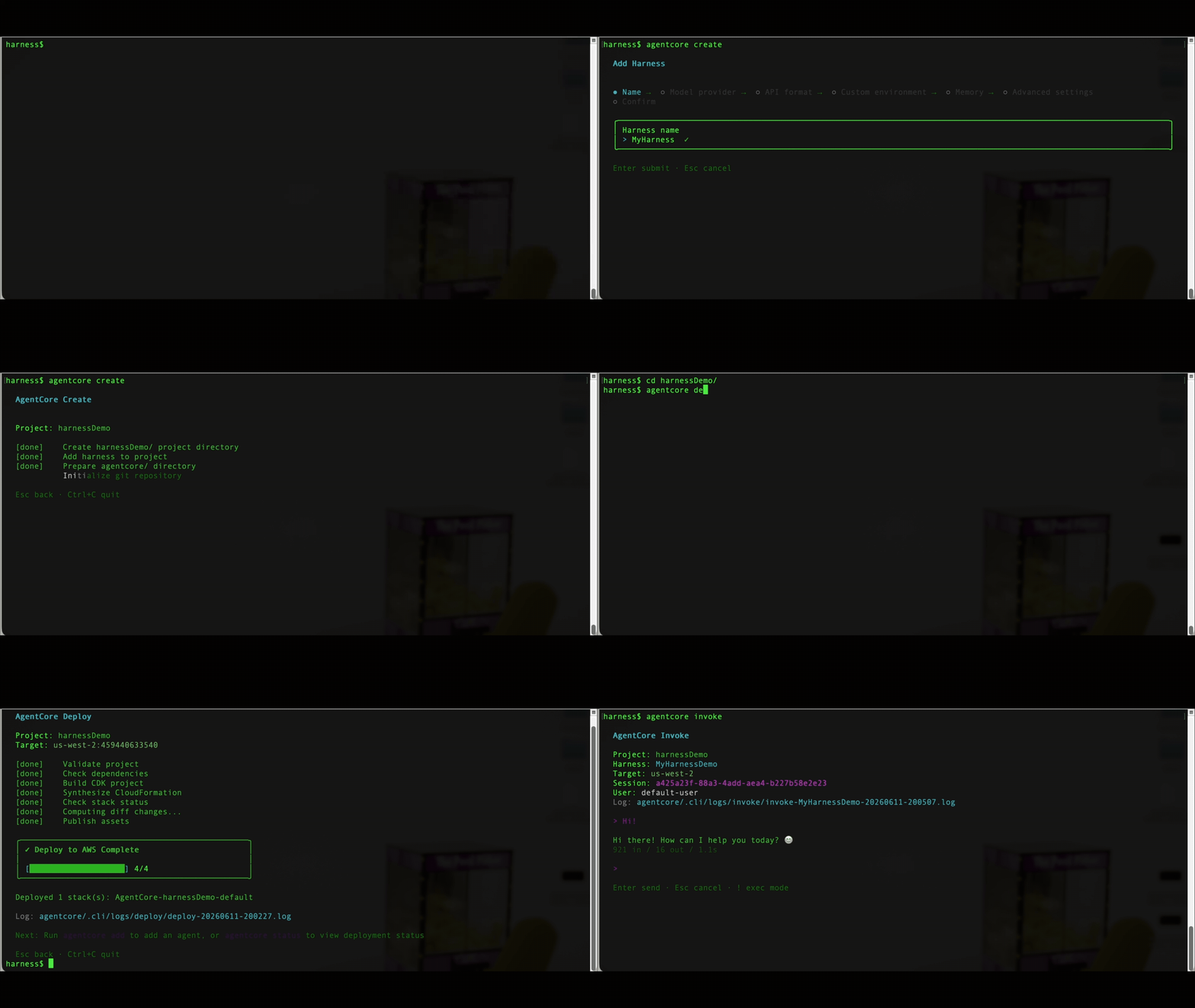
本日、Amazon Bedrock AgentCore ハーネスが一般提供されました。エージェントを定義するための 2 つの API コール(CreateHarness、および実行するための InvokeHarness)、以下の GIF に示すような AgentCore CLI での簡単なウォークスルー、あるいはコンソールでの数回のクリックを行うだけで、数分以内にエージェントを稼働させることができます。これは独自の隔離環境(ファイルシステムとシェルを含む)で動作するため、ファイルを参照したりコマンドを実行したりコードを書いたりすることが安全に行えます。セッション間を通じてユーザーや会話の履歴を記憶し、指定されたスキル(AWS がキュレートしたカタログを含む)を引き継ぎ、ウェブを検索し、ゲートウェイまたは MCP を通じてツールを呼び出し、コンテキストを失うことなくセッション中にモデルプロバイダーを切り替えることができます。すべてのステップはリアルタイムでストリーミングされ、自動的に CloudWatch へトレーシングされます。オーケストレーションコードの記述やコンテナの構築は不要です(ただし、必要であれば行うことも可能です)。
ハーネスが提供するもの
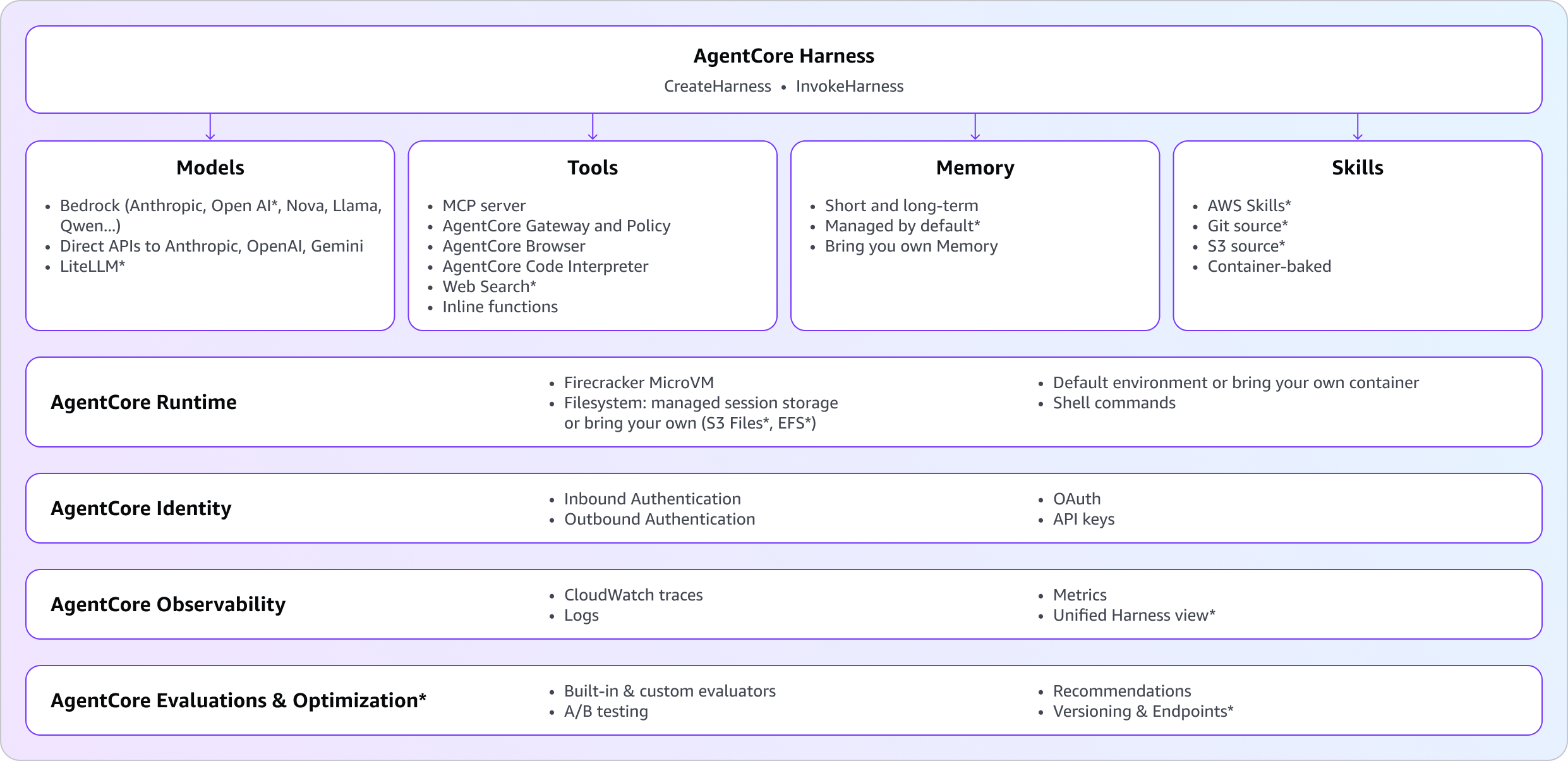
ハーネスとは、生産環境でエージェントを実行するために必要なすべての要素を、2 つの API コール(API 呼び出し)の背後にカプセル化したものです。実行したいモデル、ツール、スキル、指示を指定するだけで、AgentCore がサンドボックス化された環境、メモリ、ストレージ、アイデンティティ、そしてこれらすべてを結びつける観測性(オバザビリティ)を処理します。以下の図で GA(一般提供)時に新たに追加された機能はアスタリスク(*)でマークされています。
任意のモデル:タスクに最適なモデルを選択し、必要に応じて切り替え
異なるタスクには異なるモデルが必要です。顧客からは、「あるモデルで計画を立て、別のモデルで実行する」「価格対性能テストのためにプロバイダーを差し替える」「回帰(レグレスション)が発生したばかりのモデルから移行する」といった要望がありましたが、会話履歴を失うことなく実現したいとのことでした。CreateHarness でデフォルトのモデルを選択し、必要に応じて InvokeHarness 呼び出しごとにそれを上書きできます。デフォルトはそれ以外のすべての呼び出しに対して維持されます。希望のプロバイダーに対応する model フィールドを設定してください。
- Amazon Bedrock で提供されるあらゆるモデル、Anthropic Claude、Amazon Nova、Meta Llama、DeepSeek、Qwen、Kimi、MiniMax、Cohere、Mistral、そして最近では Bedrock 上の OpenAI GPT-5.5 および GPT-5.4 を含む
- openAi: OpenAI の API (api.openai.com) への直接アクセス
- gemini: Google Gemini
- liteLlm: Anthropic Direct、Cohere、Mistral、Vertex、Azure OpenAI など、LiteLLM がサポートするあらゆるサードパーティプロバイダー
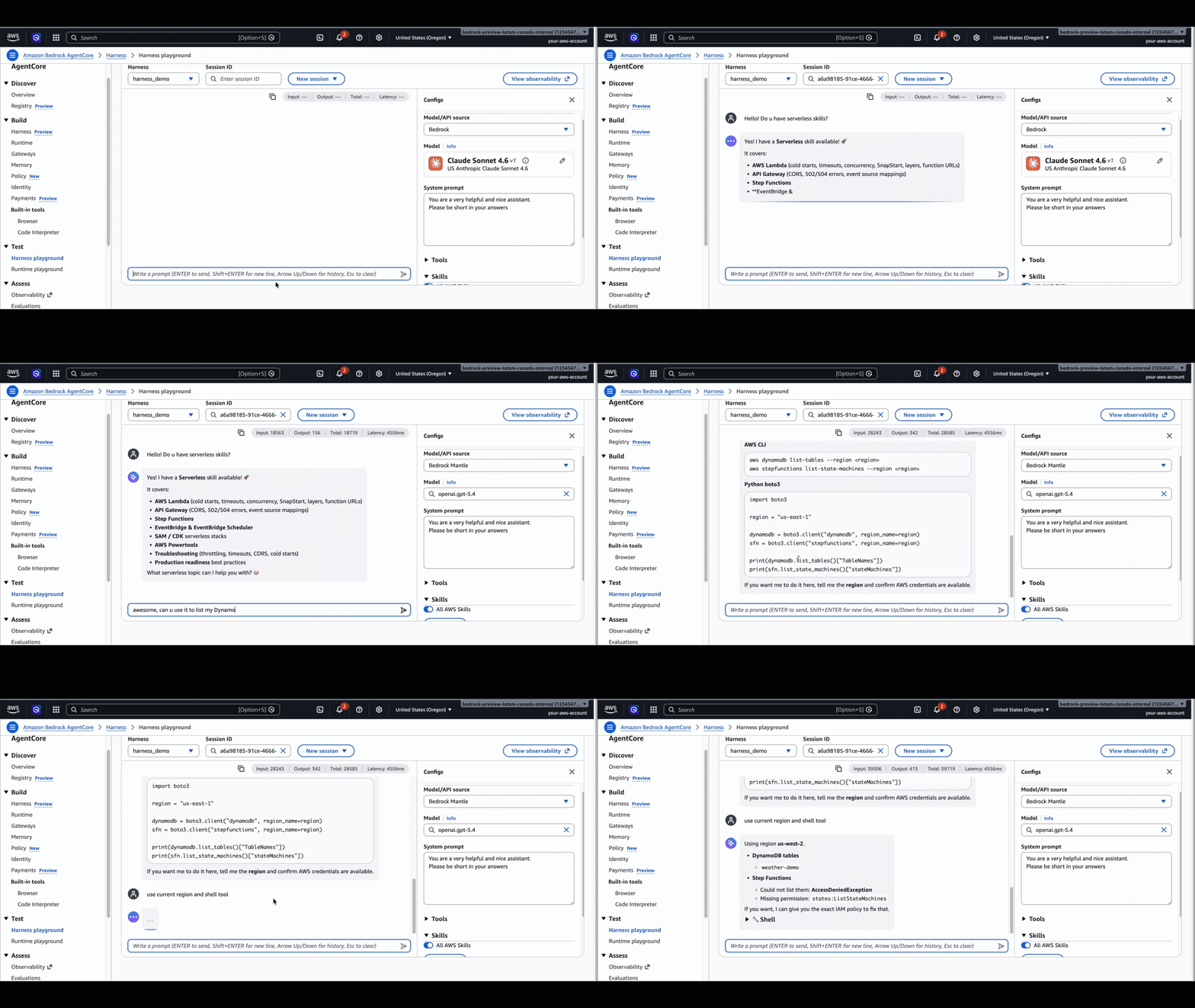
そして顧客が最も重要だと伝えてくれた部分:セッション中であってもいつでもプロバイダーを切り替え、コンテキストを維持できること。例えば、Claude Opus で計画を立て、GPT-5.5 に切り替えてコードを書き、Gemini に切り替えて要約させることができます。会話は継続します。ハッチはこの移行をシームレスに処理します。
API キーを使用して基盤となるモデルプロバイダーのいずれかにアクセスしている場合、それらはAgentCore Identity のトークン vault に安全に保存されます。エージェントが生の認証情報を直接見ることはありません。
ツールを構成として:接着コードを書かずにエージェントを世界に接続
ツールは、エージェントが自身の推論の外側にあるものに影響を与える手段であり、これらを配線するのが多くのチームが静かに嫌う部分です。顧客たちは、各 API 用のアダプターコードを書くことや、MCP サーバーのライフサイクルを管理すること、独自のブラウザサンドボックスを構築することを望んでいません。彼らが求めているのは、エージェントが何を利用できるかを宣言し、ハッチに接続、認証、実行の処理を任せることです。
CreateHarness におけるツールはリスト形式です。各エントリには型と設定ブロックが含まれており、ハブがこれらを接続します:
- agentcore_gateway: AgentCore Gateway を ARN で参照できます。ゲートウェイが公開するすべてのターゲット(OpenAPI、Smithy、Lambda、MCP)がツールとして表示され、IAM/JWT 認証、ツールごとの権限管理、およびアウトバウンド資格情報の仲介処理が自動的に実行されます。
- remote_mcp: URL を指定して任意の MCP サーバーに直接接続できます。サーバー側ですでにセキュリティ対策が施されており、その前にゲートウェイのガバナンス層を必要としない場合に適しています。
- agentcore_browser: クリック、入力、ナビゲーション、スクリーンショット機能を提供するフルブラウザサンドボックスを、一行の参照記述として利用できます。
- agentcore_code_interpreter: サンドボックス化された Python および Node.js の実行環境で、同様に一行の記述パターンを使用します。
- inline_function: ハブがストリーム内でツール使用イベントとして発行し、応答を待機するツールスキーマです。人間による承認が必要な場合や、自側で実行しなければならないツールの利用に適しています。
"tools": [
{ "type": "agentcore_browser" },
{ "type": "agentcore_code_interpreter" },
{ "type": "remote_mcp",
"name": "X_tool",
"config": { "remoteMcp": { "url": "https://mcp.X_tool/mcp" } } },
{ "type": "agentcore_gateway",
"name": "Y_tool",
"config": { "agentCoreGateway": { "arn": "arn:aws:bedrock-agentcore:..." } }
}
]
すべてのセッションには、明示的に指定しなくても組み込みのシェル(マイクロVM内でコマンドを実行)とファイル操作(エージェントのファイルシステムでの読み書き)が用意されています。これらが、モデルから状態保持型のファイルシステムやシェルの機能を利用可能にする要素です。
InvokeHarness においても、呼び出しごとの編集オプションは同様にご利用いただけます。単一の呼び出しに対して新しいツールを渡してツールを変更したり、allowed_tools パラメータを通じてその呼び出しに特化したセットにリストを絞り込んだりできます。デフォルト値は作成時に設定されますが、呼び出し時に容易に上書き可能です。
組み込みメモリ:ハッシュがユーザーと会話を記憶します
顧客は、エージェントが戻ってきたユーザーを認識し、前回の会話の続きから始め、メッセージ履歴を再生することなく設定を記憶することを望んでいます。プレビュー版では、AgentCore Memory リソースを別途プロビジョニングしてその ARN を渡す必要がありましたが、機能としては問題ありませんでした。ただし、これは追加の API 呼び出しが必要であり、本番環境への移行の過程で忘れやすいという課題がありました。
GA(一般提供)において、CreateHarness でメモリを省略すると、管理されたメモリが自動的にプロビジョニングされます。デフォルトでは、SEMANTIC および SUMMARIZATION の戦略、30 日のイベント有効期限、AWS が所有する暗号化、および actorId をキーとする名前空間テンプレートによるマルチテナント分離が適用されます。これは実際に顧客が所有するメモリリソースであり、ユーザーのためにプロビジョニングされたものです。メモリは必須ではありません。ステートレスなエージェントの場合は、memory: { disabled: {} } と設定し、ハネス(harness)はメモリ処理を完全にスキップします。すでに所有している AgentCore Memory リソースを接続したい場合は、agentCoreMemoryConfiguration にその ARN を指定して渡してください。これら 3 つのパターンは以下のようになります。
// ビルトインメモリの構成
"memory": {
"managedMemoryConfiguration": {
"strategies": ["SEMANTIC", "SUMMARIZATION"],
"eventExpiryDuration": 30
}
}
// BYO(Bring Your Own)既存メモリ
"memory": { "agentCoreMemoryConfiguration": { "arn": "arn:aws:bedrock-agentcore:..." } }
// ステートレスエージェント
"memory": { "disabled": {} }
自分のメモリへ切り替えるには、UpdateHarness 呼び出しを 1 回行うだけで済みます。管理対象の ARN を持つ agentCoreMemoryConfiguration を渡すことで、以前に管理されていたメモリは即座に切断されます。これは依然としてお客様のアカウント内の通常の AgentCore Memory リソースであるため、どこでも引き続き使用したり、別のハネスに接続したり、直接クエリを実行したり、ご自身の条件で削除したりすることが可能です。ハネスを削除する場合、デフォルトでは管理されたメモリもカスケード削除されます(deleteManagedMemory: true)。これを保持したい場合は、deleteManagedMemory: false を指定してください。
管理されたメモリは自動的ですが、ブラックボックスではありません。これは照会可能で、別のエージェントにアタッチしたり、監査したり、分析パイプラインに引き渡したりできる、実際のアドレス指定可能な AWS リソースです。
スキル:適切なタスクに適切な専門知識を付与する
顧客は、エージェントが特定のタスクを実行しようとする前に、そのタスクの処理方法を理解していることを望みます。例えば、Excel レポートの書式設定方法や、チームが使用する形式で JIRA チケットを発行する方法、AWS データへのアクセスにおける AWS 推奨手順の遵守方法などです。スキルとは、エージェントにオンデマンドでそのような知識を与える手段であり、ファイル、スクリプト、指示のバンドルとして構成されます。ハーンセスはスキルのメタデータを読み込み、実際のタスクが要求された場合にのみ、完全なコンテンツをコンテキスト内に読み込みます。
一般利用(GA)において、HarnessSkill は 4 つのソースを持つユニオン型であり、コンテナに組み込んだりシェルインしたりすることなく、宣言的にスキルをアタッチできます:
- awsSkills – AWS がキュレーションしたスキルバンドルを有効化します。
- git – HTTPS を介してパブリックまたはプライベートリポジトリをクローンし、特定のコミットまたはブランチに固定します。
- s3 – 独自の Amazon Simple Storage Service (Amazon S3) バケットからスキルバンドルを取得します。
- path – 持参したコンテナ内に既に存在するパスを参照します。
"skills": [
 { "awsSkills": {*} },
  { "git": { "uri": "https://github.com/anthropics/skills", "path": "document-skills/xlsx" } },
 { "s3":  { "uri": "s3://my-bucket/skills/team-sops/" } }
]
同じ形状は、呼び出しごとのレイヤリングのために InvokeHarness でも機能します。ハネスはセッション開始時、またはスキル構成が変更された場合の新しい呼び出し時に、各スキルをセッションファイルシステム上にマテリアライズします。
AWS 構築者にとっての大きな突破口: AWS スキルリポジトリには、SDK の使用、インフラストラクチャとしてのコード (IaC)、AWS Identity and Access Management (IAM)、Amazon CloudWatch、および Amazon Bedrock といったコアスキルから、分析、データベース、Amazon Elastic Compute Cloud (Amazon EC2)、ネットワーク、セキュリティ、サーバーレス、ストレージに至るまでのサービス固有の深いワークフローまでを網羅する厳選されたスキルが提供されています。
これをさらにシンプルにするため、一般利用開始 (GA) にて、第一級のアwsSkills トグルが導入されました。これにより、URL の指定やネットワークフェッチなしで、ハネスの基盤となるランタイムにスキルバンドルを組み込み、必要な時にいつでも利用可能になります(ゼロの配管作業)。
aws bedrock-agentcore-control create-harness \
--harness-name myAgent \
--skills '[{"awsSkills": {}}]'
または、パスのグロブで特定のバンドルにスコープを限定することも可能
aws bedrock-agentcore-control create-harness \
--harness-name myAgent \
--skills '[{"awsSkills": {"paths": ["core-skills/*", "specialized-skills/operations-skills/*"]}}]'
環境とファイルシステム:必要な環境でエージェントを実行
ほとんどのエージェントは、Python と bash を含むハッチのデフォルト環境ですぐに動作します。しかし、より高度な要件(プライベート依存関係、ランタイムバージョン、CLI ツール、またはセッション間での永続化)が必要な場合、2 つの設定項目によってエージェントの実行時環境をあなたのスタックに合わせて調整できます。それが「コンテナイメージ」と「ファイルシステム」です。
コンテナイメージ。Python と bash だけでは不十分な場合、ソースコード、依存関係、ランタイム、ツールをパッケージ化したカスタムコンテナを作成し、Amazon Elastic Container Registry (Amazon ECR) にプッシュして、CreateHarness で参照することができます。その後、エージェントはその正確な環境を使用します。また、InvokeAgentRuntimeCommand と組み合わせることも可能です。これは、エージェントのマイクロ VM セッション内で直接シェルコマンドを実行する API であり、呼び出しごとに異なるセッション固有の設定(特定のブランチのクローン、テストデータの初期化、認証情報の取得など)に利用できます。この方法は決定論的であり、モデルを介さず、トークンを消費しません。
ファイルシステム。エージェントは、単一のレスポンスを超えてファイルを保持する必要があるケースが頻繁にあります。例えば、共有ナレッジベースや、セッション間での作業ディレクトリ、または生成されたドキュメントをバケットに戻すための場所などです。ハッチでは、それぞれ到達範囲と永続化特性が異なる 3 つのファイルシステムオプションを提供しています。
タイプ
マネージド
仮想プライベートクラウド (VPC) が必要
永続性
マネージドセッションストレージ
はい
いいえ
同じ runtimeSessionId の停止/再開サイクル全体で。
Amazon Elastic File System (Amazon EFS) アクセスポイント
BYO
はい
すべてのセッション全体で、ハーンチ間で共有可能。
Amazon Simple Storage Service (Amazon S3) ファイルアクセスポイント
BYO
はい
すべてのセッションとハーンチ全体で、完全な Amazon S3 の耐久性、バージョン管理、履歴を備える。
セッション内のマイクロVMの再起動に耐性を持たせる必要がある作業ファイルにはマネージドセッションストレージを利用してください。複数のハーンチやセッションが参照データ、プロンプト、スキルバンドルを共有する必要がある場合はEFSを利用します。エージェントが標準的なファイル操作を通じて読み書きを行い、変更がバックエンドの S3 バケットに自動的に同期されるようにしたい場合(例えば、エージェントがレポートを作成すると、そのレポートが作成されながら S3 バケットに表示される)にはS3 ファイルを利用してください。
統一された観測性:エージェントの動作を一つの場所で確認する
何か問題が発生した際、顧客は「エージェントが何を実行し、何を呼び出し、どこで遅延し、どこで失敗したか」という情報を一つの場所で知りたいと考えています。典型的なハーンチの呼び出しでは、ランタイム、メモリ、ゲートウェイ、および組み込みツールが 1 つまたは 2 つをまたぐため、その全体像をつなぎ合わせるには従来は 5 つのタブを開く必要がありました。
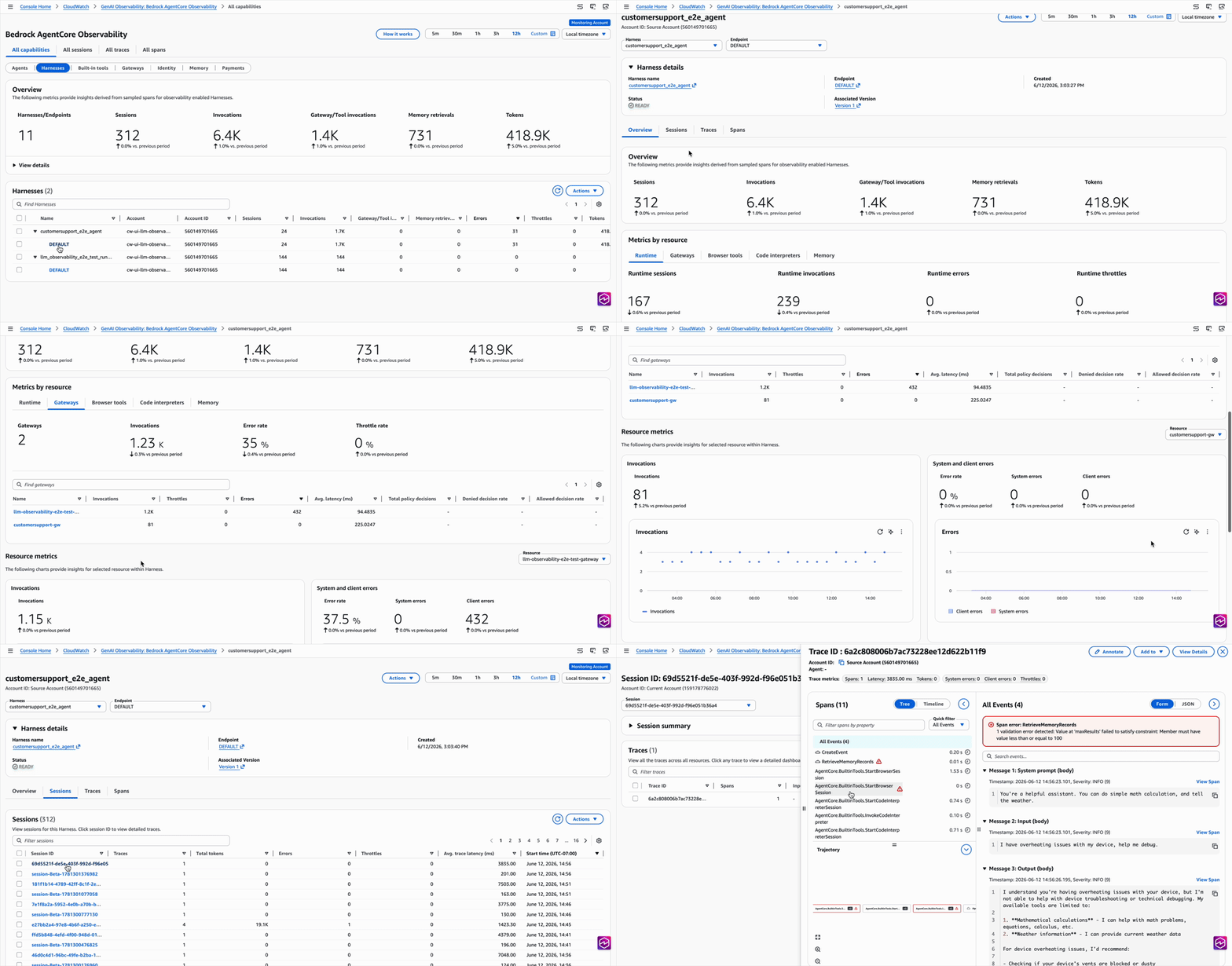
GA に伴い、AgentCore コンソールのすべてのハーンページには単一の観測ウィジェットが表示されます。これは、ハーンが触れたすべてのプリミティブを要約する集計行と、ハーンで構成されているか使用されたプリミティブのみに表示される各プリミティブごとのセクションから成ります。
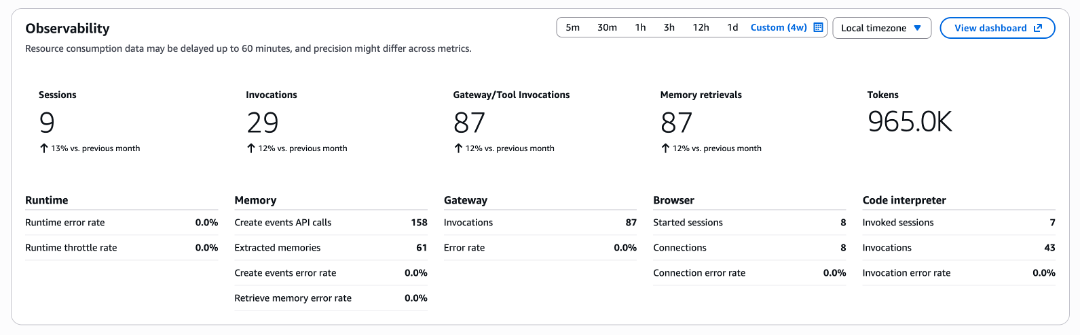
より詳細な分析には、CloudWatch GenAI Observability に、ランタイムやその他のプリミティブと並んで新しいハーンズタブが追加されました。ハーンからセッションへ、さらに単一のトレースへとドリルダウンすることで、エージェントが何を行ったか、その順序、各ステップにかかった時間、およびどこで失敗したかを正確に確認できます。ログは、メモリ、ゲートウェイ、ブラウザ、コードインタープリターなどのすべてのプリミティブから、関連するスパンの位置にインライン表示されるため、発生したことを理解するためにロググループ間を行き来する必要がなくなります。
評価と最適化:本番環境でエージェントを継続的に改善する
エージェントが本番環境に展開された後、問われるのは「動作するか?」から「改善されているか?」へと移ります。顧客は、実際のトラフィック上で自社のエージェントがどのように機能しているかをスコアリングする方法や、変更すべき点に関する提案、そしてそれらの変更をロールアウトする前に検証できる手段を求めています。GA により、このループを完結させる2つの機能が提供されます:
- AgentCore Evaluations は、組み込みの大規模言語モデル (LLM) による評価者(有用性、忠実度、安全性)またはユーザーが作成したカスタム評価者を用いて、ハッチストレースをスコアリングします。これらは、セッション発生時にリアルタイムでスコアリングするオンライン実行、単一のトレースに対するオンデマンド実行、過去のトレースに対するバッチ処理、固定されたテストデータセットとの比較、または本番環境への展開前に負荷試験を行うための合成ユーザーによるシミュレーションとして実行できます。
AgentCore の最適化 はこれらの評価者スコアを読み取り、プロンプトとツール記述の再
原文を表示
A year ago, Simon Willison wrote one of the cleanest definitions of an agent that has stuck around:
An LLM agent runs tools in a loop to achieve a goal.
That definition stuck because it describes what every production agent actually does. Kiro, Amazon Q Developer, Quick Agents, Codex, Claude Code: under the hood, they all run the same shape. The agent loop is the common denominator.
But the loop was never the hard part. The hard part was everything around it.
Pick a framework. Wire up tools. Provision sandboxed compute. Configure storage, secrets, networking. Decide where memory lives. Bolt on observability. Get the right dependencies into the right container. Also, local prototyping tends to be the easy part: a single developer can stand up an agent on their laptop in an afternoon. Getting it into production is where the work explodes, and the moment it has to serve more than one user, a whole new layer of work shows up: concurrency, isolation, identity, state, scaling.
Worse, that overhead multiplied with every new use case. Teams that wanted to experiment, try a different model, swap a tool, point the agent at a new domain, found themselves repeating the same plumbing. The bottleneck wasn’t intelligence. It was orchestration and infrastructure.
When we launched the AgentCore harness in preview in April, we made a bet: the AgentCore primitives (Runtime, Memory, Gateway, Browser, Identity, Observability) already give teams everything they need to run agents in production; what they shouldn’t have to do is wire them up by hand every time. The harness handles that wiring as a managed abstraction, so it becomes something you configure rather than something you build.
Today, Amazon Bedrock AgentCore harness is generally available. Two API calls (CreateHarness to define an agent, InvokeHarness to run it), a quick walkthrough in the AgentCore CLI (as shown in the below gif), or a few clicks in the console, and you have an agent running in minutes. It runs in its own isolated environment with a filesystem and shell, so it can read files, run commands, and write code safely. It remembers users and conversations across sessions, picks up skills you point it at (including the AWS-curated catalog), browses the web, calls your tools through gateway or MCP, and switches model providers mid-session without losing context. Every step streams back to you in real time and is automatically traced to CloudWatch. There’s no need to write orchestration code or build a container, except if you want to.
What the harness offers you
A harness is everything an agent needs to run in production, wrapped behind two API calls. You point to the model, tools, skills, and instructions you want. AgentCore handles the sandboxed environment, the memory, the storage, the identity, and the observability that ties it all together. Capabilities new at GA are marked with * in the diagram below.
Any model: Use the right model for the job, switch when you need to
Different tasks need different models. Customers told us they want to plan with one model and execute with another, swap a provider for a price-performance test, or move off a model that just shipped a regression, all without losing the conversation. Pick a default model on CreateHarness, then override it on any single InvokeHarness call when you need to. The default stays in place for every other invocation. Set the matching field on model for the provider you want:
- bedrock for any model served on Amazon Bedrock, including Anthropic Claude, Amazon Nova, Meta Llama, DeepSeek, Qwen, Kimi, MiniMax, Cohere, Mistral and as of recently OpenAI GPT-5.5 and GPT-5.4 on Bedrock
- openAi for direct access to OpenAI’s API (api.openai.com)
- gemini for Google Gemini
- liteLlm for any third-party provider supported by LiteLLM, including Anthropic direct, Cohere, Mistral, Vertex, Azure OpenAI, and others
And the part that customers told us mattered most: switch providers at any point, even mid-session, and keep context. For example, you can use Claude Opus to plan, switch to GPT-5.5 to write code, switch to Gemini to summarize. The conversation continues. The harness handles the transition seamlessly.
If you’re using API keys to access any of the underlying model providers, they’re stored securely in AgentCore Identity’s token vault. The agent never sees raw credentials.
Tools as config: Connect your agent to the world without writing glue code
Tools are how the agent affects anything outside its own reasoning, and wiring them is the part most teams quietly hate. Customers told us they don’t want to write per-API adapter code, manage MCP server lifecycles, or build their own browser sandbox. They want to declare what the agent can use and let the harness handle the connection, the auth, and the execution.
tools on CreateHarness are a list. Each entry has a type and a config block, and the harness wires them in:
- agentcore_gateway: you can reference an AgentCore Gateway by ARN. Every target the gateway exposes (OpenAPI, Smithy, Lambda, MCP) shows up as a tool, with IAM/JWT auth, per-tool authorization, and outbound credential brokering handled for you.
- remote_mcp: you can connect directly to any MCP server by URL. Good when the server is already secured and you don’t need Gateway’s governance layer in front of it.
- agentcore_browser: a full browser sandbox as a one-line reference. Click, type, navigate, screenshot.
- agentcore_code_interpreter: sandboxed Python and Node execution, same one-line pattern.
- inline_function: a tool schema the harness emits as a tool-use event in the stream and waits for you to respond on. Use it for human-in-the-loop approvals or for tools that have to run on your side.
"tools": [
  { "type": "agentcore_browser" },
  { "type": "agentcore_code_interpreter" },
  { "type": "remote_mcp",
      "name": "X_tool",
      "config": { "remoteMcp": { "url": "https://mcp.X_tool/mcp" } } },
  { "type": "agentcore_gateway",
      "name": "Y_tool",
      "config": { "agentCoreGateway": { "arn": "arn:aws:bedrock-agentcore:..." } } }
]
Every session also gets built-in shell (run commands inside the microVM) and file_operations (read and write on the agent’s filesystem) without you listing them. They’re what make the stateful filesystem and shell story usable from the model.
You have the same options on InvokeHarness for per-call edits, where you can pass new tools to change tools for a single call, or strip the list down to a focused set for that invocation via the allowed_tools parameter. Defaults are set at create time, but you can easily override at invoke time.
Built-in memory: Your harness remembers users and conversations
Customers want their agent to recognize a returning user, pick up where the last conversation left off, and remember preferences without anyone replaying message history. In preview, you had to provision an AgentCore Memory resource separately and pass its ARN, which worked but was a second API call and an easy thing to forget on the way to production.
At GA, omitting memory on CreateHarness provisions a managed memory automatically, with sensible defaults: SEMANTIC + SUMMARIZATION strategies, 30-day event expiry, AWS-owned encryption, and multi-tenant isolation by default through namespace templates that key on actorId. It’s a real, customer-owned Memory resource, provisioned for you. Memory isn’t mandatory. If your agent is stateless, set memory: { disabled: {} } and the harness skips memory entirely. If you’d rather attach an AgentCore Memory resource you already own, pass agentCoreMemoryConfiguration with its ARN. Those three paths look like the following:
// Configure built-in memory

"memory": {
 "managedMemoryConfiguration": {
    "strategies": ["SEMANTIC", "SUMMARIZATION"],
    "eventExpiryDuration": 30
  }
}

// BYO existing memory

"memory": { "agentCoreMemoryConfiguration": { "arn": "arn:aws:bedrock-agentcore:..." } }

// Stateless agent
"memory": { "disabled": {} }
Switching to your own memory is one UpdateHarness call. Pass agentCoreMemoryConfiguration with your memory ARN and the previously managed memory disassociates immediately. It’s still a regular AgentCore Memory resource in your account, so you can keep using it anywhere, attach it to another harness, query it directly, or delete it on your own terms. When you delete the harness, the managed memory is cascade-deleted by default (deleteManagedMemory: true). Pass deleteManagedMemory: false if you want to keep it.
The managed memory is automatic but not opaque. It’s a real, addressable AWS resource you can query, attach to a different agent, audit, or hand to an analytics pipeline.
Skills: Give your agent the right expertise on the right task
Customers want their agent to know how to handle a specific task before it tries it. For example, how to format an Excel report, how to file a JIRA ticket the way their team files them, or how to follow AWS-recommended procedures for accessing their data on AWS. Skills are how you give the agent that knowledge on demand. They’re bundles of files, scripts, and instructions. The harness loads skill metadata and pulls full content into context only when the task actually calls for it.
At GA, HarnessSkill is a union with four sources, so you can attach skills declaratively without baking them into a container or shelling in:
- awsSkills – turn on the AWS-curated skill bundle.
- git – clone a public or private repo over HTTPS, pinned to a commit or a branch.
- s3 – pull a skill bundle from your own Amazon Simple Storage Service (Amazon S3) bucket.
- path – reference a path that already exists in the container you brought in.
"skills": [
 { "awsSkills": {*} },
  { "git": { "uri": "https://github.com/anthropics/skills", "path": "document-skills/xlsx" } },
  { "s3":  { "uri": "s3://my-bucket/skills/team-sops/" } }
]
The same shape works on InvokeHarness for per-call layering. The harness materializes each skill onto the session filesystem on session start, or during a new invocation if the Skills configuration changes.
The big unlock for AWS builders: the AWS skills repository ships curated skills covering the AWS surface area, from core skills (SDK usage, infrastructure as code (IaC), AWS Identity and Access Management (IAM), Amazon CloudWatch, and Amazon Bedrock) to service-specific deep workflows for analytics, databases, Amazon Elastic Compute Cloud (Amazon EC2), networking, security, serverless, and storage.
To make this even simpler, GA introduces a first-class awsSkills toggle: turn on the AWS skill bundle with zero plumbing, no URL, no network fetch (the skills are brought in the harness’s underlying runtime, whenever you need them).
aws bedrock-agentcore-control create-harness \
  --harness-name myAgent \
  --skills '[{"awsSkills": {}}]'

# OR scope to specific bundles with a paths glob
aws bedrock-agentcore-control create-harness \
  --harness-name myAgent \
  --skills '[{"awsSkills": {"paths": ["core-skills/*", "specialized-skills/operations-skills/*"]}}]'
Environment and filesystem: Run your agent in the environment it needs
Most agents run fine on the harness’s default environment, which includes Python and bash. When you need more (a private dependency, a runtime version, a CLI tool, or persistence across sessions), two knobs let you shape the agent’s runtime to match your stack: the *container image* and the *filesystem*.
Container image. If Python and bash aren’t enough, you can package your source code, dependencies, runtimes, and tools into a custom container, push it to Amazon Elastic Container Registry (Amazon ECR), and reference it in CreateHarness. The agent then uses that exact environment. You can also pair it with InvokeAgentRuntimeCommand, an API that runs a shell command directly inside the agent’s microVM session, for session-specific setup that varies per invocation (clone a particular branch, seed test data, or pull credentials). It’s deterministic, doesn’t go through the model, and doesn’t burn tokens.
Filesystem. Agents often need files to outlive a single response: a shared knowledge base, a working directory across sessions, or a place to drop produced documents back into your bucket. The harness gives you three filesystem options, each with different reach and persistence characteristics.
| Type | Managed | Virtual private cloud (VPC) required | Persistence |
|---|---|---|---|
| Managed session storage | Yes | No | Across stop/resume cycles of the same runtimeSessionId. |
| Amazon Elastic File System (Amazon EFS) access point | BYO | Yes | Across all sessions, sharable across harnesses. |
| Amazon Simple Storage Service (Amazon S3) Files access point | BYO | Yes | Across all sessions and harnesses, with full Amazon S3 durability, versioning, and history. |
Reach for managed session storage for working files that need to survive microVM restarts within a session. Reach for EFS when multiple harnesses or sessions need to share reference data, prompts, or skill bundles. Reach for S3 Files when you want the agent to read and write through standard file operations while changes are automatically synchronized with the backing S3 bucket (the agent writes a report, the report appears in your S3 bucket as it goes).
Unified observability: See what your agent did, in one place
When something goes wrong, customers want to know in one place what the agent ran, what it called, where it slowed down, and where it failed. A typical harness invocation crosses runtime + memory + gateway + a built-in tool or two, and stitching that picture together used to mean opening five tabs.
At GA, every harness page in the AgentCore console shows a single observability widget: an aggregate row that summarizes the harness across every primitive it touched, plus per-primitive sections that appear only for the primitives the harness is configured with or has used.
For deeper analysis, CloudWatch GenAI Observability has a new Harnesses tab alongside Runtime and other primitives. Drill from a harness, into a session, into a single trace, and see exactly what the agent did, in what order, how long each step took, and where it failed. Logs from every primitive (memory, gateway, browser, code interpreter) surface inline at the right span, so you stop hopping between log groups to piece together what happened.
Evaluate and optimize: Keep improving your agent in production
Once your agent is in production, the question shifts from “does it work?” to “is it improving?” Customers want a way to score how their agent is actually doing on real traffic, get suggestions on what to change, and validate those changes before rolling them out. GA brings two pieces that close that loop:
- AgentCore Evaluations score harness traces with built-in large language model (LLM)-as-a-judge evaluators (helpfulness, faithfulness, safety), or with custom evaluators you author. Run them online (scoring every session as it happens), on-demand for a single trace, in batch over historical traces, against a fixed test dataset, or as a simulation with synthetic users to stress-test before going live.
AgentCore optimization reads those evaluator scores and generates prompt and tool-description rec
今日のまとめ
AIデイリーブリーフで今日の重要ニュースをまとめ読み