Latent Space が ChatGPT Work の仕組みを解説、10 億人向けエージェントの展開
本文の状態
日本語全文を表示中
詳細モードで約24分の本文を読めます。
同じ出来事の情報源
この情報源を基点に整理
Latent Space
OpenAI は 7 月 9 日に知識労働向けのエージェント製品「ChatGPT Work」をリリースし、3 週間でユーザー数 1000 万人を達成した。
AI深層分析を開く2026年8月5日 11:10
AI深層分析
キーポイント
ChatGPT Work の本格リリースと利用状況
OpenAI は 7 月 9 日に知識労働向けのエージェント製品「ChatGPT Work」をリリースし、3 週間でユーザー数 1000 万人を達成した。
機能の統合とアーキテクチャ
Work は ChatGPT、Codex アプリ、クラウドエージェントなど複数の要素を統合したものであり、8CPU・20GB RAM のマイクロVM上で動作する。
製品ラインナップの将来展望
Greg Brockman 氏によると、現在別々のモードとして存在する Chat と Work は年内に統合され、全ユーザーの利用基盤となる予定である。
クラウドとローカルの2つの動作モード
WorkはWebやモバイルでクラウド上で実行されるが、デスクトップアプリではローカルモードも提供され、ユーザーのファイルやアプリに直接アクセスして作業を行う。
タスクとアーティファクトの生成機能
新しい会話は「タスク」と呼ばれ、スプレッドシートやドキュメント、Webサイトなどの成果物をインタラクティブなビューアで表示・共有できる。
重要な引用
On July 9th, OpenAI released ChatGPT Work, their agent product for knowledge work.
Three weeks in, Work (along with Codex) has reportedly crossed 10 million users.
Greg Brockman has confirmed that they will merge by the end of the year.
In local mode, the agent works directly on your machine, across your files and apps, with full computer use.
編集コメントを表示
編集コメント
このリリースは、OpenAI が長年目指してきた「エージェント」の実用化を具体的な製品として提示した画期的な一歩である。年内の機能統合により、ChatGPT の利用体験が根本から再定義される可能性が高く、業界全体のパラダイムシフトを示唆している。
Source Article
元記事を日本語で読む
本文に関係しない購読案内、埋め込み通知、サイト内プロモーションは除いています。
編集者注:ゲストライターとしてShlok氏を迎えられたことを嬉しく思います。Shlok氏は、外部の視点からAIラボのメモリシステムを精力的に探求していることで知られています(内部者の視点については、OpenAIのアクシャイ・ナサンとの当メディアのポッドキャストをお聞きください。今年最も人気の高いエピソードの一つです!)。彼はその研究についてAIEで素晴らしい講演も行いました。私たちは2023年のPlugins 2023から2024年のDevday、そして2025年のCodexを経て、OpenAIが人類全体に向けたエージェントの研究と展開を継続して報じてきました。そして2026年を迎えた今、ChatGPT Workは長き旅路の最終段階の一つと言えるでしょう。では、詳しく見ていきましょう。
7月9日、OpenAIは知識労働向けのエージェント製品「ChatGPT Work」を発表しました。これはあらゆる観点から大規模なリリースでした。14種類の構成で3つの新モデルが追加され、ChatGPTとCodexのデスクトップアプリが統合されました。また、クラウドエージェントもこれまでで最もアクセスしやすい形で一般層に届けられました。
発売から3週間が経過した現在、Work(およびCodex)は利用者数1000万人を突破したとの報告があります。
編集者注:ChatGPTの月間アクティブユーザー(MAU)は6月に10億人を超え、今月の週間アクティブユーザー(WAU)も同様に10億人に達すると推定されています。
現在、チャット機能とWork機能はChatGPT内で別々のモードとして並列して存在していますが、グレッグ・ブロックマン氏によって年内に統合されることが確認されています。つまり、Workはパワーユーザー向けのニッチな製品ではなく、今後10億人の週間アクティブユーザーがアプリをどのように利用していくかを示すプレビューなのです。これが、OpenAI内外の人々がこれほど興奮している理由であり、より深く掘り下げる価値がある理由です。
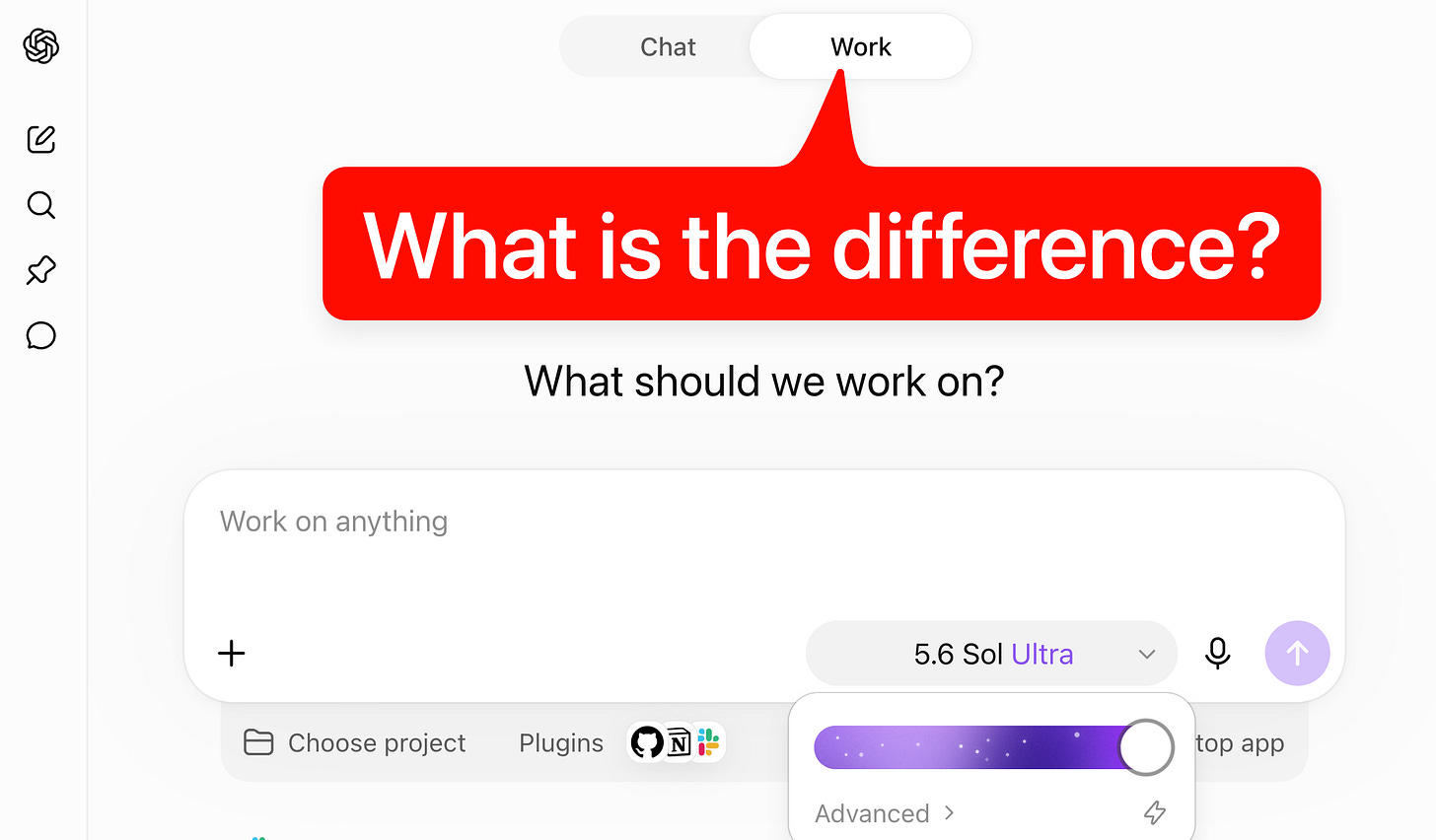
現在の「Work」の仕組みを理解するには、いくつかの解読が必要です。これは ChatGPT(チャット形式)、アプリとしての Codex、ハッチスとしての Codex、クラウドエージェントとしてのオリジナルの Codex、ChatGPT エージェント、Atlas、OpenClaw など、複数の要素が融合した製品です。周辺にあるプロダクトラインナップも複雑で混乱を招きます。さらに、Web 版とモバイル版はデスクトップ版とは仕様が異なっており(クラウドモードで実行しない限り)、一貫性がありません。
そこで私は過去数日間、この「Work」の正体を解きほぐすことに注力しました。それが何なのか、OpenAI の製品群の中でどのような位置を占めるのか、設計上の興味深い選択は何か、その背後にある緊張関係は何か、そして今後どうなると思うかについてです。以下の内容は主に Codex と私が「Work」の内部を探った結果に基づいています。各主張の出典となる会話へのリンクも随所に記載していますので、ご参照ください。
「Work」とは何なのか?
核心を簡潔に言えば:
知識労働のためのエージェントです。Slack、メール、Drive、カレンダー、CRM、プロジェクト管理ツールなど、あなたが普段仕事をしている場所に接続し、それらすべてのコンテキストを集約して、完成された成果物を生み出します。
Codex ハッチス上で動作します。つまり、同じモデルやサブエージェント、ブラウザ操作機能、そして数時間にわたるタスクの継続実行能力を継承しています。ただし、コードエージェントであることがバレてしまう証拠(Git コントロールや差分追跡など)は UI から排除されています。
ChatGPT Work はクラウド上で動作します。具体的には、高性能で隔離されたマイクロ VM 上です。Pro アカウントでは CPU 8 コア、RAM 20GB、ディスク容量 64GB が提供され、Plus アカウントでも RAM 14GB を利用できます。この VM と並行して、エージェントがツール呼び出しを通じて操作する管理された Chrome サービスも用意されています。
成果物を生成します。スプレッドシート、ドキュメント、スライドはインタラクティブなビューアで表示され、さらに「Sites」と呼ばれる機能では、Web アプリやダッシュボードを構築・ホストし、URL で共有して随時更新することも可能です。
Work における新しい会話はすべて「タスク」と呼ばれます。Web とモバイル版では、すべての処理がクラウド上で行われます。Web からタスクを開始し、スマートフォン用の ChatGPT アプリで進捗を追跡したり指示を出したりした上で、ラップトップに戻ってその結果(レポートやスプレッドシートなど)を確認できます。
デスクトップアプリでの Work はやや異なり、「クラウドモード」と「ローカルモード」の 2 つのモードがあります。クラウドモードでは、タスクは Web やモバイルと同じクラウドコンピューター上で実行され、3 つのプラットフォーム間で同期されます。
一方、ローカルモードでは、エージェントが直接ユーザーのマシン上で動作し、ファイルやアプリを操作してフルコンピュータ制御を行います。これらのタスクは Web やモバイルには表示されず、現時点ではローカルタスクをクラウドへ移行する方法もありません。つまり、ローカルモードはコード関連の UI 要素を除いた「Codex」のような存在と言えますが、その UI 要素は非開発者にとって警戒心を抱かせる要因となるため、あえて排除されています。
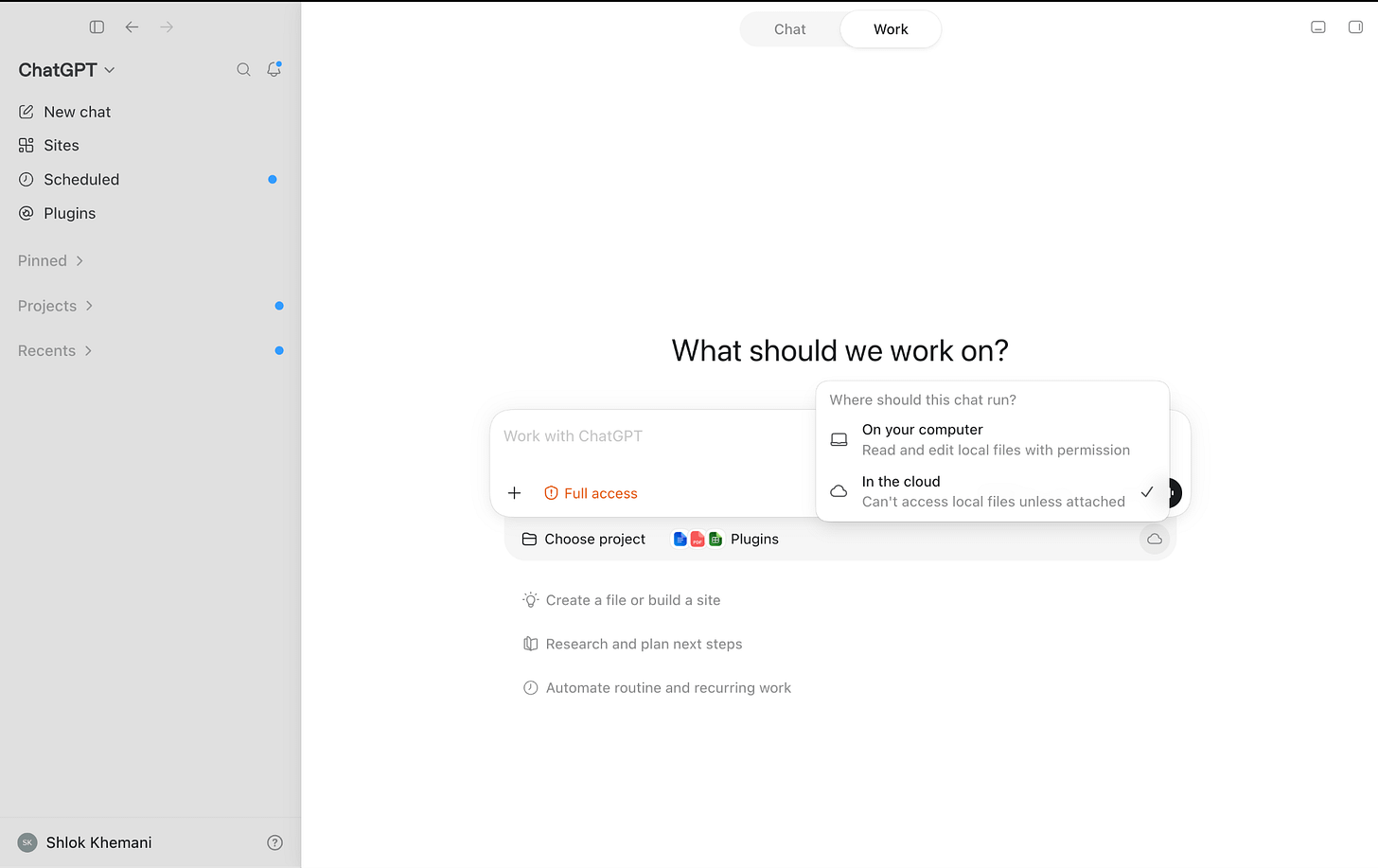
デスクトップ版の Work では、新しいタスクをローカルのコンピュータ上で実行することも、クラウド上で行うことも可能です。
しかし、ここから少し複雑な話になります。OpenAI はすでに Codex のタスクをリモート環境へ引き渡す仕組みを発表しています。執筆時点では私にはこの機能が動作していませんが、いずれは使えるようになり、その機能を Work にも導入すると予想されます。
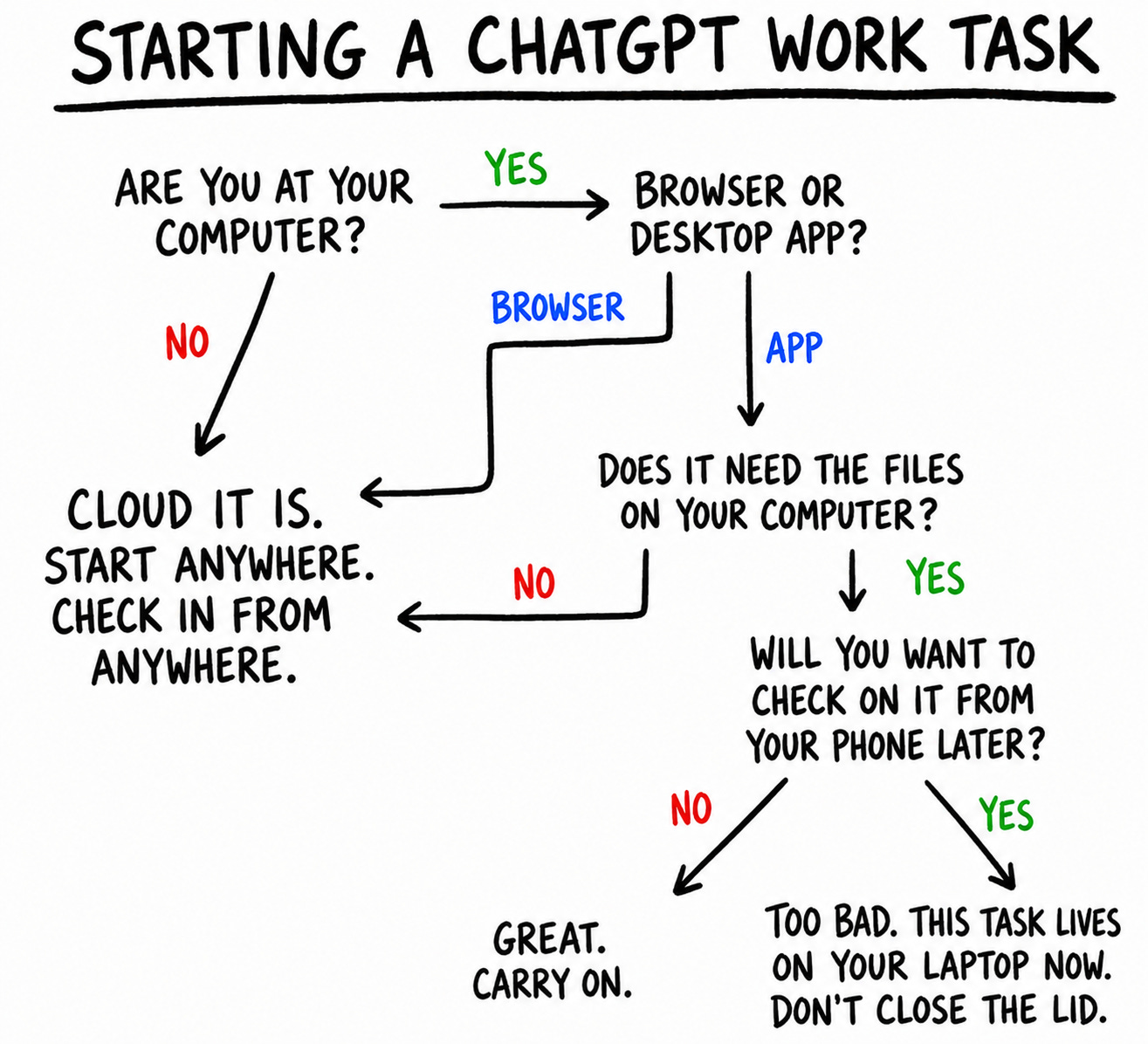
以降、本稿では「Work」という場合、クラウドモードでの動作を指します。
永続性とメモリ
OpenClaw がチャットボットと異って感じられた大きな理由の一つは、エージェントが専用のコンピュータを持っていた点です。常時稼働するラップトップや VPS(仮想プライベートサーバー)で実行し、ディレクトリの作成、ソフトウェアのインストール、データベースの管理を行わせ、それらの状態を会話やサブエージェント間でも再利用できました。その状態はチャット履歴や Markdown ファイル、あるいは専用のメモリシステムに限定されるのではなく、コンピュータ全体に広がっていたのです。
Work のクラウド上のコンピュータも永続性を持っています。ただし、常に稼働し続ける単一の仮想マシン(VM)で動作するのではなく、ワークスペースは永続ストレージに同期され、必要に応じて隔離されたマイクロ VM 上に復元されます。そのため基盤となる機械自体は変わっても、作業状態は引き継がれます。OpenClaw と比較すると、Work のエージェントがこのコンピュータに対して持つ権限ははるかに制限されています。
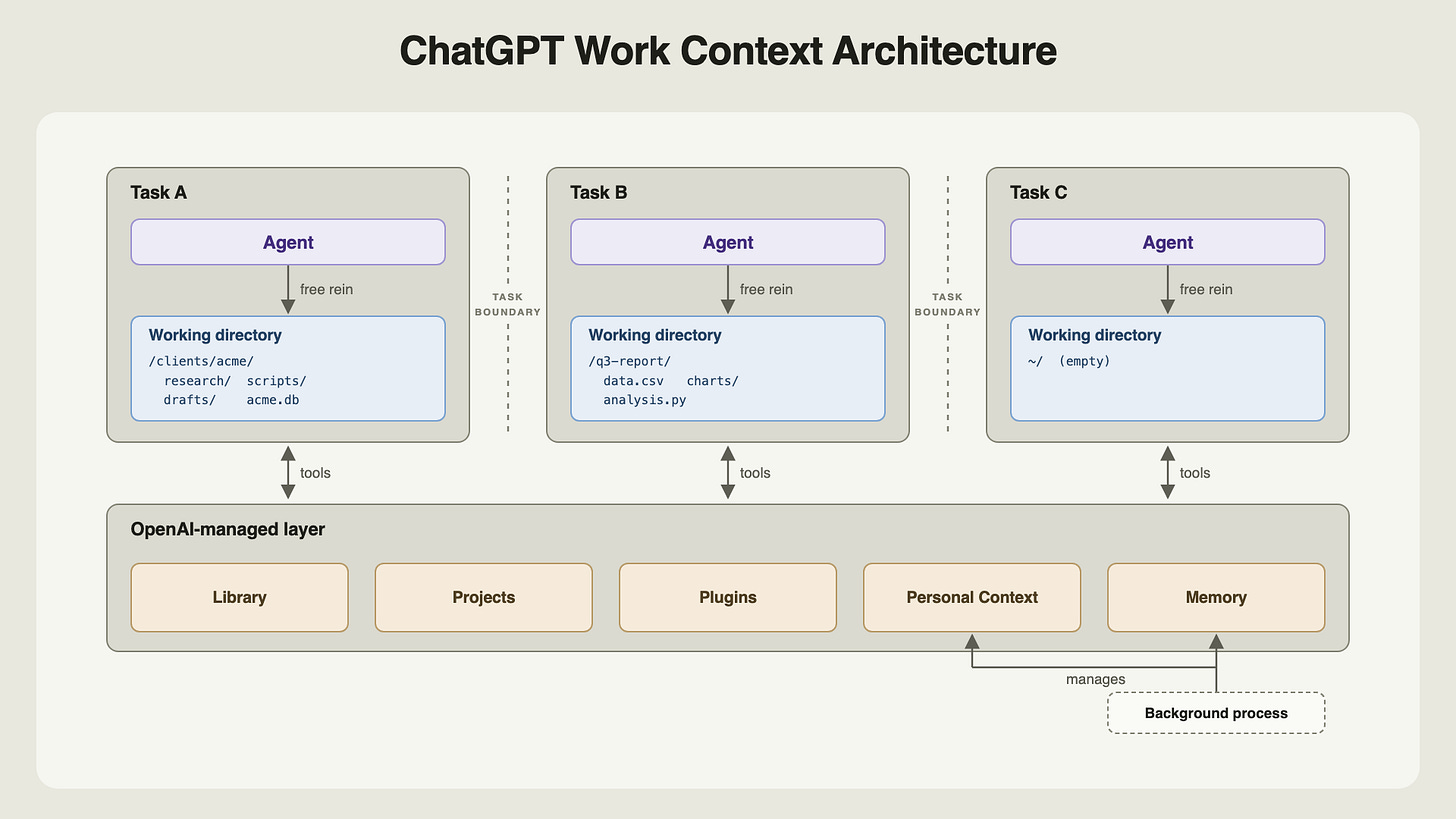
ChatGPT Work の各タスク(スレッド)は、/workspace/scratch 配下に作業用ディレクトリを取得します。ここではエージェントが通常のコンピュータと同様に振る舞うことができ、フォルダの作成や依存関係のインストール、スクリプトの記述、データベースの管理、そして Linux コマンドによる全ファイル検索が可能です。
Acme のプレゼン資料作成を依頼すると、エージェントは clients/acme ディレクトリを作成し、ソース資料をコピーしてコードで分析を実行。その結果としてチャートやスライドファイルを生成します。同じスレッド内で続報を求めると、エージェントはその作業状態に戻り、編集を継続できます。
ただし、他のスレッドの文脈が必要なタスクでは、他スレッドの作業ディレクトリを自由にアクセスできる共有ワークスペースとは見なしません。代わりに ChatGPT の製品層に依存して情報を取得します。
デフォルトでは、新しいスレッドには直近のタスクや作業ファイルの要約が圧縮されて付与されます。その要約例は以下の通りです。
20260731T15:55 Prepare Acme pilot plan:||||
Turn the attached notes into a one-page plan for the Acme pilot, with an objective, deadline, and next steps.
エージェントが参照するために、生会話のトランスクリプトをコンピューター上に保存していません。過去のスレッドからの文脈が必要なタスクでは、エージェントは「パーソナルコンテキスト(Personal Context)」という専用ツールを呼び出し、別管理サービスを通じてチャットとワークの履歴を検索し、関連する抜粋を返却します。
ファイルも同様のパターンに従います。ChatGPT のライブラリは、すべてのファイルや成果物を一元管理するユーザー向けリポジトリです。ユーザーがアップロードしたファイルは自動的にここに保存され、エージェントが作成したファイルは、ユーザーの指示がある場合や、エージェントが保持に値すると判断した場合に保存されます。また、エージェントはライブラリを整理するためにディレクトリを作成することも可能です。会話と同様に、ライブラリもコンピューター上に存在するわけではなく、専用ツールを通じてのみアクセスできます。
アップロードされたファイルは、スレッド内の作業用コピーと、ライブラリ内の正規のアイテムという 2 つの場所に存在します。興味深いことに、これら 2 つは同期されません。スレッド A でファイルをアップロードし、その後スレッド B がライブラリ版を変更した場合、スレッド A は再開時にその古くなったローカルコピーを読み続けます。
明示的な指示があれば、あるタスクのエージェントが他のタスクの一時ディレクトリを参照し、ファイルを見つけ、変更することも可能です。ただし、これはエージェントが自律的に行うものではなく、これらのディレクトリ名は不明瞭で、対応する会話への明確なマップも存在せず、保持に関する契約についても明言されていません。
メモリ管理も外部で行われます。以前の記事でも述べた通り、ChatGPT のコアとなるメモリの基本単位は、ユーザーの動的に合成されたプロフィールです。このプロダクトが非同期でその状態を維持し、タスク開始時に Work へ供給します。エージェントはこの情報に基づいて推論できますが、それを直接変更したり、他のタスクがデフォルトで読み込む OpenClaw 形式の Markdown ファイルを作成したりすることはできません。
ChatGPT の「プロジェクト」機能は Work にも引き継がれます。プロジェクトは関連する会話、恒久的な指示、そしてソース(ユーザーがアップロードしたファイル)をグループ化するものです。プロジェクト内で新しいタスクを開始すると、そのタスクには関連する会話のサマリー、指示、およびローカルコピーされたソースファイルがディレクトリに格納されます。ただし、Codex のように「プロジェクト」自体がコンピュータ上のディレクトリとして存在しているわけではありません。これもまたプロダクト側で管理される抽象化です。
つまり、エージェントはタスク内では広範な自由度を持ちますが、タスク間の継続性は、コンピュータそのものではなく、特定の設計思想を持つ ChatGPT プロダクト層を通じて実現されます。なぜこのような分離が行われているのか。私の推測としては、いくつかの理由が考えられます。
まず、Work は既存の ChatGPT の基本機能(会話、ライブラリ、個人コンテキスト、メモリ)の上に構築されています。これらすべてをコンピュータ内部から抜き取り、再構築しようとすれば、すでに 10 億人のユーザーを支えているスタック全体を書き換える必要が生じます。
また、この分離は安全装置としての役割も果たしています。すべてのファイル、会話、メモリを単一の環境に保持し、OpenClaw のように無制限なアクセスを与えることは、ユーザーにとって危険です。
これにより、OpenAI は製品のコントロールを維持できます。ユーザーが UI で目にするもの、コンテキストの管理方法、共有機能やクロスデバイス同期、ファイルバージョン管理などです。もしエージェントが環境を自由に改変できるなら、これらの仕組みはさらに複雑になります。
現在、Work に欠けているのは、個々のタスクやプロジェクトよりも上位のレイヤーで動作し、それらを調整するメタ層のエージェントです(すでに Codex をこのように利用しているケースもあります)。これが実現される日も近いかもしれません。Work はまだ黎明期にあり、数週間後にはアーキテクチャが全く異なる姿になっている可能性だってあります。
有用な能動性の兆候
現在の AI 製品は依然として受動的です。モデルが支援する前に、ユーザー自身が「何かやるべきだ」と気づき、関連するコンテキストを集め、それらをプロンプトに変換する必要があります。エージェントはその後の処理を完璧に行えますが、行動を起こす最初のきっかけは、まだユーザー自身の手にかかっています。エージェントが自発的に有用な方法を見つけ出す「能動性」こそが、パーソナル AI における聖杯の一つです。
Work はその未来の一端を垣間見せてくれます。新しい Work の会話を開くと、コンポーザー(作成画面)と共に、ユーザー自身のコンテキストから生成された個別のタスクが表示されます。
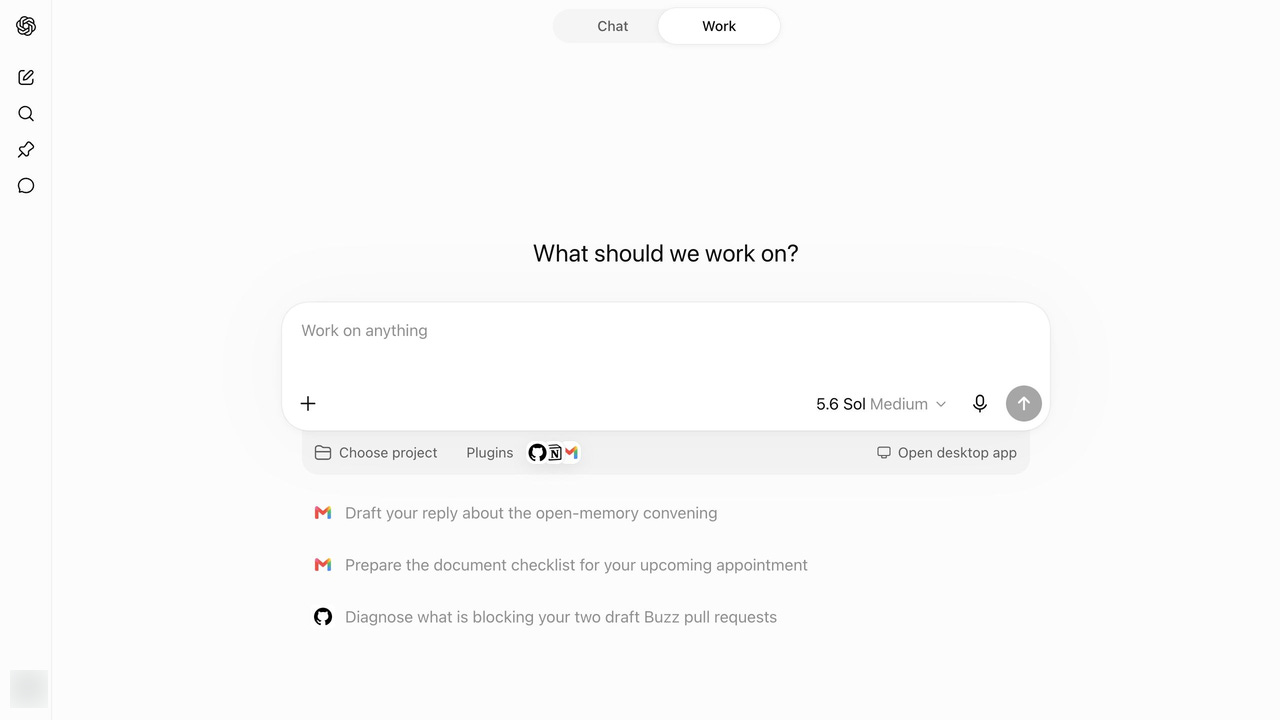
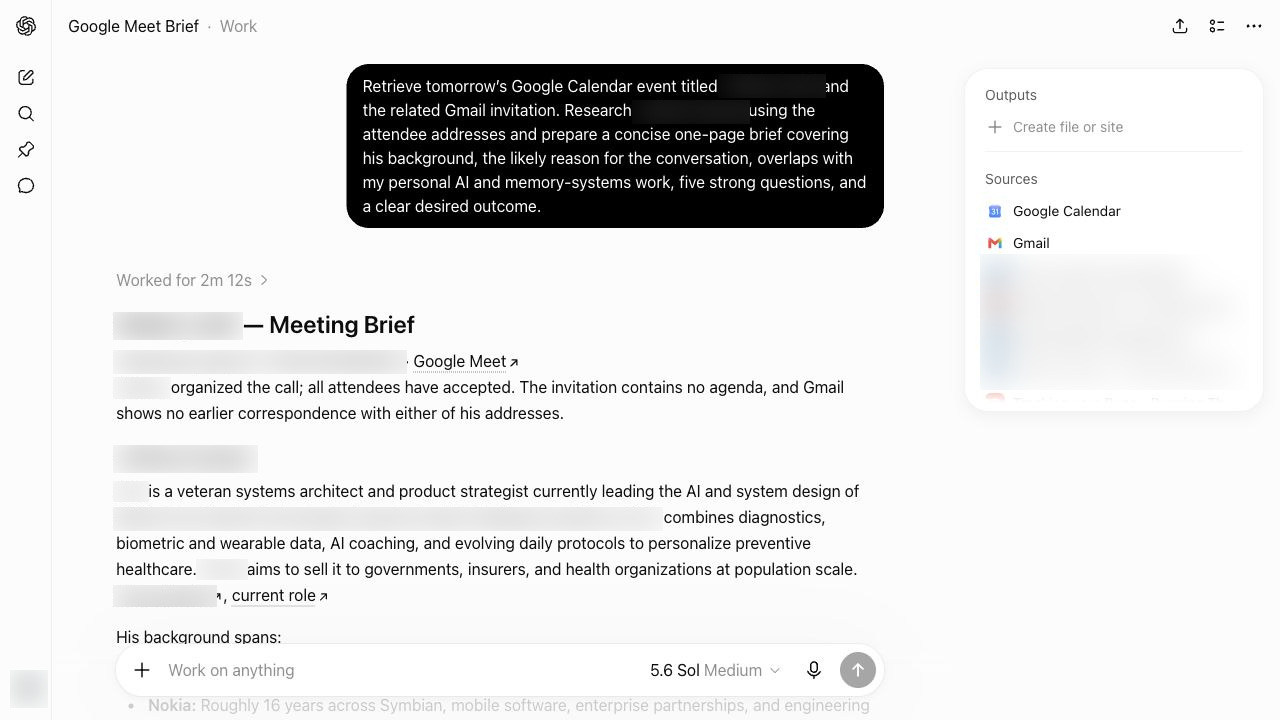
直近の通話に備えるための提案が一つありました。これを選択すると、Work が事前に作成したプロンプトを即座に読み込みます。このプロンプトは、私のコンテキスト全体を非同期で分析し、カレンダーイベントを確認。準備が有益だと推測して、カレンダーと Gmail からデータを取得。さらに、私の記憶にある興味や好みを踏まえてタスクを構成しました。
このプロンプトを送信すると、すぐに作業が始まり、結果として素晴らしい会議の要約が完成。実は自分が必要としていることに気づいていなかったほどです!
現在の Work は、タスクを提案するという信頼できる第一歩を踏み出しました。ただし、実際に実行するまでは何も始まりません。真の先回り型(プロアクティブ)な機能を実現するには、私が手動で介入しなくても、予測したタスクを自動的に完了させる必要があります。その未来は、それほど遠くないでしょう。
予約済みタスク
自動化機能を使えば、Work はユーザーが手動で指示を出すことなく、将来の特定の時刻や定期的なスケジュールでタスクを実行できます。これは ChatGPT が提供するリマインダーや cron ジョブに相当する抽象化レイヤーです。
OpenAI は 2025 年 1 月に「Scheduled Tasks(予約済みタスク)」としてこれを発表しました。Work は同じスケジューラーを基盤としつつ、それをエージェント機能へと進化させました。各実行では、エージェントのコンテキストやツールを活用してタスクを完遂できるようになっています。
これには主に二つの種類があります。
スタンドアロンのスケジュールタスクは、保存されたプロンプトから各実行を開始し、結果のために新しいタスクを開きます。これは、単発のリマインダー、毎日のブリーフィング、週次のジョブ検索、ルーチンなメールスキャンなど、独立した作業に適しています。
既存の会話内にあるスケジュールタスクは、「ハートビート」によってトリガーされ、コンテキストを維持したままそのタスクを再活性化します。これは、長時間実行中のオペレーションの監視や、接続されたサービスのポーリング、短時間間隔でのレビューループの再開など、特定のユースケースに適しています。執筆時点では、ハートビート機能はデスクトップアプリで利用可能ですが、Web 版の Work では公開されていません。
どちらの自動化も、一度きりまたは定期的な設定が可能です。トリガーには、正確な時刻や「朝」のような緩やかな時間枠、あるいはエージェントが監視する条件を指定できます。
自動化は2つの場所で管理できます。会話内では、Work に作成を依頼したり、既存の自動化を確認・指示や頻度の変更、一時停止・再開を行ったりできます。一方、「Scheduled(スケジュール)」ページでは、すべてのタスクとその次回実行時刻、直近の結果を一覧表示し、作成・編集・一時停止・削除のコントロールを提供する UI が用意されています。
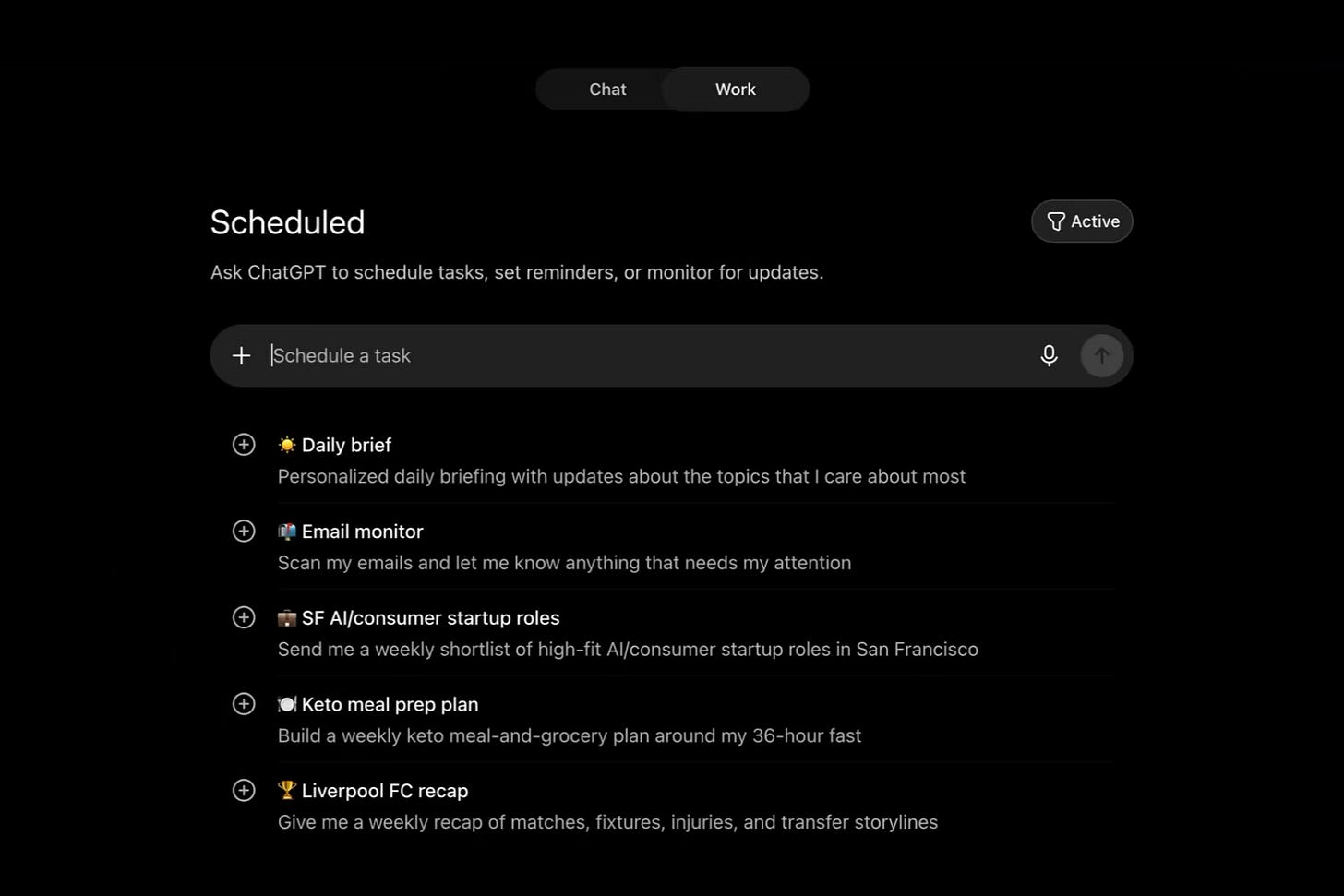
「Scheduled」ページは、ChatGPT がカスタム自動化を提案するという、もう一つの能動的な要素も追加しています。Daily Brief(デイリーブリーフ)のような汎用的なものから、私が応援しているサッカークラブのための週次リキャップのように、私の記憶に基づいたパーソナライズされたものまであります。
Browser Use(ブラウザ操作)
長年、ChatGPT のウェブへのアクセスには制限がありました。検索やページ取得はできても、curl コマンドを使ってファイルをダウンロードしたり API を呼び出したりする程度で、画面をクリックして操作を進めたり、サービスにログインしたままの状態を維持したり、フォーム入力のような一連の作業を完遂することはできませんでした。
この能力が初めて ChatGPT に与えられたのは、Operator と ChatGPT エージェントが登場した時です。その後、Codex の中核機能となり、現在は「Work」において最も統合された形で実現されています。
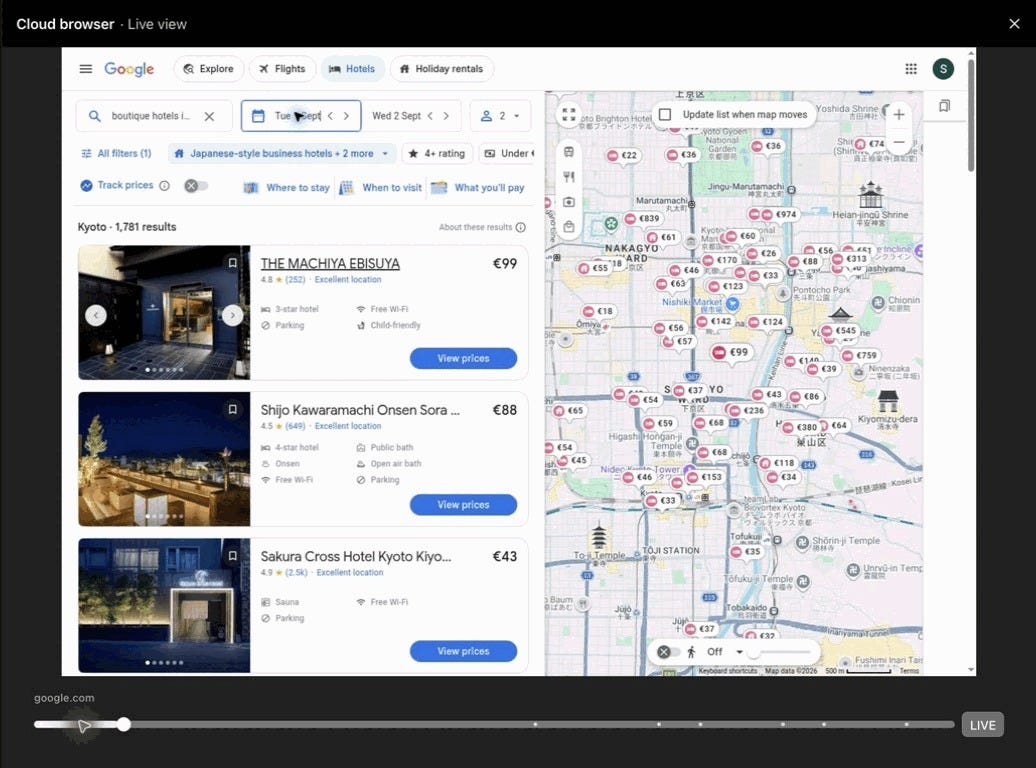
ローカルで動作する Codex とは異なり、Work のブラウザはエージェントと同じコンピューター上には存在しません。代わりに、エージェントはツール呼び出しを通じて、別サーバー上でホストされている Chrome サービスを制御します。ページの内容を確認したり、クリックや入力、スクロールを行ったり、スクリーンショットを撮ったり、タブやダイアログを管理したり、ファイルをブラウザとコンピューター間で移動させたりすることが可能です。
Web 版およびデスクトップ版の Work では、ブラウザの過去の状態を再生可能なタイムラインとして表示します。これにより、エージェントが何をしたかを後から追跡できます。また、ライブのブラウザを一時引き継いでナビゲーションやパスワード入力を行い、その後再びエージェントに任せることも可能です。ただし、モバイル端末ではまだこの機能は利用できません。
ブラウザサービスは独自の永続プロファイルも保持しています。新しいブラウザインスタンスでは、設定やログインセッションが引き継がれます。あるタスクで Wikipedia のテーマをダークモードに切り替え、Google にサインインしたとしましょう。その際、新しく生成された別のタスクでも両方が自動的に引き継がれます。
Work エージェントは、このプロファイルや認証情報を直接見ることはありません。代わりに、小さな権限台帳がワークスペースと共にコンピューター上に同期され、どのサイトに対してアクションが可能か、またファイルを移動できるかどうかを、会話全体および各会話ごとに記録します。
ただし、クラウドブラウザはデータセンター内で動作するため、ローカルのブラウザにはない制約に直面します。Amazon US では「サポートされていないセッションまたはクライアント」として拒否されましたし、Google Photos についても、共有アルバムのコピーを依頼するとタイムアウトが繰り返されました。これら両方のタスクは、ローカルモードでは正常に実行できました。
Work は CAPTCHA に挑戦することも可能ですが、これはユーザーの許可があった場合に限られます。また、ループ処理や指紋の回転、あるいはサイトのセキュリティ対策を回避する行為については、明示的に禁止されています。
それでも、クラウドブラウザを採用したことで Work の能力は飛躍的に向上しました。Web 検索機能のみを持つ ChatGPT では決して達成できなかった、広範なタスククラスを完遂できるようになったのです。
プラグイン、スキル、ツール
OpenAI は長年にわたり、ChatGPT を外部アプリやサービスと接続するための最適な基本要素を探し続けてきました。2023 年 3 月には「Plugins」、同年 11 月には「GPTs と Actions」、2025 年 6 月には「コネクタ」が導入され、さらに 2025 年後半には「Apps」「Apps SDK」「App Directory」が登場しました。そして 2026 年 3 月、プラグインは再び Codex に戻り、アプリとスキルのパッケージとして再構成されました。
7月9日のリリースにより、App ディレクトリは Plugin ディレクトリへと名称変更され、既存のアプリがプラグインとしてパッケージ化されました。また、このディレクトリは Work と Codex 全体に拡大しました。現時点では、OpenAI は Chat と Work が外部世界とやり取りするための手段として「プラグイン」を採用することに落ち着いたようです。
現在、プラグインには以下の要素が含まれます。
- Apps: エージェントを Gmail、Slack、Salesforce などのサービスに接続します。大半は MCP サーバーを使用してツールを公開しており、メッセージの検索やメール送信など、エージェントが呼び出せる個別の操作を提供します。
- Skills: ワークフローを実行するための指示と、リファレンス、テンプレート、場合によってはスクリプトといった支援資料を組み合わせて、エージェントに特定のワークフローを学習させます。
- App テンプレート: 組織が、ワークフローに依存するプライベートまたは組織固有のアプリを設定できるようにします。
プラグインには主に3つの種類があります。
Operational plugins(運用系プラグイン)は、エージェントに Codex ネイティブの機能強化を提供します。Computer Use を使えばインターフェースを操作でき、Sites でウェブサイトをデプロイできます。また、Documents、Presentations、Spreadsheets により、インタラクティブな成果物を作成することが可能です。
Role-specific plugins(役割特化型プラグイン)は、特定の業務にエージェントを備え付けます。例えば Sales プラグインでは、Salesforce や Slack など29のアプリにまたがる20のスキル(Account Signals の分析や Business Case の構築など)を適用する方法を学習させます。
Service plugins(サービス系プラグイン)は、Gmail、Slack、Notion、Figma、Salesforce、PitchBook などの外部製品へエージェントを接続します。
ユーザーは、カスタム MCP サーバーを接続し、必要に応じてスキルや独自 UI を追加することで、自分専用のプラグインを作成することも可能です。より広く配布したいと考える開発者は、OpenAI へ提出できます。承認されると、そのプラグインは「Plugin Directory」に登録されます。
現在、このディレクトリには主要なアプリやサービスの大半をカバーする 1,000 以上のプラグインが登録されていますが、「発見性」という点ではまだ課題が残っています。Work はタスクをインストール済みのプラグインにシームレスに振り分けますが、必要なプラグインが不足している際にそれを提案することはありません。例えば、飛行機やホテルを検索するよう指示すると、利用可能な旅行系プラグイン(未インストールのもの)を無視してウェブ検索を実行しました。プラグインを使えばトークン使用量を減らせたはずですし、より精度の高い結果が得られ、予約手続きも完了できたはずです。Expedia という名前を直接指定しても、プラグインの提案は促されませんでした。
製品としての課題が浮かび上がります。ChatGPT はいつタスクを自身で処理し、いつプラグインを推奨すべきか、またどの経路がユーザーにとってより良いのかをどう判断すればよいのでしょうか?さらに、複数の手段で対応可能な場合、どれを提案すべきでしょうか。堅固な発見機能(ディスカバリー層)が欠如したままでは、OpenAI はユーザー、開発者、そしてプラットフォーム化を目指す企業自身にとって、大きな価値を見逃していることになります。
今後の展望
今年後半に Work が Chat に統合されれば、その設計思想は 10 億人規模のユーザーにとってデフォルトとなります。それまでに OpenAI は、使用を通じて繰り返し浮き彫りになったいくつかの課題を解決する必要があります。
クラウドコンピューターがユーザーの主要な AI 端末となるのか。また、それとローカルマシンとの同期をいかにシームレスに感じさせるか。
Work エージェントは、そのコンピューターに対して OpenClaw のような主権を獲得するのか。ChatGPT は、継続性において特定の役割を維持し続けるのか、それとも中間的な立場を取るのか。
Work を Chat と同じくらいユーザーに馴染みのあるものにするにはどうすればよいか。同時に、OpenAI は製品内および外から、Chat ユーザーに対して Work の用途や最大限に活用する方法をどのように教育していくのか。
これらの点は、Work が印象的で野心的でありながら過小評価されているローンチであるという事実を損なうものではない。これは長年にわたり散在していた製品群と経験を統合した成果だ。
原文を表示
Editor’s note: I’m excited to welcome Shlok to our guest post roster! You may know Shlok from his excellent explorations (as an outsider — for an insider perspective see our podcast with OpenAI’s Akshay Nathan. Already one of our most popular episodes of the year!) of leading AI Lab memory systems, which he gave an excellent AIE talk on. We’ve been covering OpenAI’s research and deployment of agents to all of humanity since Plugins 2023 and Devday 2024 and Codex 2025, and now ChatGPT Work in 2026 seems the penultimate stage of the long journey. Let’s dive in!
On July 9th, OpenAI released ChatGPT Work, their agent product for knowledge work. It was, by any measure, a busy launch: three new models across fourteen configurations, a consolidation of the ChatGPT and Codex desktop apps, and cloud agents brought to the mainstream in their most accessible form yet.
Three weeks in, Work (along with Codex) has reportedly crossed 10 million users.
Editor’s note: ChatGPT estimated to cross 1B MAU in June and 1B WAU this month.
Chat and Work currently sit side by side as separate modes inside ChatGPT, but Greg Brockman has confirmed that they will merge by the end of the year. Work, then, is not just a niche product for power users, but a preview of how ChatGPT’s billion weekly users will soon use the app. That’s why people inside and outside OpenAI are so excited about it, and why it deserves a closer look.
Work in its current form takes some decoding. It’s an amalgamation of ChatGPT (in chat form), Codex the app, Codex the harness, Codex the original cloud agent, ChatGPT agent, Atlas, OpenClaw, and more. The product lineup around it is confusing. And the web and mobile versions diverge from the desktop one (unless you run it in cloud mode?!).
So I spent the past few days trying to unpack it: what Work is, where it fits in OpenAI’s lineup, the many interesting choices in its design, the tensions underneath, and where I think it’s headed. Most of what follows comes from Codex and me poking around inside Work, and I’ve linked those conversations throughout so you can see where each claim comes from.
What is Work?
At its core:
An agent for knowledge work. You connect it to the places you already work—Slack, email, Drive, calendars, CRMs, project trackers, and hundreds of other plugins—and it gathers context across all of them to produce finished work.
Runs on the Codex harness. So it inherits the same models, sub-agents, browser use, and the ability to grind on a task for hours. Its UI is stripped of the evidence (git controls, diff-traces) that would give away you’re talking to a coding agent.
Lives in a cloud computer. Specifically, a beefy, isolated microVM: Pro accounts get 8 CPUs, 20GB of RAM, and a 64GB disk; Plus gets 14GB of RAM. Alongside the VM, Work gets a managed Chrome service that the agent operates through tool calls.
Produces artifacts. Sheets, docs, and slides rendered in interactive viewers, plus Sites: hosted web apps and dashboards it can build, share via URL, and keep updated.
Every new conversation in Work is called a task. On web and mobile, Work runs in the cloud. You can kick off a task on web, track progress and give directions in the ChatGPT app on your phone, then view the result (maybe a report or a spreadsheet) back on your laptop.
Work on the desktop app is slightly different and comes in two modes: cloud and local. In cloud mode, tasks run on the same cloud computer as web and mobile and sync across all three.
In local mode, the agent works directly on your machine, across your files and apps, with full computer use. These tasks don’t appear on web or mobile, and there’s no way yet to move a local task to the cloud. This makes local mode essentially Codex, minus the code-related UI traces that would scare off a non-developer.
On desktop, each new Work task can run locally on your computer or in the cloud.
But then things get a little confusing. OpenAI did release a way to hand off a Codex task to a remote environment. Although this doesn’t work for me at the time of writing, I assume it eventually will, and that they will then bring the same functionality to Work.
For the rest of this piece, Work = Work in cloud mode.
Persistence & Memory
One big reason OpenClaw felt different from a chatbot was that the agent had a computer of its own. You could run it on an always-on laptop or a VPS, let it create directories, install software, and maintain databases, and reuse all of this across conversations and subagents. Its state lived not just in chat history, Markdown files, or a dedicated memory system, but across the whole computer.
Work’s cloud computer is persistent too. But rather than running in one VM that stays on forever, its workspace is synchronised to persistent storage and restored onto isolated microVMs as needed. So the underlying machine can change, but the working state carries over. Compared to OpenClaw, though, the agent has far less sovereignty over this computer.
Every Work task (thread) gets a working directory under /workspace/scratch, where the agent has the freedom of a normal computer: it can make folders, install dependencies, write scripts, keep databases, and search everything with ordinary Linux commands.
When I ask it to make a presentation for Acme, it can create clients/acme, copy in the source material, perform some analysis through code, and create charts and slides, all as files in the directory. When I follow up in the same thread, it returns to that working state and can continue editing it.
But when a task needs context from other threads, it does not treat their working directories as a shared workspace that it can navigate freely. It relies instead on the ChatGPT product layer.
By default, each new thread receives a compressed summary of recent tasks and files worked on . A summary might look like this:
20260731T15:55 Prepare Acme pilot plan:||||
Turn the attached notes into a one-page plan for the Acme pilot, with an objective, deadline, and next steps.
<<File name=”acme_notes.txt”>>
Raw conversation transcripts are not stored on the computer for the agent to browse. When a task needs context from previous threads, the agent calls Personal Context, a dedicated tool that queries Chat and Work history through a separately managed service and returns the relevant excerpts.
Files follow the same pattern. ChatGPT’s Library is the central user-facing repository for all files and artifacts. User uploads land there automatically; agent-created files are saved when the user asks, or when the agent judges them worth retaining. The agent can also create directories in the Library to keep it organised. Like conversations, the Library doesn’t live on the computer, and can only be reached through dedicated tools.
An uploaded file thus exists in two places: a working copy inside the thread and a canonical item in the Library. Interestingly, the two do not synchronise. If Thread A uploads a file and Thread B later changes the Library version, Thread A continues to read its now-stale local copy when resumed.
When instructed explicitly, an agent in one task can navigate the scratch directories of other tasks, find files, and modify them. But it won’t do this on its own, and the directories have opaque names, no legible map to their conversations, and no stated retention contract.
Memory is managed externally too. As I’ve written before, ChatGPT’s core memory primitive is a running, synthesised profile of the user. The product maintains that asynchronously and supplies it to Work when a task begins. The agent can reason from it, but can’t modify it or create OpenClaw-style Markdown files that other tasks load by default.
ChatGPT’s Projects carry over into Work. Projects group related conversations, standing instructions, and Sources (user-uploaded files). A new task within a Project receives its instructions, summaries of relevant conversations, and local copies of Sources in its directory. But the Project itself does not exist on the computer as a directory, as it does in Codex. It too is an abstraction the product maintains.
In short, the agent has broad freedom within a task, but continuity across tasks runs through an opinionated ChatGPT product layer rather than the computer itself. Why the split? My guess is several reasons:
Work builds on existing ChatGPT primitives (Conversations, Library, Personal Context, Memory). Ripping all of that out and rebuilding it inside the computer would mean refactoring a stack that already serves a billion users.
The separation is a guardrail. OpenClaw-style unrestricted access to a single environment holding every file, conversation, and memory is unsafe for users.
It lets OpenAI keep control of the product: what users see in the UI, how context is managed, and how sharing, cross-device sync, and file versioning work. All of that is harder to build if the agent could alter the environment at will.
What Work lacks today is a meta-layer agent, one that operates a level above individual tasks and projects and coordinates between them. (Some already use Codex this way.) Perhaps that is coming, along with much else. Work is still young, and the architecture could look very different a few weeks from now.
Hints of useful proactivity
Today’s AI products are still reactive. Before the model can help, you have to notice that something needs doing, gather the relevant context, and translate it all into a prompt. The agent can do a stellar job from there, but the initial act of agency is still yours. Proactivity, where agents figure out how to be useful on their own, is one of the holy grails of personal AI.
Work offers an early glimpse of that. When you open a new Work conversation, alongside the composer, you get personalized tasks generated from your own context.
One suggestion offered to prepare me for an upcoming call. When I selected it, Work injected a pre-authored prompt. It had reasoned asynchronously across my context: noticed the calendar event, inferred that preparation would help, pulled data from Calendar and Gmail, and framed a task around the interests and preferences in my memory. When I sent the prompt, it got to work, and the result was a great meeting brief — one I didn’t know I needed!
Today, Work takes a credible first step: it suggests tasks. But nothing happens until I execute them. For true proactivity, it would have to complete the tasks it predicts I’d want done, without me in the loop. That future doesn’t seem far off.
Scheduled Tasks
Automations let Work run tasks at a future time or on a recurring schedule, without the user manually prompting it. They are ChatGPT’s abstraction for reminders and cron jobs.
OpenAI introduced them as Scheduled Tasks in January 2025. Work builds on the same scheduler but makes it agentic: each run can use the agent’s context and tools to complete the task.
They come in two types.
A standalone scheduled task begins each run from a saved prompt and opens a fresh task for the result. It suits self-contained work: a one-off reminder, a daily briefing, a weekly job search, a routine email scan.
A scheduled task inside an existing conversation, triggered by a “heartbeat”, reawakens that task with its context intact. It suits use cases like monitoring a long-running operation, polling a connected service, or resuming a review loop at short intervals. At the time of writing, heartbeats work in the desktop app but are not exposed in Work on the web.
Either automation can be set up as one-time or recurring. Its trigger can be an exact time, a loose window such as “in the morning”, or a condition the agent monitors.
You can manage automations in two places. Inside a conversation, you can ask Work to create one, inspect existing automations, change their instructions or cadence, or pause and resume them. The Scheduled page puts all of this in a UI: every task with its next run and recent results, plus controls to create, edit, pause, or delete them.
The Scheduled page adds another element of proactivity: ChatGPT suggests custom automations for you. Some, like a Daily Brief, are generic; others, like a weekly recap for the football club I support, are personalized from my memory.
Browser Use
For years, ChatGPT had limited access to the web. It could search, retrieve pages, and use commands like curl to download files or call APIs. But it couldn’t click through an interface, stay logged into a service, or complete workflows like filling a form. ChatGPT first gained this ability with Operator and ChatGPT agent. It then became a core part of Codex and now finds its most integrated expression in Work.
Unlike Codex running locally, the Work browser doesn’t live on the same computer as the agent. Instead, the agent controls a separately hosted Chrome service through tool calls. It can inspect the page, click, type, scroll, take screenshots, manage tabs and dialogs, and move files between the browser and its computer.
On web and desktop, Work shows a replayable timeline of the browser’s past states, so you can retrace what the agent did. You can also take over the live browser to navigate or enter a password, then hand it back to the agent. You can’t do this on mobile yet.
The browser service also keeps its own persistent profile. New browser instances inherit preferences and logged-in sessions: I switched Wikipedia to dark mode and signed into Google in one task, and a fresh task inherited both. The Work agent never sees this profile or its credentials. Instead, a small permission ledger is synchronised into its computer alongside the workspace, recording, globally and per conversation, which sites it may act on and whether it may move files to or from them.
But because the cloud browser runs in a datacenter, and not on your laptop, it faces constraints a local browser does not. Amazon US rejected it as an unsupported “session or client”, and Google Photos repeatedly timed out when I asked it to copy a shared album. Both tasks worked in local mode. Work can attempt a CAPTCHA, but only with your permission, and it is instructed not to loop, rotate its fingerprint, or otherwise evade a site’s safeguards.
Still, the cloud browser makes Work far more capable. It can finish whole classes of tasks that ChatGPT with web search alone never could.
Plugins, skills, and tools
OpenAI has spent years searching for the right primitive to connect ChatGPT to outside apps and services: Plugins (March 2023), GPTs and Actions (November 2023), connectors (June 2025), and apps, the Apps SDK, and the App Directory (late 2025). In March 2026, plugins returned to Codex as packages of apps and skills.
With the July 9 launch, the App Directory became the Plugin Directory, existing apps were packaged into plugins, and the directory expanded across Work and Codex. For now, OpenAI seems to have settled on plugins as the way for Chat and Work to interact with the external world.
A plugin today can contain:
Apps, which connect the agent to services such as Gmail, Slack, or Salesforce. Most use an MCP server to expose tools: discrete operations the agent can invoke, such as searching messages or sending an email.
Skills, which combine instructions with supporting material—references, templates, and sometimes scripts—to teach the agent a workflow.
App templates, which let an organisation configure the private or organisation-specific app a workflow depends on.
Plugins come in three broad types:
Operational plugins give the agent Codex-native enhancements. Computer Use lets it operate interfaces; Sites lets it deploy websites; Documents, Presentations, and Spreadsheets let it create interactive artifacts.
Role-specific plugins equip the agent for a particular kind of work. The Sales plugin, for example, teaches it to apply 20 skills (Analyze Account Signals, Build Business Case) across 29 apps, including Salesforce and Slack.
Service plugins connect the agent to external products such as Gmail, Slack, Notion, Figma, Salesforce, and PitchBook.
Users can also create personal plugins by connecting a custom MCP server and, if needed, adding skills or custom UI. Developers who want to distribute a plugin more widely can submit it to OpenAI; once approved, it is published to the Plugin Directory.
The Plugin Directory already holds more than 1,000 plugins covering most major apps and services, but discovery is a weak link. Work routes tasks to installed plugins seamlessly, yet never suggests a relevant plugin when one is missing. When I asked it to search for flights and hotels, it ignored several available but uninstalled travel plugins in favour of web search, even though a plugin might have used fewer tokens, returned better results, and let me complete a booking directly. Even naming Expedia outright didn’t prompt it to offer the plugin.
I can imagine the product challenges: how does ChatGPT know when to handle a task itself, when to recommend a plugin, and which path serves the user better? And if several can do the job, which should it suggest? Without a solid discovery layer, though, OpenAI is leaving value on the table—for users, for developers, and for itself in its quest to become a platform.
What’s Next
When Work folds into Chat later this year, its design choices will become the default for a billion people. Before then, OpenAI has to resolve a few tensions that kept surfacing as I used it:
Does the cloud computer become the user’s primary AI computer? And how can syncing between it and the local machine feel seamless?
Do Work agents get more OpenClaw-like sovereignty over that computer? Does ChatGPT keep the opinionated role it plays in continuity, or is there a middle ground?
How does Work come to feel as familiar to users as Chat? And in the meantime, how does OpenAI teach Chat users, from within the product and outside it, what Work is for and how to get the most out of it?
None of this should detract from the fact that Work is an impressive, ambitious, yet underrated launch. It consolidates years of scattered products and expe
News to Guide
ニュースの次に確認する
発表内容を、現在の料金や仕様と照らし合わせられる関連ガイドです。
今日のまとめ
AIデイリーブリーフで今日の重要ニュースをまとめ読み