OpenRouter、画像認識 LLM への API 送信ガイドを公開
本文の状態
日本語全文を表示中
詳細モードで約22分の本文を読めます。
同じ出来事の情報源
この情報源を基点に整理
OpenRouter Blog
OpenRouter は、画像入力のみを対象としたビジョン対応 LLM の API 利用ガイドを公開し、テキストと画像 URL を含むリクエスト構造の統一性と、異なるモデル間での切り替え容易性を解説している。
AI深層分析を開く2026年8月15日 03:37
AI深層分析
キーポイント
標準化されたリクエスト構造
画像入力時は content フィールドが配列となり、テキストパートと image_url パートを同時に含む形式に統一されるため、モデル変更時に実装を変更する必要がない。
用途に応じたモデルの選択
OCR 処理に特化したモデル、UI スクリーンショットの認識に適したモデル、チャート分析に強いモデルなど、入力形状は共通のまま目的に応じて最適なモデルを切り替え可能である。
実装と運用のガイドライン
公開 URL と Base64 形式の使い分け、マルチモーダル RAG パイプラインの構築方法、および本番環境における実用的な制限事項について具体的な指針が示されている。
メッセージ順序とシステムプロンプトの活用
テキスト部分を先頭に配置する必要があるが、画像を先に参照したい場合はコンテンツ配列の順序を変更せず、システムプロンプトにその枠組みを組み込む。
ホストURLとBase64データの使い分け
画像が既にパブリックな場所に存在する場合はURLを、ローカルまたは非公開のファイルの場合はBase64エンコードしてリクエストに埋め込む。
重要な引用
The pattern is simple. Send a chat message whose content array includes a text part and an image_url part to our image understanding endpoint.
One model handles Optical Character Recognition (OCR) better, another reads UI screenshots more reliably, another reasons over charts more carefully.
"If your use case genuinely needs the image referenced before any text, move that framing into the system prompt instead of trying to reorder the content array."
"Base64 has a second advantage. Hosted URLs can fail because of access controls, regional blocks, or expired signed URLs. Those failures can't happen when the bytes are already in the request."
編集コメントを表示
編集コメント
OpenRouter は、特定のモデルに依存しない汎用的な実装パターンを提示することで、開発者の負荷を軽減する価値がある。特に、OCR やチャート解析など用途ごとに異なる強みを持つモデルを統一されたインターフェースで使い分けられる点は、実務において大きなメリットとなる。
Source Article
元記事を日本語で読む
本文に関係しない購読案内、埋め込み通知、サイト内プロモーションは除いています。
スクリーンショットの読み込み、チャートの分析、写真に関する質問への回答など、ビジョン機能を備えた大規模言語モデル(LLM)に画像を処理させるには、リクエスト本文を正しく構築する必要があります。このガイドでは、ユーザーが提供した画像を読み取る「画像入力」に焦点を当てています。生成や編集の機能については対象外です。
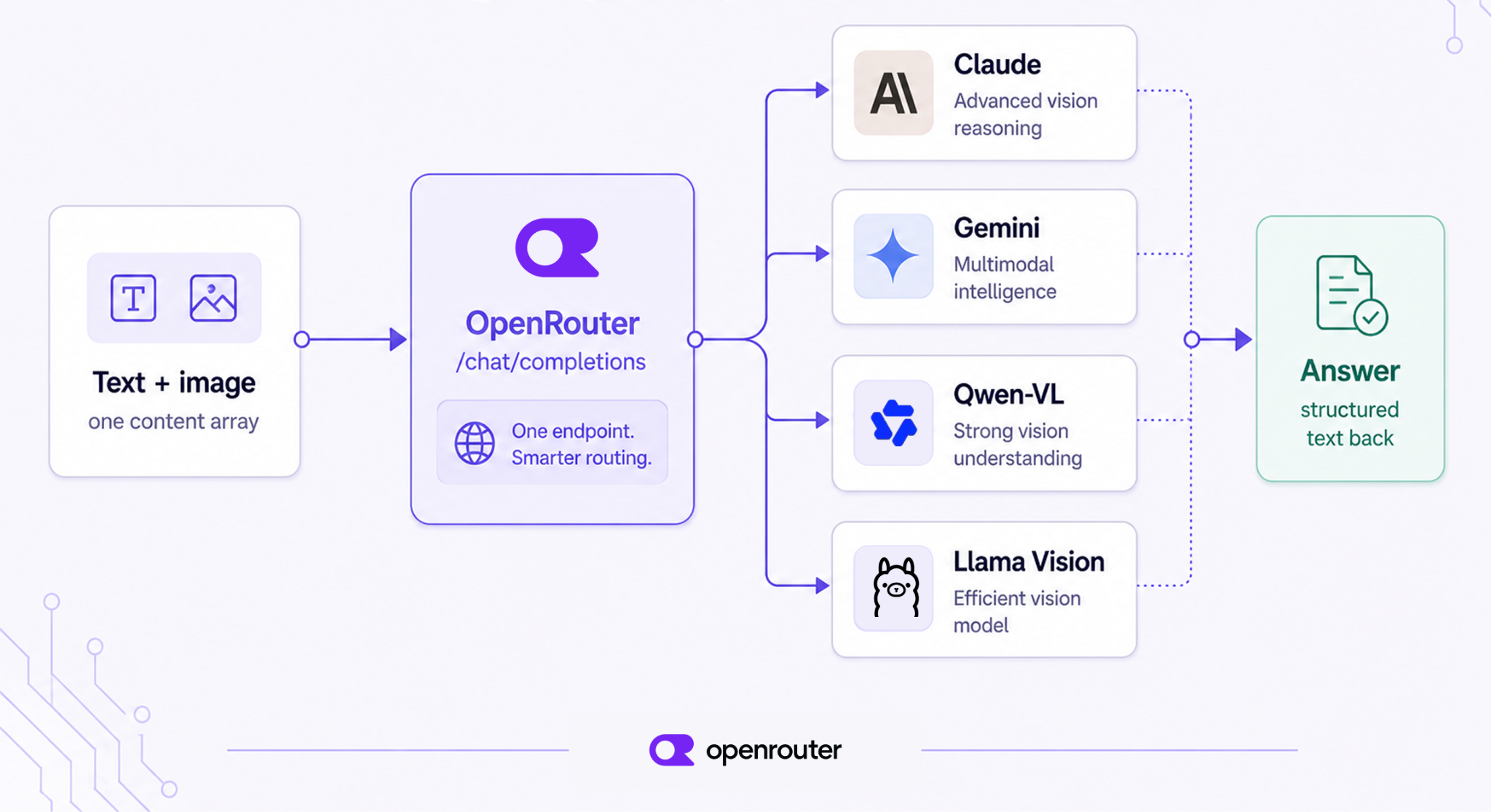
手順はシンプルです。テキスト部分と image_url 部分を組み合わせたコンテンツ配列を含むチャットメッセージを、画像理解エンドポイント に送信します。一度この形式で送信すれば、その後のリクエスト構造はそのまま維持できます。必要な変更点は、使用するビジョン対応モデルに応じて model フィールドの値を変更するだけです。
1 つのモデルは光学式文字認識(OCR)に強く、別のモデルは UI のスクリーンショットをより確実に読み取り、さらに別のモデルはチャートに対して慎重な推論を行います。入力形状が変わらないため、統合コードを変更せずにこれらの違いを検証できます。
本ガイドでは、マルチモーダルモデルへの画像送信方法について解説します。公開 URL と Base64 形式のアップロードの違いや、マルチモーダル RAG パイプラインの構築方法、そして実運用で直面する重要な制限事項についても触れます。
Tl;dr(要約)
Chat Completions API を通じて、画像理解機能を利用できます。
- エンドポイント:
POST /api/v1/chat/completions
- 本文: ユーザーメッセージの
contentが、テキスト部分{"type": "text"}と画像部分{"type": "image_url"}の 2 つからなるリストであるmessagesアレイです。
- モデル: 画像入力が可能な任意のスラッグ(例:
anthropic/claude-opus-4.8、google/gemini-3-flash-preview)。リクエスト本文は同じなので、自由に切り替えてください。
チャット呼び出しに画像を添付する基本的なリクエスト
リクエストは、ユーザーメッセージ 1 つで構成され、そのコンテンツ配列にはテキスト部分と image_url 部分の 2 つが含まれています。このガイドの残りは、このリクエストを前提に構築されています。
メッセージコンテンツ配列
テキストのみでのチャットでは、content はプレーンな文字列として送信されます。画像を追加すると、content の形式は型付きオブジェクトの配列に変更されます:
{
  "role": "user",
  "content": [
    { "type": "text", "text": "What's in this image?" },
    { "type": "image_url", "image_url": { "url": "https://example.com/receipt.jpg" } }
  ]
}
順序は重要です。テキスト部分を先に配置してください。これが配列を解析する際の基本的なルールです。
もし、画像をテキストより前に参照する必要があるユースケースが本当にある場合は、コンテンツ配列の順序を変更しようとするのではなく、その処理をシステムプロンプト側に移すことをお勧めします。
base64 データ URL とホスト型画像 URL:どちらを使うべきか
image_url.url フィールドには、2 つの形式を指定できます。1 つは公開された HTTP(S) リンクそのままの URL です。もう 1 つは data:image/jpeg;base64,<encoded-bytes> という形式で記述された Base64 データ URL です。どちらを使うかは、ファイルがすでにどこに保存されているかによって決まります。
画像がすでにパブリックな場所(CDN、署名付きリンクを持つ S3 バケット、または自社のサーバーなど)にホストされている場合は、その URL をリクエストに含めます。この方法ならリクエストサイズは小さく済み、プロバイダー側で自動的に画像のバイトデータを取得できます。
一方、画像がローカルにある場合や、パブリックな URL が不要なケース(ユーザーがアップロードした ID 写真や社内文書など)では、base64 でエンコードしてリクエストに埋め込みます。この方法だとリクエストサイズは大きくなり、転送に時間がかかりますが、ファイルは API コールを通じてのみ外部へ送出されるため、セキュリティ面で安心です。
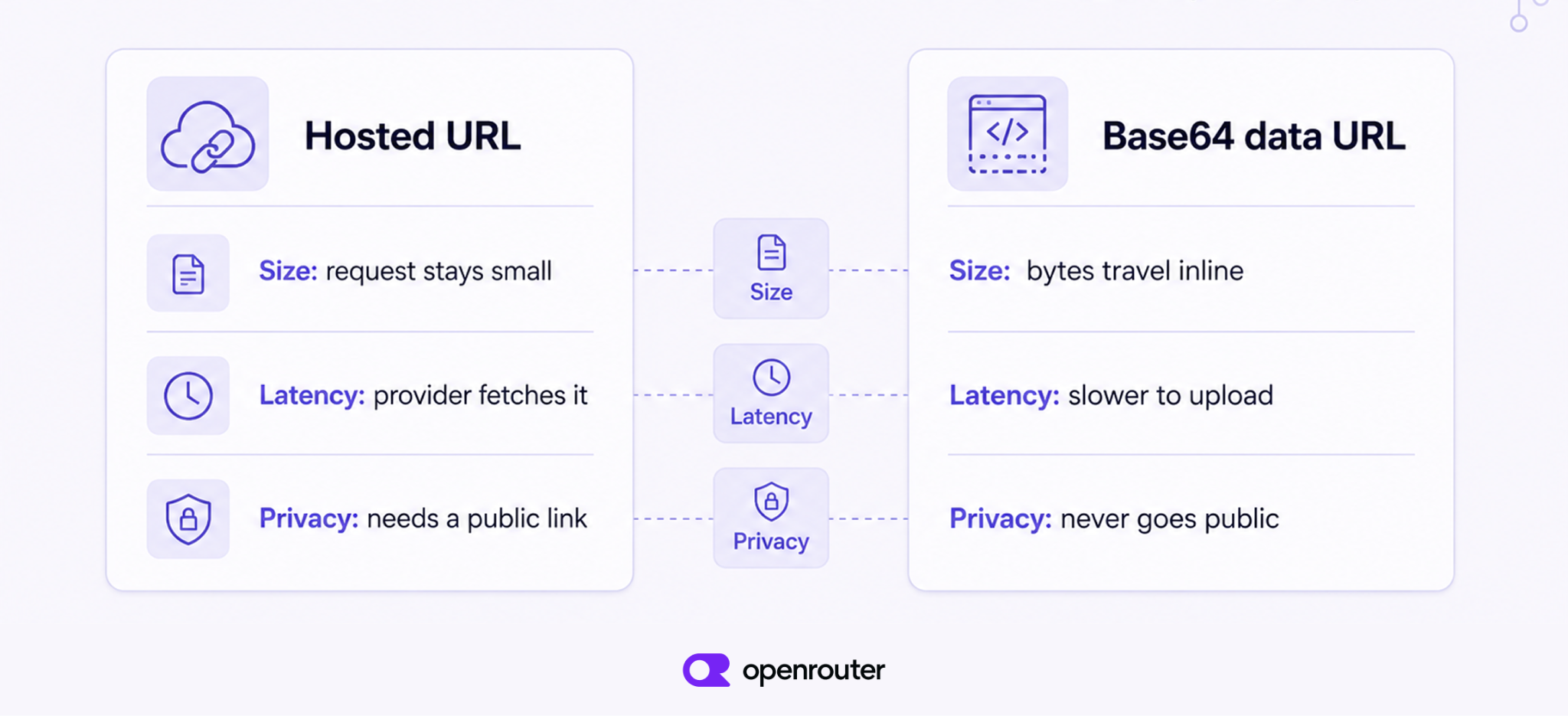
base64 にはもう一つの利点があります。ホスト URL はアクセス制御や地域制限、署名付きリンクの有効期限切れなどで失敗する可能性があります。しかし、バイトデータをリクエスト内に含める方式では、そのような失敗は発生しません。どちらの形式でも PNG、JPEG、WebP、GIF の対応が可能です。
cURL、Python、TypeScript で実行可能な例
同じリクエストを 3 つの言語で記述します。モデル間で変更されるのは MODEL の行だけです。
cURL(ホスト URL)
curl https://openrouter.ai/api/v1/chat/completions \
  -H "Authorization: Bearer $OPENROUTER_API_KEY" \
  -H "Content-Type: application/json" \
  -d '{
    "model": "anthropic/claude-opus-4.8",
    "messages": [
      { "role": "user", "content": [
        { "type": "text", "text": "What total is on this receipt?" },
        { "type": "image_url", "image_url": { "url": "https://example.com/receipt.jpg" } }
      ]}
    ]
  }'
Python(ローカルファイル → base64)
import base64, os, requests

def to_data_url(path: str, mime: str = "image/jpeg") -> str:
    with open(path, "rb") as f:
        b64 = base64.b64encode(f.read()).decode("utf-8")
    return f"data:{mime};base64,{b64}"

MODEL = "anthropic/claude-opus-4.8"  # swap this one string for any vision model

resp = requests.post(
    "https://openrouter.ai/api/v1/chat/completions",
    headers={"Authorization": f"Bearer {os.environ['OPENROUTER_API_KEY']}"},
    json={
        "model": MODEL,
        "messages": [{
            "role": "user",
            "content": [
                {"type": "text", "text": "What total is on this receipt?"},
                {"type": "image_url", "image_url": {"url": to_data_url("receipt.jpg")}},
            ],
        }],
    },
)
print(resp.json()["choices"][0]["message"]["content"])
TypeScript(ローカルファイル → base64)
import { readFile } from "node:fs/promises";

const MODEL = "anthropic/claude-opus-4.8"; // change only this to swap models
const bytes = await readFile("receipt.jpg");
const dataUrl = `data:image/jpeg;base64,${bytes.toString("base64")}`;

const res = await fetch("https://openrouter.ai/api/v1/chat/completions", {
  method: "POST",
  headers: {
    Authorization: `Bearer ${process.env.OPENROUTER_API_KEY}`,
    "Content-Type": "application/json",
  },
  body: JSON.stringify({
    model: MODEL,
    messages: [{
      role: "user",
      content: [
        { type: "text", text: "What total is on this receipt?" },
        { type: "image_url", image_url: { url: dataUrl } },
      ],
    }],
  }),
});
const data = await res.json();
console.log(data.choices[0].message.content);
ビジョンモデルの選び方
OpenRouter 上のすべてのビジョンモデルは、同じリクエスト形式を受け付けます。モデルを切り替える際は model フィールドを変更するだけでよく、その他の設定はそのまま維持できます。これにより、統合コードを変更せずに複数のモデルを比較検証することが可能になります。
モデルがビジョン対応となる仕組み
カタログにあるすべてのモデルが画像を読み取れるわけではありません。あるモデルがビジョンランゲージモデル(VLM)として認定されるのは、テキストモデルと画像エンコーダーを組み合わせ、トークンとともにピクセルも受け取れるようにしたときです。
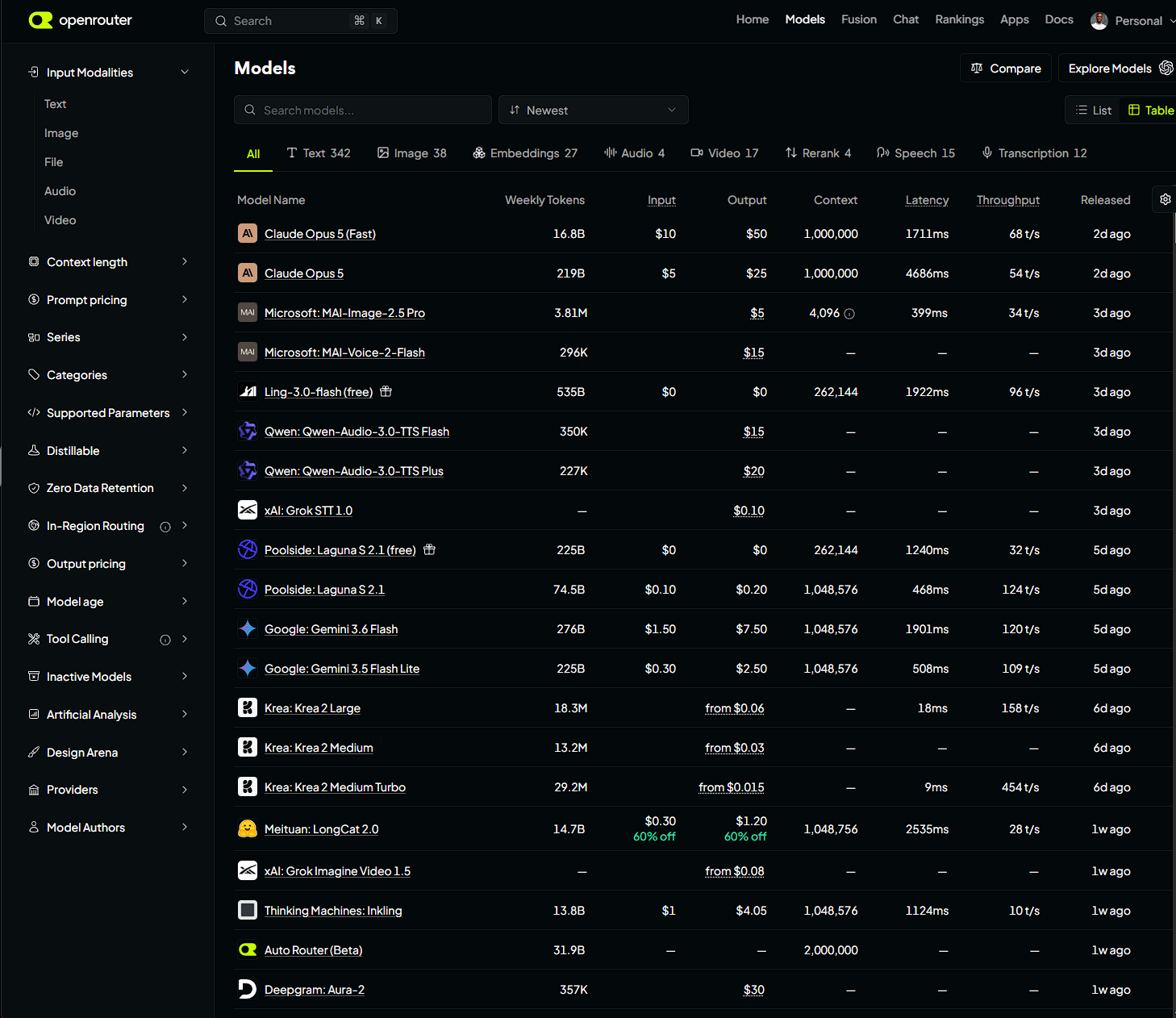
OpenRouter ではこれを直接確認できます。画像入力をサポートするモデルは、input_modalities の下に image というアーキテクチャが記載されています。これをリストしていないモデルに image_url パーツを送信すると、リクエストは失敗します。必ずカタログを確認してください。
コスト、コンテキストウィンドウ、各モデルの得意分野
これらのモデルはリクエストの形状は共通していますが、実際の挙動には違いがあります。価格、コンテキストウィンドウの長さ、レイテンシ、そして OCR やチャート、一般的なシーン理解をどの程度処理できるかはモデルごとに異なります。特定のモデルを採用する前に、実際に使用する画像で候補となるモデルをテストすることをお勧めします。
| モデル | 入力 $/M トークン | コンテキスト | 適した用途 |
|---|---|---|---|
anthropic/claude-opus-4.8 | $5.00 | 1M | 高密度ドキュメント、チャートや表の慎重な推論 |
anthropic/claude-sonnet-5 | $2.00 | 1M | 低コストでのバランスの取れたドキュメント理解 |
google/gemini-3-flash-preview | $0.50 | 1M | 高ボリュームのスクリーンショットと一般的な Q&A、低レイテンシ |
google/gemini-2.5-flash | $0.30 | 1M | 低コストのバッチ OCR およびキャプション生成 |
qwen/qwen3-vl-235b-a22b-instruct | ~$0.26 | 256K | オープンウェイトの OCR および多言語テキスト抽出 |
meta-llama/llama-4-scout | ~$0.10 | 1.3M | オープンウェイトの汎用ビジョン、セルフホストに最適 |
モデルの価格やコンテキストウィンドウは、モデルの更新に伴って変動します。本記事の表は参考例として扱い、信頼する前に必ず /models から最新の情報を取得してください。
ビジョン対応モデルをカタログからフィルタリングする
モデルリストをハードコードするのではなく、カタログに対してクエリを実行しましょう。
import requests

models = requests.get("https://openrouter.ai/api/v1/models").json()["data"]
vision = [m["id"] for m in models
          if "image" in m["architecture"]["input_modalities"]]
print(vision)  # models that accept image input
すべてのモデルでリクエスト本文は同一であるため、実行時にこのリストから任意のモデルを選択できます。特定のモデルを事前に固定するのではなく、価格やコンテキストウィンドウ、あるいはアプリケーションが必要とする条件に基づいてソートしてください。
複数の画像や長いドキュメントの送信
リクエスト内の複数画像
1 つのリクエストに送れる画像は 1 枚に限られません。必要に応じて image_url パーツをコンテンツ配列に追加してください。これで、前後比較や多ページのスキャン、あるいは複数のチャートを一度に問う質問といったケースに対応できます。
{
  "role": "user",
  "content": [
    { "type": "text", "text": "Which chart shows higher Q4 revenue?" },
    { "type": "image_url", "image_url": { "url": "https://example.com/2025.png" } },
    { "type": "image_url", "image_url": { "url": "https://example.com/2026.png" } }
  ]
}
実用上の制限:画像数、解像度、トークンコスト
一律の上限はありません。制限はプロバイダーおよびモデルごとに設定されています。リクエストあたり数枚程度の画像であれば通常問題ありませんが、数十枚を一度に送信する前に、該当モデルのエンドポイントページで具体的な制限を確認してください。画像 1 枚あたりにトークンが発生するため、コストは画像の数と解像度の両方に比例して増加します。特に、スキャンしたドキュメント全体を送信する場合などは注意が必要です。
送信前にダウンスケールまたは事前クロップすべきタイミング
領収書の写真をスマホで撮影すると、横幅が 4000 ピクセルになることも珍しくありません。しかし、下部の合計金額を読み取るために、そんな高解像度が必要だとは限りません。文字が読み取れる最小限のサイズに画像を縮小しましょう。すでに画像のどの部分が重要か分かっているなら、その部分だけを切り抜く(クロップ)のも有効です。この 2 つの手順はトークンコストを削減します。また、モデルが処理する必要のある視覚情報を排除できるため、精度向上にもつながる傾向があります。
画像のトークン化の仕組み
画像はパッチに分割され、埋め込みベクトルに変換された後、トークンとして処理されます。つまり、解像度が高いほどトークン数が増え、コストも高くなります。その仕組みを解説します。画像エンコーダー(通常は Vision Transformer)が画像を固定サイズのパッチのグリッドに分割します。各パッチは埋め込みベクトルに変換され、これは画像の一部を表すベクトルです。これらの埋め込みベクトルはトークンとして言語モデルに渡され、テキストトークンと混合されます。モデルが直接見るのは生ピクセルではなく、パッチの埋め込みベクトルです。
結果は単純明快です。ピクセル数が増えればパッチ数も増え、その分請求されるトークン数も増加します。画像をダウンスケール(解像度低下)することで、エンコーダーが生成するパッチ数を減らすことができます。特定の画像がいくつのトークンを消費するかはプロバイダによって異なりますので、正確な数値が必要な場合は各モデルのエンドポイントページを確認してください。
画像を含むドキュメントに対するマルチモーダル RAG
マルチモーダル RAG は、画像やチャート、スキャンしたページをテキストと一緒にインデックス化します。これにより、検索時に視覚的なコンテンツを返却し、ビジョンモデルに渡すことが可能になります。
このアプローチが解決するのは、「実際の文書のほとんどは純粋なテキストではない」という問題です。例えば、四半期報告書における重要な数値は、棒グラフの中にしか記載されていない場合があります。テキストのみの検索パイプラインでは OCR に依存せざるを得ませんが、OCR はチャートを誤って読み取ったり、場合によっては無視したりすることがあります。もしインデックス作成時にその視覚的コンテンツが捕捉されていなければ、後から検索で見つけることはできません。
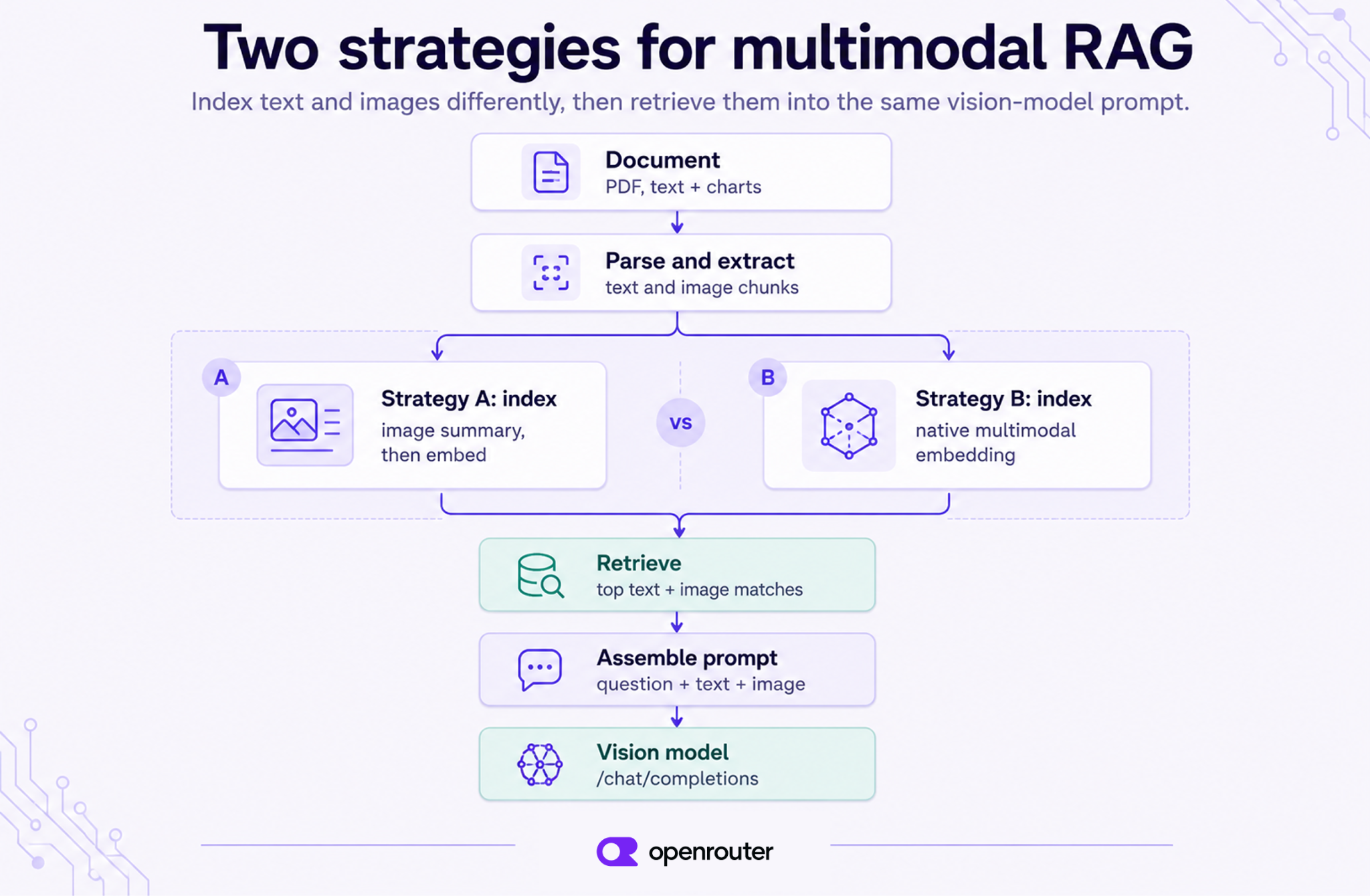
インデックス戦略 A:画像をテキストに要約して埋め込む
インデックス作成時には、すべてのチャート、図表、スキャンページを VLM(Vision Language Model)に通し、テキストによる要約を取得します。その要約を通常のテキスト埋め込みモデルでエンコードし、元の画像へのポインタも保持しておきます。
この手法の利点は、検索プロセスが完全にテキストベースに保たれるため、既存のベクトルストアをそのまま利用できる点です。一方で欠点として、検索の精度は要約の質に依存します。VLM がインデックス作成時に省略した情報は、後から検索で見つけることはできません。
インデックス戦略 B:ネイティブなマルチモーダル埋め込み
要約ステップをスキップし、画像とテキストを同じベクトル空間に配置するマルチモーダル埋め込みモデルを活用して、画像を直接埋め込むことで対応可能です。これにより、テキストクエリで画像を直接照合できるようになります。この方法では視覚的な詳細をより多く保持できますが、スタックにマルチモーダル埋め込みモデルと、その出力を格納できるベクトルストアが必要です。
既存のツールチェーンを活用したい場合や、ドキュメントが比較的単純な場合は戦略 A を採用します。一方、チャートや図表に含まれる詳細情報が要約によって失われる可能性がある場合は、戦略 B が適しています。
プロンプトの構築:取得したテキストと画像を VLM に供給する
両方のインデックス戦略において、回答ステップは同じです。最も関連性の高いテキストチャンクと画像チャンクを取得し、質問、取得したテキスト、そして取得した image_url パーツを含む単一のコンテンツ配列を構築します。
def answer(question, retrieved):
    content = [{"type": "text", "text": question}]
    for r in retrieved:
        if r["type"] == "text":
            content.append({"type": "text", "text": r["text"]})
        else:  # image chunk
            content.append({"type": "image_url",
                            "image_url": {"url": r["url"]}})
    return requests.post(
        "https://openrouter.ai/api/v1/chat/completions",
        headers={"Authorization": f"Bearer {os.environ['OPENROUTER_API_KEY']}"},
        json={"model": "anthropic/claude-opus-4.8", "messages":
              [{"role": "user", "content": content}]},
    ).json()
最小限の全体像を示すコードスケッチ
フルパイプラインは以下の通り動作します。まず、ソースドキュメントをテキストと画像のチャンクに分割し、各チャンクにはサマリーまたはマルチモーダル埋め込みでインデックス付けを行います。次に、入力されたクエリに対して上位マッチング結果を取得し、上記のようなマルチモーダルプロンプトを組み立てて、ビジョンモデルで回答を生成します。このうち、パース(解析)、インデックス作成、検索のステップのみが RAG に固有のプロセスです。最終的な回答生成のリクエストは、本ガイドの冒頭で紹介したものと同一です。もし出力を文章ではなく構造化データとして得たい場合は、ツール呼び出し機能を追加してください。
このアプローチが得意でないケース
- リアルタイム動画の理解。チャットリクエストにすべてのフレームをストリーミングで送ることは避けてください。画像配列を通じて数枚のサンプリングされたフレームを送ることは可能ですが、これはあくまで応急処置であり、本格的な動画パイプラインではありません。動画処理には、意図的なフレームサンプリング、フレーム数の厳格な制限、そしてこのエンドポイントでは対応できないレイテンシ管理が必要です。
- 低解像度でのピクセル単位の正確さや、高密度な小文字の OCR。汎用的なビジョン言語モデル(VLM)は、画像内の非常に小さな文字を見逃す可能性があります。すべての文字を正しく認識する必要がある場合は、事前にアップスケールまたはクロップを行うか、専用の OCR パイプラインを利用してください。
- 画像の生成や編集。本ガイドで取り扱っているのは画像入力のみです。つまり、ユーザーが提供した画像を読み取るモデルの利用方法について解説しています。新しい画像を作成したり既存の画像を編集したりする場合は、異なるリクエスト形式を使用します。詳細は 画像生成ドキュメント をご覧ください。
結論
LLM に画像を送信するには、テキスト部分と image_url 部分を組み合わせたコンテンツ配列を使用します。URL がホストされたファイルを指す場合でも、base64 でエンコードされたバイト列を含む場合でも、リクエストの構造は同じです。
model フィールドを変更するだけで、画像入力に対応するすべてのモデルで同じボディが動作します。マルチモーダル RAG パイプラインでは、回答生成時に適切な画像を抽出した直後に、このリクエストが実行されます。
以下の 3 つのポイントを押さえておきましょう。
- 1 つのリクエストボディで、あらゆるビジョンモデルに対応できます。 モデルを切り替えてもコンテンツ配列の構成は変わりません。変更するのは文字列 1 つだけです。
- 画像の保存場所に応じて、URL か base64 を使い分けます。 公開済みで既にホストされている画像には URL を、ローカルや非公開の画像には base64 を使用します。いずれの場合も、トークンコストを抑えるために送信前に解像度を下げておくことをお勧めします。
RAG(Retrieval-Augmented Generation)では、同じ呼び出しの前に検索機能を追加します。チャートやスキャンをテキストの隣にインデックス登録し、必要なものだけを検索して、冒頭で紹介したリクエスト形式で選択した画像をモデルに送信します。
カタログからビジョン対応モデル vision-capable models を閲覧し、統合コードを変更せずにモデルを切り替えることができます。
よくある質問
API に画像を送信できますか?
はい。テキストメッセージのコンテンツ配列に image_url または base64 データ URL の部分を追加すれば、ビジョン対応モデルならどのモデルでも読み取ることができます。リクエストの形式は、最終的に処理するプロバイダーによって変わることはありません。変更されるのは model フィールドだけです。
画像を使った RAG は可能ですか?
はい、テキストの隣にチャートや表、スキャンしたページを配置できます。インデックス作成時に画像を要約してテキスト化するか、マルチモーダル埋め込みモデルで直接埋め込むことで対応可能です。クエリ実行時には、関連するテキストチャンクと画像チャンクを取得し、それらを1 つのリクエスト内でビジョンモデルに同時に送信します。
マルチモーダル LLM は画像をどのように処理するのか?
画像エンコーダーが画像を固定サイズのパッチに分割し、各パッチを埋め込みベクトルに変換します。その後、これらの埋め込みベクトルはトークンとして言語モデルに渡され、テキストトークンと混合されます。モデルはこの埋め込みベクトルに対して推論を行い、生ピクセルデータを直接処理するわけではありません。
マルチモーダル LLM は画像をどのようにトークン化するのか?
パイプラインは「パッチ→埋め込み→トークン」という流れで動作します。解像度が高い画像ほど多くのパッチを生み出し、結果としてトークン数が増え、コストも上昇します。画像を送信する前にダウンスケール(リサイズ)することは、このコストを直接制御するための有効な手段です。
base64 と URL:どちらを使うべきか?
画像がすでに公開されており、どこかにホストされている場合は、リクエストサイズを抑えるために URL を使用してください。一方、ローカルにある場合や非公開の場合、あるいはプロバイダーがホスト先から確実に取得できない場合は、base64 でエンコードして送信します。
1 つのリクエストで何枚の画像を送れるのか?
一律に決まった数値はありません。これはプロバイダーとモデルによって異なります。通常は 1 リクエストあたり数枚程度であれば安全ですが、大量のバッチを送信する前には、各モデルの専用エンドポイントページで確認してください。画像を追加するごとにトークン数とコストが増加するためです。
すべてのモデルが画像入力をサポートしているのか?
画像を送信できるのは、入力モダリティ(input_modalities)に image が明記されているモデルだけです。どのモデルが対応しているかは、特定のモデルがサポートしていると勝手に推測するのではなく、カタログを照会して確認してください。
画像はトークンとしていくらかかるのか? (原文の技術表記: image_url)
解像度が高くなるほど、ピクセル数が増え、パッチ数も増加します。その結果、トークン数も増えることになります。ただし、各プロバイダーがどのようにトークンをカウントするかは異なるため、スケールアップ前に正確なコスト見積もりが必要な場合は、必ずモデルのエンドポイントページを確認してください。
画像入力とツール呼び出しや構造化出力を組み合わせることはできますか?
はい、ビジョンリクエストにツール呼び出しを追加すると、モデルは文章の代わりに型付き JSON を返します。具体的には { "total": 42.10 } のような形式です。これは、領収書やフォーム、スキャンされた文書から構造化データを抽出する際の一般的なパターンとなっています。
原文を表示
If you want a vision-capable Large Language Model (LLM) to read a screenshot, inspect a chart, or answer questions about a photo, you need to build the request body correctly. This guide covers image input only, meaning a model reading a picture you give it, not generating or editing one.
The pattern is simple. Send a chat message whose content array includes a text part and an image_url part to our image understanding endpoint. After that, the request shape stays the same, and you change only the model field to use any vision-capable model we support.
One model handles Optical Character Recognition (OCR) better, another reads UI screenshots more reliably, another reasons over charts more carefully. Because the input shape doesn’t change, you can test those differences without changing your integration.
This guide covers sending images to multimodal models, choosing between public URLs and base64 uploads, building multimodal RAG pipelines, and the practical limits that matter once you’re in production.
Tl;dr
We support multimodal image understanding through the Chat Completions API.
- Endpoint: POST /api/v1/chat/completions
- Body: a messages array where the user message’s content is a list of parts, one {"type": "text"} and one {"type": "image_url"}.
- Model: any slug with image input (e.g. anthropic/claude-opus-4.8, google/gemini-3-flash-preview). Swap it freely, since the request body is identical.
The basic request: attach an image to a chat call
The request is one user message with two parts in its content array, a text part and an image_url part. The rest of this guide builds on this request.
The message content array
Text-only chat sends content as a plain string. When you add an image, content becomes an array of typed objects instead:
{
  "role": "user",
  "content": [
    { "type": "text", "text": "What's in this image?" },
    { "type": "image_url", "image_url": { "url": "https://example.com/receipt.jpg" } }
  ]
}
Order matters here, so put the text part first. That’s how we parse the array. If your use case genuinely needs the image referenced before any text, move that framing into the system prompt instead of trying to reorder the content array.
base64 data URL vs. hosted image URL: when to use which
The image_url.url field accepts two shapes: a plain public HTTP(S) link, or a base64 data URL formatted as data:image/jpeg;base64,<encoded-bytes>. Which one to use depends on where the file already lives.
If the image is already hosted somewhere public, a CDN, an S3 bucket with a signed link, or your own server, pass the URL. The request stays small, and the provider fetches the bytes on its own.
If the image is local, or it shouldn’t have a public URL at all, such as a user’s uploaded ID or an internal document, encode it as base64 and put it in the request. The request gets larger and the upload takes longer, but the file only leaves your systems through the API call itself.
Base64 has a second advantage. Hosted URLs can fail because of access controls, regional blocks, or expired signed URLs. Those failures can’t happen when the bytes are already in the request. Either format supports PNG, JPEG, WebP, and GIF.
A runnable example in cURL, Python, and TypeScript
Same request, three languages. The only line that changes between models is MODEL.
cURL (hosted URL)
curl https://openrouter.ai/api/v1/chat/completions \
  -H "Authorization: Bearer $OPENROUTER_API_KEY" \
  -H "Content-Type: application/json" \
  -d '{
    "model": "anthropic/claude-opus-4.8",
    "messages": [
      { "role": "user", "content": [
        { "type": "text", "text": "What total is on this receipt?" },
        { "type": "image_url", "image_url": { "url": "https://example.com/receipt.jpg" } }
      ]}
    ]
  }'
Python (local file → base64)
import base64, os, requests

def to_data_url(path: str, mime: str = "image/jpeg") -> str:
    with open(path, "rb") as f:
        b64 = base64.b64encode(f.read()).decode("utf-8")
    return f"data:{mime};base64,{b64}"

MODEL = "anthropic/claude-opus-4.8"  # swap this one string for any vision model

resp = requests.post(
    "https://openrouter.ai/api/v1/chat/completions",
    headers={"Authorization": f"Bearer {os.environ['OPENROUTER_API_KEY']}"},
    json={
        "model": MODEL,
        "messages": [{
            "role": "user",
            "content": [
                {"type": "text", "text": "What total is on this receipt?"},
                {"type": "image_url", "image_url": {"url": to_data_url("receipt.jpg")}},
            ],
        }],
    },
)
print(resp.json()["choices"][0]["message"]["content"])
TypeScript (local file → base64)
import { readFile } from "node:fs/promises";

const MODEL = "anthropic/claude-opus-4.8"; // change only this to swap models
const bytes = await readFile("receipt.jpg");
const dataUrl = `data:image/jpeg;base64,${bytes.toString("base64")}`;

const res = await fetch("https://openrouter.ai/api/v1/chat/completions", {
  method: "POST",
  headers: {
    Authorization: `Bearer ${process.env.OPENROUTER_API_KEY}`,
    "Content-Type": "application/json",
  },
  body: JSON.stringify({
    model: MODEL,
    messages: [{
      role: "user",
      content: [
        { type: "text", text: "What total is on this receipt?" },
        { type: "image_url", image_url: { url: dataUrl } },
      ],
    }],
  }),
});
const data = await res.json();
console.log(data.choices[0].message.content);
Choosing a vision model
Every vision model on OpenRouter takes the same request shape. To switch models, change the model field and leave everything else the same. This lets you compare models without changing your integration.
What makes a model vision-capable
Not every model on the catalog can read images. A model qualifies as a vision language model (VLM) when it pairs a text model with an image encoder, letting it take in pixels alongside tokens. On OpenRouter, you can check this directly: a model’s architecture lists image under input_modalities if it supports image input. Send an image_url part to a model that doesn’t list it, and the request will fail. Check the catalog first.
Cost, context window, and what each model is good at
The request shape is the same across these models, but the models behave differently. Price, context window, latency, and how well a model handles OCR, charts, or general scene understanding all vary. Test candidate models against your actual images before you commit to one.
| Model | Input $/M tokens | Context | Good for |
|---|---|---|---|
anthropic/claude-opus-4.8 | $5.00 | 1M | Dense documents, careful reasoning over charts/tables |
anthropic/claude-sonnet-5 | $2.00 | 1M | Balanced document understanding at lower cost |
google/gemini-3-flash-preview | $0.50 | 1M | High-volume screenshots and general Q&A, low latency |
google/gemini-2.5-flash | $0.30 | 1M | Cheap batch OCR and captioning |
qwen/qwen3-vl-235b-a22b-instruct | ~$0.26 | 256K | Open-weight OCR and multilingual text extraction |
meta-llama/llama-4-scout | ~$0.10 | 1.3M | Open-weight general vision, self-host-friendly |
*Prices and context windows shift as models change. Treat this table as illustrative and pull live figures from /models before you rely on them.*
Filtering the catalog to vision-capable models
Query the catalog instead of hard-coding a model list.
import requests

models = requests.get("https://openrouter.ai/api/v1/models").json()["data"]
vision = [m["id"] for m in models
          if "image" in m["architecture"]["input_modalities"]]
print(vision)  # models that accept image input
Because the request body is identical across all of them, you can pick any model from this list at request time. Sort it by price, context window, or whatever your app cares about, instead of hard-coding one model up front.
Sending multiple images and long documents
Multiple images in one request
You aren’t limited to one image per request. Add as many image_url parts to the content array as you need. This is how you handle before-and-after comparisons, multi-page scans, or a question that covers several charts at once:
{
  "role": "user",
  "content": [
    { "type": "text", "text": "Which chart shows higher Q4 revenue?" },
    { "type": "image_url", "image_url": { "url": "https://example.com/2025.png" } },
    { "type": "image_url", "image_url": { "url": "https://example.com/2026.png" } }
  ]
}
Practical limits: image count, resolution, and token cost
There’s no universal cap. Limits are set per provider and per model. A few images per request is usually fine, but check the specific model’s endpoint page before you send dozens at once. Every image adds tokens, so cost grows with both image count and resolution, especially when you send full scanned documents.
When to downscale or pre-crop before sending
A phone photo of a receipt is usually 4000 pixels wide. No model needs that much resolution to read the total at the bottom. Shrink the image to the smallest size where the text is still legible. If you already know which part of the image matters, crop to that region. Both steps reduce token cost. Cropping also tends to improve accuracy, because it removes visual content the model would otherwise have to process.
How image tokenization works
Images are split into patches, converted to embeddings, then processed as tokens, so higher resolution means more tokens and higher cost. Here is how that works. An image encoder, typically a Vision Transformer, cuts the image into a grid of fixed-size patches. Each patch is converted into an embedding, a vector that represents that slice of the image. Those embeddings are passed to the language model as tokens, mixed in with your text tokens. The model never sees raw pixels. It sees patch embeddings.
The consequence is simple. More pixels means more patches, and more patches means more tokens on your bill. Downscaling an image reduces the number of patches the encoder produces. Exactly how many tokens a given image costs varies by provider, so check the specific model’s endpoint page if you need precise numbers.
Multimodal RAG: retrieving over documents that contain images
Multimodal RAG indexes images, charts, and scanned pages alongside text, so retrieval can return visual content and pass it to a vision model at answer time. It solves this problem: most real documents aren’t pure text. A quarterly report’s key number might appear only inside a bar chart. A text-only retrieval pipeline relies on OCR, which often reads the chart incorrectly or skips it. If your index never captured that visual content, retrieval can’t find it later.
Indexing strategy A: summarize images to text, then embed
At index time, send every chart, figure, or scanned page through a VLM and ask for a text summary. Embed that summary with your normal text embedding model, and keep a pointer back to the original image. The advantage is that retrieval stays entirely text-based, so it drops into whatever vector store you already run. The trade-off is that retrieval quality depends on the summary. Anything the VLM leaves out at index time can’t be found later.
Indexing strategy B: native multimodal embeddings
Skip the summary step and embed the image directly, using a multimodal embedding model that puts images and text in the same vector space. A text query can then match an image directly. You keep more visual detail this way, but you need a multimodal embedding model in your stack and a vector store that can hold its output. Use strategy A when you want to reuse existing tooling and the documents are relatively simple. Use strategy B when the charts and figures carry detail a summary would likely lose.
Assembling the prompt: feed retrieved text and images into the VLM
The answer step is the same for both indexing strategies. Take your best-matching text and image chunks, then build a single content array with the question, the retrieved text, and the retrieved image_url parts:
def answer(question, retrieved):
    content = [{"type": "text", "text": question}]
    for r in retrieved:
        if r["type"] == "text":
            content.append({"type": "text", "text": r["text"]})
        else:  # image chunk
            content.append({"type": "image_url",
                            "image_url": {"url": r["url"]}})
    return requests.post(
        "https://openrouter.ai/api/v1/chat/completions",
        headers={"Authorization": f"Bearer {os.environ['OPENROUTER_API_KEY']}"},
        json={"model": "anthropic/claude-opus-4.8", "messages":
              [{"role": "user", "content": content}]},
    ).json()
A minimal end-to-end code sketch
The full pipeline works like this: parse the source document into text and image chunks, index each chunk with a summary or a multimodal embedding, retrieve the top matches for an incoming query, assemble the multimodal prompt shown above, and answer with a vision model. Only the parsing, indexing, and retrieval steps are specific to RAG. The final answer call is the same request shown at the top of this guide. If you need the output as structured data rather than prose, add tool calling.
What this approach is not best for
- Real-time video understanding. Don’t stream every frame into a chat request. You can send a few sampled frames through an image array, but that’s a workaround, not a video pipeline. Real video work needs deliberate frame sampling, hard limits on frame count, and latency handling this endpoint isn’t built for.
- Pixel-precise or dense small-text OCR at low resolution. A general-purpose VLM can miss characters that are very small in the source image. If every character has to be correct, upscale or crop first, or use a dedicated OCR pipeline instead.
- Generating or editing images. This guide covers image input only, meaning the model reading a picture you give it. Creating a new image or modifying an existing one uses a different request shape. See our image generation docs for that.
まとめ
To send an image to an LLM, use a content array with a text part and an image_url part. The request shape is the same whether the URL points to a hosted file or carries base64-encoded bytes. Change the model field and the same body works with every model that accepts image input. A multimodal RAG pipeline makes this same request at answer time, after retrieval has picked the right image to send.
Three things to remember:
- One request body works for every vision model. Nothing about the content array changes when you switch models. You only change one string.
- Choose URL or base64 based on where the image lives. For public, already-hosted images, use a URL. For local or private images, use base64. Either way, downscale before sending to keep token costs down.
- RAG adds retrieval in front of the same call. Index your charts and scans next to your text, retrieve the right ones, and send the chosen image to the model using the request shown at the start.
Browse vision-capable models in the catalog and swap between them without touching your integration.
Frequently asked questions
Can I send images to the API?
Yes. Add an image_url or base64 data URL part to the message content array alongside your text, and any vision-capable model can read it. The shape of the request doesn’t change based on which provider ends up serving it. Only the model field does.
Can you do RAG with images?
Yes. Index charts, tables, and scanned pages next to your text, either by summarizing images into text at index time or by embedding them directly with a multimodal embedding model. At query time, retrieve the relevant text and image chunks and send them to a vision model together in one request.
How do multimodal LLMs process images?
An image encoder breaks the image into fixed-size patches, turns each patch into an embedding, and passes those embeddings to the language model as tokens, mixed in with your text tokens. The model reasons over those embeddings, never the raw pixels.
How do multimodal LLMs tokenize images?
The pipeline runs patches to embeddings to tokens. A higher-resolution image produces more patches, which means more tokens and a higher cost. Downscaling before you send an image is the direct way to control that cost.
base64 or URL: which should I use?
If the image is already public and hosted somewhere, use the URL, which keeps the request small. If it’s local, private, or a provider can’t reliably fetch it from wherever it’s hosted, encode it as base64 instead.
How many images can I send in one request?
There’s no single universal number, since it depends on the provider and the model. A few images per request is generally safe, but check the model’s specific endpoint page before sending a large batch, since each image adds to both token count and cost.
Do all models support image input?
No. Only models that list image under input_modalities will accept an image_url part. Query the catalog to find out which models qualify rather than assuming any given model supports it.
How much do images cost in tokens?
It scales with resolution: more pixels produce more patches, and more patches means more tokens. Exactly how a provider counts those tokens varies, so check the model’s endpoint page if you need a precise cost estimate before scaling up.
Can I combine image input with tool calling or structured outputs?
Yes. Add tool calling to a vision request and the model returns typed JSON, like { "total": 42.10 }, instead of a sentence. This is the common pattern for extracting structured fields from receipts, forms, or scanned documents.
関連記事
今日のまとめ
AIデイリーブリーフで今日の重要ニュースをまとめ読み