OpenRouter、モデルを跨ぐツール呼び出しの統一APIを提供
本文の状態
日本語全文を表示中
詳細モードで約20分の本文を読めます。
同じ出来事の情報源
この情報源を基点に整理
OpenRouter Blog
OpenRouter は、ツール呼び出しのロジックを一度記述し、モデル文字列を変更するだけで Claude や GPT など複数のプロバイダー間で切り替え可能にする API を提供すると発表した。
Continue in AI NEW LAB
このニュースを、実務の判断につなげる
AI NEW LABで、試したことや先に確認したい条件を共有できます。まずはログインなしで読めます。
AI NEW LABで論点を見るAI深層分析を開く2026年8月13日 06:11
AI深層分析
キーポイント
統一されたツール呼び出しインターフェースの実現
OpenRouter は OpenAI 互換の JSON スキーマを採用することで、モデルを切り替えてもコードの書き換えが不要な環境を提供する。
標準化された処理ループの提示
ツールの定義、リクエスト送信、tool_calls の解析、関数実行、結果の返却という一連のプロセスを cURL、Python、JavaScript/TypeScript で示している。
複数モデルでの実証と注意点
Claude、GPT、オープンウェイトモデルの 3 つで同一コードが動作する例を示すが、機能サポートはモデル依存であるため事前確認が必要だと指摘している。
モデルとツールの実行分離
AI モデルはツールを実行するのではなく、構造化されたリクエスト(例:get_weather)を返すのみである。実際の関数実行、キー管理、副作用の制御はすべてアプリケーション側で行う必要がある。
単一ツールの定義と環境設定
OpenRouter の API キーを設定し、Python 3.10 または Node 22 の SDK を使用して、Weather 関数を OpenAI 互換の JSON スキーマとして定義する必要がある。
重要な引用
With our API you don't rewrite anything. You write the loop once, change the model string, and keep the tool code unchanged.
Tool calling and function calling are two names for one mechanism.
tool_calls is an array of JSON-string arguments, so parse each argument string and never assume a single call.
The model never executes the tool itself. It returns a tool_calls request, and your application performs the execution.
編集コメントを表示
編集コメント
OpenRouter のアプローチは、マルチモデル環境における開発効率化の現実的な解決策を示している。ツール呼び出しの標準化が進む中で、この統一インターフェースは実務現場での採用を加速させる要因となるだろう。
Source Article
元記事を日本語で読む
本文に関係しない購読案内、埋め込み通知、サイト内プロモーションは除いています。
ツール呼び出し(関数呼び出しとも呼ばれます)を使えば、モデルが構造化された JSON 形式で関数の実行をリクエストできます。コード側でその関数を実行し結果を返すと、モデルはそれを使って回答を完成させます。
主要なプロバイダーのほとんどがこの機能に対応していますが、チュートリアルは特定の 1 つのプロバイダーに特化していることが多く、OpenAI のガイドに合わせて書かれたコードを Claude など別のプラットフォームに移す際にも書き換えが必要になります。しかし、当社の API ではそのような手間はありません。ループは一度だけ記述し、モデル名を指定する文字列を変更するだけで、ツール側のコードは一切変更する必要がありません。
このガイドでは、ツールの定義からリクエスト送信、tool_calls 応答の読み取り、関数の実行と結果の返却、そして最終回答の取得に至るまでの一連の流れを解説します。その後、モデル名を指定する文字列を1つ書き換えるだけで、同じコードを3つの異なるプロバイダーで動作させることができます。
当社のツール呼び出しドキュメントでは、すべてのフィールドを網羅しています。本ガイドでは、プロセスの最初から最後までを一貫して解説します。
まとめ
- ツールは1つだけ。
get_weather(location, unit)を OpenAI 互換の JSON スキーマとして一度定義するだけです。 - ループも1つ。cURL、Python、JavaScript/TypeScript で示した通り、
toolsを送信し、tool_callsを読み取り、ローカルで実行して結果を返せば、最終的な回答が得られます。
3 つのモデルで共通テスト。同じループを Claude、GPT、そしてオープンウェイトモデルに対して実行します。変更するのは単にモデル名だけです。ツール呼び出しに対応するモデルであればどれでも動作しますが、サポート内容はモデルごとに異なります。切り替える前に必ず確認してください。
tool_calls は JSON 文字列でエンコードされた引数の配列です。各引数文字列をパースし、1 つの呼び出ししか存在しないとは決して想定しないでください。
ツール呼び出しとは?「関数呼び出し」と同じ仕組み
ツール呼び出しと関数呼び出しは、実は同じメカニズムを指す別名です。モデルに対して JSON スキーマで関数の仕様(名前や入力パラメータなど)を記述し、モデルがその関数を特定の引数で実行するようコードに依頼します。その後、あなたのコードが実際にその関数を実行して結果を返し、モデルはその結果を受け取って回答を完成させます。
OpenAI が「関数呼び出し」という古い名称を広めましたが、現在では多くの API で「ツール呼び出し」と呼ばれるようになりました。意味は同じです。tools フィールドを送信すると、モデルから tool_calls のレスポンスが返されます。Claude、GPT、Llama といった主要モデルでも OpenAI と互換性のあるスキーマを採用しているため、名称の違いによってコードを変更する必要はありません。
本ガイドでは API で使われているフィールド名に合わせて「ツール呼び出し」という用語を統一して使用しますが、古いドキュメントや SDK では依然として「関数呼び出し」という表現を見かけるでしょう。
このループは以下の 4 つのステップで構成されます:
- 会話履歴とツールの定義を送信する
- モデルが
tool_callsリクエストを返す(ツール名と JSON 形式の引数が含まれる) - あなたのコードがそのツールを実行し、結果を会話履歴に追加する
- 更新された会話履歴を再度送信する。モデルは結果を読み取り、最終的な回答を返す
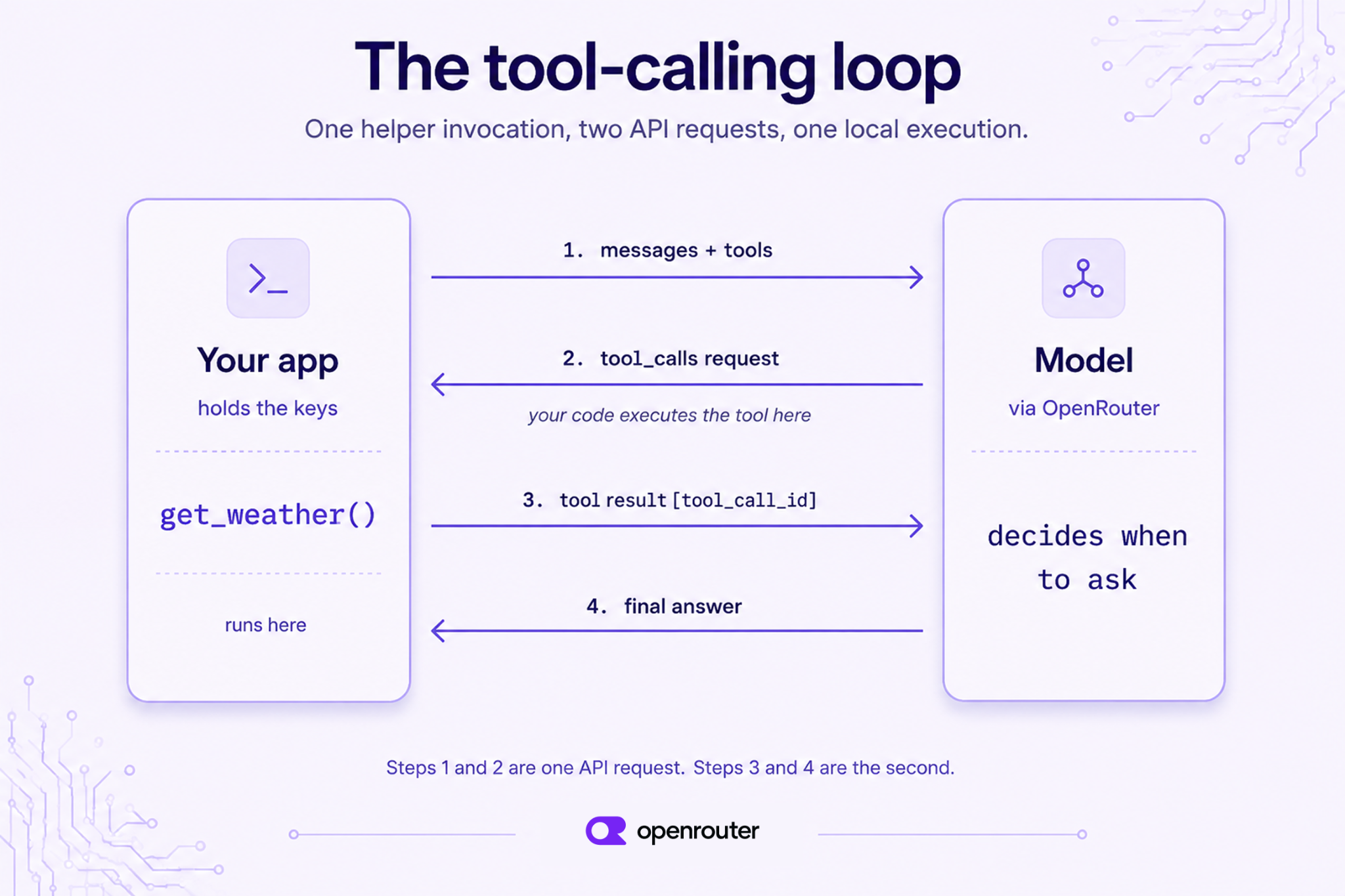
ツール呼び出しと、モデルがツールを実行することの違い
モデル自体がツールを実行することはありません。モデルは tool_calls のリクエストを返すだけで、実際の実行はあなたのアプリケーションが行います。
モデルが直接天気 API を叩いたり、データベースを検索したり、コードを実行するわけではありません。モデルが送るのは get_weather(location="Paris") といった構造化されたリクエストであり、そこで処理は一旦停止します。その後、あなたのアプリが関数を実行し、何を送り返すかを決定します。
鍵の管理や副作用、バリデーションの制御権は常にあなたが握ります。モデルが決めるのは「いつツールを呼び出すか」というタイミングだけです。
ツールを一つ定義する
作業を開始する前に、OpenRouter のアカウントと API キーが必要です。これらは ダッシュボード で作成できます。以下の例で環境変数からキーを読み込めるように、OPENROUTER_API_KEY としてエクスポートしておきましょう。
必要な SDK は Python 3.10 以降(pip install openai)か、Node 22 以降(npm install openai)のいずれかです。これ以外に追加で用意する必要はありません。
例示されている気象関数は実際の API を呼び出すのではなく固定値を返すため、OpenRouter のキーさえあれば動作します。
本ガイドではすべての例で get_weather(location, unit) という 1 つのツールを使用しています。これを OpenAI 互換の JSON スキーマとして定義してください。
tools = [
    {
        "type": "function",
        "function": {
            "name": "get_weather",
            "description": "Get the current weather for a location.",
            "parameters": {
                "type": "object",
                "properties": {
                    "location": {
                        "type": "string",
                        "description": "City name, e.g. 'Paris'",
                    },
                    "unit": {
                        "type": "string",
                        "enum": ["celsius", "fahrenheit"],
                    },
                },
                "required": ["location"],
            },
        },
    }
]
次に、モデルがリクエストする関数を実装します。実際のアプリでは気象 API を呼び出しますが、ここでは固定値を返すため、追加のキー取得は不要です。
import json

def get_weather(location, unit="celsius"):
    # Real code would call a weather API here.
    return {"location": location, "temperature": 18, "unit": unit, "sky": "clear"}
SDK の設定先をエンドポイントに指定しましょう。OpenAI API 形式に対応しているため、すでに OpenAI SDK を利用中の方でも、base_url とキーのみを変更すればすぐに使えます。
import os
from openai import OpenAI

client = OpenAI(
    base_url="https://openrouter.ai/api/v1",
    api_key=os.environ["OPENROUTER_API_KEY"],
)
SDK を接続する前に生のリクエストを確認したい場合は、cURL で最初の呼び出しを同じように実行できます。
curl https://openrouter.ai/api/v1/chat/completions \
-H "Authorization: Bearer $OPENROUTER_API_KEY" \
-H "Content-Type: application/json" \
-d '{
"model": "anthropic/claude-opus-4.8",
"messages": [{"role": "user", "content": "What'\''s the weather in Paris?"}],
"tools": [{
"type": "function",
"function": {
"name": "get_weather",
"description": "Get the current weather for a location.",
"parameters": {
"type": "object",
"properties": {
"location": {"type": "string", "description": "City name, e.g. Paris"},
"unit": {"type": "string", "enum": ["celsius", "fahrenheit"]}
},
"required": ["location"]
}
}
}]
}'
コード内のリクエスト/レスポンスループ
この関数がループ全体です。このガイドでは二度と変更する必要はありません。メッセージとツールを送信し、tool_calls を確認して各ツールを実行し、結果を末尾に追加し、モデルから最終回答を求めます。
def run_tool_loop(model, user_message):
messages = [{"role": "user", "content": user_message}]
# First call: the model may ask for a tool.
response = client.chat.completions.create(
model=model, messages=messages, tools=tools,
)
msg = response.choices[0].message
# No tool call? The model answered directly.
if not msg.tool_calls:
return msg.content
# Append the assistant's tool-call turn verbatim, then execute each call.
messages.append(msg)
for call in msg.tool_calls:
args = json.loads(call.function.arguments) # arguments arrive as a JSON string
result = get_weather(**args)
messages.append({
"role": "tool",
"tool_call_id": call.id,
"content": json.dumps(result),
})
# Second call: the model reads the tool result and writes the final answer.
final = client.chat.completions.create(
model=model, messages=messages, tools=tools,
)
return final.choices[0].message.content
Node 22 以上で openai パッケージを使用し、エンドポイントとして ours を指定した JavaScript/TypeScript 版のループは以下の通りです。
import OpenAI from "openai";
const client = new OpenAI({
baseURL: "https://openrouter.ai/api/v1",
apiKey: process.env.OPENROUTER_API_KEY,
});
// Same schema as the Python tools array above.
const tools = [
{
type: "function",
function: {
name: "get_weather",
description: "Get the current weather for a location.",
parameters: {
type: "object",
properties: {
location: { type: "string", description: "City name, e.g. 'Paris'" },
unit: { type: "string", enum: ["celsius", "fahrenheit"] },
},
required: ["location"],
},
},
},
];
function getWeather(location, unit = "celsius") {
return { location, temperature: 18, unit, sky: "clear" };
}
async function runToolLoop(model, userMessage) {
const messages = [{ role: "user", content: userMessage }];
const response = await client.chat.completions.create({ model, messages, tools });
const msg = response.choices[0].message;
if (!msg.tool_calls) return msg.content;
messages.push(msg);
for (const call of msg.tool_calls) {
const args = JSON.parse(call.function.arguments);
const result = getWeather(args.location, args.unit);
messages.push({
role: "tool",
tool_call_id: call.id,
content: JSON.stringify(result),
});
}
const final = await client.chat.completions.create({ model, messages, tools });
return final.choices[0].message.content;
}
本番環境に投入する前に、1 つだけ確認してください。arguments はモデルが生成した文字列であり、検証済みのペイロードではありません。モデルは時として無効な JSON を返したり、スキーマで定義されていないパラメータを勝手に作成したりします。関数に渡す前に、パース処理をエラーハンドリングで囲み、キーがスキーマと一致しているか必ずチェックしてください。
ここではコードを短くするため、その部分は省略しています。
以下の例では、異なるモデル文字列を指定して run_tool_loop または runToolLoop を呼び出します。
Claude で実行する
最初の試行ではモデル名だけで十分です。Anthropic のモデルを渡せば、4 つのステップがすべて 1 回の run_tool_loop 呼び出しで完了します。
answer = run_tool_loop(
    "anthropic/claude-opus-4.8",
    "What's the weather in Paris?",
)
print(answer)
# → "It's currently 18°C and clear in Paris."
run_tool_loop への1回の呼び出しで、4 つのステップが実行され、2 回の API リクエストが発生しました。最初のリクエストでは tool_calls のレスポンスが返され、コード側で get_weather を実行して結果を付加しています。2 回目のリクエストで最終的な回答が完成します。
モデルのスラッグはリリースごとに変わるため、依存させる前に model catalog で正確な文字列を確認してください。
レスポンスの読み方
関数名と引数は tool_calls アレイに含まれています。最初のレスポンスでは、choices[0].message は以下のようになります。
{
  "role": "assistant",
  "content": null,
  "tool_calls": [
    {
      "id": "call_abc123",
      "type": "function",
      "function": {
        "name": "get_weather",
        "arguments": "{\"location\": \"Paris\", \"unit\": \"celsius\"}"
      }
    }
  ]
}ここで重要なのは2点です。まず、arguments はオブジェクトではなく JSON 文字列としてエンコードされているため、json.loads または JSON.parse でパースする必要があります。
次に、tool_calls は配列であるため、1 回のレスポンスで複数の呼び出しを処理するコードが必要です。
GPT で実行してみましょう。
Claude の実行でループが機能することが確認できました。次の実行では、同じコードが別のプロバイダーでも動作します。変更点は 1 つの文字列だけです。
answer = run_tool_loop(
    "openai/gpt-4o",
    "What's the weather in Paris?",
)
print(answer)
# → "The weather in Paris is 18°C and clear right now."
Claude の例との違いは、anthropic/claude-opus-4.8 を openai/gpt-4o に置き換えただけです。ツールスキーマやループ、パース処理、結果メッセージはすべて同じです。これは両モデルで同じ tool_calls 形式を返すためです。この仕組みは、ツール対応モデルであればどれでも通用します。
ただし、モデルを切り替える前には必ずツールのサポート状況を確認してください。
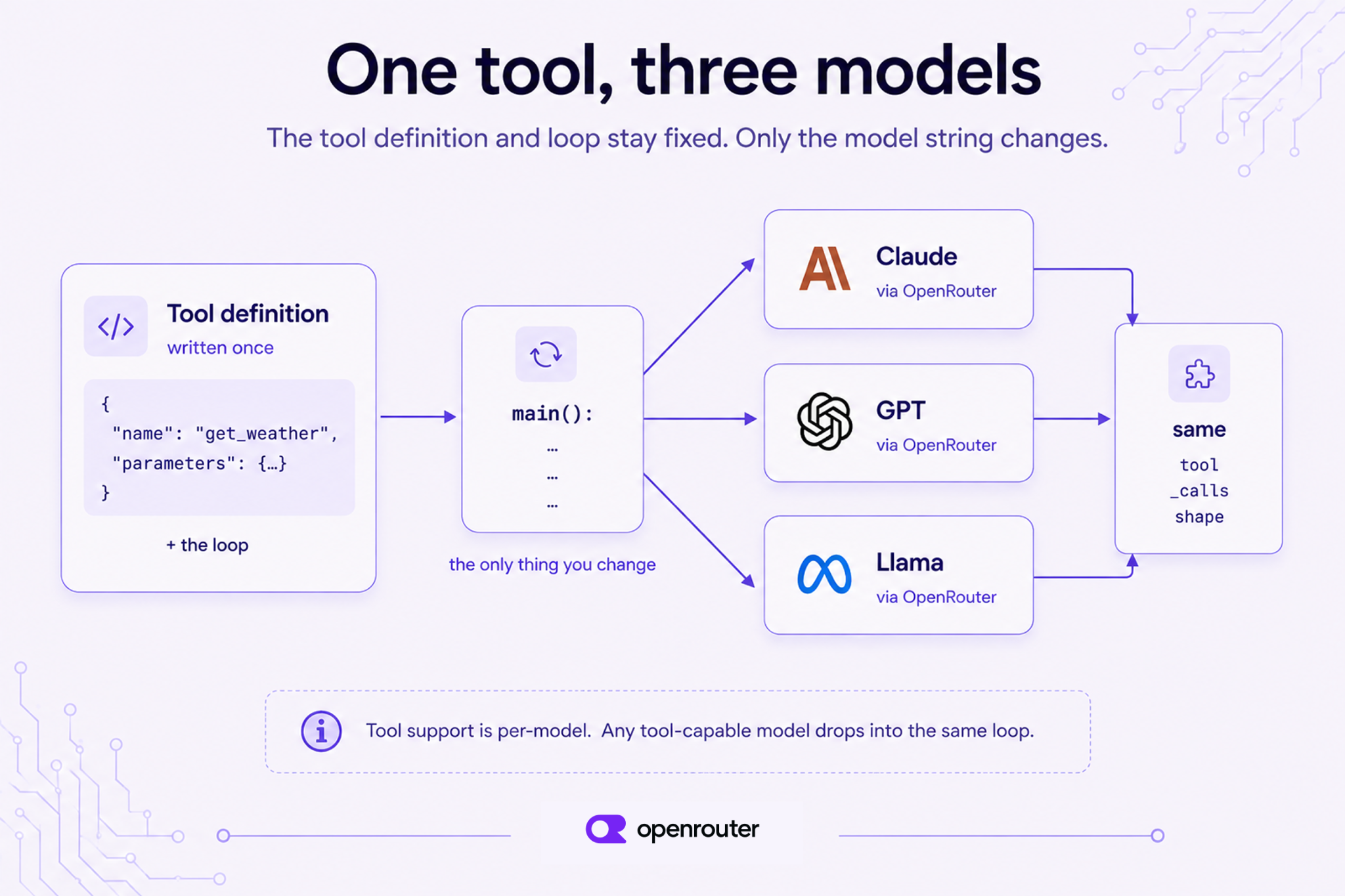
オープンソースモデルでも実行可能
プロプライエタリモデルは形式が共通していることが多いため、オープンウェイトモデルの方がより厳しいテストとなります。文字列をもう一度変更します。
answer = run_tool_loop(
    "meta-llama/llama-3.3-70b-instruct",
    "What's the weather in Paris?",
)
print(answer)
# → "Right now in Paris it's 18°C with clear skies."
同じコードベースで 3 つのプロバイダーを扱えるようになりました。オープンウェイトモデルも、Claude や GPT と同じ tool_calls 構造を返します。モデル名は設定ファイルに保存しておき、ルーティングやテスト、フォールバック時に切り替えるだけで、ツール側のコードを変更する必要はありません。
エッジケースと注意点
上記のループは一般的なケースに対応しています。しかし、本番環境では以下の 4 つの要因で動作が崩れる可能性があります:並列なツール呼び出し、ストリーミング処理、ツール機能を持たないモデル、そしてモデルにいつツールを呼ばせるかを制御する仕組みです。
並列なツール呼び出し
一部のモデルでは、1 つのレスポンス内で複数のツール呼び出しを返すことがあります。例えば、2 つの都市について質問された場合、"Paris" と "Tokyo" の両方に対する get_weather 関数が同時に返されることがあります。 (原文の技術表記: get_weather("Paris")、get_weather("Tokyo"))
このループが msg.tool_calls を反復処理する理由であり、[0] を直接読み取るわけではない。
各呼び出しでツール結果を 1 つずつ追加し、それぞれに固有の tool_call_id を付与してから次のリクエストを送信する必要があります。例示されたループはこの処理を実行しています。また、リクエスト内で parallel_tool_calls: false を設定することで、モデルが一度に 1 つのツール呼び出しのみを行うように制御することも可能です。
ストリーミングによるツール呼び出し
レスポンスをストリーミングする際、ツール呼び出しは「デルタ」と呼ばれる断片として届きます。モデルは引数文字列をチャンクに分割し、tool_calls 配列をインデックスごとに一つずつ構築していくことがあります。ストリームが終了する前にツールを実行してはいけません。各インデックスのデルタを集約し、完了信号を待ってから完全な引数文字列をパースし、その後に実行してください。
ツール機能をサポートしていないモデル
すべてのモデルがツールをサポートしているわけではありません。ツール対応のエンドポイントを持たないモデルに tools を送信すると、ツール使用に対応するエンドポイントがないことを示す 404 エラーが返されます。
フォールバックパスでは、非ツールのモデルは tools フィールドを無視し、tool_calls を一切含まない通常のテキストだけを返すことができます。この場合もエラーにはならないため、ループにモデルを追加する前にサポート状況を確認する必要があります。
ツール呼び出しに対応したモデル一覧は Tool-calling collection をご覧ください。または、カタログ の任意のモデルページを開き、supported_parameters に tools が含まれているか確認してください。
ツール呼び出しの有効化・無効化
tool_choice パラメータを使用すると、モデルがツールを呼び出すかどうかを制御できます。
tool_choice の値 | 動作 |
|---|---|
"auto" | モデルがツール呼び出しの要否を判断します。リクエストに tools が含まれている場合、これがデフォルトとなります。 |
{"type": "function", "function": {"name": "get_weather"}} | モデルは特定のツールを呼び出す必要があります。 |
"none" | このリクエストではツール呼び出しがブロックされます。 |
OpenAI 互換のスキーマでは、"required" を定義することで、モデルに対して少なくとも 1 つのツール呼び出しを実行するよう指示できます。ただし、より厳格な値への対応はモデルによって異なります。本番環境で利用する前に、必ず ツール呼び出しドキュメント で動作を確認し、対象とするモデルでテストを行ってください。
結論
1 つのツールを定義し、1 つのツール呼び出しループを作成しました。そして、単にモデル名という文字列を変更するだけで、Claude、GPT、オープンソースモデルのいずれにも同じコードを実行できます。ツール定義とループはモデルが変わっても変わらないため、プロバイダーの変更は書き直しではなく、設定ファイルの編集で済みます。
以下の 3 つを覚えておいてください:
ツール定義とループはモデルに依存しません。一度記述すれば、どのモデルでも共通の tools および tool_calls 形式が適用されるため、プロバイダーの変更は一行の編集で済みます。
tool_calls は JSON 文字列を要素とする配列です。この配列をループ処理して各引数文字列を解析してください。レスポンスに必ず一つだけの呼び出しが含まれるとは限りませんので、その前提でコードを書くのは避けてください。
モデルごとのツールサポートには差異があります。実装前に、対象のモデルがツール機能をサポートしているかを確認してください。
独自のツールを使用する場合は、ツール呼び出しドキュメント のフィールドリファレンスを起点とし、ツール対応モデル一覧 から任意のモデルを選択してください。
よくある質問
LLM におけるツール呼び出しとは?
ツール呼び出しとは、モデルがコードを実行して自身に代わって何かを行わせる機能です。最も一般的なのは関数の実行ですが、モデル自体が直接何らかの処理を行うわけではありません。
具体的には、モデルは「どのツールを」「どのような引数で」呼び出すかを指定した構造化された JSON リクエストを返します。その後、アプリケーション側がこのリクエストを実行し、その結果をモデルに返送します。これにより、モデルは回答を完成させることができます。
ツール呼び出しと関数呼び出しの違いは何ですか?
機能面での違いはありません。両者は同じ仕組みを指す異なる名称に過ぎません。「関数呼び出し」は OpenAI によって普及した古い用語で、「ツール呼び出し」が現在多くの API で採用されている名称です。
当社の API では、これらは tools フィールドと tool_calls フィールドという同一のリクエスト/レスポンス形状に対応しています。つまり、どちらかの名前で記述されたコードは、もう一方の仕組みでもそのまま動作します。
API を用いた関数呼び出しの実装方法
関数の説明を JSON スキーマとして記述し、メッセージと一緒に tools フィールドに含めて送信してください。レスポンスに tool_calls が含まれている場合は、引数文字列を解析して関数を実行します。その後、対応する tool_call_id を持つメッセージとして結果を追加し、最終回答のために会話を再度送信します。
ツール呼び出しはモデル間で同じように動作するのか?
はい、ツール対応モデルの場合です。OpenAI 互換のスキーマを1つ受け取り、Claude、GPT、オープンウェイトモデルすべてで tool_calls フォーマットを1つ返すため、ツール定義とループはどのモデルでも変更なく実行されます。唯一変わるのはモデル名だけです。ツールのサポート状況はモデルによって異なるため、各モデルごとに確認してください。
ツール呼び出しに対応するモデルは?
ツール呼び出しのサポートはモデルごとに異なります。汎用的なものではありません。ツール対応モデルの一覧については、ツール呼び出しコレクション をご覧ください。または カタログ の任意のモデルページを開き、supported_parameters に tools が含まれているか確認してください。
ツール対応のエンドポイントがない場合、404 エラーを返します(「エンドポイントがツール使用をサポートしていません」というメッセージです)。フォールバックパスでは、非ツール対応モデルがこのフィールドを無視し、プレーンテキストで応答することがあります。
オープンソースモデルでも関数呼び出しは可能か?
はい、Llama 3.3 70B Instruct などのツール対応オープンウェイトモデルも、プロプライエタリモデルと同じ tool_calls 構造を返すため、ループを変更せずにそのまま使用できます。ただし、オープンウェイトファミリーやファインチューンによってサポート状況が異なるため、利用前に各モデルのページで supported_parameters に tools が含まれているか確認してください。
パラレルツールコールとは?
並列ツール呼び出しとは、単一のモデルレスポンス内で複数のツールリクエストが返されることを指します。例えば、異なる都市に対して 2 つの get_weather コールを実行するケースなどが該当します。
実装では、コード側で tool_calls アレイを反復処理し、各呼び出しごとに結果メッセージを 1 つずつ追加する必要があります。この際、各メッセージには固有の tool_call_id を付与した上で、会話履歴として再度送信してください。
「ツール呼び出し」ドキュメント(tools および tool_calls フィールドの公式リファレンス)
ツール対応モデルを厳選したコレクション Tool calling models collection
- モデルカタログ:各モデルごとの
supported_parametersを含む完全リスト。
- OpenAI Python SDK:上記で引用した
tool_choiceのデフォルト動作とargumentsフィールドの型に関するソースコード。
原文を表示
Tool calling, also called function calling, lets a model request a function in structured JSON. Your code runs the function and returns the result, and the model uses it to finish its answer. Every major provider supports a version of this, but most tutorials cover one provider, so code written against OpenAI’s guide needs a rewrite when you move to Claude. With our API you don’t rewrite anything. You write the loop once, change the model string, and keep the tool code unchanged.
This guide covers the full loop: defining a tool, sending a request, reading the tool_calls response, running the function, returning its result, and getting the final answer. You’ll then run that same code against three providers by changing one string.
Our tool calling docs list every field. This guide shows the whole process from start to finish.
Tl;dr
- One tool, get_weather(location, unit), defined once as an OpenAI-compatible JSON schema.
- One loop, shown in cURL, Python, and JavaScript/TypeScript. Send tools, read tool_calls, execute locally, return the result, get the final answer.
- One test across three models. The same loop runs against Claude, GPT, and an open-weight model, with only the model string changing. Any tool-capable model works. Support varies by model, so check it before you switch.
- tool_calls is an array of JSON-string arguments, so parse each argument string and never assume a single call.
What is tool calling, and why “function calling” is the same thing
Tool calling and function calling are two names for one mechanism. You describe the function to the model with a JSON schema, a written spec of its name and inputs. The model can then ask your code to call it with specific arguments. Your code runs the function, returns the result, and the model uses that result to finish its answer.
OpenAI popularized the older name “function calling.” Most APIs now say “tool calling.” The two mean the same thing. You send the tools field, the model returns tool_calls, and we accept one OpenAI-compatible schema for Claude, GPT, and Llama, so the naming difference doesn’t change your code. This guide says “tool calling” throughout, since that’s what the API fields are named. You’ll still see “function calling” in older docs and SDKs.
The loop has four steps:
- Send the conversation and your tool definitions.
- The model returns a tool_calls request with a name and JSON arguments.
- Your code runs the tool and adds the result to the conversation.
- Send the conversation again. The model reads the result and returns its final answer.
Tool calling vs. the model “running” the tool
The model never executes the tool itself. It returns a tool_calls request, and your application performs the execution.
It doesn’t call your weather API, query your database, or run your code. It sends a structured request such as get_weather(location="Paris") and stops. Your app runs the function and decides what to return. You keep control over keys, side effects, and validation. The model only decides when to ask.
Define one tool
Before you begin, you need an OpenRouter account and an API key, which you can create in the dashboard. Export it as OPENROUTER_API_KEY so the examples below can read it from the environment.
You also need one SDK: Python 3.10 or later with pip install openai, or Node 22 or later with npm install openai. Nothing else is required. The weather function returns a fixed value rather than calling a real API, so the OpenRouter key is the only key you need.
The guide uses one tool, get_weather(location, unit), in every example. Define it as an OpenAI-compatible JSON schema:
tools = [
    {
        "type": "function",
        "function": {
            "name": "get_weather",
            "description": "Get the current weather for a location.",
            "parameters": {
                "type": "object",
                "properties": {
                    "location": {
                        "type": "string",
                        "description": "City name, e.g. 'Paris'",
                    },
                    "unit": {
                        "type": "string",
                        "enum": ["celsius", "fahrenheit"],
                    },
                },
                "required": ["location"],
            },
        },
    }
]
Next, write the function the model can request. A real app would call a weather API. This one returns a fixed value so you don’t need a second key to follow along:
import json

def get_weather(location, unit="celsius"):
    # Real code would call a weather API here.
    return {"location": location, "temperature": 18, "unit": unit, "sky": "clear"}
Now point the SDK at our endpoint. We accept the OpenAI API format, so if you already use the OpenAI SDK, you can change only the base_url and the key:
import os
from openai import OpenAI

client = OpenAI(
    base_url="https://openrouter.ai/api/v1",
    api_key=os.environ["OPENROUTER_API_KEY"],
)
If you want to see the raw request before wiring up an SDK, the same first call in cURL looks like this:
curl https://openrouter.ai/api/v1/chat/completions \
  -H "Authorization: Bearer $OPENROUTER_API_KEY" \
  -H "Content-Type: application/json" \
  -d '{
    "model": "anthropic/claude-opus-4.8",
    "messages": [{"role": "user", "content": "What'\''s the weather in Paris?"}],
    "tools": [{
      "type": "function",
      "function": {
        "name": "get_weather",
        "description": "Get the current weather for a location.",
        "parameters": {
          "type": "object",
          "properties": {
            "location": {"type": "string", "description": "City name, e.g. Paris"},
            "unit": {"type": "string", "enum": ["celsius", "fahrenheit"]}
          },
          "required": ["location"]
        }
      }
    }]
  }'
The request/response loop in code
This function is the whole loop, and you won’t change it again in this guide. It sends the messages and tools, checks for tool_calls, runs each tool, appends the results, and asks the model for its final answer:
def run_tool_loop(model, user_message):
    messages = [{"role": "user", "content": user_message}]
    # First call: the model may ask for a tool.
    response = client.chat.completions.create(
        model=model, messages=messages, tools=tools,
    )
    msg = response.choices[0].message
    # No tool call? The model answered directly.
    if not msg.tool_calls:
        return msg.content
    # Append the assistant's tool-call turn verbatim, then execute each call.
    messages.append(msg)
    for call in msg.tool_calls:
        args = json.loads(call.function.arguments)  # arguments arrive as a JSON string
        result = get_weather(**args)
        messages.append({
            "role": "tool",
            "tool_call_id": call.id,
            "content": json.dumps(result),
        })
    # Second call: the model reads the tool result and writes the final answer.
    final = client.chat.completions.create(
        model=model, messages=messages, tools=tools,
    )
    return final.choices[0].message.content
Here’s the same loop in JavaScript/TypeScript for Node 22+, using the openai package pointed at our endpoint:
import OpenAI from "openai";

const client = new OpenAI({
  baseURL: "https://openrouter.ai/api/v1",
  apiKey: process.env.OPENROUTER_API_KEY,
});

// Same schema as the Python `tools` array above.
const tools = [
  {
    type: "function",
    function: {
      name: "get_weather",
      description: "Get the current weather for a location.",
      parameters: {
        type: "object",
        properties: {
          location: { type: "string", description: "City name, e.g. 'Paris'" },
          unit: { type: "string", enum: ["celsius", "fahrenheit"] },
        },
        required: ["location"],
      },
    },
  },
];

function getWeather(location, unit = "celsius") {
  return { location, temperature: 18, unit, sky: "clear" };
}

async function runToolLoop(model, userMessage) {
  const messages = [{ role: "user", content: userMessage }];
  const response = await client.chat.completions.create({ model, messages, tools });
  const msg = response.choices[0].message;
  if (!msg.tool_calls) return msg.content;

  messages.push(msg);
  for (const call of msg.tool_calls) {
    const args = JSON.parse(call.function.arguments);
    const result = getWeather(args.location, args.unit);
    messages.push({
      role: "tool",
      tool_call_id: call.id,
      content: JSON.stringify(result),
    });
  }

  const final = await client.chat.completions.create({ model, messages, tools });
  return final.choices[0].message.content;
}
Add one thing before this reaches production: arguments is a string the model generated, not a validated payload. Models sometimes return invalid JSON or invent parameters your schema never declared. Wrap the parse in error handling and check the keys against your schema before passing them to your function. The examples here skip that to keep the code short.
Everything below calls run_tool_loop or runToolLoop with a different model string.
Run it against Claude
The first run only needs a model name. Pass an Anthropic model and all four steps happen in one call to run_tool_loop:
answer = run_tool_loop(
    "anthropic/claude-opus-4.8",
    "What's the weather in Paris?",
)
print(answer)
# → "It's currently 18°C and clear in Paris."
That one call to run_tool_loop ran all four steps and made two API requests. The first request returned a tool_calls request. Your code ran get_weather and appended the result. The second request returned the finished answer.
Model slugs change between releases, so confirm the exact string on our model catalog before depending on it.
Reading the response
The function name and arguments are in the tool_calls array. In the first response, choices[0].message looks like this:
{
  "role": "assistant",
  "content": null,
  "tool_calls": [
    {
      "id": "call_abc123",
      "type": "function",
      "function": {
        "name": "get_weather",
        "arguments": "{\"location\": \"Paris\", \"unit\": \"celsius\"}"
      }
    }
  ]
}
Two details matter here. First, arguments is a JSON-encoded string, not an object, so parse it with json.loads or JSON.parse. Second, tool_calls is an array, so your code has to handle more than one call per response.
Run it against GPT
The Claude run showed the loop works. The next run shows the same code works on another provider. The only edit is one string:
answer = run_tool_loop(
    "openai/gpt-4o",
    "What's the weather in Paris?",
)
print(answer)
# → "The weather in Paris is 18°C and clear right now."
The only difference from the Claude example is anthropic/claude-opus-4.8 → openai/gpt-4o. The tool schema, the loop, the parsing, and the result message all stay the same, because we return the same tool_calls format for both. This holds for any tool-capable model. Check tool support before you switch.
Run it against an open-source model
Proprietary models often share a format, so an open-weight model is a stronger test. Change the string once more:
answer = run_tool_loop(
    "meta-llama/llama-3.3-70b-instruct",
    "What's the weather in Paris?",
)
print(answer)
# → "Right now in Paris it's 18°C with clear skies."
That’s three providers on one codebase with no rewrites. The open-weight model returns the same tool_calls structure as Claude and GPT. You can store the model name in configuration and change it in a router, a test, or a fallback without touching your tool code.
Edge cases and gotchas
The loop above covers the common case. Four things can break it in production: parallel tool calls, streaming, models without tool support, and controlling when the model calls a tool.
Parallel tool calls
Some models return multiple tool calls in a single response. A model asked about two cities may return get_weather("Paris") and get_weather("Tokyo") together. This is why the loop iterates msg.tool_calls rather than reading [0]. Your code has to append one tool result per call, each carrying its own tool_call_id, before sending the next request. The example loop already does this. You can also set parallel_tool_calls: false in the request to make the model request one tool call at a time.
Streaming tool calls
When you stream a response, tool calls arrive in pieces called deltas. The model may split the arguments string across chunks and build the tool_calls array one index at a time. Don’t run the tool before the stream ends. Collect the deltas by index, wait for the finish signal, parse the complete arguments string, and then execute.
Models that don’t support tools
Not every model supports tools. If you send tools to a model with no tool-capable endpoint, we return a 404 error stating that no endpoints support tool use. In fallback paths, a non-tool model can instead ignore the field and return plain text with no tool_calls at all. That failure produces no error, so check support before you add a model to a loop. Browse our tool-calling collection, or open any model’s page in the catalog and confirm that supported_parameters includes tools.
Forcing or disabling a tool call
Use tool_choice to control whether the model calls a tool at all:
tool_choice value | Behavior |
|---|---|
"auto" | The model decides whether to call a tool. This is the default whenever tools is present in the request. |
{"type": "function", "function": {"name": "get_weather"}} | The model must call that specific tool. |
"none" | Tool calls are blocked for this request. |
The OpenAI-compatible schema also defines "required", which asks the model to make at least one tool call. Support for the stricter values varies by model, so confirm behavior in our tool-calling docs and test against your target model before depending on it in production.
まとめ
You defined one tool, wrote one tool-calling loop, and ran the same code against Claude, GPT, and an open-source model by changing a single string. The tool definition and the loop don’t change when the model does, so changing providers is a configuration edit, not a rewrite.
Three things to remember:
- The tool definition and the loop work across models. Write them once. We give every tool-capable model the same tools and tool_calls format, so changing providers is a one-line edit.
- tool_calls is an array of JSON-string arguments. Loop over the array and parse each argument string. Never assume the response holds exactly one call.
- Tool support varies by model. Confirm a model supports tools before you ship against it.
To use your own tool, start from the field reference in our tool calling docs and pick any model from our tool calling collection.
Frequently asked questions
What is tool calling in LLMs?
Tool calling lets a model request that your code run something on its behalf, most commonly a function. The model returns a structured JSON request naming the tool and its arguments, your application executes it, and you send the result back so the model can finish its answer. The model never executes anything itself.
What is the difference between tool calling and function calling?
There’s no functional difference, since both names refer to the same mechanism. “Function calling” is the older term, popularized by OpenAI, while “tool calling” is what most APIs use now. In our API, they map to one request/response shape, the tools field and the tool_calls field, so code written for one works for the other.
How do you implement function calling with an API?
Describe your function as a JSON schema and send it in the tools field alongside your messages. If the response contains tool_calls, parse the arguments string and run the function. Then append the result as a message carrying the matching tool_call_id and send the conversation again for the final answer.
Does tool calling work the same across different models?
Yes, for tool-capable models. We accept one OpenAI-compatible schema and return one tool_calls format for Claude, GPT, and open-weight models, so the same tool definition and loop run unchanged across them. Only the model string changes. Tool support varies by model, so confirm it per model.
Which models support tool calling?
Tool support is per-model rather than universal. Browse our tool calling collection for a curated list of tool-capable models, or open any model page in our catalog and check whether supported_parameters includes tools. If a model has no tool-capable endpoint, we return a 404 error saying no endpoints support tool use, and in fallback paths a non-tool model may ignore the field and reply in plain text.
Can open-source models do function calling?
Yes. Tool-capable open-weight models such as Llama 3.3 70B Instruct return the same tool_calls structure as proprietary models, so the same loop works without modification. Check the model’s page for tools in supported_parameters first, since support varies across open-weight families and fine-tunes.
What are parallel tool calls?
Parallel tool calls are multiple tool requests returned in a single model response, for example two get_weather calls for different cities. Your code must iterate the tool_calls array and append one result message per call, each carrying its own tool_call_id, before sending the conversation back.
References
- Tool calling docs, our canonical reference for the tools and tool_calls fields.
- Tool calling models collection, curated tool-capable models.
- Model catalog, full listing with supported_parameters per model.
- OpenAI Python SDK, source for the tool_choice default behavior and the arguments field type cited above.
関連記事
今日のまとめ
AIデイリーブリーフで今日の重要ニュースをまとめ読み