フラグシップの紹介:AI時代に合わせて構築された機能フラグ
本文の状態
日本語全文を表示中
詳細モードで約4分の本文を読めます。
同じ出来事の情報源
この情報源を基点に整理
Cloudflare Blog
GitHubがAI生成コードの本番環境導入の加速に対応するため、機能フラグ管理ツール「Flagship」を発表した。同ツールはAIエージェントによる自律的なコード展開を安全に管理することを目的としている。
Continue in AI NEW LAB
このニュースを、実務の判断につなげる
AI NEW LABで、試したことや先に確認したい条件を共有できます。まずはログインなしで読めます。
AI NEW LABで論点を見るSource Article
元記事を日本語で読む
本文に関係しない購読案内、埋め込み通知、サイト内プロモーションは除いています。
フラグ値はブール値、文字列、数値、または完全なJSONオブジェクトにすることができます。これは、設定ブロック、UIテーマ定義、または別々のコードパスを維持することなくユーザーを異なるAPIバージョンにルーティングする場合に便利です。
ターゲティングルール
各フラグは複数のルールを持つことができ、優先順位順に評価されます。最初に一致したルールが適用されます。
ルールは以下で構成されます:
- 特定のコンテキストにルールが適用されるかどうかを決定する条件
- ルールが一致したときに提供するフラグのバリエーション
- パーセンテージベースの配信のためのオプションのロールアウト設定
- 複数のルールが存在する場合の評価順序を決定する優先度(数字が小さいほど優先度が高い)
ネストされた論理条件
条件はAND/ORロジックを使用して構成でき、最大5レベルまでネストできます。単一のルールで以下のような表現が可能です:
(plan == "enterprise" AND region == "us") OR (user.email.endsWith("@cloudflare.com")) -> serve ("premium")
ルールの最上位レベルでは、複数の条件は暗黙のANDで結合され、ルールが一致するにはすべての条件を満たす必要があります。各条件内では、より複雑なロジックのためにAND/ORグループをネストできます。
パーセンテージによるフラグロールアウト
ワーカーの異なるアップロードバージョン間でトラフィックを分割する段階的デプロイメントとは異なり、フィーチャーフラグでは、100%のトラフィックを処理する単一バージョン内でパーセンテージによって動作をロールアウトできます。
任意のルールにパーセンテージロールアウトを含めることができます。条件に一致する全員にバリエーションを提供する代わりに、そのうちの一定割合に提供します。
ロールアウトは指定されたコンテキスト属性に対して一貫性のあるハッシュを使用します。同じ属性値(例えばuserId)は常に同じバケットにハッシュされるため、リクエスト間でバリエーションが切り替わることはありません。ユーザーの5%から10%、50%、100%へと段階的に増やすことができ、すでにロールアウトに含まれていたユーザーはそのまま残ります。
次に来るもののために構築
AI生成コードが本番環境に入ることは加速する一方です。エージェンシック・ワークフローはこれをさらに推し進めるでしょう——自律的にコードをデプロイ、テスト、反復するエージェントです。この世界で成功するチームは、最も速くリリースするチームではありません。速くリリースしながらも、ユーザーに見せるものを制御し、何かが壊れたときには数秒でロールバックし、自信を持って新しいコードパスを段階的に公開できるチームです。
それがFlagshipが構築された目的です:
- 地球規模での評価: KVを使用したグローバルキャッシュにより、全地域で高速に評価
- 完全な監査証跡: すべてのフラグ変更はフィールドレベルの差分で記録されるため、誰がいつ何を変更したかがわかります
- ダッシュボード統合: チームの誰でもコードに触れることなくフラグを切り替えたり、ロールアウトを調整したりできます
- OpenFeature互換性: 評価コードを書き直すことなくFlagshipを採用できます。書き直すことなく離脱することもできます
Flagshipを始めましょう
本日より、Flagshipはプライベートベータ版です。アクセスはこちらからリクエストできます。一般提供に近づくにつれて、価格の詳細についても共有します。
- Cloudflareダッシュボードにアクセスして最初のFlagshipアプリを作成する
- SDKをインストールする:
npm i @cloudflare/flagship; またはワーカー内で直接Workerバインディングを使用する - 統合ガイドとAPIリファレンスについてはドキュメントを読む
- サンプルコードを確認して貢献する
現在Workersでフラグをハードコーディングしている場合、またはすべてのリクエストに遅延を追加する外部サービスを通じてフラグを評価している場合は、Flagshipを試してみてください。あなたが構築するものについてお聞かせください。
原文を表示
AI is writing more code than ever. AI-assisted contributions now account for a rapidly growing share of new code across the platform. Agentic coding tools like OpenCode and Claude Code are shipping entire features in minutes.
AI-generated code entering production is only going to accelerate. But the bigger shift isn't just speed — it's autonomy.
Today, an AI agent writes code and a human reviews, merges, and deploys it. Tomorrow, the agent does all of that itself. The question becomes: how do you let an agent ship to production without removing every safety net?
Feature flags are the answer. An agent writes a new code path behind a flag and deploys it — the flag is off, so nothing changes for users. The agent then enables the flag for itself or a small test cohort, exercises the feature in production, and observes the results. If metrics look good, it ramps the rollout. If something breaks, it disables the flag. The human doesn't need to be in the loop for every step — they set the boundaries, and the flag controls the blast radius.
This is the workflow feature flags were always building toward: not just decoupling deployment from release, but decoupling human attention from every stage of the shipping process. The agent moves fast because the flag makes it safe to move fast.
Today, we're announcing Flagship — Cloudflare's native feature flag service, built on OpenFeature, the CNCF open standard for feature flag evaluation. It works everywhere — Workers, Node.js, Bun, Deno, and the browser — but it's fastest on Workers, where flags are evaluated within the Cloudflare network. With the Flagship binding and OpenFeature, integration looks like this:
await OpenFeature.setProviderAndWait(
new FlagshipServerProvider({ binding: env.FLAGS })
);
Flagship is now available in closed beta.
The problem with feature flags on Workers
Many Cloudflare developers have resorted to the pragmatic workaround: hardcoding flag logic directly into their Workers. And honestly, it works well enough in the beginning. Workers deploy in seconds, so flipping a boolean in code and pushing it to production is fast enough for most situations.
But it doesn't stay simple. One hardcoded flag becomes ten. Ten becomes fifty, owned by different teams, with no central view of what's on or off. There's no audit trail — when something breaks, you're searching git blame to figure out who toggled what.
Network call to external services
Another common pattern used on workers is to make an HTTP request to an external service in the following manner:
const response = await fetch("https://flags.example-service.com/v1/evaluate", {
...
body: JSON.stringify({
flagKey: "new-checkout-flow",
context: {
...
},
}),
});
const { value } = await response.json();
if (value === true) {
return handleNewCheckout(request);
}
return handleLegacyCheckout(request);
That outbound request sits on the critical path of every single user request. It could add considerable latency depending on how far the user is from the flag service's region.
This is a strange situation. Your application runs at the edge, milliseconds from the user. But the feature flag check forces it to reach back across the Internet to another API before it can decide what to render.
Why local evaluation doesn't solve the problem
Some feature flag services offer a "local evaluation" SDK. Instead of calling a remote API on every request, the SDK downloads the full set of flag rules into memory and evaluates them locally. No outbound request per evaluation and the flag decision happens in-process.
On Workers, none of these assumptions hold. There is no long-lived process: a Worker isolate can be created, serve a request, and be evicted between one request and the next. A new invocation could mean re-initializing the SDK from scratch.
On a serverless platform, you need a distribution primitive that's already at the edge, one where the caching is managed for you, reads are local, and you don't need a persistent connection to keep things up to date.
Cloudflare KV is a great primitive for this!
How Flagship works
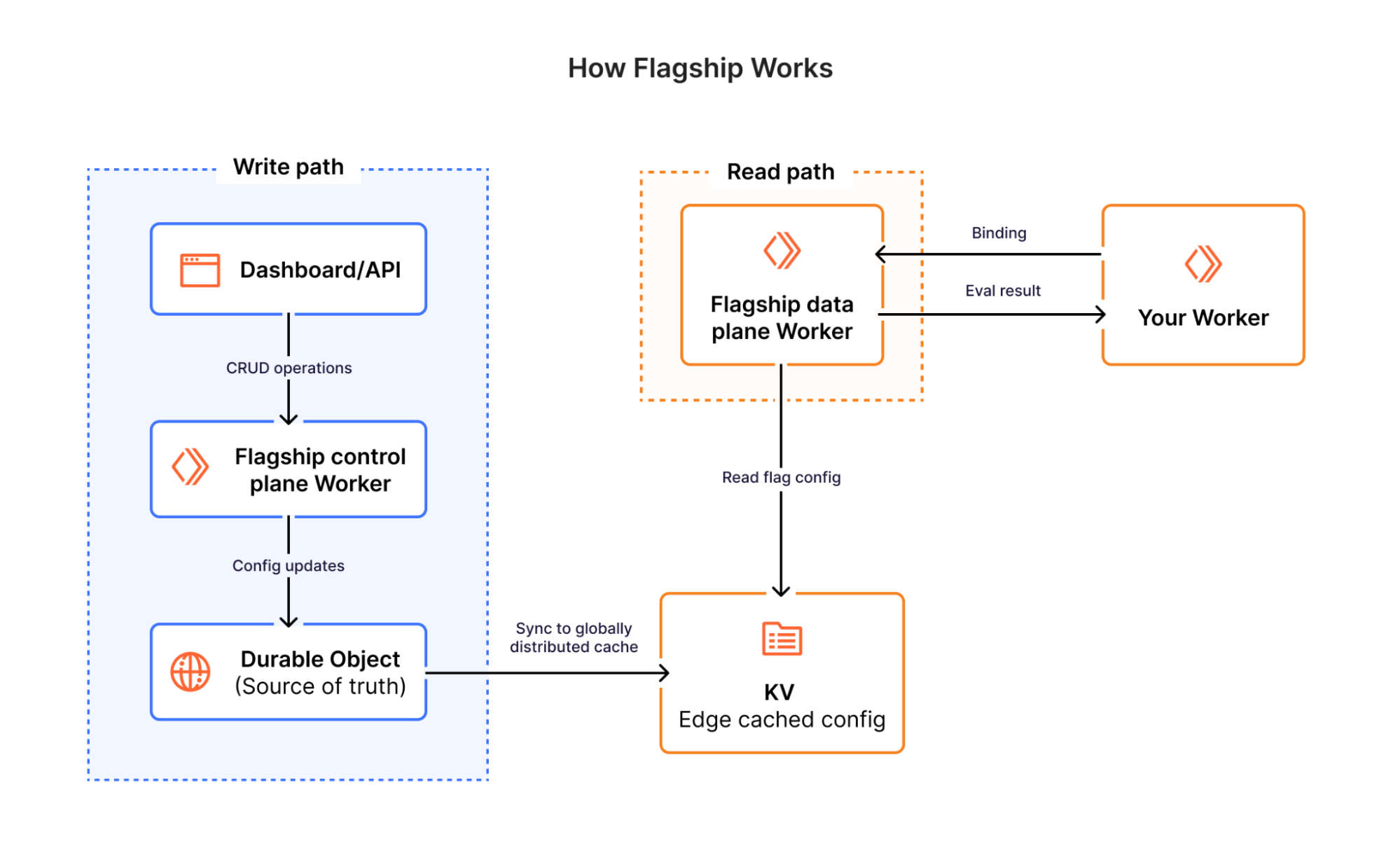
Flagship is built entirely on Cloudflare's infrastructure — Workers, Durable Objects, and KV. There are no external databases, no third-party services, and no centralized origin servers in the evaluation path.
When you create or update a flag, the control plane writes the change atomically to a Durable Object — a SQLite-backed, globally unique instance that serves as the source of truth for that app's flag configuration and changelog. Within seconds, the updated flag config is synced to Workers KV, Cloudflare's globally distributed key-value store, where it's replicated across Cloudflare's network.
When a request evaluates a flag, Flagship reads the flag config directly from KV at the edge — the same Cloudflare location already handling the request. The evaluation engine then runs right there in an isolate: it matches the request context against the flag's targeting rules, resolves the rollout percentage, and returns a variation. Both the data and the logic live at the edge — nothing is sent elsewhere to be evaluated.
 image
image
Using Flagship: the Worker binding
For teams running Cloudflare Workers, Flagship offers a direct binding that evaluates flags inside the Workers runtime — no HTTP round-trip, no SDK overhead. Add the binding to your wrangler.jsonc and your Worker is connected:
{
"flagship": [
{
"binding": "FLAGS",
"app_id": "<APP_ID>"
}
]
}
That's it. Your account ID is inferred from your Cloudflare account, and the app_id ties the binding to a specific Flagship app. In your Worker, you just ask for a flag value:
export default {
async fetch(request: Request, env: Env) {
// Simple boolean check
const showNewUI = await env.FLAGS.getBooleanValue('new-ui', false, {
userId: 'user-42',
plan: 'enterprise',
});
// Full evaluation details when you need them
const details = await env.FLAGS.getStringDetails('checkout-flow', 'v1', {
userId: 'user-42',
});
// details.value = "v2", details.variant = "new", details.reason = "TARGETING_MATCH"
},
};
The binding supports typed accessors for every variation type - getBooleanValue(), getStringValue(), getNumberValue(), getObjectValue() - plus *Details() variants that return the resolved value alongside the matched variant and the reason it was selected. On evaluation errors, the default value is returned gracefully. On type mismatches, the binding throws an exception — that's a bug in your code, not a transient failure.
The SDK: OpenFeature-native
Most feature flag SDKs come with their own interfaces and evaluation patterns. Over time, those become deeply embedded in your codebase — and switching providers means rewriting every call site.
We didn't want to build another one of those. Flagship is built on OpenFeature, the CNCF open standard for feature flag evaluation. OpenFeature defines a common interface for flag evaluation across languages and providers — it's the same relationship that OpenTelemetry has to observability. You write your evaluation code once against the standard, and swap providers by changing a single line of configuration.
import { OpenFeature } from '@openfeature/server-sdk';
import { FlagshipServerProvider } from '@cloudflare/flagship/server';
await OpenFeature.setProviderAndWait(
new FlagshipServerProvider({
appId: 'your-app-id',
accountId: 'your-account-id',
authToken: 'your-cloudflare-api-token',
})
);
const client = OpenFeature.getClient();
const showNewCheckout = await client.getBooleanValue(
'new-checkout-flow',
false,
{
targetingKey: 'user-42',
plan: 'enterprise',
country: 'US',
}
);
If you're running on Workers with the Flagship binding, you can pass it directly to the OpenFeature provider. The binding already carries your account context, so there's nothing to configure — authentication is implicit.
import { OpenFeature } from '@openfeature/server-sdk';
import { FlagshipProvider } from '@cloudflare/flagship/server';
let initialized = false;
export default {
async fetch(request: Request, env: Env) {
if (!initialized) {
await OpenFeature.setProviderAndWait(
new FlagshipServerProvider({ binding: env.FLAGS })
);
initialized = true;
}
const client = OpenFeature.getClient();
const showNewCheckout = await client.getBooleanValue('new-checkout-flow', false, {
targetingKey: 'user-42',
plan: 'enterprise',
});
},
};
Your evaluation code doesn't change — the OpenFeature interface is identical. But under the hood, Flagship evaluates flags through the binding instead of over HTTP. You get the portability of the standard with the performance of the binding.
A client-side provider is also available for browsers. It pre-fetches the flags you specify, caches them with a configurable TTL, and serves evaluations synchronously from that cache.
What you can do with Flagship
Flagship supports the patterns you'd expect from a feature flag service and the ones that become critical when AI-generated code is landing in production daily.
Flag values can be boolean, strings, numbers, or full JSON objects — useful for configuration blocks, UI theme definitions, or routing users to different API versions without maintaining separate code paths.
Targeting Rules
Each flag can have multiple rules, evaluated in priority order. The first rule that matches wins.
A rule consists of:
Conditions that determine whether the rule applies to a given context
A flag variation to serve when the rule matches
An optional rollout for percentage-based delivery
A priority that determines evaluation order when multiple rules are present (lower number = higher priority)
Nested Logical Conditions
Conditions can be composed using AND/OR logic, nested up to five levels deep. A single rule can express things like:
(plan == “enterprise” AND region == “us” ) OR (user.email.endsWith(“@cloudflare.com”))
= serve (“premium”)
At the top level of a rule, multiple conditions are combined with implicit AND where all conditions must pass for the rule to match. Within each condition, you can nest AND/OR groups for more complex logic.
Flag Rollouts by Percentage
Unlike gradual deployments, which split traffic between different uploaded versions of your Worker, feature flags let you roll out behavior by percentage within a single version that is serving 100% of traffic.
Any rule can include a percentage rollout. Instead of serving a variation to everyone who matches the conditions, you serve it to a percentage of them.
Rollouts use consistent hashing on the specified context attribute. The same attribute value (userId, for example) always hashes to the same bucket, so they won't flip between variations across requests. You can ramp from 5% to 10% to 50% to 100% of users, so those who were already in the rollout stay in it.
Built for what comes next
AI-generated code entering production is only going to accelerate. Agentic workflows will push it further — agents that autonomously deploy, test, and iterate on code in production. The teams that thrive in this world won't be the ones shipping the fastest. They'll be the ones who can ship fast and still maintain control over what their users see, roll back in seconds when something breaks, and gradually expose new code paths with confidence.
That's what Flagship is built for:
Evaluation across region Earth, cached globally using K/V.
A full audit trail. Every flag change is recorded with field-level diffs, so you know who changed what and when.
Dashboard integration. Anyone on the team can toggle a flag or adjust a rollout without touching code.
OpenFeature compatibility. Adopt Flagship without rewriting your evaluation code. Leave without rewriting it either.
Get started with Flagship
Starting today, Flagship is in private beta. You can request for access here. We'll share more details on pricing as we approach general availability.
Visit the Cloudflare dashboard to create your first Flagship app
Install the SDK: npm i @cloudflare/flagship; or use the Worker binding directly in your Worker
Read the documentation for integration guides and API reference
Check out the source code for examples and to contribute
If you're currently hardcoding flags in your Workers, or evaluating flags through an external service that adds latency to every request, give Flagship a try. We'd love to hear what you build.
関連記事
今日のまとめ
AIデイリーブリーフで今日の重要ニュースをまとめ読み