Anthropic、AI 活用によるソフトウェア開発ライフサイクルの改善指針を公開
本文の状態
日本語全文を表示中
詳細モードで約49分の本文を読めます。
同じ出来事の情報源
この情報源を基点に整理
Claude Blog
Anthropic は、コード生成がボトルネックではなくなった現在、従来の SDLC プロセスが生産性を阻害していると指摘し、エージェント AI を活用した開発ライフサイクルの再構築ガイドを公開した。
AI深層分析を開く2026年8月22日 22:20
AI深層分析
キーポイント
ボトルネックの移行
コード記述速度の向上により、従来の SDLC ではビルド工程がボトルネックではなくなり、計画・レビュー・デプロイといった人間速度の工程に遅延が生じている。
従来プロセスの非適合
人間の作業を前提とした厳格な承認ゲートや手動レビューは、エージェント AI による大量コード生成に対応できず、実態と乖離した非効率な管理コストを生んでいる。
ガバナンスコストの増大
例外処理が依然として週次や月次の会議・委員会を経由する仕組みは、高速化する開発サイクルにおいて組織的なガバナンスコストを急激に増加させる要因となっている。
AI 活用型 SDLC の提案
Anthropic は顧客事例に基づき、各工程でエージェント AI を統合し人間がループに残る形でのプロセス再構築と、開発加速のためのベストプラクティスを示している。
セキュリティボトルネックの解消
エージェントによるコード出力の増加に対応するため、規制組織では人的なレビュー速度に依存せず、セキュリティチェックもエージェントと同等のペースで実行する必要がある。
重要な引用
Code is no longer the bottleneck
The traditional SDLC was designed to maximize efficiency in an era where the most time-consuming and expensive stage was writing and implementing code, which is no longer the case.
Reviewing each line by hand made sense when a person had written it, but it can't keep up once agents write most of the diff.
Instead of a linear flow, the process becomes a loop, and AI is embedded at each point.
編集コメントを表示
編集コメント
この記事は、単なるツールの紹介に留まらず、AI の導入が組織の業務プロセス全体に与える構造的な影響を論じた重要な示唆を含んでいる。開発現場のリーダーは、ツールの変更だけでなく、承認フローやガバナンス体制そのものの見直しを迫られている現状を理解する必要がある。
Source Article
元記事を日本語で読む
本文に関係しない購読案内、埋め込み通知、サイト内プロモーションは除いています。
コードはもはやボトルネックではない
組織は、1 年前には想像もできなかった速度で AI を活用してコードを生成し始めています。しかし、コードを取り巻くプロセスは、そのスピードに追いついていません。
多くのエンジニアリングチームでは、承認ゲート、レビュー、引き継ぎ、ポリシーといった従来の仕組みがそのまま残されており、Claude Code のようなエージェント型コーディングソリューションを活用した生産性の向上が妨げられています。
ソフトウェア開発ライフサイクル(SDLC)とは、アイデアから本番環境へのリリースに至るまでの一連のプロセスです。多くの組織では、計画、設計、構築、テスト、デプロイ、保守という 6 つの段階を基本として運用しています。従来、各工程は異なる役割が担当する独立したフェーズとされていました。製品マネージャーが要件定義を行い、技術アーキテクトがそれを設計図に変換し、エンジニアがその設計を実装します。規制の厳しい企業では QA チームが検証を行い、リリースチームが本番へ展開し、運用チームが稼働状況を監視します。各工程間の連携は、ドキュメントやチケット、承認印を通じて行われてきました。
従来の SDLC は、各段階での責任所在とコントロールを確保するために、非常にプロセスに依存したものでした。しかし、このモデルは「コードの記述と実装が最も時間とコストがかかる工程」だった時代に合わせて設計されたものです。現在はもはやその状況ではありません。PRD(製品要件定義)や見積もり儀式、セキュリティレビューなどは、開発に数週間から数ヶ月、あるいは四半期を要する期間中に合意形成を図るために存在していた仕組みです。
従来のソフトウェア開発ライフサイクル(SDLC)には、すべての工程が人間によって行われることを前提とした管理策が含まれています。最も価値を生み出している組織は、アジェンティック AI が現在何ができるかに基づいてプロセスを再構築し、かつ人間が関与し続ける体制を確保しています。
本ガイドでは、顧客との協働から得た知見に基づき、Claude を SDLC の各段階に統合して開発を加速し、プロセスを高速化するための、当社の応用 AI チームによるベストプラクティスをご紹介します。
コードがボトルネック不再是となり、ビルドフェーズが従来の SDLC で想定される速度よりも速く実行できるようになると、3 つの重要な変化が生じます。
- ボトルネックはビルドフェーズの左右にある工程へ移行します。主に計画(plan)、レビュー/テスト(review/test)、デプロイ(deploy)といった、依然として人間スピードで進行する工程です。
- 管理策が現実と乖離し、制御不能な状態になります。人間が記述したコードであれば行ごとの手動レビューも意味がありましたが、差分の大部分をエージェントが生成するようになると、その対応は追いつきません。
- ガバナンスコストが増大します。例外処理が依然として週次や月次の会議・委員会を経由するためです。
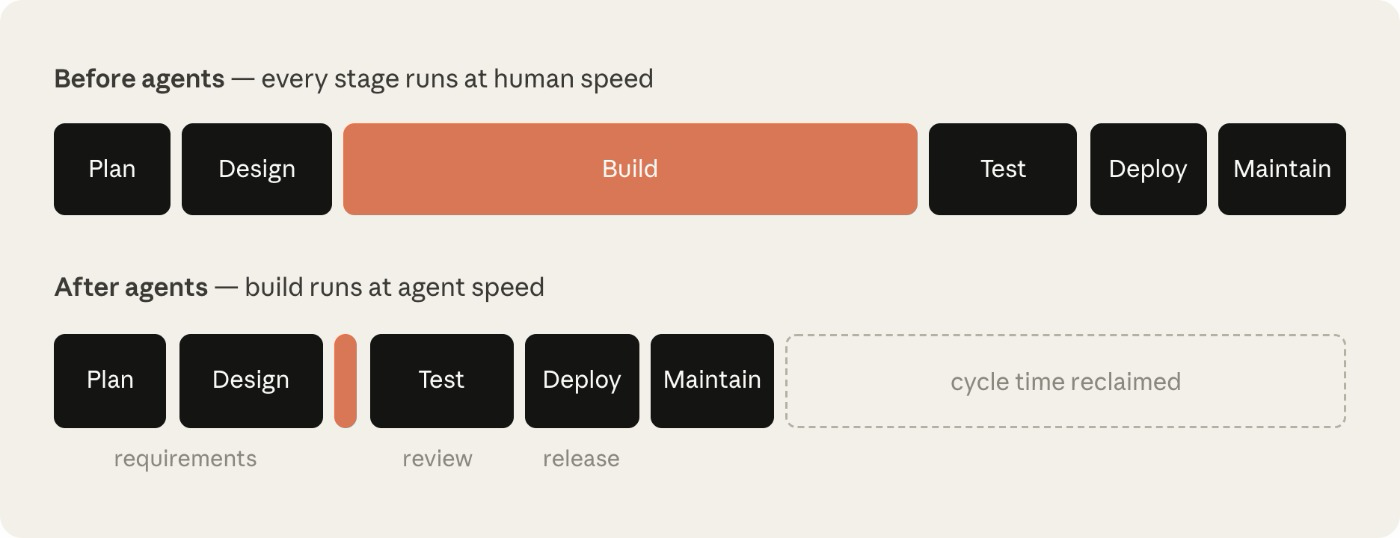
ビルド自体が制約不再是となり、その周囲にある人間スピードの工程が新たなボトルネックとなっています。人間スピードで進行するステージは所要時間を変えずに維持される一方、ビルド時間は数時間に短縮されています。
セキュリティのボトルネックを例に挙げてみましょう。セキュリティチームは人間の生産能力に合わせて人員が配置されているため、エージェントがコード生成量を倍増させると、レビュー待ち行列が膨らむか、未検証のままコードがリリースされるかのどちらかになります。規制対象となる組織ではこれらの結果を受け入れられないため、セキュリティチェックやポリシー確認もエージェントの速度に追いつく必要があります。
アジェンティック AI の生産性向上を最大限に実現し、かつ安全性を確保するためには、従来の SDLC(ソフトウェア開発ライフサイクル)全体が、実装フェーズで起こったのと同程度の変革を遂げる必要があります。
AI ネイティブな SDLC とは何か
AI ネイティブな SDLC は、従来の管理目標と新しい実行手段を組み合わせて再構築されたプロセスです。直線的なフローではなく、このプロセスはループ状となり、各段階に AI が埋め込まれます。これにより、フェーズ間の手動でぎこちない引き継ぎを解消し、次のアクションの自動化された引き継ぎとトリガーが可能になります。
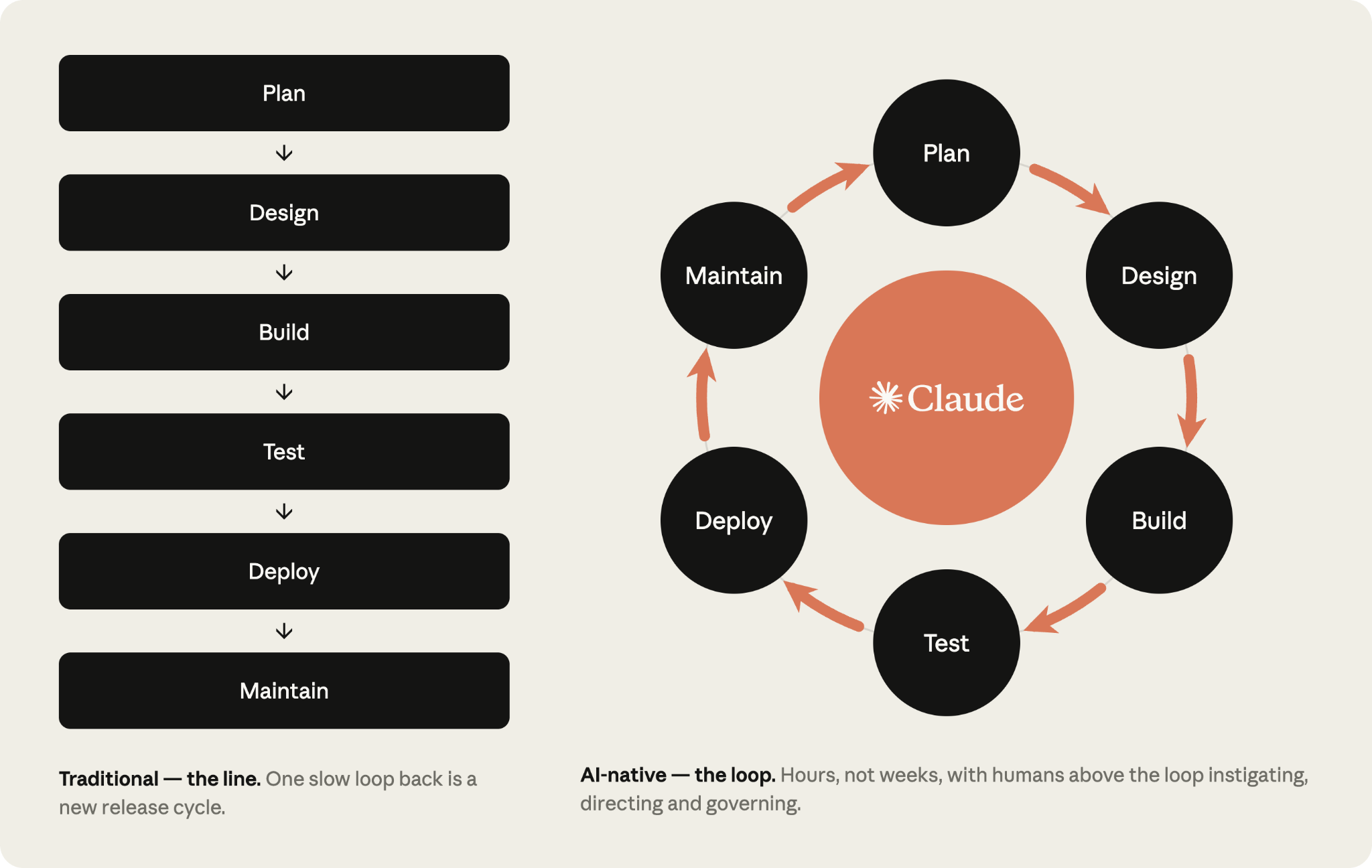
変化する点
以下の表は、Claude の支援のもと、従来の SDLC と AI ネイティブな SDLC の両極端を比較したものです。多くの組織はこの二つの間にあるどこかに位置しています。
| ステージ | 従来の SDLC | AI ネイティブ SDLC |
|---|---|---|
| 計画 | 委員会による要件の収集、ワークショップと承認を通じた要約、手書きでの文書化 | Claude がソースから直接痛み点を合成し、人間が読みやすく機械が実行可能な intent.md 内にそれらを記録する |
| 設計 | アナリストによる仕様書作成、デザイナーによる解析 | 要件と設計が、スキルとしてエンコードされた標準に導かれながら git でバージョン管理されるエージェントとの 1 つの作業セッションに圧縮される |
| 構築 | テストとコードは手書きで記述され、ドキュメントは主要な開発完了後に作成される | テストとコードは AI によって生成され、組織のナレッジはバージョン管理された機械可読の CLAUDE.md ファイルおよびスキルとして維持される |
| テスト | ステージ境界における QA ゲート | 実装に組み込まれた継続的な評価 |
| デプロイ | 人間がコードのすべての行をレビューし、ガバナンスはレビューサイクル内で発生するが、しばしば一貫性がない | エージェントによる多層のレビューと、規制対象および重要なコードに対する人間のレビュー。ガバナンスは AI が行動する際に強制され、承認ゲートとしてフックが使用される |
| 保守 | 人間が生産環境のバグを監視する | エージェントがライブデプロイメントを監視。違反した制御バンドは診断され、新しい intent.md としてループに書き戻される |
右側の列に流れる一貫したテーマは、コミットされた成果物です。各工程の終了時には、1 つの成果物をバージョン管理システムへ書き出します(intent.md、spec.md、plan.md、差分とそのテスト、レビュー結果を含む PR、インシデント記録など)。次の工程では、その成果物を読み込んで開始されます。
初期段階では、プロダクトオーナーとエージェントの両方が同じファイルを読み取り、行動を起こせるため、.md ファイルが主要な成果物となります。ビルド以降は、成果物はコードとその記録になります。コミットの連鎖自体が監査証跡となり、「誰が何を求めたか」「エージェントが何を生み出したか」「誰が承認したか」を明確にします。
判断を要するすべての決定に対する責任は人間にあります。エージェント型 SDLC の世界では、レビューが必要な成果物に応じて、人間の注力がシフトしていきます。
各工程で生成された成果物は、次の工程で読み取れる形でコミットされます。意図(intent)、仕様(spec)、計画(plan)、差分とレビュー結果を合わせると、それが監査証跡となります。
プレイ
プレイはプレイブックの中核であり、非線形な 6 つのステージ(Plan、Design、Build、Test、Deploy、Maintain)に分類されています。これら全体でライフサイクルを網羅します。
各プレイでは以下の点を扱います:
- 何を変更するか;
- 着手方法;
- 実装のための具体的な手順;
- ガバナンス上の考慮点;
- 成功したかどうかを測る指標。
これらのステップはモジュール化されており、組織は独自のニーズに基づいて、異なるタイミングで異なる工程の転換を優先的に進めることができます。各プレイには「前提条件」という項目に依存関係が明記されており、依存グラフによってさらに詳細に示されています。
ある工程は、次の工程を開始するコミットによってアーティファクトを確定させることで終了します。承認された intent.md が要件と設計のフェーズをトリガーし、承認された spec.md が計画モードを開始し、マージされた PR がパイプラインを実行します。また、本番環境で制御バンドが破られた場合、次の intent.md が作成され、このループは継続されます。
まず、各ステップを手動でプロンプトして開始し、最終的には「承認されたアーティファクトが次のゲートを発火させる」というループ状態を目指します。人間の注力はゲートに集中し、エージェントが指摘した内容を確認する形となり、各工程をゼロからやり直す必要はありません。
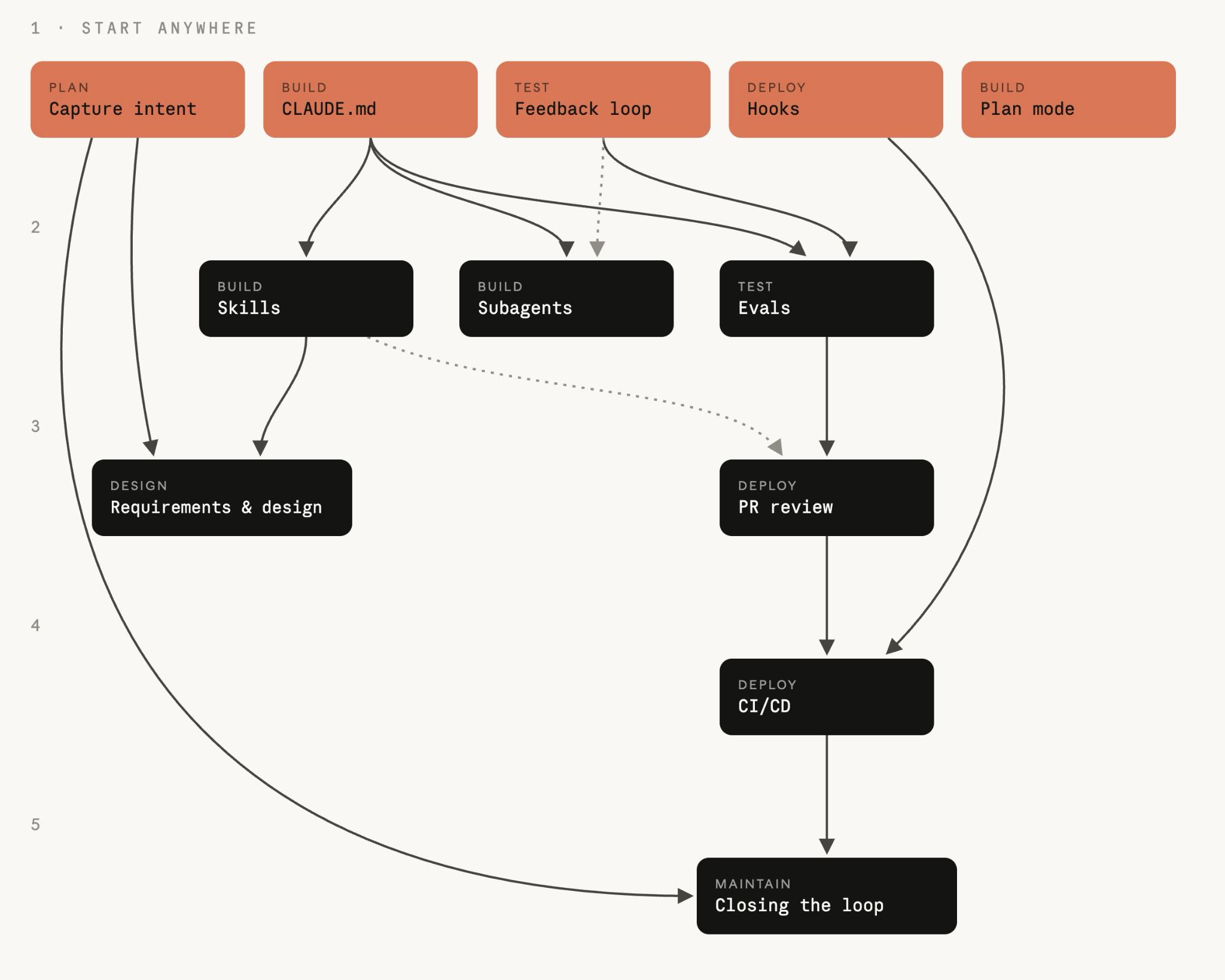
*プレイは工程ごとにリストされており、矢印は導入すべき順序を示しています。これらは同一ではありません。どの「粘土(Clay)プレイ」から始めても構いません。このプレイには入ってくる矢印がないため、先に必要なものはありません。それ以外のプレイについては、そのプレイに矢印でつながっているものが、先に導入すべきプレイです。
01
計画
アイデアは誰かが文章化するのを待たずに処理されます。意図(Intent)は、発案者自身の言葉で一度だけ記録され、次の工程がアクションを起こせるバージョン管理されたアーティファクトとして残されます。
意図を記述する intent.md
ソフトウェア開発プロセスを開始するための「intent.md」は、複数の経路から入力されます。個人がアイデアを持つ場合もあれば、チケットが作成されるケース、あるいはアラートを通じてインシデントが表面化するケースもあります(詳細はステージ6:メンテナンスを参照)。
個人がアイデアを持った際、Claude とブレインストーミングを行い、マークダウン形式のプロトタイプ仕様書を作成します。従来のソフトウェア開発ライフサイクル(SDLC)では、その人物が製品チームのメンバーに説得し、自分自身または代わりに仕様にまとめる必要がありました。
Claude が生成したプロトタイプ仕様書は人間が読みやすく、バージョン管理が可能で、次の工程ですぐに利用できます。この仕様書は「intent.md」として保存されます。
イベントトリガーから生成された意図であれ、エージェントからの提案であれ、プロセスは同じです。コミットされる前にプロダクトオーナーがエージェントが作成した intent.md をレビューし、必要に応じて修正します。
従来のアプローチでは、アイデアはバックログエントリやユーザーストーリー、ストーリーポイント、そして精査会議を経て初めて実行に移されます。各引き継ぎの時点で所有権が移転するため、エンジニアリングチームに到達する情報は、発案者が意図した内容から数段階も隔たったものになってしまいます。
AI ネイティブなアプローチでは、発案者は Claude とブレインストーミングを行い、その結果を自らの言葉で intent.md として記述します。これは発案者自身の用語体系に基づくプロトタイプ仕様書です。このアーティファクトには、「何を」「なぜ」「どのような制約下で」実現したいかが明確に含まれます。反復的なプロセスはスキルとしてエンコードされます。
始め方
前提条件
特になし。
インフラストラクチャ
エンジニアではない人でもClaudeにアクセスできる環境(claude.ai または Cowork)を整え、合意された intent.md テンプレートを用意し、プロダクトオーナーが閲覧できるバージョン管理された「意図の保管場所」を共有します。単一のプロダクトであれば、最もシンプルな方法はプロダクトリポジトリ内に intent/ フォルダを作成することです。この構成により、コードから派生した成果物と、その根拠となるアーティファクトを隣り合わせに管理できます。意図が多数のリポジトリにまたがる場合のみ、専用の意図用リポジトリを作るコストに見合う価値があります。モノレポの場合はディレクトリとして扱えば十分です。
Stage 3: Build のサイドバーでは、この保管場所が既に要件記録を保持している Jira や要件管理ツールとどう連携するかについて解説しています。
この環境の構築は、プラットフォームチームまたはエンジニアリングチームにとって一度きりのタスクです。技術チームの一員が意図の保管場所を立ち上げ、組織全体から多くの貢献者が参加することを想定して、誰が書き込み権限を持つかを決める必要があります。
リポジトリが用意された後は、Git の経験がない貢献者でも直接 Git を操作する必要はありません。バージョン管理システム(例:GitHub)へのコネクタを設定すれば、Claude が claude.ai や Cowork 上から、代わりに Markdown ファイルをコミットできるようになります。
実行方法
- 問題の提起者が、自らの言葉で Claude に問題を説明します。今日できないこと、アイデアの影響を受ける人々、より良い状態とは何か、あるいは範囲外とされる事項などを具体的に記述できます。形式的な言語は必要ありません。
- アイデアが具体化するまでブレインストーミングを行います。Claude は分析担当者が行うような質問を投げかけます。具体的には、対象範囲、ユーザー、制約条件、そして成功の定義についてです。
- Claude に対して、組織のテンプレートを用いて
intent.mdを作成するよう依頼します。このテンプレートは技術チームメンバーがスキルセットとして設定し、リーダーが承認したものを指します。これには、問題内容、提案される成果物、影響を受けるユーザーとシステム、制約条件、そして未解決の質問が含まれます。 - 提起者が、Claude の理解に誤りがあった箇所を修正します。
intent.mdを共有ホームにコミットします。著者とタイムスタンプが記録され、プロダクトオーナーがそこからアイデアを引き継ぎます。
# Intent: claims status self-service
Author: J. Ortiz (claims operations). Status: draft.

## Problem
Customers phone the contact center to ask where their claim is.
Handlers spend roughly a third of call time on status-only queries.

## Proposed outcome
Customers see claim status, next step and expected date in the portal.

## Affected users and systems
Claims handlers, portal team, claims-core API.

## Constraints
No new PII in the portal session. Existing authentication only.

## Open questions
Do third-party loss adjusters need access too?
ガバナンスの考慮事項
証拠となるのは、著者、タイムスタンプ、完全な改訂履歴を記載したコミットされた intent.md です。これは意図のホームの git 履歴にログされます。プロダクトオーナーが承認し、合否の判断(これにより意図がステージ 2:デザインへ移行する)は、マージまたはクローズレビューとして記録されます。\n
測定方法
先行指標
最初の会話から intent.md のコミットまでの時間。これは意図のホームの git 履歴から読み取られ、著者とタイムスタンプが記録されています。期待されるのは、数週間にわたる引き出しと洗練のプロセスから、数時間での完了への短縮です。
遅行指標
生存率、あるいはプロダクトオーナーが「Stage 2: Design」へ進めるために採用し、却下やクローズ処理を行わない intent.md ファイルの割合です。採用か却下の判断は、アーティファクトのマージまたはレビューのクローズとして記録されます。また、同じ変更に対して最初の spec.md コミットが行われた後に intent.md に加えられた変更回数も指標となります。
02
Design
要件定義と設計が一つのセッションに統合されます。ポリシーは数週間後のレビューで発見されるのではなく、仕様書(spec)を作成する段階で適用されます。
要件と設計
プロダクトオーナーの承認を得た後、Claude は受け入れられた intent.md を基に、要件および設計仕様書を作成します。このプロセスは、組織が持つ スキル(ブランド、セキュリティ、コンプライアンス、UX に関するガイドライン)に沿って行われます。
作成された仕様書はプロダクトオーナーがレビューしますが、作成自体は Claude が担当します。このプロセスの目的は、エンジニアリングチームが計画を立てられるよう、懸念事項を明確に示した仕様の策定です。
フロントエンドの開発はその典型例です。intent.md が承認されると、プロダクトオーナーは Claude Design(ベータ版)を用いて intent.md を元にデザインのモックアップを作成し、反復して改善した上で、最終的に Claude Code へエクスポートして実装を行います。
従来の開発プロセスでは、要件定義と設計は別々のチームが担当する独立したフェーズとして行われます。アナリストがアイデアを形式化して要件を策定し、その後デザイナーがそれを解析して設計図へと落とし込みます。この分離は責任の所在を明確にするために存在しますが、結果として工程が遅延し、情報の損失を招くことになります。
AI ネイティブな開発プロセスでは、2 つのフェーズが 1 つのプロンプトセッション内で完結します。Claude は intent.md ファイルを読み込み、組織のスキルセットに制約されつつ要件と設計仕様を生成します。その際、懸念すべき領域は明確にフラグ付けされます。
始める前に
事前準備
ブランド、セキュリティ、コンプライアンス、UX 方針などを「スキル」として記述した intent.md ファイルを作成してください。
インフラ構成
Claude にアクセス権限を持つプロダクトオーナーがいます。エンジニアリングの専門スキルは不要です。
実行方法
- プロダクトオーナーが、組織で利用可能なスキルを参照しながらセッションを開始し、
intent.mdファイルを添付します。 - プロダクトオーナーはプロンプトで
intent.mdを指し示し、制約事項を定義するとともに懸念点を明確に求めます。最初は手動で実行し、その後、組織レベルのスラッシュコマンドとして定式化してください。
そこから、インテントホームにおける intent.md の承認をトリガーとし、マージ時に非対話ジョブを実行して組織のスキルを読み込みながらパスを実行し、spec.md をプルリクエストとしてコミットします(CI/CD プレイの詳細はステージ 5:デプロイで解説しています)。この時点から、プロダクトオーナーの最初の関与はレビューとなります。
同じプロダクトオーナーが、アイデアに対して仕様書の内容をレビューします。その仕様は提示された課題を解決しているか、また intent.md から残された質問への回答や引き継ぎが行われているかを検証します。
まず、フラグを立てられた懸念事項から順に処理を進めます。これらは分析担当者がエスカレーションしたポイントに該当するためです。プロダクトオーナーは、エンジニアが仕様書を確認する前に、各項目について責任者との合意のもとで解決策を提示します。
spec.md を intent.md と一緒にコミットしてください。このファイルペアにより、「何を求められたか」と「何が決定されたか」の記録が残されます。
プロダクトオーナーは、仕様書と意図がビルド工程へ進むかどうかを判断します。組織が高リスクと分類する事項については、技術リーダーに相談の上で決定します。この判断は必ず人間が行い、仕様書を承認することが、ステージ 3「Build」におけるプランモードプレイの開始を意味します。
どのようなものか(プロンプト)
Read the attached intent.md and produce a requirements and design spec for integrating it into our existing codebase. Apply the skills available to you so the plan conforms to our brand guidelines, security policies and UX standards. Document the spec fully as spec.md, ready to hand to the engineering team. Describe clearly any areas of concern, especially where you cannot satisfy contradicting policies.ガバナンスの考慮事項
数週間後のレビューで発見されるのではなく、仕様が記述されている間にライブポリシーが読み込まれ、即座に適用されます。組織のスキルは仕様の制約として機能します。仕様書、その生成に使われたプロンプト、そして現在有効なスキルのバージョンはすべて、バージョン管理システムにログとして記録されます。プロダクトオーナーが仕様書を承認し、問題のある箇所を特定のポリシー所有者へ転送します。
測定方法について
先行指標
同じ変更に対する intent.md のコミットから spec.md のコミットまでの経過時間(2 つの Git タイムスタンプ)を、従来の要件定義と設計のサイクルと比較します。
後行指標
ビルド開始後に要件の再検討が必要になった場合、同じ変更に対する最初の plan.md コミットより後の spec.md のコミット数をカウントします。Git log を使用すればこれを直接確認できます。
03
ビルド
承認された計画がない限り、実装は行われません。組織のナレッジはエージェントが参照するファイルとなり、ガードレールは習慣ではなくコードとして実行されます。
Claude Code のプランモードをデフォルトの開始点に
エンジニアは plan mode で Claude Code セッションを開始し、ステージ 2(設計)で承認された spec.md を Claude に渡します。その後、エンジニアが納得するまで計画についてインタビュー形式で対話し、反復して改善していきます。
従来の開発プロセスでは、エンジニアが設計書を読み込んでコーディングを開始します。変更の具体的な方針、どのファイルやテストを扱うかといった詳細は、エンジニアの頭の中にあるか、せいぜいチケットのコメントに記述される程度です。他の誰かがその内容をレビューすることはできません。レビュアーが目にするのは完成した差分のみであり、その段階では手戻りが生じると修正が非常に遅くなります。
AI ネイティブな開発は、Claude がプランモードで生成した文書化された計画から始まります。このモードでは、コードベースを読み取ることはできますが、変更を加えることはありません。エンジニアはコード作成前に計画を修正し、承認されたバージョンは後続の工程のために plan.md としてコミットされます。
チェック項目を確認する
始め方
前提条件
意図定義ファイル(intent.md または spec.md)が存在する場合、および CLAUDE.md ファイルがあると役立ちます。
インフラストラクチャ
リポジトリにアクセスできる Claude Code。
このツールは、開発環境においてコードの生成や修正を支援する AI エージェントです。リポジトリへの直接アクセス権限を持つことで、プロジェクト全体を把握し、文脈に応じた的確な提案が可能になります。
実行方法
- エンジニアは、Claude とのセッションを「プランモード」から開始します。
intent.mdとspec.mdを Claude に渡し、変更対象となるファイル名、作業順序、検証用のテストケースを含む実装計画の作成を依頼します。- 計画に対して「何が壊れる可能性があるか」「どの工程が最もリスクが高いか」「Claude が却下した他の選択肢は何か」といった質問を行い、計画を検証します。
- 一度も会話を見たことのないエンジニアでも、この計画書だけで変更を実行できる状態になるまで、計画の推敲を繰り返します。
- 承認された計画を
plan.mdとしてコミットします。この計画は監査証跡の一部となり、PRレビュー(ステージ5:デプロイ)では、最終的な差分がこの計画と照合されます。 - 計画を受け入れて Claude に実装を任せます。堅牢な計画が完成していれば、実装は往々にして1回のパスで完了します。
実装が計画から逸脱した場合は、同じコミット内で plan.md を更新してください。両者の同期を強制するためにフックを使用することを検討してもよいでしょう。
実際の運用イメージ (plan.md)
# Plan: claims status self-service (from intent.md 2026-06-02)

## Files that change
portal/src/claims/StatusPanel.tsx (new), claims-api/routes/status.py,
claims-api/tests/test_status.py

## Order of work
1. Add the status endpoint behind existing auth.
2. Panel against the endpoint.
3. Wire into the portal nav.

## Risks
The claims-core API rate-limits at 50 rps; the panel must cache.

## Proof
test_status.py covers the four claim states; screenshot matches the
approved mock.
ガバナンス上の考慮事項
コード生成が行われる前に設計レビューを実施し、方向転換が必要な段階であれば文書編集の段階で対応できるようにします。Plan モードはこのプロセスを自動的に強制します。Claude はエンジニアが計画に合意するまでファイルの編集ができない仕組みになっているためです。
計画とその改訂履歴、そして誰が承認したかはすべてログに残されます。日常的な変更はエンジニアが承認しますが、組織が高リスクと分類する事項については、テックリードまたはアーキテクトへの承認フローへ回されます。
測定方法
先行指標
最初の開発パスからマージされた変更の割合、および PR メタデータに含まれる必要なデータと共に、計画承認からマージ済み PR までの所要時間。
遅行指標
PR メタデータに基づく変更ごとの再作業サイクル数、およびマージされた差分がコミットされた plan.md と依然として一致している頻度。
Claude Code の自動モード
Claude Code は、エンジニアが計画を承認し、満足して反復を重ねた後に、各編集ごとにプロンプトを入力することなく Claude が変更を適用する「自動モード」でも実行できます。後続のプレイでガードレール(調整済みの CLAUDE.md、ポリシーをエンコードしたスキル、不安全なアクションをブロックするフック、Claude が実行可能なテストスイート)が成熟すれば、自動承認は日常業務におけるデフォルトとなります。具体的には、厳密な spec.md、影響範囲の小さい変更、既存のテストでカバー済みのコードを対象とします。
このシフトは、エージェントによる編集をユーザーが見守りアクションを確認するプロセスから、より長い自律的なセッション後に成果物をレビューするプロセスへと移行しています。自動承認モードは、ワークツリーを活用して個人間およびチーム全体での並行処理を可能にし、ステージ 6「メンテナンス」で説明されているように、SDLC を自律的に実行し、ループを完結させる上で不可欠な要素です。
サイドバー
レガシーシステムと真実の源
*このプロセスが生成するすべてのアーティファクトに適用されます。*
既存の SDLC(ソフトウェア開発ライフサイクル)プロセスでは、すでにアーティファクトが管理されているはずです。ただし、それが Markdown ファイルとして保存されているわけではありません。作業項目は Jira に、要件定義は規制対応トレーサビリティ機能を備えたツールに、設計図は Figma に、変更承認は変更管理委員会(Change Board)によって行われているケースが一般的です。
これらのシステムは、監査担当者や規制当局がすでに採用しており、他のチームも依存しているため、容易に置き換えることはできません。したがって、AI ネイティブな SDLC は、既存の環境に合わせて構築する必要があります。
AI ネイティブな SDLC へ移行する際は、プロセスが生み出す各アーティファクトに対して、「唯一の情報源(ソース・オブ・トゥルース)」となるシステムを一つ指定し、他のシステムはそれのコピーまたはリンクを持つように設定します。以下に示す構成では、アーティファクトの種類に応じて情報源の選択が異なります。
リポジトリを情報源とする。 Markdown 形式のアーティファクトが権威ある記録となり、レガシーシステムはそのコミット内のファイルを参照します。これは、すべての記録を一つのツールで管理し、タイムスタンプの権限も一元化できるため、エンジニア主導の組織にとって最もクリーンな構成の一つと言えます。
レガシーシステムを情報源とする。 Jira、ServiceNow、または要件定義ツールが権威ある記録を保持し、Markdown 形式のアーティファクトは作業用コピーとして扱われます。Claude はセッション開始時にその記録を読み込み、仕様やプランを作成した同じセッション内で、MCP コネクタを通じて結果を書き戻します。
リンクによる接続が最低限の要件です。 すべてのアーティファクトには記録 ID を明記し、すべてのレガシー記録には Markdown ファイルのコミット SHA を含めます。AI ネイティブな SDLC への移行においては、真実となるソースが二つ存在することを前提に、このリンクを起点とすることが有効です。
両方のシステム(既存システムと Markdown フォーカス型システム)は、相互間にリンクが存在するか、あるいはどちらかを「唯一の真実源」として宣言していれば共存可能です。
CLAUDE.md の活用
`CLAUDE.md` ファイルには、新規参画者がすぐに必要とするコンテキストが記述されます。ここではチームの規約、コマンド、アーキテクチャ、そして頻繁に発生するミステイクについて網羅します。これまで人の頭の中や Wiki に存在していた知識を、エージェントがセッション開始時に参照するファイルへと移行させます。このファイルはチーム全体で維持管理され、ミスが発生した際には随時更新されます。
始め方
前提条件
特になし。
インフラ構成
リポジトリ、インストール済みの Claude Code、そしてコードベースに精通したエンジニアが一人いれば十分です。
実行方法
- リポジトリで
/initを実行します。Claude が検出した情報に基づき、初期のCLAUDE.mdファイルを生成します。 - 生成されたファイルは、新規参加者が初日に必要とする内容に絞り込みます。ビルド・テスト・リンティングのコマンドや重要な規約、そして Claude が繰り返し間違える箇所だけを維持してください。
リポジトリのルートに CLAUDE.md を git に追加し、チーム全員で共通バージョンを共有して、変更もコードと同様にレビューできるようにしましょう。
ここでの実用的なルールとして、「Claude が同じミスを 2 回犯したら、その修正内容を CLAUDE.md に記録する」という方法があります。
1 ページ以内に収めるようにしてください。Claude はセッション開始時にこのファイル全体を読み込むため、古くなった情報が含まれると、有益性がないままコンテキストを圧迫してしまうからです。
実際の運用イメージ (CLAUDE.md)
# Payments service

## Commands
- Build: make build
- Test: make test (unit), make itest (integration, needs docker)
- Lint: make lint (runs in CI; fix before pushing)

## Conventions
- Java 21, Spring Boot 3. No new Lombok.
- Money is always BigDecimal, never double.
- Every endpoint needs an integration test in src/itest.

## Architecture
- api/ holds REST controllers, core/ holds domain logic,
  adapters/ talks to external systems.
- Kafka events are defined in schemas/; never edit generated classes.

## Things Claude gets wrong
- Do not bump dependency versions; the platform team owns them.
- The legacy v1/ package is frozen; changes go in v2/.
ガバナンスの観点
CLAUDE.md はバージョン管理されるため、エージェントが従う指示はレビュー可能で監査可能です。チームの規約はこのファイルを通じて適用され、その変更履歴は Git の履歴に記録されます。また、コードオーナーが PR レビューにおいてこれらの変更を承認します。
測定方法
先行指標
CLAUDE.md で検出すべきミスを Claude が繰り返す頻度です。修正内容や CLAUDE.md への改訂は、Git の履歴内で追跡する必要があります。
後行指標
チームに新規メンバーが加わってから、最初の PR がマージされるまでの期間を PR 履歴から算出します。
スキルを組織の暗黙知として定着させる
スキルとは、組織が持つ暗黙知を実務レベルで運用するための手段です。指示は明確に記述され、バージョン管理が行われ、広く適用され、ポリシー変更時には中央で一括更新されます。
基本原則:一貫して適用すべき組織の暗黙知については必ずスキルとして記述してください。一方、CLAUDE.md やプロンプトに含めるべきコンポーネントに関する指示をスキル化するのは避けてください。
導入準備
前提条件
必須はありません。CLAUDE.md を用意しておくと、エージェントの作業知識をリポジトリ内に保持できるため役立ちますが、スキルはそれ自体に依存しません。
インフラ要件
名前の付いた所有者がおり、明確な根拠となる文書が存在するポリシーが 1 つ必要です。
実行方法
- 今日、一貫して適用されていない知識を一つ選びます。セキュリティ基準、API デザインの慣習、ブランドルールなどが該当します。
- その知識を「スキル」として記述します。
SKILL.mdを含むフォルダを作成し、フロントマターでトリガー条件を定義し、本文で具体的なアクションを記述します。エンジニアはポリシー所有者が管理する真実のソースから情報を取得し、Claude の支援を受けながら作成します。 - スキルをリポジトリ内の .claude/skills/ フォルダに配置してコードと一緒に配布するか、プラグイン を通じて組織全体で共有します。
- スキルが正しくトリガーされるかテストします。Claude に異なる方法で関連タスクを実行させ、毎回スキルが読み込まれることを確認してください。
- ポリシーに変更が生じた場合は、スキルも更新し、ポリシー所有者による承認を得てください。
- エンジニアは次のセッションで自動的に新しいバージョンを引き継ぎます。
実際の構成例 (.claude/skills/secure-api-review/SKILL.md)
---
name: secure-api-review
description: Apply the API security standard. Use whenever creating or
  modifying an external-facing endpoint, reviewing API code, or
  generating an OpenAPI spec.
---
# Secure API review

When you create or change an API endpoint:
1. Authentication: every endpoint requires the gateway JWT;
   no anonymous routes outside /health.
2. Input validation: validate request bodies against the OpenAPI
   schema and reject unknown fields.
3. Audit: every state-changing endpoint emits an audit event with
   actor, action, entity and timestamp.
4. Data classification: fields tagged pii in the schema must never
   appear in logs or error messages.

Run scripts/check-endpoints.sh and include its output in your summary.
ガバナンス上の考慮点
スキルは制御機能の一つですが、あくまで勧告的なものです。これにより、コード作成中に Claude がポリシーを適用する可能性が高まりますが、セッションに対して強制力はありません。常に厳格に適用される必要があるポリシーには、スキルに加え、アクションをブロックするフックや、PR 段階でポリシーを再確認するレビューパスなど、確定的な仕組みが必要です。スキルは違反を稀なものにし、フックはほぼ不可能にします。スキルの呼び出しはセッションのトレースに記録され、ポリシー所有者はコードと同様にスキルの変更を確認・管理します。
測定方法 (原文の技術表記: .claude/skills//)
先行指標
ポリシー所有者が変更を承認してから、更新されたスキルがマージされるまでの時間。これはスキルのフォルダにある PR から取得します。
後行指標
PR レビューで見つかった指摘のうち、そのポリシーに言及しているものの数です。コード記述時にすでにスキルがポリシーを適用していれば、この数はゼロに向かって減少するはずです。もし指摘数が減らない場合は、スキルのトリガーが機能していないか、あるいはテキスト内容が公式のポリシーから乖離している可能性があります。
ビルド時のガードレールとしてのフック
スキルは助言的な制御ですが、フック はその背後にある決定論的なレイヤーです。Claude のアクションの多くは実装中のファイル編集やシェルコマンドであるため、フックが最も頻繁に発火するのはビルドフェーズになります。
ビルドフェーズのフックでは以下が可能です:
- 生成されたクラスや凍結されたパッケージなど、保護対象パスへの編集をブロックする;
- ファイル編集後にフォーマッターとリンターを実行し、コードのズレが蓄積しないようにする;
- 機密情報を diff に含めない。
例外なくポリシーを維持しなければならないスキルの裏付けとしてフックを活用します。フックは一致するアクションごとに実行されるため、ビルドフェーズ用のフックは高速であり、変更されたファイルに限定する必要があります。テストスイート全体のような重いチェックは、コミット時や PR レビュー時に行うべきです。
人間の承認を求めるフックは、Stage 5: Deploy のゲートに含めるべきです。ビルド中に承認を促すと、並行して実行されているすべてのセッションにおいて人がクリティカルパスに戻ることになり、ボトルネックとなるからです。
パラレルセッションとサブエージェント
エンジニア一人が、複数の作業ストリームを同時に推進できるようになります。
パラレルセッションとは、別のタスクに取り組むもう一つの完全な Claude Code インスタンスのことです。各セッションは独立しており、git worktree のように別々の環境で動作します。それぞれのセッションは他者の存在を一切認識しておらず、それらを統括するエンジニアだけが共通の接点となります。
一方、サブエージェント は単一のセッション内で実行されるスコープ限定のヘルパーです。独自のコンテキストウィンドウとツール制限を持ち、アプリが期待通りに動作しているか検証するなど、複数のタスクで繰り返し発生する作業に適しています。
パラレルセッションによってエンジニアが同時に進行できるタスク数を増やし、サブエージェントによって各セッションを特定のタスクに集中させることができます。エンジニアの役割は、これらすべてを統括しレビューすることです。
従来のアプローチでは、エンジニアは一度に一つのタスクしか扱えず、一日または一週間の多くの時間をビルド、テスト、コードレビューに費やしていました。待機中に他のタスクへ切り替えることは可能ですが、コンテキストスイッチの負担が大きく、あえてそれを行う人はほとんどいません。
一方、AI ネイティブな環境では、エンジニアは複数の Claude セッションを同時に起動し、それぞれを独立した worktree で異なるタスクに割り当てます。繰り返し発生する作業は、独自のコンテキストと制限を持つサブエージェントとして処理されます。エンジニアの役割は、単なる実行からオーケストレーションへと、最終的にはループの構築と監視へとシフトします。
始め方
前提条件
すべてのセッションがファイルを読み込む CLAUDE.md が存在します。フィードバックループ(ステージ 4: テスト)もここでの役割を果たします。セッションが自身の作業を検証できるため、エンジニアによる監督を最小限に抑えることが可能になるからです。
インフラストラクチャ
Git リポジトリが必要です。これは、ワークツリーと権限制御を調整することで分離を実現するためです。これにより、組織が安全とみなすコマンドを実行する際に、セッションが承認プロンプトで待機する必要がなくなります。
実行方法
- エンジニアは、プランモードプレイ(ステージ3:ビルド)の計画を参照して作業が独立している箇所を確認し、異なるファイルにまたがるタスクに仕事を分割します。同じファイルを共有するタスクは、1 つのセッション内で順番に実行されます。
- 並列化する各タスクには個別のワークツリー(worktree)を用意します。例えば、一方のターミナルで
claude --worktree feature-authを、もう一方のターミナルでclaude --worktree fix-rate-limitを実行します。ワークツリーは独立したブランチ上の別チェックアウトであり、セッション間でファイルが競合するのを防ぎます。 - 並列セッション数は、2〜3 から始めるのが適切です。実質的な上限は、1 人が適切にレビューできるストリームの数によって決まります。そのため、レビューが追いつく範囲でセッション数を増やしていきます。
- 反復的な作業は、
.claude/agents/ディレクトリ内の markdown ファイルで定義したサブエージェントとして実行します。各サブエージェントには名前、使用タイミングの説明、およびアクセス可能なツールの一覧が含まれます。例としては、メインエージェントの完了後に不要な複雑さを除去するコード簡素化器、アプリを実行して動作を検証する検証者、コードベースを探索して報告するがメインコンテキストを溢れさせないリサーチャーなどが挙げられます。これらの定義は git にコミットし、チーム全体で共有できるようにします。
実際の構成例(.claude/agents/verifier.md)
---
name: verifier
description: Runs the app and checks the change works before the session
  reports done
tools: Bash, Read
---
Start the app with make run. Exercise the changed behavior and the two
nearest neighboring flows. Report what you ran, what you saw, and any
behavior that does not match plan.md. Do not fix anything; report only.
ガバナンス上の考慮点
セッション数が増えると出力も増えるため、制御はリポジトリ内の設定ファイルから行う必要があります。そこで定義されたフックや権限設定はすべてのセッションに適用され、各セッションの動作はログとして記録され、実行したエンジニアの名前と紐付けられます。
評価方法
先行指標
レビューの品質を維持したまま、エンジニアが並行して処理できるセッション数(OpenTelemetry エクスポートから算出)と、作業待ちではなく舵取りに費やす時間の割合です。
後行指標
週あたりのエンジニア別マージ件数と、PR の履歴に基づいて算出されるやり直し率を併せて読み解きます。
Claude にフィードバックループを与える
Claude には常に自己検証の手段を与えてください。テスト、ビルド、スクリーンショット差分など何でも構いません。セッションはエンジニアが確認する前に、自身で作業を検証し、ミスを修正します。
このフィードバックループと、検証者サブエージェント(ステージ3:ビルド)を混同してはいけません。フィードバックループは、作業量に応じてタスク全体を何度も実行します。一方、検証者サブエージェントは、セッションが作業完了と判断した時点で新しいコンテキストウィンドウを起動し、最終チェックをパッケージ化するための手段の一つです。これにより、コード生成の前提条件にバイアスされない客観的な判定が可能になります。
従来の開発では、コードが動作しているという信号が届くのは遅すぎます。CI では数分後、テスターによる確認は数日後、本番環境へのデプロイに至っては数週間後です。エージェントがコードを生成する時代において、この遅れた信号は、人間がすべての出力を確認しなければならないことを意味し、その人間がボトルネックとなります。
AI ネイティブなソフトウェア開発ライフサイクル(SDLC)では、人間が確認する前にシステム自身が作業を検証できる仕組みを備えています。テストを実行し、ビルドを行い、スクリーンショットを取得します。Claude はチェックが通過するまで反復処理を続け、エンジニアに届く成果物はすでに検証済みとなります。
このループの構築はセッションを実行するエンジニアの役割です。以下の手順も、彼ら向けに記述されています。
はじめに
前提条件
特になし。
インフラストラクチャ
ローカル環境でそれぞれ 1 コマンドで実行可能なテストスイートとビルドが必要です。UI 関連の作業では、Claude が結果を確認できる手段が不可欠です。ブラウザツールか、MCP を介して接続されたスクリーンショット取得ユーティリティのいずれかが必要となります。
実行方法
- 今日の実作業を確認する際に複数のコマンドや環境知識が必要になる場合は、失敗時に非ゼロを返す「make test」や「npm test」のような単一のターゲットにまとめましょう。
CLAUDE.mdの Commands セクションには、各コマンドごとに健全な出力の例を記載してください。- クロードが質問せずに作業を検証できるように、ターゲットは定量化して記述します。例えば、「test_status.py の全テストがパスする」「スクリーンショットが添付されたモックと一致している」「新しいフィールドを含むエンドポイントが 200 を返す」などが具体例です。
- バグ修正の場合、まず失敗するテストを記述してください。クロードにバグの再現テストを作成させ、実行して期待通りの理由で失敗することを確認し、そのテストをコミットします。その後、テストファイルフック(最終ステップのもの)による制限を守りながら、テスト自体を変更せずにパスさせるようクロードに指示します。修正前に存在し、エージェントが書き換えられないテストが通れば、それがバグ解消の証拠となります。
- UI 関連の作業では、視覚チェックでループを完結させます。ブラウザやスクリーンショットツール、そしてモック画像をクロードに与え、反復処理を行わせます。実装→スクリーンショット取得→比較→調整という流れを数回繰り返すのが一般的で、そのたびに結果が改善されていきます。
- 検証プロセスは「完了」の一部として組み込みましょう。指示は
CLAUDE.mdに記載し、タスク完了の報告前にテストを実行してその出力を示してください。
最後に、ループ自体の保護も必要です。コードを修正するエージェントが、そのコードに対するチェック機能を弱めてはならないからです。修正タスク中にテストファイルへの編集をブロックするフックを実装することでこれを達成できます。あるいは、レビュー時に差分を確認し、テスト関連の変更が含まれる場合は拒否するという方法もあります。
具体的な仕組み(CLAUDE.md 検証ブロック)
## Verifying your work

- Build: make build (must finish with "Build succeeded")
- Test: make test (all green; never skip or delete a failing test)
- Lint: make lint (zero warnings)

Run all three before reporting any task complete, and paste the output.
If a test fails, fix the code, not the test.
ガバナンスの考慮事項
何が強制されるか
タスク完了報告前の検証と、修正中のエージェントによるテストファイル編集のブロック。これらは組織が必要とする箇所で確実に機能するよう、フックとして実装されます。
証拠とは何か
「make test」の実行結果、ビルドログ、または Claude が実行して貼り付けたスクリーンショット差分です。証拠はツールチェーンから直接得られます。
どこに記録されるか
セッショントランスクリプト内に記録され、OpenTelemetry エクスポートを通じて組織の観測スタックへ転送されます。また、PR のチェックランにも記録され、レビュアーや後の監査者が双方で確認できます。
誰が承認するか
コードオーナーが PR をレビューし、機械的な証拠は既に添付されているため、意図とリスクに集中して判断します。
測定方法
先行指標
エージェントが作成した変更に対する初回 CI 成功率。これは CI システムで既にサポートされています。
後行指標
PR 当たりにかかるレビュー時間(PR メタデータから取得)。テストがレビュアーが行っていた検出を担うようになれば、この時間は短縮されるはずです。また、インシデントトラッカーからの変更失敗率も重要な指標となります。
CI における継続的評価
評価(evals)は、AI ネイティブな開発プロセスにおけるステージゲート QA に相当するものです。具体的には、エージェントの構成が変更されるたびに実行される一連の評価スイートを指します。新しいモデルに切り替えたり、プロンプトを再設計したりした際にも、その評価スイートによって「以前と同じ基準で作業ができているか」を確認できます。
この評価は生きたスイートとして捉えるべきです。モデルが改良されるにつれて、かつては明確な差をつけていたケースも効果が薄れ始めます。そのため、継続的なモニタリングから新たに浮上する課題に対応できる新しいテストケースを追加し続ける必要があります。
ユースケースによっては、すべての変更ごとに実行するのではなく、一定のサイクルでオフライン環境で評価を実行するチームもあるでしょう。以下に示す手順は、継続的評価(continuous evaluations)を前提としたものです。
始め方
事前準備
CLAUDE.mdの整備- フィードバックループ(ステージ 4: テスト)の確立
インフラ構成
- クラウドコードを非対話モードで実行可能な CI 環境
- 評価実行に必要な予算が確保された API キー
実行方法
- プラットフォームエンジニアは、直近の業務から 20〜50 の実タスクを収集し、期待される結果や承認された成果物を含めます。
- 各タスクを評価用テスト(eval)として記述します。具体的には、プロンプトと、合格基準(テストパス、リンティングエラーなし、動作不変、ポリシー準拠など)を定義するチェックを組み合わせた形式です。
- この評価スイートは、CI 上で非対話的にスケジュール実行されます。また、
CLAUDE.mdやスキル、フックに変更があった際にも即座に実行されます。これらの設定ファイルがエージェントの動作を制御するため、コードと同様の回帰テストが必要です。 - 設定変更の結果に基づいてマージ可否を判断します。パス率が低下するスキル変更は、マージ前にレビューを実施します。
- 本番環境でのインシデント発生時は、担当チームが対応評価用テストを作成し、スイートに恒久的な回帰テストとして追加・維持します。
実際の構成例(.github/workflows/agent-evals.yml)
name: Agent evals
on:
  pull_request:
    paths: ['CLAUDE.md', '.claude/**']
  schedule:
    - cron: '0 2 * * *'
jobs:
  evals:
    runs-on: ubuntu-latest
    steps:
      - uses: actions/checkout@v4
      - run: npm install -g @anthropic-ai/claude-code
      - name: Run eval suite
        env:
          ANTHROPIC_API_KEY: ${{ secrets.ANTHROPIC_API_KEY }}
        run: |
          for eval in evals/*.json; do
            claude -p "$(jq -r '.prompt' $eval)" \
              --allowedTools "Read,Edit,Bash(make test)" \
              --output-format json > result.json
            ./evals/check.sh "$eval" result.json
          done
ガバナンスの考慮点
評価用テストは QA の役割を果たし、エージェントの出力に対して適切なゲート機能を提供します。パス率の閾値はマージチェックとして強制され、実行ログは時系列での結果比較を可能にします。また、設定変更を行うチームが承認を行う仕組みです。
測定方法
先行指標
- 評価スイートが各実行時に報告する、時間経過に伴う評価パス率
- 本番インシデントから恒久的な評価用テストとして組み込まれるまでの所要期間
後行指標
- CI で検出された回帰バグと、インシデントトラッカーに基づいて本番環境で発見された回帰バグの比較
05
デプロイ
実行結果は双方向にレビューし、エージェントが動作する際にガバナンスを確実に適用します。
原文を表示
Code is no longer the bottleneck
Organizations have started using AI to write code at a speed unthinkable one year ago, yet the processes around the code haven't changed at the same pace.
Many engineering teams still have the same approval gates, reviews, handoffs, and policies, stalling productivity gains made by using agentic coding solutions like Claude Code.
The software development lifecycle (SDLC) is the process that takes software from idea to production. Most organizations run some version of the same six stages, covering planning, design, building, testing, deploying, and maintaining software. Traditionally, each stage is a discrete phase owned by a different role. Product managers write requirements, technical architects turn them into designs, engineers build the designs, QA teams at regulated enterprises verify it, releases teams ship it, and operations monitors what is running. Work moves between the phases through documents, tickets, and sign-offs.
The traditional software development lifecycle (SDLC) is process-heavy to ensure accountability and control at each step. However, the traditional SDLC was designed to maximize efficiency in an era where the most time-consuming and expensive stage was writing and implementing code, which is no longer the case. PRDs, estimation rituals, and product security reviews all existed to force alignment during what could be weeks, months, or quarters of development work.
The traditional SDLC also features controls that assume every step is performed by humans. The organizations generating the most value have rebuilt their process around what agentic AI can now do, while ensuring that humans stay in the loop. In this guide, we walk through several of our Applied AI team's best practices for integrating Claude internally across each stage of the SDLC to accelerate development and make processes run faster, inspired by working with our customers.
When code is no longer the bottleneck and the build phase runs faster than the traditional SDLC allows for, three things become true:
- The bottleneck moves to the steps to the left and right of the build phase. This is mainly plan, review/test, and deploy, which still run at human speed.
- The controls stop matching reality and become intractable. Reviewing each line by hand made sense when a person had written it, but it can't keep up once agents write most of the diff.
- Governance costs increase because exceptions still route through meetings and committees that meet weekly or monthly.
Let's use a security bottleneck as an example. Security teams are sized for human output, so when agents multiply code output, either the review queue builds or code ships under-reviewed. A regulated organization can't accept either outcome, so its security and policy checks have to keep pace with the agents.
To better realize the productivity gains of and secure agentic AI, the traditional SDLC lifecycle requires the same level of transformation as the implementation phase has undergone.
What is an AI-native SDLC?
The AI-native SDLC is a reimagined process that combines the old control objectives with new enforcement. Instead of a linear flow, the process becomes a loop, and AI is embedded at each point. The AI-native SDLC promotes automated handover and triggering of subsequent plays, helping to address the manual and clunky nature of handoff between the phases of the traditional SDLC.
The shifts
The table below highlights the ends of the spectrum between traditional SDLC and AI-native SDLC, supported by Claude. Most organizations sit somewhere between the two columns.
| Stage | Traditional SDLC | AI-native SDLC |
|---|---|---|
| Plan | Requirements gathered by committee, distilled through workshops and sign-offs, written up by hand | Claude synthesizes pain points straight from the sources and captures them within intent.md which is human readable and machine actionable |
| Design | Spec written by analysts, parsed by designers | Requirements and design compressed into one working session with an agent, guided by standards encoded as skills, versioned in git |
| Build | Tests and code are handwritten and documentation is written after the main development happens | Tests and code are generated by AI and institutional knowledge is maintained as versioned machine-readable CLAUDE.md files and skills |
| Test | QA gates at stage boundaries | Continuous evals woven through implementation |
| Deploy | Humans review every line of code and governance occurs in review cycles, often inconsistently | Layers of agentic review with human review reserved for regulated and critical code. Governance is enforced as the AI acts, with hooks as approval gates |
| Maintain | Humans watch production for bugs | Agents monitor live deployments. Any breached control band is diagnosed and written back into the loop as a new intent.md |
The thread running through the right-hand column is the committed artifact. Each stage ends by writing one to version control (including intent.md, spec.md, plan.md, the diff and its tests, the PR with its review findings, and the incident record) and the next stage begins by reading it. For the early stages, .md files are the predominant artifact because a product owner and an agent can both read and act on the same file. From Build onward, the artifact is code and its records. The chain of commits is also the audit trail: who asked for what, what the agent produced, and who approved it.
Humans remain accountable for every decision that requires judgment. In the agentic SDLC world, the human attention shifts along with the artifacts that must be reviewed.
Every stage commits an artifact the next stage can read. Together, the intent, the spec, the plan, the diff and the review findings are the audit trail.
Plays
The plays are the core of the playbook and are grouped into six non-linear stages (Plan, Design, Build, Test, Deploy, Maintain), which together cover the complete lifecycle.
Each play covers:
- What changes;
- Getting started;
- Concrete steps for implementation;
- Governance considerations; and
- How you measure whether it worked.
These steps are modular and organizations may choose to prioritize transforming different stages at different times based on their unique needs. Each play names its dependencies under "Prerequisites," which the dependency graph further illustrates.
A stage ends by committing an artifact with the commit initiating the next stage. An accepted intent.md triggers the requirements and design pass, an approved spec.md triggers plan mode, a merged PR triggers the pipeline, and a breached control band in production writes the next intent.md and so the loop continues.
First, you prompt each step by hand with the end state being a loop in which each accepted artifact fires the next gate. Human attention concentrates at the gates, reviewing what the agent flagged rather than starting each stage from scratch.
01
Plan
Ideas stop waiting for someone to write them up. Intent is captured once, in the originator's own words, as a version-controlled artifact the next stage can act on.
Capture as intent.md
The intent.md, which kicks off the software development process can enter through different routes. A person has an idea, a ticket is filed, or an incident is surfaced via an alert (see Stage 6: Maintenance).
When a person has an idea, they brainstorm with Claude and produce a markdown proto-spec. In the traditional SDLC, the same person must then convince a member of the product team to write the idea up with them or on their behalf.
The proto-spec generated by Claude is human readable, version-controlled, and immediately consumable by the next stage. The proto-spec is saved as an intent.md.
Regardless of whether the intent originates from an event trigger or an agent, the same steps apply: the product owner reviews and corrects the agent-written intent.md before it is committed.
TraditionalAn idea passes through backlog entries, user stories, story points, and refinement meetings before anyone can act on it. Ownership transfers at each handoff, so what reaches engineering is several steps removed from what the originator meant.
AI-nativeThe originator brainstorms with Claude and writes the result down as intent.md, a proto-spec in the originator's own terms. The artifact contains what is wanted, why, and under which constraints. Repeat processes are encoded via skills.
Getting started
Prerequisites
None.
Infrastructure
Claude access for people who are not engineers (claude.ai or Cowork); an agreed intent.md template; a shared, version-controlled home for intent that the product owner watches. For a single product the simplest home is an intent/ folder in the product repo. This setup keeps the artifact chain next to the code derived from it. A dedicated intent repo is only worth the overhead when intent spans many repositories, and in a monorepo it is a directory. The Stage 3: Build sidebar covers how this home relates to a Jira or requirements tool that already holds the record.
Setting this up is a one-time task for the platform or engineering team. A technical team member needs to stand up the intent home and decide who can write to it, since many contributors will come from across the organization.
Once the repository exists, contributors without git experience don't need to use git directly. Instead a connector to the version-control system (e.g. GitHub) lets Claude commit markdown files on their behalf from claude.ai or Cowork.
How to execute it
- The originator describes the problem to Claude in their own words. The originator may describe what they cannot do today, who is affected by the idea, what better looks like, or what is out of scope. No formal language is required.
- Brainstorm until the idea is concrete. Claude asks the questions an analyst would ask: scope, users, constraints, and what success looks like.
- Ask Claude to write the result as intent.md using the organization's template, which can be encoded as a skill set up by a technical team member and signed off by a lead. This can cover the problem, proposed outcome, affected users and systems, constraints, and open questions.
- The originator corrects anything Claude misunderstood.
- Commit intent.md to the shared home. Author and timestamp join the record, and the product owner picks the idea up from there.
# Intent: claims status self-service
Author: J. Ortiz (claims operations). Status: draft.

## Problem
Customers phone the contact center to ask where their claim is.
Handlers spend roughly a third of call time on status-only queries.

## Proposed outcome
Customers see claim status, next step and expected date in the portal.

## Affected users and systems
Claims handlers, portal team, claims-core API.

## Constraints
No new PII in the portal session. Existing authentication only.

## Open questions
Do third-party loss adjusters need access too?
Governance considerations
The evidence is the committed intent.md, which lists the author, the timestamp and the full revision history. It's logged in the git history of the intent home. The product owner approves, and the accept or reject decision that sends the intent into Stage 2: Design is recorded as the merge or the closing review.
How to measure it
Leading indicator
Time from first conversation to a committed intent.md, read from git history on the intent home, which records author and time stamp. The expectation is to fall from a multi-week elicitation and refinement cycle to hours.
Lagging indicator
The survival rate, or the share of intent.md files that the product owner accepts into Stage 2: Design rather than closes. The accept or reject decision is recorded as the merge of the artifact or the closed review. Additionally, the number of changes made to the intent.md that are made after the first spec.md commit for the same change.
02
Design
Requirements and design collapse into one session. Policy is applied while the spec is written, not discovered in a review weeks later.
Requirements and design
Once approved by the product owner, Claude takes the accepted intent.md and produces a requirements and design spec. This is guided by the organization's skills for brand, security, compliance, and UX.
The product owner reviews that spec, but doesn't write it. The goal of this process is to create a spec the engineering team can plan against, with flagged areas of concern.
Front-end work is the clearest example. Once the intent.md is accepted, the product owner mocks the design up in Claude Design (beta) from the intent.md, iterates on the mock, and then exports it to Claude Code to build.
TraditionalRequirements and design are separate phases run by separate teams. Analysts formalize the idea into requirements and designers then parse those back into a design. The separation exists for accountability, but it is slow and lossy.
AI-nativeBoth phases happen in a single prompted session. Claude takes intent.md and produces a requirements and design spec, constrained by the organization's skills, with areas of concern flagged.
Getting started
Prerequisites
Write an intent.md file, with brand, security, compliance, and UX policies written as skills.
Infrastructure
A product owner with Claude access. No engineering skill is required.
How to execute it
- The product owner opens a session with the organization's skills available and attaches the intent.md.
- The product owners prompt points at the intent.md, names the constraints, and demands flagged concerns. Run it by hand at first, then codify it as an organization-level slash command. From there make the acceptance of intent.md in the intent home the trigger, with a non-interactive job that fires on the merge, run the pass with the organization's skills loaded, and commit spec.md as a pull request (the CI/CD play in Stage 5: Deploy covers the plumbing). From that point the product owner's first involvement is the review.
- The same product owner reviews the spec against the idea. Does the spec solve the stated problem, and are the open questions from intent.md answered or carried forward?
- Work through the flagged concerns first as they are the points an analyst would have escalated. The product owner resolves each one with its policy owner before engineering sees the spec.
- Commit spec.md alongside intent.md. The file pair records what was asked for and what was decided.
- The product owner decides whether the spec and intent progress to build, consulting a technical lead for anything the organization classes as higher risk. A human team mate always makes this call, and accepting the spec is what starts the plan mode play in Stage 3: Build.
What it looks like (the prompt)
Read the attached intent.md and produce a requirements and design spec for integrating it into our existing codebase. Apply the skills available to you so the plan conforms to our brand guidelines, security policies and UX standards. Document the spec fully as spec.md, ready to hand to the engineering team. Describe clearly any areas of concern, especially where you cannot satisfy contradicting policies.Governance considerations
Instead of being discovered in a review weeks later, the live policy is read and applied while the spec is written. The organization's skills are applied as constraints on the spec. The spec, the prompt that produced it, and the skill versions in force are all logged in version control. The product owner signs off the spec, and routes flagged concerns to the named policy owners.
How to measure it
Leading indicator
Elapsed time between the intent.md commit and the spec.md commit for the same change (two git timestamps), compared with the old requirements-plus-design cycle.
Lagging indicator
Requirements rework after build starts. Count spec.md commits dated after the first plan.md commit for the same change. Git log will give this directly.
03
Build
Nothing is implemented without an accepted plan. Institutional knowledge becomes files the agent reads, and the guardrails run as code rather than as habits.
Claude Code plan mode as the default starting point
Engineers start Claude Code sessions in plan mode, give Claude the approved spec.md from Stage 2: Design, and let it interview them, iterating on the plan until the engineer is happy with it.
TraditionalAn engineer reads the design and starts writing code. How the change will be made, down to which files and which tests, stays in the engineer's head or at best a ticket comment. Nobody else can review it. The first thing a reviewer sees is the finished diff, and by then rework is slow.
AI-nativeWork starts with a written plan that Claude produces in plan mode, where it can read the codebase without changing anything. The engineer corrects the plan before code is written, and the approved version is committed as plan.md for later stages to check against.
Getting started
Prerequisites
The intent artifact (intent.md or spec.md) if one exists, and the CLAUDE.md file helps.
Infrastructure
Claude Code with access to the repository.
How to execute it
- The engineer starts the session in plan mode with Claude.
- The engineer gives Claude the intent.md and the spec.md and asks for an implementation plan that names the files that change, the order of the work, and the tests that prove it.
- Interrogate the plan by asking what the change could break, which step is most risky, and what other options Claude chose not to do.
- Iterate until an engineer who has never seen the conversation could implement the change from the plan alone.
- Commit the approved plan as plan.md. The plan joins the audit trail, and the PR review play (Stage 5: Deploy) checks the eventual diff against it.
- Accept the plan and let Claude implement. With a solid plan, the implementation is often a single pass.
- When implementation departs from the plan, update plan.md in the same commit. Consider using a hook to enforce synchronization between the two.
What it looks like (plan.md)
# Plan: claims status self-service (from intent.md 2026-06-02)

## Files that change
portal/src/claims/StatusPanel.tsx (new), claims-api/routes/status.py,
claims-api/tests/test_status.py

## Order of work
1. Add the status endpoint behind existing auth.
2. Panel against the endpoint.
3. Wire into the portal nav.

## Risks
The claims-core API rate-limits at 50 rps; the panel must cache.

## Proof
test_status.py covers the four claim states; screenshot matches the
approved mock.
Governance considerations
Design review happens before any code is generated, when changing course is still a matter of editing a document. Plan mode enforces this itself, since Claude cannot edit files until the engineer accepts the plan. The plan and its revisions are logged along with who accepted it. Routine changes are approved by the engineer, and anything the organization classes as higher risk goes to a tech lead or architect.
How to measure it
Leading indicator
Share of changes that merge from the first implementation pass, and time from plan approval to merged PR with the required data within the PR metadata.
Lagging indicator
Rework cycles per change, again from the PR metadata, and how often the merged diff still matches the committed plan.md.
Claude Code on auto mode
Claude Code can also run in auto mode, where the engineer approves the plan and, once happy and iterated upon, Claude applies each change without a per-edit prompt. As the guardrails from the later plays mature (a tuned CLAUDE.md, skills that encode policy, hooks that block unsafe actions, and a test suite Claude can run), auto-accept becomes the default for routine work: a tight spec.md, a small blast radius, and code the tests already cover.
The shift is now away from the user watching the agent make the edits and reviewing actions, towards the review of artifacts after longer autonomous sessions. Auto-accept mode further enables parallelism across individuals and the team when used with worktrees and is fundamental to running the SDLC autonomously and closing the loop as described in Stage 6: Maintenance.
Sidebar
Legacy systems and the source of truth
*Applies to every artifact the process produces.*
Existing SDLC processes likely already track artifacts, just not in markdown files. Work items may be in Jira, requirements in a tool with regulatory traceability built in, designs in Figma, and change approvals with a change board. Those systems are hard to displace because auditors and regulators already accept them and other teams depend on them, so the AI-native SDLC has to fit around what exists.
When transitioning to the AI-native SDLC, for every artifact the process produces, name one system as the source of truth, with everything else holding a copy or a link to the original. The configurations below can be set up to have one source of truth, with the choice differing per artifact:
The repo as the source of truth. The markdown artifacts are the authoritative record and the legacy system references files within commits. This can be one of the cleanest configurations for engineering-led organizations, as all records live in one tool with one timestamp authority.
The legacy system as the source of truth. Jira, ServiceNow, or the requirements tool holds the authoritative record and the markdown artifacts are working copies. Claude reads the record at the start of the session and writes the outcome back through an MCP connector in the same session that produced the spec or the plan.
Linkage as the minimum bar. All artifacts note the record ID and all legacy records contain the commit SHA of the markdown file. Linkage is a good place to start when transitioning to the AI-native SDLC, accepting that there are two sources of truth.
Both the legacy system and the markdown-first system can coexist, so long as there is a link between the two or one is declared the source of truth.
The CLAUDE.md
CLAUDE.md gives Claude the context a new joiner would need, covering conventions, commands, architecture, and the mistakes the team sees most often. Knowledge that used to sit in people's heads and on wikis becomes a file the agent reads at the start of every session, maintained by the whole team and iterated on whenever a mistake is made.
Getting started
Prerequisites
None.
Infrastructure
A repo, Claude Code installed, and one engineer who knows the codebase well.
How to execute it
- Run /init in the repo. Claude generates a starting CLAUDE.md from what it finds.
- Cut the generated file down to what a new joiner would need on day one. Keep the build, test and lint commands, the conventions that matter, and the things Claude keeps getting wrong.
- Check CLAUDE.md into git at the repo root so the whole team shares one version and changes are reviewed like code.
- A working rule helps here. When Claude makes a mistake twice, the correction goes into CLAUDE.md.
- Keep it under a page, because Claude reads all of it at the start of a session and anything stale is taking up context for no benefit.
What it looks like (CLAUDE.md)
# Payments service

## Commands
- Build: make build
- Test: make test (unit), make itest (integration, needs docker)
- Lint: make lint (runs in CI; fix before pushing)

## Conventions
- Java 21, Spring Boot 3. No new Lombok.
- Money is always BigDecimal, never double.
- Every endpoint needs an integration test in src/itest.

## Architecture
- api/ holds REST controllers, core/ holds domain logic,
  adapters/ talks to external systems.
- Kafka events are defined in schemas/; never edit generated classes.

## Things Claude gets wrong
- Do not bump dependency versions; the platform team owns them.
- The legacy v1/ package is frozen; changes go in v2/.
Governance considerations
CLAUDE.md is version controlled, so the instructions the agent works to are reviewable and auditable. Team conventions are applied through the file, changes to it are logged in git history, and code owners approve those changes in PR review.
How to measure it
Leading indicator
How often Claude repeats a mistake CLAUDE.md should have caught. The corrections or changes to the CLAUDE.md should be tracked within the git history.
Lagging indicator
Time to first merged PR for a new member of the team from PR history.
Skills as institutional knowledge
Skills are how an organization makes its institutional knowledge operational. The instructions are explicit, version-controlled, applied broadly, and updated centrally when policy changes. The rule of thumb: write a skill for institutional knowledge that must be applied consistently; don't write a skill for components that belong in CLAUDE.md or a prompt.
Getting started
Prerequisites
None required. Having a CLAUDE.md helps, because it keeps the agent's working knowledge in the repo, but a skill does not depend on it.
Infrastructure
One policy with a named owner and a written source of truth.
How to execute it
- Pick one piece of knowledge that is enforced inconsistently today. This could be a security standard, an API design convention, or a brand rule.
- Write it as a skill, a folder containing a SKILL.md whose frontmatter says when it triggers and whose body says what to do. An engineer writes it from the policy owner's source of truth, using Claude to help.
- Put the skill in the repo at .claude/skills/<name>/ so it ships with the code, or distribute it organization-wide through a plugin.
- Test that the skill triggers. Ask Claude to do the relevant task in different ways and confirm the skill loads each time.
- When the policy changes, change the skill and have the policy owner sign off the change.
- Engineers pick up the new version automatically in their next session.
What it looks like (.claude/skills/secure-api-review/SKILL.md)
---
name: secure-api-review
description: Apply the API security standard. Use whenever creating or
  modifying an external-facing endpoint, reviewing API code, or
  generating an OpenAPI spec.
---
# Secure API review

When you create or change an API endpoint:
1. Authentication: every endpoint requires the gateway JWT;
   no anonymous routes outside /health.
2. Input validation: validate request bodies against the OpenAPI
   schema and reject unknown fields.
3. Audit: every state-changing endpoint emits an audit event with
   actor, action, entity and timestamp.
4. Data classification: fields tagged pii in the schema must never
   appear in logs or error messages.

Run scripts/check-endpoints.sh and include its output in your summary.
Governance considerations
A skill is a control, though an advisory one. It makes Claude likely to apply the policy while the code is written, and nothing forces a session to comply with it. A policy that must always hold needs something deterministic behind the skill, such as a hook that blocks the action or a review pass that re-checks the policy at the PR. The skill makes violations rare and the hook makes them close to impossible. Skill invocations are logged in session traces, and the policy owner reviews skill changes like code.
How to measure it
Leading indicator
Time from the policy owner approving a policy change to the updated skill merging, taken from the PR on the skill folder.
Lagging indicator
PR reviews findings that cite the policy, which should fall towards zero once the skill is applying the policy while the code is written. Where the findings don't fall towards zero, either the skill isn't triggering or its text has drifted from the official policy.
Hooks as build-time guardrails
A skill is an advisory control while a hook is the deterministic layer behind it. Most of Claude's actions are file edits and shell commands during implementation, so the build phase is where hooks can end up firing most often.
Build-phase hooks can:
- Block edits to protected paths such as generated classes or a frozen package;
- Run the formatter and linter after file edits so drift never accumulates;
- Keep credentials out of the diff.
Back any skill whose policy has to hold without exception. A hook runs on each action that matches it, so build-phase hooks should be fast and scoped to the file that changed. Heavier checks such as the full test suite belong at the commit or the PR.
A hook that asks a human for approval belongs with the gates in Stage 5: Deploy, because an approval prompt during the build puts a person back on the critical path of all the sessions running in parallel.
Parallel sessions and subagents
One engineer can drive several streams of work at once.
A parallel session is another full Claude Code instance, working a separate task in its own git worktree. Each independent session knows nothing about the others, and the engineer steering them is the only thing they share.
A subagent runs inside a single session as a scoped helper with its own context window and tool limits and suits jobs that recur in multiple tasks such as verifying the app runs as expected.
Parallel sessions raise the number of tasks an engineer can have in flight, while subagents keep each session focused on its own task. The engineer's job is steering and reviewing all of them.
TraditionalOne engineer works one task at a time and spends a significant portion of their day or week on builds, tests and reviewers. Switching between tasks while waiting is possible, but the context switch is tiring enough that few people choose to.
AI-nativeOne engineer runs several Claude sessions at once, each in its own worktree on its own task. Repeated jobs become subagents with their own context and tool limits. The engineer's job shifts to orchestrating, and eventually, to building and monitoring loops.
Getting started
Prerequisites
The CLAUDE.md, since all sessions read the file. The feedback loop (Stage 4: Test) also helps here, because less supervision from the engineer is needed when a session can verify its own work.
Infrastructure
A git repository, since isolation comes from worktrees and permission settings tuned so sessions are not waiting on approval prompts for commands the organization considers safe.
How to execute it
- The engineer splits the work into tasks that touch different files, using the plan from the plan mode play (Stage 3: Build) to see where the work is independent. Tasks that share files run in a single session, one after another.
- Each parallel task gets its own worktree, for example claude --worktree feature-auth in one terminal and claude --worktree fix-rate-limit in another. A worktree is a separate checkout on its own branch, which stops sessions colliding on files.
- Two or three sessions is a sensible starting point. The practical ceiling is how many streams one person can review properly, so add sessions only while review is keeping up.
- Turn repeated jobs into subagents, as defined in markdown files in .claude/agents/, each with a name, a description of when to use it, and the tools it may touch. Examples include a code simplifier that strips needless complexity after the main agent finishes, a verifier that runs the app and checks behavior, a researcher that explores the codebase and reports back without flooding the main context. Check the definitions into git so the whole team shares them.
What it looks like (.claude/agents/verifier.md)
---
name: verifier
description: Runs the app and checks the change works before the session
  reports done
tools: Bash, Read
---
Start the app with make run. Exercise the changed behavior and the two
nearest neighboring flows. Report what you ran, what you saw, and any
behavior that does not match plan.md. Do not fix anything; report only.
Governance considerations
More sessions means more output, so the controls have to come from configuration in the repo. Hooks and permission settings there apply to all sessions, and what a session does is logged and attributed to the engineer who ran it.
How to measure it
Leading indicator
Concurrent sessions per engineer while review quality holds, counted from the OpenTelemetry export, and the share of the day spent steering rather than waiting.
Lagging indicator
Changes merged per engineer per week read alongside the rework rate as determined per the PR history.
Give Claude a feedback loop
Always give Claude a way to verify its own work, whether tests, a build, or a screenshot diff. A session checks its own work and fixes its own mistakes before an engineer sees them.
The feedback loop should not be confused with a verifier subagent (Stage 3: Build). The feedback loop runs through the whole task as many times as the work. The verifier subagent, on the other hand, is one way to package the final check by running a fresh context window once the session believes the work is done. This way the verdict is not colored by the assumptions that produced the code.
TraditionalThe signal that code works arrives late. CI minutes later, a tester days later, production weeks later. With an agent producing the code, a late signal means a person has to check all of its output, and that person becomes the bottleneck.
AI-nativeThe session is given a way to check its own work before a person sees it. Run the tests, run the build, take the screenshot. Claude iterates until the check passes, so what reaches the engineer has already passed it. Setting the loop up falls to the engineer running the session, and the steps below are written for them.
Getting started
Prerequisites
None.
Infrastructure
A test suite and a build that run locally with one command each. For the UI work, a way for Claude to see the result is crucial, either a browser tool or a screenshot utility wired in via MCP.
How to execute it
- If checking the work today takes a sequence of commands and some environment knowledge, wrap it in a single target such as "make test" or "npm test" that exits non-zero on failure.
- In the CLAUDE.md's Commands section, list each command with an example of a healthy output.
- State a target and make it quantifiable so Claude can check the work without asking you, for example: "All tests in test_status.py pass," "the screenshot matches the attached mock," or "the endpoint returns 200 with the new field".
- For bug fixes, write the failing test first. Ask Claude to reproduce the bug as a test, run it, and confirm it fails for the reason you expect. Commit that test. Only then ask Claude to make it pass without editing the test, with the test-file hook from the final step enforcing the restriction. A test that existed before the fix, and that the agent couldn't rewrite, is proof the bug is gone.
- For UI work, close the loop with a visual check. Give Claude a browser or screenshot tool, give it the mock, and let it iterate. Implement, screenshot, compare, and adjust. Two or three rounds is normal, and the result should improve with each one.
- Make verification part of "done." Instruction lives in CLAUDE.md. Run the tests before reporting a task complete, and show the output.
- Finally, the loop itself needs protecting, because an agent fixing code must not be able to weaken the check on that code. A hook that blocks edits to test files during a fix task does this. The alternative is to check the diff in review and reject any change that touches a test.
What it looks like (CLAUDE.md verification block)
## Verifying your work

- Build: make build (must finish with "Build succeeded")
- Test: make test (all green; never skip or delete a failing test)
- Lint: make lint (zero warnings)

Run all three before reporting any task complete, and paste the output.
If a test fails, fix the code, not the test.
Governance considerations
What is enforced
Verification before a task is reported done, and the block on the agent editing test files during a fix, both implemented as hooks where the organization wants them guaranteed.
What the evidence is
The literal output of "make test," the build log, or the screenshot diff that Claude ran and pasted, so the evidence comes from the toolchain.
Where it is logged
In the session transcript, which the OpenTelemetry export forwards to the organization's observability stack, and in the PR's check run, where the reviewer and any later auditor can both see it.
Who approves
The code owner reviewing the PR, who can concentrate on intent and risk because the mechanical evidence is already attached.
How to measure it
Leading indicator
First-pass CI success rate for agent-written changes, which the CI system already supports.
Lagging indicator
Review time per PR (from the PR metadata), which should fall once the tests catch what reviewers used to catch, and the change failure rate from an incident tracker.
Continuous evals in CI
Evals are the AI-native equivalent of stage-gate QA. In practice that means a suite that runs whenever the agent's configuration changes. When a new model is swapped in or a prompt is rewritten, the eval suite says whether the agent still does the work to the same standard.
The evals should be seen as a live suite. As models improve, cases that once discriminated stop doing so and new ones must be added that arise from ongoing monitoring.
Depending on the use case, some teams may prefer to run these evals offline on a set cadence rather than on every change. The steps below are for continuous evaluations.
Getting started
Prerequisites
The CLAUDE.md and feedback loop (Stage 4: Test).
Infrastructure
CI that can run Claude Code non-interactively, and an API key with budget for eval runs.
How to execute it
- The platform engineer collects 20 to 50 real tasks from recent work with its expected/accepted outcome.
- Write each task as an eval, meaning the prompt plus the checks that define acceptable (tests pass, lint clean, behavior unchanged, policy followed).
- The suite runs non-interactively in CI on a schedule and on any change to CLAUDE.md, skills or hooks, since that configuration steers the agent and deserves the regression testing that code gets.
- Gate configuration changes on the results. A skill change that drops the pass rate gets reviewed before it merges.
- Each production incident gets an eval, written by the team that owned the incident, and stays in the suite as a regression test.
What it looks like (.github/workflows/agent-evals.yml)
name: Agent evals
on:
  pull_request:
    paths: ['CLAUDE.md', '.claude/**']
  schedule:
    - cron: '0 2 * * *'
jobs:
  evals:
    runs-on: ubuntu-latest
    steps:
      - uses: actions/checkout@v4
      - run: npm install -g @anthropic-ai/claude-code
      - name: Run eval suite
        env:
          ANTHROPIC_API_KEY: ${{ secrets.ANTHROPIC_API_KEY }}
        run: |
          for eval in evals/*.json; do
            claude -p "$(jq -r '.prompt' $eval)" \
              --allowedTools "Read,Edit,Bash(make test)" \
              --output-format json > result.json
            ./evals/check.sh "$eval" result.json
          done
Governance considerations
Evals give QA a gate that keeps up with agent output. The pass-rate threshold is enforced as a merge check, runs are logged so results can be compared over time, and the team that owns the configuration change approves it.
How to measure it
Leading indicator
The eval pass rate over time, reported by the suite on every run, and how long a production incident takes to become a permanent eval.
Lagging indicator
Regressions caught in CI compared with regressions found in production derived from the incident tracker.
05
Deploy
Review runs in both directions, and governance is enforced as the agent acts
関連記事
News to Guide
ニュースの次に確認する
発表内容を、現在の料金や仕様と照らし合わせられる関連ガイドです。
今日のまとめ
AIデイリーブリーフで今日の重要ニュースをまとめ読み