Cerebras、Gemma 4 で構築した高速マルチモーダルアプリ 3 つを公開
本文の状態
日本語全文を表示中
詳細モードで約12分の本文を読めます。
同じ出来事の情報源
この情報源を基点に整理
Cerebras Engineering
Cerebras Engineering は、Google の最新オープンウェイトマルチモーダルモデル「Gemma 4」を自社のシステムで動作させ、2,300 トークン/秒という破格の推論速度を達成したと発表した。
AI深層分析を開く2026年8月4日 12:06
AI深層分析
キーポイント
推論速度の記録的突破
Cerebras システム上で稼働するオープンウェイトモデルとして、初めて 2,000 トークン/秒の壁を破り、約 2,300 トークン/秒の速度を達成した。
Gemma 4 の機能統合
Google が発表した 31B パラメータの密集型モデル「Gemma 4」は、ビジョン、推論、長文コンテキスト、思考連鎖(Chain-of-Thought)、関数呼び出し、そして強力なエージェント機能を統合している。
実用ワークフローの実現
この高速化により、リアルタイムのマルチモーダルエージェントや反復的な推論プロセスを伴う対話型ワークフローが現実的なものとなった。
Cerebras上のGemma 4の仕様
31Bパラメータの密結合モデルであり、テキストと画像の入力をサポートするビジョン機能や131Kのコンテキストウィンドウを備えている。
性能評価におけるGemma 4の位置づけ
Artificial Analysisによると、Gemma 4はGemma 3 26Bから大幅な進歩を示し、そのインテリジェンス指数で最強のオープンウェイトモデルの一つにランクされている。
重要な引用
For the first time, an open-weight multimodal model has broken the 2,000 tok/s barrier.
Running on Cerebras at ~2,300 tokens/sec, it makes real-time multimodal agents, iterative reasoning, and interactive workflows practical.
According to Artificial Analysis, Gemma 4 represents a major jump over Gemma 3 26B, and ranks among the strongest open-weight models in its Intelligence Index.
From upload to output, the full response returned in 1.79 seconds on Cerebras, compared to almost 25 seconds on GPU providers, a 17× speedup on Cerebras.
編集コメントを表示
編集コメント
Gemma 4 の Cerebras 上での動作は、オープンソースモデルの速度制限に対する新たな基準を示すものである。開発者はこのパフォーマンスをベンチマークとして活用し、リアルタイム応答が求められるアプリケーション設計に反映させるべきだ。
Source Article
元記事を日本語で読む
本文に関係しない購読案内、埋め込み通知、サイト内プロモーションは除いています。
私たちは、Cerebras 上で秒間約 2,300 トークンの速度で動作する Gemma 4 を活用し、1 週間にわたってマルチモーダルなユースケースの開発を行いました。その成果と得られた知見をご紹介します。
ついにオープンウェイトのマルチモーダルモデルが、秒間 2,000 トークンという壁を突破しました。Gemma 4 31B on Cerebras がその証です。
Google の最新オープンウェイトマルチモーダルモデルである Gemma 4 は、この 31B 密度モデルにビジョン機能、推論能力、長いコンテキストの処理、思考連鎖(Chain-of-Thought)、関数呼び出し、そして強力なエージェント機能をすべて統合しました。
Cerebras 上で秒間約 2,300 トークンの速度で動作するこのモデルは、リアルタイム対応のマルチモーダルエージェントや反復的な推論、インタラクティブなワークフローを現実的なものへと変えます。
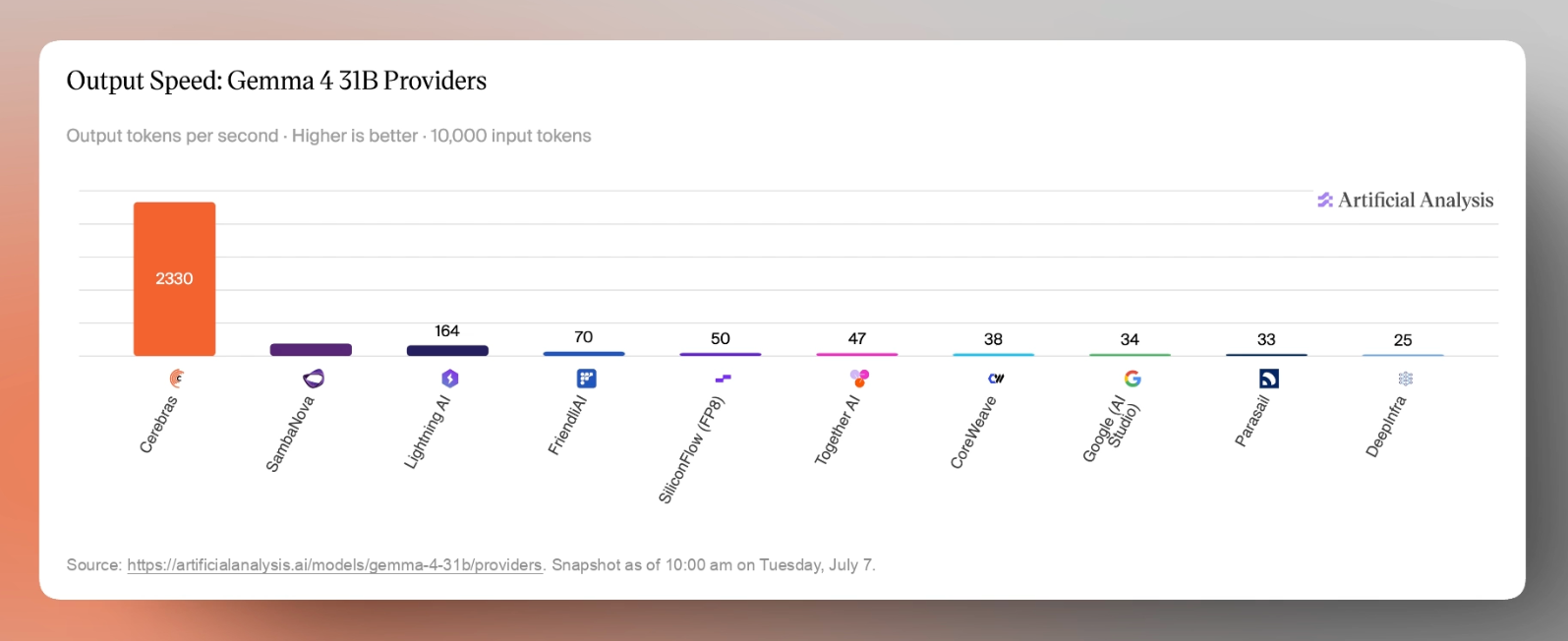
Cerebras のスペック:
Gemma 4 の主要特徴
- 31B デンシモデル:全パラメータが 307 億個あり、推論のたびにすべてのパラメータが活用される高密度なモデルです。
- ビジョン機能搭載:OCR(光学文字認識)、ドキュメント理解、画像検索、物体検出、UI 解析、動画フレーム分析など、テキストと画像の入力を両方サポートします。
- 131K コンテキストウィンドウ:長い文書や大量のバッチ処理、エージェントのトレース、多段階のワークフローを扱えます。
- 140 以上の言語対応:グローバルなエンタープライズおよび消費者向けアプリケーションでの多言語利用に最適化されています。
- インストラクションチューニング済み:プロンプトの理解、チャット、構造化された JSON の出力、システム指示、関数呼び出し、エージェントワークフローへの対応を目的に調整されています。
では、これらの機能が実際の性能としてどう発揮されるかが大きな疑問点です。Artificial Analysis によると、Gemma 4 は Gemma 3 26B と比較して大幅な進化を遂げ、モデル性能の主要な独立ベンチマークである Intelligence Index において、オープンウェイトモデルの中でトップクラスに位置しています。
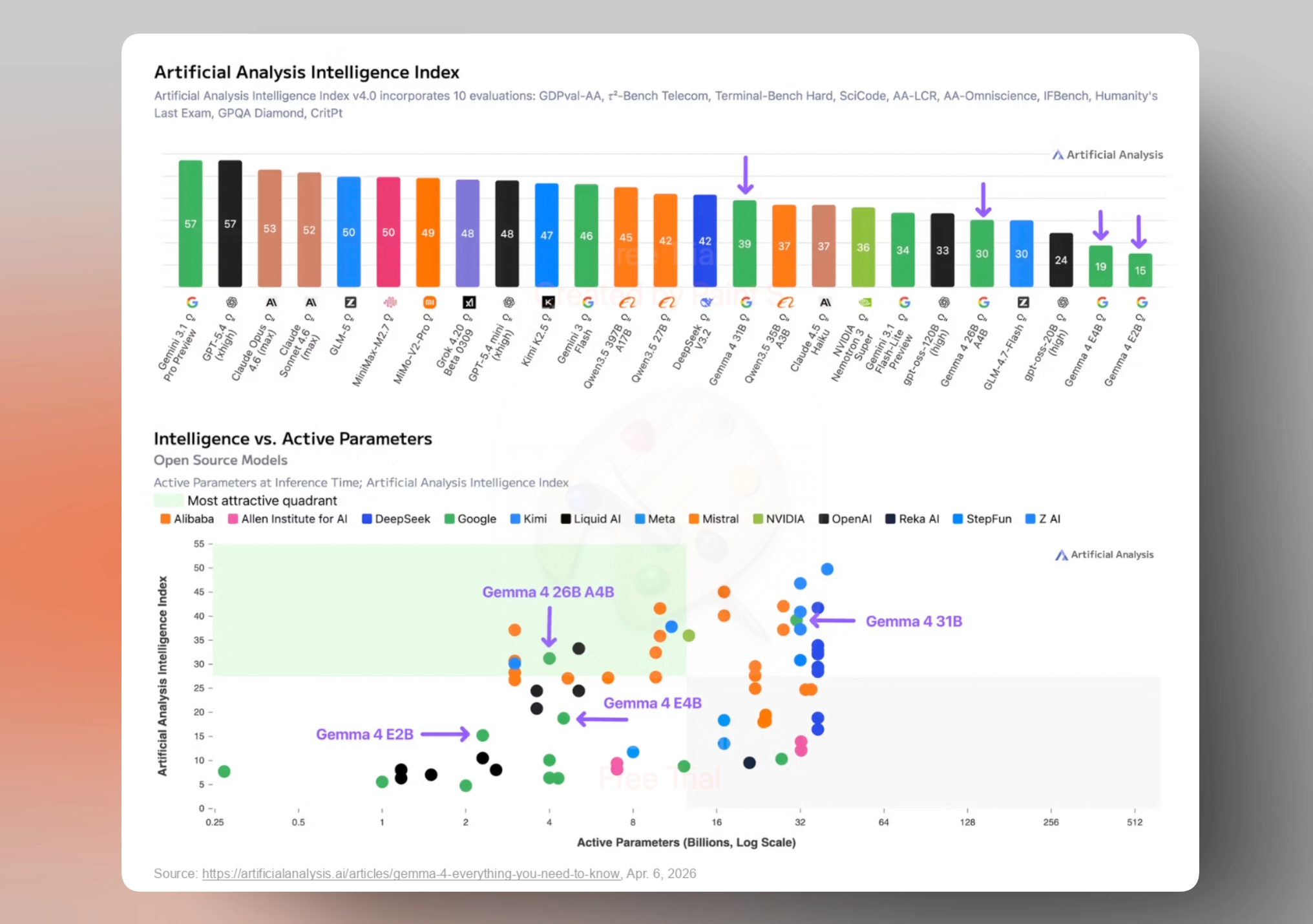
Cerebras でホストされている最初の、かつ最速のマルチモーダルモデルである Gemma 4 の画像入力機能をまずテストしないわけにはいきませんでした。
私たちが構築し、検証したマルチモーダルのユースケース:
ドキュメント分析
まずは、古典的なマルチモーダルワークフローである「並列ドキュメント分析」をテストしました。60 ページにわたる DeepSeek-V4 技術レポート をアップロードし、Gemma 4 に最初の 3 つの技術図表(グラフやチャートを含む)とその各章からの重要なポイントを解説させました。
アップロードから回答出力まで、Cerebras では1.79 秒で完了しました。一方、GPU ベースのプロバイダーでは約 25 秒を要しました。これは Cerebras で17 倍の高速化を実現したことになります。
研究者にとって、この速度は文献レビューの形そのものを変えます。モデルが分厚い論文を一つずつ解析するのを待つ必要はなく、長い技術文書を素早く問いかけ、図表を検証し、コンテキストが鮮明なうちに質問から回答へと瞬時に移動できるようになります。
画像分析
次に、画像検索をテストしました。これは人気のある GPU 推論プロバイダーとの同時比較です。このデモでは、Gemma 4 に画像フォルダへのパスを指定し、「*food*」や「*red car*」といった自然言語で検索条件を入力すると、Gemma 4 は同時に 2 つのエージェントを起動します。
左側は Cerebras で稼働する Gemma 4、右側は同じモデルを GPU で実行しています。両方の推論プロバイダーが、全く同じ 80 枚の画像セットを同じバッチ処理で、同じプロンプトでループ処理するため、残された変数は速度のみです。その差は明白です。モデルが「何倍も速い」という説明は抽象的に聞こえるかもしれませんが、実際に目撃すると話は別です。動画でその様子を直接ご覧いただきましょう。
これまで、Gemma 4 はドキュメントやチャート、画像といった静的なマルチモーダル入力のテストを行ってきました。しかし、現実世界の視覚タスクは単一のプロンプトで完結するものではありません。フレームにまたがって展開され、呼び出しが繰り返され、構造化された出力を必要とし、さらに下流のアクションへとつながります。この全体のパイプラインにおいて、高速な推論が相乗効果を生み出すことが重要です。
レンタカー損傷スキャウト
チームメイトの最近の欧州旅行や、その道中で目にしたいくつかのレンタカーに着想を得て、「Damage Scout」というレンタカーの外観点検アプリを開発しました。
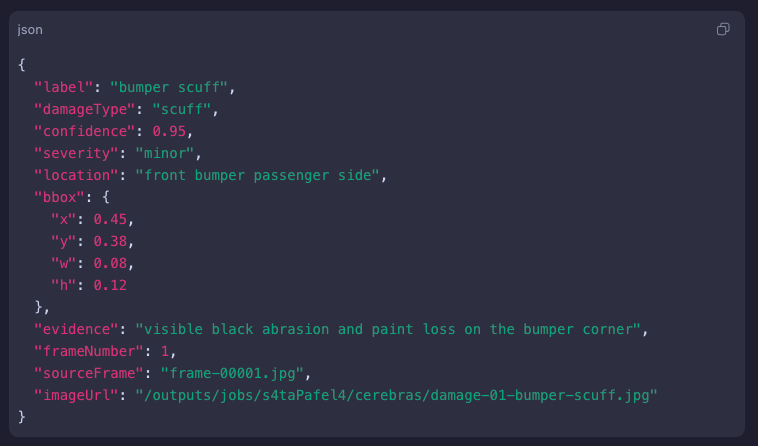
このワークフローは、レンタカーの受け渡し時に撮影されるような短い車両外観動画から始まります。アプリはその動画からフレームをサンプリングし、Gemma 4 on Cerebras に送信して、目に見える損傷の内容、その場所、そして評価に対するモデルの信頼度を記述する構造化された JSON を取得します。
その後、同じキズが複数のフレームで重複して検出されるのを排除し、最も明確な証拠となるフレームにボックスを描画。最終的にレビュー可能な損傷レポートを生成し、次の工程へ引き渡すことができます。これら一連の処理は、瞬く間に完了します。
元の動画は 60fps で撮影されていたため、SUV の周囲をカメラが移動する間、2 秒ごとに 1 フレームずつサンプリングしました。その結果、34 秒間の録画から 17 フレームが抽出されました。
以下は、Cerebras WSE-3 ウェーハ上で実行した直近のテスト結果の一例です。パイプラインが進むにつれて、注釈付きフレームがほぼ即座に返却され、目に見える損傷がラベル付けとボックス描画で示されました。
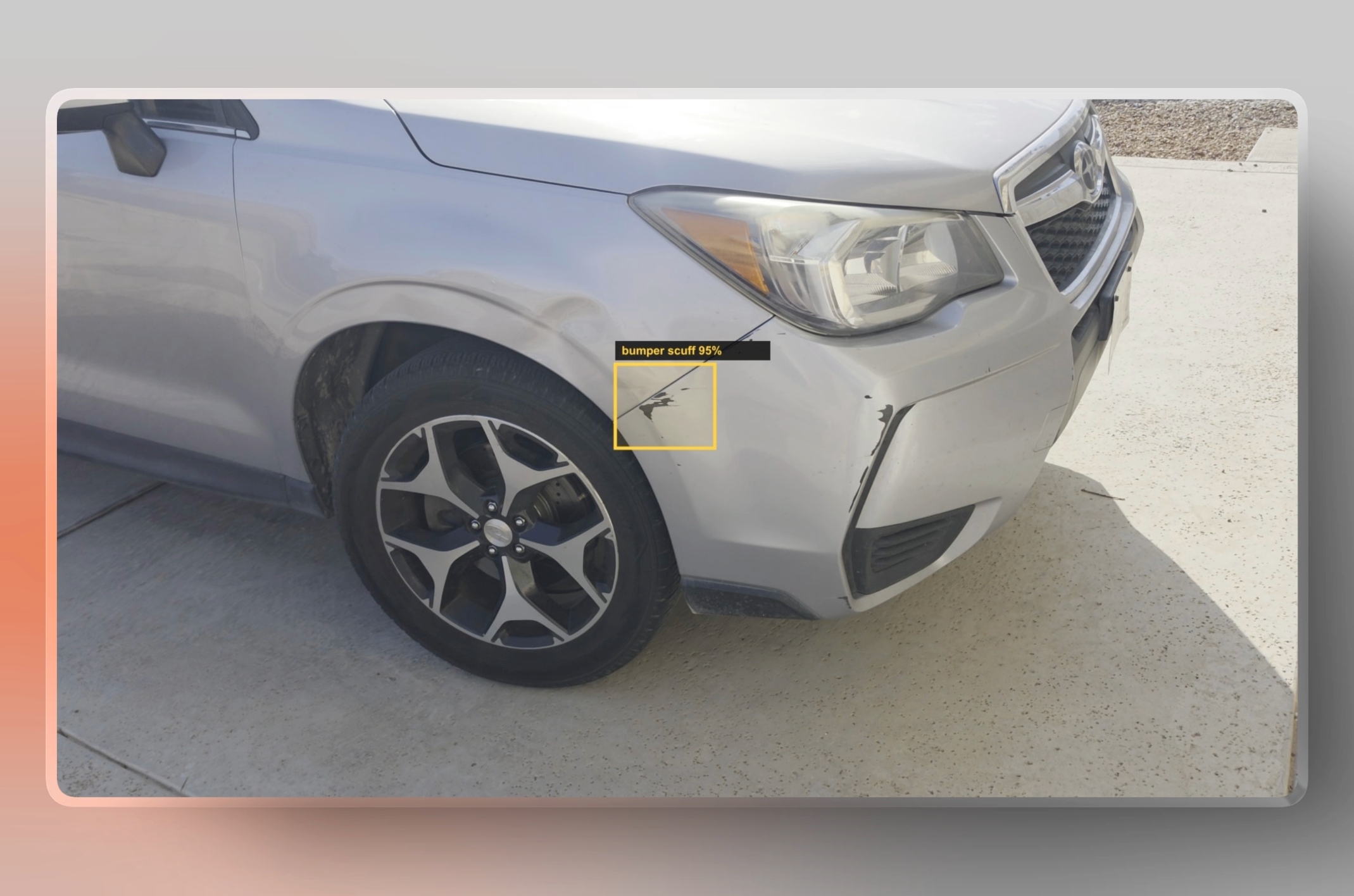
画像に輪郭を描くため、Gemma 4 の構造化出力機能を活用し、JavaScript で画像上のバウンディングボックスを生成しました。3 枚の画像を一度に処理するバッチあたり平均 300 ミリ秒で完了します。17 フレーム分の全データを開始から終了までわずか 5 秒で処理・注釈付けすることができました。
並列デモを視聴すれば、レイテンシの差が一目でわかります。同じGemma 4 31Bモデルを提供する一般的なGPUプロバイダと並べて実行している様子をご覧ください。結果は自明です。同一のリクエスト、同一の録画条件で比較すると、約17倍高速でした。
これらのデモを通じて得られた教訓は明確です。Cerebras上のGemma 4は、マルチモーダルワークフローを対話的に感じさせるのに十分な速度を持っていましたが、推論速度そのものが結果のすべてではありません。この体験が成功したのは、周囲のシステムも高速化のために設計されていたからです。プロンプト形式、画像処理、バッチ処理、構造化出力、そしてツールオーケストレーションなど、あらゆる要素が重要でした。
これらの教訓は、Cerebras上でGemma 4を実際のマルチモーダルアプリケーションに展開する開発者にとって、実践的な出発点となりました。
私たちが学んだこと:高速なマルチモーダルアプリのための7つのヒント
Gemma 4の性能を最大限引き出すには、推論エンドポイントだけでなく、アプリケーション全体に速度設計を組み込む必要があります。
公式のチャットテンプレートを使用してください。Gemma 4 は、標準的なシステム、ユーザー、アシスタント/モデルのターンと、画像・音声・思考・ツール・tool_calls・tool_responses の適切なフォーマットを前提としています。この構造が正しく処理されれば、モデルは非常に信頼性が高まります。逆に、特にエージェントワークフローにおいて手動で誤った実装を行うと、モデル自体の失敗のように見えるものの、実際にはハッチング(利用環境)に起因する問題が発生し、推論品質が低下します。
生成パラメータは Google が推奨するデフォルト値から始めましょう。今回の生成では温度を 1.0、top_p を 0.95 に設定しました。これにより、ドキュメント分析や画像検索、動画フレーム解析といった特定のワークフロー向けに調整を行う前に、堅牢なベースラインを確保できました。
思考モードは意図的に有効化してください。推論が重要なワークフローでは思考モードが役立ちますが、すべてのケースでデフォルトとして追加すべきではありません。公式ドキュメントによると、システム指示に enable_thinking: true を記述することで有効化でき、他のシステム指示やツール定義と1 つのシステムターンにまとめた場合に最も効果が発揮されます。
多回対話の履歴は整理して保ってください。多回対話型エージェントでは、通常の会話履歴から生の思考プロセスを削除する必要がありますが、必要な場合は tool_call シーケンス中のみ保持します。長時間稼働するエージェントの場合、過去の推論を要約し、その要約を通常のテキストとしてフィードバックする方が望ましいです。これにより、生きた思考連鎖の繰り返し注入や、推論ループの発生を防ぐことができます。
マルチモーダルプロンプトでは、画像をテキストの前に配置してください。プロンプトの構成は重要です。画像入力はテキスト指示よりも前に来るべきであり、視覚トークンの予算はタスクに合わせて調整する必要があります。画像検索や分類には比較的低い解像度で十分ですが、文書解析、チャートの理解、フレーム単位の検査では、より高い解像度と多くの視覚トークンが必要になります。
長いコンテキストは、入力が構造化されている場合に最も効果を発揮します。巨大なコンテキストウィンドウは強力ですが、魔法のようなものではありません。131K のコンテキストウィンドウがあっても、完璧な情報検索ができるとは限りません。文書分析や企業ワークフローでは、タスクを構造化し、引用や抽出された証拠を要求し、必要に応じてチャンク(分割)を行い、出力を検証することが重要です。
ツールループはシンプルで明確に保ちましょう。ワークフローでツールを使用する場合、ループは清潔に保つ必要があります。モデルが推論して tool_call を発行し、アプリケーションがそれを実行し、その後 tool_response を返してモデルが継続する。この構造により、オーケストレーションのオーバーヘッドに速度を奪われることなく、アプリケーション全体で高速性を維持できます。
結論はシンプルです。Gemma 4 は高速ですが、最高の結果を得るには、アプリケーション全体がこの速度を維持できることが不可欠です。クリーンなテンプレート、明確なプロンプト、意図的な推論、構造化された tool_call、そして適切なマルチモーダル設定こそが、生来の推論速度を実感できるインタラクティブなワークフローへと変える鍵となります。
開発を始める
重要なのは、トークンを高速に出力できることだけではありません。低遅延のマルチモーダル推論が可能になることで、開発者が設計できるものの範囲そのものが変わります。
長い待ち時間やプログレスバー、バッチ処理に依存するのではなく、リアルタイムフィードバック、迅速な反復、そして継続的な対話を軸にしたアプリケーションを構築できるようになります。
この変化は、全く異なる種類の製品体験を生み出します。何を、どのように作るかという根本が変わるのです。
開発者にとっては、より野心的な製品パターンが実現可能になります。より豊かなインタラクション、頻繁なモデル呼び出し、緊密なフィードバックループ、そしてデフォルトで対話的なワークフローです。
速度は単なるパフォーマンスの数値ではなく、体験を支える基盤となります。
Gemma 4 は本日、Cerebras で利用可能です。cloud.cerebras.ai からアクセスして開発を始めましょう。作ったものを共有し、X(旧 Twitter)で @cerebras をタグ付けしてください。
—————————————-
*デザインサポート、校正、そして貴重なレビューフィードバックを提供してくれた Halley Chang 氏、Tin Hoang 氏、Manny Monge 氏、Sneha Khanvilkar 氏に特別感謝します。*
原文を表示
We spent a week building multimodal use cases with Gemma 4, running on Cerebras at ~2,300 tok/s. Here are some of the things we built and our learnings.
For the first time, an open-weight multimodal model has broken the 2,000 tok/s barrier. Meet Gemma 4 31B on Cerebras.
As Google’s latest open-weight multimodal model, Gemma 4 brings vision, reasoning, long context, chain-of-thought, function calling, and strong agentic capabilities together in this 31B dense model.
Running on Cerebras at ~2,300 tokens/sec, it makes real-time multimodal agents, iterative reasoning, and interactive workflows practical.
The specs on Cerebras:
- 31B dense model - 30.7B-parameter dense model, meaning all parameters participate in each inference pass.
- Vision-capable - Supports text + image input for OCR, document understanding, image search, object detection, UI understanding, and video-frame analysis.
- 131K context window - Handles long documents, large batches, agent traces, and multi-step workflows.
- 140+ languages - Built for multilingual use cases across global enterprise and consumer applications.
- Instruction-tuned - Optimized for following prompts, chat, structured JSON outputs, system instructions, function calling, and agentic workflows.
The bigger question is: how well those capabilities translate into real performance? According to Artificial Analysis, Gemma 4 represents a major jump over Gemma 3 26B, and ranks among the strongest open-weight models in its Intelligence Index, one of the leading independent benchmarks for model performance.
As the the first and fastest multimodal model hosted on Cerebras, we couldn't resist putting Gemma 4's image inputs to the test first.
Multimodality use cases we built and tested:
Document Analysis
First, we tested a classic multimodal workflow: side-by-side document analysis. We uploaded the 60-page DeepSeek-V4 technical report and asked Gemma 4 to explain the first three technical figures, including the graphics, charts, and key takeaways from each.
From upload to output, the full response returned in 1.79 seconds on Cerebras, compared to almost 25 seconds on GPU providers, a 17× speedup on Cerebras.
For researchers, this kind of speed changes the shape of literature review. Instead of waiting on a model to parse dense papers one at a time, they can quickly interrogate long technical documents, inspect figures, and move from question to answer while the context is still fresh.
Image Analysis
Next, we tested Image search, side by side against a popular GPU inference provider. For this demo, we point Gemma 4 to a folder of images, typed what we were looking for in plain language, like ’*food’* or *a ‘red car*,’ and Gemma 4 starts two agents at the same time. The left side runs Gemma 4 on Cerebras, while the right side runs the same model on GPUs.
Both inference providers loop over the exact same set of 80 images, batched the same way, with the same prompt, so the only variable left is speed. The difference is not subtle. Reading that a model is many times faster is abstract, but seeing it live is not. We’ll let the video do the talking.
So far, we had tested Gemma 4 on static multimodal inputs: documents, charts, and images. But many real-world visual tasks are not single prompts. They unfold across frames, repeated calls, structured outputs, and downstream actions, where fast inference compounds across the whole pipeline.
Rental Car Damage Scout
Inspired by our teammate's recent Euro summer trip and a few rental cars along the way, we built Damage Scout, a rental car walk-around inspector.
The workflow starts with a short vehicle walk-around video, the kind someone might record at rental pickup or drop-off. The app samples frames from the video, sends them to Gemma 4 on Cerebras, and asks for structured JSON describing any visible damage, its location, and the model’s confidence in its assessment.
From there, it deduplicates repeat sightings of the same scratch across frames, draws boxes on the clearest evidence frames, and assembles a damage report that can be reviewed or passed into the next step. All done within the time that you can blink.
Because the original video was recorded at 60fps, we sampled one frame every two seconds as the camera moved around the SUV. That produced 17 frames from a 34-second recording.
Here’s a sample result from a recent run we ran on Cerebras WSE-3 Wafers. Annotated frames started returning almost immediately, with visible damage labeled and boxed as the pipeline progressed.
To draw the outlines on the images, we used Gemma 4’s structured outputs to generate the bounding boxes over the images using Javascript. Each batch of three images took an average of 300ms to process. All 17 frames were processed and annotated in just 5 seconds, start to finish.
The full side-by-side demo makes the latency difference obvious. Watch on as we run it side-by-side against a popular GPU provider serving the same Gemma 4 31B model. The results speak for themselves. Same request, same recording, ~17x faster.
Across these demos, the lesson became clear: Gemma 4 on Cerebras was fast enough to make multimodal workflows feel interactive, but raw inference speed was only part of the result. The experience worked because the surrounding system was designed for speed too: prompt format, image handling, batching, structured outputs, and tool orchestration all mattered.
Those lessons became a practical starting point for developers deploying Gemma 4 on Cerebras in real multimodal applications.
What we learned: 7 tips for fast multimodal apps
To get the most out of Gemma 4, speed has to be designed into the whole application, not just the model endpoint.
- Use the official chat template. Gemma 4 expects standard system, user, and assistant / model turns, along with the correct formatting for images, audio, thinking, tools, tool_calls, and tool_responses. When that structure is handled correctly, the model becomes much more reliable. When it is hand-rolled incorrectly, especially in agent workflows, reasoning quality can degrade in ways that look like model failure but are really harness issues.
- Start with Google’s recommended generation defaults. For generation, we used temperature: 1.0 and top_p: 0.95. That gave us a strong baseline before tuning for specific workflows like document analysis, image search, and video-frame analysis.
- Enable thinking mode intentionally. Thinking mode can help with reasoning-heavy workflows, but it should not be added everywhere by default. The official docs activate it with <|think|> in the system instruction, and it works best when consolidated with other system instructions and tool definitions in a single system turn.
- Keep multi-turn history clean. For multi-turn agents, raw thoughts should be stripped from normal conversation history, but preserved during a tool_call sequence when needed. For long-running agents, it is better to summarize previous reasoning and feed that summary back as normal text, instead of repeatedly injecting raw chain-of-thought and creating reasoning loops.
- Put images before text in multimodal prompts. Prompt structure matters. We found that image inputs should come before the text instruction, and the visual token budget should match the task. Image search and classification can often use lower visual detail, while document parsing, chart understanding, and frame-level inspection benefit from higher resolution and more visual tokens.
- Long context works best when the input is structured. A large context window is powerful, but not magic. Even with a 131K context window, we learned not to assume perfect retrieval. For document analysis and enterprise workflows, it is better to structure the task, ask for citations or extracted evidence, chunk when needed, and validate the output.
- Make the tool loop simple and explicit. When a workflow uses tools, the loop should stay clean: the model reasons, emits a tool_call, the application executes it, and then returns a tool_response for the model to continue. That structure helps preserve speed across the whole application instead of losing it in orchestration overhead.
The takeaway is simple: Gemma 4 is fast, but the best results come when the whole application preserves that speed. Clean templates, clear prompts, intentional reasoning, structured tool_calls, and the right multimodal settings are what turn raw inference speed into workflows that feel genuinely interactive.
Start building
The larger point is not just that you can print tokens faster. Rather, it is that low-latency multimodal inference changes what developers can reasonably design. Instead of building around long waits, progress bars, and batch jobs, you can build around real-time feedback, rapid iteration, and continuous interaction.
That shift opens up a different kind of product experience. It changes what and how you can build.
For developers, that opens up more ambitious product patterns: richer interactions, more frequent model calls, tighter feedback loops, and workflows that feel interactive by default. Speed becomes a foundation for the experience, not just a performance claim.
Gemma 4 is available today on Cerebras atcloud.cerebras.ai. Build with it, share what you make, and tag @cerebras on X.
—————————————-
*Special thanks to Halley Chang, Tin Hoang, Manny Monge, and Sneha Khanvilkar for their design support, copyediting, and thoughtful review feedback.*
今日のまとめ
AIデイリーブリーフで今日の重要ニュースをまとめ読み