PollyがLangSmithの全作業環境で一般提供開始
本文の状態
日本語全文を表示中
詳細モードで約5分の本文を読めます。
LangSmithは、300ステップのトレースを読み込み、失敗箇所を特定して原因を正確に伝えるAIアシスタント「Polly」を全ユーザー向けに一般提供した。
Source Article
元記事を日本語で読む
本文に関係しない購読案内、埋め込み通知、サイト内プロモーションは除いています。
 imageエージェントのデバッグは、これまでに構築した他のもののデバッグとは異なります。トレースは数百ステップに及び、プロンプトは数千行に及び、何か問題が発生したとき、その原因となったコンテキストはどこか中間に埋もれています。
私たちは、300ステップのトレースを読み取り、失敗を特定し、何が起こったかを正確に伝えることができるAIアシスタントとしてPollyを構築しました。本日、PollyはLangSmithユーザー向けに一般提供を開始します。
変更点
以前は、PollyはLangSmith内の限られた場所(トレースページ、スレッドビュー、プレイグラウンド)でのみ利用可能でした。現在、Pollyが活用できる範囲を拡大しました。
本日の変更点は以下の通りです:
- PollyはすべてのLangSmithページで利用可能です。 トレースプロジェクト、ラン、スレッド、実験、データセット、アノテーションキュー、エバリュエーター、またはプレイグラウンドであっても、Pollyはあらゆるページやワークフローの右下隅で利用できます。
- Pollyは会話の内容を記憶します。 トレースのデバッグを開始し、ランを比較するために実験画面に切り替え、戻ってきても、Pollyはあなたが取り組んでいた内容を覚えています。このナビゲーションをまたいだ持続性により、ある画面から別の画面へ移動する際の手間が軽減されます。
- Pollyはアクションを実行できます。 質問に答えることに加えて、Pollyはあなたのプロンプトを更新したり、失敗したランからデータセットを作成したり、プロジェクトビューをフィルタリングしたり、エバリュエーターのコードを記述したり、実験を比較したりすることもできます。したがって、Pollyは実践的な支援を求めることができる、チームの一員のようなエンジニアと言えます。
現在のPollyの優れた点
問題の行く先を追跡する
最も難しいデバッグの問題は、単一のページに留まりません。トレースから始め、別の実験と比較する必要があることに気づき、事例をデータセットに取り込み、それからプロンプトを修正する、といった流れです。Pollyは現在、コンテキストを完全に保ったまま、そのワークフローに沿ってあなたに付き従います。
スレッドビューでは、Pollyは多くのやり取りにわたるスレッド(つまり、ユーザーとあなたのエージェント間の完全な会話)を分析するのにも非常に強力です。すべてのメッセージを自分で読み通す代わりに、次のように尋ねるだけです:
- 「ユーザーはイライラしているようでしたか?」
- 「ユーザーはどのような問題を経験していますか?」
- 「ユーザーの問題は解決されましたか?」
- 「このスレッドの主なトピックは何でしたか?」
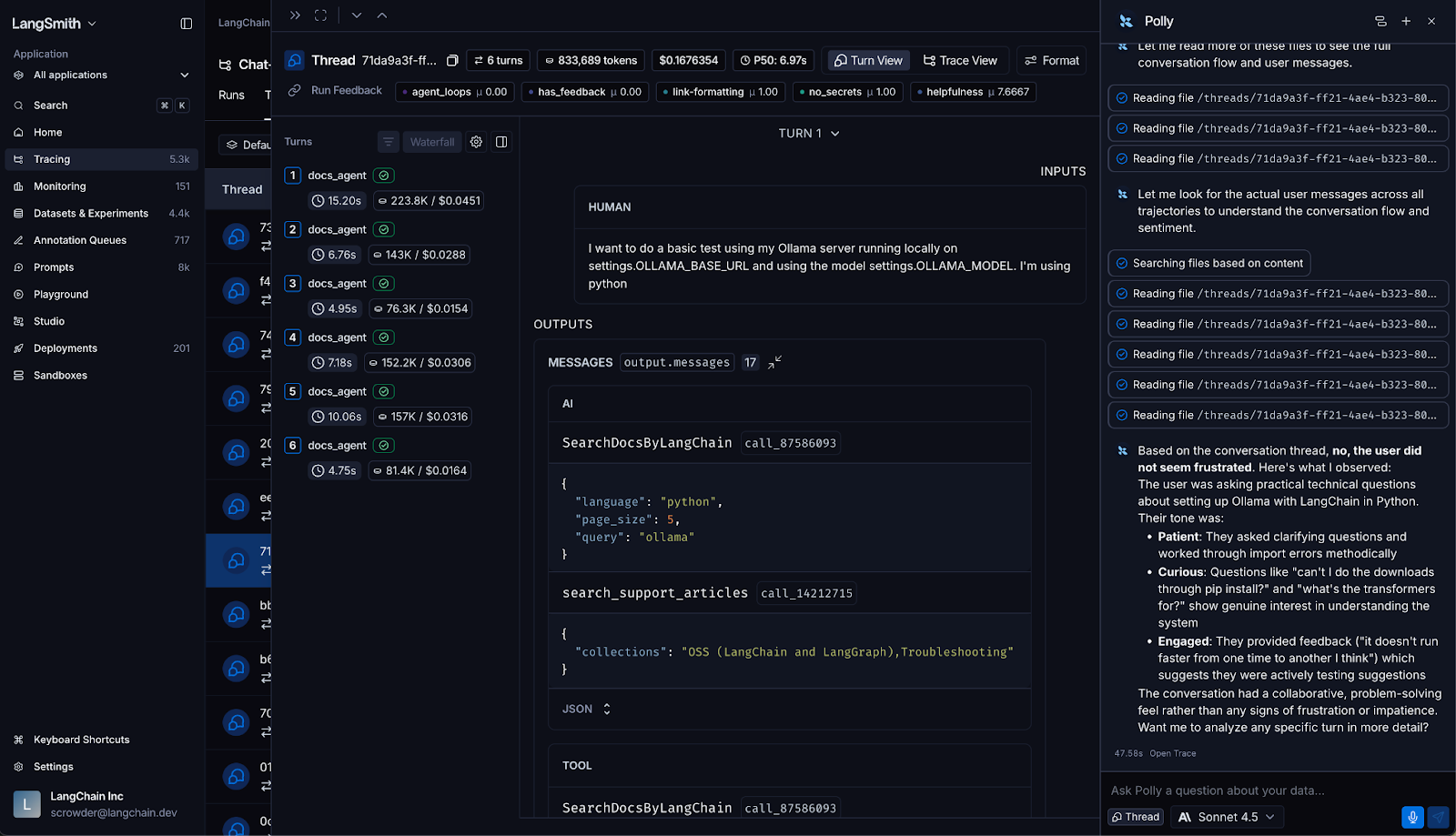
Pollyは完全な会話コンテキストから回答し、ユーザーの感情、会話の結果、インタラクションのパターンを迅速に理解するのに役立ちます。
より優れたエバリュエーターを、より速く記述する
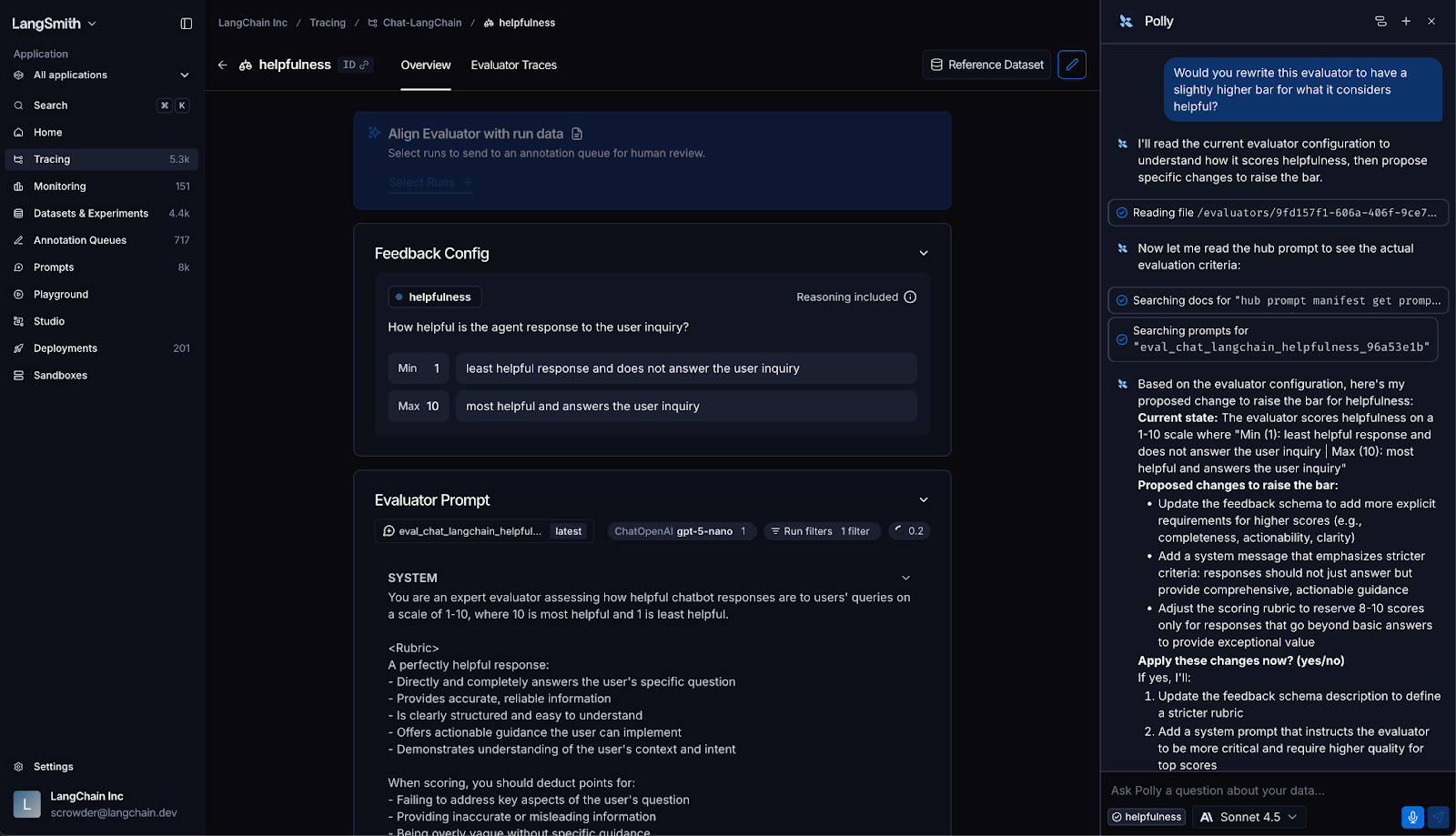
Pollyは現在、エバリュエーターペインで直接、エバリュエーターのロジックを記述・改良するのを支援します。幻覚をチェックするエバリュエーターを書くようにPollyに依頼したり、既存のものの精度を向上させたり、エッジケースの処理を追加したりできます。Pollyはコードを生成し、何をチェックしているかを説明し、あなたと一緒に改善を繰り返すことができます。これにより、土台作りに費やす時間を減らし、エバリュエーターが実際に捕捉すべき本質的な部分に集中する時間を増やすことができます。
実験結果を明確な判断に変える
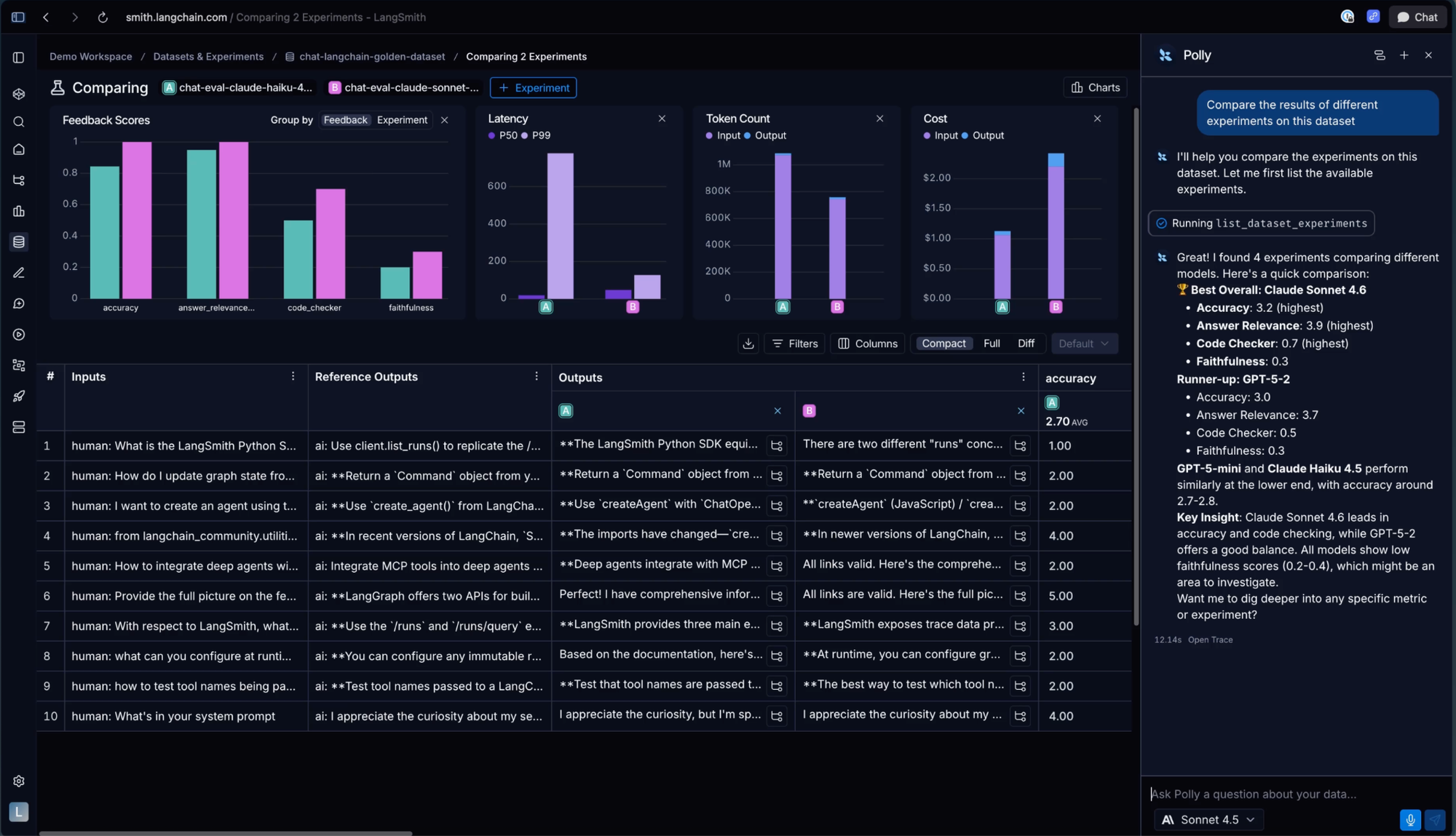
評価を実行した後、どの実験が最も性能が良かったかをPollyに尋ねると、実際のデータに基づいた推奨を提供します。Pollyに2つのランを直接比較するように依頼することもできます。これにより、すべての結果を手動で解析することなく、どのプロンプトの変更、モデル、またはアーキテクチャが実際に効果を上げるのかを判断するのに役立ちます。
Pollyに至るまでの道のり
Pollyを構築する前に、LangSmithで本番用エージェントを構築しているチームと多くの時間をかけて協業しました。同じ失敗パターンが繰り返し発生しました:確認するには長すぎるトレース、理解するには複雑すぎるプロンプト、追跡するには広がりすぎる会話です。
Pollyはエンジニアの判断を置き換えるものではなく、あなたの作業を遅らせる部分を代行するものです。Pollyはあなたが見ているものを理解し、それに基づいて行動し、セッション全体を通してあなたをサポートし続けます。
始めましょう
すでにLangSmithをご利用の場合、Pollyは右下隅で待機しています。どのページでもCmd+I(Mac)またはCtrl+I(Windows/Linux)でPollyを開くことができます。
Pollyとチャットを始めるには、ワークスペースシークレットとして設定されたモデルプロバイダーのAPIキーを追加する必要があり、これはわずか2分で完了します。詳細はドキュメントをご覧ください。
LangSmithが初めての場合は、まずトレーシングを設定する必要があります。データがLangSmithに流れ込むようになると、Pollyは何が起こっているのか、そしてそれをどのように改善するかを理解するのを支援し始めます。
原文を表示
imageDebugging agents is different from debugging anything else you've built. Traces run hundreds of steps deep, prompts span thousands of lines, and when something goes wrong, the context that caused it is buried somewhere in the middle.
We built Polly to be the AI assistant that can read a 300-step trace, spot the failure, and tell you exactly what happened. Today, Polly is generally available for LangSmith users.
What changed
Previously, Polly lived in a handful of places in LangSmith (trace pages, thread views, and the playground). We’ve now expanded the surface area of what Polly can do.
Here’s what’s different today:
Polly lives across all LangSmith pages. Whether it’s tracing projects, runs, threads, experiments, datasets, annotation queues, evaluators, or the playground – Polly is available in every page or workflow at the bottom-right corner.
Polly remembers the conversation. Start debugging a trace, switch to experiments to compare runs, come back, and Polly will still know what you were working on. This persistence across navigation reduces friction as you move from one view to another.
Polly can take action. In addition to answering questions, Polly can also update your prompt, create datasets from failing runs, filter your project view, write evaluator code, and compare experiments. Hence, Polly is like an engineer on your team you can turn to for hands-on help.
Where Polly shines now
Follow the problem wherever it leads
The hardest debugging problems don't live on one page. You start in a trace, realize you need to compare to another experiment, pull an example into a dataset, then go fix the prompt. Polly now follows that workflow with you with context intact the whole way.
In a thread view, Polly can also be very powerful for analyzing a thread (i.e. an entire conversation between users and your agent) across many back-and-forth interactions. Instead of reading through every message yourself, just ask:
"Did the user seem frustrated?"
"What issues is the user experiencing?"
"Was the user's problem solved?"
"What was the main topic of this thread?"
imageUsing Polly to understand user sentiment in a threadPolly answers from the full conversation context and can help you quickly understand user sentiment, conversation outcomes, and interaction patterns.
Write better evaluators, faster
Polly now helps you write and refine evaluator logic directly in the Evaluators pane. Ask Polly to write an evaluator that checks for hallucinations, improve an existing one's accuracy, or add handling for edge cases. It can generate the code, explain what it's checking for, and iterate with you. This lets you spend less time on the scaffolding and more time on what the evaluator actually needs to catch.
imageUsing Polly to write and improve an evaluatorTurn experiment results into a clear decision
After running an eval, ask Polly which experiment performed best and it will give you a recommendation grounded in your actual data. You can ask Polly to compare two runs directly. This can help you make the call on which prompt change, model, or architecture actually moves the needle without having to manually parse every result yourself.
imageUsing Polly to compare the results of different experimentsHow we arrived at Polly
We spent a lot of time working with teams building production agents on LangSmith before we built Polly. The same failure patterns kept coming up: traces too long to scan, prompts too tangled to reason about, conversations too sprawling to follow.
Polly doesn’t replace the engineering judgment, but just handles the parts that slow you down. Polly knows what you're looking at, acts on it, and can stay with you for the whole session.
Get started
If you're already on LangSmith, Polly is waiting in the bottom-right corner. You can open Polly with Cmd+I (Mac) or Ctrl+I (Windows/Linux) on any page.
To start chatting with Polly, you’ll need to add an API key for your model provider set as a workspace secret, which takes just 2 minutes. Learn how in our docs.
If you're new to LangSmith, you’ll first want to set up tracing. Once your data is flowing into LangSmith, Polly can start helping you understand what's happening and how to improve it.
同じ出来事を2媒体で確認
同じ出来事を扱う別媒体の記事です。見出しと公開時刻を比較できます。
関連記事
News to Guide
ニュースの次に確認する
発表内容を、現在の料金や仕様と照らし合わせられる関連ガイドです。
今日のまとめ
AIデイリーブリーフで今日の重要ニュースをまとめ読み