Claude Codeの使用:セッション管理と100万トークンのコンテキスト
本文の状態
日本語全文を表示中
詳細モードで約1分の本文を読めます。
同じ出来事の情報源
6媒体で確認
Claude Blog · InfoQ · AWS Machine Learning Blog · TechCrunch AI · Simon Willison Blog · The Decoder
各社の報じ方を比較 ↓Anthropic社が、Claude Codeのセッション管理機能と100万トークンのコンテキスト長を発表した。これにより、開発者は長期間の対話と大規模なコードベースの処理が可能になる。
Continue in AI NEW LAB
このニュースを、実務の判断につなげる
AI NEW LABで、試したことや先に確認したい条件を共有できます。まずはログインなしで読めます。
AI NEW LABで論点を見るSource Article
元記事を日本語で読む
本文に関係しない購読案内、埋め込み通知、サイト内プロモーションは除いています。
前回の記事では、Claude Codeの基本的なセッション管理機能について説明しました。今回は、より高度な機能である100万トークンのコンテキストウィンドウの活用方法に焦点を当てます。
100万トークンのコンテキストウィンドウは、大規模なコードベースや長文ドキュメントの処理に特に有効です。この機能を最大限に活用するためには、適切なセッション構造とデータの整理が不可欠です。
まず、プロジェクト全体のアーキテクチャを理解することが重要です。大規模なコードベースを扱う場合、関連するファイルを論理的なグループに分けて、セッション内で効率的にナビゲートできるようにします。
次に、コンテキスト管理のベストプラクティスを紹介します。定期的に不要なコンテキストをクリアすることで、パフォーマンスを最適化できます。また、重要なコードスニペットやドキュメントへの参照をピン留めする機能も活用しましょう。
最後に、実際のユースケースとして、大規模なリファクタリングプロジェクトでのClaude Codeの活用例を紹介します。100万トークンのコンテキストを活用することで、プロジェクト全体の依存関係を把握しながら、安全かつ効率的なコード変更が可能になります。
原文を表示
Using Claude Code: session management and 1M context
How you manage sessions, context, and compaction in Claude Code shapes your results more than you might expect. Here's a practical guide to making the right call at every turn.
CategoryClaude Code
ProductClaude Code
DateApril 15, 2026
Reading time5min
ShareCopy linkhttps://claude.com/blog/using-claude-code-session-management-and-1m-context
We released /usage
What came up again and again in these calls is that there is a lot of variance in how users manage their sessions, especially with our new update to 1 million context in Claude Code.
Do you only use one session or two sessions that you keep open in a terminal? Do you start a new session with every prompt? When do you use compact, rewind or subagents? What causes a bad compact or bad session?
There’s a surprising amount of detail here that can really shape your experience with Claude Code and almost all of it comes from managing your context window.
A quick primer on context, compaction and context rot
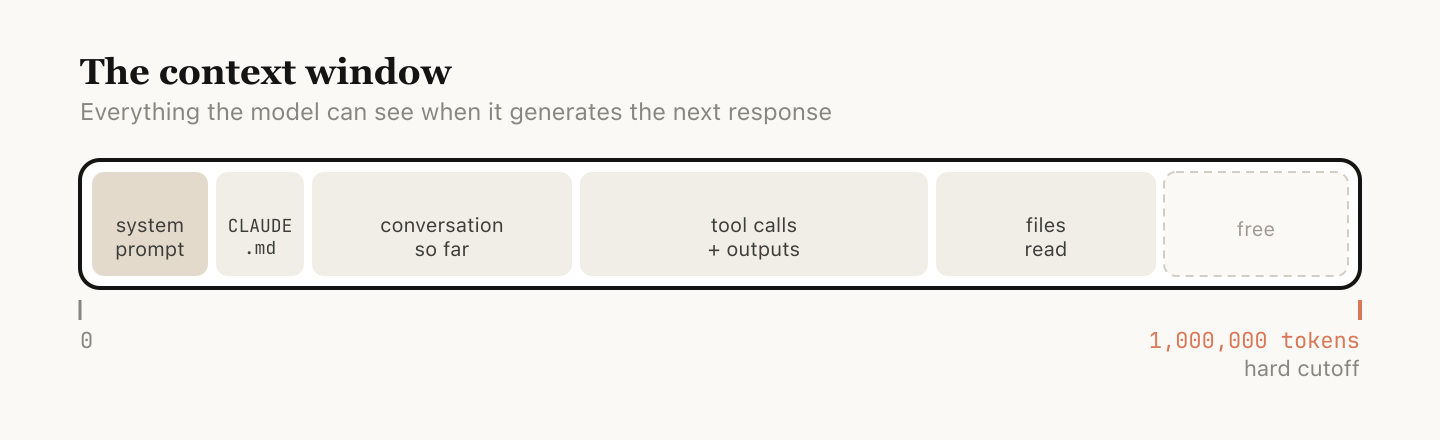
The context window is everything the model can "see" at once when generating its next response. It includes your system prompt, the conversation so far, every tool call and its output, and every file that's been read. Claude Code has a context window of one million tokens.
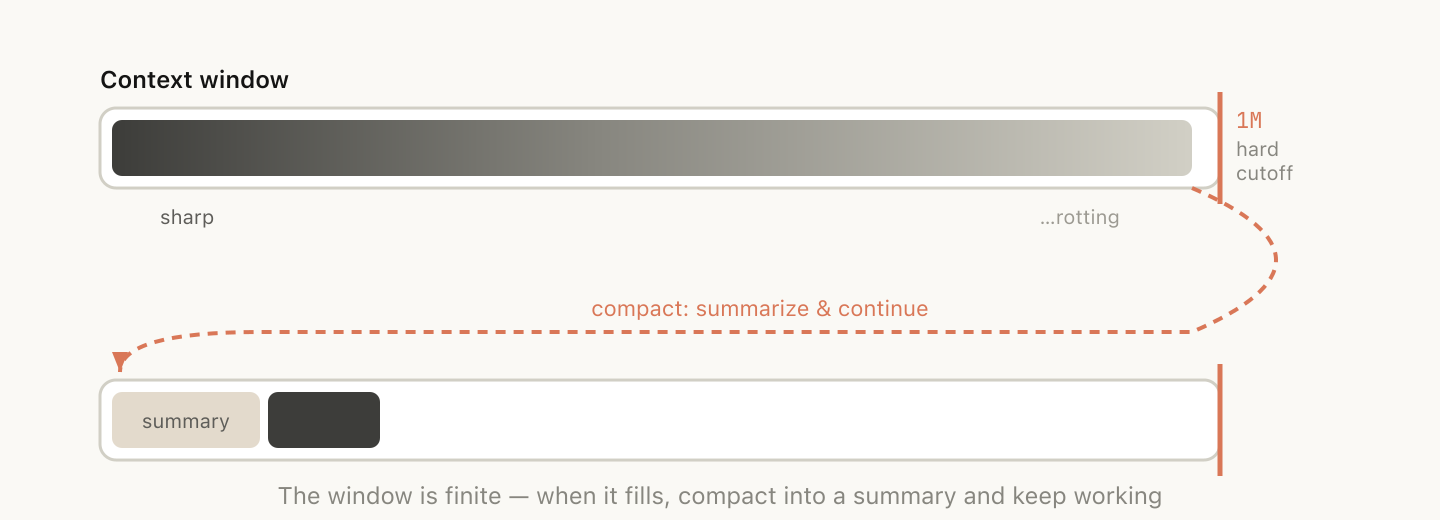
Unfortunately, using context has a slight impact on performance, which is often called context rot. Context rot is the observation that model performance degrades as context grows because attention gets spread across more tokens, and older, irrelevant content starts to distract from the current task.
Context windows are a hard cutoff, so when you’re nearing the end of the context window, the task you’ve been working on is automatically summarized into a smaller description and the model continues the work in a new context window. We call this compaction. You can also trigger compaction yourself.
Every turn as a branching point
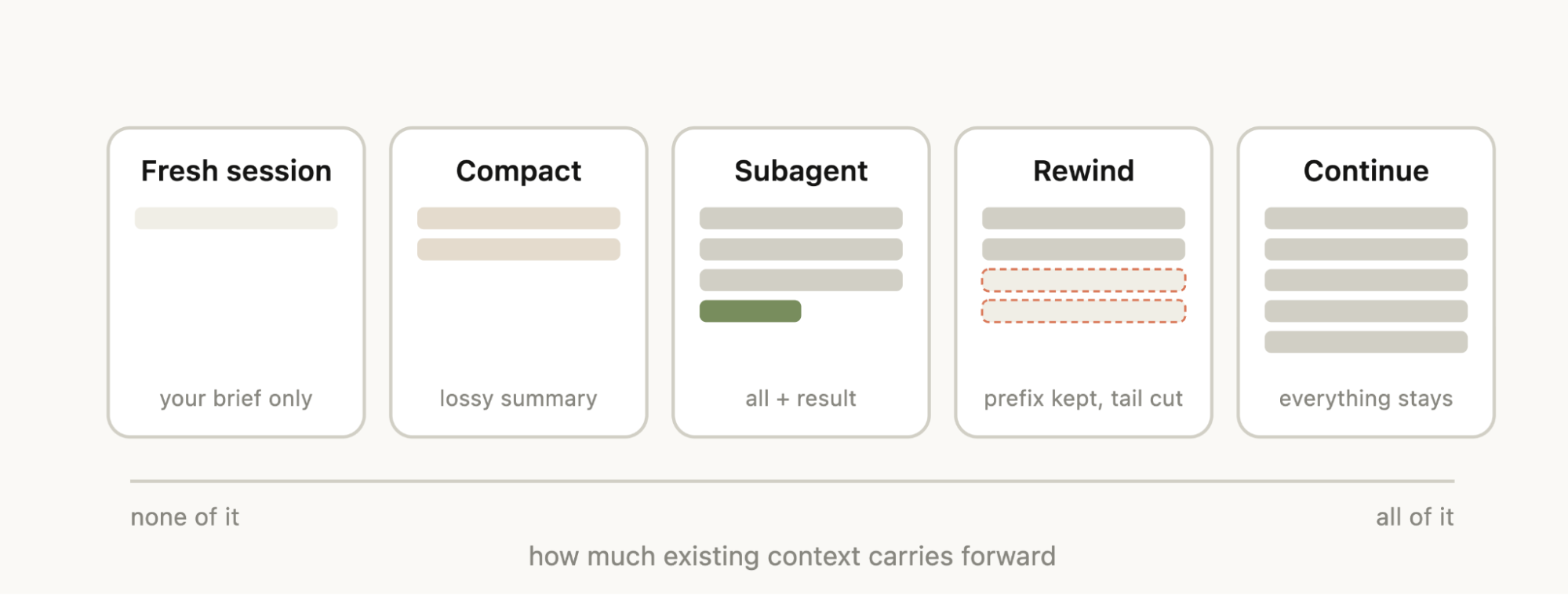
Say you've just asked Claude to do something and it's finished—you’ve now got some information in context (tool calls, tool outputs, your instructions) and you have a surprising number of options for what to do next:
Continue — send another message in the same session
Compact — summarize the session so far and keep going on top of the summary
Subagents — delegate the next chunk of work to an agent with its own clean context, and only pull its result back in
While the most natural course is just to continue, the other four options exist to help manage your context.
When to start a new session
When do you keep a long running session vs starting a new one? Our general rule of thumb is when you start a new task, you should also start a new session.
While 1M context windows mean that you can now do longer tasks more reliably, for example building a full-stack app from scratch, context rot may occur.
Sometimes you may do related tasks where some of the context is still necessary, but not always. For example, writing the documentation for a feature you just implemented. While you could start a new session, Claude would have to reread the files that you just implemented, which would be slower and more expensive.
Rewinding instead of correcting
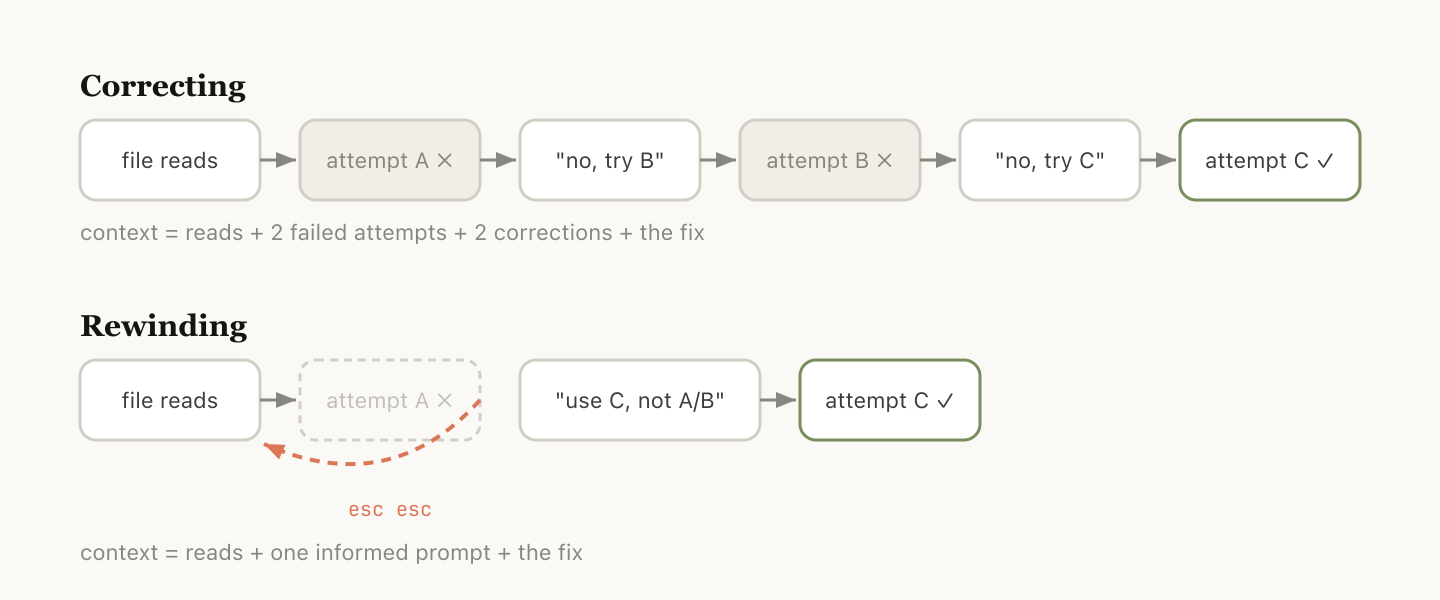
In Claude Code, double-tapping Esc (or running /rewind
Rewind is often the better approach to correction. For example, Claude reads five files, tries an approach, and it doesn't work. Your instinct may be to type "that didn't work, try X instead." But the better move may be to rewind to just after the file reads, and re-prompt with what you learned. "Don't use approach A, the foo module doesn't expose that—go straight to B."
You can also use “summarize from here” or the /rewind
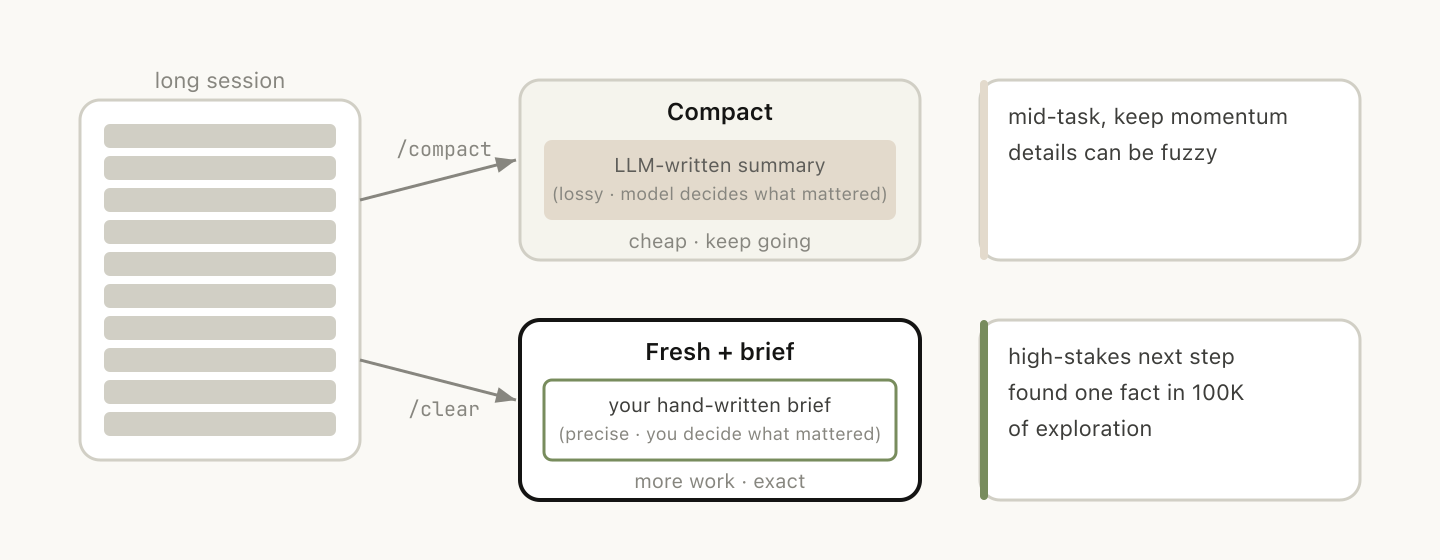
Compacting vs. launching a fresh session
Once a session gets long, you have two ways to shed extraneous context: /compact
Compact asks the model to summarize the conversation so far, then replaces the history with that summary. It's lossy, but you didn't have to write anything yourself and Claude might be more thorough in including important learnings or files. You can also steer it by passing instructions (/compact focus on the auth refactor, drop the test debugging
What causes a bad autocompact?
If you run a lot of long-running sessions, you might have noticed times in which compacting might be particularly bad. In this case we’ve often found that bad compacts can happen when the model can’t predict the direction your work is going.
In the example above, autocompact fires after a long debugging session and summarizes the investigation and your next message is "now fix that other warning we saw in bar.ts."
But because the session was focused on debugging, the other warning might have been dropped from the summary.
This is particularly difficult, because due to context rot, the model is at its least intelligent point when compacting. With one million context, you have more time to /compact proactively with a description of what you want to do.
Subagents and fresh context windows
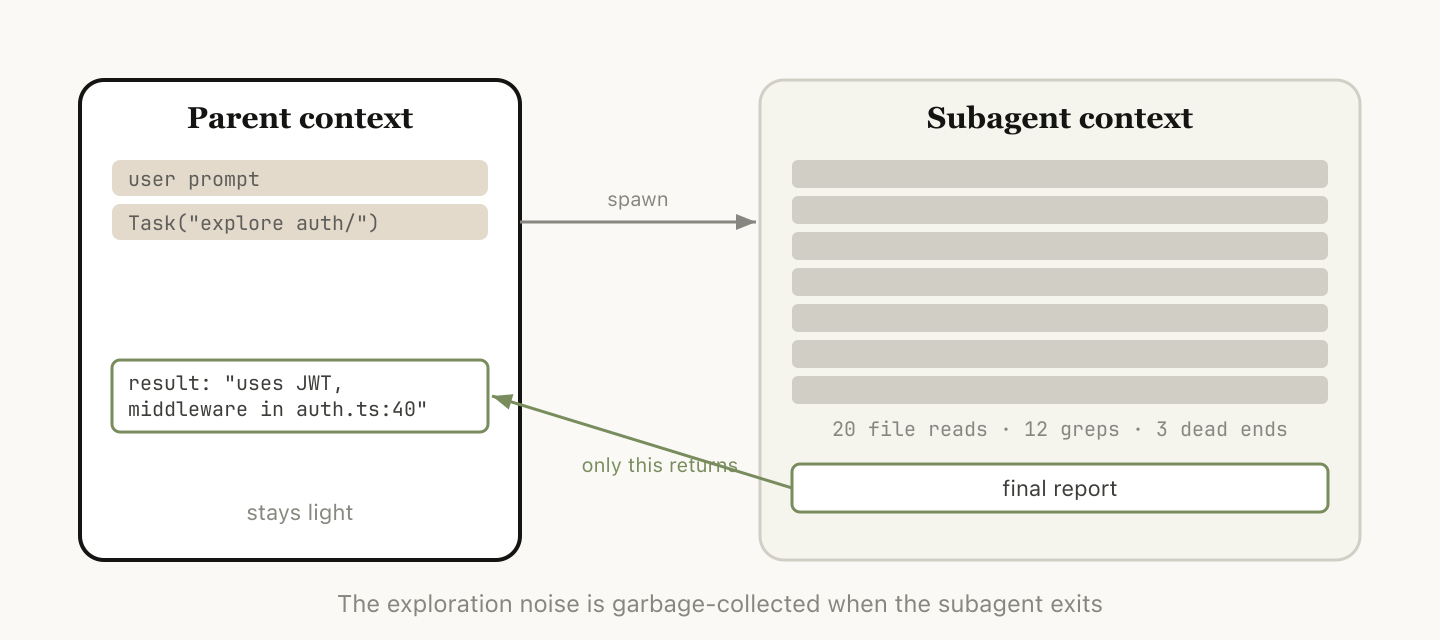
Subagents tend to work well when you know in advance that a chunk of work will produce a lot of intermediate output you won't need again.
When Claude spawns a subagent via the Agent tool, that subagent gets its own fresh context window. It can do as much work as it needs to, and then synthesize its results so only the final report comes back to the parent.
The mental test we use at Anthropic: will I need this tool output again, or just the conclusion?
While Claude Code will automatically call subagents, you may want to tell it to explicitly do this. For example, you may want to tell it to:
“Spin up a subagent to verify the result of this work based on the following spec file”
“Spin off a subagent to read through this other codebase and summarize how it implemented the auth flow, then implement it yourself in the same way”
“Spin off a subagent to write the docs on this feature based on my git changes”
Putting it together
To help you choose which context management feature to use, we put together this helpful table that outlines common situations, what tool to reach for, and why.
Consider reaching for
Same task, context is still relevant
Everything in the window is still load-bearing; don't pay to rebuild it.
Claude went down a wrong path
Rewind (double-Esc)
Keep the useful file reads, drop the failed attempt, re-prompt with what you learned.
Mid-task but the session is bloated with stale debugging/exploration
/compact <hint>
Low effort; Claude decides what mattered. Steer it with instructions if needed.
Starting a genuinely new task
Zero rot; you control exactly what carries forward.
Next step will generate lots of output you'll only need the conclusion from (codebase search, verification, doc writing)
Intermediate tool noise stays in the child's context; only the result comes back.
We look forward to seeing what you build.
Get started with Claude Code today.
About the author: Thariq Shihipar is a member of technical staff at Anthropic, working on Claude Code.
PrevPrev0/5NextNexteBook
Explore more product news and best practices for teams building with Claude.
Redesigning Claude Code on desktop for parallel agents
Claude CodeRedesigning Claude Code on desktop for parallel agentsRedesigning Claude Code on desktop for parallel agentsRedesigning Claude Code on desktop for parallel agentsRedesigning Claude Code on desktop for parallel agents  Apr 10, 2026Seeing like an agent: how we design tools in Claude Code
Claude CodeSeeing like an agent: how we design tools in Claude CodeSeeing like an agent: how we design tools in Claude CodeSeeing like an agent: how we design tools in Claude CodeSeeing like an agent: how we design tools in Claude Code  Apr 7, 2026How and when to use subagents in Claude Code
Claude CodeHow and when to use subagents in Claude CodeHow and when to use subagents in Claude CodeHow and when to use subagents in Claude CodeHow and when to use subagents in Claude Code  Mar 19, 2026Product management on the AI exponential
Claude CodeProduct management on the AI exponential Product management on the AI exponential Product management on the AI exponential Product management on the AI exponential Transform how your organization operates with Claude
Get the developer newsletter
Product updates, how-tos, community spotlights, and more. Delivered monthly to your inbox.
SubscribeSubscribePlease provide your email address if you'd like to receive our monthly developer newsletter. You can unsubscribe at any time.
同じ出来事を6媒体で確認
同じ出来事を扱う別媒体の記事です。見出しと公開時刻を比較できます。
News to Guide
ニュースの次に確認する
発表内容を、現在の料金や仕様と照らし合わせられる関連ガイドです。
今日のまとめ
AIデイリーブリーフで今日の重要ニュースをまとめ読み