Simon Willison、Claude Fable 5 でラッコの強奪ゲームを構築
本文の状態
日本語全文を表示中
詳細モードで約10分の本文を読めます。
同じ出来事の情報源
この情報源を基点に整理
Simon Willison Blog
Simon Willison は、2024 年のツイート内容を元に Claude Fable 5(Claude Code for web)を用いてラッコの強奪ゲームを構築し、ほぼ完成した状態で公開したと報告している。
AI深層分析を開く2026年8月6日 05:31
AI深層分析
キーポイント
Claude Code for web の実証実験
Simon Willison は Claude Fable 5 を実行環境として使用し、過去の GPT-3 と DALL-E の生成物を入力として与えることで、ゲーム全体を構築する実験を行った。
過去のプロトタイプとの比較
2022 年に GPT-3 と DALL-E で作成された「Raccoon Heist」の概念と画像を基に、現在のモデルがより高度なゲーム開発を可能にするか検証した。
成果物の公開
実験の結果として動作するゲームへのリンク、GitHub リポジトリ、およびデモ動画が Simon Willison のブログで公開された。
GitHub Pages を活用したリアルタイムテスト手法
Claude Code で作成したコードを GitHub リポジトリのブランチにプッシュし、Pages 設定でデプロイすることで、開発中の即時プレビューが可能になる。
モバイル環境での完全自律型ゲーム制作
技術選定や追加の指示を一切行わず、AI にデザイン判断と OpenAI の画像生成 API を利用したテクスチャ作成を任せている。
重要な引用
Today, on the fourth anniversary of that tweet, I decided to see if Claude Fable 5 (running in Claude Code for web) could build the entire game from the content of that tweet. It did a pretty good job of it!
My GPT-3 prompt back then was: Write a detailed product description of a computer game where a team of raccoons go on heists.
"Work independently - do not ask me to make any further design decisions."
"Commit and push as often as possible so I can preview your work"
編集コメントを表示
編集コメント
この記事は特定の AI モデルの能力を実証する実験記録であり、業界全体を揺るがす新機能発表ではない。しかし、Claude Code for web の実用範囲を示す貴重な事例として参考になる。
Source Article
元記事を日本語で読む
本文に関係しない購読案内、埋め込み通知、サイト内プロモーションは除いています。
2024 年、私は ツイート で、GPT-3 が生成したゲームのコンセプトと DALL-E で描かれた概念アート「art」のスクリーンショットを公開しました。そのツイートからちょうど 4 周年となる今日、Claude Fable 5(ウェブ版 Claude Code で動作)が、あのツイートの内容を元にゲーム全体を構築できるか試してみることにしました。結果は非常に良好でした!
実際に プレイできるゲームはこちら です。また、GitHub リポジトリ も公開しており、短いデモ動画も用意しています。
お使いのブラウザは HTML5 ビデオをサポートしていません。
構築方法
これは 2022 年 8 月 5 日のツイート です:
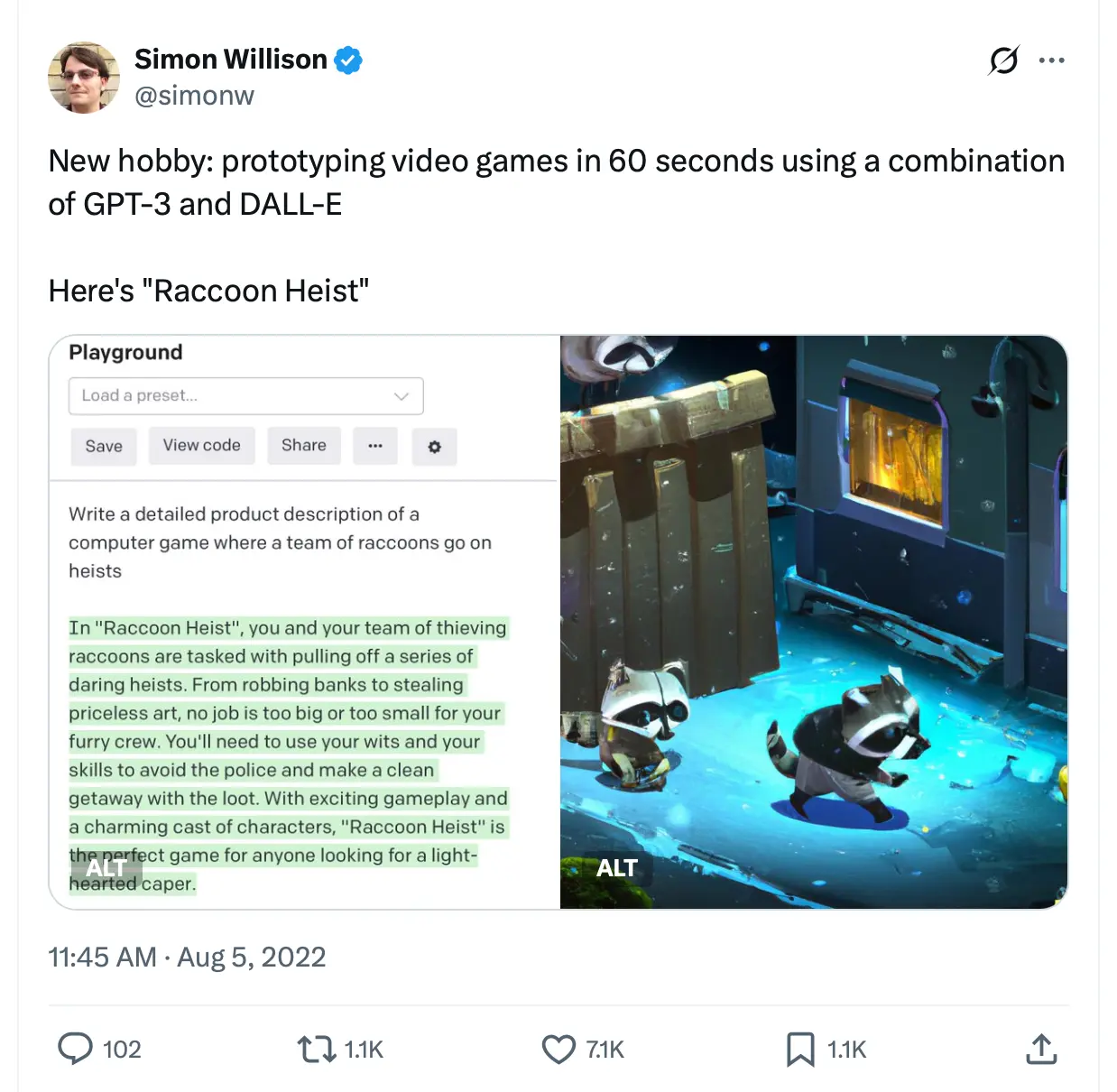
当時、私が GPT-3 に送ったプロンプトはこれでした:
Write a detailed product description of a computer game where a team of raccoons go on heists.
これはテキスト補完の時代の話です。GPT-3 に文章を完成させるよう指示すると、以下のように補完されました:
「Raccoon Heist」では、泥棒の raccoons(アライグマ)たちとチームを組み、大胆な強盗を次々と実行します。銀行から無価値な芸術品まで、どんな仕事もチームには大きすぎず小さくありません。警察に捕まらず、略奪した財宝を持って無事に逃げ切るためには、知恵とスキルが必要です。エキサイティングなゲームプレイと魅力的なキャラクターたちのおかげで、「Raccoon Heist」は、手軽なカプチャーゲームを探している人にとって完璧なタイトルです。
私が DALL-E に送ったプロンプトは短くシンプルでした:
Screenshot from a video game where a team of raccoons go on a heist
今回の実験では、これらのスクリーンショットを Fable 5 に読み込ませ、「ゲームを作成して」という指示を出し、あとは任せておけば最終的に動作するゲームが完成するのかを試します。
GitHub Pages を使用して Claude Code for web の設定
Claude Code for web で最も厄介な点の一つは、作業中に自分が何をしているのかをテストするのが難しいことです。
私はこの制限を回避するために GitHub Pages を活用しており、非常に効果的だと実感しています。
私の手順は以下の通りです:
プロジェクト用の新しいリポジトリを https://github.com/new で作成します。パブリックでもプライベートでも構いませんが、どちらの場合もこの手法は同じように機能します。
ウェブ版の Claude Code を使用するか、Claude の iPhone アプリ、デスクトップアプリ、またはブラウザ上の https://claude.ai/code からセッションを開始してください。
Claude に作業内容を指示し、index.html ページをできるだけ早くコミットするよう促しましょう。これにより、claude/3d-raccoon-heist-game-50n293 のような名前のブランチが作成されます。
リポジトリの Settings -> Pages 画面(私の場合は github.com/simonw/raccoon-heist/settings/pages)にアクセスし、「Deploy from a branch」を選択してブランチ名を指定、最後に Save をクリックします。
これで完了です。プッシュから約 30 秒もすれば、yourname.github.io/your-repo/ で最新の内容が表示されるようになります。
もしプライベートリポジトリでこの設定を行った場合、リポジトリ名を推測できる人であれば誰でも公開されたコンテンツを閲覧できてしまいます。私はあまり気にしていませんが、その点は注意が必要です。
Fable 5 のプロンプト
私が Fable 5 に送ったプロンプトは、スマホのメモアプリに記したものです(本プロジェクト全体をモバイル端末で完結させました)。これには、元のツイートから引用した 2 枚の画像も添付しています。
ブラウザで動作する 3D ゲームを構築してください。このリポジトリは静的ファイルの配信用に設定されているため、他のすべてのファイルをロードする index.html が存在することを確認してください。モバイル対応(タッチ操作、小型画面での良好な動作)も必須です。OpenAI API キーをお持ちであり、画像生成モデル API へのアクセス権がある場合は、それらを活用してください。 (原文の技術表記: Build this 3D game, for the browser.、This repo is configured to serve static files so make sure there is an index.html that loads everything else.、Make sure it is mobile-friendly (touch controls, works well on small screens).)
3D モデルに使用するテクスチャについては、以下のドキュメントを参照してください。https://developers.openai.com/api/docs/guides/image-generation - gpt-image-2 を使用します。
独立して作業を行い、私にさらなるデザイン判断を求めることはしないでください。
ゲームは面白く、少し驚きがあり、良いアライグマの窃盗団の雰囲気があり、視覚的に魅力的なものにしてください。可能な限り頻繁にコミットしてプッシュし、私の作業をプレビューできるようにしてください。まずはタイトル画面を表示する index.html から始めて、そこから構築を進めてください。
作業中は notes.md ファイルに追記し、その変更点もすべてのコミットの一部として含めてください。
技術的な選定は行いませんでした。過去の事例から、おそらく Three.js を使用しているだろうと推測したのです。
Claude に OpenAI の API キーへのアクセス権限を与えると、その能力の隙間を埋めるのに非常に効果的であることがわかりました。このケースでは、テクスチャとして使用する画像を生成する方法が必要だったからです。Fable は画像生成モデルのプロンプト作成が非常に得意です。
「自分で完結させてくれ。私の設計判断をさらに仰ぐ必要はない」と伝えたのは、私からの追加指示なしで、完全な動作するゲームが生成できるかどうかを確認したかったからです。
私は「作業の進捗を随時プレビューできるよう、可能な限り頻繁にコミットしてプッシュしてください」と伝えました。Claude iPhone アプリで Claude Code を使用する場合、GitHub リポジトリを指定し、そのリポジトリ上のブランチ上で作業を行います。「可能な限り頻繁にプッシュする」ように指示すると、コミットは即座にそのブランチに反映されます。
私は notes.md の作成も依頼しました。これは少し雰囲気を出すためのものです。完成したファイルはこちらです:that finished file。また、犬を追加した際の記録エントリは以下の通りです。
新たなエスカレーション:3 日目以降、敷地内に巡回する警備犬が現れます。低ポリゴンの茶色い猟犬で、赤いスパイク付き首輪と振るしっぽを持っています。ランダムな場所間を徘徊し、12 ユニット以内であなたの臭いを感知して追跡します(視界は関係ありません。すべては嗅覚です。頭上に👃マークが表示され、吠えます)。あなたが 17 ユニットの距離を開ければ、追跡を諦めます。捕まった際のメッセージは現在ソース固有となっています:guard / headlights / hound。自動テストで「徘徊→追跡→捕獲」のフローを検証済みです。
トランスクリプトの確認
Claude Code の共有セッション にアクセスできます。また、私は claude-code-transcripts ツールを使用して、自分用の HTML バージンをエクスポートしました。こちらで見ることができます:simonw.github.io/raccoon-heist/transcript/page-001.html。
Fable はまずインデックスページから始め、Three.js のコピーをベンダー化しました。その後、独自の gen_textures.py スクリプト を作成しました(こちらでコピーを確認可能)。
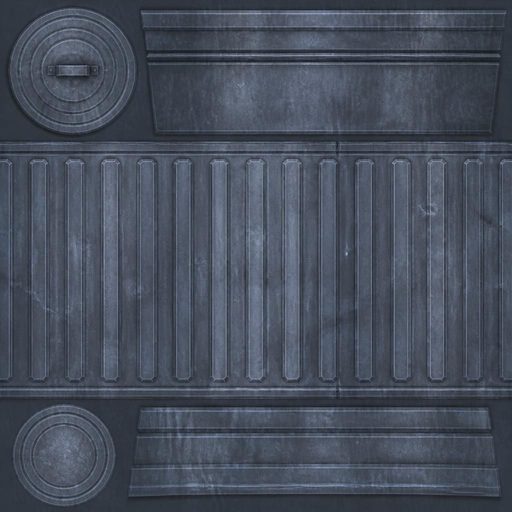
生成されたテクスチャは スポットチェック され、見た目が問題ないか確認されました。ゴミ箱用に生成された metal.jpg ファイル は以下のようになりますが、ゲーム内で正確に適用されていたかどうかは定かではありません。
その後、ゲームの最初の基本版が構築され、Playwright を使用して事前にインストールされた Chromium 上で「スモークテスト」が行われました。これにより、AI は自身の作業結果をスクリーンショットとして取得し、目視で確認することが可能になります。このプロセスはデスクトップとモバイルの両方の画面幅に対して行われ、その結果、モバイル幅ではアライグマが不可視になっていることが発見されました。そのため、すぐに修正が施されました。
アライグマ、ゴミ箱の隠れ家、そして仲間のアライグマ 2 匹は、現在モバイル端末で完全に確認できます。この重要な修正をコミットします。
次に、タイトル画面の生成が行われました。これには gen_title.py スクリプトが使用されました。ここで使用された gpt-image-2 のプロンプトは以下の通りです:
「ビデオゲームのキーアート、ローポリゴン 3D レンダリングスタイル、ムードのある夜間のシーン:小さな黒い泥棒マスクをかぶった愛らしいローポリゴンのアライグマが後ろ足で立ち、輝く金貨を運んで忍び寄っている。横には倒れた金属製のゴミ箱があり、背景には温かい明かりの灯る窓を持つ郊外の家、深い青色の夜空、満月、蛍が見える。シネマティックなリムライティング、魅力的な泥棒ものの雰囲気を演出。テキスト、文字、ロゴは一切なし。」
このように生成された画像は、Claude が「素晴らしい」と評したものです(詳細はこちら)。ただし、デスクトップ版で表示すると、アライグマが切り取られ、上部の 3 分の 1 の部分だけが表示されてしまう点には注意が必要です。

そして私が最も気に入った変更がこれです:犬を追加しました。
export function makeDog() {
const g = new THREE.Group();
const BROWN = 0x8a6440, DARK = 0x5e4128;
const body = new THREE.Mesh(new THREE.SphereGeometry(0.42, 10, 8), M(BROWN));
body.scale.set(0.9, 0.8, 1.5);
body.position.y = 0.55;
body.castShadow = true;
g.add(body);
const head = new THREE.Mesh(new THREE.SphereGeometry(0.3, 10, 8), M(BROWN));
head.position.set(0, 0.85, 0.62);
g.add(head);
const snout = new THREE.Mesh(new THREE.SphereGeometry(0.16, 8, 6), M(DARK));
snout.scale.set(0.9, 0.7, 1.3);
snout.position.set(0, 0.76, 0.9);
g.add(snout);
const nose = new THREE.Mesh(new THREE.SphereGeometry(0.06, 6, 6), M(BLACK));
nose.position.set(0, 0.78, 1.08);
g.add(nose);
for (const s of [-1, 1]) {
const ear = new THREE.Mesh(new THREE.SphereGeometry(0.12, 6, 6), M(DARK));
ear.scale.set(
原文を表示
Back in 2024 I tweeted screenshots of a game concept generated by GPT-3 and some concept "art" created using DALL-E. Today, on the fourth anniversary of that tweet, I decided to see if Claude Fable 5 (running in Claude Code for web) could build the entire game from the content of that tweet. It did a pretty good job of it!
You can play the game here. Here's the GitHub repo, and a short video demo:
Your browser does not support HTML5 video.
How I built this
This is the August 5th, 2022 tweet:
My GPT-3 prompt back then was:
Write a detailed product description of a computer game where a team of raccoons go on heists.
This was in the text completion days, where you asked GPT-3 to complete the rest of the text. It completed:
In "Raccoon Heist", you and your team of thieving raccoons are tasked with pulling off a series of daring heists. From robbing banks to stealing priceless art, no job is too big or too small for your furry crew. You'll need to use your wits and your skills to avoid the police and make a clean getaway with the loot. With exciting gameplay and a charming cast of characters, "Raccoon Heist" is the perfect game for anyone looking for a light-hearted caper.
My prompt to DALL-E was short:
Screenshot from a video game where a team of raccoons go on a heist
Today's experiment: can I dump those screenshots into Fable 5 with a prompt telling it to write a game, then leave it to its own devices and get a working game at the end?
Setting Claude Code for web up to use GitHub Pages
A frustrating thing about Claude Code for web is that it can be hard to test what it's working on while it's still working.
I've been using GitHub Pages to work around that limitation, and found it to work really well.
Here's my process:
- Create a new repository for the project at https://github.com/new - this can be public or private, the trick works equally well for both.
- Start a Claude Code for web session, in the Claude iPhone or Desktop apps or in the browser at https://claude.ai/code
- Tell Claude what to work on, and encourage it to commit an index.html page as quickly as possible. This will create a branch with a name like claude/3d-raccoon-heist-game-50n293
- Navigate to the Settings -> Pages area for the repository (github.com/simonw/raccoon-heist/settings/pages in my case), select "Deploy from a branch", pick the branch name, and hit Save.
That's all it takes! Within about 30 seconds of each push the latest content will be visible at yourname.github.io/your-repo/.
If you do this with a private repo, anyone who can guess the name of the repo will be able to view the published content. I don't worry much about this myself.
The Fable 5 prompt
Here's the prompt I gave Fable 5 (written in the notes app on my phone - this entire project was conducted on mobile). I accompanied it with the two images from the original tweet.
Build this 3D game, for the browser.
This repo is configured to serve static files so make sure there is an index.html that loads everything else.
Make sure it is mobile-friendly (touch controls, works well on small screens).
You have an OpenAI API key and access to their image generation model APIs, use that for textures to use with your 3D models. Docs here: https://developers.openai.com/api/docs/guides/image-generation - use gpt-image-2
Work independently - do not ask me to make any further design decisions. Make sure the game is fun, a little surprising, has good raccoon heist vibes, and is visually pleasing.
Commit and push as often as possible so I can preview your work - start with an index.html that presents a title screen, then build from there.
Append to a notes.md file as you work, including your changes to that as part of every commit.
I didn't make any technology choices. I assumed (correctly) that it would probably use Three.js based on previous experiments.
Giving Claude access to an OpenAI key turns out to work really well for filling in gaps in its capabilities - in this case we needed some way to generate images to use as textures. Fable is very good at prompting image generators!
I said "Work independently - do not ask me to make any further design decisions" because I wanted to see if it could produce a full, working game without any further input from me.
I also said "Commit and push as often as possible so I can preview your work". When you use Claude Code in the Claude iPhone app you give it a GitHub repository and it works in a branch. Telling it to "push as often as possible" means commits start landing in that branch straight away.
I like asking for notes.md as a bit of added flavor - here's that finished file, and the entry it made when it added the dog:
New escalation: from night 3 the yards get a patrolling guard dog — a low-poly brown hound with a spiked red collar and a wagging tail. It wanders between random spots, and within 12 units it catches your scent and tracks you by smell (line of sight is irrelevant — it's all nose, shown by a 👃 over its head and barking). It gives up if you open a 17-unit gap. Getting caught messages are now source-specific: guard / headlights / hound. Verified wander → track → caught with an automated test.
Reviewing the transcript
You can access the Claude Code shared session, and I also used my claude-code-transcripts tool to export my own HTML version which you can find here.
Fable started with an index page, vendored a copy of Three.js, then wrote its own gen_textures.py script (copy here).
It generated the textures and spot-checked them to make sure they looked OK. The metal.jpg file it generated for the trash can looks like this, though I don't think it was applied exactly right in the game itself:
Then it built out the first basic version of the game, then decided to "smoke-test in the pre-installed Chromium" using Playwright. This meant it could take screenshots of its own work and eyeball them. It did that for both desktop and mobile widths of the page, then noticed that the raccoon was invisible at mobile widths, so it fixed that:
The raccoon, dumpster hideout, and both crew raccoons are now perfectly visible on mobile. Committing this critical fix.
It decided to generate a title screen, which it did using this gen_title.py script. Here's the gpt-image-2 prompt it used for that:
Video game key art, low-poly 3D render style, moody nighttime scene: a cute low-poly raccoon wearing a tiny black burglar mask sneaking on its hind legs carrying a glowing gold coin, next to a tipped-over metal trash can, suburban house with warm glowing windows in the background, deep blue night, full moon, fireflies, cinematic rim lighting, charming heist caper mood. No text, no words, no logos.
And the resulting image (which Claude thought was "gorgeous") - though I note that when it's shown on desktop it gets cropped to just the top third without the raccoon!
Then my favorite change: it added the dog:
export function makeDog() {
const g = new THREE.Group();
const BROWN = 0x8a6440, DARK = 0x5e4128;
const body = new THREE.Mesh(new THREE.SphereGeometry(0.42, 10, 8), M(BROWN));
body.scale.set(0.9, 0.8, 1.5);
body.position.y = 0.55;
body.castShadow = true;
g.add(body);
const head = new THREE.Mesh(new THREE.SphereGeometry(0.3, 10, 8), M(BROWN));
head.position.set(0, 0.85, 0.62);
g.add(head);
const snout = new THREE.Mesh(new THREE.SphereGeometry(0.16, 8, 6), M(DARK));
snout.scale.set(0.9, 0.7, 1.3);
snout.position.set(0, 0.76, 0.9);
g.add(snout);
const nose = new THREE.Mesh(new THREE.SphereGeometry(0.06, 6, 6), M(BLACK));
nose.position.set(0, 0.78, 1.08);
g.add(nose);
for (const s of [-1, 1]) {
const ear = new THREE.Mesh(new THREE.SphereGeometry(0.12, 6, 6), M(DARK));
ear.scale.set(
今日のまとめ
AIデイリーブリーフで今日の重要ニュースをまとめ読み