Anthropic、営業チームがClaudeを大規模運用する手法を公開
本文の状態
日本語全文を表示中
詳細モードで約12分の本文を読めます。
同じ出来事の情報源
この情報源を基点に整理
Claude Blog
Anthropic は自社ビジネス開発チームが「Claude Cowork」を活用して、営業メールの自動下書き作成や顧客対応の自動化をスケールさせ、手作業からの解放と戦略的業務への集中を実現した事例を発表する。
Continue in AI NEW LAB
このニュースを、実務の判断につなげる
AI NEW LABで、試したことや先に確認したい条件を共有できます。まずはログインなしで読めます。
AI NEW LABで論点を見るAI深層分析を開く2026年8月11日 09:37
AI深層分析
キーポイント
営業プロセスの自動化基盤構築
Anthropic は営業担当者が頻繁に受ける質問とその回答を文書化し、Claude が参照する販売ナレッジベースとして活用している。
インボックススキルの時間削減効果
毎時実行されるインボックススキルがメールスレッドを検索し、システムプロンプトとナレッジベースに基づいて返信のドラフトを作成する。
個別化されたスタイル適応機能
各営業担当者の執筆スタイルを学習したボイススキルを用いたプロファイルが、AI による下書き作成に組み込まれている。
ナレッジベースの継続的更新
Claude はナレッジベース内の情報を常時監視し、古くなった情報や不確実な情報をフラグ付けして担当者に検証を促す。
Gmail と Google Calendar を監視するスキルによるフォローアップ自動化
このスキルは Gmail と Google Calendar を常時監視し、会議の欠席や prospects の反応がない場合に即座に通知を出す。これにより、チームは迅速なフォローアップが可能になり、機会損失を防ぐことができる。
重要な引用
A foundational piece of our inbound setup is a document where I've collected the questions we most commonly receive in our sales inbox, along with our best answers to those questions.
The heaviest workflow built on that document is an inbox skill that runs every hour: it scans a rep's inbox, finds every thread that the rep needs to answer, and drafts a reply for the rep to read, edit, and send.
Claude proposes each Salesforce update with the evidence behind it and waits for approval.
When I edit or reject a proposal, it records the reason why so it doesn't repeat the mistake.
編集コメントを表示
編集コメント
この事例は、生成 AI が単なるチャットツールを超えて、組織内の定型的業務を駆動するインフラとして機能し得ることを示している。特にナレッジベースの自動更新メカニズムは、情報の鮮度を保ちながら自動化を継続させるための重要な知見と言える。
Source Article
元記事を日本語で読む
本文に関係しない購読案内、埋め込み通知、サイト内プロモーションは除いています。
営業職の初期段階では、担当者が数百社に及ぶリストを渡され、各企業の調査や適切な担当者探し、メールアドレスの特定、 outreach の文書作成などを手作業で行う必要がありました。インバウンド対応も同様に手作業が多く、時間がかかるワークフローでした。
昨年夏にアンソロピックに入社し、営業用メールボックスの管理を引き継ぎました。顧客からの問い合わせに対応するために毎日約 5 時間を費やしていました。製品に関する同じような質問への回答が大半を占め、さらに自らの担当案件の管理も並行して行う必要がありました。
こうした業務の多くは現在、Claude Cowork でスキルやスケジュールされたタスクとして設定されています。顧客向けにパーソナライズしたメールは下書きとして作成され、送信前に私が確認してカスタマイズする形式です。アウトバウンド業務では、これまで数時間を費やしていた詳細な調査が不要になりました。
その結果、チームメンバー一同が手作業や反復的な業務に割く時間を減らし、より重要なことに集中できるようになりました。それは顧客支援です。
以下に、アンソロピックにおける営業機能の向上において Claude Cowork が果たしている役割について説明します。これにより、戦略的な業務への時間配分、顧客課題の理解深化、そして Claude による解決策の教育といった活動に注力することが可能になっています。
事務作業と反復タスクの自動化
BDR(ビジネス・デベロップメント・リーダー)は営業プロセスの入り口を担い、流入する問い合わせの質を見極めつつ、新規の見込み顧客リスト(パイプライン)構築を進めます。Anthropic では現在、これらの業務をすべて「Claude Cowork」を通じて実行しています。
インバウンド対応の基盤となるのが、私が営業担当から寄せられる頻出質問と、それに対する最適な回答を集めたドキュメントです。これは営業チームのナレッジベースとして機能し、Claude は返信文を作成する前にこのドキュメントを参照します。実はこのドキュメント自体も Claude の協力を得て作成したもので、私は関連情報源へのアクセス権限を与えるだけで済みました。現在では、Claude が定期的にチェックを行い、古くなった可能性のある情報をフラグ付けしてユーザーが確認・更新できる仕組みになっています。
このドキュメントを土台とした最も負荷の高いワークフローは、1 時間ごとに実行される「インボックス・スキル」です。これは担当者の受信トレイをスキャンし、返信が必要なメールスレッドを特定した上で、担当者が読み込んで編集・送信するための下書きを作成します。このスキルの構成要素は、シンプルなシステムプロンプト、製品事実のソースとなるナレッジベース、そして各担当者の執筆スタイルを反映したプロファイルです。なお、このプロファイルもまた、「音声スキル」を用いて作成しており、過去に書いたドキュメントやメッセージ、メールを読み込んで分析することで、それぞれの書き方を学習します。
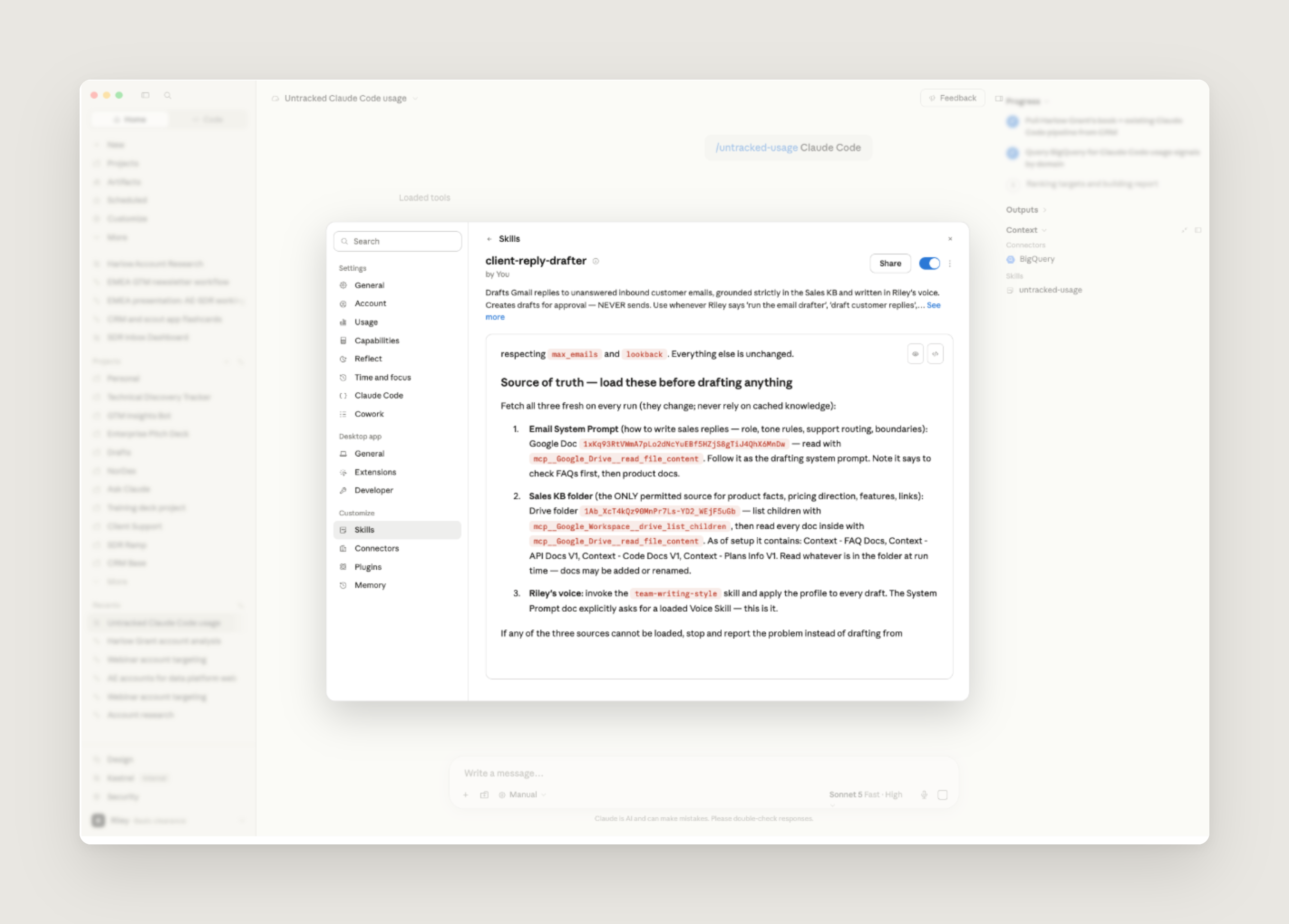
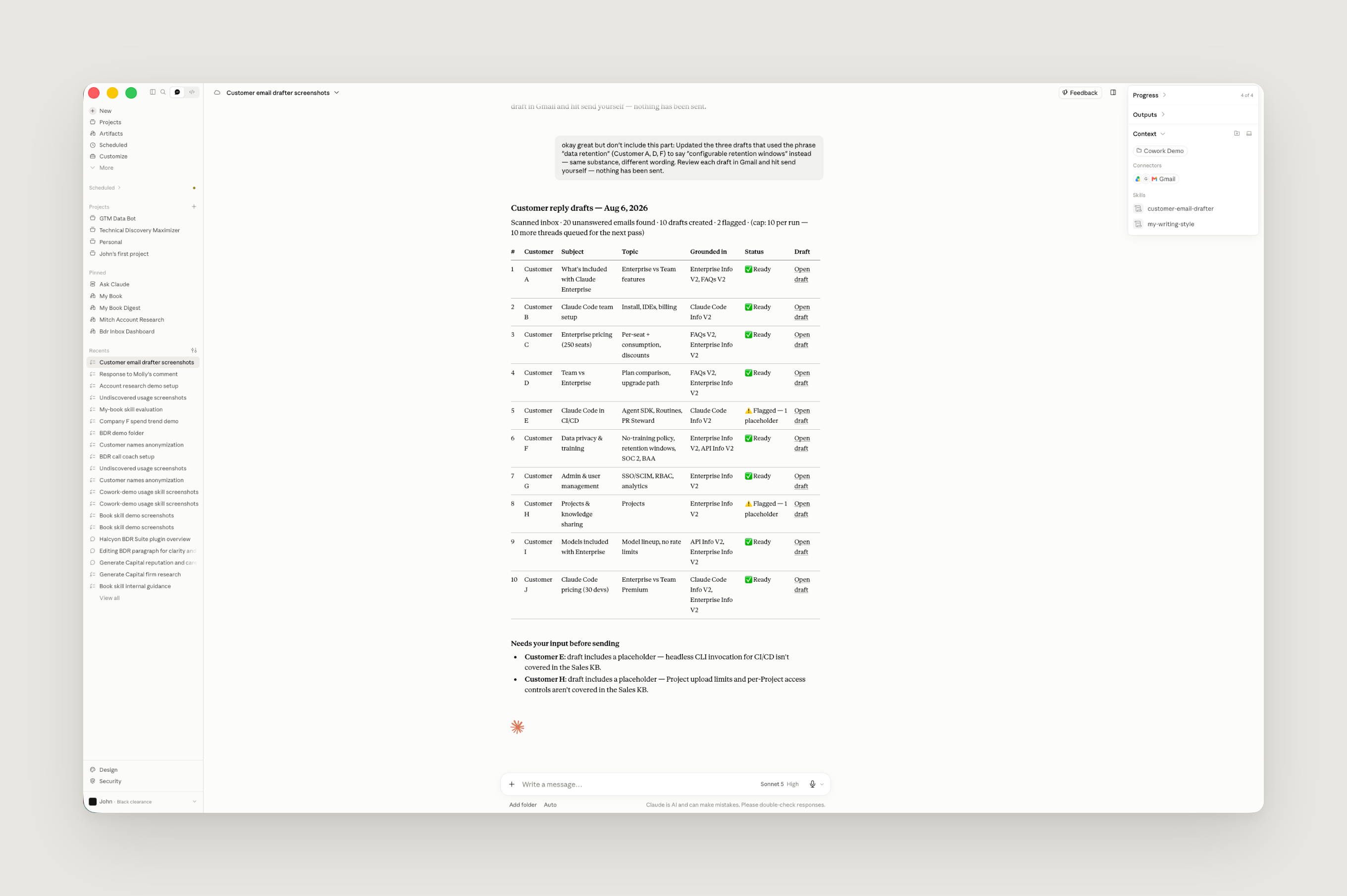
*この「メール下書き」スキルは営業担当者の受信トレイをスキャンし、レビュー用の返信文を下書きとして残します。このプレビューに含まれるすべての情報は、公開用に匿名化されています。
また、事務作業の負担を軽減するための2 つの軽量なスキルも活用しています。BDR(ビジネス開発担当者)なら誰もが経験する「来場者の欠席」や「見込み客からの連絡が途絶える」という悩みは深刻です。これに対処するため、Gmail と Google Calendar を監視し、そのような事態が発生した際に通知を受け取るスキルを構築しました。これにより、迅速なフォローアップが可能になります。
もう一つのスキルでは、CRM コネクタを活用して新規リードをすべてスキャンし、パーソナライズされた最初のコンタクト文を下書きします。この処理は一日中スケジュール通りに実行され、リードが放置されることを防ぎます。
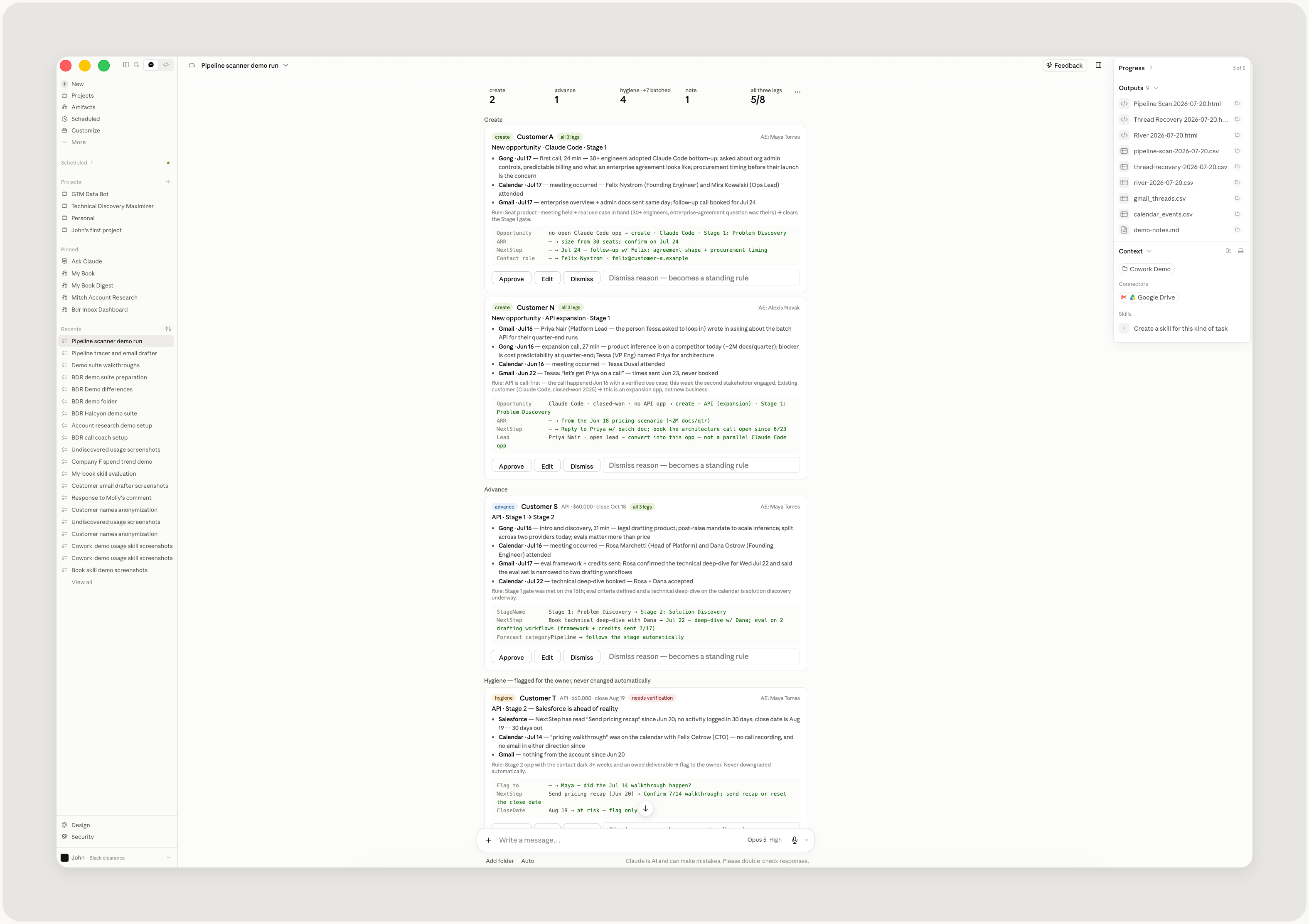
さらに、Salesforce の情報を最新の状態に保つためのスキルも用意しています。これは、社内ガイドラインにある商談ステージの定義を読み込み、Gmail や Gong で実際に起きている事象と照合するものです。例えば、顧客との面談を終えて価格に関する質問に進んだ場合、商談は次のステージへ進むべきです。Claude は Salesforce の更新案を提示し、その根拠となる証拠も併せて示します。その後、承認を待機します。私が編集や却下を行った際、その理由が記録され、同じミスを繰り返さない仕組みになっています。
アウトバウンドと収益業務の最適化
私は常に同時に約 100 の顧客アカウントを担当しています。これらすべてのアカウントをカバーできているのは、夜間に自動実行される「スキル」のおかげです。このスキルは私の担当する全アカウントを対象に prospecting(見込み客開拓)を行い、各アカウントの現状を把握します。具体的には、「誰と接点があるか」「現在 Claude をどのように活用しているか」「関連するシグナルは何かなど」を確認します。
これを実現するために、Claude は Salesforce や Apollo、Common Room といった営業ツール、Gong、そしてデータウェアハウスに接続し、徹底的なリサーチを実施。さらに、チームが策定したアウトバウンドガイドラインや ICP(Ideal Customer Profile:理想顧客像)の基準と照合して情報を検証します。
これらの機能は、Claude が Anthropic の BDR(ビジネス開発担当者)のように振る舞うための文脈を提供します。朝になると、私は Claude Cowork を開き、各アカウント向けのブリーフィング、スコアリング、そしてアウトバウンドのアクションプランを確認します。
このワークフローは時間の経過とともにさらに有用になります。各 BDR が Claude の成果に対してフィードバックを提供し、それが再びスキルに反映されるためです。また、スキルは小さなメモリファイルと台帳を保持しており、重複作業や繰り返しのミスを防いでいます。
こうしたリサーチ結果はフォローアップの会話で活用されます。そのため、 outreach(営業アプローチ)は顧客ごとに最適化され、顧客との対話では彼らのビジネス状況を把握した上で、課題に深く寄り添いながら戦略的な議論へと発展させることが可能になります。
Discovery calls は、Claude を活用して改善を進めているアウトバウンド活動の重要な一部です。私たちは「Gong の通話記録」を「discovery call playbook」と照合し、各通話ごとのスコアカードを作成するスキルを活用しています。このスキルは会話内容に基づいた具体的なフィードバックを提供します。具体的には、「3 つの優れた点」「改善すべき 3 つの領域」「評価基準に基づく明確な合格・不合格判定」、そして「次に取り組むべき最も効果的な課題」の 1 つが含まれます。
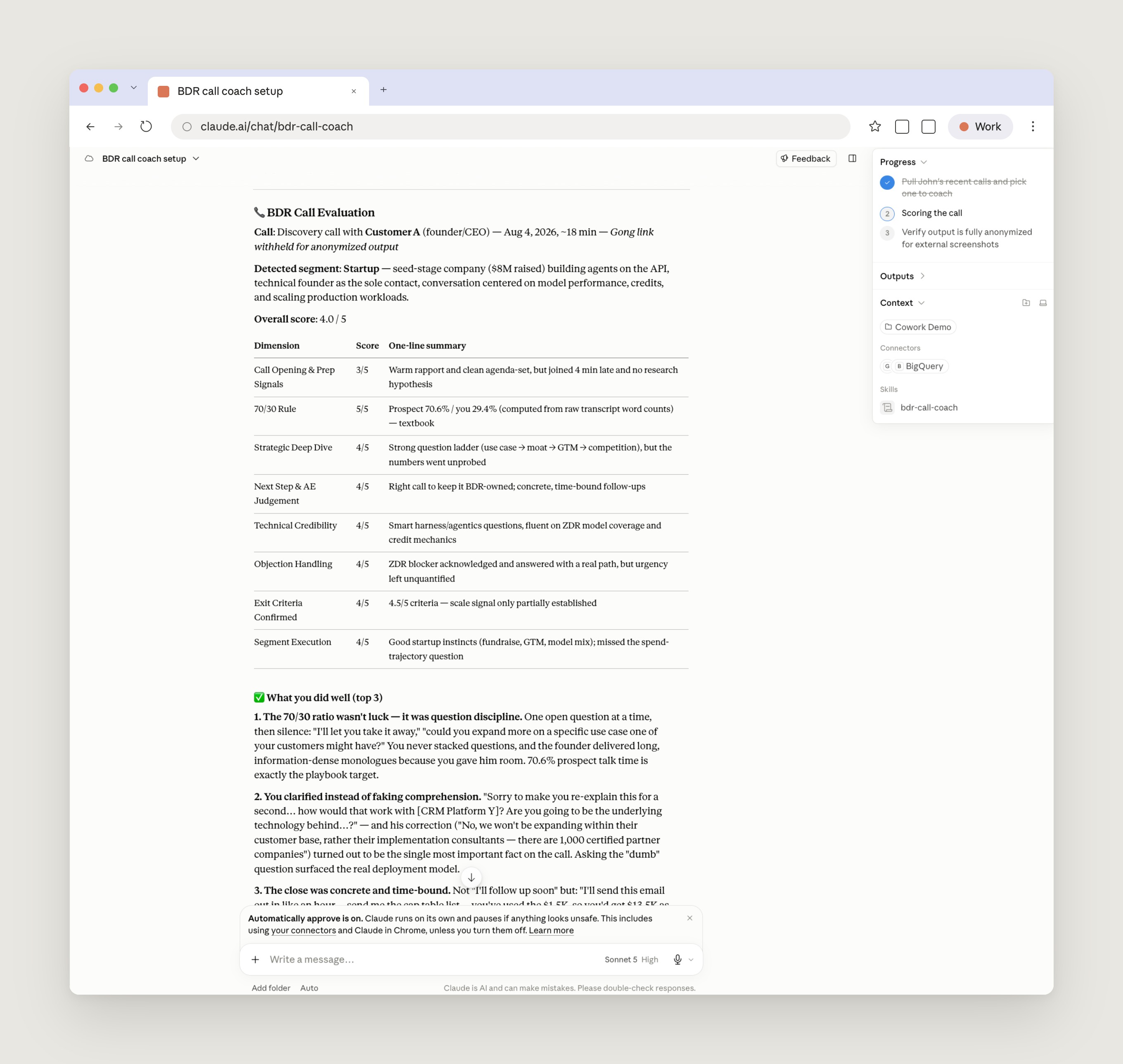
*このコールコーチスキルは、discovery calls のスコアカードを提供し、改善のための具体的な推奨事項も示します。ここではデモデータを使用しており、公開のためにすべての情報を匿名化しています。
個別リクエストの効率化
BDR チームには、しばしば突発的なリクエストが寄せられますが、Claude を活用することで、AE とより戦略的に連携することが可能になります。例えば、主要顧客の利用動向に興味を持った AE に対しては、関連するトレンドを明確に示す読みやすく記述性の高いダッシュボードを、プロンプト一つで即座に提供できます。
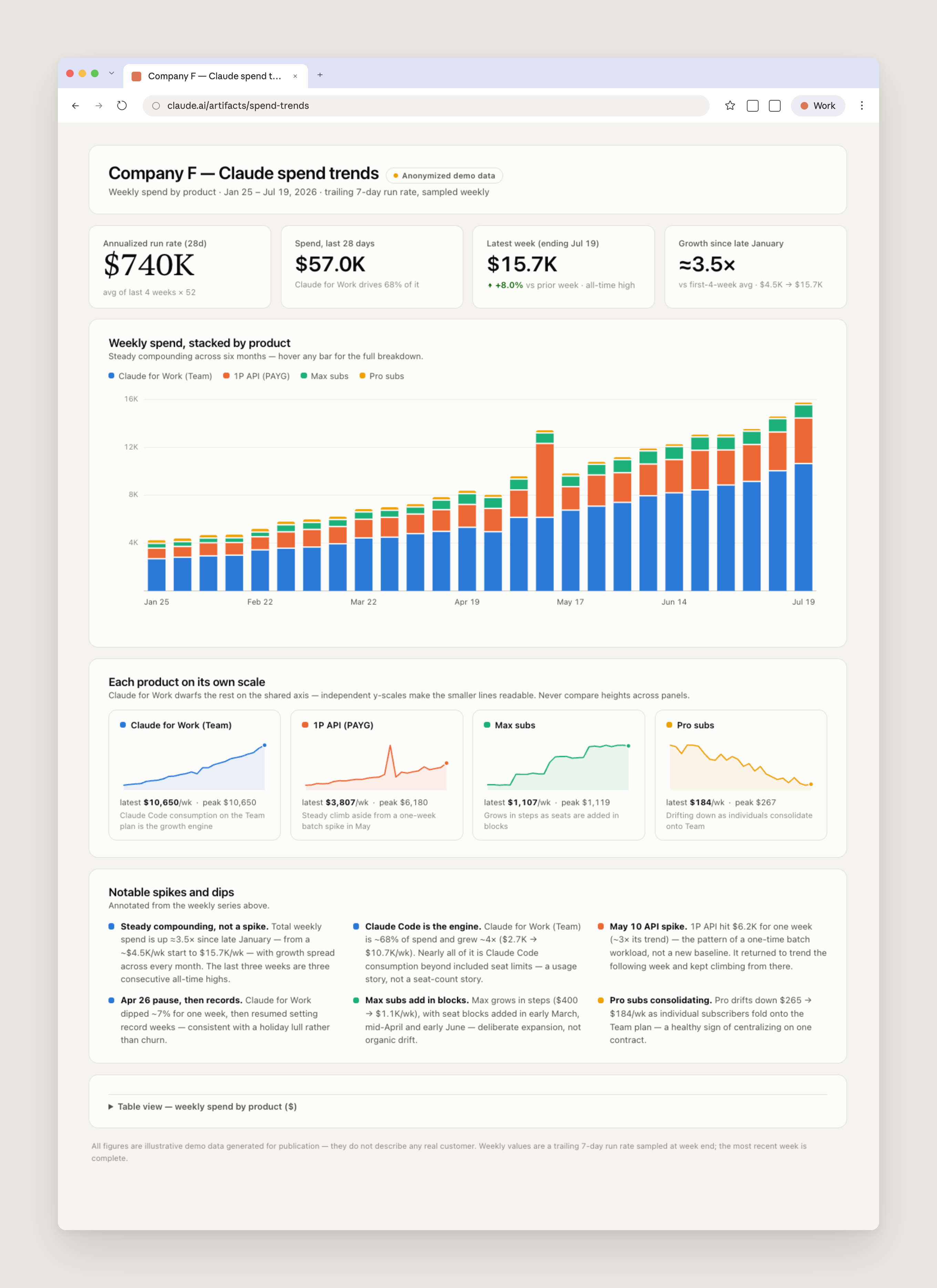
*ターゲット顧客向けに生成された支出分析レポート。
データ分析やレポート作成における Claude の活用は、アウトバウンド営業にも役立ちます。私が特に気に入っているワークフローの一つが、「未発見のユースケース」を検出するプロンプトを実行することです。この手法では、営業担当者の顧客リスト全体を精査し、まだ販売機会として認識されていないアカウントレベルでの利用シグナルを見つけ出します。多くの場合、これは顧客と協力して Claude の利用状況や体験を最適化するためにアプローチを開始する絶好のタイミングを示すシグナルとなります。
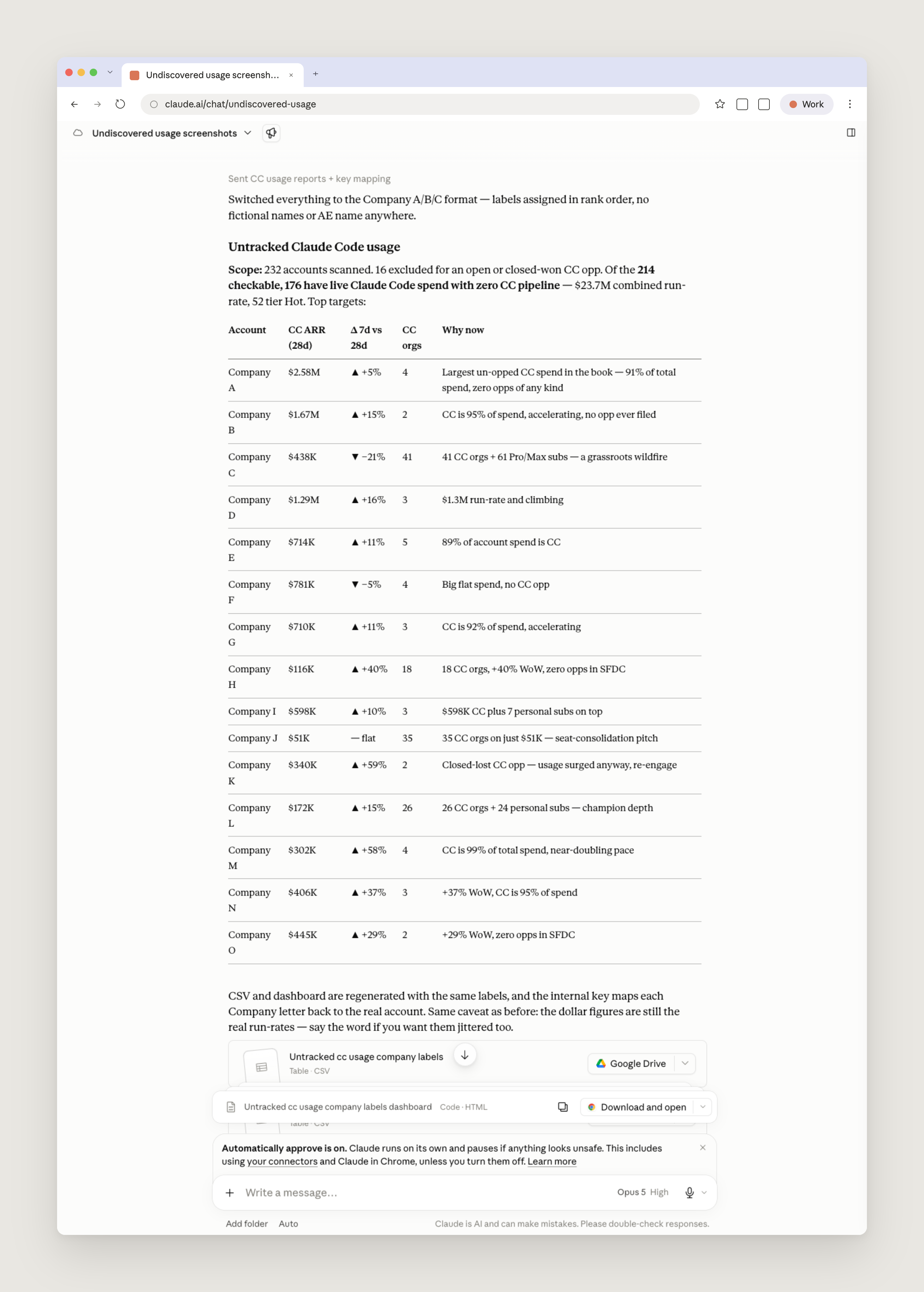
*製品中心の調査により、ある営業担当者の顧客リストから、すでに製品を利用しているが対応する販売機会がないアカウントがすべて抽出されます。表示されているのはデモデータであり、公開用に匿名化または加工された情報です。
また、イベントへの招待 outreach にも Claude を活用しています。最近、私のチームの営業担当者が、「Claude Code for Data Engineering」というウェビナー(Claude Code for Data Engineering)が控えていることを指摘し、自分の顧客リストの中で興味を持ちそうな企業はないかと尋ねてきました。私にはそのようなスキルはありませんが、この種のリクエストであればプロンプトで十分対応可能です。Claude は顧客リスト全体の利用データと CRM の履歴を確認し、各アカウントを理想顧客像(ICP)に照らしてスコアリングしました。そして、招待する価値のある連絡先を含む最適な候補を特定したのです。
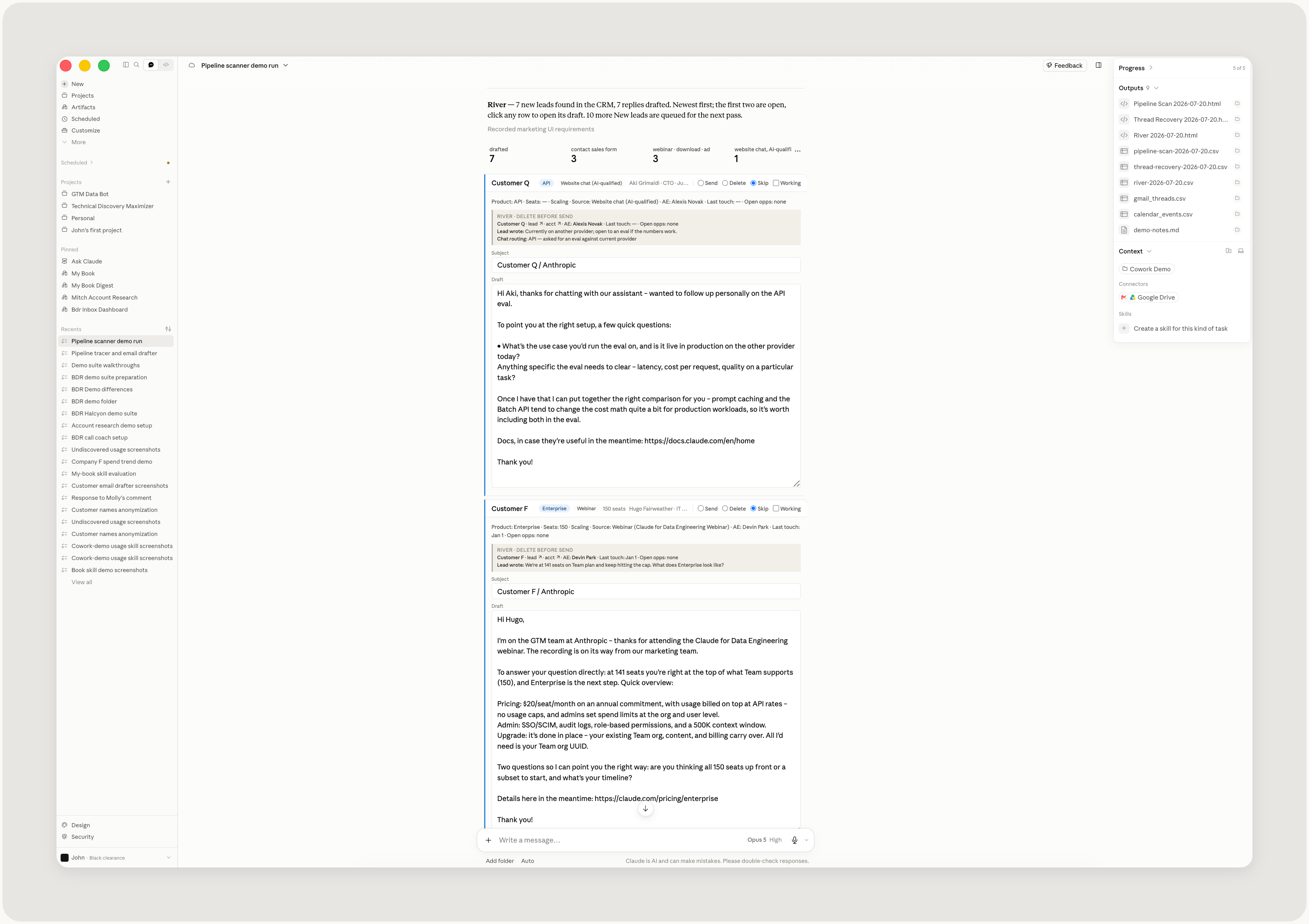
ウェビナー招待の適切な顧客先を探すよう依頼すると、Claude はデータベースを瞬時に検索し、自社の理想顧客像(ICP)に照らして各企業をスコアリングします。
これらのスキルとスケジュールされたタスク、そして私たちが構築したコンテキストを組み合わせることで、Claude は常時稼働するビジネス開発パートナーへと進化します。
Claude Cowork を活用し始めるビジネス開発チームへのアドバイス
以下に、Claude Cowork の導入を検討しているビジネス開発チーム向けのヒントをご紹介します。
ワークフローを構築する前に、ナレッジベースを整備しましょう。チームが繰り返し答えている質問と、それに対する最良の回答を1 つの外部公開ドキュメントに集約します。手書きで書く必要はありません。Claude に関連する製品ドキュメントやチームチャネルを参照させれば、最初のバージョンを自動生成できます。
チームの作業スタイルを Claude に例示しましょう。Claude は与えられた文脈に基づいてドラフトを作成します。アウトバウンド営業の場合には、成功したメッセージの事例や理想とする顧客像(ICP)を含めることができます。各担当者が自分の執筆スタイルを学習させることで、生成されたドラフトが送信者の口調に似せることも可能です。
すべての発信には必ず人間を介在させましょう。Claude はドラフト作成までを行いますが、最終的な確認、編集、送信は人が行います。
スキルをチーム全体で共有しましょう。最も頻繁に使用するスキルは共有プラグインに保存し、担当者が日常的にそのスキルを一貫して利用していることが確認できたら、そのスキルを推奨します。
スキルはチーム全体の作業スタイルに適応できる汎用性を持たせましょう。セグメントや書籍、ワークフローは担当者によって異なります。そのため、特定の 1 人の業務範囲に限定するのではなく、チーム全体で柔軟に活用できる一般的なスキルとして設計しています。
フィードバックをスキルに反映させましょう。フックの削除やドラフトの修正を行った際、その理由を Claude に記録させてスキルに蓄積します。これにより、同じミスを繰り返さないようにします。
私の最良のアドバイスは、とにかく実験を始めることです。提供できる文脈やツールが多ければ多いほど、達成できる成果も大きくなります。
「Claude Cowork for Business Development Representatives」ウェビナーで、ジョンがこれらのスキルを実演している様子をご覧ください。
今すぐ *Claude Cowork* の利用を開始しましょう。
本記事に掲載されているすべての UI モックアップは合成データを用いて作成されたものであり、実際の企業や個人を表現したものではありません。
原文を表示
Early in my career in business development, account executives would hand me lists with hundreds of accounts and I’d have to investigate each company, find the right contacts, hunt down emails, and draft outreach. The inbound side had similarly manual and time-consuming workflows.
When I joined Anthropic last summer, I took over the responsibility of managing our sales inbox. I would spend around 5 hours per day manually responding to inbound interest from prospects, often answering the same or similar questions about our products, on top of managing my own book of business.
A lot of that work is now set up as skills and scheduled tasks in Claude Cowork. Personalized customer emails are prepared as drafts that I need to review and customize before sending. My outbound work begins with detailed research that I didn’t need to spend hours compiling.
As a result, my teammates and I spend less time on manual, repetitive work and more time on what matters: helping our customers.
Here’s how Claude Cowork is upleveling the business development function at Anthropic, allowing us to dedicate more time to strategic work, understanding customer problems, and helping educate them on how Claude can solve them.
Automating administrative and repeatable tasks
BDRs sit at the beginning of the sales process, qualifying inbound demand and building outbound pipeline for the business. At Anthropic, those motions now run through Claude Cowork first.
A foundational piece of our inbound setup is a document where I’ve collected the questions we most commonly receive in our sales inbox, along with our best answers to those questions. This document functions as our sales knowledge base, which Claude reads before drafting any replies we send. Claude helped me create that document (I simply pointed it to the relevant sources of information), and now continuously verifies that it is up to date by flagging information that might potentially be stale, which users can validate.
The heaviest workflow built on that document is an inbox skill that runs every hour: it scans a rep's inbox, finds every thread that the rep needs to answer, and drafts a reply for the rep to read, edit, and send. This skill is made of a thin system prompt, the knowledge base as context, and a profile of the rep’s writing style (which each of us also creates using a voice skill that reads through documents, messages, and emails we have written).
I also lean on two lighter skills that help with my administrative workload. Every BDR knows the pain of meeting no-shows and prospects going dark. To address this, I built a skill that watches Gmail and Google Calendar to notify me when that happens, so I can follow up quickly.
The other skill uses our CRM connector to scan for all new leads and draft a personalized first touch. It runs on a schedule throughout the day to ensure we don’t leave leads waiting.
We also have a skill that keeps Salesforce current by reading our internal guidance on opportunity stages and checking it against what's actually happening in Gmail and Gong. If we've met with a customer and moved on to pricing questions, the opportunity should probably progress a stage. Claude proposes each Salesforce update with the evidence behind it and waits for approval. When I edit or reject a proposal, it records the reason why so it doesn’t repeat the mistake.
Optimizing outbound and revenue work
On average, I work upwards of a hundred accounts at any given time. I’m able to cover all these accounts thanks to a skill that runs as a scheduled task overnight. It prospects across my entire book, observing the current state of each account; for example, who are we in touch with, how do they use Claude today, and what signals are relevant. To accomplish this, Claude connects to Salesforce, sales tools like Apollo and Common Room, Gong, and our data warehouse, performs deep research, and validates it against outbound guidance and ICP criteria that our team has curated.
These pieces of the skill add context to help Claude work more like a BDR at Anthropic. In the morning, I open up Claude Cowork to a brief, a score, and an outbound play for each account.
This workflow becomes increasingly useful over time as each BDR can provide feedback on Claude’s results, which then feeds back into the skill. The skill keeps a small memory file and ledger, preventing repetitive or duplicative work.
We use this research in follow-up conversations, so our outreach is tailored and when we talk to customers we're informed on their business and close enough to their problems to have a deeper strategic discussion.
Discovery calls are another part of our outbound motion we are working to improve with Claude. We use a skill that evaluates Gong transcripts against our discovery call playbook and builds a scorecard for each call, with specific feedback based on the conversation. The feedback includes top three things done well, top three areas to improve, an explicit pass or fail score on our criteria, and a single highest-leverage thing to practice next.
Streamlining one-off requests
Often, requests come to the BDR team in an ad-hoc manner and Claude makes it possible for us to partner with our AEs in a more strategic way. If an AE is curious about usage trends for a top account, we are a prompt away from providing a legible and descriptive dashboard that highlights the relevant trends.
Working with Claude on data analysis and reporting comes into play in outbound work, too. One of my favorite workflows is running an undiscovered usage prompt. It considers an AE’s full book and finds usage signals on the account level where we do not yet have a sales opportunity. Often, this is a great signal for us to begin reaching out and working together with a customer to optimize their usage and experience with Claude.
We also use Claude for event outreach. One of my AEs recently flagged that we have an upcoming Claude Code for Data Engineering webinar and asked if I could find accounts in his book that would be interested in attending. I don’t have a skill for that, but for this type of request a prompt was enough. Claude checked usage data and CRM history across the book, scored each account against our ICP, and flagged the best fits with contacts worth inviting.
Together, these skills, scheduled tasks, and the context we've curated turn Claude into an always-on business development partner.
Advice for business development teams on getting started with Claude Cowork
Below, are some tips for business development teams on getting started with Claude Cowork:
- Build the knowledge base before the workflows. Collect the questions your team answers repeatedly, and your best answers, into a single external-facing document. You don't have to write it by hand: point Claude at your relevant product docs and team channels and have it build the first version.
- Give Claude examples of how your team works. Claude drafts against the context you give it. For outbound, this can include examples of messages that worked and your ideal customer profile. Each rep can also have Claude learn their writing style, so drafts arrive sounding like the sender.
- Keep a person on every send. Claude can generate drafts, but we still read, edit, and send them.
- Share skills across the team. Our team keeps its most-used skills in a shared plugin, promoting a skill there once we establish that reps use it consistently in their daily work.
- Make skills general enough to adapt to the whole team’s way of work. Segments, books, and workflows differ across reps, so we keep shared skills general enough to adapt rather than scoped to one person's routine.
- Write feedback back into the skills. When you dismiss a hook or correct a draft, have Claude record the reason in the skill so it doesn’t make the same mistake again.
My best advice? Just start experimenting. The more context and tools you give it, the more you can get done.
*Watch John demo these skills during our *Claude Cowork for Business Development Representatives* webinar.*
*Get started with*Claude Cowork* today.*
*All UI mockups in this article are depicted with synthetic data and do not represent real companies or individuals. *
関連記事
今日のまとめ
AIデイリーブリーフで今日の重要ニュースをまとめ読み