Anyscale、物理的 AI を扱うためのスキル「Physical AI Skill」を発表
本文の状態
日本語全文を表示中
詳細モードで約31分の本文を読めます。
同じ出来事の情報源
この情報源を基点に整理
Anyscale Engineering
Anyscale は Ray と Anyscale を用いたロボットおよび自動運転システム構築のための新ワークロードスキル「Physical AI Skill」を発表し、6 つの異なるワークロードクラスをカバーする。
AI深層分析を開く2026年8月4日 11:02
AI深層分析
キーポイント
Physical AI Skill の概要と機能
Anyscale は Ray と Anyscale を活用したロボットおよび自動運転システム構築のための新ワークロードスキル「Physical AI Skill」を発表し、複雑なシステム決定を明確化してコードや依存関係、構成設定を生成する。
6 つのワークロードクラスと学習モード
このスキルはオフライン/オープンループ RL ポストトレーニング(ログデータからの報酬)とオンライン/クローズドループ RL ポストトレーニング(シミュレータ内での環境相互作用)など、6 つの異なるワークロードクラスをカバーする。
対応モデルと学習スタック
π0, SmolVLA, OpenVLA-7B, GR00T-N1.5/N1.7 などの VLA モデルや、LeRobot v3 のロボットデモンストレーションデータをサポートし、Ray Train や Ray Data を活用した分散学習スタックを提供する。
多様なワークロードとモデルの対応
VLAのファインチューニングからオフライン・オンラインRL、ロボットの推論まで、幅広いワークロードに対応する。π0やGR00T-N1.5などの主要なモデルファミリーをRayおよびCosmos-RLを活用してトレーニングできる。
RayとCosmos-RLによる統合インフラ
分散処理、GPU管理、シミュレーション連携においてRay CoreやRay Serveが中心的役割を果たす。Cosmos-RLはオフラインおよびオンラインのRLトレーニングを支え、vLLMを用いたロールアウトを可能にする。
重要な引用
Today we are introducing the Anyscale Physical AI Skill, a new workload skill for building robotics and autonomous-driving systems with Ray and Anyscale.
The Physical AI Skill covers six distinct workload classes.
This is an environment-interaction distinction—not a claim that the open-loop path implements classical offline-RL algorithms such as CQL or IQL.
Physical AI is reshaping robotics and autonomous driving at the same time.
編集コメントを表示
編集コメント
Anyscale は Ray エコシステムを物理 AI 領域へ拡大し、ロボットや自動運転の開発における複雑な設定作業を軽減するツールを提供した。これは、分散学習環境の構築や VLA モデルのファインチューニングを標準化しようとする動きの一環であり、実用性の高い進展と言える。
Source Article
元記事を日本語で読む
本文に関係しない購読案内、埋め込み通知、サイト内プロモーションは除いています。
本日、Ray と Anyscale を活用してロボットや自律走行システムを構築するための新しいワークロードスキル「Anyscale Physical AI Skill」をご紹介します。このスキルは、ワークロードの範囲を明確にし、困難なシステムの意思決定を可視化するとともに、実行に必要なコード、依存関係のバージョン指定、計算リソースの設定、起動手順などを自動生成します。
これは、Anyscale Agent Skills を物理 AI 領域へ拡張したものであり、LLM 事後学習スキル のアプローチに則っています。
LinkSupported physical AI workloads, models, and simulation environments
Physical AI Skill は、6 つの異なるワークロードクラスをカバーしています。ここで言う「オフライン/オープンループ RL 事後学習」とは、ポリシーが候補となる軌道(トラジェクトリ)を生成するものの、報酬は環境内で行動するのではなく、記録されたデータから得られることを意味します。一方、「オンライン/クローズドループ RL 事後学習」は、ポリシーがシミュレータ内で実際に行動し、その結果生じる状態遷移から学習することを指します。
これは環境との相互作用の有無による分類であり、オープンループの手法が CQL や IQL といった古典的なオフライン RL アルゴリズムを実装しているという主張ではありません。
| ワークロード | モデルファミリー | データまたはシミュレーション環境 | Ray とトレーニングスタック |
|---|---|---|---|
| VLA 微調整(模倣学習 / SFT) | π0/π0.5, SmolVLA, OpenVLA-7B, GR00T-N1.5/N1.7, Alpamayo-1.5、および Cosmos3-Nano(アクションポリシーモード) | LeRobot v3 ロボットデモ、PhysicalAI-AV 運転データ、カスタムエピソード動画 | Ray Train(小規模モデルには DDP、シャードされたフル微調整には FSDP/FSDP2、LoRA およびバックボーン凍結戦略); Ray Data(入力パイプラインでサポートされている場合の非同期 CPU 動画デコード) |
| オフライン/オープンループ VLA RL ポストトレーニング | Alpamayo-1.5-10B および検証可能な軌道報酬を持つ他の VLA ポリシー | 記録された PhysicalAI-AV 軌道(トレーニングループ内にシミュレータなし) | Cosmos-RL (GRPO/RLVR トレーニング); vLLM (ポリシーロールアウト); Ray Core (マルチ GPU ワーカー上でのポリシーおよびロールアウト配置) |
| オンライン/クローズドループ VLA RL ポストトレーニング | Alpamayo-1.5-10B | AlpaGym, AlpaSim、および PhysicalAI-AV NuRec シーン(アクション後の状態遷移からの報酬あり) | Cosmos-RL (ポリシートレーニング); vLLM (ポリシーロールアウト); AlpaSim (シミュレーションサービス); Ray Core (マルチ GPU ワーカーの予約および配置) |
| ロボットポリシーサービングおよびクローズドループ評価 | π0/π0.5, GR00T-N1.5/N1.7、および Alpamayo-1.5 | LIBERO 操作タスク、Isaac Sim 上の Isaac Lab、AlpaSim 自動運転シーン | Ray Serve (HTTP ポリシーエンドポイント); Ray Core (GPU 分離型シミュレータワーカー); AlpaSim (gRPC ドライバおよびランタイムサービス) |
| ワールドモデルおよびアクション条件付きトレーニング | Cosmos-Predict2-2B, ResNet-18 + Transformer 潜在ダイナミクスモデル、V-JEPA/V-JEPA 2、拡散型ワールドモデル | LeRobot/FMB 軌道およびマルチカメラロボットまたは自動運転車動画 | Ray Data (分散前処理); Ray Train (分散トレーニング); Ray actors (イマジネーションロールアウトおよびモデル予測制御) |
| シミュレータネイティブ RL、ドメインランダム化、およびスイープ | 事前学習済み Isaac ヒューマノイドポリシー、Brax PPO ヒューマノイドポリシー、エンジンネイティブエージェント | Isaac Sim 上の Isaac Lab, Brax を用いた MuJoCo MJX、ヘッドレス Unreal Engine 5.7 | Ray Core (シミュレータまたはトレーニングプロセスごとに 1 つの GPU タスクまたはアクター。ポリシー最適化、堅牢性スイープ、ゲームエンジンオーケストレーション用) |
関連リソース:Cosmos-RL、AlpaSim、LIBERO、NVIDIA Isaac Lab、MuJoCo MJX、Brax、そして Unreal Engine 5.7。
これらのモデル名は、エンドツーエンドで実装された構成を示すものであり、閉じたホワイトリストを意味するものではありません。新しい VLA や世界モデルの場合、スキルは最も近い検証済みのモデルサイズとワークロードアーキテクチャから開始し、その後、メモリ、依存関係、データアダプター、評価の再検証を経てリリースされます。
なぜ今、物理 AI なのか?
物理 AI は、ロボット工学と自動運転の両方を同時に変革しようとしています。openpi、SmolVLA、OpenVLA、GR00T、そして Alpamayo 1.5 に代表される「ビジョン・言語・アクション(VLA)」モデルは、カメラからの映像情報と言語指令、状態情報を統合し、ロボットや車両の行動軌道へと変換します。
ロボット工学においては、これらのモデルがさまざまなタスクにわたる操作やヒューマノイド型の動作を汎用的に行えるよう設計されています。一方、自動運転分野では、Alpamayo 1.5 が VLA の推論能力と軌道予測を組み合わせて、長尾分布(ロングテール)の運転シナリオ を研究しています。
産業へのインパクトとして期待されるのは、単にモデルのチェックポイントが良くなることではありません。ロボットや車両から収集したデータを、トレーニング、シミュレーション、評価、そして実装へとつなぐまでのサイクルを劇的に短縮できる点にあります。
世界基盤モデルは、その開発ループのもう一つの側面を担っています。単に次の行動を選択するだけでなく、環境が時間とともにどのように変化するかをモデル化・生成することで、チームが合成トレーニングシナリオの作成や将来状態の予測、行動条件付きの結果のテスト、ポリシーの訓練を可能にします。
NVIDIA Cosmos 3 は重要な進展を示しています。16B の Cosmos3-Nano と 64B の Cosmos3-Super は、統一されたオムニモーダルな Mixture-of-Transformers アーキテクチャを採用し、テキスト、画像、動画、音声、そして行動の推論と生成を可能にします。
自動運転チームにとっては、これは長尾現象への対応や将来予測、運転ポリシー開発のためのツールキットを広げることを意味します。一方、ロボット工学チームにとっては、同じ基盤がロボットの具現化を超えた世界シミュレーション、身体性に基づく推論、行動学習を支えるものとなります。
物理 AI のワークロードは、実態を隠した小規模な分散システムです。1 つの VLA(Vision-Language-Action)モデルをファインチューニングするには、CPU で数千本の MP4 クリップをデコードしながら、モデルが巨大な場合は数十億パラメータを持つトランスフォーマーを GPU 間でシャードする必要があります。世界モデルのポストトレーニングでは、マルチカメラ動画パイプラインや生成コンポーネント、大規模な分散チェックポイントの管理が必要になります。
ポリシーの評価は、重負荷の GPU 物理シミュレータと重負荷の GPU モデルを同期して実行し、これを数千回繰り返すことを意味します。強化学習ではこれらすべてが同時に必要になることもあります——トレーナー、ロールアウトエンジン、そして場合によっては完全な運転シミュレータです。これらはすべてクラスタ上で共有され、重みや観測データを相互にやり取りします。
どのレイヤーでも誤りがあると、例えば不適切な GPU の割り当て、古くなったトランスフォーマーのピン設定、ワーカーにダウンロードされないゲート付きチェックポイントなどが発生し、問題が発覚するのは実行開始から数時間後になってしまいます。事前には検出できないのです。
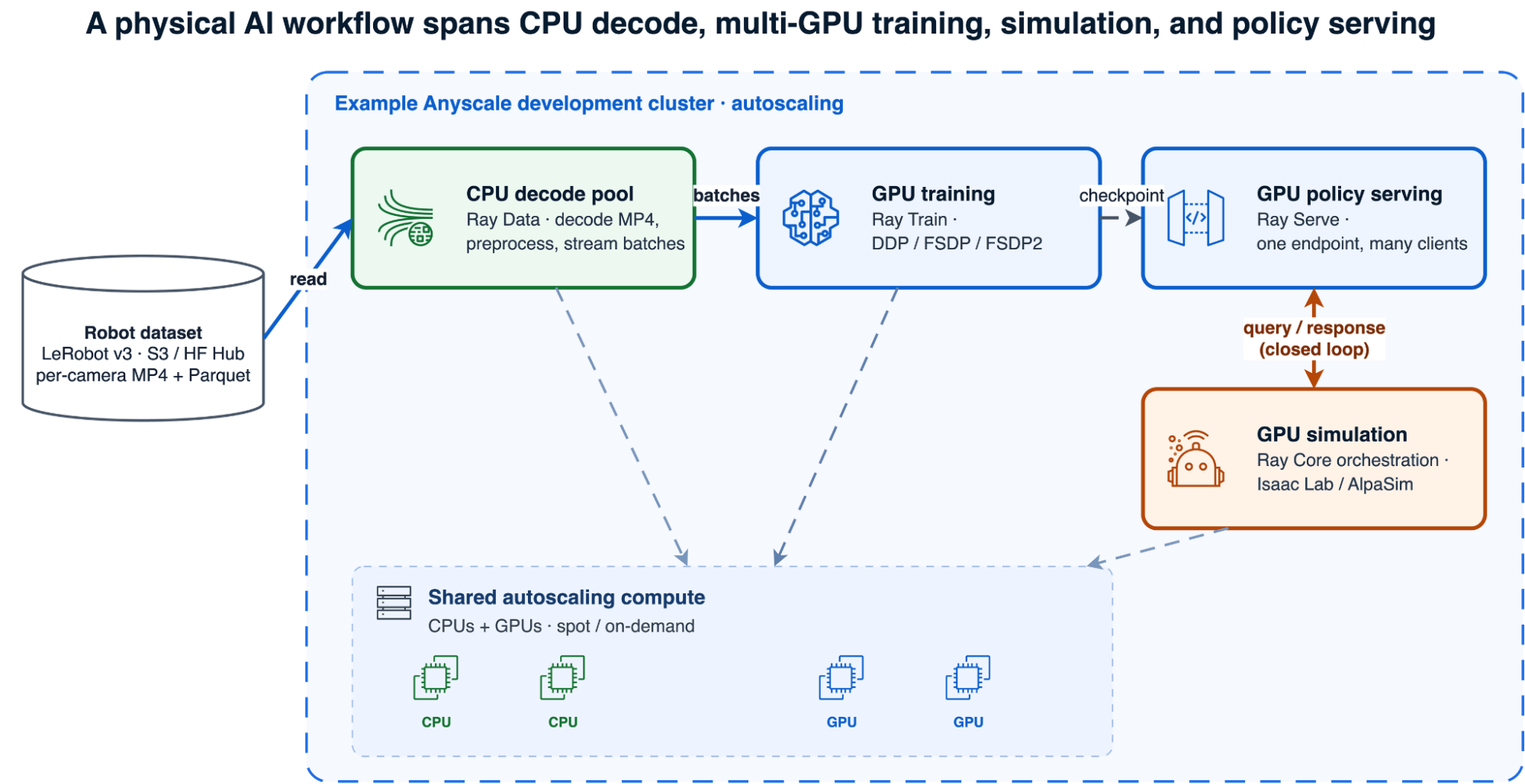
異種物理AIスタック
物理AIのワークフローは、CPUによるデコード、マルチGPUでのトレーニング、シミュレーション、そしてポリシー推論までを横断します。
LinkWhat you get
- 要件に基づいた計画: モデル、データ、トレーニング戦略、評価方法、デプロイ先、GPU構成、および予想される実行時間に関する包括的なロードマップ。
- Ray と Anyscale の実行可能なアーティファクト: 一から構築されたインフラストラクチャではなく、エンドツーエンドでテスト済みのワークロードパターンに基づいた実用的な成果物です。
- 検証済みシステムガイダンス: メモリサイズの設定、依存関係の固定、モデルアクセスの制限、CPU と GPU の分離、シミュレータの起動などに関する具体的な指針。
- 標準的なコードの所有権: Ray、PyTorch、LeRobot、Cosmos-RL、およびシミュレータネイティブなコンポーネントなど、独自のライブラリやフレームワークを使用します。独自のプロプライエタリなモデル抽象化に依存するわけではありません。
この違いは重要です。サポートされる構成は成功した実行事例に基づいていますが、生成された各ワークロードは、あなたのモデル、データセット、クラウド環境、そして組織固有のものです。本番環境や自動実行ジョブとして運用に移す前に、必ず Anyscale Workspace 内で検証を行ってください。
LinkWhy physical AI workloads are hard to operationalize
ロボット学習のモデルやツールは利用しやすくなっていますが、単一 GPU のチュートリアルを超えるとシステム側の負荷が急激に増大します。同じような運用上の課題が、さまざまなワークロードで繰り返し発生しています。
1 つのジョブ内でも計算リソースは多様化しています。 LeRobot フォーマットのデータセットでは、動画がカメラごとの MP4 ファイルとして保存されています。これらをデコードする処理は CPU 負荷が高くメモリを大量に消費しますが、ポリシーのトレーニングは GPU を使用します。この 2 つを同じノード上で実行すると、MP4 のデコード処理と 30 GB のトレーニングプロセスがホスト RAM を争い、最終的に OOM(Out Of Memory)エラーが発生してしまいます。さらに閉ループ評価では状況が悪化します。ポリシー推論と物理シミュレーションがステップごとに交互に実行され、各出力が次の入力へと繋がっていくため、それぞれのコンポーネントには意図的な GPU とプロセスの分離が必要になります。
Physical AI の依存関係は、パッケージ単位ではなくまとまりとして移動します。 ワークロードには、モデルコード、データセットプロセッサ、GPU カーネル、コンパイル済み拡張機能、分散トレーニング、シミュレータランタイムなどが複合的に含まれます。一見安全なアップグレードであっても、前処理 API の名前変更やチェックポイント動作の変化、あるいはフレームワークや CUDA ランタイムとの互換性を欠いた GPU 拡張機能の残存などを招く可能性があります。シミュレータはシステム依存関係を追加するため、単純なパッケージインストールではなく、専用イメージやコンテナ化されたサービス群が必要になることもあります。そのため、最新コンポーネントを個別に選択する汎用コーディングエージェントが作成した環境は、一見妥当に見えても、実際に GPU ワーカーで実行され始めて初めて失敗することがあります。
Physical AI Skill は、対象のワークロードに対してテスト済みの互換性セットから出発し、ドライバー、ワーカー、ランタイムイメージ全体にこれを一貫して適用します。また、どのコンポーネントをアップグレードする場合でも、エンドツーエンドで再検証が必要となる変更として扱います。
メモリ確保は過小評価されがちです。 7B パラメータのモデルを混合精度 AdamW でフルファインチューニングする場合、活性化値を含めると重み、勾配、マスター重み、オプティマイザ状態だけで約 112–120 GB のメモリが必要になります。これは 48 GB GPU を用いた DDP(データ並列処理)の容量を超えてしまうため、検証済みの構成では 4 台の GPU で FSDP FULL_SHARD を採用しています。実際の必要量は精度設定やオプティマイザの種類、活性化チェックポイントの有無、シーケンス長によって異なります。
Mixture-of-Transformers モデルは「アクティブなパラメータ」ではなく「総パラメータ数」でサイズが定義されます。Cosmos3-Nano の 2 つの約 8B トワー(塔)モデルは、1 トークンごとに一部しか動作しないとしても、合計約 16B のパラメータをすべてメモリ上に保持します。間違った推定値に基づいてリソースを割り当てると、処理開始直後のステップゼロで実行が失敗してしまいます。
シミュレータ自体がインフラです。 Isaac Lab での検証では、Isaac Sim はコールドスタートに約 15 分を要し、大量のログを出力するため、単純な stdout ベースのプロセス間通信プロトコルでは処理が破綻しました。AlpaSim はネストされたコンテナ内で 6 つの gRPC サービスとして動作しますが、検証済みの Podman Docker 互換パスでは、Compose の GPU 予約設定や一般的な --gpus フラグが無視されます。そのため、GPU の配置は NVIDIA のレガシーなコンテナランタイムを通じて明示的に指定する必要があります。
これらの課題の多くはモデル研究そのものというより、継続的なシステム開発の領域ですが、多くのチームが繰り返し直面し、解決を迫られています。
リンク:Anyscale Physical AI Skill の仕組み
Physical AI Skill は、ロボット学習のワークロードを記述するだけで、Ray や Anyscale で実行可能なアーティファクトのセットを自動生成します。構成要素、GPU 形状、依存関係、モデルへのアクセス方法、評価手法、実行時間といった具体的な計画も明示されます。
単に空のファイルを手渡すのではなく、このスキルは多肢選択式の要件フローに沿って進み、実際の運用実績で証明されたシステムパターンからワークロードを構築します。
具体的には、以下の機能を提供します:
ワークロードを分類し、適切な決定ゲートを通じて処理経路を分けます。VLA のファインチューニング、RL によるポストトレーニング、ポリシーのサービング、クローズドループシミュレーション、GPU シミュレーションスイープ、あるいは世界モデルのポストトレーニングなど、ロボット固有ではないタスクは Ray Train、Ray Serve、Ray Data といった汎用スキルにルーティングされます。
必要な Ray コンポーネントを選択します。CPU でのビデオデコードには Ray Data を、分散 GPU 学習(DDP、FSDP、FSDP2)には Ray Train を、ポリシーエンドポイントには Ray Serve をそれぞれ使用します。また、シミュレーターのオーケストレーションや GPU 並列処理のファンアウトには Ray Core を活用します。
ハードウェアの規模設定は推測ではなく、検証済みのテーブルに基づいて行います。テスト済みモデルとトレーニング構成を起点とし、7B モデルのフルファインチューニングにシャードが必要だったり、MoE モデルが総パラメータ数でサイズ決定されたりする場合は警告を発します。
モデルへのアクセス権限とバージョン固定を確認します。ゲート付きダウンロードはメタデータだけでなく実際のファイル取得を通じて検証し、公開リポジトリとゲート付きリポジトリを区別します。また、ワークロードが必要とする transformers/lerobot や PyTorch の正確なバージョン固定を引き継ぎます。
実行開始前に所要時間とチェックポイントの頻度を推定します。これにより、24 時間のジョブが 20 時間目で予期せぬ事態に陥るのを防ぎ、最初のチェックポイントも早期に取得してシグナルを確認できるようにします。
検証済みのオーケストレーションパターンを活用し、既存の分散システム構造を維持したまま、モデルやデータセット固有のコードを生成します。
成功したエンドツーエンドの実行から、ワークロード固有の専門知識を適用します。依存関係の互換性、分散戦略、CPU と GPU の分離、リソース配置、チェックポイント作成と復旧などを含むこれらの知見により、生成された各ワークロードは失敗を再発見するのではなく、実証済みの運用パターンから開始されます。
このスキルが生成するのは Ray、PyTorch、LeRobot、Cosmos-RL といった標準的なオープンソースコードであり、独自のアブストラクションではありません。そのため、結果に対する完全なコントロール権を保持できます。これはブラックボックスではなく、あなたが所有する出発点です。
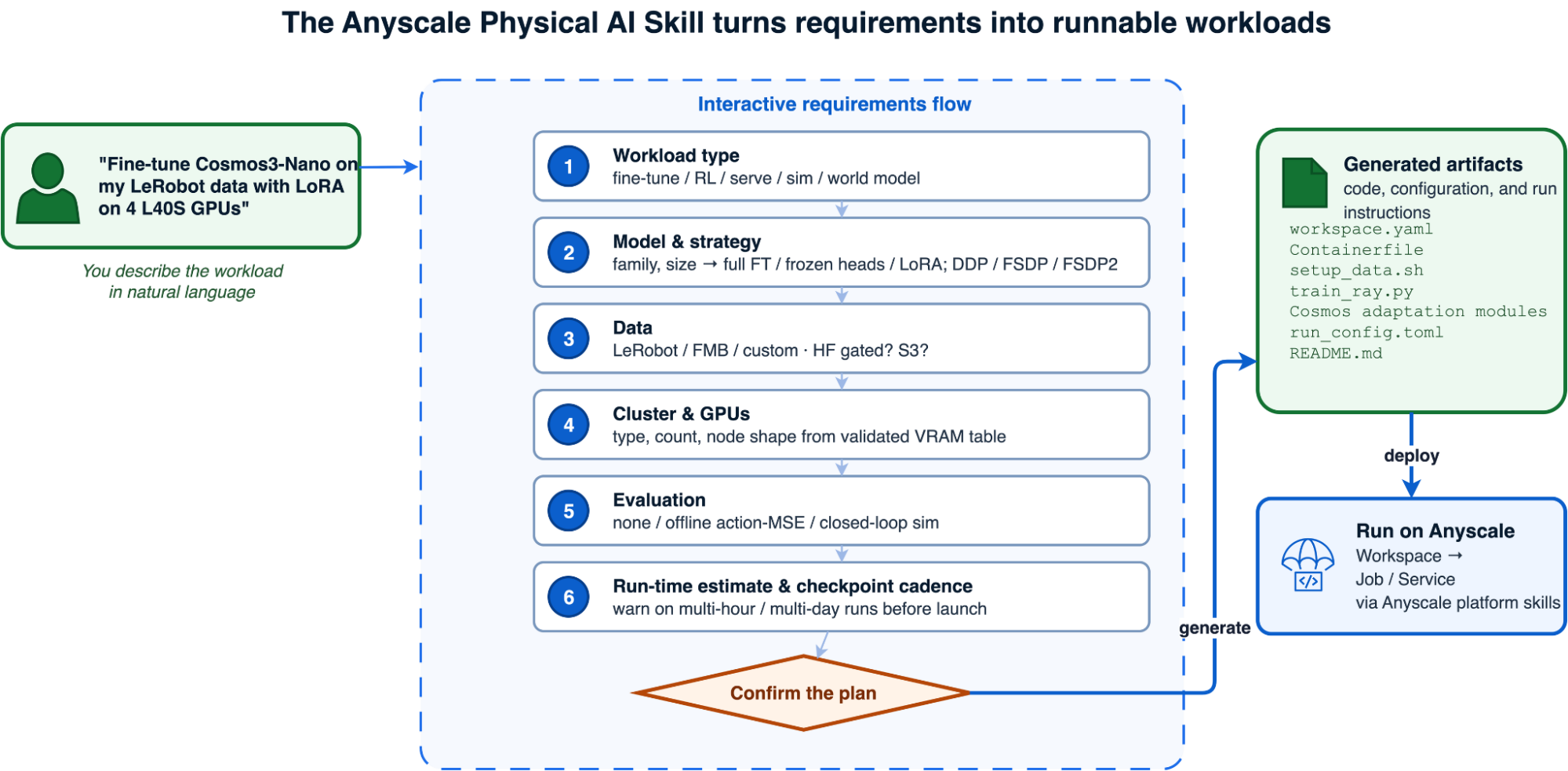
Anyscale Physical AI スキルの要件フロー
*The Anyscale Physical Al Skill turns requirements into runnable workloads*
スキルなし vs スキルあり
同じ物理 AI の要求を 2 つのコーディングエージェントに与えます。スキルがない場合、一方はインフラや依存関係について推測する必要がありますが、スキルがある場合は他方が検証済みのパターンから開始します。
この違いは回避された失敗として現れます:
| 失敗モード | スキルなしの場合 | スキルありの場合 |
|---|---|---|
| モデルに不適切な GPU | CUDA out of memory at step 0 | 起動前に検証済みの VRAM テーブルからサイズを算出 |
| DDP での 7B フルファインチューニング | OOM with roughly 120 GB of model, gradient, and optimizer state | 単一の 4-GPU ノードで FSDP FULL_SHARD にルーティング |
| ホスト RAM の OOM(ビデオデータ) | MP4 decode starves the training process | Ray Data 用の分散 CPU データノードプール |
| ゲート付きチェックポイントのダウンロード失敗 | 403 after the GPU cluster is already running | GPU 作業開始前に実ファイルのダウンロードを検証済み |
| 期限切れのライブラリピン | transformers API mismatch at import | モデルごとの正確なピンを継承 |
| ランタイム環境のマージ競合 | Job fails at startup on duplicate keys | RAY_OVERRIDE_JOB_RUNTIME_ENV=1 が設定済み |
| アクティブパラメータに基づく MoE のサイズ指定 | Under-provisioned, dies on load | Sized by total parameters |
| 多日間の実行が後から判明 | Schedule blown | Run-time estimated up front with faster-hardware options |
LinkShow me: fine-tune Cosmos 3 from one request
NVIDIA Cosmos 3 は、物理 AI のスキルには汎用的な訓練知識だけでは不十分であることを示す好例です。Cosmos3-Nano は推論、生成、ネイティブアクション機能を統合した 160 億パラメータの 2 つ塔型 Mixture-of-Transformers モデルです。これをロボットポリシーとして微調整するには、160 億パラメータのモデル全体を扱う必要があり、カスタム CUDA スタックや分散チェックポイント、LeRobot による動画デコード、そして torchrun で起動するように設計されたトレーニングフレームワークへの対応が求められます。
まずは目的とする成果から始めます:
Use the physical-ai skill to fine-tune Cosmos3-Nano in action-policy mode on my
LeRobot v3 dataset with LoRA, using one 4×L40S node on Anyscale.
このスキルは、自己完結型のディレクトリを生成する前に、アクション空間、カメラマッピング、データセットの場所、GPU トポロジ、実行時間、チェックポイントの間隔、評価計画を確認します。
The skill confirms the action space, camera mapping, dataset location, GPU topology, run time, checkpoint cadence, and evaluation plan before generating a self-contained directory:

cosmos3_nano_action_policy_20260710_120000/
├── README.md                    # architecture, hardware, run and recovery steps
├── user_request_summary.txt     # confirmed model, data, compute, and evaluation plan
├── workspace.yaml               # CPU head + one 4×L40S GPU worker
├── Containerfile                # Cosmos, PyTorch, CUDA, and flash-attn environment
├── setup_data.sh                # dataset and checkpoint staging
├── train_ray.py                 # Ray Train launcher for Cosmos
├── src/
│   ├── action_policy.py         # model and LoRA configuration
│   └── lerobot_dataset.py       # bimanual LeRobot v3 adaptation
└── run_config.toml              # batch, optimizer, parallelism, and checkpoints
生成されたドライバは CPU ヘッドを軽量に保ちつつ、Ray Train に L40S ノード上に 4 つのワーカーを配置させます。Cosmos はネイティブトレーナーを維持し、Ray Train が torchrun の代わりに分散ランチャーとして機能します。セットアップヘルパーやファイル読み込みコードは省略した、コアとなる統合部分は以下のようになります:
import os
import runpy
import sys

import torch
from ray.train import FailureConfig, RunConfig, ScalingConfig
from ray.train.torch import TorchTrainer

def train_loop_per_worker(config):
    # Install the generated dataset/model configuration before importing Cosmos.
    _apply_xvla_adaptation(config["adaptation"], config["framework_dir"])

    local_rank = int(os.environ["LOCAL_RANK"])
    torch.cuda.set_device(local_rank)
    os.chdir(config["framework_dir"])

    sys.argv = ["train", f"--sft-toml={config['toml']}"]
    runpy.run_module("cosmos_framework.scripts.train", run_name="__main__")

trainer = TorchTrainer(
    train_loop_per_worker,
    train_loop_config={
        "framework_dir": FRAMEWORK_DIR,
        "toml": RUN_CONFIG,
        "adaptation": generated_files,
        "overrides": [],
    },
    scaling_config=ScalingConfig(
        num_workers=4,
        use_gpu=True,
        resources_per_worker={"GPU": 1, "CPU": 10},
    ),
    run_config=RunConfig(
        name="cosmos3-action-policy",
        failure_config=FailureConfig(max_failures=0),
    ),
)
trainer.fit()
生成された設定では、LoRA のランクを 32 に設定しており、学習可能なパラメータ数は約 3070 万(16B モデル全体の約 0.2%)です。48 GB の L40S GPU を使用する場合、検証済みのラウンドごとのバッチ上限は 4 です。有効なバッチサイズは、ラウンドごとのバッチを大きくするのではなく、勾配累積によって拡張されます。モデルは 1 ノード上の 4 枚の GPU に分割され、PyAV が CPU ワーカー上で 3 カメラ構成の LeRobot ストリームをデコードします。
4×L40S 環境での検証済み 60 イテレーションの実行では、ウィンドウ化された平均損失が 12.20 → 10.66 → 8.93 と、3 つの区間で順次低下しました。分散チェックポイントはイテレーション 30 と 60 に保存され、それぞれ約 86 GB のサイズでした(モデル、EMA、fp32 オプティマイザの状態を含むためです)。このスキルは、長時間の実行を開始する前に、こうしたワークロード固有の制約を反映しています。
より従来の Ray Data → Ray Train VLA パイプラインについては、*LeRobot データセットと Ray を用いた VLA 微調整パフォーマンスの最適化* をご覧ください。ここではファイルグループのパーティショニングにより、DROID 上の冗長なビデオオープン回数が 135 倍(286,000 から 2,124 へ)削減されています。
リンク:自動運転 VLA のクローズドループ RL 後学習への詳細
微調整とサービングはすでに確立された手法です。このスキルが支える最も困難なワークロード、そして Ray と Anyscale がもたらす価値を最もよく示すのが、自律走行 VLA 向けのクローズドループ強化学習です。
LinkWhy クローズドループが異なる点
Physical AI スキルは、オープンループとクローズドループの両方の強化学習(RL)に対応しています。
オープンループ RL はよりシンプルな出発点です。これはシミュレータを実行せず、データセットに記録された軌道に対して、ポリシーが予測した軌道を評価するだけです。システムがポリシーの学習とロールアウト生成のみを行えばよいため、GPU メモリや計算資源の要件は比較的控えめで済みます。
一方、クローズドループ RL はより困難な問いに答えるものです。「もし自動車が実際にポリシーの行動を実行したらどうなるか?」という問いです。これは、各意思決定に対して反応するシミュレータをループ内(in the loop)に組み込みます。これによりより現実的なフィードバックが得られますが、その分、リソース消費量が大幅に増え、運用上の複雑さも増します。ポリシーの学習、ロールアウト推論、シーンレンダリング、物理演算、シミュレーションをすべて同時に実行する必要があり、GPU メモリや計算資源の需要が増大するだけでなく、調整の難易度や障害発生モードも増加します。
NVIDIA の **AlpaSim** は、このような反応型の運転環境を提供し、**AlpaGym** はこれを GRPO 学習に接続することで、ポリシーが運転した結果に応じた報酬を反映させます。
このスキルは、同じ自然言語の入口からアクセス可能です:
Use the /anyscale-workload-physical-ai skill to run closed-loop GRPO post-training for Alpamayo-1.5 with AlpaSim.クローズドループ化により、メモリプロファイルが変化します。検証済みの AlpaGym 設定では、全パラメータによるポリシー更新、専用ポリシー推論ロールアウトランタイム、およびシミュレータを 1 つの 8× A100-80GB ノード上で実行します。このスキルは、起動前に高負荷なワーカーフラグを設定し、Anyscale Workspace でスタックを検証することを推奨しています。
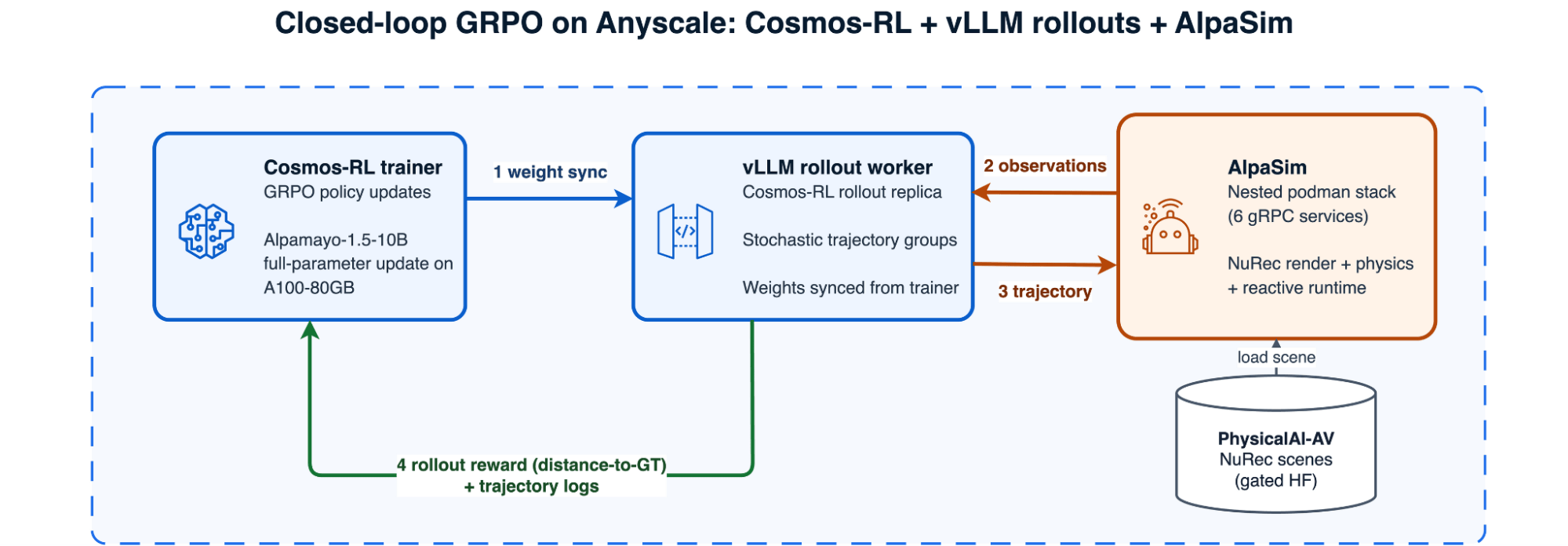
Anyscale 上の Cosmos-RL トレーナー、AlpaGym ロールアウトランタイム、ネストされた Podman AlpaSim を用いたクローズドループ GRPO
*Anyscale Cosmos-RL + VLLM rollouts + AlpaSim におけるクローズドループ GRPO*
Ray と Anyscale が解決する課題
ここからが本格的なインフラ整備の領域です。このスキルに組み込まれた修正機能こそが、その価値を発揮する場所となります。
Docker デーモンを必要としないネストされたコンテナ。AlpaSim は 6 つのサービスからなる gRPC スタックです。生成されたワークロードは、Docker 互換ソケットの背後で rootful の Podman を使用してこれを実行します。
実際に動作する GPU パススルー機能。この検証済みの Podman 環境では、Compose の GPU リソース予約や --gpus オプションは無視されます。
生成されたワークロードは、サービスごとに NVIDIA_VISIBLE_DEVICES の割り当てパッチを作成し、レガシーモードで nvidia-container-runtime を使用します。
- ハードウェアは実証データから選択されています。 L40S 搭載の小型 GPU ノードではメモリ壁にぶつかるため、検証済みの構成では 8× A100-80GB を採用し、
PREFER_SPOTとクロスゾーンスケーリングを活用してキャパシティへのアクセスを向上させています。
ゲートアクセスは二重に検証されています。Alpamayo の重みと PhysicalAI-Autonomous-Vehicles-NuRec シーンには、それぞれ独立した Hugging Face からの許可が必要です。A100 ワーカーを使用する前に、実際のファイルダウンロードを通じて両方の許可が正しく確認される仕組みになっています。
Ray レイヤーは意図的に小さく設計されています。一つのワーカーにすべての GPU を確保し、検証済みのマルチプロセスハネスをそこに割り当てるのです。そのタスク内では、AlpaGym がトレーニング・ロールアウト・シミュレーターのループを管理します。
import ray

@ray.remote(num_cpus=24, max_retries=0)
def run_phase(script: str, args: list[str]) -> int:
    return subprocess.run(
        ["bash", script, *args],
        cwd="/mnt/cluster_storage/alpagym/bundle",
        check=False,
    ).returncode

# Reserve all eight GPUs on the p4de worker. Inside this task, AlpaGym starts the
# Cosmos-RL trainer, AlpaGym rollout runtime, and nested-Podman AlpaSim services.
task = run_phase.options(num_gpus=8, accelerator_type="A100-80G")
return_code = ray.get(task.remote("run_all.sh", ["trend"]))
assert return_code == 0
エージェント検証でわかったこと
この検証により、Anyscale 上でカスタムイメージの構築から二重のアクセス許可取得、ネストされた Podman 環境での AlpaSim、Cosmos-RL によるポリシー更新、AlpaGym のロールアウト実行、そしてチェックポイントのエクスポートに至るまで、パイプライン全体がエンドツーエンドで正常に動作することが確認されました。
初期の煙シミュレーションでは、粗い progress_safety 報酬関数とバッチサイズ 1 を使用しました。学習は完了しましたが、reward_std=0 となったため、GRPO はグループ内での学習信号を得ることができませんでした。
A100 のトレンド設定では、代わりに distance_to_gt を使用し、train_batch=8 で確率的サンプリングと複数回の生成を行いました。12 ステップの実行を通じて reward_std は 0.001 から 0.011 の範囲に留まり、損失が減少したことから、非ゼロの最適化シグナルが存在することが示されました。
このランでは報酬の明確な増加は確認されませんでした。対象となったのは、ベースポリシーが既にある程度ログされた軌道に近い状態であった 1〜5 の一般的なシーンに限定されています。
ポリシー品質の改善を評価するには、より困難なロングテールシーンの導入、トレーニングステップ数の増大、およびロールアウトとトレーナーのレプリカ数の増加が必要です。そのため、今回のヘルススクレイパーでは報酬の分散がゼロでないこと、報酬の傾向、そして損失の傾向という 3 つの条件を個別にチェックしています。
これらの結果は、トレーニングハッチの妥当性と学習シグナルの存在を検証するものですが、ポリシー品質の向上を示すものではありません。
ループを閉じる:単一のワークロードからデータフライホイールへ
各要素は個別に機能するよりも、連携することでより強力になります。一度、ポリシーの微調整・提供・評価が同一プラットフォーム上のシミュレーションで可能になれば、これらの工程はデータフライホイールとして統合されます。具体的には、ポリシーを訓練し、それを提供してシミュレータ上で展開します。成功した軌道データを保持し、それらを既存のデータセットに統合(ユニオン)して再訓練を行います。
このループの実証には、π0.5 ポリシーと Isaac Lab の Franka ロールアウトを使用しました。Ray Train、Ray Serve、そして Ray Core のシミュレーションワーカーが単一のクラスター上で稼働し、報酬でフィルタリングされたデータセットの統合と、前後比較機能を実装しています。
軌道を戻す最もシンプルな方法は、元のデモと報酬閾値をクリアしたシミュレーションエピソードを単純に結合することです。これは非常に良い出発点であり、ループを検証するために私たちが採用した手法でもあります。ただし、シミュレーションと実世界の混合比率自体が調整すべきパラメータであり、フライホイールが成熟するにつれてより意図的な戦略へと移行することを推奨します。
シミュレーションデータが少なすぎれば、シミュレータが表面化させるはずのロングテールケースに到達できません。逆に多すぎると、ポリシーはシミュレータが捉えている内容へ偏り、実世界の微妙なニュアンスを見失い、シミュレーションと実世界とのギャップを広げてしまいます。
結合処理は Ray Data の操作として実装されているため、ループの他の部分は変更せずに、単純な結合を重み付けサンプリングや層別サンプリングに置き換えることができます。具体的には、シミュレーションデータの割合を上限設定したり、稀なケースを過剰サンプリングしたり、トレーニング中にシミュレーションと実世界をカリキュラム方式で混合したりすることが可能です。
各ステージが標準的な Ray API を使用しているため、このフライホイールは独立したオーケストレーションシステムではありません。Ray Train、Ray Serve、Ray Core、Ray Data を組み合わせた Python ネイティブのワークフローとして機能し、データセットが進化するにつれて再実行が可能です。
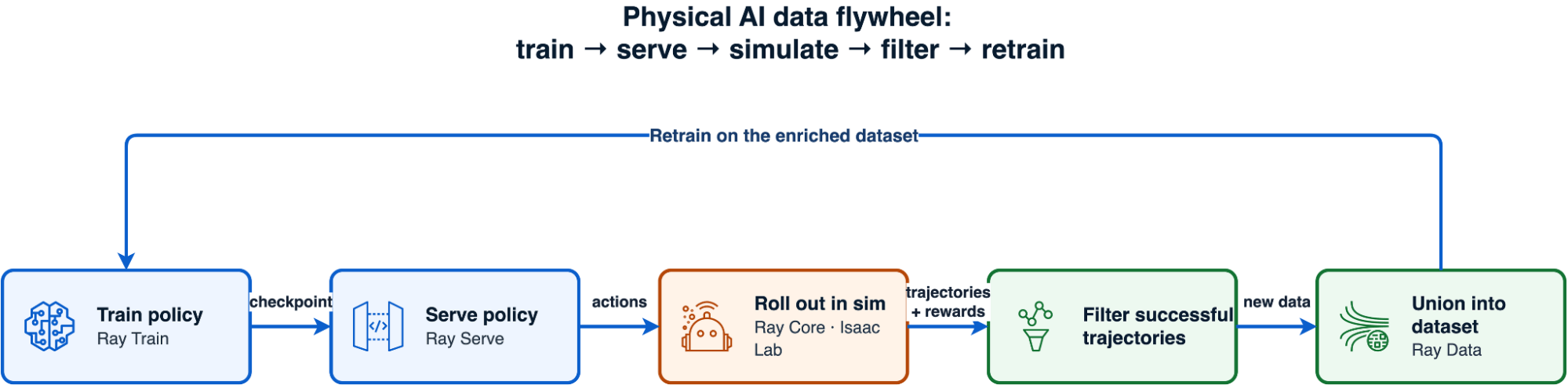
データフライホイール:ポリシーの学習、サービス提供、シミュレーションでの展開、成功した軌道のフィルタリング、再学習
Anyscale での開発から本番環境への移行
Anyscale Physical AI Skill がワークロードを生成し、Anyscale Platform Skills がそれを実行・運用します。/anyscale-platform-run で実行を開始し、/anyscale-platform-inspect で稼働中のワークロードの状態を確認できます。また、/anyscale-platform-fix を使用すれば、失敗した実行の診断と修復が可能です。
推奨される手順は、まず Anyscale Workspace で検証を行い、その後、限定的なトレーニングやシミュレーションのワークロードを Anyscale Job へ移行し、本番環境のエンドポイントを Anyscale Service として公開することです。また、ロボット制御に特化したオーケストレーションが不要な場合は、汎用的なワークロードを /anyscale-workload-ray-train、/anyscale-workload-ray-serve、または /anyscale-workload-ray-data にルーティングします。
リンクされたエージェントスキルと物理AIリソース
より広範な製品ストーリーやその他の専門スキルについては、以下の通りです。
「Anyscale エージェントスキル」の紹介記事では、開発ライフサイクル全体にわたってワークロード、プラットフォーム、インフラストラクチャのスキルがどのように構成されるかを解説しています。
「LLM 後学習向けの Anyscale エージェントスキルの紹介」では、SFT(教師あり微調整)、プレファレンス最適化、RLVR に対する同じく要件優先のアプローチを扱っています。
「ログを読むのをやめよう:Anyscale のエージェントスキルで Ray をデバッグする」記事では、生成後のワークロードに対して「検査」と「修正」のスキルがどのように機能するかを示しています。
Ray と Anyscale を活用した物理 AI に関する詳細はこちら:
原文を表示
Today we are introducing the Anyscale Physical AI Skill, a new workload skill for building robotics and autonomous-driving systems with Ray and Anyscale. It scopes the workload with you, makes the hard systems decisions explicit, and generates the code, dependency pins, compute configuration, and launch instructions needed to run it. It extends Anyscale Agent Skills into physical AI, following the LLM post-training skill.
LinkSupported physical AI workloads, models, and simulation environments
The Physical AI Skill covers six distinct workload classes. Here, offline/open-loop RL post-training means the policy generates candidate trajectories but receives rewards from logged data without acting in an environment. Online/closed-loop RL post-training means the policy acts inside a simulator and learns from the resulting state transitions. This is an environment-interaction distinction—not a claim that the open-loop path implements classical offline-RL algorithms such as CQL or IQL.
| Workload | Model families | Data or simulation environment | Ray and training stack |
|---|---|---|---|
| VLA fine-tuning (imitation learning / SFT) | π0/π0.5, SmolVLA, OpenVLA-7B, GR00T-N1.5/N1.7, Alpamayo-1.5, and Cosmos3-Nano in action-policy mode | LeRobot v3 robot demonstrations, PhysicalAI-AV driving data, and custom episodic video | Ray Train (DDP for smaller models; FSDP/FSDP2 for sharded full fine-tuning; LoRA and frozen-backbone strategies); Ray Data (disaggregated CPU video decoding when supported by the input pipeline) |
| Offline/open-loop VLA RL post-training | Alpamayo-1.5-10B and other VLA policies with verifiable trajectory rewards | Logged PhysicalAI-AV trajectories, with no simulator in the training loop | Cosmos-RL (GRPO/RLVR training); vLLM (policy rollouts); Ray Core (policy and rollout placement on a multi-GPU worker) |
| Online/closed-loop VLA RL post-training | Alpamayo-1.5-10B | AlpaGym, AlpaSim, and PhysicalAI-AV NuRec scenes, with rewards from post-action state transitions | Cosmos-RL (policy training); vLLM (policy rollouts); AlpaSim (simulation services); Ray Core (multi-GPU worker reservation and placement) |
| Robot policy serving and closed-loop evaluation | π0/π0.5, GR00T-N1.5/N1.7, and Alpamayo-1.5 | LIBERO manipulation tasks, Isaac Lab on Isaac Sim, and AlpaSim autonomous-driving scenes | Ray Serve (HTTP policy endpoints); Ray Core (GPU-isolated simulator workers); AlpaSim (gRPC driver and runtime services) |
| World-model and action-conditioned training | Cosmos-Predict2-2B, ResNet-18 + Transformer latent-dynamics models, V-JEPA/V-JEPA 2, and diffusion world models | LeRobot/FMB trajectories and multi-camera robot or autonomous-vehicle video | Ray Data (distributed preprocessing); Ray Train (distributed training); Ray actors (imagination rollouts and model-predictive control) |
| Simulator-native RL, domain randomization, and sweeps | Pretrained Isaac humanoid policies, Brax PPO humanoid policies, and engine-native agents | Isaac Lab on Isaac Sim, MuJoCo MJX with Brax, and headless Unreal Engine 5.7 | Ray Core (one GPU task or actor per simulator or training process for policy optimization, robustness sweeps, and game-engine orchestration) |
Upstream resources: Cosmos-RL, AlpaSim, LIBERO, NVIDIA Isaac Lab, MuJoCo MJX, Brax, and Unreal Engine 5.7.
These model names describe the configurations exercised end to end, not a closed allowlist. For a new VLA or world model, the skill starts from the closest validated model size and workload architecture, then revalidates memory, dependencies, data adapters, and evaluation before launch.
LinkWhy physical AI, and why now?
Physical AI is reshaping robotics and autonomous driving at the same time. Vision-language-action (VLA) models such as openpi, SmolVLA, OpenVLA, GR00T, and Alpamayo 1.5 map camera observations, language, and state to robot or vehicle action trajectories. In robotics, these models are designed to generalize manipulation and humanoid behavior across tasks. In autonomous driving, Alpamayo 1.5 combines VLA reasoning with trajectory prediction to studylong-tail driving scenarios. The potential industry impact is a shorter loop from robot or fleet data to training, simulation, evaluation, and deployment—not simply a better model checkpoint.
World foundation models are the other half of that development loop. Instead of only choosing the next action, they model and generate how an environment evolves over time, helping teams create synthetic training scenarios, predict future states, test action-conditioned outcomes, and train policies. NVIDIA Cosmos 3 marks an important development: the 16B Cosmos3-Nano and 64B Cosmos3-Super use a unified omnimodal Mixture-of-Transformers architecture to reason over and generate text, images, video, audio, and actions. For self-driving teams, that broadens the toolkit for long-tail scenario generation, future prediction, and driving-policy development; for robotics teams, the same foundation supports world simulation, embodied reasoning, and action learning across robot embodiments.
A single physical AI workload is a small distributed system in disguise. Fine-tuning one VLA means decoding thousands of MP4 clips on CPUs while sharding a multi-billion-parameter transformer across GPUs if the model is large. Post-training a world model adds multi-camera video pipelines, generation components, and large distributed checkpoints. Evaluating a policy means running a heavy GPU physics simulator in lockstep with a heavy GPU model, thousands of times over. Reinforcement learning can require all of the above at once—a trainer, a rollout engine, and sometimes a full driving simulator, all sharing a cluster and passing weights and observations back and forth. Get any layer wrong—the wrong GPU, a stale transformers pin, a gated checkpoint that never downloaded to the worker—and you find out hours into a run, not before it.
The heterogeneous physical AI stack
*A physical Al workflow spans CPU decode, multi-GPU training, simulation, and policy serving*
LinkWhat you get
- A requirements-driven plan for the model, data, training strategy, evaluation method, deployment target, GPU shape, and expected run time.
- Runnable Ray and Anyscale artifacts grounded in workload patterns tested end to end, rather than an infrastructure stack generated from scratch.
- Validated systems guidance for memory sizing, dependency pins, gated model access, CPU/GPU separation, and simulator bring-up.
- Standard code you own: Ray, PyTorch, LeRobot, Cosmos-RL, and simulator-native components—not a proprietary modeling abstraction.
The distinction matters: the supported configurations are grounded in successful runs, but every generated workload is specific to your model, dataset, cloud, and organization. Validate it in an Anyscale Workspace before promoting it to an unattended Job or production Service.
LinkWhy physical AI workloads are hard to operationalize
Robot-learning models and tools are becoming more accessible, but the systems burden grows quickly beyond a single-GPU tutorial. The same operational problems recur across workloads.
The compute is heterogeneous — inside one job. LeRobot-format datasets store video as per-camera MP4 files. Decoding them is a CPU-bound, memory-hungry job; training the policy is a GPU-bound job. Colocate the two and MP4 decode competes with a 30 GB training process for host RAM until the node OOMs. Closed-loop evaluation is worse: policy inference and physics simulation alternate step by step, each output feeding the next input, and each component needs deliberate GPU and process isolation.
Physical AI dependencies move as a unit, not one package at a time. A workload can combine model code, dataset processors, GPU kernels, compiled extensions, distributed training, and a simulator runtime. A seemingly safe upgrade can rename a preprocessing API, change checkpoint behavior, or leave a GPU extension incompatible with the framework or CUDA runtime. Simulators add system dependencies that may require a purpose-built image or a set of containerized services rather than a simple package install. A general-purpose coding agent that selects the newest components independently can therefore produce an environment that looks plausible but fails only after the workload reaches a GPU worker. The Physical AI Skill starts from a tested compatibility set for the selected workload, applies it consistently across the driver, workers, and runtime image, and treats any component upgrade as a change that must be revalidated end to end.
Memory is easy to under-budget. A 7B full fine-tune with mixed-precision AdamW can require roughly 112–120 GB for weights, gradients, master weights, and optimizer state before activations. That exceeds DDP capacity on 48 GB GPUs; our validated configuration uses four-way FSDP FULL_SHARD. The exact requirement depends on precision, optimizer, activation checkpointing, and sequence length. Mixture-of-Transformers models size by *total* parameters, not active ones: Cosmos3-Nano's two ~8B towers keep all ~16B resident even though a fraction fires per token. Size from the wrong number and the run dies at step zero.
Simulators are their own infrastructure. In our Isaac Lab validation, Isaac Sim took roughly 15 minutes to cold-start and emitted enough logs to break a naive stdout-based subprocess protocol. AlpaSim runs as six gRPC services in nested containers; on the validated Podman Docker-compat path, Compose GPU reservations and the usual --gpus flag are ignored, so GPU placement must be injected through NVIDIA's legacy container runtime.
Most of this is recurring systems work rather than model research, yet teams repeatedly have to solve it.
LinkHow the Anyscale Physical AI Skill works
The Physical AI Skill turns a described robot-learning workload into a complete set of runnable Ray and Anyscale artifacts—with an explicit plan for components, GPU shape, dependencies, model access, evaluation, and run time. Instead of handing you a blank file, it walks through a multiple-choice requirements flow and builds the workload from systems patterns proven in real runs.
Concretely, the skill:
- Classifies the workload through decision gates — VLA fine-tune, RL post-train, policy serving, closed-loop sim, GPU sim sweep, or world-model post-training — and routes anything that isn't robotics-specific to the right general skill (Ray Train, Ray Serve, Ray Data).
- Picks the Ray components that fit: Ray Data for CPU video decode, Ray Train for distributed GPU training (DDP, FSDP, FSDP2), Ray Serve for policy endpoints, and Ray Core for simulator orchestration and GPU-parallel fan-out.
- Sizes the hardware from a validated table, not a guess — using tested model and training configurations as starting points, and warning when a 7B full fine-tune needs sharding or an MoE model must be sized by total parameters.
- Verifies model access and version pins — confirming gated downloads with a real file pull (not just metadata), distinguishing public from gated repositories, and carrying forward the exact transformers/lerobot/PyTorch pins the workload needs.
- Estimates run time and checkpoint cadence before you launch, so a 24-hour run doesn't surprise you at hour 20, and the first checkpoint lands early enough to see signal.
- Uses validated orchestration patterns, preserving the working distributed-systems structure while generating the model- and dataset-specific code.
- Applies workload-specific expertise from successful end-to-end runs — covering dependency compatibility, distributed strategy, CPU/GPU separation, resource placement, checkpointing, and recovery — so each generated workload starts from proven operating patterns instead of rediscovering failures during bring-up.
Because the skill generates standard open-source code — Ray, PyTorch, LeRobot, Cosmos-RL — rather than proprietary abstractions, you keep full control of the result. It is a starting point you own, not a black box.
The Anyscale Physical AI Skill requirements flow
*The Anyscale Physical Al Skill turns requirements into runnable workloads*
LinkWithout the skill vs with the skill
Give two coding agents the same physical AI request. Without a skill, one must guess at infrastructure and dependencies; with the skill, the other starts from validated patterns.
The difference shows up in the failures avoided:
| Failure mode | Without the skill | With the skill |
|---|---|---|
| Wrong GPU for the model | CUDA out of memory at step 0 | Sized from a validated VRAM table before launch |
| 7B full fine-tune on DDP | OOM with roughly 120 GB of model, gradient, and optimizer state | Routed to FSDP FULL_SHARD on a single 4-GPU node |
| Host RAM OOM on video data | MP4 decode starves the training process | Disaggregated CPU-data node pool for Ray Data |
| Gated checkpoint never downloaded | 403 after the GPU cluster is already running | Verified with a real file download before GPU work begins |
| Stale library pin | transformers API mismatch at import | Exact per-model pins carried forward |
| Runtime-env merge conflict | Job fails at startup on duplicate keys | RAY_OVERRIDE_JOB_RUNTIME_ENV=1 set for you |
| MoE sized by active params | Under-provisioned, dies on load | Sized by total parameters |
| Multi-day run discovered late | Schedule blown | Run-time estimated up front with faster-hardware options |
LinkShow me: fine-tune Cosmos 3 from one request
NVIDIA Cosmos 3 is a strong example of why a physical AI skill needs more than generic training knowledge. Cosmos3-Nano is a 16B two-tower Mixture-of-Transformers model that combines reasoning, generation, and native action capabilities. Fine-tuning it as a robot policy means accounting for the full 16B resident model, a custom CUDA stack, distributed checkpointing, LeRobot video decode, and a training framework originally designed to launch with torchrun.
You start with the outcome you want:
Use the physical-ai skill to fine-tune Cosmos3-Nano in action-policy mode on my
LeRobot v3 dataset with LoRA, using one 4×L40S node on Anyscale.
The skill confirms the action space, camera mapping, dataset location, GPU topology, run time, checkpoint cadence, and evaluation plan before generating a self-contained directory:
The skill confirms the action space, camera mapping, dataset location, GPU topology, run time, checkpoint cadence, and evaluation plan before generating a self-contained directory:

cosmos3_nano_action_policy_20260710_120000/
├── README.md                    # architecture, hardware, run and recovery steps
├── user_request_summary.txt     # confirmed model, data, compute, and evaluation plan
├── workspace.yaml               # CPU head + one 4×L40S GPU worker
├── Containerfile                # Cosmos, PyTorch, CUDA, and flash-attn environment
├── setup_data.sh                # dataset and checkpoint staging
├── train_ray.py                 # Ray Train launcher for Cosmos
├── src/
│   ├── action_policy.py         # model and LoRA configuration
│   └── lerobot_dataset.py       # bimanual LeRobot v3 adaptation
└── run_config.toml              # batch, optimizer, parallelism, and checkpoints
The generated driver keeps the CPU head lightweight and asks Ray Train to place four workers on the L40S node. Cosmos keeps its native trainer; Ray Train replaces torchrun as the distributed launcher. The core integration looks like this, with setup helpers and file-loading code omitted:
import os
import runpy
import sys

import torch
from ray.train import FailureConfig, RunConfig, ScalingConfig
from ray.train.torch import TorchTrainer

def train_loop_per_worker(config):
    # Install the generated dataset/model configuration before importing Cosmos.
    _apply_xvla_adaptation(config["adaptation"], config["framework_dir"])

    local_rank = int(os.environ["LOCAL_RANK"])
    torch.cuda.set_device(local_rank)
    os.chdir(config["framework_dir"])

    sys.argv = ["train", f"--sft-toml={config['toml']}"]
    runpy.run_module("cosmos_framework.scripts.train", run_name="__main__")

trainer = TorchTrainer(
    train_loop_per_worker,
    train_loop_config={
        "framework_dir": FRAMEWORK_DIR,
        "toml": RUN_CONFIG,
        "adaptation": generated_files,
        "overrides": [],
    },
    scaling_config=ScalingConfig(
        num_workers=4,
        use_gpu=True,
        resources_per_worker={"GPU": 1, "CPU": 10},
    ),
    run_config=RunConfig(
        name="cosmos3-action-policy",
        failure_config=FailureConfig(max_failures=0),
    ),
)
trainer.fit()
The generated configuration uses LoRA rank 32: 30.7 million trainable parameters, or about 0.2% of the 16B model. On 48 GB L40S GPUs, the validated per-rank batch ceiling is four; effective batch size scales through gradient accumulation rather than a larger per-rank batch. The model is sharded across the four GPUs on one node, while PyAV decodes the three-camera LeRobot stream on CPU workers.
In a validated 60-iteration run on 4×L40S, windowed mean loss fell from 12.20 → 10.66 → 8.93 across thirds. Distributed checkpoints landed at iterations 30 and 60; each was roughly 86 GB because it included model, EMA, and fp32 optimizer state. The skill surfaces these workload-specific constraints before a long run begins.
For a more conventional Ray Data → Ray Train VLA pipeline, see Optimizing VLA Fine-Tuning Performance with LeRobot Datasets and Ray, where file-group partitioning reduced redundant video opens on DROID by 135×, from 286,000 to 2,124.
LinkDeep dive: closed-loop RL post-training for a driving VLA
Fine-tuning and serving are well-trodden. The hardest workload the skill supports — and the one that best shows what Ray and Anyscale buy you — is closed-loop reinforcement learning for an autonomous-driving VLA.
LinkWhy closed-loop is different
The physical AI skill supports both open-loop and closed-loop RL. Open-loop RL is the simpler starting point: it scores the policy's predicted trajectory against a trajectory recorded in the dataset, without running a simulator. Because the system only needs to train the policy and generate rollouts, its GPU memory and compute requirements are comparatively modest.
Closed-loop RL answers the harder question: what would happen if the car actually took the policy's action? It puts the policy in the loop with a simulator that reacts to each decision. This produces more realistic feedback, but it is also substantially more resource-intensive and operationally complex. Policy training, rollout inference, scene rendering, physics, and simulation must run together, increasing GPU memory and compute needs while adding coordination and failure modes. NVIDIA's AlpaSim provides this reactive driving environment, and AlpaGym connects it to GRPO training so the reward reflects what happens when the policy drives.
The skill reaches this from the same natural-language entry point:
Use the /anyscale-workload-physical-ai skill to run closed-loop GRPO post-training for Alpamayo-1.5 with AlpaSim.Closed-loop changes the memory profile. The validated AlpaGym configuration uses full-parameter policy updates, a dedicated policy-inference rollout runtime, and the simulator on one 8× A100-80GB node. The skill flags that expensive worker before launch and recommends validating the stack in an Anyscale Workspace.
Closed-loop GRPO on Anyscale with a Cosmos-RL trainer, AlpaGym rollout runtime, and nested-Podman AlpaSim
*Closed-loop GRPO on Anyscale Cosmos-RL + VLLM rollouts + AlpaSim*
LinkWhat Ray and Anyscale resolve
This is where the plumbing gets serious, and where the skill's baked-in fixes earn their keep:
- Nested containers without a Docker daemon. AlpaSim is a six-service gRPC stack. The generated workload runs it with rootful Podman behind a Docker-compatible socket.
- GPU passthrough that actually works. On this validated Podman path, Compose GPU reservations and --gpus are ignored. The generated workload patches per-service NVIDIA_VISIBLE_DEVICES assignments and uses nvidia-container-runtime in legacy mode.
- Hardware selected from evidence. Small GPU nodes with L40S hit memory walls. The validated configuration uses 8× A100-80GB, with PREFER_SPOT and cross-zone scaling to improve capacity access.
- Gated access, verified twice. Alpamayo weights and PhysicalAI-Autonomous-Vehicles-NuRec scenes require independent Hugging Face grants. The workload verifies both with real file downloads before the A100 worker is used.
The Ray layer is intentionally small: reserve all GPUs on one worker and dispatch the validated multi-process harness to it. AlpaGym owns the training/rollout/simulator loop inside that task.
import ray

@ray.remote(num_cpus=24, max_retries=0)
def run_phase(script: str, args: list[str]) -> int:
    return subprocess.run(
        ["bash", script, *args],
        cwd="/mnt/cluster_storage/alpagym/bundle",
        check=False,
    ).returncode

# Reserve all eight GPUs on the p4de worker. Inside this task, AlpaGym starts the
# Cosmos-RL trainer, AlpaGym rollout runtime, and nested-Podman AlpaSim services.
task = run_phase.options(num_gpus=8, accelerator_type="A100-80G")
return_code = ray.get(task.remote("run_all.sh", ["trend"]))
assert return_code == 0
LinkWhat the agent validation showed
The validation confirmed that the complete pipeline runs end to end on Anyscale: custom image, two access grants, nested-Podman AlpaSim, Cosmos-RL policy updates, AlpaGym rollouts, and checkpoint export.
The initial smoke configuration used a coarse progress_safety reward and a batch of one. It completed, but reward_std=0, so GRPO had no within-group learning signal. The A100 trend configuration instead used distance_to_gt, train_batch=8, stochastic sampling, and multiple generations. Across a 12-step run, reward_std stayed between 0.001 and 0.011 and loss decreased, indicating a nonzero optimization signal.
The run did not show a clear increase in reward. It covered only one to five common scenes where the base policy was already close to the logged trajectory. Evaluating policy-quality improvements will require harder, long-tail scenes, more training steps, and more rollout and trainer replicas. The included health scraper therefore checks three conditions separately: nonzero reward variance, reward trend, and loss trend. These results validate the training harness and the presence of a learning signal, but not an improvement in policy quality.
LinkClosing the loop: from one workload to a data flywheel
The pillars are more powerful together than apart. Once a policy can be fine-tuned, served, and evaluated in simulation on the same platform, those stages compose into a data flywheel: train a policy, serve it, roll it out in the simulator, keep the trajectories that succeed, union them back into the dataset, and retrain. We validated this loop with a π0.5 policy and Isaac Lab Franka rollouts—Ray Train, Ray Serve, and Ray Core simulation workers running on one cluster, with a reward-filtered dataset union and a before/after comparison built in.
The simplest way to fold trajectories back is a straight union: concatenate the original demonstrations with the simulated episodes that clear a reward threshold. That's a perfectly good starting point and what we used to validate the loop—but the sim/real mix ratio is itself a knob worth tuning, and we'd recommend graduating to a more deliberate strategy as the flywheel matures. Too little simulated data and you never reach the long-tail cases the simulator was meant to surface; too much, and the policy drifts toward what the simulator captures while forgetting real-world nuances it doesn't—widening the sim-to-real gap. Because the union is just a Ray Data operation, you can swap the naive concatenation for weighted or stratified sampling—capping the sim fraction, oversampling rare scenarios, or curriculum-mixing sim and real over training—without changing the rest of the loop.
Because every stage uses standard Ray APIs, the flywheel is not a separate orchestration system. It composes Ray Train, Ray Serve, Ray Core, and Ray Data in one Python-native workflow that you can rerun as the dataset evolves.
The data flywheel: train a policy, serve it, roll it out in simulation, filter successful trajectories, retrain
*Physical Al data flywheel*
LinkFrom development to production on Anyscale
The Anyscale Physical AI Skill generates the workload; the Anyscale Platform Skills run and operate it. /anyscale-platform-run launches it, /anyscale-platform-inspect reads live workload state, and /anyscale-platform-fix diagnoses and repairs a failing run. The recommended path is to validate in an Anyscale Workspace first, then promote finite training and simulation workloads to an Anyscale Job or production endpoints to an Anyscale Service. The skill also routes generic workloads to /anyscale-workload-ray-train, /anyscale-workload-ray-serve, or /anyscale-workload-ray-data when robotics-specific orchestration is unnecessary.
LinkRelated Agent Skills and physical AI resources
For the broader product story and other specialized skills:
- Introducing Anyscale Agent Skills explains how workload, platform, and infrastructure skills compose across the development lifecycle.
- Introducing the Anyscale Agent Skill for LLM Post-Training covers the same requirements-first approach for SFT, preference optimization, and RLVR.
- Stop Reading Logs: Debugging Ray on Anyscale with Agent Skills shows how the inspect and fix skills operate a workload after generation.
For more on physical AI with Ray and Anyscale:
AI算出
主要ニュースainew評価高い
Anyscale が独自に開発した「Physical AI Skill」という新しい概念とツールの導入を発表しており、AI エージェントや物理的 AI の実装という中心テーマに直結する画期的な発表である。ただし、日本企業への直接的な影響や日本語一次情報としての価値は限定的であるため、関連性は低めとなる。
6つの評価軸を見る
- AI関連度
- 75
- 情報源の信頼性
- 100
- 新規性
- 75
- 調べる価値
- 75
- 重複の少なさ
- 100
- 日本での有用性
- 25
今日のまとめ
AIデイリーブリーフで今日の重要ニュースをまとめ読み