AWS AgentCore、Web検索のドメイン・日付フィルタ機能を追加
本文の状態
日本語全文を表示中
詳細モードで約17分の本文を読めます。
同じ出来事の情報源
この情報源を基点に整理
AWS Machine Learning Blog
AWS は Amazon Bedrock AgentCore の Web Search 機能にランタイムドメイン・日付フィルタと新リージョン追加を発表し、開発者が企業ガバナンスを維持しつつ柔軟な検索制御を実現可能とした。
AI深層分析を開く2026年8月20日 07:47
AI深層分析
キーポイント
ランタイムフィルタ機能の導入
Web Search コネクタ v1.2.0 で、API 呼び出しごとにドメインの許可・除外リストや公開日付のウィンドウを指定する機能がサーバーサイドで実装された。
階層的なガバナンスモデル
既存の管理者レベルのドメインポリシーと新機能のランタイムフィルタを組み合わせることで、組織全体の統制を保ちつつ個別のリクエストごとの柔軟性を両立する。
リージョン拡大による低遅延化
Web Search 機能が eu-west-1(アイルランド)と ap-northeast-1(東京)に追加され、欧州およびアジア太平洋地域の顧客がデータ近接要件を満たしつつ低遅延で利用できるようになった。
ゼロ・エグレスアーキテクチャの維持
検索クエリは AWS 内部で完結するゼロ・エグレス構造を維持しており、規制対象顧客が大西洋を越えたトラフィック転送を行わずに Grounded Agents を構築できる。
ドメインと公開日フィルターの仕様
各リストは最大100ドメインまでサポートされ、ISO-8601 UTC形式の開始日・終了日で結果を制限できる。
重要な引用
This capability ships as part of the web-search connector version 1.2.0.
These capabilities give developers per-call control over which web domains their agents can search and what publication-date window results must fall within, all enforced server-side.
AgentCore uses a zero-egress architecture where search queries remain within AWS.
Real-world agent workloads demand more granular control than organization-wide policies alone can provide
編集コメントを表示
編集コメント
ランタイムフィルタの導入により、AI エージェントの実運用におけるリスク管理が格段に容易になる。特にデータ所在地規制が厳しい地域での展開を加速させる重要な一歩と言える。
Source Article
元記事を日本語で読む
本文に関係しない購読案内、埋め込み通知、サイト内プロモーションは除いています。
AI エージェントが Web Search を活用して顧客に代わって回答の根拠を示す際、そのエージェントを運用する組織は、エージェントが参照するソースや情報の鮮度度を制御するためにドメインフィルターと日付フィルターが必要です。金融サービス向けのエージェントが未検証のブログを根拠として引用すべきではありませんし、製品情報に関するエージェントも、ユーザーが現在の在庫状況について質問しているのに 3 年前の価格や在庫データを出典とするべきではありません。在庫数や価格は急速に変動するためです。
本日、Amazon Bedrock AgentCore の Web Search において、ランタイムレベルでのドメインと公開日付のフィルタリング機能を正式に発表します。Bedrock Agent Core は、あらゆるフレームワークやモデルに対応し、大規模なエージェントの構築・接続・最適化を可能にするプラットフォームです。この機能は、Web Search コネクタバージョン 1.2.0 に含まれて提供されます。これにより、開発者は各呼び出しごとに、エージェントが検索対象とする Web ドメインと、結果に含まれる情報の公開日付範囲を細かく制御できるようになります。これらの制限はすべてサーバーサイドで強制されるため、外部のオーケストレーションは不要です。
既存の管理者レベルでのドメインポリシーと組み合わせることで、組織は多層構造のフィルタリングモデルを構築できます。これにより、企業のガバナンス要件を厳格に守りつつ、個々の API 呼び出しにおいてもリクエストごとに動的に検索範囲を絞り込む柔軟性を確保することが可能になります。
今回のリリースでは、ランタイムフィルタリング機能の強化に加え、Web Search の利用可能リージョンを 2 つ追加しました。新たに追加されたのは eu-west-1(アイルランド・ダブリン)と ap-northeast-1(日本・東京)です。
これにより、欧州およびアジア太平洋地域の顧客は、ワークロードに近い地域エンドポイントから Web Search を呼び出せるようになります。これによってレイテンシが削減され、データ所在地の要件を満たす組織にとって EU 内でのアクセス経路も確保されます。
AgentCore はゼロ・エグレスアーキテクチャを採用しており、検索クエリは常に AWS 内部で完結します。今回のリージョン拡大により、規制対象となる顧客でも大西洋を越えてトラフィックを送信することなく、信頼性の高いエージェントを構築できる道が開かれました。
本稿では、ランタイムフィルタリングとは何か、その重要性、レイヤー構造を持つ管理機能とランタイム機能を組み合わせたモデルの仕組み、新 API パラメータを使った始め方、そしてリージョン拡大がワークロードに与える影響について解説します。
コネクタバージョン 1.2.0 の新機能
今回のリリースでは、Web Search ツールの入力スキーマにある filters オブジェクト内に、以下の 2 つの新機能が追加されました。
1. ランタイムドメインフィルタリング
すべての tools/call 呼び出しにおいて、include(許可リスト)または exclude(拒否リスト)としてドメインの一覧を渡すことができます。これにより、リクエストごとにエージェントが参照可能なソースを細かく制御できるようになります。
| フィールド | 説明 |
|---|---|
| filters.domainFilter.include | これらのドメインからの結果が返されます |
| filters.domainFilter.exclude | これらのドメインからの結果は除外されます |
各リストは最大 100 ドメインまでサポートしており、これらは独立してカウントされます。
2. 公開日によるフィルタリング
ISO-8601 形式の UTC 範囲を指定し、その期間内に公開されたコンテンツのみを対象に結果を絞り込むことができます。
| フィールド | 説明 |
|---|---|
| filters.publishedDateFilter.from | 最も早い公開日(対象含む) |
| filters.publishedDateFilter.to | 最も遅い公開日(対象含む) |
両方のフィルターはオプションであり、リクエストごとに適用されます。これらを指定しない場合、インデックスに登録されたすべてのコンテンツが検索対象となる既存の動作が維持されます。
ランタイムフィルタリングが必要な理由
実世界のエージェントワークロードでは、組織全体のポリシーだけでは不十分で、より細粒度な制御が必要です:
- タスクごとのソース制限:規制改正を分析するコンプライアンスエージェントは、一般ウェブではなく .gov ドメインと承認された出版社のみを検索すべきです。
- 時間範囲の指定:「今週の決算説明会」を要約する市場インテリジェンスエージェントは、クエリの検索順位が高くても、過去の四半期の結果を表示してはいけません。
- 呼び出し時の動的許可/拒否:複数のテナントにサービスを提供するプラットフォームでは、各テナントごとに別々のターゲットを作成することなく、リクエストごとに異なるドメインポリシーを適用する必要があります。
- コンテンツの鮮度保証:「最新リリースで何が変わったか」に対応するカスタマーサポートエージェントは、過去 7 日以内に公開されたドキュメントのみを返すべきです。
ランタイムフィルタリングは、これらの要件に応えるため、制御機能を API コール自体に組み込むことで実現します。
仕組み:リクエストフロー
以下の図は、フィルタリングされた検索リクエストのライフサイクルを示しています。エージェントが tools/call をクエリとフィルターと共に送信すると、ゲートウェイがランタイムフィルターと管理者レベルのポリシーをマージし、ウェブインデックスに対してフィルタリングされたクエリを実行します。その後、生結果に対するコンプライアンスチェックを実施し、検証済みの結果のみをエージェントに返して、回答の根拠として利用させます。
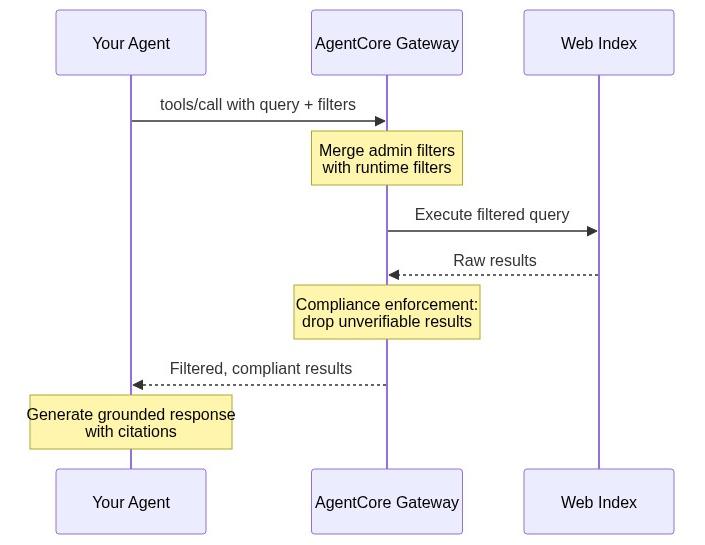
図 1: フィルタリングされた Web 検索リクエストのライフサイクル。ツール呼び出し(tools/call)から検証済み結果まで
この一連のプロセスはすべてサーバー側で完結します。クライアント側でのフィルタリングループも、事後処理も、追加の往復通信も発生しません。
階層型フィルターモデル:管理者設定とランタイムの連携
今回の機能導入における重要な設計原則の一つは、ランタイムフィルターが範囲を狭めることはできても、管理者によって設定された範囲を広げることはできないという点です。これにより、ランタイムで呼び出し元が何を要求しようとも、常にエンタープライズポリシーが適用されます。管理者レベルのドメインリストは、コネクタリソース作成時に設定されます。
統合ロジック
以下の図は、管理者レベルとランタイムレベルのフィルターリストがどのように結合されるかを示しています。許可リスト(include lists)は共通部分(インターセクション)でマージされ、両方のリストに含まれるドメインのみが残ります。一方、除外リスト(exclude lists)は和集合(ユニオン)でマージされ、いずれかのレベルでブロックされたドメインはそのままブロック状態を維持します。d.com が有効な許可リストから除外されている点に注目してください。これは、このドメインがランタイムリストには含まれているものの、管理者ポリシーには存在しないためです。
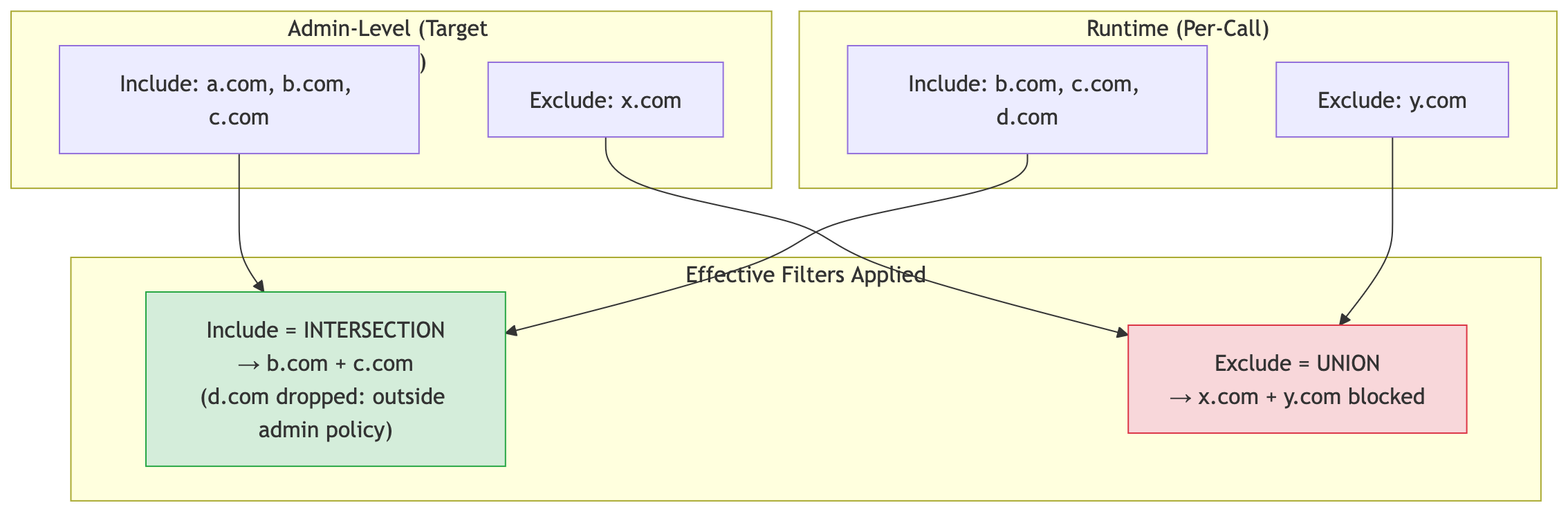
Figure 2: How admin and runtime domain lists merge, intersecting include lists and unioning exclude lists
ドメインの許可リスト(include): 有効な許可リストは、管理者設定とランタイム呼び出しの両方のリストが一致する部分(共通部分)で構成されます。例えば、管理者が [a.com, b.com, c.com] を許可し、ランタイム側で [b.com, c.com, d.com] が指定された場合、検索対象となるのは b.com と c.com のみです。d.com は管理者のリストに含まれていないため、自動的に除外されます。
ドメインの拒否リスト(exclude): 有効な拒否リストは、管理者設定とランタイム呼び出しの両方のリストを合わせたもの(和集合)になります。管理者が [x.com] をブロックし、ランタイム側で [y.com] も除外する場合、両方のドメインがブロックされます。
注意: ランタイム側の呼び出し元は、管理者が許可していないドメインを検索することはできません。また、管理者が拒否したドメインを解除することもできません。ランタイムでのフィルタリングは、検索範囲をさらに制限する役割しか果たしません。
フィルタ準拠の動作
フィルタが有効になっている場合、Web Search では再現率よりも精度を優先します。フィルタ基準に照らして検証できない結果は、フィルタなしで返すのではなく、最初から除外されます。
- ドメインフィルタが有効: 認識できるドメインを持たない結果は検索対象から除外されます。
- 日付フィルタが有効: 公開日が明確でない結果も除外されます。
フィルターを有効にすると、検索結果の件数は減る可能性があります。ただし、取得されるすべての結果は、指定したフィルターの条件を満たしています。
制限の適用
管理用除外リスト、管理用許可リスト、ランタイム用除外リスト、ランタイム用許可リストの 4 つのリストがあります。各リストは最大 100 エントリ を独立してサポートします。完全な設定詳細と構成ルールについては、開発者ガイドの ドメインフィルターの設定 を参照してください。
始め方
Web Search は、AgentCore Gateway を通じて提供されます。これは Amazon Bedrock AgentCore の機能で、エージェントとツールを接続するための管理されたエンドポイント(Model Context Protocol (MCP) に互換性あり)を提供します。ランタイムでのドメインおよび日付フィルターを Web Search ターゲットに有効にするには、以下の手順に従ってください。
前提条件
- Web Search ターゲットがコネクタバージョン 1.2.0 以降に固定された Amazon Bedrock AgentCore Gateway。
- AWS Identity and Access Management (IAM) の権限:呼び出し元のエージェントまたはアプリケーションには、Gateway の Amazon Resource Name (ARN) に対して
bedrock-agentcore:InvokeGatewayの権限が必要です。また、Gateway のサービスロールにはbedrock-agentcore:InvokeWebSearchの権限が必要です。完全なポリシーについては、Gateway サービスロールの設定 を参照してください。
最新の AWS SDK(Python、JavaScript、Java、.NET、Go、Ruby、PHP のいずれか)が必要です。
ステップ 1: バージョン 1.2.0 の Web Search ターゲットを作成する
AWS SDK for Python (Boto3) を使用して、バージョン 1.2.0 に固定し、管理者レベルのドメインポリシーを適用したターゲットを作成(または更新)します。すでにバージョン 1.1.0 で Web Search ターゲットをお持ちの場合は、新しいターゲットを作成する代わりに UpdateGatewayTarget を使用して、そのターゲットをバージョン 1.2.0 にピン留めすることも可能です。
AgentCore CLI やコンソールを含む追加の設定オプションについては、Web Search ツールのセットアップ をご覧ください。
import boto3

gateway_client = boto3.client("bedrock-agentcore-control", region_name="us-east-1")

# Create a Web Search target pinned to version 1.2.0 with admin-level domain filtering
target = gateway_client.create_gateway_target(
    gatewayIdentifier="your-gateway-id",
    name="web-search-filtered",
    targetConfiguration={
        "mcp": {
            "connector": {
                "source": {"connectorId": "web-search", "version": "1.2.0"},
                "configurations": [
                    {
                        "name": "WebSearch",
                        "parameterValues": {
                            "domainFilter": {
                                "include": [
                                    "approved-wire-1.com",
                                    "approved-wire-2.com",
                                    "sec.gov",
                                    "investor.gov",
                                ],
                                "exclude": ["unreliable-source.net"],
                            }
                        },
                    }
                ],
            }
        }
    },
    credentialProviderConfigurations=[
        {"credentialProviderType": "GATEWAY_IAM_ROLE"}
    ],
)

print(f"Target ID: {target['targetId']}")
print(f"Status: {target['status']}")
ステップ 2: ランタイムフィルターで呼び出す
エージェントが法務チームのために SEC の執行措置を監視していると想像してください。このチームは sec.gov を信頼できる一次情報源としてのみ認めており、過去の提出物ではなく今月の措置が必要としています。エージェントが送信する tools/call ペイロードの例は以下の通りです。
{
    "jsonrpc": "2.0",
    "id": "1",
    "method": "tools/call",
    "params": {
        "name": "WebSearch",
        "arguments": {
            "query": "latest SEC enforcement actions 2026",
            "filters": {
                "domainFilter": {
                    "include": ["sec.gov"],
                    "exclude": []
                },
                "publishedDateFilter": {
                    "from": "2026-07-01T00:00:00Z",
                    "to": "2026-08-04T23:59:59Z"
                }
            }
        }
    }
}
エージェントが受け取るのは、過去 5 週間以内に sec.gov で公開された結果のみです。第三者による法的解説や、時代遅れの提出物は含まれません。
注意: tools/call リクエストで使用するツール名は、tools/list で発見された名前を使用してください。この名前は ___WebSearch というパターンに従います。
先ほど作成したターゲットは、web-search-filtered___WebSearch です。
ランタイムの許可リスト(sec.gov)と管理者の許可リスト(approved-wire-1.com、approved-wire-2.com、sec.gov、investor.gov)が重複しています。sec.gov は両方のリストに含まれているため検索対象となります。もし some-other-site.com を指定した場合でも、管理者の許可リストにないため、エラーにならずに自動的に除外されます。
サンプルコード例
AgentCore Gateway で作成した MCP クライアントに、新しいフィルタをランタイムで適用して利用する例を以下に示します。ツール呼び出し用の MCP クライアントを作成するコードサンプル
例 1: 規制文書への言及が必須の臨床研究アシスタント
製薬企業の法務・規制対応チーム向けに、研究支援アシスタントを開発しているケースを想定します。同社のポリシーでは、回答には FDA(米国食品医薬品局)、NIH(国立衛生研究所)、または ClinicalTrials.gov の情報源からの引用のみを許容しています。健康系ブログからの引用は単なる品質の問題にとどまらず、監査で問題となるコンプライアンス違反に直結します。このルールは、モデルがどのようなクエリを生成しようとも、すべての検索に対して厳格に適用されなければなりません。
import json

# Pharma research assistant: only approved regulatory sources
compliance_request = json.dumps({
    "jsonrpc": "2.0",
    "id": "req-001",
    "method": "tools/call",
    "params": {
        "name": "WebSearch",
        "arguments": {
            "query": "FDA drug approval process 2026 guidance",
            "maxResults": 10,
            "filters": {
                "domainFilter": {
                    "include": ["fda.gov", "nih.gov", "clinicaltrials.gov"]
                }
            }
        }
    }
})

# Send via your MCP client (SigV4-signed or OAuth-authenticated)
response = mcp_client.send(compliance_request)
results = json.loads(response)

# Every result is from fda.gov, nih.gov, or clinicaltrials.gov
for result in results["result"]["content"]:
    print(result["text"])
エージェントが引用するすべての結果は、現在、承認された規制情報源からのものであることが検証可能です。WebMD の記事が検索クエリで 1 位にランクインしていても、その内容はモデルのコンテキストウィンドウには決して含まれません。
例 2:株式更新エージェント、今週の報道のみを対象とする
取引所では、営業時間中に株価の更新情報を生成するエージェントを運用しています。課題は、トレーダーが「半導体株の最新動向はどうなっているか?」と質問した際、エージェントが昨四半期の評価の高い分析結果を提示してしまう点です。古くなった情報に基づいて行動すれば、トレーダーは損失を被ります。すべての検索結果は過去 7 日以内に公開されたものでなければなりません。
from datetime import datetime, timedelta, timezone

# Calculate the 7-day window
now = datetime.now(timezone.utc)
seven_days_ago = now - timedelta(days=7)

stock_update_request = json.dumps({
    "jsonrpc": "2.0",
    "id": "req-002",
    "method": "tools/call",
    "params": {
        "name": "WebSearch",
        "arguments": {
            "query": "semiconductor stocks latest developments",
            "maxResults": 15,
            "filters": {
                "publishedDateFilter": {
                    "from": seven_days_ago.strftime("%Y-%m-%dT%H:%M:%SZ"),
                    "to": now.strftime("%Y-%m-%dT%H:%M:%SZ")
                }
            }
        }
    }
})

response = mcp_client.send(stock_update_request)
このエージェントによる株価更新情報は、過去 7 日以内に発表された報道のみを対象とします。昨四半期の評価の高い分析結果はモデルに届かないため、トレーダーを誤解させることはありません。
注記: 公開日が認識できない結果は、日付フィルターが有効な場合に除外されます。これにより、返されるすべての結果が確実に指定した期間内であることが保証されます。
例 3:投資家向け情報開示のコンプライアンス、一次情報源と今四半期のみの対象
IR(投資家関係)チームは、決算分析のドラフト作成にエージェントを活用しています。2 つの厳格なルールがあります。(1) 一次情報のみを使用すること:SEC の提出書類や公式の IR ページのみとし、クラウドソーシング型の金融解説サイトは絶対に使用しないこと。(2) 今四半期の出版物のみを対象とすることです。現在の四半期分析において昨四半期の数値を引用することは重大な誤りとなります。両方の制約を、すべての検索で同時に適用する必要があります。
# IR compliance agent: primary sources + current quarter only
financial_request = json.dumps({
    "jsonrpc": "2.0",
    "id": "req-003",
    "method": "tools/call",
    "params": {
        "name": "WebSearch",
        "arguments": {
            "query": "AMZN quarterly earnings report Q2 2026",
            "maxResults": 10,
            "filters": {
                "domainFilter": {
                    "include": ["sec.gov", "investor.gov"],
                    "exclude": ["example-crowd-commentary-1.com", "example-crowd-commentary-2.com"]
                },
                "publishedDateFilter": {
                    "from": "2026-04-01T00:00:00Z",
                    "to": "2026-08-04T23:59:59Z"
                }
            }
        }
    }
})

response = mcp_client.send(financial_request)
エージェントのドラフトでは、2026年第2四半期および第3四半期の公式提出書類と通信社報道のみが引用対象となります。クエリに完全に一致していても、クラウドソーシングによるコメントや意見記事はブロックされます。また、どのソースからのものであっても、それ以前の四半期に属する情報はすべて除外されます。
例4:テナントごとのソースポリシーを持つSaaSプラットフォーム
あなたは研究
原文を表示
When an AI agent uses Web Search to ground its answers on behalf of a customer, the organization behind that agent needs domain and date filters to control which sources the agent consults and how fresh those sources must be. A financial-services agent shouldn’t ground its answers in an unvetted blog. A product-information agent shouldn’t cite pricing or inventory data from three years ago when the user asked about current availability, as stock levels and pricing change rapidly.
Today, we’re announcing runtime domain and published-date filtering for Web Search on Amazon Bedrock AgentCore, a platform to build, connect, and optimize agents at scale with any framework or model. This capability ships as part of the web-search connector version 1.2.0. These capabilities give developers per-call control over which web domains their agents can search and what publication-date window results must fall within, all enforced server-side. No external orchestration is required. When combined with existing admin-level domain policies, organizations have a layered filtering model that enforces enterprise governance while giving individual API calls the flexibility to narrow scope dynamically, per request.
Alongside runtime filtering, this release also expands Web Search availability to two new AWS Regions: eu-west-1 (Dublin) and ap-northeast-1 (Tokyo). Customers in Europe and Asia Pacific can now invoke Web Search from a regional endpoint closer to their workloads, reducing latency and providing an EU-based entry point for organizations with data proximity requirements. AgentCore uses a zero-egress architecture where search queries remain within AWS. This regional expansion gives regulated customers in these regions a path to grounded agents without routing traffic across the Atlantic.
In this post, we walk through what runtime filtering is, why it matters, how the layered admin-plus-runtime model works, how to get started with the new API parameters, and what regional availability means for your workloads.
What’s new in connector version 1.2.0
This launch introduces two new capabilities within the filters object of the Web Search tool input schema:
1. Runtime domain filtering
Pass an include (allowlist) or exclude (denylist) list of domains on every tools/call invocation. This gives per-request control over which sources the agent may consult.
| Field | Description |
|---|---|
| filters.domainFilter.include | Results from these domains are returned |
| filters.domainFilter.exclude | Results from these domains are suppressed |
Each list supports up to 100 domains, counted independently.
2. Published-date filtering
Restrict results to content published within a specific date range using ISO-8601 UTC bounds:
| Field | Description |
|---|---|
| filters.publishedDateFilter.from | Earliest publication date (inclusive) |
| filters.publishedDateFilter.to | Latest publication date (inclusive) |
Both filters are optional and applied per request. Omitting them preserves the existing behavior where all indexed content is eligible.
Why runtime filtering matters
Real-world agent workloads demand more granular control than organization-wide policies alone can provide:
- Per-task source restriction: A compliance agent analyzing regulatory updates should only search .gov domains and approved publishers, not the open web.
- Temporal scoping: A market-intelligence agent summarizing “this week’s earnings calls” should never surface results from prior quarters, even if they rank highly for the query.
- Dynamic allow/deny at call time: A multi-tenant platform serving different customers may need different domain policies per request, without creating separate targets for each tenant.
- Content freshness guarantees: A customer support agent answering “what changed in the latest release” should only return documentation published in the past 7 days.
Runtime filtering addresses these needs by moving control into the API call itself.
How it works: The request flow
The following diagram shows the lifecycle of a filtered search request: your agent sends a tools/call with query and filters, the Gateway merges your runtime filters with the admin-level policy, executes the filtered query against the web index, enforces compliance on the raw results, and returns only verified results for your agent to ground its response on.
**Figure 1: Lifecycle of a filtered Web Search request, from tools/call to verified results
The entire lifecycle is server-side. There’s no client-side filtering loop, no post-processing, and no additional roundtrips.
The layered filtering model: Admin + runtime
A key design principle of this launch is that runtime filters can narrow but never expand the scope set by an administrator**. This ensures enterprise policy is always enforced, regardless of what a runtime caller requests. The admin-level domain lists are set up during creation of the connector resource.
Merge logic
The following diagram illustrates how admin-level and runtime filter lists combine: include lists merge by intersection (only domains present in both lists survive) while exclude lists merge by union (a domain blocked at either level stays blocked). Notice how d.com is dropped from the effective allowlist because it appears only in the runtime list, not the admin policy.
**Figure 2: How admin and runtime domain lists merge, intersecting include lists and unioning exclude lists
Domain include (allowlist): The effective allowlist is the intersection** of admin and runtime lists. If the admin allows [a.com, b.com, c.com] and the runtime call includes [b.com, c.com, d.com], only b.com and c.com are searched. The domain d.com is outside the admin domain list and is silently dropped.
Domain exclude (denylist): The effective denylist is the union of admin and runtime lists. If the admin blocks [x.com] and the runtime call excludes [y.com], both are blocked.
Note: A runtime caller can’t search a domain the admin hasn’t allowed and can’t unblock a domain the admin has denied. Runtime filters can only *further restrict* the search space.
Filter compliance behavior
When filters are active, Web Search prioritizes precision over recall. Results that can’t be verified against your filter criteria are excluded rather than returned unfiltered:
- Domain filter active: Results without a recognizable domain are excluded from consideration.
- Date filter active: Results without a recognized publication date are excluded.
You might receive fewer results when filters are active, but every result you do receive satisfies your specified filter criteria.
Cap enforcement
There are four lists: admin include, admin exclude, runtime include, and runtime exclude. Each supports up to 100 entries independently. For full configuration details and composition rules, see Configure domain filtering in the Developer Guide.
Getting started
Web Search is delivered through AgentCore Gateway, a capability of Amazon Bedrock AgentCore that provides a managed endpoint, compatible with the Model Context Protocol (MCP), for connecting agents to tools. Follow these steps to enable runtime domain and date filtering for your Web Search target.
Prerequisites
- An Amazon Bedrock AgentCore Gateway with a Web Search target pinned to connector version 1.2.0 or later.
- AWS Identity and Access Management (IAM) permissions: your calling agent or application needs bedrock-agentcore:InvokeGateway on the gateway Amazon Resource Name (ARN), and the Gateway’s service role needs bedrock-agentcore:InvokeWebSearch. See Configure the Gateway Service Role for the complete policy.
- The latest AWS SDK (Python, JavaScript, Java, .NET, Go, Ruby, or PHP).
Step 1: Create a Web Search target with version 1.2.0
Use AWS SDK for Python (Boto3) to create (or update) a target pinned to version 1.2.0, with admin-level domain policies. If you already have a Web Search target on version 1.1.0, you can use UpdateGatewayTarget to pin it to version 1.2.0 instead of creating a new target. For additional setup options, including the AgentCore CLI and console, see Set up Web Search Tool.
import boto3

gateway_client = boto3.client("bedrock-agentcore-control", region_name="us-east-1")

# Create a Web Search target pinned to version 1.2.0 with admin-level domain filtering
target = gateway_client.create_gateway_target(
    gatewayIdentifier="your-gateway-id",
    name="web-search-filtered",
    targetConfiguration={
        "mcp": {
            "connector": {
                "source": {"connectorId": "web-search", "version": "1.2.0"},
                "configurations": [
                    {
                        "name": "WebSearch",
                        "parameterValues": {
                            "domainFilter": {
                                "include": [
                                    "approved-wire-1.com",
                                    "approved-wire-2.com",
                                    "sec.gov",
                                    "investor.gov",
                                ],
                                "exclude": ["unreliable-source.net"],
                            }
                        },
                    }
                ],
            }
        }
    },
    credentialProviderConfigurations=[
        {"credentialProviderType": "GATEWAY_IAM_ROLE"}
    ],
)

print(f"Target ID: {target['targetId']}")
print(f"Status: {target['status']}")
Step 2: Invoke with runtime filters
Imagine your agent monitors SEC enforcement actions for a legal team. The team only trusts sec.gov as a primary source, and they need actions from the current month, not historical filings. Here’s the tools/call payload your agent sends:
{
    "jsonrpc": "2.0",
    "id": "1",
    "method": "tools/call",
    "params": {
        "name": "WebSearch",
        "arguments": {
            "query": "latest SEC enforcement actions 2026",
            "filters": {
                "domainFilter": {
                    "include": ["sec.gov"],
                    "exclude": []
                },
                "publishedDateFilter": {
                    "from": "2026-07-01T00:00:00Z",
                    "to": "2026-08-04T23:59:59Z"
                }
            }
        }
    }
}
The agent receives only results from sec.gov published in the last five weeks. There’s no third-party legal commentary or outdated filings in the results.
Note: The tool name in your tools/call request is the name discovered through tools/list, which follows the pattern ___WebSearch. For the target created earlier, that’s web-search-filtered___WebSearch. The runtime include list (sec.gov) intersects with the admin list (approved-wire-1.com, approved-wire-2.com, sec.gov, investor.gov). Because sec.gov appears in both, it is searched. If you passed some-other-site.com, it would be silently dropped because it’s not in the admin allowlist.
Sample code examples
Here are some examples of how you can use the MCP client created from the AgentCore Gateway with the new filters at runtime. Code sample to create MCP client for calling tools
Example 1: Clinical research assistant with regulatory citation requirements
You’re building a research assistant for a pharmaceutical company’s regulatory affairs team. Company policy mandates that every answer cite only FDA, NIH, or ClinicalTrials.gov. A citation from a health blog isn’t only a quality issue. It’s a compliance violation that could surface in an audit. The agent needs to enforce this on every search, regardless of what query the model constructs.
import json

# Pharma research assistant: only approved regulatory sources
compliance_request = json.dumps({
    "jsonrpc": "2.0",
    "id": "req-001",
    "method": "tools/call",
    "params": {
        "name": "WebSearch",
        "arguments": {
            "query": "FDA drug approval process 2026 guidance",
            "maxResults": 10,
            "filters": {
                "domainFilter": {
                    "include": ["fda.gov", "nih.gov", "clinicaltrials.gov"]
                }
            }
        }
    }
})

# Send via your MCP client (SigV4-signed or OAuth-authenticated)
response = mcp_client.send(compliance_request)
results = json.loads(response)

# Every result is from fda.gov, nih.gov, or clinicaltrials.gov
for result in results["result"]["content"]:
    print(result["text"])
Every result your agent cites is now verifiably from an approved regulatory source. Even if a WebMD article ranks #1 for the query, it never enters the model’s context window.
Example 2: Stock-update agent, only this week’s coverage
Your trading desk runs an agent that generates stock updates throughout the trading day. The problem: when a trader asks “what’s the latest on semiconductor stocks?”, the agent used to surface a highly-ranked analysis from last quarter, and a trader who acts on stale coverage loses money. You need every result to be from the past 7 days, no exceptions.
from datetime import datetime, timedelta, timezone

# Calculate the 7-day window
now = datetime.now(timezone.utc)
seven_days_ago = now - timedelta(days=7)

stock_update_request = json.dumps({
    "jsonrpc": "2.0",
    "id": "req-002",
    "method": "tools/call",
    "params": {
        "name": "WebSearch",
        "arguments": {
            "query": "semiconductor stocks latest developments",
            "maxResults": 15,
            "filters": {
                "publishedDateFilter": {
                    "from": seven_days_ago.strftime("%Y-%m-%dT%H:%M:%SZ"),
                    "to": now.strftime("%Y-%m-%dT%H:%M:%SZ")
                }
            }
        }
    }
})

response = mcp_client.send(stock_update_request)
The agent’s stock updates now draw only on coverage published in the last seven days. That highly-ranked analysis from last quarter? It never reaches the model, so it can never mislead a trader.
Note: Results without a recognized publication date are excluded when the date filter is active. This ensures every returned result is verifiably within your time window.
Example 3: Investor-relations compliance, primary sources, current quarter only
Your investor-relations team uses an agent to prepare earnings analysis drafts. Two hard rules: (1) only primary sources: SEC filings and official investor pages: never crowdsourced financial commentary sites, and (2) only publications from this quarter, because citing last quarter’s numbers in a current-quarter analysis is a material error. You need both constraints enforced simultaneously on every search.
# IR compliance agent: primary sources + current quarter only
financial_request = json.dumps({
    "jsonrpc": "2.0",
    "id": "req-003",
    "method": "tools/call",
    "params": {
        "name": "WebSearch",
        "arguments": {
            "query": "AMZN quarterly earnings report Q2 2026",
            "maxResults": 10,
            "filters": {
                "domainFilter": {
                    "include": ["sec.gov", "investor.gov"],
                    "exclude": ["example-crowd-commentary-1.com", "example-crowd-commentary-2.com"]
                },
                "publishedDateFilter": {
                    "from": "2026-04-01T00:00:00Z",
                    "to": "2026-08-04T23:59:59Z"
                }
            }
        }
    }
})

response = mcp_client.send(financial_request)
The agent’s draft now cites only official filings and wire reports from Q2 and Q3 2026. Crowdsourced commentary and opinion pieces are blocked even if they match the query perfectly. Anything from prior quarters is excluded regardless of source.
Example 4: SaaS platform with per-tenant source policies
You operate a researc
関連記事
今日のまとめ
AIデイリーブリーフで今日の重要ニュースをまとめ読み