Amazon Bedrock のコスト配分を Athena と CUDOS で追跡可能に
本文の状態
日本語全文を表示中
詳細モードで約14分の本文を読めます。
同じ出来事の情報源
この情報源を基点に整理
AWS Machine Learning Blog
AWS は Amazon Bedrock のコスト帰属機能を強化し、IAM プリンシパルごとの詳細な追跡と Athena を用いたクエリ分析、CUDOS ダッシュボードによる可視化を可能にする実装ガイドを発表した。
Continue in AI NEW LAB
このニュースを、実務の判断につなげる
AI NEW LABで、試したことや先に確認したい条件を共有できます。まずはログインなしで読めます。
AI NEW LABで論点を見るAI深層分析を開く2026年8月13日 03:11
AI深層分析
キーポイント
IAM プリンシパルごとのコスト追跡機能の導入
Amazon Bedrock の新機能により、各推論リクエストがどの IAM プリンシパルによって実行されたかを自動的に追跡し、line_item_iam_principal カラムを通じてユーザーやアプリケーション単位の可視性を提供する。
CUR 2.0 と Athena を用いた分析手法の解説
IAM プリンシパルデータをインストゥメントした Cost and Usage Report (CUR) 2.0 の設定方法と、Amazon Athena を使用してコストデータをクエリし、チームやプロジェクト単位で集計する手順を詳述している。
CUDOS ダッシュボードによる事前構築された可視化
Athena の柔軟な集計機能に加え、組織の特定の構造に合わせた事前構築されたビジュアルを提供する CUDOS ダッシュボードの新機能を導入し、コストと利用状況の詳細分析を支援する。
実装に必要な前提条件と権限
AWS アカウントのアクセス権限、IAM 権限、S3 バケットの準備に加え、Claude Code や Kiro-CLI を利用した自動化セットアップの可能性など、実装前に確認すべき具体的な要件を提示している。
IAM プリンシパルデータのCURエクスポート設定
コスト帰属にはCUR 2.0エクスポートで「Include caller identity (IAM principal) allocation data」を有効にする必要がある。これによりline_item_iam_principal列とIAMタグがデータに追加され、時間粒度は詳細な分析のために「Hourly」を選択する。
重要な引用
This feature automatically traces every inference request back to the IAM principal that made the call.
With optional cost allocation tags, you can also aggregate spend by team, project, or tenant using AWS Cost Explorer.
CUDOS offers pre-built visuals tailored to your organization's specific structure.
This is the critical setting that populates the line_item_iam_principal column and surfaces IAM principal tags (prefixed with iamPrincipal/) in your cost data.
編集コメントを表示
編集コメント
このガイドは、生成 AI の利用が拡大する中で課題となるコストの透明性確保に直結する実用的な解決策を示している。特に大規模組織における AI プロジェクトの予算管理や責任所在の明確化において、即座に活用可能なフレームワークを提供している点が高く評価される。
Source Article
元記事を日本語で読む
本文に関係しない購読案内、埋め込み通知、サイト内プロモーションは除いています。
前回の Part 1 では、Amazon Bedrock の詳細なコスト配分機能について紹介しました。この機能により、すべての推論リクエストが IAM プリンシパル(呼び出し元)に自動的に追跡可能になり、新しい line_item_iam_principal カラムを使うことで、ユーザー別やアプリケーション別の利用状況を把握できるようになります。さらに、オプションのコストアロケーションタグを活用すれば、AWS Cost Explorer を使ってチーム、プロジェクト、テナント単位での支出を集計することも可能です。
このアプローチを使えば、Claude Code や Codex といったサードパーティ製ツール、あるいは自社で開発したカスタムビルドなど、Bedrock を活用するあらゆるサービスやアプリケーションについて、必要な粒度で利用状況を追跡できます。本記事では、Amazon Athena のクエリと CUDOS ダッシュボードを活用して、Amazon Bedrock のコスト配分を可視化・分析する方法をご紹介します。
まず、IAM プリンシパルデータを組み込んだ Cost and Usage Report (CUR) 2.0 を Data Exports を通じてセットアップする手順を解説します。次に、Amazon Athena で CUR データをクエリして分析を行う方法を示し、最後に CUDOS ダッシュボードの新たな機能について紹介します。これには、Bedrock の詳細なコスト・利用データが含まれます。Athena は集計処理や各種ビジネスインテリジェンス(BI)ツールとの連携、請求プロセスにおいて柔軟性を提供しますが、CUDOS は組織固有の構造に合わせた事前構築済みビジュアルを提供し、より直感的な分析を可能にします。
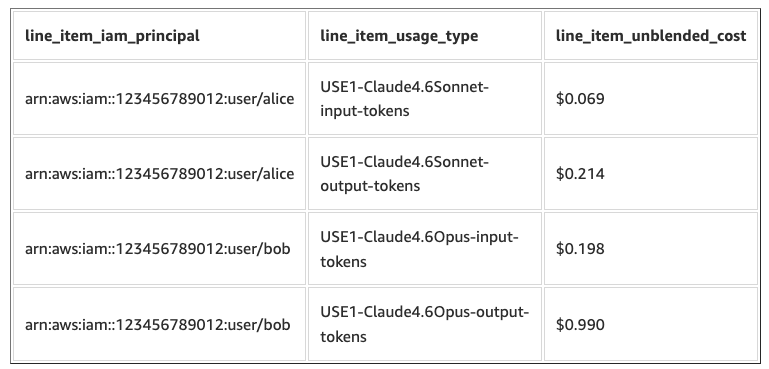
IAM プリンシパルと使用タイプ別の Amazon Bedrock コストを示すクエリ出力の例
Cost and Usage Reports (CUR 2.0) の設定
Amazon Bedrock のコストを分析する前に、CUR 2.0 データのエクスポートを設定し、それを Amazon Athena に接続する必要があります。
前提条件
以下の準備が必要です。
- 請求コンソールにアクセスできる AWS アカウント
- Cost and Usage Reports、S3、Athena 用の IAM 権限
- CUR データ保存用の S3 バケット
- SQL と AWS Management Console の基本的な理解
- (オプション) 自動セットアップ用の Claude Code または Kiro-CLI
必要な IAM 権限 を持っているか確認してください。
Amazon Bedrock のコスト帰属には、CUR 2.0 エクスポートで IAM プリンシパルデータを有効にし、line_item_iam_principal カラムと関連する IAM プリンシパルタグに値が埋め込まれるようにする必要があります。
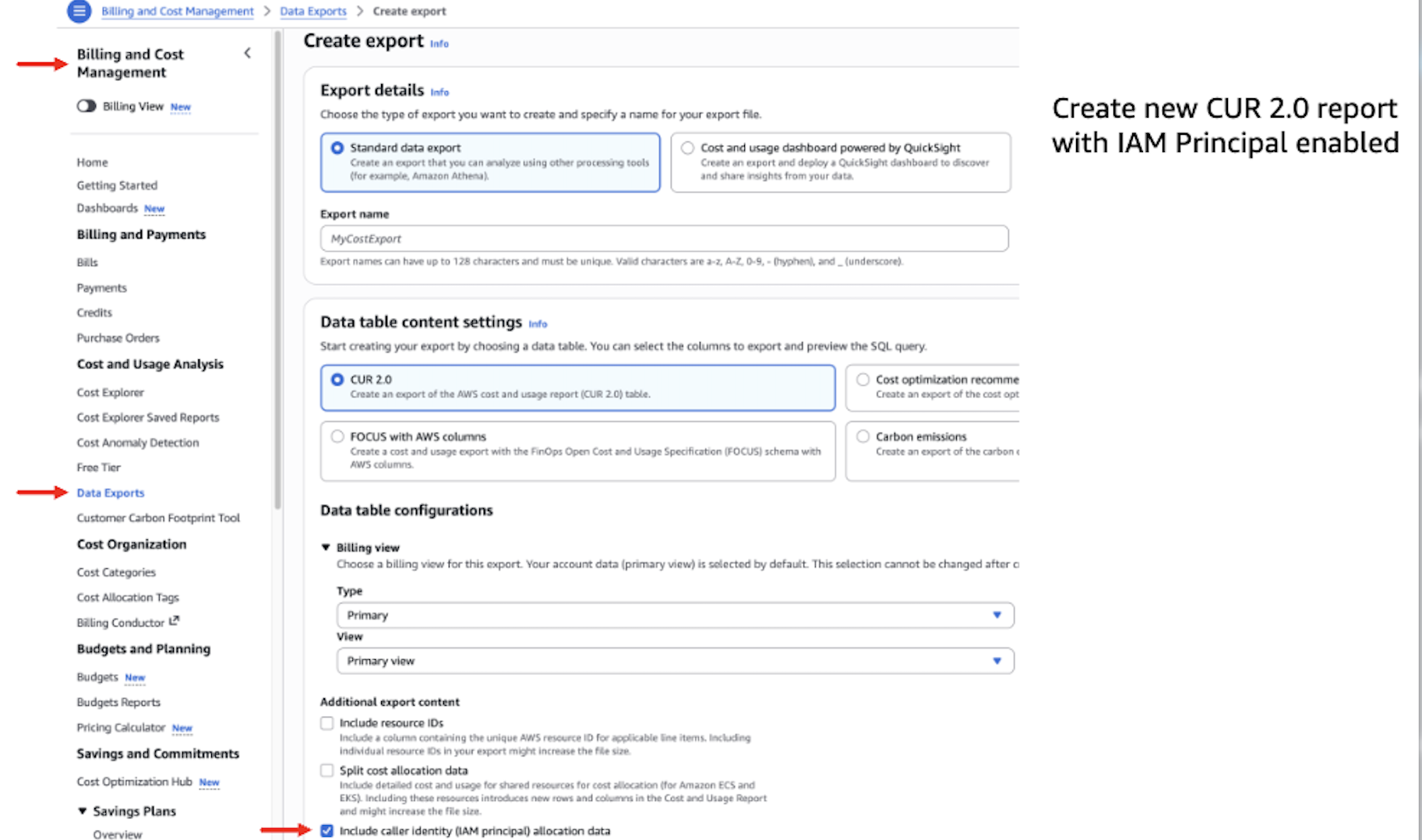
Caller Identity (IAM プリンシパル) のアロケーションデータを有効にした CUR 2.0 の標準データエクスポートを作成する手順です。
追加のエクスポートコンテンツで、以下のチェックボックスをオンにします。Caller Identity (IAM プリンシパル) アロケーションデータの含める — これが最も重要な設定です。これにより、line_item_iam_principal カラムが埋められ、コストデータに iamPrincipal/ というプレフィックスが付いた IAM プリンシパルのタグが表示されるようになります。
データテーブルの設定では、時間粒度を「毎時」に選択して、詳細なデータを取得できるようにします。
エクスポートの配信オプションでは、ファイルバージョン管理を「既存レポートの上書き」に設定し、重複したデータを保存しないようにします。
*重要:* IAM プリンシパルデータを有効にすると、CUR ファイルのサイズが増加します。以前は 1 行だった使用量が、貢献した各 IAM プリンシパルごとに 1 行ずつに分割されるためです。多くの異なるプリンシパルが存在する高負荷ワークロードでは、Amazon S3 のストレージ容量を十分に確保し、古い CUR ファイルについては Amazon S3 ライフサイクルポリシー の活用を検討してください。
AWS による最初の CUR 2.0 レポートが S3 バケットに配信されるまで、最大 24 時間かかる場合があります。
CUR 2.0 を Amazon Athena に接続する
Amazon Athena を使えば、管理すべきインフラを一切用意せず、標準的な SQL で CUR データをクエリできます。このセットアップをさらに簡素化するために、Claude Code や Kiro-CLI、Codex などの AI アシスタントと連携可能なオプションの agent.md スキルリポジトリが用意されています。これを使えば、Athena 環境から CUR データへの接続までを一貫して自動化できます。
- リポジトリをクローンします(
git clone https://github.com/aws-samples/sample-cur-iam-principal-bedrock-tracking)。 - このディレクトリで Claude Code(
claude)または Kiro CLI(kiro)を起動します。 - プロンプト:「agent.md を読み、そのワークフローに従ってコストと利用状況レポートの追跡を設定し、今月の Amazon Bedrock 主体別クエリを実行してください」
マニュアルセットアップ手順 を踏むことも可能です。
CUDOS ダッシュボードも展開する場合は、AWS CloudFormation からデプロイ できます。この際、Athena クエリ用データベースも同時に作成されます。
デプロイ完了後、Athena クエリエディタ で以下のようなテストクエリを実行できます:
SELECT
    line_item_iam_principal,
    line_item_usage_type,
    line_item_unblended_cost
    --# Note: replace your_cur_table_name, like `cid_data_export.cur2`
FROM your_cur_table_name
WHERE line_item_product_code in ('AmazonBedrock', 'AmazonBedrockService')
    AND line_item_iam_principal IS NOT NULL
LIMIT 10;
このクエリで IAM プリンシパルの ARN と Bedrock の利用タイプを含む行が返されれば、セットアップは完了しており、より深い分析が可能になっています。
Athena クエリのパターン:Bedrock コスト追跡用
Athena に CUR 2.0 データが格納されれば、SQL を使ってコストの細分化された内訳を即座に確認できます。ここでは、最も一般的な分析シナリオに対応する、段階的に高度化する 3 つのクエリパターンを紹介します。
注記: 以下のクエリでは、your_cur_table_name を実際の CUR Athena テーブル名(例:cid_data_export.cur2)に置き換えてください。
クエリ 1: IAM プリンシパル別および利用タイプ別の Bedrock コスト
このクエリは、呼び出し元の ID とモデルの利用状況に基づいて Amazon Bedrock の支出を完全に内訳します。具体的には、「誰がどのモデルを呼び出し、どれほどの費用がかかっているのか」という問いに答えるものです。
SELECT
    line_item_iam_principal,
    line_item_usage_type,
    SUM(line_item_usage_amount) AS total_tokens,
    SUM(line_item_unblended_cost) AS total_cost
FROM your_cur_table_name
WHERE line_item_product_code in ('AmazonBedrock', 'AmazonBedrockService')
    AND billing_period = DATE_FORMAT(CURRENT_DATE, '%Y-%m')
    AND line_item_iam_principal IS NOT NULL
    -- AND line_item_usage_type LIKE '%Sonnet%input%'
GROUP BY
    line_item_iam_principal,
    line_item_usage_type
ORDER BY total_cost DESC;
出力例:
| line_item_iam_principal | line_item_usage_type | total_tokens | total_cost |
|---|---|---|---|
| arn:aws:sts::123456789012:assumed-role/ChatApp/session-1 | USW2-anthropic.claude-opus-4-8-mantle-cache-write-tokens-standard | 1629.5 | $11.2029 |
| arn:aws:sts::123456789012:assumed-role/DocProcessor/batch-7 | USW2-Claude4.6Sonnet-output-tokens | 68.579 | $1.131 |
| arn:aws:sts::123456789012:assumed-role/ClaudeCode/chat | USW2-Claude4.6Sonnet-cache-write-input-token-count | 831.74 | $3.4309 |
| arn:aws:iam::123456789012:user/alice | USW2-Claude4.6Sonnet-input-tokens | 17.33 | $0.0572 |
分析のヒント:
line_item_usage_type LIKE '%Sonnet%output%'や%nova%といった LIKE パターンを使用して、特定のモデルに絞り込んでください。
line_item_iam_principal カラムには完全な ARN が格納されています。仮定ロールの場合、最後の / の後のセッション名が特定のユーザーまたはセッションを識別します。
クエリ 2: 既知の IAM プリンシパルタグごとのコスト内訳
IAM プリンシパルに「team」や「project」、「costcenter」といった次元タグを付与し、それらをコスト配分タグとして有効化した場合、これらのタグは CUR 2.0 データに表示されます。
「tags」列の一部として、iamPrincipal/ プレフィックスの後にタグキーを続けます。
このクエリは、これらのタグごとにコストをグループ化することで、「今月のエンジニアリングチームが Bedrock に費やした金額はいくらか?」や「チャットボットのプロジェクトにおける Bedrock の総コストはいくらか?」といった質問に答えることができます。
プロジェクト別:
SELECT
    tags['iamPrincipal/project'] AS project,
    line_item_usage_type,
    SUM(line_item_usage_amount) AS total_tokens,
    SUM(line_item_unblended_cost) AS total_cost
FROM your_cur_table_name
WHERE line_item_product_code in ('AmazonBedrock', 'AmazonBedrockService')
    AND billing_period = DATE_FORMAT(CURRENT_DATE, '%Y-%m')
    AND line_item_iam_principal IS NOT NULL
GROUP BY
    tags['iamPrincipal/project'],
    line_item_usage_type
ORDER BY total_cost DESC;
出力例:
| プロジェクト | 行項目使用タイプ | 総トークン数 | 総コスト |
|---|---|---|---|
| data-science | USW2-Claude4.5Sonnet-cache-write-input-token-count | 433.893 | 1.789808625 |
| data-science | USW2-Claude4.6Sonnet-cache-read-input-token-count | 5372.659 | 1.77297747 |
| engineering | USW2-Claude4.5Sonnet-input-tokens | 29.481 | 0.0972873 |
| engineering | USW2-Claude4.5Sonnet-output-tokens | 31.102 | 0.513183 |
注意: このクエリは、IAM プリンシパルに適切なキーでタグ付けされており、かつそのタグがコスト配分タグとして有効化されている場合にのみ結果を返します。
クエリ 3: 未知のタグスキーマに対する UNNEST を用いた動的なタグの発見
大規模組織では、すべての IAM プリンシパルに適用されるタグの種類を事前に把握できない場合があります。チームごとに使用するタグキーが異なることもあれば、時間とともに新しいタグが導入されることもあります。以下の例は、Athena の UNNEST 関数を利用して動的に探索する方法を示しています。
このクエリでは、Bedrock ワークロード全体で使用されているすべての IAM プリンシパルタグを発見し、各タグキーと値のペアごとのコスト配分を表示します。
WITH iam_principal_costs AS (
    SELECT
        t.key AS tag_name,
        t.value AS tag_value,
        line_item_usage_type,
        line_item_unblended_cost
    FROM your_cur_table_name
    CROSS JOIN UNNEST(tags) AS t(key, value)
    WHERE line_item_product_code IN ('AmazonBedrock', 'AmazonBedrockService')
        AND line_item_iam_principal IS NOT NULL
        AND line_item_iam_principal != ''
        AND t.key LIKE 'iamPrincipal/%'
)
SELECT
    tag_name || ': ' || tag_value AS tags,
    line_item_usage_type,
    SUM(line_item_unblended_cost) AS total_cost
FROM iam_principal_costs
GROUP BY tag_name, tag_value, line_item_usage_type
ORDER BY total_cost DESC;
実世界のユースケース:複数サービス間のコスト比較
複数の AI ベース型サービスを運用しているプラットフォームチームを想定してください。例えば、ドキュメント要約パイプライン(DocProcessor)と顧客向けチャットボット(ChatApp)を同時に運用しているとします。各サービスには独自の IAM ロールを割り当てることができます。前述のクエリパターンを用いれば、以下のクエリで各サービスの支出がどのように推移しているかを切り分けて確認できます。
SELECT
    line_item_iam_principal,
    line_item_usage_type,
    SUM(line_item_usage_amount) AS total_usage,
    SUM(line_item_unblended_cost) AS total_cost
FROM your_cur_table_name
WHERE line_item_product_code IN ('AmazonBedrock', 'AmazonBedrockService')
    AND billing_period = DATE_FORMAT(CURRENT_DATE, '%Y-%m')
    AND line_item_iam_principal IS NOT NULL
    AND (
        line_item_iam_principal LIKE '%DocProcessor%'
        OR line_item_iam_principal LIKE '%ChatApp%'
    )
GROUP BY
    line_item_iam_principal,
    line_item_usage_type
ORDER BY total_cost DESC;
出力例:
| line_item_iam_principal | line_item_usage_type | total_usage | total_cost |
|---|---|---|---|
| arn:aws:sts::123456789012:assumed-role/ChatApp/session-1 | USE1-Claude4.6Sonnet-output-tokens | 4,800,000 | $72.00 |
| arn:aws:sts::123456789012:assumed-role/ChatApp/session-1 | USE1-Claude4.6Sonnet-input-tokens | 2,900,000 | $8.70 |
| arn:aws:sts::123456789012:assumed-role/DocProcessor/batch-7 | USE1-NovaLite-output-tokens | 6,100,000 | $1.46 |
| arn:aws:sts::123456789012:assumed-role/DocProcessor/batch-7 | USE1-NovaLite-input-tokens | 3,200,000 | $0.19 |
この出力結果から、プラットフォームチームは以下のような質問に回答できます。
今月の Bedrock 利用料の主要な貢献元はどのアプリケーションですか? この例では、ChatApp は Claude 4.6 Sonnet を使用して 80 ドル以上を占めていますが、DocProcessor は Nova Lite を使用して 5 ドル未満です。
ワークロードごとに異なるモデルを使用することでコスト削減が可能でしょうか? DocProcessor はすでに単純な要約タスクに適した Nova Lite を採用していますが、チームは ChatApp が一部の対話処理で軽量モデルに切り替えることで、72 ドルの出力トークンコストを削減できるかどうかを検討する余地があります。
Athena クエリの利用料金
実行したクエリに対してのみ課金されます。料金は各クエリでスキャンされたデータ量に基づいて計算されます。コンソールでは各クエリ実行後にこの情報が表示され、Athena コンソールの「Recent Queries」タブでも確認できます。
Athena クエリの料金は、スキャンしたデータ 1 TB あたり 5 ドルです(ただし、1 クエリあたり最低 10 MB の課金が発生します)。テーブルは hive partition projection を billing_period で自動的に使用しているため、特定の月のスコープでクエリを実行すると、その月のフォルダにある parquet ファイルのみがスキャンされます。通常のスキャン量は 10 MB を大幅に下回るため、1 クエリあたりのコストは約 0.00005 ドル(最低課金額)となります。
コストを抑えるためには、必ず WHERE billing_period = ... フィルターを含め、必要な列のみを選択し、SELECT * を避けてください。
Cloud Intelligence Dashboards フレームワーク
CUDOS ダッシュボードは、オープンソースの Cloud Intelligence Dashboards (CID) フレームワーク の一部です。提供されているインフラストラクチャー・アズ・コード(IaC)テンプレートを使用して、AWS アカウント内でこのフレームワークをデプロイできます。CID フレームワークは、AWS 組織全体での財務責任の明確化と運用効率の向上を支援します。また、CUDOS ダッシュボードは AWS インフラストラクチャ全体の費用対効果に向けたデータ駆動型の意思決定をサポートする、詳細かつ実行可能なインサイトを提供します。
CUDOS における Amazon Bedrock のコストと利用状況のインサイト
CUDOS バージョン 5.8 では、AI/ML タブに包括的な Amazon Bedrock セクションが追加され、IAM プリンシパルごとのコスト帰属機能を完全にサポートするようになりました。このダッシュボードでは以下のような機能が利用可能です。
- 柔軟なグループ化機能: IAM プリンシパル、IAM プリンシパルのタグ(プロジェクトやチームなど)、モデル/リソースグループ、リージョン、またはダッシュボードのデプロイ時に設定されたその他のコスト分類項目に基づいて、Amazon Bedrock の支出をグループ化できます。
100 万トークンあたりのコスト追跡
支出グラフにトレンドラインを重ね表示し、モデルの切り替えやキャッシュのようなプロンプト最適化による影響を可視化します。
以下の図は、CUDOS ダッシュボードの AI/ML タブにある Amazon Bedrock のサマリーセクションを示しています。IAM プリンシパルごとにグループ化され、各プリンシパルのコスト内訳と 100 万トークンあたりのコスト推移が表示されています。
原文を表示
Part 1 introduced granular cost attribution for Amazon Bedrock. This feature automatically traces every inference request back to the IAM principal that made the call. It showed how the new line_item_iam_principal column can give you per-user and per-application visibility. With optional cost allocation tags, you can also aggregate spend by team, project, or tenant using AWS Cost Explorer. With this approach, you can typically track usage at the granularity you want for any Bedrock-powered service or application, whether third-party tools like Claude Code or Codex or your own custom builds. This post shows how to visualize and analyze cost attribution for Amazon Bedrock through Amazon Athena queries and CUDOS dashboards.
First, this post shows you how to set up Cost and Usage Report (CUR) 2.0 through Data Exports instrumented with IAM principal data. Next, this post shows you how to query CUR data with Amazon Athena for analysis. It then introduces the new capabilities of CUDOS dashboards, including granular Bedrock cost and usage data. While Athena provides flexibility for aggregations, integration with different business intelligence (BI) tools, and chargeback processes, CUDOS offers pre-built visuals tailored to your organization’s specific structure.
**Example query output showing Amazon Bedrock costs by IAM principal and usage type
Setting up Cost and Usage Reports (CUR 2.0)
Before you can analyze Amazon Bedrock costs, set up a CUR 2.0 data export and connect it to Amazon Athena.
Prerequisites
You need the following:
- An AWS account with billing console access.
- IAM permissions for Cost and Usage Reports, S3, and Athena.
- An S3 bucket for CUR data storage.
- Basic familiarity with SQL and the AWS Management Console.
- (Optional) Claude Code or Kiro-CLI for automated setup.
Make sure you have the required IAM permissions.
For Amazon Bedrock cost attribution, you need to enable IAM principal data in your CUR 2.0 export so that the line_item_iam_principal column and associated IAM principal tags are populated.
Creating a CUR 2.0 data export with IAM principal data
Follow the instructions in Creating a standard data export to set up your CUR 2.0 export. When configuring the export, make sure the following options are part of your final configuration:
Creating a CUR 2.0 standard data export with caller identity (IAM principal) allocation data enabled
- In Additional export content, select the following checkboxes:
Include caller identity (IAM principal) allocation data — This is the critical setting that populates the line_item_iam_principal column and surfaces IAM principal tags (prefixed with iamPrincipal/) in your cost data.
- In Data table configurations:
Time granularity: Select Hourly for maximum detail.
- In Data export delivery options:
File versioning: Select Overwrite existing report to avoid storing duplicate data.
*Important:** Enabling IAM principal data increases CUR file sizes because usage that was previously a single row is now expanded into multiple rows, one for each IAM principal that contributed to the usage. For high-volume workloads with many distinct principals, plan your Amazon S3 storage accordingly and consider Amazon S3 Lifecycle policies for older CUR files.*
It may take up to 24 hours for AWS to deliver your first CUR 2.0 report to the S3 bucket.
Connecting CUR 2.0 to Amazon Athena
With Amazon Athena, you can query your CUR data using standard SQL with no infrastructure to manage. To streamline this setup, an optional agent.md skill repo is available that you can use with AI assistants like Claude Code, Kiro-CLI, or Codex. It automates the end-to-end process of connecting your Athena environment to your CUR data.
- Clone the repo (git clone https://github.com/aws-samples/sample-cur-iam-principal-bedrock-tracking).
- Launch Claude Code (claude) or Kiro CLI (kiro) in this directory.
- Prompt: “Read agent.md and follow its workflow to set up Cost and Usage Report tracking and run the Amazon Bedrock-by-principal query for the current month.”
You may also follow the manual setup steps.
If you plan to deploy the CUDOS dashboard as well, you can deploy it from AWS CloudFormation. This also deploys the Athena query database as part of the process.
Once deployed, here is a sample test query in the Athena Query Editor that you can use:
SELECT
    line_item_iam_principal,
    line_item_usage_type,
    line_item_unblended_cost
    --# Note: replace your_cur_table_name, like `cid_data_export.cur2`
FROM your_cur_table_name
WHERE line_item_product_code in ('AmazonBedrock', 'AmazonBedrockService')
    AND line_item_iam_principal IS NOT NULL
LIMIT 10;
If this returns rows with IAM principal ARNs and Bedrock usage types, your setup is complete and ready for deeper analysis.
Athena query patterns for Bedrock cost tracking
With your CUR 2.0 data available in Athena, you can now answer granular cost attribution questions using SQL. This section provides three progressively sophisticated query patterns that cover the most common analysis scenarios.
Note: In the following queries, replace your_cur_table_name with the actual name of your CUR Athena table (for example, cid_data_export.cur2).
Query 1: Bedrock costs by IAM principal and usage type
This query provides a complete breakdown of Amazon Bedrock spending by caller identity and model usage. It answers the question: *“Who is calling which models, and how much are they spending?”*
SELECT
    line_item_iam_principal,
    line_item_usage_type,
    SUM(line_item_usage_amount) AS total_tokens,
    SUM(line_item_unblended_cost) AS total_cost
FROM your_cur_table_name
WHERE line_item_product_code in ('AmazonBedrock', 'AmazonBedrockService')
    AND billing_period = DATE_FORMAT(CURRENT_DATE, '%Y-%m')
    AND line_item_iam_principal IS NOT NULL
    -- AND line_item_usage_type LIKE '%Sonnet%input%'
GROUP BY
    line_item_iam_principal,
    line_item_usage_type
ORDER BY total_cost DESC;
Example output:
| line_item_iam_principal | line_item_usage_type | total_tokens | total_cost |
|---|---|---|---|
| arn:aws:sts::123456789012:assumed-role/ChatApp/session-1 | USW2-anthropic.claude-opus-4-8-mantle-cache-write-tokens-standard | 1629.5 | $11.2029 |
| arn:aws:sts::123456789012:assumed-role/DocProcessor/batch-7 | USW2-Claude4.6Sonnet-output-tokens | 68.579 | $1.131 |
| arn:aws:sts::123456789012:assumed-role/ClaudeCode/chat | USW2-Claude4.6Sonnet-cache-write-input-token-count | 831.74 | $3.4309 |
| arn:aws:iam::123456789012:user/alice | USW2-Claude4.6Sonnet-input-tokens | 17.33 | $0.0572 |
Analysis tips:
- Use LIKE patterns such as line_item_usage_type LIKE '%Sonnet%output%' or %nova% to filter for specific models.
- The line_item_iam_principal column contains the full ARN. For assumed roles, the session name after the last / identifies the specific user or session.
Query 2: Costs broken down by known IAM principal tags
When you’ve tagged your IAM principals with dimensions like team, project, or costcenter (and activated those tags as cost allocation tags), they appear in your CUR 2.0 data as part of the *tags* columns, with the iamPrincipal/ prefix followed by your tag key. This query groups costs by those tags to answer questions like: *“How much did the engineering team spend on Bedrock this month?”* or *“What’s the total Bedrock cost for the chatbot project?”*
By project:
SELECT
    tags['iamPrincipal/project'] AS project,
    line_item_usage_type,
    SUM(line_item_usage_amount) AS total_tokens,
    SUM(line_item_unblended_cost) AS total_cost
FROM your_cur_table_name
WHERE line_item_product_code in ('AmazonBedrock', 'AmazonBedrockService')
    AND billing_period = DATE_FORMAT(CURRENT_DATE, '%Y-%m')
    AND line_item_iam_principal IS NOT NULL
GROUP BY
    tags['iamPrincipal/project'],
    line_item_usage_type
ORDER BY total_cost DESC;
Example output:
| project | line_item_usage_type | total_tokens | total_cost |
|---|---|---|---|
| data-science | USW2-Claude4.5Sonnet-cache-write-input-token-count | 433.893 | 1.789808625 |
| data-science | USW2-Claude4.6Sonnet-cache-read-input-token-count | 5372.659 | 1.77297747 |
| engineering | USW2-Claude4.5Sonnet-input-tokens | 29.481 | 0.0972873 |
| engineering | USW2-Claude4.5Sonnet-output-tokens | 31.102 | 0.513183 |
Note: This query returns results only if your IAM principals have been tagged with the relevant keys and those tags have been activated as cost allocation tags.
Query 3: Dynamic tag discovery using UNNEST for unknown tag schemas
In large organizations, you may not know in advance which tags have been applied across all IAM principals. Different teams might use different tag keys, or new tags might be introduced over time. The following example shows how to dynamically explore using Athena’s UNNEST function.
This query discovers all IAM principal tags being used across your Bedrock workloads and shows cost allocation for each tag key-value pair:
WITH iam_principal_costs AS (
    SELECT
        t.key AS tag_name,
        t.value AS tag_value,
        line_item_usage_type,
        line_item_unblended_cost
    FROM your_cur_table_name
    CROSS JOIN UNNEST(tags) AS t(key, value)
    WHERE line_item_product_code IN ('AmazonBedrock', 'AmazonBedrockService')
        AND line_item_iam_principal IS NOT NULL
        AND line_item_iam_principal != ''
        AND t.key LIKE 'iamPrincipal/%'
)
SELECT
    tag_name || ': ' || tag_value AS tags,
    line_item_usage_type,
    SUM(line_item_unblended_cost) AS total_cost
FROM iam_principal_costs
GROUP BY tag_name, tag_value, line_item_usage_type
ORDER BY total_cost DESC;
Real-world use case: Multi-service cost comparison
Consider a platform team running multiple AI-powered services. For example, the team might run a document summarization pipeline (DocProcessor) and a customer-facing chatbot (ChatApp). The team can assign each service to its own IAM role. With the query patterns from the preceding section, you can isolate how the spend for each service trends with the following query:
SELECT
    line_item_iam_principal,
    line_item_usage_type,
    SUM(line_item_usage_amount) AS total_usage,
    SUM(line_item_unblended_cost) AS total_cost
FROM your_cur_table_name
WHERE line_item_product_code IN ('AmazonBedrock', 'AmazonBedrockService')
    AND billing_period = DATE_FORMAT(CURRENT_DATE, '%Y-%m')
    AND line_item_iam_principal IS NOT NULL
    AND (
        line_item_iam_principal LIKE '%DocProcessor%'
        OR line_item_iam_principal LIKE '%ChatApp%'
    )
GROUP BY
    line_item_iam_principal,
    line_item_usage_type
ORDER BY total_cost DESC;
Example output:
| line_item_iam_principal | line_item_usage_type | total_usage | total_cost |
|---|---|---|---|
| arn:aws:sts::123456789012:assumed-role/ChatApp/session-1 | USE1-Claude4.6Sonnet-output-tokens | 4,800,000 | $72.00 |
| arn:aws:sts::123456789012:assumed-role/ChatApp/session-1 | USE1-Claude4.6Sonnet-input-tokens | 2,900,000 | $8.70 |
| arn:aws:sts::123456789012:assumed-role/DocProcessor/batch-7 | USE1-NovaLite-output-tokens | 6,100,000 | $1.46 |
| arn:aws:sts::123456789012:assumed-role/DocProcessor/batch-7 | USE1-NovaLite-input-tokens | 3,200,000 | $0.19 |
From this output, the platform team can answer questions like:
Which application is the top contributor to this month’s Bedrock spend? In this example, ChatApp accounts for over $80 using Claude 4.6 Sonnet, while DocProcessor costs under $5 using Nova Lite.
Could we reduce costs by using a different model for each workload? DocProcessor is already on Nova Lite (appropriate for straightforward summarization tasks), but the team might evaluate whether ChatApp could handle some interactions with a lighter model to reduce the $72 output-token cost.
Cost of Athena queries
You pay only for the queries that you run. You are charged based on the amount of data scanned by each query. The console displays this information after each query, and this information is also available in the Recent Queries tab in the Athena console.
Athena queries are billed at $5 per TB scanned (with a 10 MB minimum per query). Because our table automatically uses hive partition projection on billing_period, queries scoped to a single month only scan the parquet files in that month’s folder. Scans are typically well under 10 MB, which costs about $0.00005 per query (the 10 MB minimum).
To keep costs low, always include a WHERE billing_period = ... filter and select only the columns you need rather than SELECT *.
The Cloud Intelligence Dashboards framework
CUDOS dashboard is part of the open source Cloud Intelligence Dashboards (CID) framework, which you can deploy in your AWS account using the provided infrastructure as code (IaC) templates. The framework helps you drive financial accountability and increase operational efficiency across your AWS organizations. The CUDOS dashboard provides detailed and actionable insights, supporting data-driven decisions for cost efficiency across your AWS infrastructure.
Amazon Bedrock cost and usage insights in CUDOS
CUDOS version 5.8 introduces a comprehensive Amazon Bedrock section in the AI/ML tab, with full IAM principal cost attribution support. The dashboard provides:
- Flexible grouping dimensions: Group your Amazon Bedrock spend by IAM Principal, IAM Principal Tags (such as Project or Team), Model/Resource Group, Region, or any other cost taxonomy fields configured during dashboard deployment.
- Cost-per-million-tokens tracking: A trend line overlaid on your spend chart showing how cost per million tokens evolves over time, helping you measure the impact of model selection changes or prompt optimization efforts, like caching for example.
The following figure shows the Amazon Bedrock Summary section in the AI/ML tab of the CUDOS dashboard, grouped by IAM principal, with per-principal cost breakdown and cost-per-million-tokens trend.
関連記事
今日のまとめ
AIデイリーブリーフで今日の重要ニュースをまとめ読み