ドキュメントの自己テストをどのように実装したか
本文の状態
日本語全文を表示中
詳細モードで約6分の本文を読めます。
同じ出来事の情報源
この情報源を基点に整理
LangChain Blog
著者は、更新されにくいコードサンプルの問題に対処するため、Deep Agents CLIを用いてインラインコードをテスト可能でCI対応の例へ自動移行する手法を開発した。
Continue in AI NEW LAB
このニュースを、実務の判断につなげる
AI NEW LABで、試したことや先に確認したい条件を共有できます。まずはログインなしで読めます。
AI NEW LABで論点を見るSource Article
元記事を日本語で読む
本文に関係しない購読案内、埋め込み通知、サイト内プロモーションは除いています。
古くなったコードサンプルは、ドキュメントにおける普遍的な問題です。チュートリアル、API ガイド、または統合例を提供するすべてのチームは、依存関係の変更や API の進化に伴い、サンプルが壊れる現象を最終的に経験します。この問題は私たちに固有のものではありませんが、私たちのプロダクト、そしてより広く AI および LLM(大規模言語モデル)分野の進化速度が速いため、この問題は悪化しています。新しいモデル、更新された SDK、そして変化するベストプラクティスの登場により、先月まで機能していたものが今日では機能しない可能性があります。
コードサンプルを「テスト可能」にすることで、この問題は解決します。つまり、CI(継続的インテグレーション)内でそれらを実行し、正しく実行されることをアサート(検証)し、壊れた場合はビルドを失敗させることです。しかし、コードサンプルをテスト可能な状態に設定するのは容易ではなく、事前の投資が必要です。このセットアップコストがあまりにも重荷に感じられるため、プロジェクトが実現しないことがあります。
その作業をエージェント(自律型ソフトウェアエージェント)に委任することが、完璧な解決策です。
問題:テストできない不完全なインラインコード
インラインのコードサンプルは記述が容易です。コードをテストし、関連するスニペットをコピーして、マークダウンファイル(またはその他のドキュメントファイル)に貼り付け、公開します。問題は、それらが静的であるため、API が変更された場合、その API を使用しているコードサンプルの更新を忘れる可能性があることです。
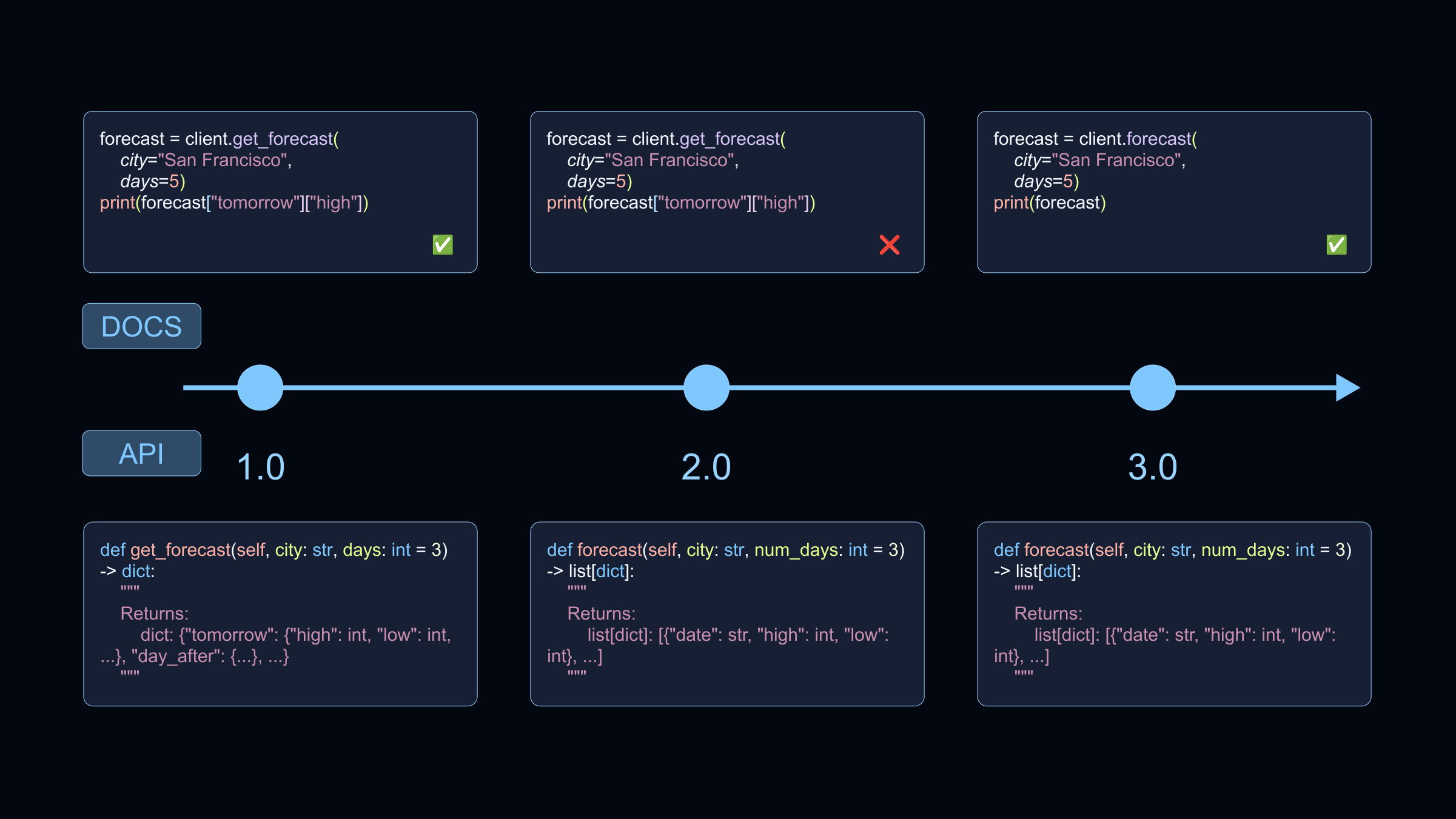
理想的には、コードサンプルが動作しなくなった際にそれを把握したいものです。そのために継続的インテグレーション(Continuous Integration: CI)テストが必要です。アプリケーションコードに適用されるのと同じ原則——チェックを自動化し、変更や回帰(Regression)を検出し、何かが壊れた場合にビルドを失敗させる——が文書にも適用されます。つまり、コードサンプルはテストに合格しなければならない「コード」として扱うべきです。文書内のコードサンプルを検証可能にするための手動プロセスは以下のようになります。
- インラインのコードをスタンドアロンのファイルに抽出する。
- セットアップおよびテardown(後処理)コードを追加する。
- どの部分がコードスニペットであるかを示すマークアップを追加する。
- コードスニペットを抽出するためのツールを使用する。
- 抽出したコードスニペットを文書内で再利用可能なスニペットとして組み込む。
- CI を使用して、サンプルが変更された際や定期的にスタンドアロンのコードスニペットを実行する。
LangChain では、この移行ワークフローをオフロードするために Deep Agents CLI を使用しました。コーディングは不要です。
解決策:Deep Agents + スキル:指示を1回記述し、残りを委任する
Deep Agents CLI は、チャットで操作できるコマンドラインエージェントです。その機能の一つは、スキルからの情報を使用してタスクを実行することです。スキルは、タスクがスキルの説明と一致する際にエージェントが読み込む再利用可能な指示です。これらのスキルは、これらのタスクを行うかもしれない同僚へのステップバイステップの指示を書くように記述できます。まさにそれが私たちが行ったことです。エージェントが実行すべき各ステップを記述しました:
- コードを
src/code-samples/{product}配下のスタンドアロンファイルに移動し、製品領域ごとに整理する。 - コードスニペットが完全な実行可能例となるよう、セットアップとテardown を追加する。
- 設定されたリンターを使用してコードの静的解析(Lint)を行う。
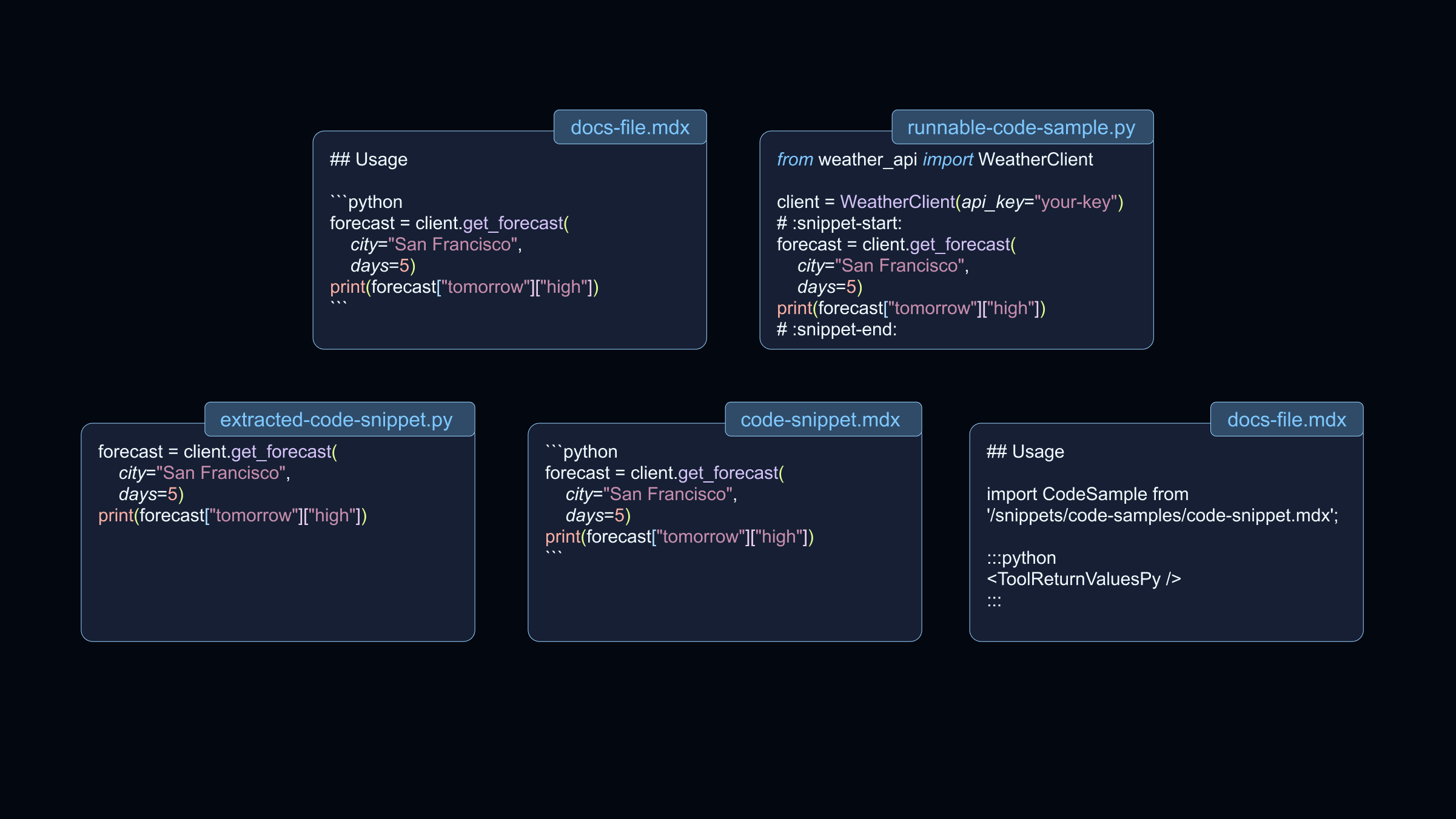
:snippet-start:および:snippet-end:タグを使用してコードスニペットを定義するマークアップを追加する。スニペット内で除外したいコードがある場合は、:remove-start:と:remove-end:を使用してそれを除外できる。- コードサンプルを実行してテストする。
- マークアップに基づいてスニペットを生成し、生成されたファイルをドキュメントに含める。
これはフローのエージェント部分であり、その上にテストが定期的に実行され、テスト失敗時にチケットを作成する GitHub Action が必要となる。
このスキルは、ドキュメントリポジトリ内の隠しフォルダ [.deepagents/skills/docs-code-samples/SKILL.md](https://github.com/langchain-ai/docs/blob/main/.deepagents/skills/docs-code-samples/SKILL.md) に配置されている。この設定により、誰でもドキュメントリポジトリ内から Deep Agents CLI を開き、エージェントに対してドキュメント内の 1 つ以上のコードサンプルを検証可能(testable)にするよう依頼できる。Deep Agent に「streaming.mdx のインラインコードを検証可能なコードサンプルに移行する」と依頼すると、このスキルが使用される。エージェントは適切なファイルを作成し、適切なタグを追加し、適切なコマンドを実行し、コードスニペットをドキュメントファイルに含める。
SKILL.md
ドキュメント・コードサンプルのスキルは、.deepagents/skills/docs-code-samples/SKILL.md に配置されています。そのフロントマターには、エージェントがいつこれを使用すべきかを示す description が含まれています:
name: docs-code-samples
description: LangChain ドキュメント(MDX ファイル)からのインラインコードサンプルを、Bluehawk で抽出され Mintlify スニペットとして使用される外部のテスト可能なコードファイルに移行する際に、このスキルを使用してください。ドキュメントからコードブロックを抽出する際、実行可能なコードサンプルを作成する際、スニペット区切り文字を使用する際、または Bluehawk の出力を MDX 埋め込みに接続する際に適用されます。
スキルの本文には、エージェントに対する完全なコンテキストが含まれています:
- スキルを使用するタイミング
- ディレクトリ構造とファイルレイアウト
- 段階的な移行手順
- 実行するコマンドとその順序
- 規約(命名、タグ付け、インポート)
GitHub リポジトリ で完全な SKILL.md ファイルをご覧いただけます。
始め方
これは、リポジトリ内の Deep エージェントで スキル を使用する一例に過ぎません。
Deep Agents CLI での作業を開始するには、CLI ドキュメント をご確認ください。
原文を表示
Stale code samples are a universal documentation problem. Every team that ships tutorials, API guides, or integration examples eventually sees examples break as dependencies change and APIs evolve. The problem is not unique to us, but it is exacerbated by how quickly our product—and the AI and LLM space more broadly—moves. New models, updated SDKs, and shifting best practices mean that what worked last month may not work today.
Making code samples *testable *solves this. That means running them in CI, asserting they execute correctly, and failing the build when they break. But setting up code samples to be testable is not trivial and requires some upfront investment. This setup cost can feel so daunting that the project never happens.
Delegating that work to agents is the perfect solution.
The problem: incomplete inline code that can’t be tested
Inline code samples are convenient to write. You test the code, copy the relevant snippet, paste it into your markdown files (or other docs files) and you ship. The problem is they're static and when an API changes you might forget to update the code sample if it uses that API.
Ideally you want to know when code samples stop working. You want continuous integration tests. The same principle that applies to application code—automate checks, catch changes and regressions, fail the build when something breaks—applies to docs: treat code samples as code that must pass tests. To make code samples in docs testable the manual process looks like this:
- Extract inline code into standalone files.
- Add setup and teardown code.
- Add markup to designate what is the code snippet.
- Use tooling to extract the code snippet.
- Include the extracted code snippets as reusable snippets in the docs.
- Use CI to run the standalone code snippets regularly and when the samples change.
At LangChain, we used the Deep Agents CLI to offload the migration workflow. No coding required.
The Solution: Deep Agents + Skills: Write instructions once, delegate the rest
The Deep Agents CLI is a command line agent that you can chat with. One of its capabilities is using information from skills to perform tasks. Skills are reusable instructions that the agent loads when a task matches the skill description. These skills can be written just like step-by-step instructions to a coworker who might do these tasks. That’s exactly what we did. We wrote each step for the agent to perform:
- Move code into standalone files under src/code-samples/{product}, organized by product area.
- Add setup and teardown to make code snippets complete runnable examples.
- Lint the code using the configured linters.
- Add markup to define the code snippet using :snippet-start: and :snippet-end: tags. If there is code that needs to be removed in the snippet it can be excluded with :remove-start: and :remove-end:.
- Run the code samples to test them.
- Generate the snippets based on the markup and include the generated files in the docs.
This is the agentic part of the flow, on top of that we need a GitHub action that regularly runs the tests and creates tickets if a test fails.
This skill is in a hidden folder in our docs repo at .deepagents/skills/docs-code-samples/SKILL.md. With this set up, anyone can open the Deep Agents CLI from within the docs repo and ask the agent to make one or more code samples in the docs testable. When you ask a Deep Agent to "migrate the inline code in streaming.mdx to testable code samples," it uses this skill. The agent creates the right files, adds the right tags, runs the right commands, and includes the code snippets in the docs files.
SKILL.md
The docs-code-samples skill lives in .deepagents/skills/docs-code-samples/SKILL.md. Its frontmatter includes a description that tells the agent when to use it:
name: docs-code-samples
description: Use this skill when migrating inline code samples from LangChain docs (MDX files) into external, testable code files that are extracted with Bluehawk and used as Mintlify snippets. Applies when extracting code blocks from documentation, creating runnable code samples, using snippet delineators, or wiring Bluehawk output into MDX includes.
The body of the skill contains the full context for the agent:
- When to use the skill
- Directory structure and file layout
- Step-by-step migration instructions
- Commands to run and in what order
- Conventions (naming, tagging, imports)
You can view the full SKILL.md file in our GitHub repository.
Getting Started
This is only one example of how you can use skills with deep agents in your repository.
To get started with the Deep Agents CLI, check out the CLI docs.
関連記事
今日のまとめ
AIデイリーブリーフで今日の重要ニュースをまとめ読み