SageMaker AI と Bedrock AgentCore を組み合わせたエージェントワークフロー構築法
本文の状態
日本語全文を表示中
詳細モードで約13分の本文を読めます。
同じ出来事の情報源
この情報源を基点に整理
AWS Machine Learning Blog
Amazon SageMaker AI の OpenAI 互換エンドポイントと Amazon Bedrock AgentCore ランタイムを組み合わせることで、独自コスト最適化モデルと管理型基盤モデルを混在させる手法が示された。
AI深層分析を開く2026年8月15日 02:36
AI深層分析
キーポイント
ハイブリッドモデル統合の解決策
Amazon SageMaker AI の OpenAI 互換エンドポイントと Amazon Bedrock AgentCore ランタイムを組み合わせることで、独自コスト最適化モデルと管理型基盤モデルを混在させる手法が示された。
3 つの役割を持つエージェント構成
オーケストレーター(Claude Haiku 4.5)、予算管理(Claude Sonnet 4.6)、金融分析(Qwen 3.5 9B)という 3 つの専門エージェントが連携し、複雑なタスクを分担して処理する。
トークンレベルの可観測性の実装
Strands Agents のデフォルト機能では不足する SageMaker エンドポイントからのトークンレベルの可観測性を取得する方法に焦点を当て、統合メカニズムの詳細が解説された。
実用的なアーキテクチャとリソース
単一の Amazon Bedrock AgentCore コンテナを通じて 3 つのモデルホスティングパスを接続する構成図が提示され、完全なソースコードは GitHub リポジトリで公開されている。
必要な環境と前提条件
AWS アカウントに SageMaker AI、Bedrock、AgentCore の権限が必要であり、Python 3.12+ と特定のライブラリをインストールする必要がある。
重要な引用
mixing managed foundation models (FMs) with your own cost-optimized or domain-specific models, without rewriting your agent framework to do it
Specialized agents can collaborate on complex tasks while each uses the model best suited to its job.
The focus is on the integration mechanics including how to get token-level observability from SageMaker endpoints
Deploy Qwen 3.5 9B using the vLLM Deep Learning Container (DLC), image vllm:0.22.1-gpu-py312-cu130, on ml.g6e.2xlarge.
編集コメントを表示
編集コメント
AWS は既存のツールを組み合わせることで、複雑なマルチエージェント環境の実装ハードルを下げる具体的なアプローチを示した。特に Strands Agents の可観測性課題に対する解決策は、実運用における監視体制を強化する上で有益である。
Source Article
元記事を日本語で読む
本文に関係しない購読案内、埋め込み通知、サイト内プロモーションは除いています。
エージェントワークフローを構築する際の一般的な課題は、マネージド型ファウンデーションモデル(FMs)と、コスト最適化や特定のドメインに特化した独自モデルを組み合わせる際、エージェントフレームワーク自体を書き換えることなく実現することです。本稿では、Amazon SageMaker AI 上で OpenAI 互換エンドポイントを活用し、Amazon Bedrock AgentCore のランタイム機能である「Managed Deployment」と連携させる方法をご紹介します。これにより、専門的なエージェントが複雑なタスクに協力しながらも、それぞれの業務に適したモデルを個別に使用することが可能になります。この組み合わせによって、コスト最適化、データ所在地の確保、そしてモデルの柔軟性を備えた、すぐに本番環境で利用可能なアーキテクチャを実現できます。
ここでは、Qwen 3.5 9B を Amazon SageMaker AI にデプロイし、Amazon Bedrock 上のモデルとともに Strands Agents のマルチエージェントシステムに統合し、ワークフロー全体を Amazon Bedrock AgentCore ランタイムへ展開する手順を追います。特に焦点を当てるのは、SageMaker エンドポイントからトークンレベルの観測性を取得する方法など、Strands ではデフォルトでは提供されていない統合の仕組みです。
ソリューション概要
本アーキテクチャは、単一の Amazon Bedrock AgentCore コンテナを通じて 3 つのモデルホスティングパスを接続します。
- オーケストレーターエージェント(Bedrock 上の Claude Haiku 4.5) – ユーザーの意図を分類し、グローバルなクロスリージョン推論を経由してタスクをルーティングします。
- バジェットエージェント(Bedrock 上の Claude Sonnet 4.6) – 構造化された Pydantic 出力を用いて、50/30/20 の予算配分処理を担当します。
Amazon SageMaker AI と Bedrock AgentCore を活用したエージェントワークフローの構築
- 金融分析エージェント (Amazon SageMaker AI 上で動作する Qwen 3.5 9B) – ツール呼び出し機能を活用した株式分析とポートフォリオ構築。
Amazon Bedrock で利用可能なモデルは、AWS リージョンによって異なります。詳細は Amazon Bedrock のリージョン別サポートモデル一覧 をご確認ください。
ユーザーからのリクエストは、Amazon Bedrock AgentCore ランタイム内で動作するオーケストレーターエージェントに入力されます。このオーケストレーターは「Strands Agents」の「ツールとしてのエージェント」というパターンを採用し、リクエストを予算管理用エージェントまたは金融分析用エージェントへ振り分けます。
両方の専門化されたエージェントはそれぞれ独自のモデルを呼び出します。予算管理用エージェントは Amazon Bedrock を介して Claude Sonnet 4.6 を呼び出し、金融分析用エージェントは OpenAI 互換 API を通じて SageMaker AI のリアルタイムエンドポイントから Qwen 3.5 9B を呼び出します。処理結果はオーケストレーターを経由してユーザーへ返されます。
完全なソースコードについては、関連する GitHub リポジトリ をご覧ください。以下の図はこのアーキテクチャを示しています。
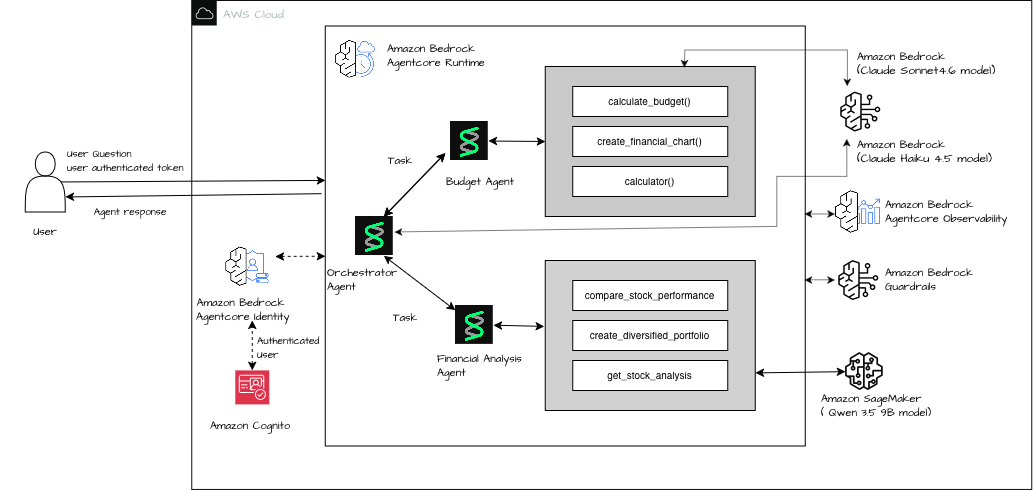
図 1: Amazon Bedrock と Amazon SageMaker AI にまたがるマルチエージェントワークフローのアーキテクチャ
前提条件
本記事の手順を実行するには、以下の前提条件を満たす必要があります。
Amazon SageMaker AI、Amazon Bedrock、および AgentCore へのアクセス権限を持つ AWS アカウントが必要です。
pip install sagemaker-core openai httpx strands-agents[otel] yfinance pydantic bedrock-agentcore
sagemaker:InvokeEndpoint および sagemaker:CallWithBearerToken の権限が付与された、AWS Identity and Access Management (IAM) ロールも用意してください。
Claude Haiku 4.5 および Claude Sonnet 4.6 の Bedrock モデルアクセスには、Python 3.12 以降が必要です。
ステップ 1: SageMaker AI で Qwen 3.5 9B をデプロイする
ml.g6e.2xlarge インスタンス上で、vLLM Deep Learning Container (DLC) イメージ vllm:0.22.1-gpu-py312-cu130 を使用して Qwen 3.5 9B をデプロイします。
region = "us-west-2"
model_id = "Qwen/Qwen3.5-9B"
instance_type = "ml.g6e.2xlarge"  # 1x L40S (48GB VRAM)
num_gpu = 1

# vLLM 0.22.1, Python 3.12, CUDA 13.0, Ubuntu 22.04
inference_image = f"763104351884.dkr.ecr.{region}.amazonaws.com/vllm:0.22.1-gpu-py312-cu130-ubuntu22.04-sagemaker"

env = {
    "SM_VLLM_MODEL": model_id,
    "SM_VLLM_TENSOR_PARALLEL_SIZE": "1",
    "SM_VLLM_MAX_MODEL_LEN": "32768",
}

# Create Model
sm.create_model(
    ModelName=model_name,
    ExecutionRoleArn=role,
    PrimaryContainer={"Image": inference_image, "Environment": env},
)

# Create Endpoint Config + Endpoint
sm.create_endpoint_config(
    EndpointConfigName=endpoint_config_name,
    ProductionVariants=[{
        "VariantName": "v1",
        "ModelName": model_name,
        "InstanceType": instance_type,
        "InitialInstanceCount": 1,
        "ContainerStartupHealthCheckTimeoutInSeconds": 1200,
        "InferenceAmiVersion": inference_ami_version,
    }],
)

sm.create_endpoint(EndpointName=endpoint_name, EndpointConfigName=endpoint_config_name)
ステップ 2: マルチエージェントシステムの構築
SageMaker AI の OpenAI 互換 API では、ベアータクエンの付与が必要です。トークンは有効期限があるため、長時間実行されるエージェントセッションでは、すべてのリクエストで自動的に更新する仕組みを用意する必要があります。httpx.Auth サブクラスを作成して、自動更新機能を実装しましょう。
import httpx
from openai import AsyncOpenAI
from sagemaker.core.token_generator import generate_token

class SageMakerAuth(httpx.Auth):
    def __init__(self, region): self.region = region
    def auth_flow(self, request):
        request.headers["Authorization"] = f"Bearer {generate_token(region=self.region)}"
        yield request

strands_client = AsyncOpenAI(
    base_url=f"https://runtime.sagemaker.{REGION}.amazonaws.com/endpoints/{ENDPOINT_NAME}/openai/v1",
    api_key="sagemaker",
    http_client=httpx.AsyncClient(auth=SageMakerAuth(region=REGION)),
)
Strands Agents の「ツールとしてのエージェント」というパターンを活用し、各呼び出しごとに新しいエージェントインスタンスを構築してください。
from strands import Agent, tool
from strands.models.openai import OpenAIModel

qwen_model = OpenAIModel(
    client=strands_client, model_id="",
    params={"temperature": 0.7, "max_tokens": 4096, "stream_options": {"include_usage": True}},
)

@tool
def financial_analysis_agent_tool(query: str) -> str:
    fresh = Agent(model=qwen_model, tools=[...], callback_handler=None)
    return str(fresh(query))

orchestrator = Agent(
    model=BedrockModel(model_id="global.anthropic.claude-haiku-4-5-20251001-v1:0"),
    tools=[budget_agent_tool, financial_analysis_agent_tool],
)
ステップ 3: Amazon Bedrock AgentCore ランタイムへのデプロイ
bedrock-agentcore-starter-toolkit を使用してデプロイを行います。完全なデプロイ手順については、deploy_agentcore.ipynb を参照してください。
from bedrock_agentcore_starter_toolkit import Runtime

agentcore_runtime = Runtime()
agentcore_runtime.configure(
    entrypoint="main.py", auto_create_execution_role=True,
    auto_create_ecr=True, requirements_file="requirements.txt",
    region="ap-south-1", agent_name="personal_finance_agent",
)

launch_result = agentcore_runtime.launch(
    env_vars={
        "SAGEMAKER_ENDPOINT_NAME": "qwen35-9b-260612-082732",
        "SAGEMAKER_REGION": "ap-south-1",
        "AGENT_OBSERVABILITY_ENABLED": "true",
    }
)
SageMaker エンドポイントの観測可能性を設定する
Amazon Bedrock AgentCore のランタイムは、OpenTelemetry を自動的に活用してエージェントに計測機能を付与しますが、すべてのモデルプロバイダーに対して均等に機能するわけではありません。Amazon SageMaker AI 上の Qwen モデルのコストやレイテンシを監視するには、デフォルトの計測機能がどこで不足しているのか、そしてそのギャップをどう埋めるべきかを理解する必要があります。
課題:見えないトークン使用量
Amazon Bedrock AgentCore のランタイムは OpenTelemetry を介してエージェントに自動的に計測機能を付与します。しかし、重要な欠陥が存在します。
- Amazon Bedrock モデル呼び出しでは、生成 AI スパンとトークン数が自動的に取得されます。追加の手間は不要です。
Strands の OpenAIModel を通じて利用する「Amazon SageMaker OpenAI 互換エンドポイント」では、トークンの自動テレメトリが取得されません。この仕組みは、生成 AI への呼び出しとして認識できないためです。
その結果、Amazon SageMaker で Qwen 3.5 9B を呼び出す金融分析エージェントが消費したトークン数は、トレース上では完全に確認できません。コストの監視や性能低下(レジッション)の検出、レイテンシのデバッグも不可能になります。
根本原因: Strands の OpenTelemetry(OTEL)統合は、ツール呼び出しやエージェントのライフサイクルイベントのスパンを出力しますが、OpenAIModel プロバイダに対してトークン属性を持つ gen_ai.chat スパンは出力しません。AgentCore の自動計測機能は、Amazon Bedrock モデル推論呼び出し(boto3 を通じて行われるもの)のみを生成 AI 操作として認識しています。
解決策:カスタム OpenTelemetry スパン
Amazon SageMaker エージェントの呼び出しをラップし、Strands の内部 AgentResult.metrics.accumulated_usage からトークン使用量を抽出する gen_ai.chat スパンを手動で発行します。
from opentelemetry import trace

tracer = trace.get_tracer("financial_analysis_agent")

@tool
def financial_analysis_agent_tool(query: str) -> str:
    """Route investment queries to Qwen on SageMaker with observability."""
    with tracer.start_as_current_span("gen_ai.chat", attributes={
        "gen_ai.system": "openai",
        "gen_ai.request.model": f"qwen3.5-9b ({SAGEMAKER_ENDPOINT_NAME})",
        "gen_ai.operation.name": "chat",
    }) as span:
        fa_agent = Agent(
            model=OpenAIModel(
                client=strands_client, model_id="",
                params={"temperature": 0.7, "max_tokens": 4096,
                        "stream_options": {"include_usage": True}},
            ),
            system_prompt=FINANCIAL_ANALYSIS_PROMPT,
            tools=[get_stock_analysis, create_diversified_portfolio, compare_stock_performance],
            callback_handler=None,
        )
        result = fa_agent(query)
        # Extract token usage from Strands agent metrics
        usage = result.metrics.accumulated_usage
        span.set_attribute("gen_ai.usage.input_tokens", usage.get("inputTokens", 0))
        span.set_attribute("gen_ai.usage.output_tokens", usage.get("outputTokens", 0))
        span.set_attribute("gen_ai.usage.total_tokens", usage.get("totalTokens", 0))
        return str(result)
重要なポイント: Strands は、inputTokens、outputTokens、totalTokens というキーを用いてトークン使用量を内部で追跡します。この辞書は、モデルプロバイダーが使用量データを返した場合にのみ埋められます。
なぜ stream_options が vLLM において必須なのか
デフォルトでは、vLLM はストリーミングレスポンスに使用量(usage)のチャンクを含めません。Strands はテキストチャンクを受け取りますが、最終的な使用量オブジェクトは取得できません。その結果、accumulated_usage の値はゼロのままになります。
これを解決するには、stream_options: {"include_usage": True} を追加して vLLM に指示し、トークン数を含む追加の最終チャンクを送信させる必要があります。
qwen_model = OpenAIModel(
    client=strands_client,
    model_id="",
    params={
        "temperature": 0.7,
        "max_tokens": 4096,
        "stream_options": {"include_usage": True},  # Critical for token tracking
    },
)このパラメータを指定しないと、gen_ai.chat スパンは 0 トークンとして報告されます。これではカスタムスパンの目的が達成できません。
設定手順
- Amazon CloudWatch Transaction Search を有効にする(アカウントまたはリージョンごとに一度だけ実施):
aws xray update-trace-segment-destination --region ap-south-1 --destination CloudWatchLogs

aws xray update-indexing-rule --region ap-south-1 --name "Default" \
--rule '{"Probabilistic": {"DesiredSamplingPercentage": 100}}'- Strands に OTEL エクストラをインストールする:
strands-agents[otel]>=1.0.0。
- コード内または環境変数で
AGENT_OBSERVABILITY_ENABLED=trueを設定します。
- コンテナの起動コマンド(CMD)として
opentelemetry-instrumentを使用します。 OpenAIModelのパラメータにstream_options: {"include_usage": True}を追加してください。
- SageMaker エージェント呼び出しを囲む
gen_ai.chatスパンをカスタム作成してください。
トレース出力の例
{
    "name": "gen_ai.chat",
    "attributes": {
        "gen_ai.system": "openai",
        "gen_ai.request.model": "qwen3.5-9b (qwen35-9b-260612-082732)",
        "gen_ai.operation.name": "chat",
        "gen_ai.usage.input_tokens": 1391,
        "gen_ai.usage.output_tokens": 1432,
        "gen_ai.usage.total_tokens": 2823
    },
    "durationNano": 37237386894
}
Bedrock AgentCore の観測ダッシュボード上のエージェント軌跡
このトレースビューでは、Amazon SageMaker AI でホストされた Qwen モデルの gen_ai.chat スパンと、自動的に計測された Amazon Bedrock AgentCore のスパンが並んで表示されており、両者のトークン数も確認できます。このようなエンドツーエンドの観測性を構築する過程で、いくつかの実装上のポイントに注目すべきことが明らかになりました。
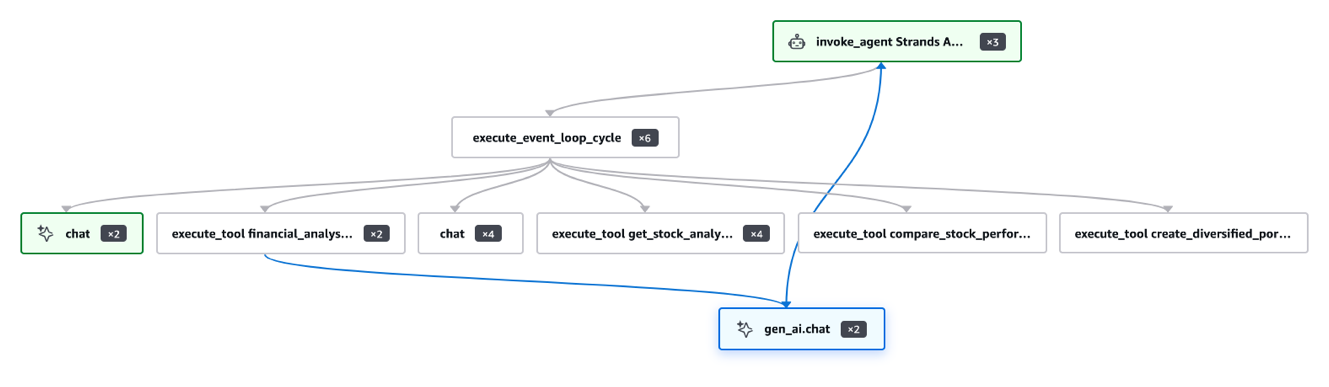
図 2:SageMaker でホストされたモデルのトークン数を含む AgentCore の観測性トレース
主な学び
Amazon Bedrock AgentCore は、Claude や Amazon Nova に対する Bedrock の呼び出しを自動計測します。追加の設定は不要です。
SageMaker OpenAI エンドポイントでは、手動でスパンを作成する必要があります。Strands は OpenAIModel に対して gen_ai.chat スパンを出力しません。
トークン使用量の取得には stream_options の設定が必要です。vLLM ではデフォルトでストリーミング時に使用量が送信されないためです。
・result.metrics.accumulated_usage の利用 – キーは inputTokens、outputTokens、totalTokens です。
・AWS X-Ray のサンプリングレートが重要 – デフォルトの 1% では大半のトレースが除外されるため、開発中は 100% に設定してください。
・リクエストごとに新しいエージェントインスタンスを生成 – シングルトン型にすると並列呼び出しでエラーが発生します。
パターンの拡張
このアーキテクチャはコンポーザブルです。以下の方向性を検討できます:
微調整済みモデルへの切り替え:SM_VLLM_MODEL 環境変数を、Amazon Simple Storage Service (Amazon S3) に保存した微調整済みのチェックポイントを指すように設定します。この際、認証レイヤー、OTEL スパン、および AgentCore のデプロイ構成は変更しません。
A/B テストの実施:ベースモデルと微調整済みモデルの両方を同じ Amazon SageMaker エンドポイントにデプロイし、OTEL スパンにバリアント属性を追加して、トレース上で品質を比較できるようにします。
コスト意識のあるルーティング:リクエストを送信する前にクエリの複雑さをチェックします。単純な参照タスクは Amazon Bedrock の Haiku モデルへルーティングし、多段階の推論が必要なタスクには Amazon SageMaker の GPU エンドポイントを割り当てます。
クリーンアップ
今後の課金を防ぐために、以下のリソースを削除してください。
agentcore_control = boto3.client("bedrock-agentcore-control", region_name=region)
agentcore_control.delete_agent_runtime(agentRuntimeId=launch_result.agent_id)
sagemaker_client.delete_endpoint(EndpointName=ENDPOINT_NAME)
sagemaker_client.delete_endpoint_config(EndpointConfigName=f"qwen35-9b-epc-{TIMESTAMP}")
sagemaker_client.delete_model(ModelName=f"qwen35-9b-{TIMESTAMP}")
結論
本記事では、Amazon SageMaker AI で自己ホストしたモデルを Amazon Bedrock AgentCore ランタイムに接続する方法と、Strands Agents ではデフォルトで計測されない Amazon SageMaker エンドポイントからのトークンレベルの完全な観測性を取得する手法について解説しました。
AgentCore 内で、本番環境対応の SageMaker 認証を実現するには、httpx.Auth と generate_token() を組み合わせて AsyncOpenAI を使用します。
カスタム gen_ai.chat の OpenTelemetry (OTEL) スパンと、stream_options: {"include_usage": True} を組み合わせることで、Amazon SageMaker エンドポイントにおけるトークン数の完全な可視性が実現されます。
・result.metrics.accumulated_usage – トークン数を抽出するための Strands API です。
まずは、関連するリポジトリ をクローンし、完全な参照資料については OBSERVABILITY.md をご覧ください。
関連リソース
- SageMaker AI 向け OpenAI 互換 API
- Strands Agents — ツールとしてのエージェント
- Amazon Bedrock AgentCore の観測機能
- OpenTelemetry 生成 AI セマンティック・コンベンション
執筆者について

Ayush Sharma
Ayush はシニア AI スペシャリストです。
原文を表示
A common challenge in building agentic workflows is mixing managed foundation models (FMs) with your own cost-optimized or domain-specific models, without rewriting your agent framework to do it. In this post, we show you how to combine OpenAI-compatible endpoints on Amazon SageMaker AI with Amazon Bedrock AgentCore runtime, a capability of Amazon Bedrock AgentCore, and its managed deployment. Specialized agents can collaborate on complex tasks while each uses the model best suited to its job. This combination gives you cost optimization, data residency, and model flexibility in a single production-ready architecture.
We walk through deploying Qwen 3.5 9B on Amazon SageMaker AI, integrating it into a Strands Agents multi-agent system alongside models on Amazon Bedrock, and shipping the entire workflow to Amazon Bedrock AgentCore runtime. The focus is on the integration mechanics including how to get token-level observability from SageMaker endpoints, which Strands doesn’t provide by default.
Solution overview
The architecture connects three model-hosting paths through a single Amazon Bedrock AgentCore container:
- Orchestrator agent (Claude Haiku 4.5 on Bedrock) – Classifies user intent and routes tasks through Global cross-Region inference.
- Budget agent (Claude Sonnet 4.6 on Bedrock) – Handles 50/30/20 budget breakdowns with structured Pydantic output.
- Financial analysis agent (Qwen 3.5 9B on Amazon SageMaker AI) – Stock analysis and portfolio construction using tool-calling.
Amazon Bedrock model availability varies by AWS Region. See Supported models by AWS Region in Amazon Bedrock.
A user request enters the orchestrator agent running inside the Amazon Bedrock AgentCore runtime. The orchestrator uses the *agents as tools* pattern from Strands Agents to route the request to either the budget agent or the financial analysis agent. Both specialized agents call their respective models. The budget agent invokes Claude Sonnet 4.6 through Amazon Bedrock, and the financial analysis agent invokes Qwen 3.5 9B through a SageMaker AI real-time endpoint using the OpenAI-compatible API. Results flow back through the orchestrator to the user. For the complete source code, see the accompanying GitHub repository. The following diagram illustrates this architecture.
Figure 1: Architecture of the multi-agent workflow across Amazon Bedrock and Amazon SageMaker AI
Prerequisites
You must have the following prerequisites to follow along with this post.
- An AWS account with permissions for Amazon SageMaker AI, Amazon Bedrock, and AgentCore.
pip install sagemaker-core openai httpx strands-agents[otel] yfinance pydantic bedrock-agentcore.
- An AWS Identity and Access Management (IAM) role with sagemaker:InvokeEndpoint and sagemaker:CallWithBearerToken.
- Bedrock model access for Claude Haiku 4.5 and Claude Sonnet 4.6.
- Python 3.12+.
Step 1: Deploy Qwen 3.5 9B on SageMaker AI
Deploy Qwen 3.5 9B using the vLLM Deep Learning Container (DLC), image vllm:0.22.1-gpu-py312-cu130, on ml.g6e.2xlarge.
region = "us-west-2"
model_id = "Qwen/Qwen3.5-9B"
instance_type = "ml.g6e.2xlarge"  # 1x L40S (48GB VRAM)
num_gpu = 1

# vLLM 0.22.1, Python 3.12, CUDA 13.0, Ubuntu 22.04
inference_image = f"763104351884.dkr.ecr.{region}.amazonaws.com/vllm:0.22.1-gpu-py312-cu130-ubuntu22.04-sagemaker"

env = {
    "SM_VLLM_MODEL": model_id,
    "SM_VLLM_TENSOR_PARALLEL_SIZE": "1",
    "SM_VLLM_MAX_MODEL_LEN": "32768",
}

# Create Model
sm.create_model(
    ModelName=model_name,
    ExecutionRoleArn=role,
    PrimaryContainer={"Image": inference_image, "Environment": env},
)

# Create Endpoint Config + Endpoint
sm.create_endpoint_config(
    EndpointConfigName=endpoint_config_name,
    ProductionVariants=[{
        "VariantName": "v1",
        "ModelName": model_name,
        "InstanceType": instance_type,
        "InitialInstanceCount": 1,
        "ContainerStartupHealthCheckTimeoutInSeconds": 1200,
        "InferenceAmiVersion": inference_ami_version,
    }],
)

sm.create_endpoint(EndpointName=endpoint_name, EndpointConfigName=endpoint_config_name)
Step 2: Build the multi-agent system
The OpenAI-compatible API of SageMaker AI expects a bearer token. Tokens expire, so for any long-running agent session you need a way to refresh them on every request. Set up auto-refreshing bearer tokens with an httpx.Auth subclass:
import httpx
from openai import AsyncOpenAI
from sagemaker.core.token_generator import generate_token

class SageMakerAuth(httpx.Auth):
    def __init__(self, region): self.region = region
    def auth_flow(self, request):
        request.headers["Authorization"] = f"Bearer {generate_token(region=self.region)}"
        yield request

strands_client = AsyncOpenAI(
    base_url=f"https://runtime.sagemaker.{REGION}.amazonaws.com/endpoints/{ENDPOINT_NAME}/openai/v1",
    api_key="sagemaker",
    http_client=httpx.AsyncClient(auth=SageMakerAuth(region=REGION)),
)
Build using Strands Agents’ *agents as tools* pattern with fresh agent instances per invocation.
from strands import Agent, tool
from strands.models.openai import OpenAIModel

qwen_model = OpenAIModel(
    client=strands_client, model_id="",
    params={"temperature": 0.7, "max_tokens": 4096, "stream_options": {"include_usage": True}},
)

@tool
def financial_analysis_agent_tool(query: str) -> str:
    fresh = Agent(model=qwen_model, tools=[...], callback_handler=None)
    return str(fresh(query))

orchestrator = Agent(
    model=BedrockModel(model_id="global.anthropic.claude-haiku-4-5-20251001-v1:0"),
    tools=[budget_agent_tool, financial_analysis_agent_tool],
)
Step 3: Deploy to Amazon Bedrock AgentCore runtime
Deploy using the bedrock-agentcore-starter-toolkit. See deploy_agentcore.ipynb for the full deployment notebook.
from bedrock_agentcore_starter_toolkit import Runtime

agentcore_runtime = Runtime()
agentcore_runtime.configure(
    entrypoint="main.py", auto_create_execution_role=True,
    auto_create_ecr=True, requirements_file="requirements.txt",
    region="ap-south-1", agent_name="personal_finance_agent",
)

launch_result = agentcore_runtime.launch(
    env_vars={
        "SAGEMAKER_ENDPOINT_NAME": "qwen35-9b-260612-082732",
        "SAGEMAKER_REGION": "ap-south-1",
        "AGENT_OBSERVABILITY_ENABLED": "true",
    }
)
Configure observability for SageMaker endpoints
Amazon Bedrock AgentCore runtime instruments your agents with OpenTelemetry automatically, but that instrumentation doesn’t extend equally to every model provider. Before you can monitor cost and latency for the Qwen model on Amazon SageMaker AI, you must understand where the default instrumentation falls short and how to close that gap.
The challenge: Invisible token usage
Amazon Bedrock AgentCore runtime automatically instruments agents using OpenTelemetry. However, there is a critical gap:
- Amazon Bedrock model calls get full generative AI spans with token counts automatically. No extra work is needed.
- Amazon SageMaker OpenAI-compatible endpoints (through Strands OpenAIModel) don’t get automatic token telemetry. The instrumentation doesn’t recognize them as generative AI calls.
This means tokens consumed by the financial analysis agent calling Qwen 3.5 9B on Amazon SageMaker are completely invisible in traces. You cannot monitor cost, detect regressions, or debug latency.
Root cause: Strands’ OTEL integration emits spans for tool calls and agent lifecycle events, but it doesn’t emit gen_ai.chat spans with token attributes for the OpenAIModel provider. The auto-instrumentation of AgentCore only recognizes Amazon Bedrock model inference calls (made through boto3) as generative AI operations.
The solution: Custom OpenTelemetry spans
Manually emit a gen_ai.chat span that wraps the Amazon SageMaker agent invocation and extracts token usage from Strands’ internal AgentResult.metrics.accumulated_usage:
from opentelemetry import trace

tracer = trace.get_tracer("financial_analysis_agent")

@tool
def financial_analysis_agent_tool(query: str) -> str:
    """Route investment queries to Qwen on SageMaker with observability."""
    with tracer.start_as_current_span("gen_ai.chat", attributes={
        "gen_ai.system": "openai",
        "gen_ai.request.model": f"qwen3.5-9b ({SAGEMAKER_ENDPOINT_NAME})",
        "gen_ai.operation.name": "chat",
    }) as span:
        fa_agent = Agent(
            model=OpenAIModel(
                client=strands_client, model_id="",
                params={"temperature": 0.7, "max_tokens": 4096,
                        "stream_options": {"include_usage": True}},
            ),
            system_prompt=FINANCIAL_ANALYSIS_PROMPT,
            tools=[get_stock_analysis, create_diversified_portfolio, compare_stock_performance],
            callback_handler=None,
        )
        result = fa_agent(query)
        # Extract token usage from Strands agent metrics
        usage = result.metrics.accumulated_usage
        span.set_attribute("gen_ai.usage.input_tokens", usage.get("inputTokens", 0))
        span.set_attribute("gen_ai.usage.output_tokens", usage.get("outputTokens", 0))
        span.set_attribute("gen_ai.usage.total_tokens", usage.get("totalTokens", 0))
        return str(result)
Key detail: Strands tracks token usage internally with keys inputTokens, outputTokens, and totalTokens. This dict is populated only if the model provider returns usage data.
Why stream_options is mandatory for vLLM
By default, vLLM doesn’t include a usage chunk in streaming responses. Strands receives text chunks but never a final usage object. As a result, accumulated_usage stays at zero. Adding stream_options: {"include_usage": True} tells vLLM to send an extra final chunk with token counts:
qwen_model = OpenAIModel(
    client=strands_client,
    model_id="",
    params={
        "temperature": 0.7,
        "max_tokens": 4096,
        "stream_options": {"include_usage": True},  # Critical for token tracking
    },
)
Without this parameter, your gen_ai.chat spans report 0 tokens. This defeats the purpose of the custom span.
Step-by-step configuration
- Turn on Amazon CloudWatch Transaction Search (one-time per account or Region):
aws xray update-trace-segment-destination --region ap-south-1 --destination CloudWatchLogs

aws xray update-indexing-rule --region ap-south-1 --name "Default" \
--rule '{"Probabilistic": {"DesiredSamplingPercentage": 100}}'- Install Strands with OTEL extras: strands-agents[otel]>=1.0.0.
- Set AGENT_OBSERVABILITY_ENABLED=true in your code or env vars.
- Use opentelemetry-instrument as the container CMD.
- Add stream_options: {"include_usage": True} to OpenAIModel params.
- Create custom gen_ai.chat span wrapping the SageMaker agent call.
Example trace output
{
    "name": "gen_ai.chat",
    "attributes": {
        "gen_ai.system": "openai",
        "gen_ai.request.model": "qwen3.5-9b (qwen35-9b-260612-082732)",
        "gen_ai.operation.name": "chat",
        "gen_ai.usage.input_tokens": 1391,
        "gen_ai.usage.output_tokens": 1432,
        "gen_ai.usage.total_tokens": 2823
    },
    "durationNano": 37237386894
}
Agent trajectory on Bedrock AgentCore Observability dashboard
This trace view shows the gen_ai.chat span for the Amazon SageMaker AI hosted Qwen model alongside the automatically instrumented Amazon Bedrock AgentCore spans, with token counts now visible for both. Building this end-to-end observability surfaced several implementation details worth calling out.
Figure 2: AgentCore observability trace with token counts for the SageMaker-hosted model
Key learnings
- Amazon Bedrock AgentCore auto-instruments Bedrock calls – No extra work for Claude or Amazon Nova.
- SageMaker OpenAI endpoints need manual spans – Strands doesn’t emit gen_ai.chat spans for OpenAIModel.
- Token usage requires stream_options – vLLM doesn’t send usage in streaming by default.
- Use result.metrics.accumulated_usage – Keys: inputTokens, outputTokens, totalTokens.
- AWS X-Ray sampling rate matters – Default 1 percent drops most traces. Use 100 percent during development.
- Fresh agent instances per request – Singletons cause concurrent invocation errors.
Extending the pattern
This architecture is composable. A few directions to explore:
- Swap in fine-tuned models: Point SM_VLLM_MODEL to your fine-tuned checkpoint on Amazon Simple Storage Service (Amazon S3). The auth layer, OTEL spans, and AgentCore deployment stay unchanged.
- A/B test with inference components: Deploy base and fine-tuned variants on the same Amazon SageMaker endpoint. Add a variant attribute to your OTEL span to compare quality in traces.
- Cost-aware routing: Check query complexity before dispatch. Route simple lookups to Haiku on Amazon Bedrock. Reserve the Amazon SageMaker GPU endpoint for multi-step reasoning tasks.
Cleaning up
To avoid incurring future charges, delete the resources:
agentcore_control = boto3.client("bedrock-agentcore-control", region_name=region)
agentcore_control.delete_agent_runtime(agentRuntimeId=launch_result.agent_id)
sagemaker_client.delete_endpoint(EndpointName=ENDPOINT_NAME)
sagemaker_client.delete_endpoint_config(EndpointConfigName=f"qwen35-9b-epc-{TIMESTAMP}")
sagemaker_client.delete_model(ModelName=f"qwen35-9b-{TIMESTAMP}")
まとめ
In this post, we showed how to connect a self-hosted model on Amazon SageMaker AI to Amazon Bedrock AgentCore runtime, and critically, how to get full token-level observability from Amazon SageMaker endpoints that Strands Agents doesn’t instrument by default.
- httpx.Auth + generate_token() + AsyncOpenAI – Production-ready SageMaker authentication inside AgentCore.
- Custom gen_ai.chat OTEL span + stream_options: {"include_usage": True} – Full token visibility for Amazon SageMaker endpoints.
- result.metrics.accumulated_usage – The Strands API for extracting token counts.
To get started, clone the accompanying repository and see OBSERVABILITY.md for the complete reference.
Related resources
- OpenAI-compatible API for SageMaker AI
- Strands Agents — agents as tools
- Amazon Bedrock AgentCore Observability
- OpenTelemetry generative AI semantic conventions
About the authors
Ayush Sharma
Ayush is a Senior AI Specialis
関連記事
News to Guide
ニュースの次に確認する
発表内容を、現在の料金や仕様と照らし合わせられる関連ガイドです。
今日のまとめ
AIデイリーブリーフで今日の重要ニュースをまとめ読み